



Customer support teams are overwhelmed with tickets. Agents spend hours drafting responses, prioritizing issues, and deciding when to escalate. This workload often leads to fatigue and inefficiencies. AI prompts offer a simple solution: pre-designed instructions for AI tools like ChatGPT to generate quick, accurate, and consistent replies.
Here’s what you’ll learn:
- Save time: AI prompts can reduce ticket resolution times by up to 20%.
- Improve consistency: Ensure all agents provide professional, aligned responses.
- Boost customer satisfaction: Faster replies and empathetic messaging lead to happier customers.
This article provides 25 ready-to-use prompts for tasks like triaging tickets, analyzing sentiment, managing escalations, and drafting resolutions. Whether you’re classifying tickets, addressing customer frustration, or summarizing case histories, these prompts help support teams work smarter, not harder.
Start with simple prompts like prioritizing tickets or rewriting responses in a friendlier tone. Gradually expand to advanced prompts for churn analysis and knowledge base improvements. With AI, your team can handle repetitive tasks faster, leaving more time for meaningful customer interactions.
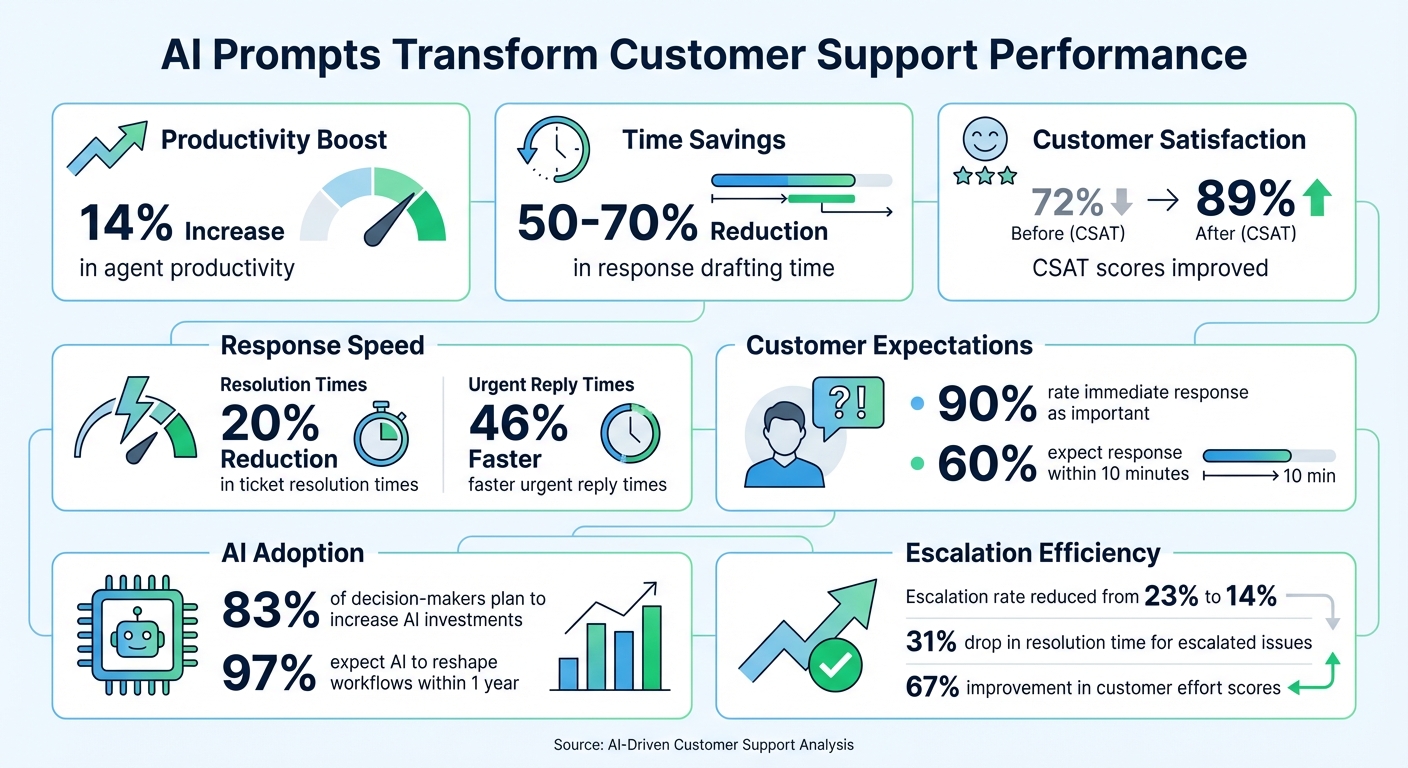
AI Prompts Impact on Customer Support: Key Performance Metrics
How To Automate Customer Service With AI Agents (Multimodal Chatbots & Evaluation)
1. Triage and Prioritization
Triage can be one of the most time-consuming tasks for support teams, as agents manually sift through tickets to determine urgency and route issues appropriately. AI prompts can completely streamline this process, instantly categorizing, prioritizing, and routing tickets based on intent, sentiment, and complexity.
The results speak for themselves. For instance, a holiday rental company managed to cut urgent reply times by 46% and saw an 11% increase in CSAT during the pandemic. Considering that 90% of customers rate an immediate response as "important" or "very important", and 60% believe "immediate" means a response within 10 minutes, faster triage isn’t just a convenience – it’s essential for customer retention.
AI-driven triage tools offer practical, ready-to-use prompts that are specific, focused, and action-oriented. These prompts give AI clear instructions and defined outputs, enabling quicker triage, smarter routing, and more time for agents to focus on resolving issues.
1. Classify Ticket by Category
Automatically organize incoming tickets into categories like billing, technical issues, or general inquiries. This eliminates the need for manual tagging and speeds up routing to the right specialist.
"Classify this ticket into the correct category: billing, technical, or general inquiry. Provide only the category name."
2. Detect Escalation Needs
Ensure only the tickets that genuinely require Tier 2 support get escalated. This prompt evaluates the complexity of the issue and delivers a clear yes/no response with reasoning.
"Does this ticket require escalation to Tier 2? Answer yes or no, then provide a one-sentence explanation based on the complexity of the issue."
3. Analyze Customer Sentiment
Identify negative sentiment in customer messages to prioritize frustrated customers and address their concerns before they consider leaving.
"Analyze this customer’s message and tell me if the tone is positive, neutral, or negative. Include one sentence explaining why."
4. Rank Ticket Urgency
Assign urgency scores to tickets based on their impact and time sensitivity, helping agents focus on what matters most.
"Rank this support ticket based on urgency and impact on a scale of 1-10. Provide the score and a brief reason."
5. Flag Churn Risk
Review a customer’s ticket history to identify early signs of dissatisfaction and potential churn, enabling proactive interventions.
"Review the last 5 tickets for this customer and flag potential churn risk. Answer yes or no, then explain in one sentence."
6. Summarize Ticket for Quick Review
Generate a concise, three-bullet summary of the ticket, capturing the customer’s main issue, any missing information, and their sentiment. This gives agents instant context for faster action.
"Summarize this ticket in 3 bullet points. Include the customer’s main issue, any missing information, and their sentiment (positive, neutral, or negative)."
2. Sentiment and Customer Experience
Fast triage ensures quick responses, but understanding customer sentiment is what truly elevates support. It’s not just about solving problems; it’s about recognizing how customers feel. Sentiment detection allows teams to pinpoint high-emotion tickets, prioritize frustrated customers, and customize solutions. For instance, 80% of customers who interact with well-designed AI chatbots report having a positive experience.
But detecting sentiment alone isn’t enough – it’s how you use that insight to respond empathetically that makes the difference. A generic "I’m sorry for the inconvenience" can come across as cold or robotic. While speed is important, it shouldn’t come at the cost of empathy. Effective responses should first acknowledge a customer’s frustration before offering a solution. Below are practical prompts that turn sentiment analysis into meaningful, human-centered interactions.
Prompts for Empathy-Driven Customer Support
7. Rephrase for a Friendlier Tone
Adjust technical or overly formal responses into warm, conversational messages without altering their core meaning. This ensures a consistent, approachable brand voice, even when multiple agents are involved.
"Rewrite this response in a friendlier, more empathetic tone without changing the meaning."
8. Acknowledge Frustration Before Solving
When a customer is upset, begin by validating their feelings. This simple step can prevent interactions from feeling dismissive or impersonal.
"A customer is upset about [issue]. Write a response that acknowledges the customer’s frustration in one sentence before detailing immediate actions."
9. Detect Tone Shifts Across Conversations
Monitor a customer’s recent interactions to spot changes in their sentiment. A noticeable decline can signal the need for proactive outreach to avoid churn.
"Review this customer’s last 3 messages and tell me if their tone has shifted from positive to neutral or negative. Explain the shift in one sentence."
10. Generate a Customer Health Score
Combine sentiment trends with resolution speed to create a quick health score. This gives account managers a clear view of which customers may need extra attention.
"Based on this customer’s ticket history and sentiment over the last 30 days, assign a health score from 1-10. Explain your reasoning in one sentence."
11. Humanize an Automated Response
Take a system-generated message and make it feel more personal and warm. This is especially useful for routine updates, like confirmation emails, that might otherwise feel impersonal.
"Rewrite this automated message to sound more human and empathetic. Keep it under 75 words and make the customer feel valued."
12. Identify When to Escalate Based on Emotion
If a customer remains dissatisfied after two automated responses, it’s time to escalate. This prompt evaluates emotional intensity to decide if a live agent should step in.
"Analyze this customer’s message for signs of frustration or anger. If the emotion level is high, recommend immediate escalation to a live agent. Answer yes or no, then explain in one sentence."
sbb-itb-e60d259
3. Resolution and Escalation Management
After sorting tickets and gauging customer sentiment, the next step is crafting resolutions that effectively close cases while identifying when escalation is necessary. The line between a quick resolution and a drawn-out exchange often depends on clarity. Does your response include the right policy details, the proper troubleshooting steps, and clear follow-up instructions? Research shows that 90% of customers consider an immediate response essential, with 60% defining "immediate" as 10 minutes or less. However, speed without accuracy only adds to the workload.
Creating effective responses requires context, tone guidelines, constraints, and placeholders for variables like order numbers. Without a verified knowledge base, AI may unintentionally provide incorrect information or fabricated policies. The aim is to turn one-off responses into reusable templates that ensure consistency across your team while maintaining a human touch. These templates also pave the way for better escalation management.
Equally important is deciding when and how to escalate. A well-structured prompt can determine if a ticket requires Tier 2 support, summarize the case history for a smooth handoff, and save customers from repeating themselves. For example, one B2B software company reduced its escalation rate from 23% to 14% over eight months by using "warm handoff" prompts. These prompts summarized ticket history and customer sentiment before transferring cases, leading to a 31% drop in resolution time for escalated issues and a 67% improvement in customer effort scores. Agents no longer needed to ask customers to re-explain their concerns.
Below are five practical prompts designed to streamline resolution drafting and escalation management, ensuring faster and more accurate outcomes.
13. Draft a Policy-Grounded Refund Response
This prompt confirms refund eligibility, provides clear instructions, and outlines the timeline based on your return policy.
"Based on our refund policy, write a response to this customer confirming eligibility for a refund. Include the exact steps they need to take and the timeline for processing. Keep it under 100 words and use a kind but professional tone."
14. Generate Sequential Troubleshooting Steps
Instead of overwhelming customers with too much information, this prompt offers three steps in order of likelihood to solve the issue, starting with the simplest.
"Provide three troubleshooting steps for [issue] in order of likelihood to resolve the problem. Start with the simplest step. If none work, include a clear escalation path to a specialist."
15. Acknowledge and Resolve Shipping Delays
This prompt helps you address delays directly, provide an updated delivery date, and include a goodwill gesture like a discount to maintain customer trust.
"A customer’s order is delayed. Write a response that acknowledges the delay in one sentence, provides the new delivery date, and offers a $10 discount code for their next purchase. Keep it under 75 words."
16. Summarize Case History for Escalation
Use this to create a concise summary before escalating a ticket to Tier 2, giving specialists full context and avoiding redundant explanations from customers.
"Summarize this ticket history in two paragraphs: 1) the customer’s original issue and sentiment, and 2) troubleshooting steps already attempted. Include any unresolved technical details."
17. Draft a Billing Dispute Clarification
This prompt explains disputed charges, references the billing policy, and offers guidance on adjustments – all while maintaining a calm and supportive tone.
"A customer is disputing a $49 charge on their invoice. Write a response that explains the charge, references our billing policy, and offers to walk them through the adjustment process if necessary. Keep it under 100 words and sound empathetic but confident."
4. Knowledge and Insights
Every resolved ticket holds potential insights that can transform your support processes. By leveraging these insights, you can refine your documentation, speed up ticket resolution, and boost customer satisfaction. Each ticket is a window into what’s working, what isn’t, and what’s missing. With the help of AI prompts, you can analyze hundreds of tickets to uncover knowledge gaps, identify root causes, and enhance self-service options.
Unfortunately, many teams treat knowledge management as an afterthought, updating documentation only after recurring issues surface. By the time this happens, resolution times have already stretched, customer satisfaction has dipped, and agents are left feeling frustrated. A proactive approach flips this script. For example, an AI prompt can analyze the last 50 tickets, pinpoint recurring themes not covered in your knowledge base, and suggest three new article topics. This shifts the focus from reactive problem-solving to predictive action, lightening future workloads and improving triage.
These prompts transform everyday support data into meaningful insights, helping you achieve greater operational efficiency. Below are seven practical prompts designed to close knowledge gaps, extract valuable insights, and refine your support operations.
18. Identify Knowledge Base Gaps
This prompt scans recent tickets to highlight recurring questions that aren’t addressed in your documentation, allowing you to prioritize new content.
"Review the past 50 tickets. Identify common themes not covered in existing knowledge base articles and recommend 3 new article topics."
19. Perform Root Cause Analysis on Escalations
Analyze escalated tickets to uncover systemic issues in your products or services that require engineering or process improvements.
"From these 20 escalated tickets, identify the root causes and recommend systemic fixes."
20. Draft a Knowledge Base Article from a Resolved Ticket
Turn a successfully resolved ticket into a knowledge base article, capturing the problem, solution, and key search terms.
"Draft a new knowledge base article based on the resolution to [Ticket URL]. Include a clear title, a summary under 100 words, and 5 relevant keywords."
21. Clarify a Frequently Misunderstood Feature
When customers repeatedly misunderstand a feature, use this prompt to craft a clear explanation and update your FAQs.
"We’ve noticed customers frequently misunderstand [Feature]. Write an explanation that clarifies this and suggest how to update our FAQ."
22. Analyze Customer Health Score Over Time
Evaluate a customer’s interaction history over six months to generate a health score (1–10) based on sentiment and resolution speed.
"Analyze the past 6 months of interactions for account [Name]. Create a health score (1–10) based on sentiment and resolution speed."
23. Identify Trends in Customer Feedback
Spot patterns in customer feedback by category (e.g., billing, onboarding, technical issues) over a specific time frame to guide improvements.
"Identify trends and patterns in our [customer feedback] by [category] over [time period]."
24. Simplify Complex Policies for Self-Service
Convert internal policy documents into simple, customer-friendly instructions with clear, sequential steps to improve self-service.
"Summarize this content to write a clear product return policy and outline 5 steps for customers to take in sequential order."
Conclusion
These 25 prompts deliver results that can make a real difference. Companies using AI-driven workflows have reported a 14% boost in productivity for support agents, time savings of up to 50–70% on response drafting, and CSAT scores climbing from 72% to 89%. Rather than being optional tools, these prompts are becoming a critical part of how businesses operate.
"The goal isn’t to automate away the human connection; it’s to clear the clutter so your agents have the time to build it." – Yatharth Jain, Founder, Knowmax
To get started, focus on integrating the basic prompts first. Begin with copy-paste prompts 1–10 to streamline tasks like triage, sentiment detection, and drafting responses. Once your team sees first response times shrink from over 2 hours to nearly instant and resolution times drop from 24 hours to minutes, you can explore advanced prompts. These can help tackle churn analysis, identify knowledge gaps, and investigate root causes. Create a shared library in your CRM or Slack so every agent, regardless of their experience, can quickly access these high-performing templates.
The companies leading the way in B2B support aren’t just hiring more staff – they’re using AI prompts to handle repetitive tasks. This allows their agents to focus on solving complex problems and building stronger customer relationships. With 83% of decision-makers planning to increase AI investments and 97% of business owners expecting AI to reshape workflows within the next year, the real question is no longer if you should adopt these tools, but how quickly you can put them to work.
Start using these 25 prompts today. Test them on live tickets and watch as your team improves reply speed, boosts customer satisfaction, and reduces costs – all at the same time.
FAQs
How do AI prompts enhance customer satisfaction in support operations?
AI prompts improve customer satisfaction by providing quick, precise, and consistent answers to support inquiries. They take over repetitive tasks like sorting requests, prioritizing issues, and analyzing customer sentiment. This automation speeds up resolution times and ensures customers get prompt, tailored assistance.
Beyond that, AI prompts help support teams tackle more complex problems with greater efficiency, enhancing the quality of responses. The result? A smoother experience for customers, increased satisfaction, and stronger trust in your support services.
How can I start using AI prompts in my customer support processes?
To start using AI prompts in your customer support workflows, focus on identifying tasks that can be automated or streamlined. These might include things like ticket triage, escalation processes, or even sentiment analysis. The key is to customize AI prompts to fit your team’s specific needs and match your brand’s tone, ensuring they’re clear and designed to produce accurate, helpful responses.
Once you’ve crafted these prompts, integrate them into your existing systems and provide your team with the training they need to use them effectively. Test the prompts in real-world scenarios to see how they perform, and collect feedback to make adjustments as needed. Keep an eye on metrics like response times and resolution rates to measure the impact of the AI prompts. By taking a gradual, thoughtful approach, you can improve efficiency, boost customer satisfaction, and lighten the workload for your support team.
How can AI prompts improve the management and prioritization of support tickets?
AI prompts simplify ticket management and prioritization by taking over repetitive tasks and organizing workflows more efficiently. They can quickly sort tickets by urgency, content, or sentiment, enabling support teams to address the most pressing issues first. This not only cuts down on manual work but also speeds up response times significantly.
On top of that, AI prompts can summarize ticket details, giving agents a clear and concise overview of the problem without the need for lengthy reviews. By spotting critical keywords or emotional cues, these prompts ensure that complex or urgent tickets are escalated to the right team without delay. The result? Quicker resolutions, evenly distributed workloads, and happier customers.
Related Blog Posts
- 10 Ways to Reduce Support Ticket Response Time
- How AI Improves Time Management in Support
- 10 best ticketing systems for startups and how to choose one
- Great Customer Service Examples (and Why They Work)
Evaluating help desks for a B2B team?
Supportbench is all-inclusive from $32 per agent per month, with migration and onboarding included. See pricing or book a 20-minute demo.






