Looking for the right B2B support platform? Here’s what you need to know about TeamSupport and Supportbench:
- TeamSupport focuses on account-level management, offering tools like the Customer Distress Index (CDI) to predict churn risks. Pricing starts at $45/user/month, but key features like chat and analytics come as add-ons, raising costs significantly.
- Supportbench provides an all-in-one solution starting at $35/user/month, bundling advanced AI tools, dynamic SLAs, and health scoring without extra fees. It’s designed for quick setup and minimal IT involvement.
Quick Comparison
| Feature | TeamSupport | Supportbench |
|---|---|---|
| Base Price | $45/user/month | $35/user/month |
| AI Features | Customer Distress Index, bots | AI Copilot, auto summaries |
| SLA Management | Standard SLAs | Dynamic SLAs tied to risks |
| Setup Costs | $1,000–$2,000 | Free |
| User Rating | 4.4/5 (G2) | 4.9/5 (G2, Capterra) |
Key takeaway: TeamSupport suits larger teams needing deep integrations, while Supportbench offers a cost-efficient, feature-packed alternative for mid-sized B2B operations.
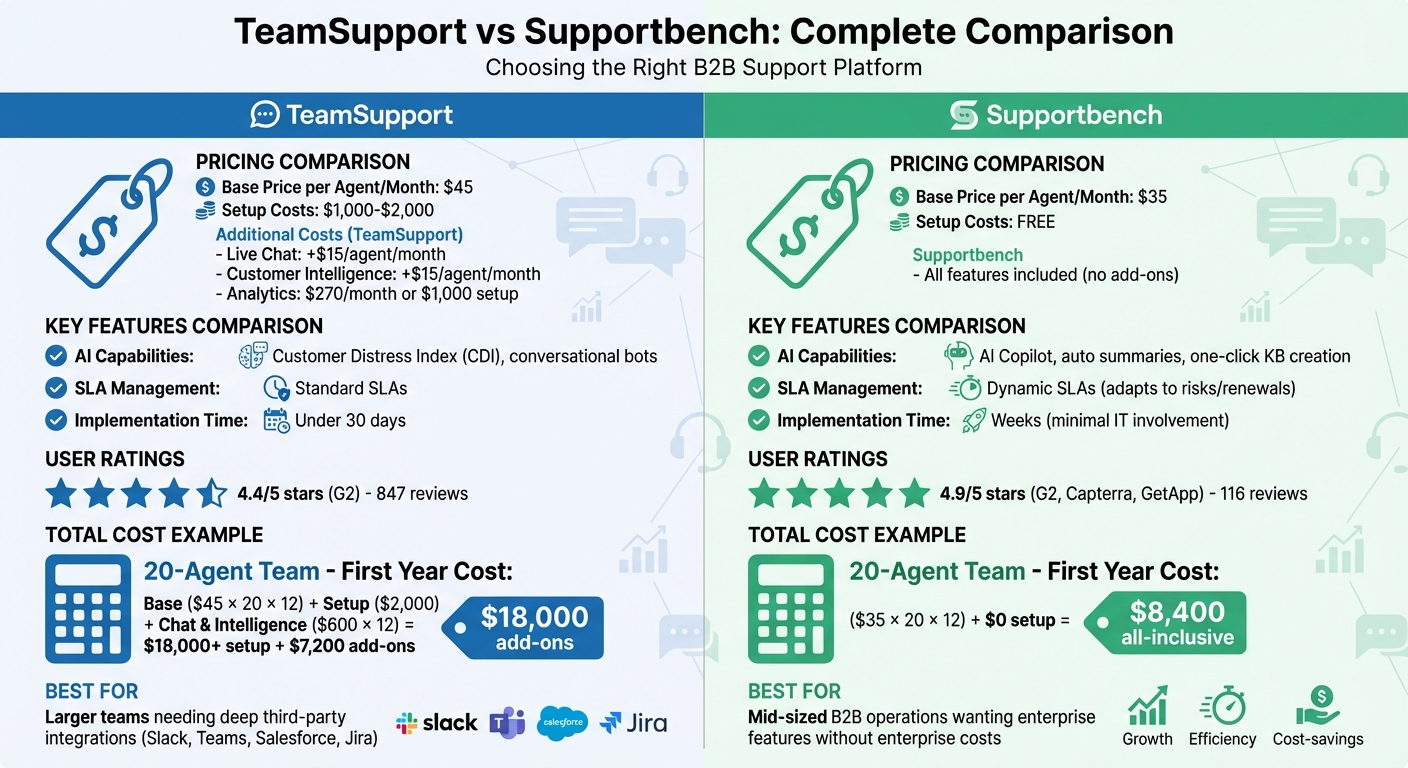
TeamSupport vs Supportbench: Pricing, Features, and Total Cost Comparison
Platform Overviews: TeamSupport vs. Supportbench
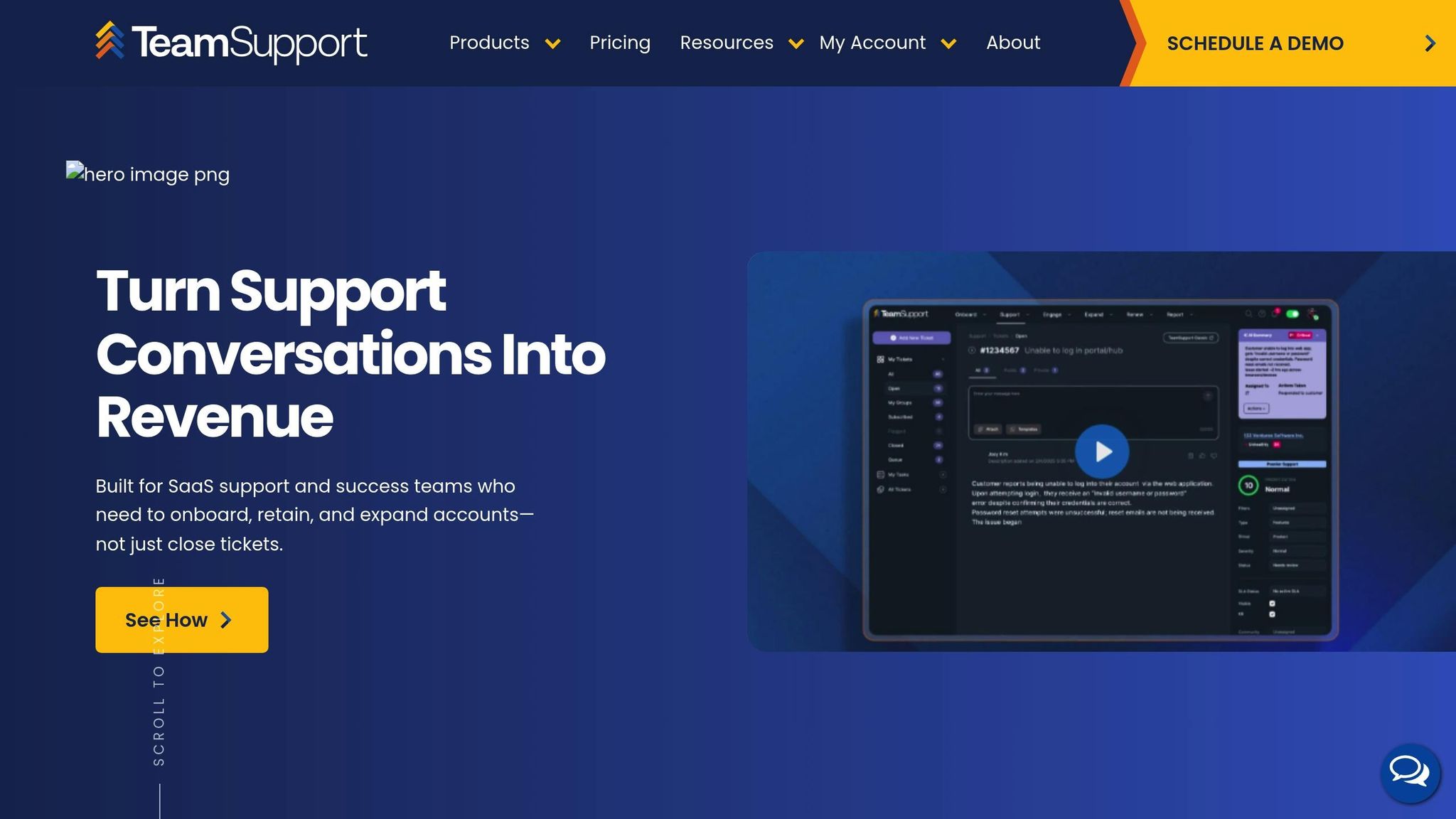
TeamSupport: Core Features
TeamSupport takes an account-focused approach, consolidating all interactions with customers into a single view, treating them as organizations rather than individual users. Over 1,200 support teams currently use the platform, which holds a 4.4/5 rating on G2.
One standout feature is the Customer Distress Index (CDI), a predictive tool that identifies at-risk accounts by analyzing engagement patterns, support activity, and sentiment. This proactive approach helps teams address issues before customers churn. Additionally, TeamSupport integrates with Slack and Microsoft Teams, allowing teams to manage workflows directly within these platforms.
For better collaboration between support, product, and sales teams, TeamSupport offers native integrations with Jira, Salesforce, and HubSpot. These integrations streamline processes like syncing feature requests and bug reports. In fact, one software company reported a 95% drop in outstanding calls after unifying their agents on the platform.
Pricing ranges from $45 to $50 per user/month, with a 14-day trial available. The platform focuses on fast onboarding, aiming to get teams fully operational in under 30 days. However, some users have pointed out that automation capabilities are limited, and the pricing may feel steep compared to more basic tools. Despite these concerns, TeamSupport is well-suited for handling the intricate demands of modern B2B support.
Now, let’s see how Supportbench approaches similar challenges with its bundled offerings.
Supportbench: Core Features
Supportbench takes a different approach by bundling all features into its base price, starting at $35 per user/month. Serving 9,000 businesses worldwide, the platform boasts a 4.9/5 rating on both G2 and Capterra.
A key feature is the Customer 360 View, which consolidates data like contracts, licensing, product usage, and history into a single interface. Building on this unified data, Supportbench uses dynamic SLAs that adapt based on customer behavior. For example, SLAs tighten as renewal dates approach or when churn risks rise, ensuring high-value accounts receive priority attention.
Supportbench also leverages AI tools, including an AI Copilot that automates tasks like generating case summaries, suggesting replies, tagging tickets, and creating knowledge base articles. The platform further enhances customer support with predictive CSAT and CES scoring, sentiment analysis, and AI-powered Quality Assurance to review tickets for empathy and accuracy.
Implementation is designed to be quick, taking weeks rather than months, and the platform doesn’t require IT involvement – Customer Success Operations teams can manage it independently. Users often highlight the intuitive interface and responsive support team. Hugh Dauterman, Data Operations Director, shared:
"Supportbench has supplied our group with a whole client control system. Because the whole things is in a single platform, all are capable of control all conversation in a single area and feature complete over sight into each clients and group."
These features make Supportbench a strong contender for addressing the complex needs of today’s B2B support teams.
sbb-itb-e60d259
Comparing B2B-Specific Features
Complex Account Management and Multi-Stakeholder Coordination
Supporting B2B customers means managing entire organizations rather than just individual users. For instance, TeamSupport’s account-level consolidation allowed Procuro, Inc. to maintain high support standards without hiring five additional staff members, as shared by Chief Operating Officer Enrique Alvarez-Cuenod.
Supportbench, on the other hand, emphasizes role-based portal access, ensuring that stakeholders only see information relevant to their responsibilities. Both platforms offer a Customer 360 view, but with different focuses: Supportbench integrates contracts, licensing, and product usage directly into its interface, while TeamSupport zeroes in on account health and activity history.
When it comes to collaboration, TeamSupport features a "Water Cooler" tool that encourages internal agent discussions and cross-team sharing of support insights. It also uses a Customer Distress Index to monitor account sentiment and identify at-risk accounts before they churn. Meanwhile, Supportbench employs dynamic SLAs that tighten as renewal dates approach or when churn risks are detected, ensuring high-priority stakeholders receive timely attention.
| Feature | TeamSupport | Supportbench |
|---|---|---|
| Primary Focus | Account insights and distress tracking | Multi-stakeholder support and layered account context |
| Account Structure | Unified views with multiple contacts per account | Context-rich layers, including contracts and licensing |
| Collaboration | "Water Cooler" for agent chats and team visibility | Multi-department collaboration tools |
| Customer Portal | Centralized hub for tickets, knowledge base, and community | Role-specific access control for stakeholders |
| SLA Management | Standard SLAs with automated routing | Dynamic SLAs that adapt to risks or renewals |
These tools make managing complex accounts and coordinating across teams more efficient, setting the stage for addressing long-running cases.
Long-Running Cases and Escalation Management
Prolonged issue resolution is a common challenge in B2B support. TeamSupport addresses this with features for managing recurring and known issues, which help streamline how long-term product problems are handled.
Supportbench offers a structured escalation system with multi-level paths, moving cases from Tier 1 to Tier 3 or management based on automated rules tied to SLA thresholds. To ensure smooth handoffs, mandatory templates capture essential technical details like logs, troubleshooting steps, and error messages. Eric Klimuk, Founder and CTO of Supportbench, explains:
"Escalating a case can make the customer unhappy as this means they will have to wait for someone to respond, relearn the issue and ask the same questions. You can potentially mitigate this by finding a workaround… before escalating up."
TeamSupport facilitates teamwork on complicated cases by integrating with Slack and Microsoft Teams, allowing teams to manage workflows directly within these platforms. Supportbench focuses on tracking escalation performance through internal notes, scorecards, and automated notifications.
AI Features: Automation and Analytics
Handling complex accounts and lengthy resolutions becomes easier with advanced AI tools. TeamSupport uses its Customer Distress Index (CDI) to analyze ticket sentiment, volume, and velocity, flagging at-risk accounts. It also employs conversational bots that reference approved articles and release notes, while rich-media ticketing allows bots to gather screenshots, logs, and other details upfront for faster resolutions.
Supportbench prioritizes agent productivity with features like one-click knowledge base creation from resolved tickets and automated case summarization. The platform claims its AI tools help resolve up to 64% of queries using natural language understanding. Additional features include auto-tagging to classify cases and case summaries that help new agents quickly understand ongoing issues without combing through lengthy email threads.
Supportbench also offers a "no-code" approach, enabling Customer Success Operations teams to manage AI workflows independently. Its dynamic SLAs adjust automatically based on renewal or risk signals. Meanwhile, TeamSupport integrates account data and product usage insights into workflows, allowing bots to prioritize high-value accounts.
| AI Capability | TeamSupport | Supportbench |
|---|---|---|
| Predictive Analytics | Customer Distress Index: Tracks sentiment, volume, and velocity | Health Scoring & Risk Signals: Integrated customer success metrics |
| Proactive Features | Account-Level Health Signals: Enables proactive outreach | Dynamic SLAs: Adjusts SLAs for renewals or risks |
| Content Automation | Knowledge Grounding: Bots use approved articles and release notes | One-Click KB Creation: Converts resolved tickets into articles |
| Agent Assistance | AI-Assisted Operations: Routing and automated summaries | Case Summaries: Simplifies issue context for agents |
| Data Collection | Rich-Media Ticketing: Gathers screenshots, logs, and fields | Auto-Tagging: Classifies cases with AI |
Pricing and Scalability Comparison
Pricing Structure and Total Cost Analysis
Supportbench offers an all-inclusive pricing model starting at $32 per agent per month (billed annually) for its Professional tier. This tier covers a range of features, including AI tools, ticketing, a knowledge base, health scoring, and free onboarding without setup fees. For teams requiring more advanced functionality, the Enterprise tier is priced at $100 per agent per month, adding sandbox environments, white labeling, SSO, and a dedicated Success Manager to the mix.
On the other hand, TeamSupport begins at $45 per agent per month for its Starter plan, which is limited to 5 users. Its Professional tier costs $65 per agent per month, while the Scale tier is priced at $85 per agent per month, with both tiers allowing unlimited users. However, additional charges apply for key features: Messaging & Live Chat costs $15 per agent per month, Customer Intelligence is another $15 per agent per month, and Insights (Analytics) incurs either a $270 monthly fee or a $1,000 setup fee.
Implementation costs also differ significantly. Supportbench includes free onboarding, training, and data migration as part of its pricing. In contrast, TeamSupport charges $1,000–$2,000 for basic training and $1,000 per 5,000 records for assisted data imports. For a 20-agent team, these upfront costs with TeamSupport can range between $1,500–$3,500 before the platform is fully operational. Additionally, teams would need to budget approximately $600 per month for chat and intelligence features.
| Cost Item | Supportbench | TeamSupport |
|---|---|---|
| Base Entry Price | $32/agent/month (Annual) | $45/agent/month (Annual) |
| Onboarding/Training | Free | $1,000–$2,000 |
| Data Migration | Free | $1,000 per 5,000 records |
| Live Chat | Included | +$15/agent/month |
| Customer Health Scoring | Included | +$15/agent/month |
| Professional Services | Included/Available | $175–$250/hour |
Supportbench also introduces a flexible scaling mechanism: after the first 15 agents, the cost increases by $2.50 per additional agent, with a maximum cap of $150 per agent. Once a team reaches 60 agents, accounts automatically switch to the Enterprise plan. In contrast, TeamSupport’s Professional and Scale tiers maintain a higher base cost per agent, regardless of team size, while offering unlimited users. These pricing structures directly impact how each platform scales as teams grow.
Scaling for Growing Teams
When it comes to scaling, both platforms take distinct approaches. TeamSupport focuses on managing relationship complexity rather than just ticket volume. Its account-centric architecture is designed to handle multiple stakeholders, shared SLAs, and unified organizational context. This model aligns with the platform’s pricing by addressing the needs of complex organizations. However, implementing this system effectively often requires careful planning to map workflows at the account level.
Supportbench, on the other hand, prioritizes an all-inclusive model tailored for mid-sized businesses. Features like NPS, CSAT, and health scoring are included from the start, providing enterprise-level tools without requiring IT involvement. Teams can be up and running in weeks, avoiding the hassle of piecing together multiple systems. This unified approach helps reduce long-term operational costs by eliminating add-on fees as teams expand. However, as a younger company – founded in 2015 compared to TeamSupport’s 2009 – Supportbench may face challenges in convincing some enterprises of its long-term stability.
User Feedback and Performance Data
TeamSupport User Feedback
TeamSupport boasts an 88/100 user satisfaction score and a 4.5/5 rating on GetApp, based on 847 reviews. Many users appreciate its focus on managing complex B2B relationships, particularly through tools like the Customer Distress Index (CDI), which helps identify at-risk customers before they churn.
Despite these strengths, there’s been a noticeable dip in user engagement recently, even with historically strong satisfaction scores. The most frequent criticism revolves around its outdated interface, which users find cumbersome. For example, Rashi from Hiver shared:
The interface feels outdated and clunky, making even simple tasks take longer than they should. Routing and automation are too basic, so tickets pile up instead of moving quickly to the right person.
Other common complaints include limited reporting capabilities that require managers to export data for external analysis and basic automation tools that necessitate extra manual work. However, it’s worth noting that TeamSupport has delivered measurable results for some users. For instance, Sharp-aX, a software company, reduced its outstanding calls by 95% and significantly improved resolution times after consolidating its fragmented support systems with TeamSupport.
On the other hand, Supportbench users seem to have a markedly different experience.
Supportbench User Feedback
Supportbench users consistently report high satisfaction, with the platform earning a 4.9/5 rating across major review platforms like G2, Capterra, and GetApp, based on 116 reviews. The platform’s AI-driven features are a standout for many users, offering tools like automated email thread summarization and one-click conversion of resolved tickets into knowledge base articles. Supportbench describes itself as:
not your typical ticketing system with a suite of disjointed products but was created to be one seamless solution handling all business-critical functions.
Users also appreciate the platform’s "everything included" pricing model, which eliminates the need for costly add-ons often seen with enterprise helpdesk solutions. This approach allows teams to get fully operational in a matter of weeks, requiring minimal IT involvement. Features like adaptive response times and customer success health scoring are particularly valuable for managing high-volume B2B SaaS accounts and fostering long-term client relationships.
Overall, Supportbench’s modern, integrated approach stands in stark contrast to the more traditional and sometimes cumbersome experience reported by TeamSupport users.
Choosing the Right Platform for Your B2B Operations
Main Differences Between Platforms
When deciding between platforms, it’s essential to weigh how each option fits your specific priorities. The differences often come down to market maturity and cost efficiency.
TeamSupport, established in 2009, excels in offering extensive third-party integrations and advanced relationship mapping. However, these features come at a higher price point. On the other hand, Supportbench, launched in 2015, provides a cost-effective, all-inclusive experience with a strong focus on AI capabilities. While TeamSupport’s pricing reflects its broader integration options, Supportbench simplifies operations by bundling core features without extra fees.
AI functionality is another key distinction. TeamSupport emphasizes intelligent routing and proactive recommendations within messaging platforms like Slack or Microsoft Teams. Meanwhile, Supportbench automates the entire knowledge lifecycle, from turning resolved tickets into knowledge base articles with a single click to summarizing lengthy email threads automatically.
Matching Platform Capabilities to Your Needs
Your choice should reflect your operational priorities, such as workflow integration, budget predictability, and implementation speed. Here’s how the platforms align with these needs:
- TeamSupport is ideal for companies heavily reliant on tools like Slack or Microsoft Teams. Its native integrations streamline support workflows by keeping everything within these platforms, reducing the need for constant app switching. Features like the Customer Distress Index (CDI) and its extensive integration options make it particularly appealing for scaling B2B SaaS companies handling complex account structures.
- Supportbench caters to mid-sized B2B organizations that want enterprise-grade tools without breaking the bank. Its Customer 360 view combines contracts, licensing, and product usage directly in the support interface. With an implementation time of just weeks (not months), it minimizes deployment risks. Additionally, its 4.9/5 average rating across major review platforms highlights its ability to deliver value without hidden costs.
For teams managing high-touch accounts with long email threads and detailed historical data, Supportbench’s AI-powered case summaries and multi-department visibility offer the depth needed without requiring additional IT resources. Companies struggling with tool overload will appreciate its all-in-one design, which eliminates the complexity of juggling multiple systems.
These comparisons provide a clear roadmap for matching platform features to your specific operational needs, helping you make an informed decision.
FAQs
Which platform is better for complex B2B accounts?
Supportbench stands out when it comes to managing complex B2B accounts, thanks to its specialized features like a Customer 360 view, AI-powered tools (including predictive analytics and sentiment analysis), and renewal-sensitive SLAs. These capabilities are particularly suited for high-value accounts involving multiple stakeholders. While TeamSupport does facilitate collaboration across departments, Supportbench’s emphasis on long-term account management, AI-driven insights, and the ability to scale effectively makes it a better option for navigating intricate account structures and multi-year contracts.
What add-on costs can increase TeamSupport’s total price?
When considering TeamSupport, it’s important to account for additional costs that may increase the total price beyond the base subscription fee. These extra charges can include fees for AI productivity tools, data import services, advanced training, and professional services. For example, data imports might be billed on a per-record basis, while custom services are often charged by the hour. Organizations requiring extensive setup, integrations, or continuous support should be prepared for these costs, as they can add up quickly.
How do dynamic SLAs improve renewal and churn outcomes?
Dynamic SLAs take service agreements to the next level by leveraging AI-driven analytics to adjust commitments in real time. Unlike traditional static SLAs, these dynamic agreements consider factors like customer sentiment, urgency, and account health to proactively address critical issues. This adaptability not only ensures faster and more effective responses but also strengthens trust and satisfaction among customers.
By predicting potential SLA breaches, dynamic SLAs help prevent service disruptions before they occur. This proactive approach leads to stronger customer relationships, reduces churn, and boosts the likelihood of renewals. It’s a smarter way to prioritize what matters most to your customers while ensuring long-term retention.
Related Blog Posts
- Zendesk vs Freshdesk vs Supportbench: Which Support Platform is Better and for who in 2026?
- Freshdesk vs. Supportbench: Why B2B Teams Outgrow Freshdesk’s Ticket Model
- Help Scout vs. Supportbench: The Gap Between Shared Inboxes and Enterprise Helpdesks
- Zoho Desk vs. Supportbench: Which Offers Better Customization for B2B?