


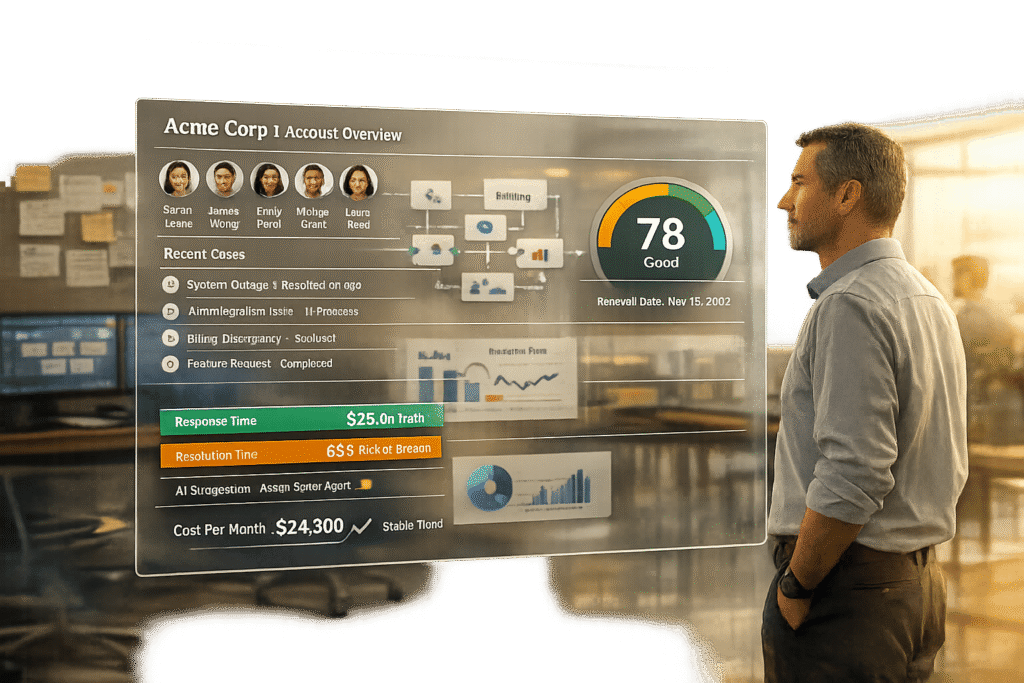
When B2B support teams grow, Freshdesk’s ticket-based system often becomes a bottleneck. Built for high-volume, transactional B2C interactions, it struggles with the complexities of multi-stakeholder relationships and long-term account management that define B2B operations. Supportbench, designed specifically for B2B, offers an account-centric approach that consolidates all customer interactions, contracts, and histories into a single view. This eliminates inefficiencies caused by fragmented tickets and rigid workflows.
Key Takeaways:
- Freshdesk: Affordable for small teams but expensive at scale due to add-ons. Its ticket model creates fragmented data, lacks flexibility, and struggles with growing B2B needs.
- Supportbench: Organizes interactions by account, includes dynamic SLAs and AI tools at $32/agent with no hidden fees, making it scalable and cost-effective for B2B teams.
Quick Comparison:
| Feature | Freshdesk (Ticket Model) | Supportbench (Account Model) |
|---|---|---|
| Design Focus | High-volume B2C interactions | Complex, long-term B2B relationships |
| Data Organization | Scattered across tickets | Unified account view |
| SLAs | Fixed | Dynamic, context-aware |
| AI Tools | Add-ons or premium tiers | Included in base price |
| Cost | $79+/agent/month for enterprise features | $32/agent/month (all-inclusive) |
For growing B2B teams, Supportbench offers a tailored solution that avoids the rising costs and inefficiencies of Freshdesk’s ticketing system.
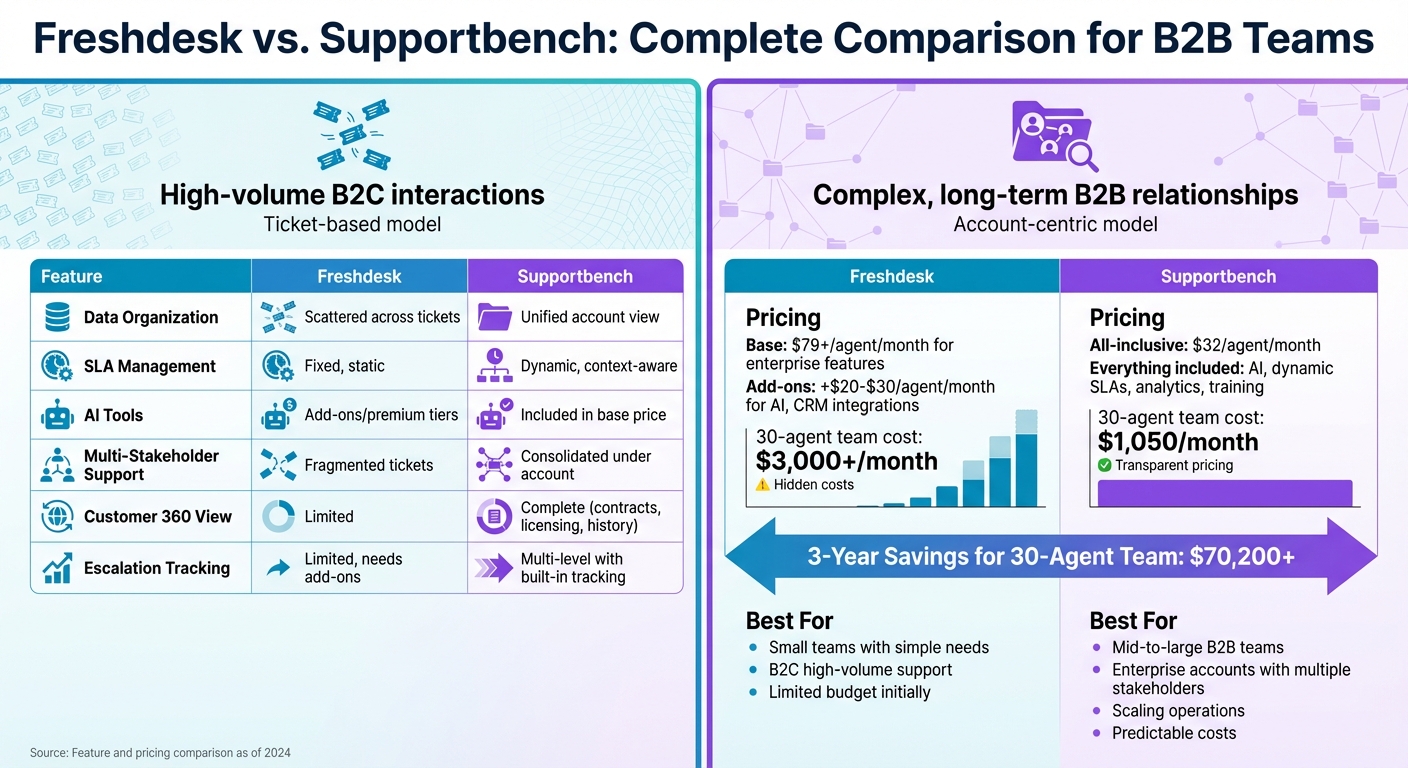
Freshdesk vs Supportbench Feature and Pricing Comparison for B2B Teams
Freshdesk‘s Ticket Model: Built for B2C, Not B2B
Freshdesk was designed with high-volume, transactional B2C interactions in mind. It works well for online businesses that deal with thousands of quick, isolated issues. However, the needs of B2B support are entirely different. B2B relationships are long-term, often spanning months or years, involving multiple stakeholders and requiring a consistent understanding of the client’s history at every interaction.
The ticket-based setup in Freshdesk treats each interaction as a standalone event. This means that when multiple contacts from the same enterprise reach out, separate tickets are created without any built-in connection between them. For B2B teams managing complex accounts, this design leads to inefficiencies and operational headaches.
Multi-Stakeholder Accounts and Fragmented Data
In a B2B setup, a single customer account typically involves multiple contacts – sometimes 10 or more – spread across various departments and roles. Let’s take an enterprise client of a SaaS company as an example: one user might report login problems, another might have questions about billing, and the CTO might escalate concerns about SLA violations. In Freshdesk, these would be logged as three unrelated tickets, with no way to group them under a single account.
This lack of a unified view means teams don’t have easy access to critical details like contracts, licensing, or a complete interaction history. The result? Support teams often have to ask customers to repeat themselves, leading to longer resolution times and frustrated clients who expect their support team to already know their account’s history.
Workflows That Struggle to Scale
The challenges don’t stop at fragmented data. Freshdesk’s rigid workflows make scaling B2B operations even harder. As teams grow, the platform’s automation tools fall short of handling the complex scenarios that B2B support demands. For example, routing a high-priority issue for a key account to a specialist team based on account history requires manual effort because the system lacks the flexibility to automate such tasks.
When extended B2B cases involve multiple teams, Freshdesk’s ticketing system fragments the process even further. Agents end up spending 20–30% more time switching between tickets to piece together context. SLA management is also static and doesn’t adapt to key business signals like upcoming contract renewals or accounts showing signs of churn.
For escalations that require input from various teams, Freshdesk’s tracking tools fall short. Teams often lose visibility into the case’s status, who’s handling it, and what progress has been made – leaving them without the governance structure that B2B operations need to function smoothly.
The Hidden Costs of Add-Ons and Enterprise Features
Adding to these challenges is Freshdesk’s pricing model, which can quickly become a financial burden for B2B teams. While the platform’s free plan might seem appealing at first, essential features for B2B support are locked behind higher-tier plans. Freshdesk offers four pricing tiers: Free ($0), Growth ($15/agent/month), Pro ($49/agent/month), and Enterprise ($79/agent/month), all billed annually.
For example, advanced SLA management – a critical feature for prioritizing accounts – requires the Enterprise plan at $79 per agent per month. Want AI-powered automation? That’s an extra cost. Need CRM integrations or advanced escalation tools? Those come as paid apps, adding another $20–$30 per agent monthly. For a team of 20 agents, these additional costs can push annual expenses beyond $50,000.
What starts as a seemingly budget-friendly solution often becomes expensive as teams realize they need to pay for add-ons to get the functionality they require. Features like dynamic SLAs, multi-stakeholder tracking, and AI tools – essentials for B2B operations – aren’t included upfront. As a result, many B2B teams find their costs doubling or even tripling each year as they add the tools necessary to support their operations effectively.
sbb-itb-e60d259
Supportbench‘s Account-Centric Approach for B2B Support
Supportbench takes a customer-focused approach by organizing all interactions at the account level. This means every interaction, escalation, contract, licensing detail, and health score is consolidated into a single, unified view. With this setup, teams have all the context they need to provide personalized, high-touch support.
For B2B teams managing enterprise clients with multiple stakeholders, this approach addresses operational inefficiencies. Imagine a CFO, an IT admin, and an end user from the same company all reaching out about different issues. Instead of handling these cases separately, Supportbench groups them under one account. This gives agents a complete relationship history without needing to switch tools or ask customers to repeat information. The Customer 360 view includes everything from contracts and product usage to notes from customer success managers and CRM data – all in one place. Unlike traditional ticket-based systems, this method centralizes customer information, enabling deeper, more meaningful relationships and smoother service delivery.
Dynamic SLAs That Adjust to Customer Needs
Supportbench takes service level agreements (SLAs) to the next level with dynamic SLAs that adapt based on real-time account activity. Traditional SLAs treat every ticket equally, but Supportbench’s system adjusts automatically. For example, if a high-value account is nearing its renewal date or showing signs of churn, the platform prioritizes their cases by tightening response times and escalating them – no manual input needed.
This approach ensures that your most critical customers get timely attention exactly when they need it. The system eliminates the need for spreadsheets or manual tracking to identify at-risk accounts, which helps reduce churn and boost retention. These adaptive SLAs also lay the groundwork for more efficient AI-driven support.
Built-In AI Tools to Lighten the Workload
Supportbench includes AI-powered tools across all pricing tiers – no extras required. These features are designed to automate the repetitive tasks that often bog down B2B support teams. For example, the AI can generate concise case summaries from threads with over 50 interactions, saving agents 20–30 minutes per case.
Other AI capabilities include predictive CSAT and CES analytics, sentiment analysis, and auto-tagging of cases. The platform can even detect first contact resolution and convert resolved cases into knowledge base articles with a single click. These tools cut down on manual work by 30–50%, allowing agents to spend more time focusing on customer relationships rather than administrative tasks.
Complete Case History for Long-Term Client Management
B2B relationships often last for years, making continuity and context essential. Supportbench provides a chronological record of every customer interaction, ensuring agents have a full understanding of past touchpoints. This comprehensive history helps agents make informed decisions and improves customer satisfaction.
The platform also offers multi-level escalation management with built-in tracking, so teams always know who’s handling a case and its current status. Role-based access ensures that each stakeholder sees only the information relevant to them, while maintaining full oversight for your team. For B2B teams managing complex, long-term accounts, this level of organization and governance is critical – something traditional ticket-based systems struggle to deliver effectively at scale.
Feature Comparison: Freshdesk vs. Supportbench
Tickets vs. Cases: Side-by-Side Comparison
The way support systems handle customer interactions can make or break your service efficiency. Freshdesk operates on a ticket-based model, where each inquiry is treated as a standalone issue. In contrast, Supportbench uses a case-based system tailored for B2B support, consolidating all customer interactions, stakeholders, and histories into a single, unified account.
| Capability | Supportbench (B2B Case Model) | Freshdesk (B2C Ticket Model) |
|---|---|---|
| Primary Design | Built for complex, long-term B2B cases | Optimized for high-volume B2C tickets |
| Customer Context | Provides a 360-degree view, including contracts, licensing, and product usage | Scattered across individual tickets |
| SLA Management | Dynamic SLAs that adjust to renewal dates and risk factors | Fixed SLAs |
| Escalation Tracking | Multi-level escalations with built-in tracking | Limited support, often needing add-ons |
| AI Capabilities | Includes case summaries, KB article creation, and predictive analytics | Available only in higher-priced tiers |
| Pricing Model | All-inclusive at $32 per agent | Add-ons and feature upgrades increase costs |
For B2B teams, the difference is stark. Supportbench’s case model eliminates the need for agents to manually piece together customer histories from multiple tickets. Instead, it provides a complete, centralized view of each customer’s journey. This approach not only boosts efficiency but also ensures service consistency, especially for accounts involving multiple stakeholders or complex issues. Freshdesk, while effective for simpler, high-volume customer interactions, can struggle when scaling to meet the demands of larger teams or intricate B2B workflows.
Scaling for Mid-to-Large B2B Organizations
The ability to scale effectively is a key concern for growing B2B support teams. Freshdesk works well for small to medium-sized businesses (SMBs) and smaller teams, offering a straightforward solution for managing customer tickets. However, as businesses expand, its limitations become evident. The platform’s reliance on add-ons and feature upgrades can drive up costs, while its lack of enterprise-level tools often forces larger teams to switch to more advanced systems.
Supportbench, on the other hand, is designed with scalability in mind. Its account-centric model simplifies complex interactions, making it a practical choice for businesses managing hundreds of accounts with multiple stakeholders. Whether you’re an SMB planning for growth or a large enterprise needing robust tools, Supportbench offers a solution that evolves with your needs – without hidden costs. Features like customizable surveys, real-time analytics, agent scorecards, customer success health scoring, and adaptive response times are included across all pricing tiers, ensuring consistent functionality regardless of your team’s size.
For mid-to-large B2B organizations, the value lies in Supportbench’s ability to handle complexity without compromising usability. While its setup may require some initial effort, the platform’s design pays off by streamlining workflows and supporting advanced operations. Freshdesk’s simpler interface might be appealing for smaller teams, but it often sacrifices the flexibility needed for intricate B2B processes. Supportbench strikes a balance, offering both the depth required for enterprise support and an interface that remains approachable for new users. This makes it a solid choice for businesses looking to scale their customer support without running into the roadblocks that come with outgrowing less adaptable platforms.
Total Cost of Ownership: Freshdesk vs. Supportbench
When planning for long-term growth, understanding the total cost of ownership is essential for B2B teams navigating operational challenges.
Freshdesk’s Add-On Model and Rising Costs
Freshdesk starts with an appealing low-cost entry point, offering a free plan and affordable tiers that cater to startups and smaller businesses. However, as B2B teams grow and require advanced features, the initial affordability diminishes. Essential tools like advanced AI capabilities and detailed reporting dashboards aren’t included in the base plans – they’re locked behind add-ons or higher-priced tiers.
This creates what many call an "add-on pricing trap." Features critical for managing multi-stakeholder accounts, tracking escalations, and supporting renewal-sensitive workflows come at a premium. As teams expand beyond basic ticketing systems, they face repeated decisions about which upgrades are worth the added cost. This not only complicates budgeting but also leads to significantly higher expenses. What starts as an economical choice for smaller teams often becomes unsustainable for larger, more complex B2B environments, forcing some businesses to either absorb unexpected costs or switch to a platform better suited for their needs.
Supportbench’s Transparent All-Inclusive Pricing
Supportbench takes a different route, offering a flat, all-inclusive pricing model at $32 per agent per month, billed annually. This price includes enterprise-level features that other platforms typically reserve for premium tiers or sell as costly add-ons. These features include predictive analytics, sentiment analysis, SLA-driven workflows, AI-powered case summaries, knowledge base creation, customer health scoring, and comprehensive reporting tools.
With Supportbench, there are no surprise fees or hidden costs. Onboarding and training are included in the subscription price, avoiding the professional service fees that often accompany enterprise software implementations. For teams with more than 15 agents, the cost scales predictably – just $2.50 per additional agent, capped at $150 per agent regardless of team size. This structure ensures that costs remain manageable as businesses grow, an essential factor for scaling B2B SaaS support operations.
Pricing Comparison Table
| Cost Factor | Supportbench | Freshdesk |
|---|---|---|
| Base Price | $32/agent/month (annual) | Low initial cost, increases with scale |
| AI Tools | Included (e.g., summaries, KB creation, sentiment analysis) | Add-on or restricted to premium tiers |
| SLAs | Included (dynamic, renewal-sensitive) | Requires plan upgrade |
| Reporting & Analytics | Included (35+ KPIs, real-time dashboards) | Limited in base plans, full access requires upgrades |
| Onboarding & Training | Free | Often charged as professional services |
| Customer 360 View | Included (contracts, licensing, full history) | Fragmented across tickets, challenging to scale |
| Scaling Costs | +$2.50/agent after 15 agents (max $150/agent) | Escalating add-on costs with complexity |
For a 30-agent team, Supportbench costs $1,050 per month ($32 for the first 15 agents plus $2.50 for each additional agent). In contrast, achieving the same level of functionality with platforms that rely on add-ons could cost three to five times more once you factor in fees for AI tools, advanced SLAs, reporting upgrades, and professional services. Over three years, these differences can add up significantly, making the total cost of ownership a critical factor to consider beyond the initial pricing.
Supportbench’s predictable pricing provides a clear path for B2B teams to scale without unexpected financial hurdles.
Conclusion
B2B support thrives on long-term relationships, handling multi-stakeholder accounts, and navigating intricate workflows. Traditional ticketing systems often fall short, struggling with scattered data, rigid SLAs, and mounting costs from add-ons. As teams expand and customer interactions grow more complex, these limitations become even harder to manage. This highlights the need for a platform purpose-built for B2B support.
Supportbench addresses these challenges with its account-centric design, bringing all interactions and case histories into a single, unified view. Features like dynamic SLAs and built-in AI help reduce workloads and streamline scaling. High-value accounts are automatically prioritized, while enterprise-grade tools such as predict customer churn, sentiment analysis, and automated case summaries come standard – without additional fees.
The platform’s pricing model is straightforward and transparent. At $32 per agent per month, Supportbench includes all enterprise-level features that other platforms often reserve for higher-priced tiers. For a team of 30 agents, this amounts to about $1,050 per month, offering predictable costs without the surprise expenses tied to add-ons.
For B2B teams, selecting the right support platform means finding one that aligns with operational needs and growth ambitions. If your business depends on managing complex accounts, maintaining comprehensive customer histories, and delivering tailored service at scale, Supportbench offers a unified solution equipped to support your growth. Its focus on operational efficiency and scalability ensures that your support system can evolve alongside your business.
FAQs
When should a B2B team move from tickets to accounts?
When managing complex, long-term customer relationships, a B2B team should move away from a ticket-based model and adopt account-level support. This approach is essential for managing multi-stakeholder collaboration, addressing dynamic SLAs, and creating personalized workflows. As teams grow, tickets alone can’t keep up with the need for customer 360 views, account-level insights, and proactive strategies. Shifting to account-level support helps scale operations, manage contracts efficiently, and deliver tailored services that meet client needs.
How do dynamic SLAs work for renewals and churn risk?
Dynamic SLAs leverage real-time data – such as customer priority level, sentiment, and the complexity of cases – to adjust response times and priorities ahead of time. With AI-powered tools, teams can predict potential SLA breaches by analyzing patterns, customer tone, and case history. This allows for early intervention. These systems can also automate workflows, like escalating high-priority cases to senior agents or alerting managers. The result? Reduced customer churn, better renewal rates, and support efforts that match customer value and urgency.
What AI features reduce agent workload the most?
AI tools are transforming how agents handle their tasks, making processes smoother and more efficient. Features like AI copilots provide real-time response suggestions, helping agents craft replies quickly. They also summarize past interactions, giving agents the context they need without digging through lengthy case histories. On top of that, AI copilots can instantly retrieve relevant information from knowledge bases, ensuring agents always have the right answers at their fingertips.
Automation is another game-changer. Tools like ticket routing, auto-tagging, and predictive resolution scoring streamline workflows, cutting down on manual tasks and ensuring issues are handled faster.
AI also takes knowledge management to the next level. It can generate articles from resolved cases, building a more robust knowledge base without extra effort. Plus, its ability to perform precise searches saves time, letting agents find exactly what they need without sifting through irrelevant information.
By reducing repetitive tasks and optimizing information access, AI doesn’t just save time – it empowers agents to focus on what they do best: helping customers.
Related Blog Posts
- Zendesk vs Freshdesk vs Supportbench: Which Support Platform is Better and for who in 2026?
- HappyFox alternatives for B2B: what platforms support complex workflows best?
- What are the best Intercom alternatives for B2B support teams that need ticketing?
- Help Scout alternatives for B2B teams: what to choose when you outgrow shared inbox






