



Choosing the wrong support software can cost you – financially and operationally. Nearly half of companies replace their help desk software within three years, leading to wasted time, disrupted workflows, and increased expenses. For a 50-agent team, on-premise setups alone can add $80,000–$120,000 annually. Bad decisions also frustrate customers, with poor communication channels and AI errors damaging trust.
To avoid these pitfalls, use a data-driven scorecard. It helps you objectively evaluate vendors, prioritize features like security and integration, and align decisions with business goals. A structured process improves success rates by 30% and ensures transparency for legal, finance, and IT teams. Key factors to assess include resolution efficiency, cost predictability, and AI capabilities – critical for managing complex B2B relationships in today’s digital-first environment.
Here’s what you’ll learn:
- Why structured vendor evaluation matters
- How to build and weight a scorecard
- Questions to ask during demos
- Red flags to watch for
- Tips for post-selection success
The goal? Choose a platform that saves money, scales with your team, and delivers measurable improvements like faster resolutions and better customer experiences.
How to Simplify Your Enterprise Software Selection Process
Key Evaluation Criteria for B2B Support Software
When choosing support software for complex B2B environments, it’s essential to focus on factors that influence both operational efficiency and financial outcomes. B2B support involves managing intricate, account-based relationships that prioritize long-term customer success. The right software evaluation framework should address key goals like faster issue resolution, predictable expenses, and effective AI functionality.
The importance of this decision can’t be overstated. With approximately 80% of B2B interactions now happening digitally, and deals requiring over 62 touchpoints across more than six months, the software you choose becomes more than just a tool – it’s the backbone for managing multi-stakeholder relationships. To meet these demands, prioritize features like account hierarchies, business messaging channels, and the technical depth that B2B customers expect.
At its core, the evaluation boils down to three critical areas: resolution efficiency, cost predictability, and AI capabilities. Let’s break these down further.
Resolution Efficiency and Speed
In B2B support, resolution efficiency isn’t just about response times. It’s about how quickly your team can deliver accurate, contextual answers to complex technical questions. The best platforms integrate account history, contract details, usage patterns, and API data directly into the agent’s interface – eliminating the need to switch between systems or ask customers to repeat themselves.
AI plays a big role here. AI-driven triage and routing ensure that technical queries are sent to the right specialists, not generalists. Some platforms achieve 92% accuracy in routing technical conversations, significantly reducing the time wasted on manual ticket assignments [8][9]. This precision allows your team to focus on solving problems rather than managing workflows.
First-contact resolution (FCR) is another key metric. Historically hard to measure, AI now makes it easier to determine whether a case was resolved on the first interaction by analyzing case histories [2]. This is critical for B2B customers, who expect clear, definitive answers without back-and-forth exchanges. Platforms that use AI to draft responses based on your documentation help agents deliver accurate answers faster, while still allowing for human oversight.
Service Level Agreement (SLA) management in B2B must also adapt to context. For instance, a high-value account experiencing issues or an upcoming renewal might require dynamic SLA adjustments. AI-powered platforms can reduce resolution times by up to 52%, but this depends on having a well-maintained, up-to-date knowledge base [8].
While resolution speed is vital, it’s equally important to consider cost predictability and scalability.
Scalability and Cost Predictability
Transparent pricing models are essential for sustainable growth. When evaluating cost predictability, consider the Total Cost of Ownership (TCO) over three years, not just the monthly per-seat cost. This includes anticipated ticket volume growth, AI resolution credits, mandatory add-ons, and the operational costs of addressing inaccuracies from AI responses [2][5][6].
Different pricing models come with varying risks. Per-seat pricing offers steady costs tied to team size, while per-resolution models can lead to unexpected expenses during high-volume periods. For example, a 10-agent team handling 5,000 tickets monthly with 40% AI deflection would pay about $350/month on a platform with inclusive AI. In contrast, a platform charging $0.99 per AI resolution could cost $2,270/month – an annual difference of $23,040 for the same workload [6].
Watch out for platforms that lock essential B2B features behind higher-tier plans. For example, 40% of B2B teams say Slack Connect integration is a top requirement when evaluating tools [6]. Make sure features like account hierarchies, API extensibility, or two-way Slack threading are included in the base price and not tied to costly upgrades.
Scalability isn’t just about handling higher ticket volumes – it’s about maintaining performance as complexity increases. Can the platform handle concurrent users while keeping response times under 0.3 seconds [10]? Does it provide the API depth needed to pull billing or usage data directly into the agent interface [6]? For larger teams, opting for a self-hosted solution over a cloud-native one could add $80,000–$120,000 annually in infrastructure and IT labor costs [2]. These hidden expenses can escalate as your operations grow.
AI-Native Capabilities
True AI-native platforms are fundamentally different from legacy systems with AI add-ons. They are built from the ground up with natural language processing, enabling them to handle unstructured data like Slack messages, call transcripts, and technical documentation without forcing it into rigid formats [7].
"Most AI implementations fail because companies bolt AI features onto legacy platforms built for a pre-AI era, creating disconnected experiences rather than intelligent, integrated systems."
- Alon Talmor, Founder and CEO, Mosaic AI [7]
Retrieval-Augmented Generation (RAG) is a standout AI feature for B2B support. It ensures that AI responses are based on your documentation rather than generic training data [5]. To evaluate this, test the platform with 50–100 real customer questions and check for factual accuracy and clear citations [5]. The best platforms display answer sources prominently, so agents can verify information quickly.
AI should also support seamless escalation paths. For example, AI can handle straightforward queries with 92% routing accuracy, while escalating complex cases to human agents with full conversation context intact [5][7][8][9]. Companies using advanced AI tools report up to 50% resolution rates through AI alone [6]. However, this figure is only meaningful if the AI provides accurate answers that don’t require frequent corrections.
Another critical feature is the ability to identify knowledge gaps. AI can highlight topics that customers frequently ask about but aren’t covered in your existing documentation, creating a feedback loop for your content team [5]. Some platforms even offer AI-driven templates to create new documentation based on resolved cases, reducing the manual workload [2].
How to Build Your Scorecard: Methods and Weighting
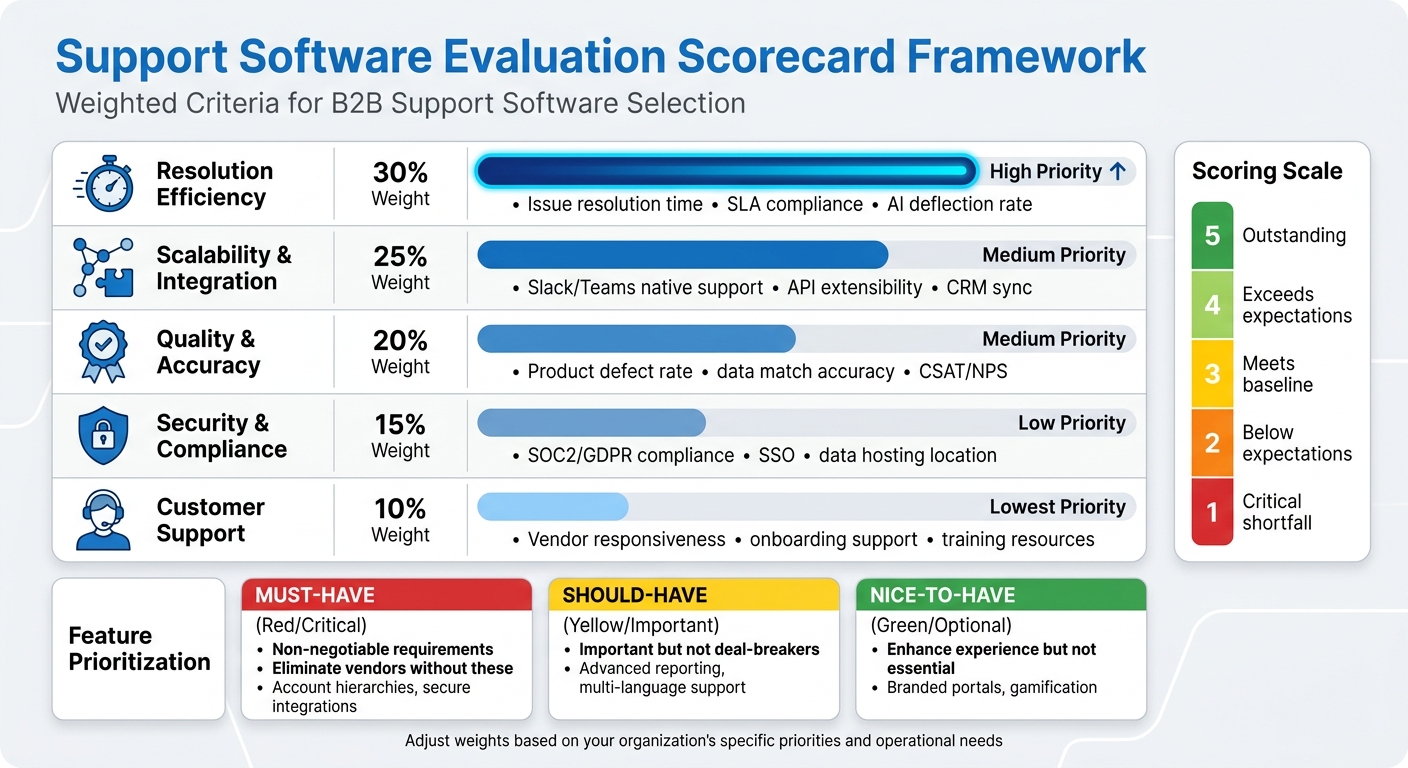
Support Software Evaluation Scorecard Framework with Weighted Criteria
Creating a scorecard starts with turning operational challenges into measurable criteria. Before you even think about scheduling a vendor demo, pinpoint the specific problem you’re trying to solve. Are you aiming to ease agent burnout, improve data consistency across disconnected systems, or cut costs without compromising service levels? Your scorecard should focus on these goals rather than just listing generic features [11]. This step lays the groundwork for organizing and prioritizing your evaluation criteria effectively.
To identify key criteria, gather resources like existing RFPs, vendor responses, and internal reports [12]. Then, group these criteria into meaningful categories. Common ones include Resolution Efficiency, Scalability & Integration, Quality & Accuracy, Security & Compliance, and Customer Support. Each of these ties directly to business outcomes, such as faster resolution times, predictable costs, or reduced compliance risks [12][14].
Categorizing and Weighting Evaluation Criteria
Once your categories are set, assign percentage weights based on their importance to your business. For example, if resolution speed is a top priority, you might allocate 30% to Resolution Efficiency. If integration is a major concern, you could assign 25% to Scalability & Integration. The weights should reflect the areas where failure would have the biggest impact [4][12].
Use a 1–5 scoring scale for each requirement, where 1 indicates a critical shortfall and 5 means the vendor exceeds expectations. Multiply these scores by their respective weights to turn subjective opinions into objective comparisons. This method keeps evaluations consistent, whether you’re looking at three or ten vendors [1][13].
| Evaluation Category | Weight (%) | Key B2B Metrics to Score |
|---|---|---|
| Resolution Efficiency | 30% | Issue resolution time, SLA compliance, AI deflection rate |
| Scalability & Integration | 25% | Slack/Teams native support, API extensibility, CRM sync |
| Quality & Accuracy | 20% | Product defect rate, data match accuracy, CSAT/NPS |
| Security & Compliance | 15% | SOC2/GDPR compliance, SSO, data hosting location |
| Customer Support | 10% | Vendor responsiveness, onboarding support, training resources |
Note: Adjust these weights to align with your organization’s specific priorities [11][12][13].
Separating Must-Have from Nice-to-Have Features
Before diving into vendor demos, establish a framework to distinguish between "must-have", "should-have", and "nice-to-have" features [17]. Must-haves are non-negotiable – eliminating any vendor that doesn’t meet these criteria is essential. In B2B support, must-haves often include features like robust account hierarchies and secure integrations [11][15].
"If you’re choosing a vendor for a business-critical function (like data or CRM), support is strategy."
Should-haves are important but not deal-breakers. Features like advanced reporting dashboards or multi-language support add value but aren’t essential. Nice-to-haves, such as branded customer portals or gamification for agents, enhance the experience but don’t directly address core operational needs. By clearly separating these categories, you avoid choosing a tool that dazzles in a demo but lacks the essentials your team relies on daily [17].
When evaluating AI-specific features, focus on your top 10–15 support intents. Identify which issues should be resolved autonomously and which require human oversight [4]. If a vendor’s AI can’t handle your most critical support intents without manual intervention, it’s a major red flag.
Involving Key Stakeholders in the Process
Selecting software isn’t a one-person job. While RevOps typically leads the process and manages the tech stack roadmap [11], input from other teams is vital. Support and sales leaders ensure agent workflows and customer needs are addressed. IT and security teams review SSO, accessibility, and data privacy standards [14]. Finance evaluates budget constraints and total cost of ownership, while procurement handles contract negotiations and legal compliance [11].
Involve these stakeholders early – ideally during the scorecard design phase, before shortlisting vendors. Each group brings a unique perspective: agents prioritize intuitive interfaces, IT focuses on integration and uptime, and leadership is concerned with ROI and scalability. Companies that include cross-functional teams in evaluations are 1.6 times more likely to achieve full system adoption within the first year [18]. This collaborative approach strengthens the data-driven decision-making process.
Once your scorecard is finalized, use it during vendor evaluations. For demos, provide a scripted agenda with real-world workflows – such as processing a refund request or managing a complex escalation – to see how the software performs under practical conditions [16][17]. Don’t let vendors take control with generic use cases. Instead, have each stakeholder group submit their top three evaluation questions in advance and score the vendor’s responses based on your predefined criteria. This ensures your scorecard reflects actual operational needs, not just flashy features from a presentation.
sbb-itb-e60d259
Evaluating Vendor Fit: Questions and Benchmarks
Your evaluation process is only as strong as the questions you ask and the benchmarks you set. Generic demos often fall short of revealing how software handles complex, real-world scenarios – like escalating multi-account issues or processing refund requests that require multiple approvals. The right questions and clear benchmarks can help you identify a platform that solves your challenges instead of creating new ones.
Questions to Ask During Vendor Demos
Start by focusing on AI quality and accuracy. Ask vendors how they evaluate response quality beyond CSAT scores. Look for metrics like per-response scoring for accuracy, completeness, tone, and compliance with policies [1]. Dive into their hallucination mitigation strategies: Does the AI use Retrieval-Augmented Generation (RAG) grounded in your documentation? Does it provide source citations for every response? [5][1] For example, in a 2026 test of 200 common questions, one platform achieved a 67% deflection rate but had 8 hallucinations, while another had only 2 hallucinations but a lower deflection rate of 54% [2]. Understanding how vendors balance speed and accuracy is critical – ask for specifics.
Next, evaluate escalation logic. Does the system have configurable confidence thresholds to ensure smooth AI-to-human transitions? Can it escalate conversations to a human when confidence is low, passing along the full conversation history and retrieved sources? [5][1] With 90% of support teams reporting challenges with AI-to-human handoffs [1], ask vendors about their missed escalation rates – the percentage of tickets that should have been handed off but weren’t [1].
For integration depth, confirm that integrations are bi-directional and that knowledge management updates automatically. Manual updates can lead to outdated AI responses. Can the AI draft responses directly in the agent workspace? Does it sync custom fields or follow existing routing rules? [5][1] The best platforms re-ingest content frequently – hourly or daily – from sources like documentation, wikis, and tickets [5][1].
When discussing operational ownership, clarify post-deployment responsibilities. If the vendor says your team will manage the system, ask about the internal resource cost, which typically ranges from 0.5 to 2 full-time employees (FTEs) [1]. For security and compliance, request SOC 2 Type II certification (Type I only verifies controls at a single point in time) and ensure customer data isn’t used for model training unless you explicitly opt in [5][1].
Armed with these targeted questions, you’ll be better equipped to spot any red flags during vendor evaluations.
Red Flags and Deal-Breakers
Be cautious of vendors making claims like "our model doesn’t hallucinate" or "we use CSAT to measure AI accuracy" [1]. Every large language model is prone to hallucinations, and CSAT, with response rates of only 5–15%, is not a reliable real-time quality metric [1]. If a vendor can’t explain their hallucination mitigation strategy, such as RAG grounding or source citations, consider it a major risk.
"The demo is not the product. The questions you ask – and the answers you demand – are what separate a good vendor decision from a costly mistake." – Twig [1]
Avoid vendors with vague or restrictive pricing and contract terms. Watch out for 24-month minimum terms, auto-renewal clauses requiring 90+ days’ notice, or "commercially reasonable efforts" language in SLAs instead of clear, numeric commitments [1][4]. For example, GDPR requires breach notifications within 72 hours – terms like "timely" are insufficient [4]. Also, ensure the contract includes a "change-of-control" clause, allowing you to exit without penalties if the vendor is acquired. Recent acquisitions have left customers facing integration challenges when not using the parent platform [1].
Other deal-breakers include manual knowledge base updates, lack of data portability guarantees, and the absence of SOC 2 Type II certification. Be wary if data training consent is buried in the Terms of Service rather than the Master Service Agreement or if the vendor refuses to share penetration test results under NDA [1][4]. Unrealistic implementation timelines – like promises of under 8 weeks without detailed milestones – are another red flag. Typical enterprise implementations take 8–14 weeks [2][4]. These benchmarks help ensure vendor claims align with industry standards.
Using Industry Benchmarks for Comparison
Industry benchmarks provide a valuable lens for evaluating vendor performance. For AI deflection rates, use these 2026 results as a baseline: Platform A (67%), Platform B (54%), Platform C (49%), Platform D (43%), and Platform E (38%) [2]. Be sure to distinguish between "containment rate" (customer didn’t request human help) and "resolution rate" (issue was fully resolved), as vendors may conflate the two to inflate performance metrics [4].
For total cost of ownership (TCO), model costs at different volumes – current, 2×, and 0.5× – to see how pricing scales. Here’s a 3-year TCO snapshot for 20 agents: Platform B ($82,800), Platform A ($71,280 plus AI resolution costs), Platform E ($32,400), Platform C ($35,280), and Platform D ($28,800) [2]. AI-specific pricing varies widely, from $0.99 per resolution to $5 per ticket, or annual contracts ranging from $95,000 to $590,000 [1].
For reporting speed, test how quickly the platform answers operational questions like "Which category breaches SLA most?" Benchmarks range from 12 to 45 minutes [2]. For mobile incident response, compare alert-to-first-response times: Platform E (3m 20s), Platform B (4m 45s), Platform C (5m 10s), and Platform F (6m 30s) [2].
Finally, ensure pilot validity by targeting 500–1,000 resolved conversations per intent category to achieve statistically valid accuracy results [4]. During the pilot, submit 50–100 real historical customer questions to test factual accuracy and grounding [5]. Include scenarios with recently updated policies and adversarial inputs to see if the AI fabricates answers [4]. Don’t rely solely on vendor confidence scores – run your own human review to validate accuracy.
Making the Final Decision with Confidence
Once you’ve built a detailed scorecard, it’s time to turn those insights into action. The right choice isn’t just about picking the platform with the highest score – it’s about finding one that aligns with your goals, scales with your team, and delivers measurable benefits like quicker resolutions and lower costs.
Interpreting and Acting on Scorecard Results
Start by reviewing the weighted scores across all categories and look for patterns. For instance, if your priorities were weighted as 30% to Quality and Safety, 20% to Pricing and Contracts, 20% to Implementation and Operations, 15% to Integration and Flexibility, and 15% to Security and Risk [1], the platform with the highest overall score should stand out. But dig deeper: does one vendor excel in AI quality but fall short in integration? Or perhaps another offers great transparency in pricing but lacks scalability?
Next, calculate the 3-year total cost of ownership (TCO) at different volume levels – current, half, and double your current size – to see how costs might scale [1]. For example, a 20-agent team might cost around $82,800 on one platform over three years, compared to just $35,280 on another [2]. Choose a tool that not only meets today’s needs but also anticipates future growth to avoid having to switch platforms prematurely. Match the platform to your business model – whether it’s Gorgias for e-commerce, Intercom for SaaS, or Jira for internal IT – to ensure it addresses your specific challenges [3][2].
Don’t forget to test the "bad day" scenario: How does the platform handle unexpected volume spikes, outages, or agent turnover? [16] This kind of analysis ensures your decision isn’t just strong on paper but also reliable under real-world pressure. Once you’ve identified your top choice, plan for a careful rollout to minimize risks and surprises.
Tips for Post-Selection Success
Once the contract is signed, it’s time to roll out the platform. Start by auditing your current setup. Pull data from the last three months, such as top ticket types, average resolution times, and SLA breaches [2][19]. This will provide a baseline to measure whether the new platform delivers on its promises, like faster resolutions or cost savings.
Roll out the platform in phases. Begin with one team or channel for a 2–3 week pilot to test configurations and resolve any edge cases [2][19]. During this phase, train agents using real, anonymized historical tickets instead of polished vendor demos [2]. This will prepare them for the messy, real-world scenarios they’ll face.
Focus on automation early. In the first week, set up automated routing and response rules, as these can significantly save time [2]. Dedicate at least 40 hours to creating or migrating your top 50 knowledge base articles to ensure AI-driven self-service features are ready to go [2]. A well-organized knowledge base can reduce simple customer queries by as much as 20–35% [19].
Perform thorough post-migration checks. Compare record counts and manually verify tricky data points – aim for 5 checks per 100,000 records – to ensure nothing important is lost or misaligned [19]. Measure success during the trial phase by tracking metrics like Average Handle Time (AHT), First-Response Time (FRT), and agent satisfaction to confirm the platform is improving efficiency [3].
Finally, gather feedback from your support agents during the pilot. Look for issues like clunky UI elements or missing quick-reply templates that might slow them down [19]. Enterprise rollouts often take longer than vendors suggest, so take your time and don’t let them rush you through critical setup steps [2]. This careful approach will set you up for long-term success.
FAQs
How do I choose scorecard weights for my team?
When assigning weights to your scorecard criteria, focus on what aligns best with your team’s objectives and areas where support is most needed. Give more weight to critical factors like AI capabilities or scalability, and assign less weight to criteria with a smaller impact on decision-making.
Make sure the total weights add up to 100%. For instance, if AI features are a top priority, you might allocate 40-50% of the total weight to that category. This ensures your scorecard reflects what matters most to your strategy and goals.
What should I test to validate AI answer accuracy?
To ensure AI-generated answers are accurate, it’s essential to cross-check them against recent, reliable sources. Look at trusted industry reports, vendor documentation, or other authoritative references to confirm details like features, pricing, and capabilities. Pay close attention to how the AI interprets features and benchmarks – these should align with current trends in the field. Always verify that the information is up-to-date by consulting the latest publications, as relying on outdated data can result in errors.
What costs should I include in 3-year TCO?
When calculating a 3-year Total Cost of Ownership (TCO), it’s essential to factor in all the direct and indirect costs that can accumulate. Here’s what you should include:
- Subscription fees per agent: These are the recurring costs for each agent using the software or platform. Make sure to calculate this over a 36-month period.
- AI tools: If the platform integrates AI features, such as chatbots or analytics tools, account for their licensing or usage fees.
- Implementation or onboarding fees: Many providers charge a one-time fee for setup, training, or onboarding. This cost can vary significantly depending on the complexity of the system.
- Additional features: Costs for optional but essential tools like workforce management, quality assurance, or advanced reporting should also be included.
- Usage-based charges: Some platforms may have fees tied to usage, such as API calls, storage, or overage charges for exceeding limits.
- Hidden fees: Watch out for less obvious costs like premium support, system upgrades, or data migration fees that might arise during the 3 years.
By thoroughly evaluating these elements, you can get a clearer picture of the overall investment required and avoid surprises down the line.
Related Blog Posts
- How do you choose a helpdesk for regulated or high-risk B2B customers (scorecard)?
- How do you write a helpdesk vendor evaluation checklist for Support Ops (2026)?
- Help Scout alternatives for B2B teams: what to choose when you outgrow shared inbox
- Best Helpdesk Software with Built-in Customer Health Scoring






