


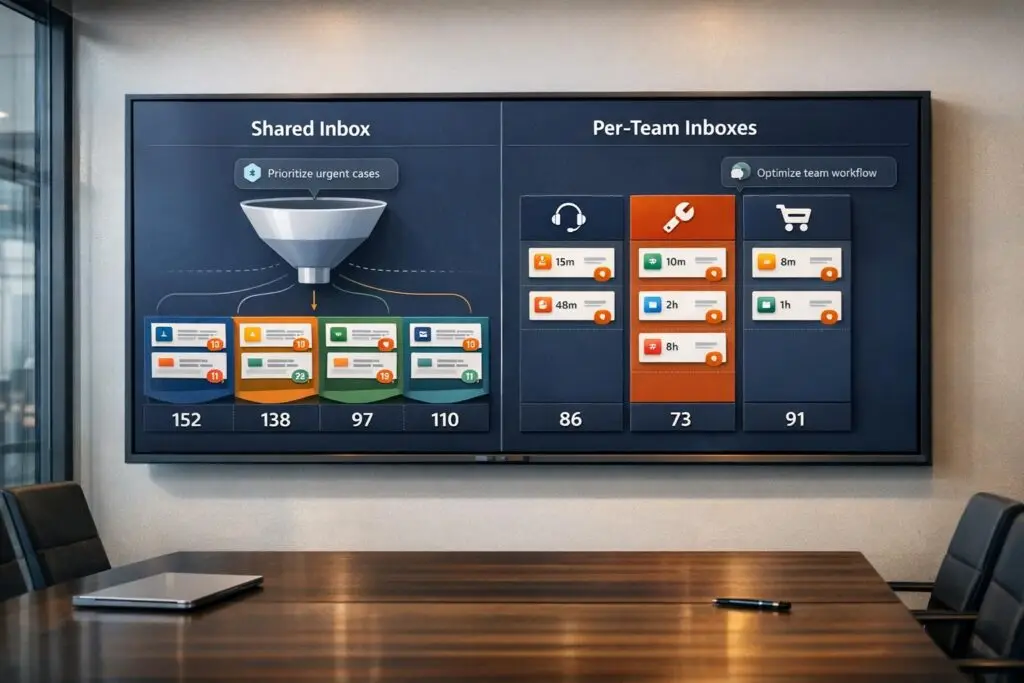
When it comes to managing support emails, you have two main options: shared addresses (e.g., support@yourcompany.com) or per-team addresses (e.g., billing@, technical@, sales@). Each approach has its strengths and weaknesses, and your choice depends on your team’s size, email volume, and need for structure.
- Shared Addresses: All emails go to a single inbox, providing transparency and collaboration. Works best for small teams with low email volume. However, without clear ownership, emails may go unanswered or get duplicate responses. AI tools can help by automating email routing and response drafting.
- Per-Team Addresses: Each department gets its own email. This setup ensures clear ownership and scales well for larger teams or higher email volumes. It offers better organization, SLA tracking, and accountability but can be more expensive and take longer to set up.
Quick Comparison
| Feature | Shared Address | Per-Team Address |
|---|---|---|
| Cost | Free (with email suite) | $12–$65 per user/month |
| Ownership | Ambiguous | Clear assignment |
| Collision Detection | None | Yes |
| Reporting | Manual tracking | Automated |
| Setup Time | Minutes | Days to weeks |
| Best For | Small teams, <50 emails/day | Larger teams, >50 emails/day |
If you’re handling fewer than 50 emails a day with a small team, stick with a shared address. For larger teams or higher volumes, a per-team setup offers better structure and efficiency. AI tools can enhance both systems by automating processes and reducing response times.
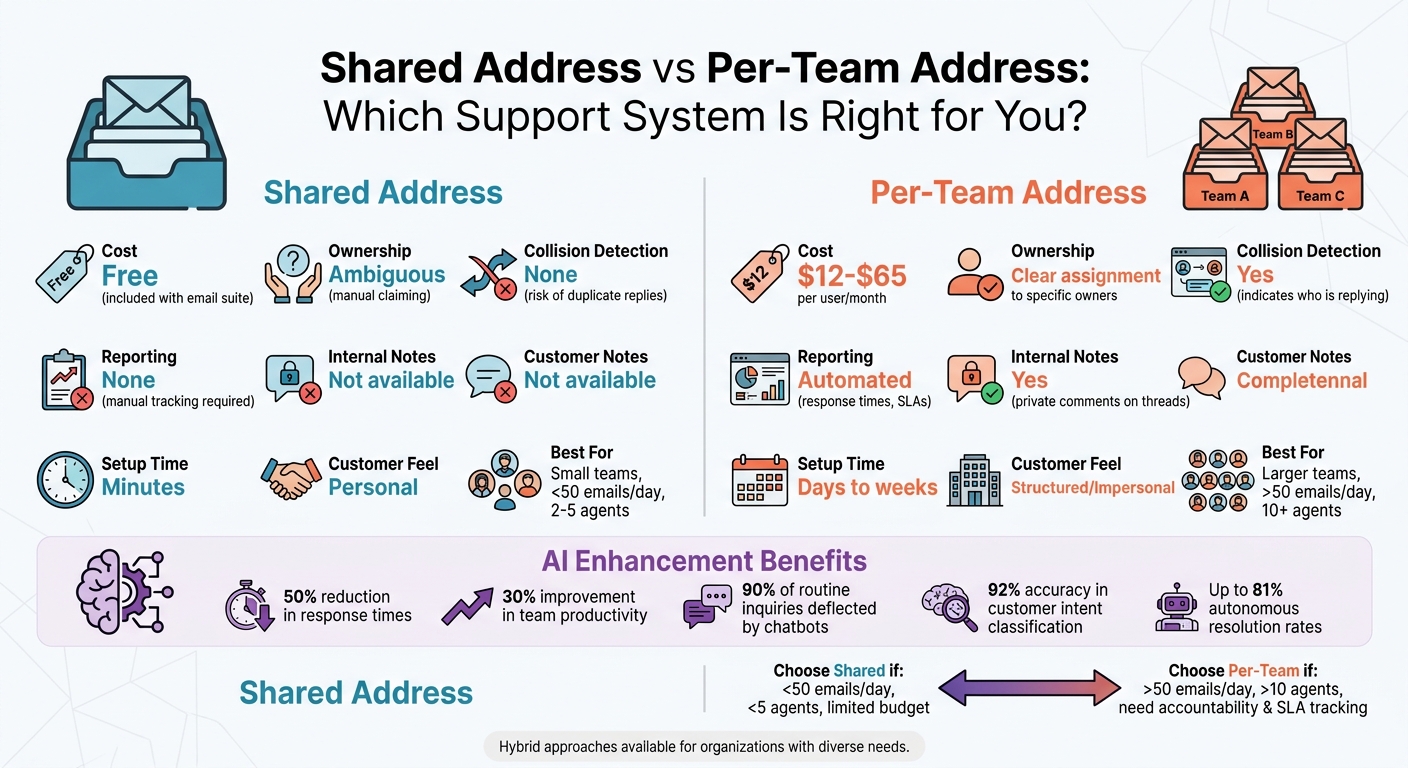
Shared vs Per-Team Email Support System Comparison
1. Shared Address Architecture
A shared address architecture channels all incoming messages into a central inbox, creating a unified system for handling inquiries. Every team member can access this shared queue, ensuring no messages get lost in personal inboxes and every issue is visible to the whole team. This setup helps prevent anything from slipping through the cracks [1].
Collaboration & Visibility
One of the biggest advantages of this approach is the transparency it offers. With everyone working from the same queue, team members can easily see which issues are resolved and which still need attention. Many modern team inbox tools take this a step further by including features like collision detection. This means agents get real-time alerts if someone else is already viewing or responding to a message. Additionally, these tools allow for internal notes and the ability to @mention colleagues directly within the email thread [1] [4].
"Shared mailboxes handle access. Team inboxes handle access plus workflow, accountability, and measurement." – Jayson DeMers, CEO, EmailAnalytics [1]
While transparency enhances collaboration, it’s equally important to ensure that ticket routing is well-organized to avoid unassigned or overlooked queries.
Ticket Routing & SLA Management
Accountability can be a sticking point with shared address systems. In basic setups – like those offered by Microsoft 365 or Google Workspace – emails are visible to everyone, but there’s no formal way to assign responsibility. This can lead to "orphaned" messages that no one takes ownership of [1] [5]. Teams often try to address this manually by using color codes or folders, but a better solution is upgrading to a team inbox tool that allows for formal assignments and tracks accountability.
Another limitation of native shared mailboxes is the lack of built-in SLA (Service Level Agreement) tracking. Features like response time alerts or resolution deadlines are essential for teams aiming to maintain fast response times – ideally under one hour, which is considered a benchmark for strong customer service. For smaller teams (fewer than 10 agents or under 200 emails daily), manual coordination might work. But as volume grows, automation becomes essential to maintain efficiency and meet SLAs. AI integration can significantly improve routing and SLA management.
AI Integration
AI is increasingly becoming a key component of shared address systems, addressing many of the challenges teams face. For instance, AI can automate email routing by analyzing keywords, sender domains, or even the tone of the message to direct inquiries to the right person or department [2] [4]. Additionally, AI-powered chatbots can handle routine questions, reducing the number of emails reaching the shared inbox by up to 90% [4]. When human attention is needed, AI assistants can draft reply suggestions, saving team members about an hour of work each day [3]. These AI-driven improvements often lead to a 50% reduction in response times and a 30% improvement in team productivity compared to traditional setups [1].
Cost structures for these tools are also evolving. Traditional team inbox tools typically charge $12 to $65 per user per month [1]. However, newer AI-focused platforms are moving towards flat-rate pricing. For example, eesel AI offers plans starting at $299 per month for up to 1,000 AI interactions [5], providing a more predictable option for growing teams.
sbb-itb-e60d259
2. Per-Team Address Architecture
Unlike shared mailboxes, a per-team address architecture allocates specific mailboxes to individual departments like support, billing, or sales. This setup ensures that each team has clear ownership of their communications from the outset.
Collaboration & Visibility
One of the standout benefits of this approach is the clarity it brings to ownership. In shared mailboxes, messages can often go unclaimed, but in a per-team system, every message is assigned to a specific owner right away [1]. Features like internal notes and @mentions allow agents to collaborate on complex issues within the same thread. Managers gain access to real-time dashboards, which provide insights into workloads and help prevent overlap. Collision detection, for example, alerts team members if someone else is already handling a message, making it easier to manage departmental tasks. This level of organization matters – 33% of employees report that poorly managed email systems negatively affect their work experience [4].
Scalability & Performance
A per-team architecture grows seamlessly with your business. As operations expand, you can add new specialized mailboxes without disrupting existing workflows [6]. Each mailbox operates independently, so if one team faces capacity issues or exceeds daily sending limits, it doesn’t affect others. This contrasts sharply with shared mailbox setups, which often struggle when teams grow beyond 5–10 members or handle more than 50–200 emails daily [2]. This structured design supports smooth scaling and improves processes like ticket routing and SLA management.
"Account-level limits create contention between agents. Mailbox-level limits create isolation. In a multi-agent system, isolation is what keeps the system stable." – Robotomail [6]
Ticket Routing & SLA Management
AI-driven tools significantly enhance the efficiency of ticket routing in per-team setups, cutting response times by as much as 50% [1]. Modern classifiers can determine customer intent with 92% accuracy in under 200 milliseconds, and they can handle 20% to 50% of repetitive service desk tasks – like password resets – without requiring human input [2][8]. Additionally, AI-powered chatbots can deflect over 90% of routine inquiries, reducing the overall inbox load. However, it’s crucial to streamline manual workflows before automating them. Automating an inefficient process can lead to even greater issues [7].
AI Integration
Per-team systems leverage advanced AI technologies like Retrieval-Augmented Generation (RAG) to quickly search knowledge bases and generate actionable instructions for both agents and customers [8]. According to Arahi AI, these tools can process tasks in seconds, increasing autonomous resolution rates to as high as 81% [5].
Pricing for AI tools is evolving too. While traditional per-user pricing ranges from $19 to $115 per agent per month, newer models offer alternatives like flat-rate or usage-based pricing. For example, flat-rate plans may start at $300 per month for a set number of AI interactions, while usage-based models charge around $0.20 per classification and $0.30 per resolution [1][2].
Pros and Cons
Weighing the pros and cons helps identify when each system works best, building on the earlier detailed explanations.
Deciding between shared and per-team email systems depends on the strengths and weaknesses of each approach. Shared mailboxes are simple and budget-friendly – they’re often included at no additional cost with Microsoft 365 or Google Workspace. They’re easy to set up, require little training, and get the job done for smaller teams. However, they come with some drawbacks. Without clear ownership, emails can slip through the cracks or get duplicate responses. Plus, there’s no built-in way to monitor response times or team performance.
On the other hand, per-team systems bring structure and accountability. Features like collision detection and SLA tracking make it easier to manage high email volumes and ensure timely responses. These systems are also scalable as your team grows. The downside? They tend to cost more – starting around $12 per user per month, with enterprise options climbing higher – and may take up to two weeks to fully implement and learn.
Here’s a quick comparison of the two systems across key factors:
| Feature | Shared Mailbox (Native) | Per-Team / Ticketing System |
|---|---|---|
| Cost | Free (included with email suite) | ~$12–$65 per user/month |
| Ownership | Ambiguous; manual claiming | Clear assignment to specific owners |
| Collision Detection | None; risk of duplicate replies | Yes; indicates who is replying |
| Reporting | None (manual tracking required) | Automated (response times, SLAs) |
| Internal Notes | Not available (requires forwarding) | Yes (private comments on threads) |
| Setup Time | Minutes | Days to weeks |
| Customer Feel | Personal | Structured/Impersonal |
AI tools are also shaking things up in support operations. Modern AI classification can work with either system to automatically sort and route emails. This means even small teams can handle larger volumes efficiently, sticking with a shared mailbox instead of upgrading to a full help desk solution.
The choice between these systems doesn’t have to be permanent. For teams managing fewer than 50 emails a day with fewer than five agents, a shared mailbox can work perfectly. But as email volumes climb past 500 messages a month or team sizes grow beyond 10 members, switching to a per-team system can make a big difference in efficiency. As one expert put it, "The Front vs Zendesk decision is not permanent." This breakdown offers a clear path to choosing the right system to improve your team’s workflow.
Conclusion
The right mailbox setup depends on your team’s size, email volume, and accountability needs. For smaller teams managing fewer than 20 emails daily with 2–5 agents, a shared mailbox is often enough and comes at no extra cost if you’re already using an email suite. But when email traffic exceeds 50 messages a day or your team grows beyond five members, a per-team mailbox system becomes crucial. This setup offers better organization and tracking, helping maintain response times under four hours.
AI tools can enhance both shared and per-team systems by automating email routing. This allows even smaller teams to handle larger volumes efficiently, without needing a full-scale help desk solution [2].
For organizations with diverse needs, a hybrid approach might be the way to go. HR departments may only require basic communication tools like distribution lists, while support teams benefit from more structured systems. Microsoft 365 Groups is one example of a built-in hybrid option, combining shared mailbox features with distribution capabilities [9]. To ensure a smooth transition, consider running both systems in parallel for two weeks to prevent any emails from being overlooked [1]. This approach helps balance simplicity with structure.
Start by evaluating your team’s email volume and response times. If you’re not already tracking these metrics, set up essential support metrics first [1]. Use shared mailboxes for lower email volumes, shift to per-team systems when accountability becomes a priority, and explore AI tools to streamline operations without losing the personal touch. By tailoring your solution to your team’s actual needs, you can avoid unnecessary costs and focus on what truly works for your workflow.
FAQs
What’s the best first step to measure email volume and response times?
Start with the tracking tools already built into your email or support platform. Most platforms include basic analytics that let you monitor metrics like the number of incoming emails and response times. These tools give you a solid starting point to understand your support activity. By establishing this baseline, you’ll be better prepared to evaluate performance and consider more advanced options, like AI tools or workflow automation, down the line – all without needing to invest a lot of time or effort upfront.
How can AI prevent missed or duplicate replies in a shared inbox?
AI streamlines shared inbox management by automating tasks like email organization, routing, and drafting responses. It evaluates emails to determine their intent and urgency, assigns them to the appropriate team member, and creates drafts tailored to the context of the message. These tools also monitor ownership, enforce workflows, and enhance transparency, helping prevent issues such as multiple agents replying to the same thread or missing critical messages.
When should we switch from shared support@ to per-team addresses?
When your shared support@ mailbox starts causing problems like duplicate replies, missed urgent tickets, SLA violations, or challenges in tracking team performance, it’s time to consider switching to per-team email addresses. As ticket volume and complexity increase, shared inboxes can become chaotic, leading to slower workflows and more confusion.
Using dedicated team addresses, paired with AI-powered automation, can streamline ticket routing, speed up resolutions, and enhance collaboration. This approach is perfect for scaling support operations efficiently.






