


In B2B customer support, admins and end users have distinct needs that require tailored approaches. Admins focus on control, compliance, and detailed reporting, while end users prioritize quick, self-service solutions for daily tasks. Failing to address these differences can lead to inefficiencies, frustration, and even customer churn.
Here’s how to effectively support both groups:
- Admins need: Tools for system control, compliance, and advanced troubleshooting. Their issues often impact larger teams or entire organizations.
- End users need: Fast, accessible solutions like in-app chat or self-service resources. They prefer straightforward, task-focused support.
- AI solutions: Automate repetitive tasks, provide role-specific workflows, and improve efficiency for both groups. For example, AI can help admins with predictive reporting and end users with instant ticket routing.
Balancing these priorities ensures smoother operations, stronger relationships, and measurable benefits like improved satisfaction scores and reduced support costs.
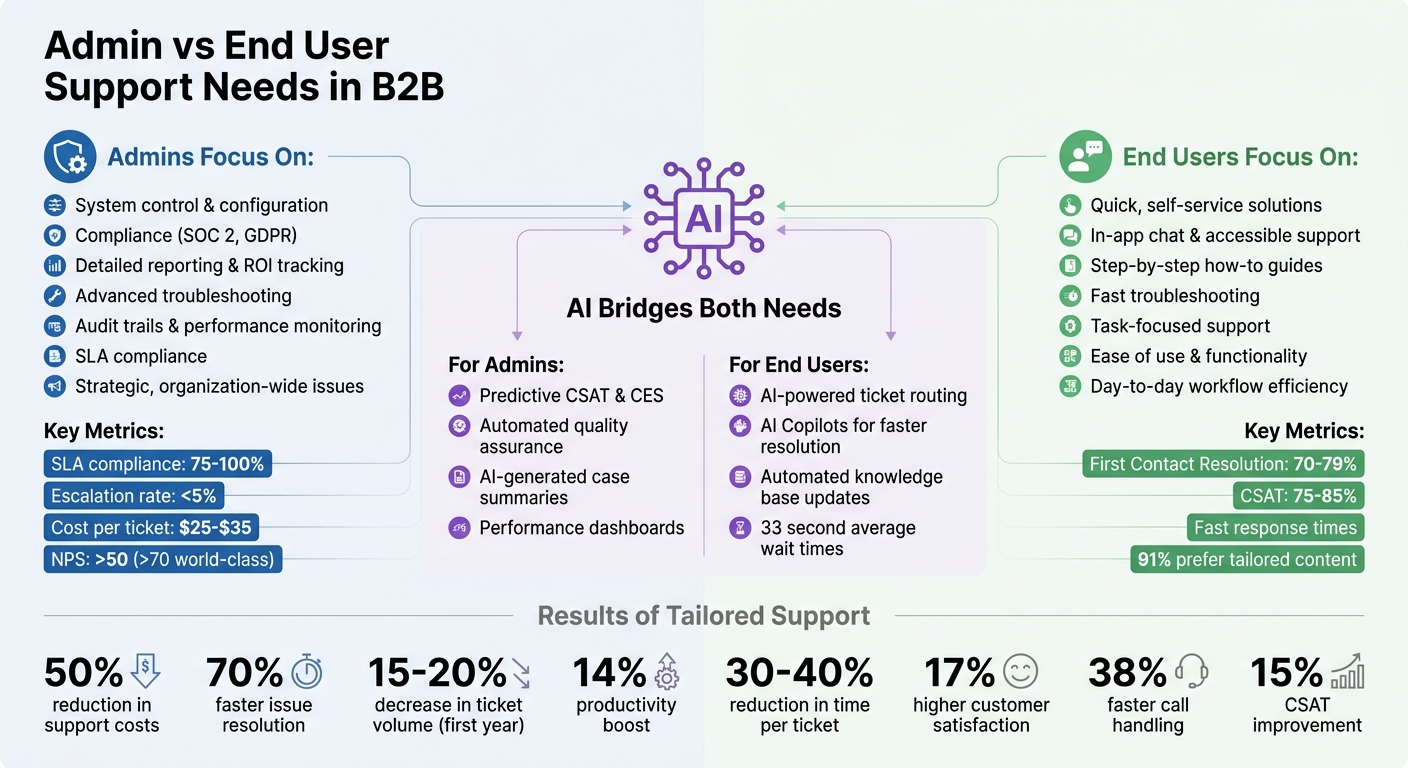
Admin vs End User Support Needs in B2B Customer Service
How Admins and End Users Differ in B2B Support
Admins and end users play very different roles in a B2B setting. Admins are concerned with big-picture goals like system configuration, security, compliance (think SOC 2 and GDPR), and demonstrating ROI. Their focus is on ensuring the platform consistently delivers value and keeps company data secure. End users, on the other hand, are all about getting their day-to-day tasks done. They need quick troubleshooting, clear "how-to" instructions, and fast solutions to keep their workflows running smoothly.
These differing priorities can sometimes create tension. As Austin Guanzon, Customer Support Manager at Dialpad, points out:
"In B2B customer support… interactions often span multiple stakeholders and even multiple teams within an organization. To make things even more complex, these stakeholders sometimes also have different goals" [2].
Take this example: an end user might prefer an instant automated response to solve their issue, but an admin might prioritize a more thorough, human-verified process to ensure accuracy and protect the company’s reputation.
The technical skills of these two groups also vary widely. Admins often have a deeper understanding of system configurations and can handle more complex tasks. End users, however, are generally focused on ease of use and functionality, which means they rely on straightforward solutions. These differences shape how support teams approach and tailor their strategies for each group.
What Admins Need: Control, Reporting, and Compliance
Admins need tools and support that give them control over the system, ensure compliance, and provide detailed reporting. Features like audit trails and performance monitoring are key for them to oversee team activities and track ROI, especially for quarterly business reviews. Their support requests are often strategic and involve advanced troubleshooting, integration advice, or documentation for configuring systems. When admin issues arise, they often affect multiple users or entire departments.
Meeting SLAs (Service Level Agreements) is especially critical in B2B scenarios. Missing a deadline can lead to financial penalties or even legal problems, particularly if custom contracts specify strict uptime or response requirements. Support teams often rely on automated tracking to ensure these enterprise-level commitments are met, prioritizing thorough and accurate resolutions over a quick initial reply [1].
What End Users Need: Fast Answers and Easy Access
End users, by contrast, are looking for quick, simple solutions. They want support to be as accessible and frictionless as possible, favoring channels like Slack, in-app chat, or self-service knowledge bases. With around 84% of developers already using or planning to use AI tools in their workflows [4], expectations for speed and ease are higher than ever. They want enterprise software to feel as intuitive as the consumer apps they use every day.
Their needs are more transactional, focusing on account-specific troubleshooting, practical code snippets, and bite-sized "how-to" guides. Self-service options are particularly important – not just for their convenience but also to free up support teams to handle bigger, more complex issues that impact the organization as a whole. Integrating AI into these processes can further streamline operations, benefiting both end users and admins.
sbb-itb-e60d259
How to Customize Support for Each Group
When it comes to offering support, one size definitely doesn’t fit all. Admins and end users have vastly different expectations, and addressing their needs effectively requires tailored communication and resources. As John Sanchez, keynote speaker and author, puts it:
"The Platinum Rule… says ‘do unto others as they would like done unto them.’ In other words, give them communication the way they want to receive it" [5].
This means creating resources that are specific to each group’s unique workflows and skill levels. Trying to combine admin and end-user content into "one-size-fits-all" articles only leads to confusion. Specialized resources not only make information easier to find but also improve the efficiency of AI tools in retrieving the right content [8]. Organizations that adopt this approach report a 50% cut in support costs and resolve issues 70% faster [9].
Creating Admin-Specific Resources and Communication
Admins need resources that align with their strategic role. This includes advanced setup guides, security protocols, audit logs, and performance dashboards. Communication with admins should focus on the bigger picture – think cost-to-value insights, growth opportunities, and risk management [6]. Keep updates concise and centered on business outcomes rather than diving into overly technical details.
Here are a few ways to streamline admin support:
- Automate SLA tracking and performance reporting: These tools help highlight value during quarterly business reviews.
- Use active listening techniques: Rephrase their concerns to ensure you understand both their goals and the emotions tied to their decisions [5].
- Label content clearly: Add "Who this article applies to" tags at the top of admin-focused documentation so they can quickly identify relevant materials [7].
Simplifying Support for End Users
End users, on the other hand, are looking for quick, actionable solutions. They benefit most from a self-service knowledge base filled with simple, step-by-step instructions and FAQs. These resources should be free of technical jargon and easy to understand, as 91% of users prefer well-tailored content [9].
To make support even more accessible, integrate it directly into their workflow. Tools like Slack or in-app chat allow users to get help without leaving their current task. As Enjo points out:
"The modern user does not navigate to a help center; they ask a question inside their workflow" [8].
Additionally, use saved views to organize content by role – whether it’s IT, HR, or general operations. This targeted approach can reduce support ticket volume by 15-20% within the first year [9].
Using AI to Support Both Admins and End Users
AI is changing the way support teams operate, benefiting both admins and end users. Modern AI platforms offer tools tailored to each group’s needs – admins focus on oversight and control, while end users prioritize quick and seamless help.
AI Tools for Admin Oversight and Reporting
Admins thrive with AI tools that provide a comprehensive view of support operations and account health. Features like predictive CSAT and Customer Effort Scores (CES) highlight potential risks, such as churn or challenging cases, even before surveys are completed. This allows admins to step in early when high-risk accounts need attention.
Automated quality assurance is another game-changer, reviewing every single interaction for factors like empathy, accuracy, tone, and policy adherence. This delivers objective performance insights across the team. Additionally, AI-generated case summaries simplify the process of understanding complex account histories – ideal for quarterly business reviews or executive-level reports.
AI Tools for End User Resolution
For end users, speed is everything. AI-powered ticket routing ensures cases are prioritized based on urgency, topic, or even emotion, so critical issues reach the right agent immediately. In 2024, a global camping company used an IBM cognitive tool to boost agent efficiency by 33% and cut average wait times to just 33 seconds [10]. That kind of responsiveness can make all the difference when someone needs help.
AI Copilots take this a step further by suggesting optimal responses, drawing from case histories and knowledge base content. This helps human agents resolve issues faster without sacrificing quality. Fully autonomous AI tools can even convert resolved tickets into external knowledge base articles with a single click, ensuring self-service resources are always current. For example, a German media company working with IBM introduced an AI-powered assistant in 2024 that delivered personalized product recommendations 10 times faster, resulting in a 15% boost in customer satisfaction [10]. These tools not only speed up support but also pave the way for customized workflows and configurations.
Setting Up Role-Based Permissions and Workflows with AI
AI’s ability to streamline resolution is further enhanced by role-based configurations, which ensure secure and customized access. Admins gain access to sensitive internal data and compliance tools, while end users see only relevant public information. This two-layer system – Roles (the blueprint) and Permission Sets (the specific tools) – keeps operations secure and organized [11].
AI can also enable dynamic workflows that adapt to context. For instance, service level agreements (SLAs) can adjust response time targets based on the urgency or tone detected in customer messages. Regional teams might only access AI tools relevant to their area, while compliance reviewers receive read-only access to metrics. Ian Heinig from Delight.ai highlights this balance:
"When everyone works efficiently within clearly defined guardrails, you never have to choose between speed and safety as you scale AI operations" [11].
This structured approach has led to 17% higher customer satisfaction and 38% faster average call handling times for organizations that have embraced AI effectively [10].
Resolving Conflicts Between Admins and End Users
Even the most advanced AI tools can’t eliminate all conflicts between admins and end users. These two groups often have very different priorities. Admins are focused on compliance, accurate reporting, and sticking to business rules, while end users are looking for quick resolutions and immediate assistance. When support systems lean too heavily toward pleasing end users at the expense of following admin-defined rules, something called priority inversion can happen. This can lead to serious legal or financial consequences [13]. To address these challenges, deliberate strategies are essential.
Addressing Common Points of Friction
One common source of conflict is when an end user’s request clashes with company policies. Take, for instance, an incident in early 2024 involving Air Canada. Their chatbot mistakenly created a bereavement fare refund policy that didn’t actually exist, prioritizing customer satisfaction over established rules. The courts later held Air Canada accountable for this invented policy, highlighting the risks of allowing user demands to override admin-defined business logic [13].
To avoid similar situations, support teams should embed clear conflict-resolution protocols into their systems. For example, using AI-powered ticket prioritization—like XML tagging with priority attributes—can help systems rank platform rules above business rules and business rules above user requests [13]. As Tian Pan, Engineer-Founder, explains:
"The model will always make a priority call when instructions conflict. The only question is whether your team made that call first." [13]
Role ambiguity is another common issue. If it’s unclear whether billing or technical support should handle a specific issue, frustration builds on both sides. Detailed handoff documentation, which includes context, ownership transfer steps, and rollback conditions, can make transitions between support levels much smoother [16]. Additionally, automation tools can help balance speed and accuracy. For instance, high-confidence responses (95% or above) can be sent automatically, while medium-confidence answers are flagged for review by admins or human agents – especially in sensitive areas like billing or compliance [3].
Keeping Communication Clear Between Stakeholders
Technical fixes alone aren’t enough – clear communication is just as important. Synchronizing platforms, such as integrating Jira for admin updates with a support system used by end users, can prevent critical information from being lost during handoffs [16]. Zac Garcia, Manager of Global Customer Care Operations at Fossil Group, highlights the value of such tools:
"It provides a way to communicate outside the ticket to the rest of the business, without leaving the ticket. This is a game changer for Support." [14]
Consistency in handling high-risk scenarios is also key. Internal playbooks and ticket tags (e.g., "Refund_Exception") can ensure workflows stay aligned with company policies [17]. For escalated conflicts, support managers should rely on structured approaches like the HEARD framework to de-escalate situations while validating both sides’ perspectives [15] [18].
Ultimately, fostering strong relationships with both admins and end users is essential for building efficient and effective support systems. With only 40% of B2B customers feeling their issues are fully resolved – and just 5% being highly satisfied with the process – transparent communication and collaborative problem-solving can set businesses apart [12].
Tracking Success with AI-Driven Metrics
Once you’ve implemented AI-powered support systems, it’s crucial to track their impact on both admins and end users. These two groups often have different priorities – admins focus on broader business metrics like SLA compliance, cost efficiency, and escalation trends, while end users care about getting fast, straightforward support experiences [19]. To truly measure success, you need to balance these perspectives without being overwhelmed by data. This approach works hand-in-hand with the AI-driven strategies discussed earlier.
Metrics can be grouped into five main categories – Efficiency, Quality, Productivity, Compliance, and Cost – to assess performance in a meaningful way [19]. AI tools help by offering real-time insights, such as automated ticket analytics that highlight potential friction points before they escalate [19]. Eric Klimuk, Founder and CTO of Supportbench, emphasizes the importance of actionable metrics:
"The best metrics don’t just track history – they change what happens next." [19]
AI dashboards convert raw data into insights, showing details like error reduction rates and time saved per ticket. These insights not only clarify ROI but also enhance team productivity [20].
Metrics That Matter for Admins and End Users
Admins and end users judge success using different benchmarks. For admins, the focus is on metrics like SLA compliance (ideally between 75% and 100%), low escalation rates (under 5% is ideal), cost per ticket (ranging from $25–$35 in the tech industry), and Net Promoter Scores (NPS) above 50, with scores over 70 considered world-class [19]. These metrics ensure that support efforts align with overall business goals, such as improving renewal rates and maintaining compliance.
End users, however, are more concerned with their immediate experience. Key indicators for them include First Contact Resolution (FCR), where industry standards range from 70% to 79%, quick First Response Times, and Customer Satisfaction (CSAT) scores, which typically fall between 75% and 85% [19].
AI platforms like Supportbench help bridge these two perspectives by automating data collection and analysis. Features such as AI Predictive CSAT and FCR detection identify potential issues before they affect customer interactions. Meanwhile, AI Predictive CES transforms performance data into actionable insights that resonate with both admins and end users.
Here’s a quick look at how these metrics align with each group:
| Metric Category | Admin Focus | End User Focus | Supportbench AI Feature |
|---|---|---|---|
| Response & Resolution | SLA compliance and escalation tracking | First Contact Resolution and fast response times | AI Predictive CSAT and FCR detection |
| Satisfaction | Net Promoter Score (NPS) and cost efficiency monitoring | Customer Satisfaction (CSAT) | AI Predictive CES |
The key is to focus on metrics that matter and use AI-driven insights to take meaningful action. As Eric Klimuk puts it:
"If you’re reporting on volume without context or measuring time without linking it to customer satisfaction, you’re just busy, not improving." [19]
Conclusion
Providing support for customers with multiple stakeholders isn’t about picking sides between admins and end users. It’s about creating systems that effectively meet the needs of both groups. Admins need tools for control, visibility, and compliance to manage their organization’s use of your product. On the other hand, end users expect quick, seamless support that gets them back to work with minimal hassle. Addressing these distinct needs ensures a support experience that satisfies everyone involved.
AI tools play a big role here. They handle routine end-user queries automatically while also offering admins robust reporting dashboards and oversight capabilities. The result? A 14% boost in productivity, a 30–40% cut in time per ticket, and a 20–30% reduction in overall costs [10][21].
To make the most of these gains, start with clear, role-based workflows. Combine these workflows with AI to automate repetitive tasks and surface actionable insights. As Laura Ramos, Vice President and Principal Analyst at Forrester, puts it:
"B2B use cases will always require a hybrid human-AI agent approach" [22].
This balanced approach allows you to scale your support operations without losing the personal, relationship-focused interactions that admins value so highly.
Keep an eye on meaningful metrics – like SLA compliance and NPS for admins, and FCR and CSAT for end users. These indicators help you strengthen relationships, minimize churn, and turn your support function into a true revenue driver.
FAQs
How do I separate admin and end-user support without duplicating work?
To manage support effectively, set up tiered workflows that allocate tasks based on their complexity and the type of stakeholder involved. This approach ensures that simpler issues and more complex problems are handled by the appropriate teams.
Automating ticket routing is another key step. By doing so, issues are directed to the correct tier right away, saving time and reducing confusion. Additionally, create role-specific workflows paired with shared knowledge bases. This helps minimize redundant efforts and ensures that both admins and end users have access to the information they need.
Finally, define clear escalation paths. This keeps responsibilities well-organized, streamlines the overall process, and helps maintain efficiency across the board for both administrators and end users.
What role-based permissions should AI have for admins vs end users?
Role-based permissions should stick to the least-privilege principle. This means admins should only have the access they need to manage configurations, user permissions, and security within their specific duties – nothing more. For end users, access should be restricted to basic actions like submitting or viewing tickets, without granting any administrative controls.
When it comes to AI permissions, these should also align with specific roles. The AI should handle tasks such as workflow management securely, avoiding unnecessary access. This approach ensures smooth collaboration, helps maintain compliance, and reduces potential risks.
How can I prevent AI from breaking compliance or company policies?
To keep AI systems aligned with compliance requirements and company policies, it’s crucial to establish strong governance frameworks and clear boundaries. Here’s how you can make that happen:
- Set up approval workflows: Define structured processes for reviewing and approving AI-driven decisions, especially in sensitive areas.
- Incorporate human oversight: For critical decisions, always involve human judgment to validate outcomes and reduce risks.
- Monitor AI behavior continuously: Regularly track how the AI operates to catch and address issues like policy violations or unexpected behavior.
- Define escalation protocols: Outline clear steps for escalating concerns when anomalies or risks are detected.
Additionally, conducting regular audits and implementing human-in-the-loop processes can help ensure that AI systems remain compliant. This approach minimizes risks like bias, hallucinations, and security vulnerabilities, making it easier to scale AI solutions safely and responsibly.






