



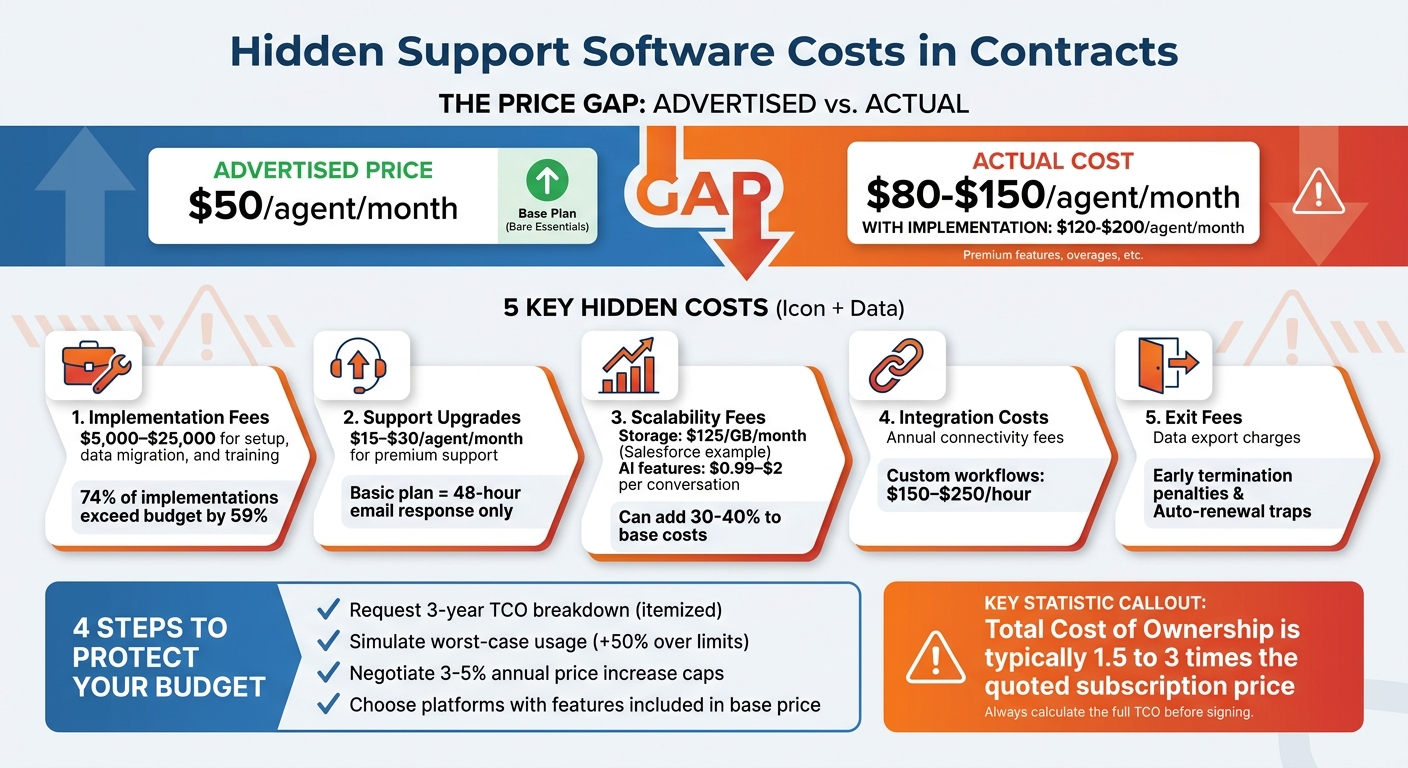
Most support software costs more than advertised. While pricing pages may claim "$50 per agent per month", the actual cost often ranges from $80 to $150 per agent, or even $120 to $200 when implementation fees are included. These hidden charges can disrupt budgets and slow operations.
Key hidden costs to watch for:
- Implementation fees: $5,000–$25,000 for setup, data migration, and training.
- Support upgrades: $15–$30 per agent/month for faster response times or dedicated managers.
- Scalability fees: Overcharges for storage, API limits, or AI features (e.g., $0.99–$2 per AI conversation).
- Integration costs: Annual "connectivity" fees or charges for custom workflows.
- Exit fees: Data export charges or penalties for early termination.
What to do:
- Request a 3-year Total Cost of Ownership (TCO) breakdown with itemized costs.
- Simulate worst-case usage to estimate overage fees.
- Negotiate caps on price increases (3–5% annually).
- Opt for platforms with features included in the base price to avoid costly add-ons.
Understanding these pitfalls and negotiating upfront can save thousands annually.
Hidden Support Software Costs: Advertised vs Actual Pricing Breakdown
Why Your Cloud Software May Cost More Than You Think
sbb-itb-e60d259
Common Hidden Costs in Support Software Contracts
Most vendors present a straightforward per-agent price, but 74% of software implementations end up exceeding their initial budget by an average of 59% [6]. These overruns often stem from pricing structures that aren’t immediately obvious. Let’s break down the areas where hidden costs tend to pile up.
Implementation and Onboarding Fees
Setting up help desk software can cost anywhere from $5,000 to $25,000 [6], covering essentials like configuration, data migration, and training. Just the process of migrating data can demand 10–40 hours of staff time, involving tasks like cleaning up ticket history and mapping custom fields [2]. If you’re using AI-powered tools, expect additional charges for tasks like training the system to align with your brand voice [3].
"The implementation partner’s estimate is almost always low… Build a 40-50% contingency into your implementation budget. You’ll need it." – Softabase Editorial Team [6]
Internal costs can escalate quickly. For example, a 50-person support team experiencing a 20% dip in productivity during the first month could lose around $67,000 in output [6]. Add to that training costs of $500–$1,500 per user [6], consultant rates of $150–$250 per hour [6], and up to 400 hours of internal engineering time for large-scale integrations [7], and the numbers add up fast.
Support and Maintenance Charges
Support tiers often come with hidden fees. For instance, basic plans might only include email support with a 48-hour response time, while faster options like phone support or a dedicated account manager require an upgrade to a pricier enterprise plan. These costs often reveal themselves when you need urgent help and find out it’s not included in your base subscription.
Even after the initial setup, ongoing support and usage fees can quietly inflate your expenses.
Scalability and Usage Limitations
Scaling up your operations can sometimes feel like a financial penalty. For example, Salesforce charges $125 per gigabyte per month for data storage overages and $5 per gigabyte for file storage [8]. API usage limits are another common issue – Sales Cloud users typically get 1,000 API calls per user per day, and exceeding that limit halts integrations unless you upgrade [8].
While calculating the ROI of AI is essential for budgeting, these features often bring additional costs. Intercom’s Fin AI charges $0.99 per AI-resolved conversation [2], while Salesforce’s Agentforce costs $2 per conversation on top of the core license fees [8]. These per-resolution fees can become unpredictable during high-demand periods, with some organizations spending 30–40% more than their base license costs on such charges [8].
"Hidden costs are not accidental – they are structural features of how Salesforce bills and how organizations consume the platform." – Fredrik Filipsson, Co-Founder, Redress Compliance [8]
Integration and Customization Costs
Connecting your support software to other tools like CRMs or Slack often incurs extra fees. Some vendors charge annual "connectivity" or "maintenance" fees just to keep these integrations running [1]. Customizing workflows can also be expensive – if even minor tweaks require paid professional services, you’re effectively paying what some call a "rigidity tax" [1].
"If every minor adjustment to a contract approval workflow requires a paid engagement with the vendor’s services team, you aren’t just paying for software, you’re paying a ‘rigidity tax.’" – Team Pactly [1]
Feature Restrictions and Add-Ons
Key features often come as extra-cost add-ons. For instance, Zendesk Advanced AI costs around $50 per agent per month [2]. Other tools like advanced reporting, workforce management, and quality assurance also carry additional charges – ranging from $5–$15 per agent per month for analytics, $25–$50 per agent per month for workforce management, and $15–$30 per agent per month for QA tools [2]. Even adding channels like phone or SMS support can cost an extra $20–$50 per agent per month [2].
Some features, like sandboxes or testing environments, are often locked behind enterprise-level plans, forcing upgrades even if your team size doesn’t justify it [2]. Additionally, bundled modules can lead to paying for tools you don’t actually use [1].
Exit and Vendor Lock-In Fees
Leaving a platform can be just as costly as joining one. Vendors may charge for data exports, offboarding, or early termination fees. Auto-renewal clauses with narrow opt-out windows can also trap businesses into another year of payments if deadlines are missed.
"We’ve passed an auto renewal cut off date, and now we’re locked in." – David Morgan, CFO, Loop Returns [9]
Poor contract management costs companies an average of 9.2% of their annual revenue [9], with 40% of contract revenue leakage tied to inadequate oversight [9]. In 2024, Meta faced a €251 million fine from Ireland’s Data Protection Commission for GDPR violations related to poor documentation and breach notification [9]. This highlights how contract mismanagement can have serious financial consequences. Understanding these exit costs is key to making informed, long-term decisions about your support software.
Red Flags to Watch for in Contract Language
Once you’ve uncovered hidden costs, it’s time to dig into the contract language itself. Vendors often use vague or misleading phrasing to conceal extra charges, so knowing what to look for can save you from unexpected expenses.
Common Contractual Red Flags
One phrase to be wary of is "standard support included." While it sounds reassuring, it typically translates to basic email or web ticket support during business hours, with response times that can stretch to 48 hours or more [10][3]. If you need 24/7 phone support or a dedicated account manager, you’ll likely have to upgrade to a "Premium" or "Enterprise" plan, which could add $15–$30 per agent per month [2].
Another common trap lies in terms like "reasonable storage included" or "fair use policy." These phrases are intentionally vague, leaving the vendor free to define what "reasonable" means after you’ve signed the contract. Exceeding these undisclosed limits can lead to overage fees for call recordings, ticket data, or file storage [10].
Be cautious of terms such as "one-time integration project" or "non-BAU, billable changes." These indicate that even small workflow adjustments may require paid professional services [10][1]. If the contract doesn’t clearly define "Business As Usual" (BAU), you could face charges of $150–$250 per hour for minor tweaks [2].
Phrases like "available on Enterprise only" or "advanced analytics available on [Tier]" suggest that features showcased in demos might require a costly plan upgrade [10][2]. Similarly, terms such as "per-message fee subject to carrier changes" or "billed per minute transcribed" can lead to unpredictable invoices, especially during periods of high call volume [10].
Exit clauses deserve just as much scrutiny. Watch for terms such as "remaining contract value due" upon termination or "data export fees," which can act as financial penalties for switching vendors [10][1]. Ensure data exports are offered in structured formats like CSV or JSON; limited options could be a warning sign [5].
Comparison: Included vs. Hidden Costs
Understanding what’s genuinely included in the base price versus what incurs additional charges can prevent costly surprises. Here’s a breakdown of how these costs typically play out:
| Category | Included in Base Price | Often Hidden (Extra Cost) | Cost Example/Trigger |
|---|---|---|---|
| Support | Email/Web tickets (9-5) | 24/7 Phone, Dedicated Manager | $15-$30/agent/month [2] |
| Implementation | Basic account setup | Data migration, CRM integration | $5,000+ one-time fee [2] |
| Usage | "Standard" seat access | Overage minutes, SMS surcharges | Higher per-unit rates [3] |
| AI/Automation | Basic bot workflows | AI transcription, AI sentiment analysis | $0.99 per resolution [2] |
| Data/Storage | 30-90 day retention | Long-term storage, PCI compliance | Per GB or per hour [10] |
| Connectivity | Standard API access | "Integration maintenance" fees | Annual "connectivity" fee [1] |
The Total Cost of Ownership (TCO) for enterprise software often ends up being 1.5 to 3 times the quoted subscription price once all extra fees are factored in [3]. To avoid surprises, ask vendors to model a "worst-case" invoice where your usage – whether it’s minutes, AI resolutions, or tickets – exceeds plan limits by 50% [3]. This exercise can reveal the true cost of overages before you commit.
"The gap between the pricing page and your invoice typically looks like this: Advertised price: $50/agent/month; Actual cost after add-ons: $80-150/agent/month." – Jonathan Bar, Founder, Corebee [2]
Lastly, negotiate a cap on annual price increases – aim for 3–5% – to protect yourself from the industry average of 12.2% annual SaaS price inflation [5]. Without this safeguard, a $1,000/month tool could cost 76% more after five years due to compounded increases [5].
Step-by-Step Guide to Evaluating Support Software Contracts
Now that you’re aware of the potential pitfalls, it’s time to create a structured process for reviewing contracts. This can help you avoid unexpected costs and ensure your software remains affordable as your team grows. A clear understanding of total expenses is key to identifying hidden fees.
Request a Total Cost of Ownership Breakdown
Ask for a detailed breakdown of the 3-year Total Cost of Ownership (TCO). This should include base licenses, implementation, overages, add-ons, integrations, and exit fees. Don’t settle for vague estimates – insist on itemized details for every category.
Here’s why this matters: The actual costs of software are often much higher than expected. For example, ERP implementations typically cost 3–4 times the software license price, while CRM implementations run 2–3 times the license cost [6]. A vendor might quote $50 per agent per month, but once you add implementation, training, and add-ons, the first-year cost could easily jump to $80–$150 per agent [2].
To protect yourself, include a 40–50% contingency buffer on top of any vendor-provided implementation estimate. Why? Because 74% of software implementations go over budget, with an average overrun of 59% [6]. This buffer can help you manage scope creep and unexpected professional service fees.
Once you’ve addressed TCO, it’s time to evaluate how the platform scales with your business.
Audit Feature Usage and Scalability
Ask vendors to project costs at double and five times your current headcount, and confirm any fees tied to per-user or per-resolution AI usage. Some platforms impose "tier jumps", where hitting a certain headcount can triple your per-user costs overnight [6][4]. Be wary of AI add-ons that require licensing for every user, even if only part of your team will use the feature [11].
Look closely at API call limits and storage caps. Access to enterprise-level APIs often requires expensive tiers, costing $500–$2,000 per month [6][4]. Similarly, CRM platforms may charge $125 per month per 500MB of extra storage [6]. If your data needs exceed the base plan, these costs can escalate quickly.
Clarify Support Tiers and SLAs
Pin down the specifics of support tiers, response times, and penalties for missed Service Level Agreements (SLAs). Basic support often means email or web tickets with response times of 48 hours or more during business hours [3]. Upgraded support packages can cost an additional 20% of the total contract value [11][3]. Replace vague terms like "best effort" with clear commitments.
Once you’ve nailed down support terms, shift your focus to integration and exit conditions.
Review Integration and Exit Terms
Ensure data export terms are clearly defined, and confirm that integration fees and early termination penalties are capped or waived. Watch out for "Data Egress" charges, which can be steep – pulling 1PB of data from a cloud storage environment might cost between $90,000 and $120,000 [13]. Negotiate discounts or caps on these fees upfront, before your data grows to a level where migration costs become unmanageable.
Be cautious of early termination penalties that require paying out the remainder of a multi-year contract [13][4]. Nonrefundable upfront fees, such as activation or setup charges, are another red flag – they often remain nonrefundable even if you cancel early [12][14]. Ensure the contract specifies that data exports will be delivered in structured formats like CSV or JSON at no extra cost [5].
"The biggest cost of cloud isn’t your monthly bill – it’s the financial and operational stranglehold that makes leaving almost impossible." – Ismail Kovvuru, DevOps Engineer [13]
Simulate Real Usage Scenarios
Model your team’s growth and peak demands to estimate total costs under realistic conditions. Ask the vendor to simulate an invoice where your usage – whether it’s conversations, API calls, or storage – exceeds plan limits by 50% [3]. This exercise can reveal hidden overage fees before you commit to a contract.
Negotiate overage rates upfront so they’re closer to your standard per-unit costs, rather than inflated default rates [3]. Additionally, conduct quarterly audits to deactivate unused accounts, as many SaaS tools count anyone with a login as an active seat [4]. This simple step can save you from paying for licenses you don’t need.
Finally, protect yourself from price hikes by negotiating a cap on annual increases. Aim for 3–5%, as the industry average for SaaS price inflation is 5–15% per year [4].
Negotiation Strategies to Avoid Hidden Costs
Secure predictable costs now to save thousands annually and sidestep surprise charges as your team expands.
Prioritize Scaled Pricing Models
Choose pricing structures that adjust based on active users to avoid paying for inactive accounts. Per-agent models often lead to "seat creep", where vendors charge for every user who has ever logged in – even if they’re no longer active, such as former employees or contractors [4]. This could mean paying for 15 seats when only 10 are actively in use.
For teams ranging from 5 to 50 agents, flat-rate pricing is often a smarter choice. For example, a $99/month flat-rate plan could save over $28,000 annually compared to an enterprise per-agent model for a 10-agent team [2].
"The cheapest per-agent price does not always mean the lowest total cost. A $99/month flat-rate platform can save over $28,000/year compared to an enterprise per-agent platform for the same 10-agent team."
- Jonathan Bar, Founder, Corebee [2]
If you’re stuck with per-agent pricing, negotiate terms that charge only for active users. Implement quarterly audits to deactivate accounts that have been inactive for 30 days or more [4]. This aligns with earlier advice to regularly review user accounts for cost efficiency.
To further control costs, ensure all potential charges are clearly outlined in writing.
Demand All-Inclusive Quotes
Avoid surprises by requesting a detailed pricing schedule that lists every possible charge – setup fees, training, integrations, API access, SSO, advanced analytics, and feature add-ons [3].
Ask for a sample invoice that shows costs if usage exceeds plan limits by 50%. Check that overage rates match your standard per-unit cost to avoid unexpected spikes in expenses [3].
When negotiating renewal terms, aim to cap annual price increases at 3–5%, since SaaS prices often rise by 5–15% per year [4].
Once you’ve secured a comprehensive pricing schedule, focus on platforms that include essential features in their base price.
Choose Platforms Without Add-Ons
A straightforward way to avoid hidden costs is to select platforms where essential features are included in the base price. Look for solutions that bundle AI capabilities, enterprise security like SSO, advanced analytics, and integrations, rather than charging extra for these features.
For instance, SSO alone can add $3–$5 per user per month if it’s only available in premium tiers [4]. Advanced analytics could tack on another $500–$2,000 per month [4]. These extra charges can quickly add up, turning a $50/agent/month base price into $120–$200 per agent per month once you account for necessary features.
Carefully map out which features are essential for your team and ensure they’re included in the negotiated price. Core capabilities like routing, recording, API access, and integrations should all be locked into the contract at the agreed-upon rate [10].
Conclusion
Hidden charges in contracts can often turn a seemingly good deal into a costly surprise. Advertised prices rarely tell the whole story, so it’s essential to dig deeper into the fine print to avoid unexpected expenses.
To keep costs under control, take these steps: ask for a detailed total cost of ownership breakdown, including every possible charge; model worst-case usage scenarios to see how overage penalties might affect your budget [3]; and negotiate caps on annual price increases before committing to a contract [5]. These actions can help you better predict expenses and protect your support operations from financial surprises.
This methodical approach aligns with the contract audit and negotiation strategies discussed earlier, emphasizing the importance of transparent pricing. Look for platforms that include key features – like AI tools, single sign-on (SSO), and advanced analytics – in their base price, instead of charging extra for each add-on. For mid-sized teams, switching to flat-rate pricing models could save over $28,000 annually compared to traditional per-agent pricing structures [2].
FAQs
What should a 3-year TCO include?
When calculating a 3-year Total Cost of Ownership (TCO) for support software, it’s essential to factor in all relevant costs to get a clear picture of the financial commitment. This includes the base platform fees, implementation charges, training expenses, and ongoing maintenance.
Don’t overlook potential hidden costs either – things like add-ons, usage overages, or scalability fees can quickly add up. By taking these into account, organizations can avoid unexpected expenses and ensure their decisions align with both their budget and operational goals.
How do I estimate overage fees before signing?
To get a handle on overage fees, start by reviewing your contract to understand usage limits. Think about your future needs – especially during busy periods like holidays or product launches – so you can plan ahead. It’s also smart to negotiate terms that include caps on penalties and a clear breakdown of fees.
Keep an eye on your usage regularly and set up alerts to avoid going over your limits. When you’re reviewing a contract, factor in all costs, including possible overage charges. This approach can help you stay on top of your budget and avoid surprises.
Which contract terms hide future cost increases?
Some contract terms can sneak in future cost increases that catch you off guard. Common culprits include auto-renewals, usage-based overage charges, and contractual lock-ins.
- Auto-renewals: Long-term agreements often renew automatically, sometimes at higher rates, and without clear upfront notice. This can lead to unexpected increases when the renewal kicks in.
- Overage charges: SaaS contracts frequently impose extra fees if you exceed limits on things like storage, recordings, or feature usage. These charges are often buried in the fine print, making them easy to overlook until they appear on your bill.
- Contractual lock-ins: Some agreements lock you into terms that make it difficult (or expensive) to switch providers, effectively tying you to escalating costs.
These hidden costs can be hard to spot unless you carefully review the contract details or billing terms.






