


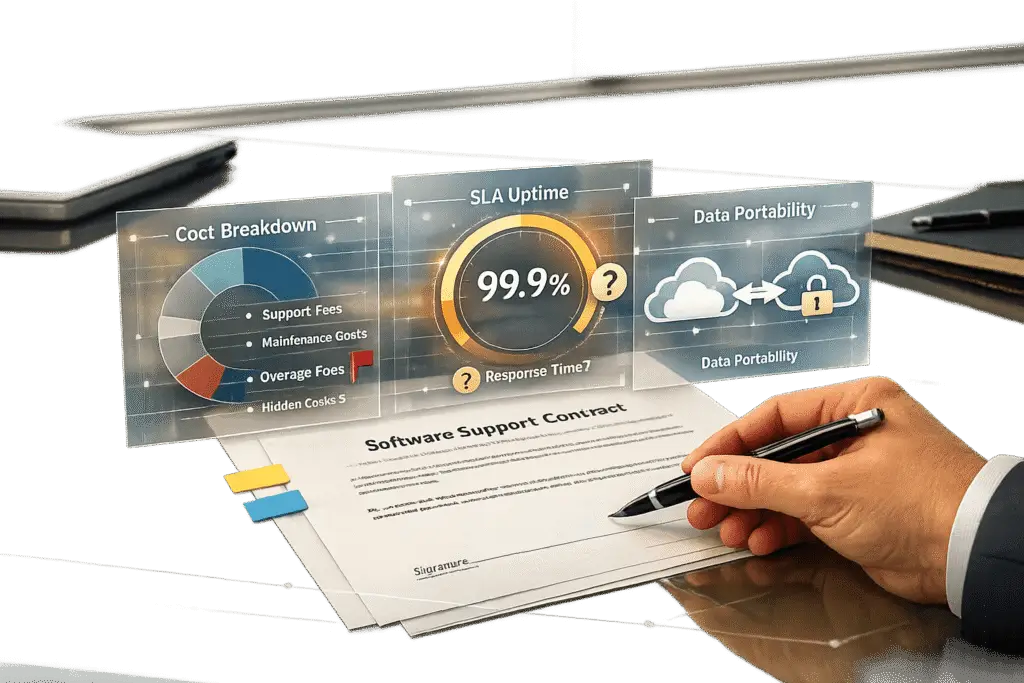
Support software contracts can have serious hidden risks if not reviewed carefully. Here’s what you need to know to protect your team and budget:
- Hidden Fees: Watch for unexpected costs like setup, training, API access, or data storage.
- Vague SLAs: Terms like "commercially reasonable efforts" or unclear uptime guarantees can leave you unprotected.
- Auto-Renewals: Long notice periods (90–120 days) can trap you in underperforming contracts.
- Liability Caps: Vendors often cap their liability too low, leaving your company exposed to financial risks.
- Data Ownership Issues: Ensure you retain ownership and can export your data without extra charges.
Key Tips:
- Push for clear SLAs with measurable metrics and enforceable penalties.
- Negotiate liability caps that reflect actual business risks (12–24 months of fees).
- Cap annual price increases at 3–5%.
- Include termination and data portability clauses to maintain flexibility.
Thorough contract review and negotiation are essential to avoid costly mistakes, hidden fees, and operational disruptions.
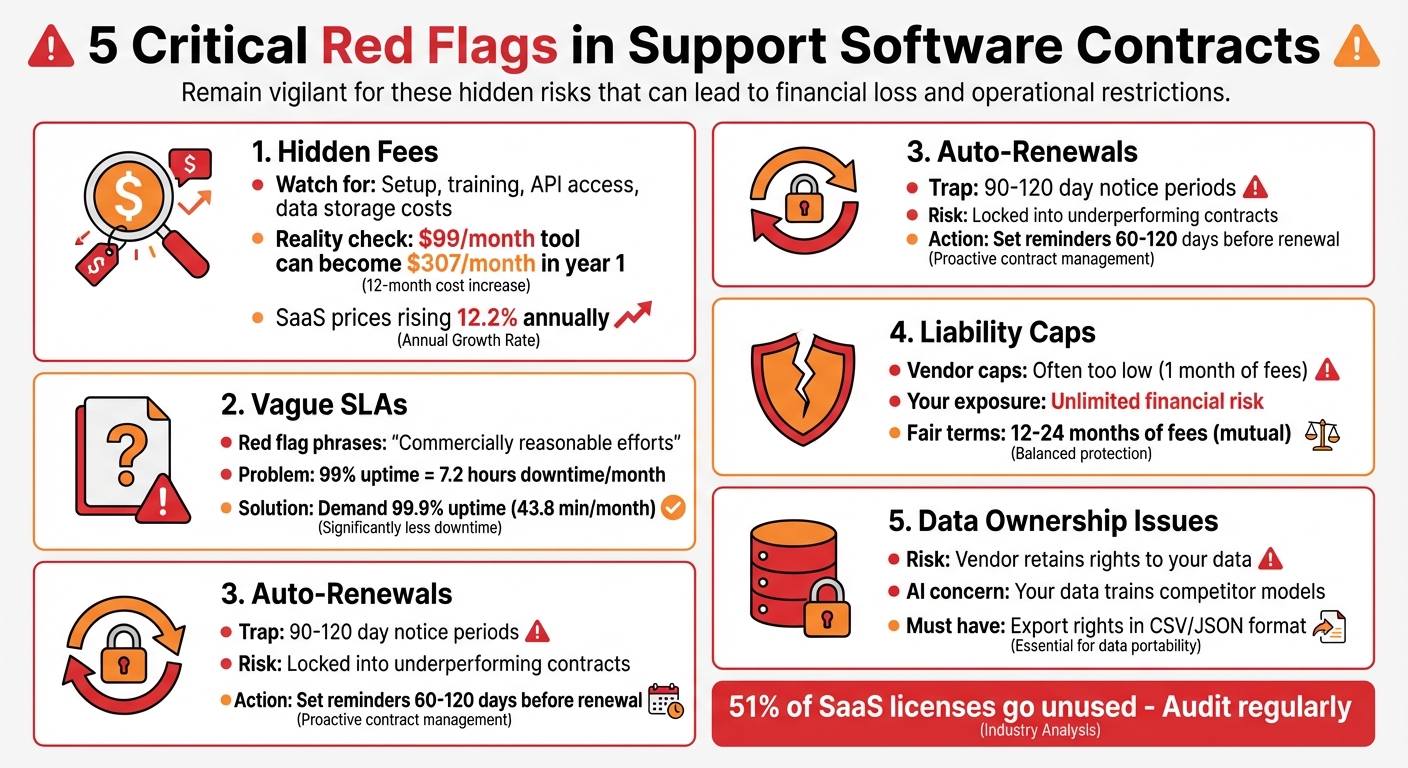
5 Critical Red Flags in Support Software Contracts
Negotiating Software Contracts: An Expert Guide to Secure Best Deals
sbb-itb-e60d259
Hidden Fees and Pricing Traps to Avoid
Advertised prices often don’t tell the whole story. According to Vertice‘s 2024 research, SaaS prices have been climbing at an annual rate of 12.2%. This means a tool advertised at $1,000 per month today could cost nearly $1,762 per month after five years. On top of that, hidden costs – like setup, training, and data migration – can turn a $99/month tool into $307/month in its first year alone [9]. These pricing surprises can disrupt budgets and operational plans, making it crucial to carefully review contracts before committing.
Common Hidden Fees and How to Spot Them
Software vendors often bury additional costs in fine print, leaving customers with unexpected expenses. One of the most common traps is usage-based charges. For example, transcription might be billed per minute, sentiment analysis could be charged per conversation, or fees might apply if your recording storage exceeds "fair use" limits. Some older vendors have even started adding annual "connectivity fees" for API access to platforms like Salesforce or Slack [10][11].
Implementation costs are another area to watch. While a vendor might advertise a low per-seat price, they could charge extra for essentials like training, setup, and integration. Then there are "rigidity taxes" – fees for professional services to make minor workflow changes that should ideally be included. Team Pactly highlights this issue:
If every minor adjustment to a contract approval workflow requires a paid engagement with the vendor’s services team, you aren’t just paying for software, you’re paying a ‘rigidity tax’
[11].
Feature gating is also becoming a common issue. Vendors may move previously included features – like CRM integrations or advanced reporting – into higher-tier plans. This forces customers to pay for more expensive plans just to retain access to what they need. For instance, a base license costing $65 per seat can quickly rise after necessary add-ons [10].
Being aware of these hidden fees can help you plan better and avoid pricing surprises.
How to Negotiate Clear Pricing Terms
To uncover potential overage penalties, try modeling pricing at 120% and 150% of your expected usage [10]. This can help you understand what costs might look like during seasonal spikes or periods of rapid growth.
Set clear limits on annual price increases. Aim to negotiate caps of 3% to 5% instead of agreeing to vague terms like "subject to prevailing market rates" [7]. Ask for an itemized breakdown of all costs, including implementation, training, data migration, premium support, and any AI-related fees, before signing anything [3][10]. It’s also important to define which configuration changes are considered routine and which will require additional paid services [10].
Make sure your contract includes clear terms for data export. Ensure you can retrieve your data in standard formats like CSV or JSON without additional fees [7][9]. Since studies show that 51% of SaaS licenses go unused in the average organization [9], regularly audit your licenses and adopt a "use it or reassign it" policy to cut down on waste.
Vague Service Level Agreements (SLAs) and Performance Terms
Promises like "commercially reasonable uptime" often lack clarity and fail to provide measurable commitments [7]. This vagueness highlights the importance of crafting precise, quantifiable SLA terms that align with your operational needs. For example, a 99% uptime guarantee allows for roughly 7.2 hours of downtime per month – enough to disrupt workflows and frustrate customers [14]. Additionally, vendors may include broad exclusions like "emergency maintenance" or "third-party provider failures", which can obscure significant downtime from the SLA [16].
Brian Heller from Outside GC explains the issue perfectly:
"Emergency maintenance should not be considered permitted downtime… whenever there’s a problem, the fix is, by its very nature, ’emergency maintenance,’ so this is an exception that essentially swallows the rule." [13]
Another pitfall is subjective issue classification. Vendors often use their own severity levels, which may not align with your business priorities. For instance, what your support team considers a critical outage could be downgraded to "minor", delaying much-needed resolution [13]. To avoid these traps, scrutinize SLA language for exact metrics and enforceable remedies.
How to Read SLA Language for Better Protection
Start by insisting on specific uptime percentages – 99.9% or higher for critical services. This reduces allowable downtime to about 43.8 minutes per month instead of 7.2 hours [14]. Establish clear deadlines for response and repair times, along with enforceable remedies [13].
Ensure that uptime calculations exclude emergency maintenance and are independently monitored to prevent disputes during outages [13][14]. Metrics for API response times and data processing speeds are equally important; a system may be technically online but still fail operationally if it’s slow or inefficient [14].
For AI-based platforms, include terms that define metrics like query response times, processing throughput, prediction accuracy thresholds, and acceptable error rates [15].
Routine maintenance should also be clearly defined. Contracts should specify that maintenance must be pre-scheduled, occur during off-peak hours, and be limited in frequency [13]. Vendors should provide at least 72 hours’ notice for scheduled updates [14].
Negotiating Enforceable Penalty Clauses
Once clear SLA metrics are in place, add enforceable penalty clauses to hold vendors accountable. Build in automatic service credits – 10% for uptime between 99% and 99.9%, 25% for uptime below 99%, and 50% for uptime below 95% – without requiring you to file a claim [13][17]. Brian Heller emphasizes:
"A 99.99% uptime ‘guarantee’ is meaningless if you get the same remedy whether actual availability is 95% or 99%." [13]
Include a "persistent failure" clause that allows you to terminate the contract without penalty if the vendor fails to meet SLA standards for three consecutive months or four times within a rolling 12-month period [13]. Also, make sure service credits are treated as specific remedies for performance failures and don’t count against general liability caps [14].
Finally, eliminate vague phrases like "commercially reasonable efforts" or "best endeavors." Replace them with measurable metrics [14]. Set clear timelines for breach notifications, requiring vendors to inform you of security incidents or major outages within 24 to 72 hours [7]. Well-defined SLAs and penalty clauses not only safeguard your operations but also ensure the software serves your business effectively.
Data Ownership, Portability, and Vendor Lock-In Risks
When it comes to maintaining flexibility in your operations, clear agreements on data ownership and portability are just as important as a well-defined SLA. Without these safeguards, you could face not only financial hurdles but also technical barriers that make switching vendors nearly impossible.
Understanding Data Ownership Clauses
Your contract must clearly state that you own all data you upload, whether it’s customer information, transaction logs, or custom configurations [18][8]. But here’s the catch: some vendors sneak in clauses that grant them broad rights to use your data. For example, one company that spent $500,000 on custom software discovered at the end of their contract that the developer retained ownership of the code. Since they only had a non-exclusive license, the developer was free to offer the same custom features to a direct competitor [2].
For AI-based platforms, the risks are even greater. In November 2025, a healthcare staffing firm faced major legal and financial fallout after an AI screening tool misused candidate health data. The vendor’s contract allowed them to use customer data for model training without proper disclosure, which resulted in a discrimination complaint from over 3,000 candidates [20]. Jana Gouchev, Managing Attorney at Gouchev Law, highlights the gravity of this issue:
"Data ownership is one of the most important parts of an AI service contract. Your agreement should say who owns both the data you provide (input) and the content or insights the model produces (output)."
To avoid similar pitfalls, include clauses that prohibit vendors from using your data or prompts to train their models without explicit written consent [19][20]. This ensures that proprietary workflows, customer insights, and operational data remain under your control and aren’t used to improve tools that your competitors might also leverage.
Just like transparent pricing and strong SLAs, clear data rights are essential for maintaining your long-term flexibility and avoiding vendor lock-in.
Ensuring Easy Data Export and Migration
Owning your data is one thing, but it’s meaningless if you can’t access or transfer it easily. Your contract should guarantee export rights in common, non-proprietary formats like CSV, JSON, or XML [18][1]. Some vendors store data in proprietary formats that only their software can interpret, effectively locking you in even if you technically own the data [18][21].
Include a clause that provides a 30–90 day transition period with uninterrupted access to your data and APIs at normal performance levels. Without this, vendors could cut off access as soon as your contract ends, leaving you in a bind. Will Bond, Growth Marketing Lead at Genie AI, explains:
"The best time to negotiate exit rights is before you sign, when the vendor wants your business. Once you are dependent on their platform, your leverage diminishes substantially."
Before your contract ends, test the vendor’s data export process [18]. Negotiate for at least one full data export per contract term at no extra cost to avoid unexpected "hostage data" fees [18]. Also, ensure the vendor provides technical documentation, API access, and adequate support to make the transition to a new provider smoother [18][3].
Finally, insist on a certificate of deletion once the transition is complete. This guarantees that all sensitive data is permanently removed from the vendor’s systems, safeguarding your customer information and protecting your business [18][3]. These precautions are vital for maintaining both control over your data and operational flexibility, especially in AI-driven environments.
AI-Native Platform Considerations
AI-driven support platforms introduce contractual challenges that traditional SaaS agreements often fail to address. For support leaders relying more on AI-native tools, these risks demand stronger safeguards. When your data flows through machine learning models, it opens the door to potential misuse. Without specific contractual protections, you might inadvertently allow your proprietary workflows to train models that competitors also use. Worse, you could face legal trouble if the AI makes a critical error. Just like hidden fees or vague SLAs, unaddressed AI risks can disrupt your operations. These risks call for customized contract language that goes beyond standard SaaS terms.
Transparency in AI Data Usage and Decision-Making
One of the biggest risks with AI platforms is hidden clauses around model training rights. Some vendors include broad terms that let them use your customer prompts, support tickets, and operational data to improve their models [19][20]. Jana Gouchev, Managing Attorney at Gouchev Law, cautions:
"If you’re subscribing to a service that uses AI, make sure you don’t inadvertently give the vendor rights in the contract to use your input for training."
This is especially concerning for organizations managing sensitive data – like financial records, healthcare information, or proprietary customer insights. For example, in February 2026, a European bank with 45,000 users negotiated an opt-out from abuse monitoring for its investment banking divisions, reducing regulatory risk exposure by €15M–€25M [23].
Your contract should clearly prohibit the use of your data for model training without explicit written consent [19][24]. Additionally, you should secure the right to access audit reports and documentation about the model’s logic and training datasets. This is critical for compliance with emerging regulations, such as the EU AI Act and Colorado AI Act [5][22]. Standard agreements like a Master Subscription Agreement won’t cut it – consider a dedicated AI Addendum to address these unique concerns [19].
Negotiating AI Performance Guarantees
Beyond ensuring transparency in data usage, your contract should also set clear performance standards for AI systems. Unlike traditional software, AI operates on a spectrum of accuracy. Vague disclaimers about performance can leave you vulnerable to errors [25][5]. As AI tools evolve from assisting agents to making decisions autonomously, contracts need to prioritize outcomes over simple metrics like uptime [24].
Negotiate performance warranties that hold AI-generated work to the same "professional and workmanlike" standards as human work [24]. Define precise accuracy benchmarks – for instance, requiring that 99% of support tickets are resolved within specific timeframes, with less than 1% leading to complaints. Include change management provisions that obligate vendors to notify you before rolling out model updates and allow you to revert changes if performance declines [24][15].
Push for indemnification coverage to address AI-specific risks, such as intellectual property infringement or biased and defamatory content generated by the AI [19][5]. Standard liability caps, such as one month of fees, are inadequate – aim for coverage reflecting 12 to 24 months of fees to account for the potential fallout from AI errors [2]. Finally, ensure that AI systems require human approval for high-risk decisions, helping to catch costly mistakes before they impact your customers [24].
Best Practices for Contract Negotiation and Review
Taking the time to thoroughly review contracts can save your business from costly headaches down the line. Skipping this step could leave you stuck with hidden fees, weak service agreements, or unfair data ownership terms. A structured review process is your best defense against these pitfalls.
Key Steps for Contract Review
Start by clearly defining your needs before even looking at a vendor’s contract. Ask yourself: Why do you need this application? How many licenses are necessary? What timeline do you expect for a return on your investment? This preparation helps you avoid being sold features you don’t need [27].
Next, assemble a team from different departments – IT, security, finance, and legal – so you can evaluate the contract from multiple perspectives [7]. When reviewing the document, go through it clause by clause, paying close attention to areas like liability caps, indemnification, data ownership, and termination rights [6][26]. Make sure all requested changes are documented in a single, consolidated redline version [7][3]. This approach strengthens your position during negotiations [2].
Timing matters, too. Vendors are often more flexible at the end of their fiscal quarter or year, so schedule negotiations accordingly [7]. Keep your budget private and use industry benchmarks to justify your pricing expectations [27]. Also, stay ahead of auto-renewal clauses by setting reminders 60–120 days before the contract ends [7][12].
For enterprise SaaS contracts, consider hiring a professional attorney for the review. This typically takes 1–2 hours and costs between $300 and $500 [26]. While it’s an upfront expense, it can prevent costly mistakes. If your business involves sensitive data or AI tools, include an AI-specific addendum to address issues like model training rights and performance guarantees [26].
Finally, don’t hesitate to walk away if the terms don’t meet your criteria.
Knowing When to Walk Away
Some contract terms can be deal-breakers. For example, vague service level agreements (SLAs) or hidden fees can signal future problems. If a vendor refuses to commit to specific SLA metrics – like uptime percentages of 99.5% or higher – or uses unclear terms like "commercially reasonable efforts", it’s a red flag [7][3]. Similarly, if they claim ownership of your data or won’t guarantee its return in a standard format (like CSV or JSON), it’s best to look elsewhere [7][3][26].
Security compliance is another critical area. A vendor that lacks certifications like SOC 2 or ISO 27001 – or won’t agree to reasonable breach notification timelines – is not worth the risk [7][4]. Watch out for liability clauses, too. If the vendor caps their liability at a trivial amount (e.g., less than 3–6 months of fees) but demands unlimited liability from you, that’s an unfair imbalance. Industry norms typically call for mutual caps of 12–24 months of fees [6][26][2].
Before negotiations, establish your Best Alternative to a Negotiated Agreement (BATNA). Having a solid backup plan – whether it’s another vendor or an in-house solution – gives you the confidence to walk away from unfavorable terms [27]. Vendors who refuse to modify high-risk clauses or insist on a "take it or leave it" approach are often challenging to work with later on [7][2]. Your contract should safeguard your business, not just serve the vendor’s interests.
Conclusion: Securing a Contract That Supports Your Operations
Throughout this article, we’ve seen how every clause in a support software contract can influence your ability to adapt and manage costs effectively. These contracts are more than just paperwork – they’re a critical tool that impacts your budget, flexibility, and ability to scale [12]. Without careful negotiation, you could find yourself stuck with rigid terms, hidden fees, and unnecessary risks. The good news? With a thorough review and clear communication, many of these pitfalls can be avoided.
Think of your contract as a business asset, not just a vendor’s document. Standard terms often favor the vendor, so it’s essential to scrutinize key areas like SLAs, price adjustments, and data ownership. Aim for uptime guarantees of at least 99.5%, limit annual price increases to 3%-5%, and ensure you have the right to export your data in standard formats without extra charges [7]. For AI-driven platforms, include an AI Addendum that explicitly prevents the use of your proprietary data for unauthorized model training [20].
Taking these steps will prepare you for effective negotiations.
"If you fast‑track vendor selection and ignore contract nuance, you might gain speed but lose control."
– Jana Gouchev, Founder, Gouchev Law [20]
This quote highlights why balanced negotiations matter. Negotiating isn’t about creating conflict – it’s about ensuring fairness and sharing risks appropriately. Focus on key areas like liability caps and indemnity clauses, organize your points in a single redlined document, and time your negotiations to align with the vendor’s fiscal calendar to maximize your leverage [2] [7]. Additionally, set reminders at least 30 days before auto-renewal dates to avoid being locked into multi-year commitments you didn’t plan for [7].
FAQs
What hidden fees should I ask vendors to list upfront?
When dealing with vendors, make sure they provide a clear breakdown of any fees associated with their services. This includes costs for setup, integrations, and premium features like AI tools. Don’t forget to ask about charges for storage, call recordings, additional phone numbers, and any usage-based fees. Understanding these details upfront can save you from surprise expenses down the line.
What SLA terms are must-haves for support-critical tools?
When it comes to support-critical tools, certain SLA (Service Level Agreement) terms are absolutely essential. These include:
- Specific uptime guarantees, such as 99.9%, to ensure the tool remains operational almost all the time.
- Clearly outlined response and resolution times, so you know how quickly issues will be addressed and resolved.
- Remedies, like service credits, which kick in if the provider fails to meet the agreed standards.
These terms are crucial for holding providers accountable and reducing downtime risks that could disrupt critical operations.
How do I prevent vendor lock-in and keep my data portable?
To maintain flexibility and avoid being tied to a single vendor, it’s crucial to negotiate contract terms that prioritize data portability. Insist on provisions that allow for data export and migration in open, standard formats. Stay away from proprietary formats that could limit your options later.
Make sure the contract includes clear exit rights and guarantees unrestricted access to your data even after the agreement ends. Additionally, request clauses that mandate secure data transfers or the return of your data in a usable format. This approach ensures you retain control and makes switching providers much smoother if the need arises.






