


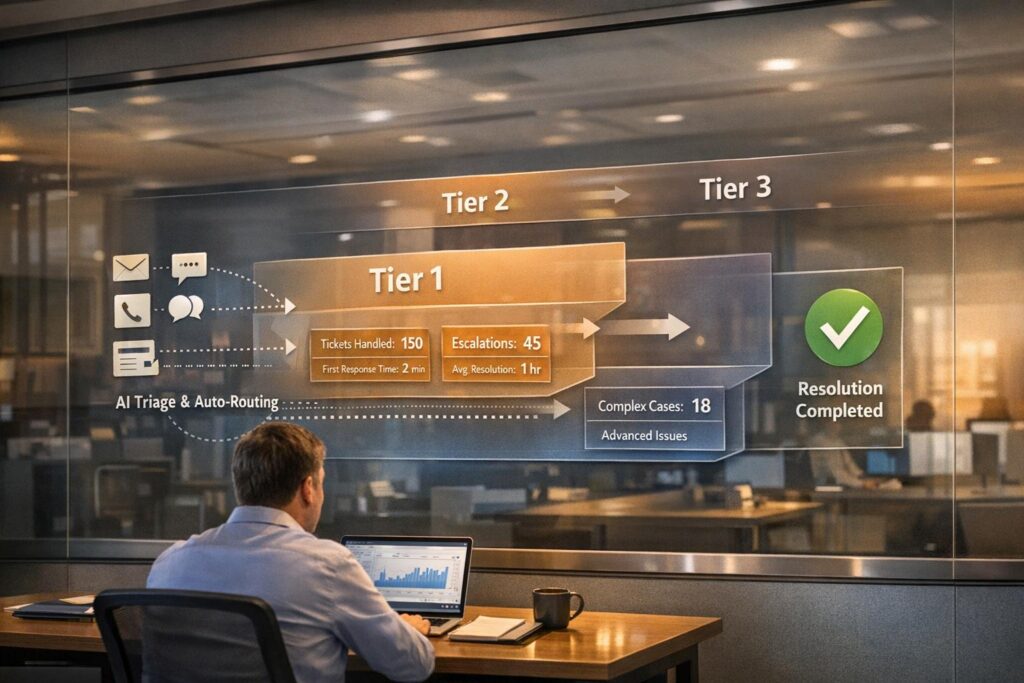
Multi-tier support workflows help streamline customer service by assigning issues to the right level of expertise. Here’s how it works:
- Tier 1: Handles simple tasks like password resets and account setup. These agents are generalists who follow scripts and resolve common issues quickly.
- Tier 2: Tackles more complex problems, such as advanced troubleshooting or system configuration. These specialists work behind the scenes to resolve issues Tier 1 cannot handle.
- Tier 3: Focuses on the most technical or unique problems, often requiring code-level fixes or deep expertise.
Key Benefits:
- Faster Resolutions: Simple problems are solved at Tier 1, reducing wait times.
- Cost Efficiency: Specialists at higher tiers focus only on complex issues, optimizing operations.
- Scalability: As your business grows, you can expand Tier 1 capacity without overloading skilled agents.
- Career Growth for Staff: Clear roles and responsibilities help employees develop skills and advance.
Quick Setup Tips:
- Automate ticket intake and triage using AI to route issues accurately.
- Define clear escalation rules and completion criteria for each tier.
- Use channel-specific workflows (e.g., email, chat, portal) to improve efficiency.
- Regularly audit workflows to ensure no ticket is overlooked or escalated unnecessarily.
A well-organized tiered system improves customer satisfaction, reduces costs, and keeps your team focused on the right tasks.
What Tier 1, Tier 2, and Tier 3 Support Teams Do
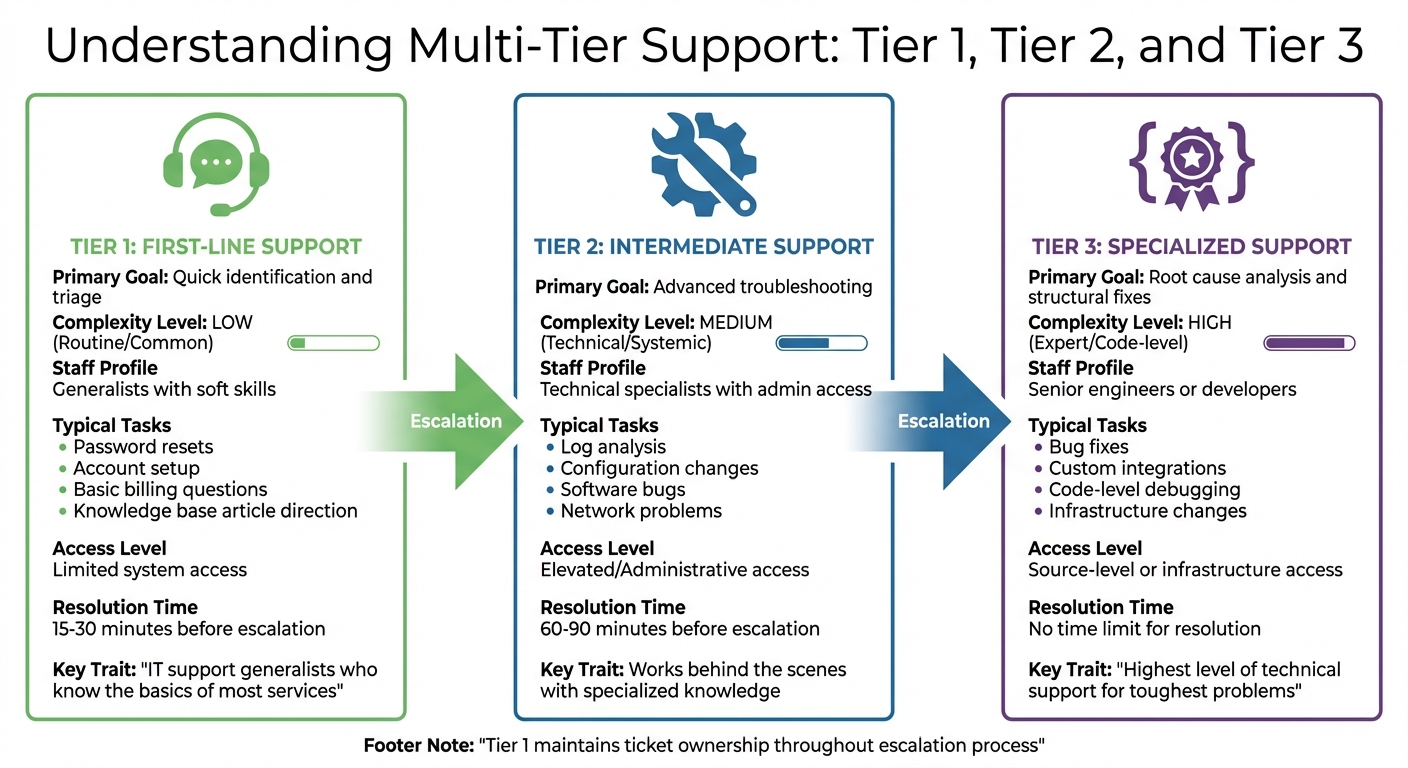
Tier 1 vs Tier 2 vs Tier 3 Support: Roles, Tasks, and Resolution Times
Each support tier in your help desk has a specific purpose, ensuring smooth operations and avoiding bottlenecks. Here’s a breakdown of what each tier handles to keep ticket management efficient.
Tier 1: First-Line Support
Tier 1 agents are your go-to for initial customer interactions. They handle a high volume of straightforward tasks like unlocking accounts, answering basic billing questions, and directing users to relevant knowledge base articles. These agents rely heavily on excellent communication skills and follow standardized processes, with only limited access to systems.
"The leading superpower associated with tier 1 technicians is that they’re IT support generalists. They know the support basics of most (if not all) services used by the organization." – InvGate
Typically, Tier 1 agents spend 15–30 minutes troubleshooting before escalating. If the issue requires advanced permissions or specialized expertise, they pass it along to Tier 2, ensuring they include detailed documentation of the steps already taken.
Tier 2: Intermediate Support
Tier 2 teams dive deeper into technical issues and backend systems. These specialists handle tasks like advanced troubleshooting, analyzing logs, and making configuration changes. Unlike Tier 1, they’re not generalists – they’re equipped with specialized knowledge about your product’s infrastructure. This allows them to tackle software bugs, network problems, and other challenges that Tier 1 can’t resolve.
Their troubleshooting process usually takes 60–90 minutes. If an issue requires code-level adjustments or an in-depth root cause analysis, they escalate it to Tier 3. While Tier 2 works behind the scenes, they collaborate with Tier 1 through internal notes, keeping Tier 1 as the primary point of contact for the customer.
Tier 3: Specialized Support
Tier 3 is made up of senior engineers, developers, and subject matter experts. These professionals handle the most complex and unique problems, often involving unprecedented issues or code-level debugging.
"Tier 3 support includes agents who have the highest level of technical support and can tackle the toughest user problems… these tickets have no time limit for resolution." – Zendesk
Beyond resolving issues, Tier 3 documents their fixes to create knowledge base articles. This process helps "shift left", enabling Tier 1 agents to handle similar problems in the future without escalation.
| Feature | Tier 1: First-Line | Tier 2: Intermediate | Tier 3: Specialized |
|---|---|---|---|
| Primary Goal | Quick identification and triage | Advanced troubleshooting | Root cause analysis and structural fixes |
| Complexity | Low (Routine/Common) | Medium (Technical/Systemic) | High (Expert/Code-level) |
| Staff Profile | Generalists with soft skills | Technical specialists with admin access | Senior engineers or developers |
| Typical Tasks | Password resets, account setup | Log analysis, configuration changes | Bug fixes, custom integrations |
| Access Level | Limited system access | Elevated/Administrative access | Source-level or infrastructure access |
How to Set Up Intake, Triage, and Routing Workflows
Automating ticket intake and creating channel-specific routing workflows can significantly reduce response times and prevent bottlenecks. Modern AI-driven platforms are designed to handle these tasks seamlessly.
Automating Intake and Triage
AI-powered triage eliminates the need for manual categorization by automatically identifying ticket intent, sentiment, and language. It then applies appropriate tags and priorities to each case. For example, tickets marked with a "Very Negative" sentiment can be escalated directly to Tier 2 for faster resolution.
Take Wolseley Canada as an example. In 2025, under the leadership of Eilis Byrnes, their Customer Service and Process Improvement Manager, the company adopted Supportbench to manage 7,000 to 8,000 support emails each month. By switching from manual sorting to automated routing based on case type and client profile, they not only addressed overdue issues but also improved their visibility into SLA compliance.
"The ticketing system assisted us in resolving instances that were long overdue and in providing the staff with a smooth platform experience." – Eilis Byrnes, Customer Service and Process Improvement Manager, Wolseley Canada
AI can also step in to collect missing details before an agent even sees the ticket. For instance, if a customer submits a return request without including an invoice number, the system can automatically prompt them to provide it. For routine issues like password resets or subscription cancellations, AI can send self-service links and close the ticket as "Solved" without involving an agent. This "Tier 0" deflection ensures straightforward requests don’t clog up the queue, allowing agents to focus on more complex problems.
Once triage is automated, adding channel-specific routing enhances the support process even further.
Channel-Specific Routing
Each support channel operates differently, so routing logic must be tailored to fit how customers interact with your team. For email, AI can tag tickets for "auto-routing", placing them into a general omnichannel queue for Tier 1 agents. If AI detects a specialized issue – like a billing question marked "Urgent" – it can bypass Tier 1 entirely and send the ticket directly to the right expert.
Portal submissions, on the other hand, benefit from field-based routing. When customers fill out web forms and select options like "Product Category" or "Issue Type", these choices can trigger routing rules that send tickets straight to the appropriate Tier 2 or Tier 3 teams. This reduces the risk of generic inquiries landing in the wrong queue.
For real-time channels like live chat, immediate assignment is critical. Features like "Focus Mode" can limit agents to handling one conversation at a time, with a 30-second timer to reassign unaccepted chats. AI-powered chatbots can also handle common questions, such as "Check order status", by providing instant answers before escalating to a human agent when needed.
Fallback mechanisms are essential to ensure no ticket is left unassigned. If Tier 1 agents are at capacity or unavailable, tickets should automatically reroute to Tier 2 teams or an overflow queue, ensuring every customer inquiry is addressed promptly.
Defining Roles, Escalation Rules, and Completion Criteria
To complement automated routing and triage workflows, it’s essential to define clear roles and escalation rules. This ensures tickets move smoothly through the system, avoiding delays, duplicated efforts, and the frustration of customers having to repeat themselves.
Completion Criteria for Each Tier
Tier 1:
Tickets in Tier 1 are marked as "complete" when resolved using knowledge base articles, standard scripts, or predefined procedures for common issues like password resets or account unlocks. If a Tier 1 agent cannot resolve the issue within 15–30 minutes using these resources, the ticket should be escalated with thorough documentation.
Tier 2:
For Tier 2, tickets are completed after advanced troubleshooting – such as reviewing system logs or making configuration changes – successfully resolves the issue. If troubleshooting takes longer than 60–90 minutes without resolution, escalation is required. Additionally, any newly resolved issue should be documented in the knowledge base to enable Tier 1 agents to handle similar cases in the future.
Tier 3:
A Tier 3 ticket is considered "done" when the root cause of the problem is identified and a permanent solution is implemented, whether through a code patch, infrastructure change, or product update. Unlike the lower tiers, Tier 3 has no strict time limits, allowing experts to focus on delivering a lasting fix.
These criteria provide a clear framework for escalation triggers and approval checkpoints at each tier.
When to Escalate and Approval Gates
Escalation should rely on specific, predefined triggers rather than subjective decisions. For instance, if a Tier 1 agent spends more than 20 minutes on an issue without making progress, the ticket should be escalated automatically. Similarly, issues requiring technical expertise or system access beyond an agent’s scope should be escalated promptly. Tickets nearing SLA deadlines should also be routed to the next tier before the SLA is breached.
For cases involving financial decisions, such as reimbursements or hardware replacements, clearly defined approval gates specify which tier has the authority to act, minimizing delays caused by seeking additional permissions. High-impact issues, such as those affecting critical systems or multiple users, should bypass standard escalation rules and go directly to Tier 3. To ensure smooth transitions, document all troubleshooting steps before escalation. This prevents the next tier from repeating diagnostics and saves valuable time.
By integrating these criteria and triggers into your automated workflows, your support operations can maintain consistency and efficiency.
| Support Tier | Completion Criteria | Typical Escalation Trigger |
|---|---|---|
| Tier 1 | Resolved via knowledge base articles or standard scripts | Exceeded standard resolution time |
| Tier 2 | Resolved through advanced diagnostics | 60–90 minutes elapsed or technical bug identified |
| Tier 3 | Root cause identified and permanent fix applied | Requires developer or vendor intervention |
sbb-itb-e60d259
Ticket Lifecycle States and Sample Workflows
In an AI-driven environment, having clear ticket lifecycles and tailored workflows for each support channel can make operations more efficient and organized.
Standard Ticket Lifecycle States
Tickets typically move through the following stages: New (received but not yet reviewed), Triaged (categorized and prioritized), In Progress (assigned and actively being worked on), Pending Customer (awaiting user input), Resolved (solution provided), and Closed (finalized after a period of inactivity).
Throughout this process, Tier 1 remains the primary owner of the ticket, even when escalations occur. As Sophie Danby from InvGate explains, "The tier 1 helpdesk retains ownership of the incident or request no matter what level it escalates to, meaning that nothing gets lost, ignored, or forgotten about". This ensures that Tier 1 agents handle communication with the user, providing updates and closure details, while Tier 2 and Tier 3 teams focus on resolving technical aspects in the background.
To streamline these transitions, automation plays a key role. For instance:
- Tickets can automatically move from New to Triaged based on predefined rules like category, priority, or customer tier.
- Tickets marked as Resolved can transition to Closed after 96 hours of inactivity, leaving room for customer follow-ups.
- For tickets in Pending Customer for over 24 hours, automated reminders can re-engage users.
- Fallback mechanisms ensure that no ticket remains unassigned or overlooked.
These lifecycle states form the backbone of workflows across all support channels.
Sample Workflows for Email, Portal, and Chat
Email workflows are straightforward and linear. Emails are automatically converted into tickets, assigned a priority, and routed to Tier 1. If unresolved as the SLA nears its breach (e.g., 75% of SLA time elapsed), the ticket escalates to Tier 2 specialists. This automation ensures SLA compliance and efficient ticket handling.
Portal workflows focus on self-service options first. Users are encouraged to consult a knowledge base or interact with an AI chatbot (Tier 0) before submitting a ticket. If further assistance is needed, the portal generates a ticket with pre-filled metadata – such as category, urgency, and account details. This skips basic triage and routes the ticket directly to the appropriate tier, reducing Tier 1 workload and expediting resolutions for more complex issues.
Chat workflows are designed for real-time interactions. AI chatbots handle routine inquiries at Tier 0, while more complicated issues are immediately escalated to live Tier 1 agents. For critical incidents identified during chat, tickets can bypass standard escalation paths and go directly to Tier 3 or specialized "war rooms". This channel is particularly effective for urgent cases, as it allows for dynamic adjustments, skipping triage when necessary.
These workflows demonstrate how channel-specific processes can adapt ticket lifecycle states to meet the unique demands of each platform, ensuring faster and more effective support.
Launch Checklist and Common Pitfalls
Implementation Checklist
Before you launch, there are a few essential steps to get everything running smoothly. Start by defining your Tier 1, Tier 2, and Tier 3 groups, assigning custom roles to each. Configure your AI to identify intent, language, and sentiment accurately. Don’t forget to set your business hours, account for holidays, and establish SLA targets to keep things on track.
Next, focus on omnichannel routing. Assign tickets based on issue type, customer tier, and agent skills. Set up VIP escalation triggers and fallback paths to ensure nothing slips through the cracks. Test with sample tickets to confirm routing works as intended, and resolve any rule conflicts that pop up. Wrap things up by creating dashboards to monitor key metrics like reassignment rates, resolution times, and SLA compliance. These tools will help you spot and address issues quickly after launch.
Once live, keep a close eye on workflows and make adjustments as needed to ensure everything continues to run efficiently.
Common Pitfalls and How to Avoid Them
When implementing multi-tier systems, two challenges often cause trouble: over-escalation and unclear ownership.
Over-escalation happens when too many tickets end up in Tier 3, overwhelming your most skilled agents. This issue is often tied to inadequate Tier 1 training or routing rules that don’t account for agent certifications. To address this, enforce workload caps, use availability filters, and invest in better training and documentation for Tier 1 and Tier 2 agents.
Unclear ownership occurs when tickets remain "Open" without a clear assignee. This usually stems from overly narrow or conflicting routing rules. To fix this, set up fallback conditions and default queues as safety nets. Make sure team leads can see the rule logic and train agents to understand how assignments work. Regularly auditing routing rules is crucial to keep them effective as your team and customer needs evolve.
Here’s a quick breakdown of common pitfalls and how to handle them:
| Pitfall | Description | Practical Solution |
|---|---|---|
| Over-escalation | Too many tickets escalate to Tier 3, creating bottlenecks. | Enforce workload caps, use availability filters, and improve Tier 1/2 training. |
| Unclear Ownership | Tickets stay "Open" without an assignee. | Establish fallback conditions, default queues, and clarify routing rules. |
| Inflexible Rules | Static routing logic struggles with new channels or higher volumes. | Use metadata, tags, and time-based triggers to create dynamic pathways. |
| Lack of Transparency | Agents don’t understand ticket assignments, leading to frustration. | Make routing logic visible to team leads and train agents on assignment criteria. |
| No Post-Launch Audit | Routing logic becomes outdated over time. | Schedule regular audits and monitor reassignment rates and SLA trends. |
Conclusion
Multi-tier support workflows are a game-changer when it comes to maximizing support efficiency and return on investment. By clearly defining the roles of Tier 1, Tier 2, and Tier 3, businesses can ensure their highly skilled technical experts focus on solving complex issues, while routine tasks are handled swiftly by frontline agents or automated systems. This structured approach allows companies to scale their support operations without needing to hire additional staff – an essential advantage for B2B organizations dealing with increasing support demands.
AI automation takes this efficiency to the next level, transforming support functions into strategic assets. With tools like automated routing and well-defined escalation rules, businesses can streamline operations even further. Adding a Tier 0 layer – powered by conversational AI and self-service resources – helps resolve common issues like password resets before they ever reach a human agent. This not only delivers the highest ROI but also enables support teams to manage growing ticket volumes without expanding headcount. As Moveworks aptly puts it, "The future of enterprise support lies in intelligent automation that enhances your team’s capabilities".
Beyond efficiency, a well-structured workflow with clear escalation triggers and completion criteria prevents tickets from getting stuck or bouncing between teams. This clarity doesn’t just improve customer experience – it also creates growth opportunities for employees, allowing agents to advance from handling routine inquiries to tackling more challenging technical problems. This kind of career progression can significantly boost employee retention.
Intelligent triage and automated routing bring even more benefits by cutting resolution times and offering valuable insights into team performance. They allow businesses to identify training needs, audit processes, and refine workflows to keep pace with evolving customer expectations. Regularly reviewing and updating routing logic ensures your support system remains effective and adaptable.
When implemented effectively, multi-tier support workflows do much more than cut costs – they lay the groundwork for scalable, high-quality support that meets the demands of modern B2B operations. This integrated approach ensures your team can deliver consistent, reliable service while keeping pace with growth.
FAQs
How can AI make tiered support workflows more efficient?
AI plays a key role in streamlining tiered support workflows by taking over repetitive tasks, optimizing ticket routing, and enabling proactive problem-solving. For instance, AI can quickly analyze ticket details – like intent, language, and sentiment – to ensure requests are routed to the right team or support tier without delay. This not only reduces manual effort but also minimizes the chances of misrouting. Routine tasks, such as password resets or account updates, can also be handled by AI, allowing support agents to dedicate their time to more challenging issues.
AI also makes escalation processes smoother by flagging tickets that show signs of complexity or customer dissatisfaction. This ensures critical issues are addressed promptly while avoiding unnecessary escalations. Additionally, AI enhances agent productivity by providing real-time suggestions, such as relevant knowledge base articles or pre-written responses, helping agents resolve issues more efficiently. By integrating AI into tiered support workflows, companies can achieve faster resolutions, fewer errors, and more cost-efficient operations.
How can I set up effective escalation rules for my help desk?
Setting up effective escalation rules is key to resolving complex or high-priority issues promptly while keeping customers happy. The first step? Clearly define when escalation is needed. This could include factors like issue complexity, urgency, SLA breaches, or even specific customer requests. Make sure these criteria are documented in a detailed escalation policy to keep your team aligned and consistent.
It’s equally important to assign clear ownership at every support tier. This avoids unnecessary escalations and ensures everyone knows their responsibilities. Define what "done" looks like at each level so agents can confidently decide when it’s time to escalate. Using automated workflows or AI tools can also simplify the process, helping to reduce errors and save time.
Lastly, don’t let your escalation rules grow stale. Regularly review and fine-tune them based on performance data. This ensures your process stays efficient and avoids unnecessary delays.
How does a multi-tier support system improve customer satisfaction and help employees grow?
A multi-tier support system is a game-changer for customer satisfaction. By assigning issues to the appropriate level of expertise – whether it’s Tier 1, Tier 2, or Tier 3 – problems are resolved faster and more effectively. Clear escalation processes ensure that straightforward issues are handled quickly, while more complex ones are sent to specialized agents who can provide precise solutions. The result? Less frustration for customers and a smoother overall experience with minimal delays.
For support teams, this structure is just as beneficial. It creates a clear pathway for skill development, with lower-tier agents honing foundational abilities and higher-tier agents tackling advanced challenges. This setup not only encourages professional growth but also boosts team efficiency by reducing unnecessary escalations. Over time, employees gain confidence and expertise, making them better equipped to handle a variety of situations. A well-organized tiered system ultimately benefits everyone involved, delivering a more seamless and rewarding support experience.






