


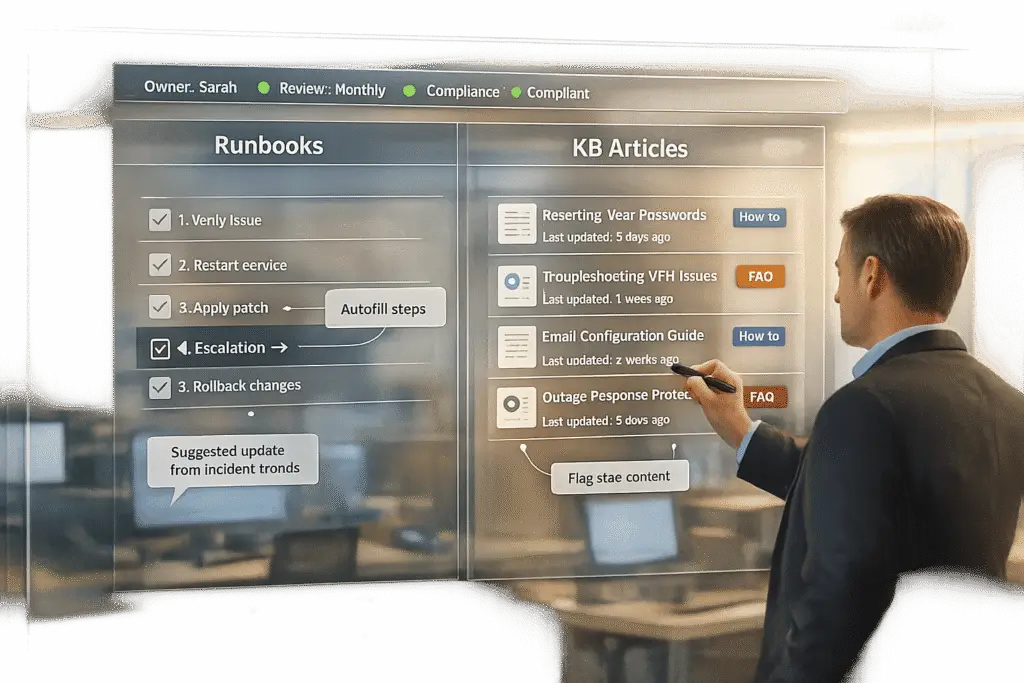
When it comes to support documentation, runbooks and KB (Knowledge Base) articles serve different purposes. Runbooks are step-by-step guides for technical tasks like restarting a server or handling incidents. They’re aimed at engineers or support staff who need precise instructions under pressure. KB articles, on the other hand, provide clear answers to common questions like “How do I reset my password?” and are designed for customers, new employees, or support agents seeking quick self-help through a customer self-service portal.
Key Differences:
- Runbooks: Action-focused, technical, used internally, updated with infrastructure changes.
- KB Articles: Information-focused, customer-facing, updated with product changes.
Quick Comparison:
| Feature | Runbooks | KB Articles |
|---|---|---|
| Audience | Engineers, technical teams | Customers, support agents |
| Purpose | Task execution, error reduction | Ticket deflection, self-help |
| Style | Step-by-step, commands, scripts | Plain language, FAQs |
| Update Trigger | Code or infrastructure changes | Product UI or customer feedback |
| Access | Internal, permission-gated | Public or internal help center |
Bottom Line: Use runbooks for technical processes requiring precision. Use KB articles for clear, accessible answers to common questions. Both tools, when used correctly, improve efficiency and reduce errors.
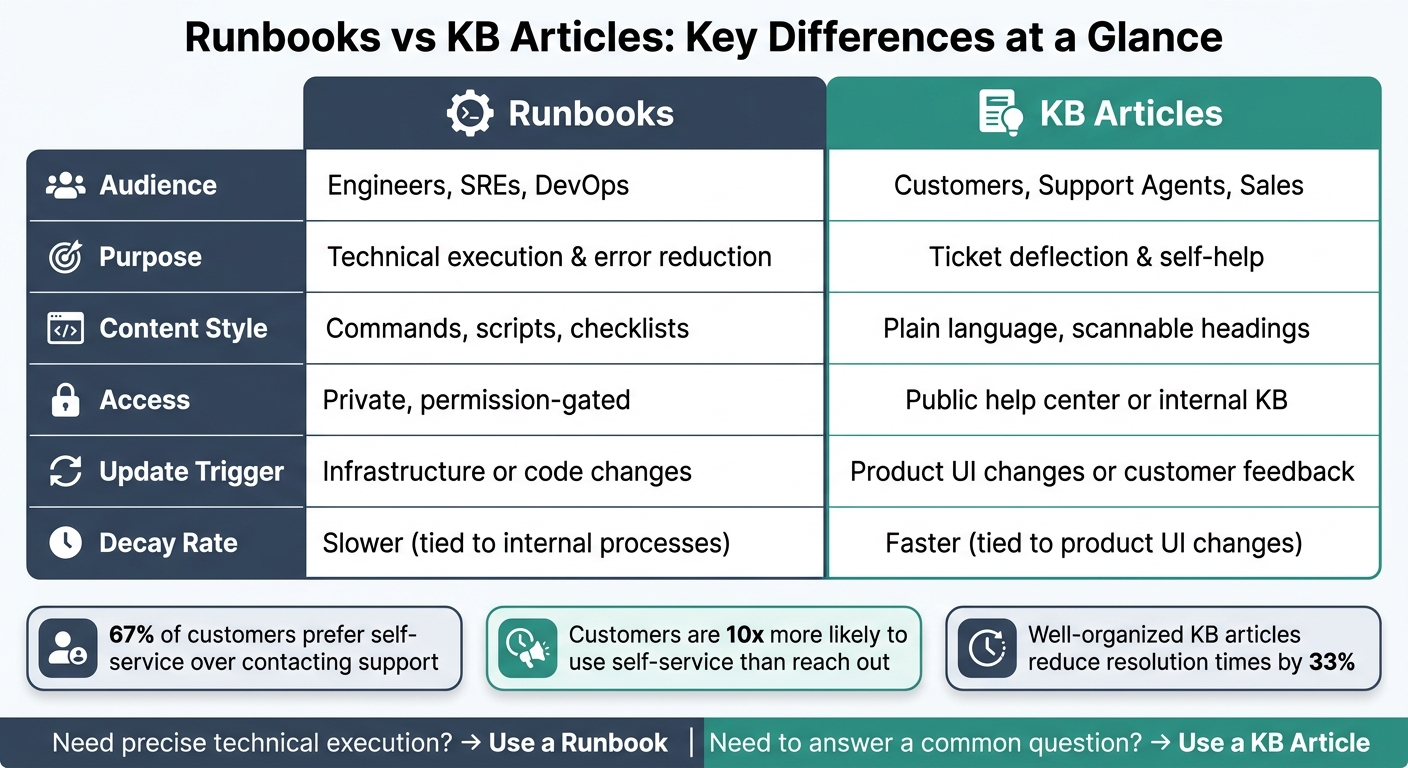
Runbooks vs KB Articles: Key Differences at a Glance
KB Articles: Purpose and Best Practices
Structure and Purpose of KB Articles
A KB article serves a single purpose: it answers one specific question or explains one specific task. When an article tries to tackle multiple topics, it becomes harder to locate, harder to follow, and more prone to inaccuracies over time.
There are four main types of KB articles: how-to guides (step-by-step instructions for completing tasks), troubleshooting articles (guides that address specific problems and their fixes), FAQs (quick answers to common questions), and conceptual articles (clear explanations of features and their purposes). Identifying the type of article you’re writing at the start helps avoid unnecessary content sprawl, which can undermine the usability of a help center.
The structure of a KB article matters. The answer should appear right at the beginning – ideally within the first two or three sentences. Retrieval-Augmented Generation (RAG)-powered help centers give more weight to the top of a document, so burying the answer reduces its effectiveness for both readers and AI systems[5]. Titles should align with how users search; for instance, "How to export contacts" is far more effective than a vague title like "Data management" when it comes to search visibility and quick comprehension.
When KB Articles Work Best
KB articles shine when they empower users to solve their problems independently. The statistics back this up: 67% of customers prefer self-service over contacting a company representative[5], and customers are 10 times more likely to use self-service options than to reach out to a support team[4]. Additionally, leveraging a knowledge base for efficient customer support can reduce resolution times by 33% for cases that still require agent involvement[4].
These articles aren’t just valuable for customers – they’re also a key resource for onboarding new support agents. A well-maintained help center provides new hires with a reliable source of information, reducing reliance on senior team members for guidance.
"A support team scales better when answers live in systems, not in the heads of three reliable people." – DocsBot AI[4]
While KB articles are excellent for delivering information, they’re not ideal for tasks that require detailed execution. When a task involves specific sequences, conditional steps, or coordination across systems, runbooks are the better tool. KB articles work best when users need information, but runbooks take over when precision and step-by-step instructions are critical.
What Good KB Governance Looks Like
The primary reason KB articles lose their value isn’t that they were never written – it’s that they were written correctly once but later became outdated.
"The biggest cause of poor customer self-service experiences isn’t lack of content – it’s content that was once correct but has since become misleading." – Kate Leggett, Vice President and Principal Analyst, Forrester Research[5]
The solution isn’t universal, frequent reviews. Instead, it’s trigger-based reviews: tag each article by feature area and review it whenever engineering updates that feature. For high-traffic or high-risk topics like billing or security, monthly reviews are recommended[4].
Another strategy to reduce the maintenance burden is to use function-first language. For example, write "Click Export" rather than "Click the blue button in the top right." This approach minimizes errors caused by changes to UI design, as 65% of software teams release updates at least once per week[2]. Button labels are far more stable than visual elements, so focusing on functionality ensures articles remain accurate longer.
sbb-itb-e60d259
Runbooks: Purpose and Role in Support Operations
What Runbooks Are and How They Work
A runbook is a step-by-step guide designed to handle a specific operational task or incident. Unlike general reference documents or wiki pages, a runbook is focused solely on actionable steps and excludes background details.
"A runbook is not a wiki page or a general knowledge document. It is a step-by-step procedure for handling a specific operational task or incident." – Nawaz Dhandala, Author [6]
What sets a runbook apart is its clarity and precision. The best runbooks are practical, self-contained, regularly tested, and up-to-date. Without these qualities, a runbook loses its value, especially in high-pressure situations where clear guidance is essential.
The structure of a runbook reflects its purpose. A well-crafted one typically includes:
- Metadata: Details like the owner, last test date, estimated duration, and risk level.
- Trigger Conditions: Clear indicators for when the runbook should – and should not – be used.
- Prerequisites: A checklist of what must be in place before starting.
- Step-by-Step Instructions: Detailed steps with expected outcomes or command outputs.
- Escalation Paths: Defined actions if something goes wrong.
With this foundation in mind, let’s explore when runbooks are most useful.
When to Use a Runbook
Runbooks are ideal for tasks where precision and consistency are critical. Unlike knowledge base (KB) articles, which provide general guidance, runbooks demand strict, sequential execution. They’re designed for situations where mistakes can have serious consequences – think server restarts, security incidents, disaster recovery, or account provisioning.
"The opposite of an effective runbook is one that says ‘investigate the issue and take appropriate action.’ That is not helpful at 2 AM." – Nawaz Dhandala, Author [6]
Runbooks are particularly useful for repetitive tasks, ensuring that processes are carried out the same way every time, regardless of who’s handling them. Modern runbooks often integrate with automation tools, enabling tasks like running scripts or triggering workflows with a single command. This integration can significantly reduce Mean Time To Resolution (MTTR) during critical incidents [3].
By standardizing these procedures, teams can ensure runbooks remain a reliable resource over time.
What Runbooks Need to Stay Effective
The biggest challenge for runbooks isn’t creating them – it’s keeping them accurate and relevant. Over time, infrastructure changes, code evolves, and if the runbook isn’t updated, it becomes unreliable. A runbook that hasn’t been tested in six months can’t be trusted [6].
To prevent this, two key practices are essential: ownership and change-triggered reviews. Every runbook should have a designated owner responsible for maintaining its accuracy. Instead of relying on arbitrary review schedules, teams can automate alerts through CI/CD pipelines. This way, any infrastructure changes automatically notify the runbook owner to update the document [6].
Version control also plays a crucial role. Storing runbooks in systems like Git provides an audit trail, simplifies rollbacks, and encourages collaboration among team members [8][9]. Additionally, periodic "game day" exercises – where teams test runbooks in a controlled environment with intentionally broken systems – ensure that the documentation remains reliable and ready for real-world use.
Runbooks vs KB Articles: Differences and Overlaps
Side-by-Side Comparison
Runbooks and KB articles may both fall under the umbrella of documentation, but they serve very different purposes. Here’s a quick breakdown of how they compare:
| Dimension | Runbook | KB Article |
|---|---|---|
| Primary Audience | Engineers, SREs, DevOps [1] | Customers, support agents, sales [4] |
| Purpose | Technical execution and error reduction [1] | Ticket deflection and knowledge scaling [4] |
| Content Style | Commands, scripts, checklists [1] | Plain language, scannable headings [4] |
| Update Trigger | Infrastructure or code changes [1] | Product UI changes or customer feedback [2] |
| Access | Private, permission-gated [1] | Public help center or internal KB [2] |
| Decay Rate | Slower (tied to internal processes) | Faster (tied to product UI changes) [2] |
One key distinction lies in how quickly the content becomes outdated. Henrik Roth, Co-Founder & CMO of HappySupport, explains:
"Help center content decays much faster than internal KB content because it is tightly coupled to the product UI – every UI change can invalidate articles, screenshots, and step-by-step guides." [2]
How to Choose Between the Two
The choice between a runbook and a KB article boils down to two factors: who needs the information and what they need to do with it.
- Use a KB article when the audience includes customers or non-technical team members, and the goal is to explain features, policies, or common errors. KB articles are ideal for deflecting tickets, answering recurring questions, or documenting stable processes.
- Use a runbook when technical operators need precise, actionable steps – especially during high-pressure situations. Tasks involving system commands, rollback procedures, or high-risk operations demand the clarity and structure of a runbook.
There’s also a middle ground: SOPs (Standard Operating Procedures). These documents can act as a bridge between KB articles and runbooks. For example, an SOP in your KB might explain the "what" and "why" of a process, while linking to a runbook for the technical "how." This approach avoids duplication and keeps documentation focused and actionable [4].
Common Mistakes to Avoid
One of the biggest pitfalls is writing a runbook like a KB article. Including too much background information, vague instructions, or unclear sequences renders the runbook useless during an incident. An engineer troubleshooting at 2 AM doesn’t need a lengthy explanation – they need exact commands, in order, with expected outputs.
On the flip side, treating a KB article like a runbook is just as problematic. Overloading KB articles with technical jargon or internal commands makes them inaccessible to customers and frontline agents, defeating their purpose.
Getting these formats wrong has real consequences. Engineers lose critical time during incidents if they’re stuck sifting through verbose content. Similarly, customers and agents might feel frustrated or helpless when faced with overly technical documentation [1]. Choosing the right format from the beginning saves time, reduces confusion, and ensures smoother operations.
Using AI to Build and Manage Runbooks and KB Articles
How AI Speeds Up Documentation Creation
AI makes building a knowledge base faster and more efficient by transforming closed cases, resolution notes, and chat logs into structured drafts for knowledge base (KB) articles and runbooks. With tools like Supportbench, this process happens seamlessly within the platform. For example, when an agent resolves a case with a clear problem-solution sequence, the AI reads the case history and generates a draft that includes a subject, summary, and relevant keywords. If the resolution involves a repeatable technical process, the draft automatically reflects that step-by-step structure. This approach mirrors how your team actually solves problems, rather than relying on hypothetical workflows. Because these drafts are built using real case data, they’re often accurate right from the start, cutting down on the time needed for editing before publication. This streamlined process ensures your documentation is both timely and reliable.
Using AI to Maintain Content Quality
Once documentation is created, keeping it accurate and up-to-date is crucial. AI tools help by identifying when content might be outdated.
"Nothing destroys knowledge base credibility faster than outdated information. When customers encounter inaccurate articles, they stop trusting the entire resource and go straight to support tickets." – Softabase Editorial Team [7]
For example, platforms integrated with GitHub can flag KB articles whenever a related code deployment changes the interface described in those articles. Similarly, for internal runbooks, drift detection tools monitor for deviations from documented steps or recurring escalations that a runbook should have resolved. These signals highlight when updates are needed. Ignoring such governance can have real consequences: a neglected knowledge base can lose over 15% of its practical value in just six months [10].
Tracking Performance with AI
Measuring how well your documentation performs is just as important as creating it. External metrics like ticket deflection, search success rates, and view-to-ticket ratios, along with internal metrics such as mean time to resolution (MTTR) and escalation rates, reveal how effective your content really is.
Supportbench leverages AI-driven analytics to connect KB article performance directly to case outcomes. For instance, if an article sees high traffic but is followed by frequent ticket submissions, it’s a sign that the content isn’t resolving customer issues effectively. For runbooks, strong performance shows up in fewer escalations and quicker resolutions for recurring problems.
One often-overlooked strategy is tracking failed searches. When users search for something and get no results, it highlights gaps in your documentation. Treating these failed queries as a content backlog transforms a passive metric into an actionable plan for improvement [2][7].
AI doesn’t just speed up the creation process – it also ensures your documentation evolves alongside your operational needs.
Conclusion: Picking the Right Tool for Your Support Team
Runbooks handle tasks; KB articles provide context. If an agent needs to restart a service or follow a step-by-step technical fix, a runbook is the go-to. On the other hand, when users need guidance on policies, features, or onboarding, KB articles are the better fit.
To make runbooks effective, apply the "2 a.m. test." This means an on-call engineer with minimal context should be able to follow the runbook flawlessly – even in the middle of the night. If instructions like "fix the database" still linger, the runbook isn’t ready. Every document should also have a clear owner to ensure it stays up-to-date and relevant [11].
Strong documentation isn’t just about clarity – it’s about leveraging the right tools. AI can simplify content creation, identify outdated information, and highlight gaps in your documentation strategy.
"A help center with 50 well-organized articles and a properly tuned search will deflect more tickets than one with 200 articles and broken search configuration." – Henrik Roth, Co-Founder, HappySupport [2]
FAQs
How do I decide whether to write a runbook or a KB article?
Choose a runbook when you need detailed, step-by-step instructions for handling specific situations like troubleshooting or responding to incidents during outages. These are your go-to guides for urgent, action-driven tasks.
On the other hand, use a KB (knowledge base) article when sharing proactive, informational content. KB articles are ideal for answering frequently asked questions, offering preventive advice, or providing standardized information for routine operations. They’re perfect for enabling self-service and supporting everyday workflows.
What should a runbook include to pass the “2 a.m. test”?
A runbook that passes the “2 a.m. test” ensures engineers can resolve incidents quickly and effectively, even in the middle of the night. To achieve this, it must provide clear, actionable steps that eliminate the need for extra digging or guesswork. In other words, it should be self-contained, easy to follow, and regularly updated.
Here are the key elements every runbook needs:
- Clear title and metadata: Make it easy to identify the runbook and understand its purpose at a glance.
- Symptoms or triggers: Include details to help engineers confirm they’re dealing with the specific issue the runbook addresses.
- Step-by-step instructions: Provide detailed, sequential steps with built-in verification points to ensure progress is on track.
- Optional escalation paths: For more complex scenarios, outline when and how to escalate the issue.
A well-thought-out runbook can make all the difference during high-pressure situations, especially when time is of the essence.
How can AI help keep runbooks and KB articles from going outdated?
AI plays a key role in keeping runbooks and knowledge base (KB) articles up to date by automating the process of monitoring and updating content. It can identify shifts in product architecture, software updates, or recurring incident patterns and alert teams about content that may need revision. By leveraging natural language processing (NLP) and machine learning, AI can review user interactions, suggest updates, or even create draft revisions. This helps ensure that information remains accurate and useful, all while reducing the need for extensive manual work.






