


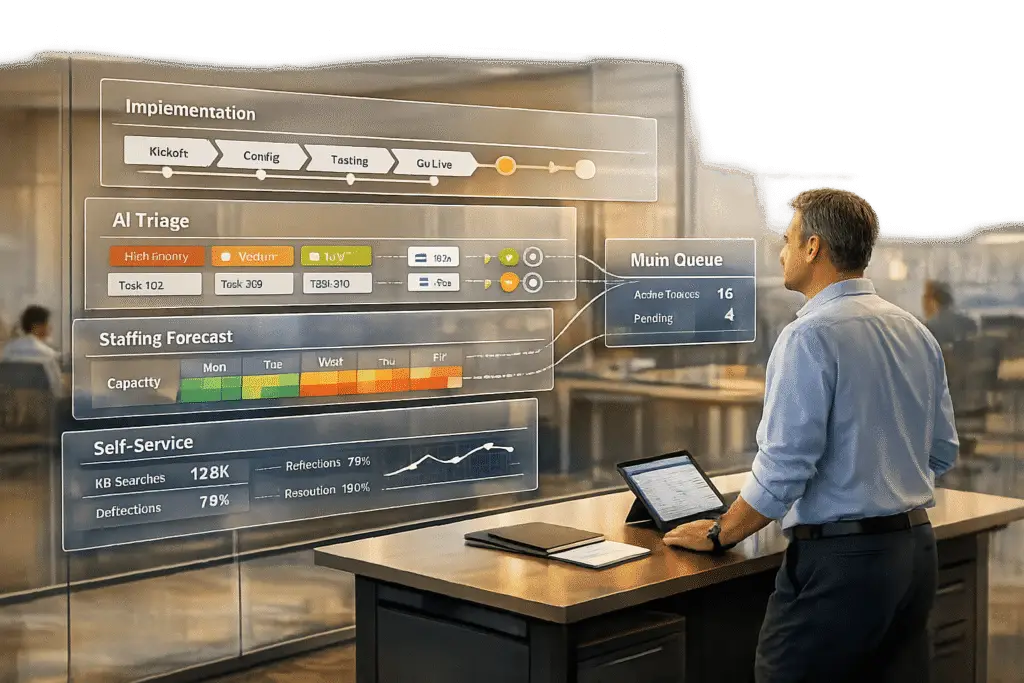
Managing implementation support without overwhelming your support queue boils down to three key strategies: separating workflows, leveraging AI, and optimizing team capacity. Here’s the breakdown:
- Separate Implementation Tasks: Use dedicated queues, set different SLAs, and assign specialized teams to handle complex onboarding tasks without disrupting regular support.
- Leverage AI for Efficiency: Automate ticket classification, routing, and repetitive tasks like status updates. AI can also assist with triage, draft responses, and provide agents with necessary context.
- Optimize with Predictive Analytics: Analyze historical ticket data to forecast workload spikes, adjust staffing, and prioritize escalations for complex cases.
- Build Self-Service Resources: Develop a robust knowledge base and contextual help to reduce ticket volume and empower users to solve common issues independently.
- Equip Agents with Tools: Use AI to surface relevant case histories, suggest responses, and identify best practices to improve efficiency and maintain quality.
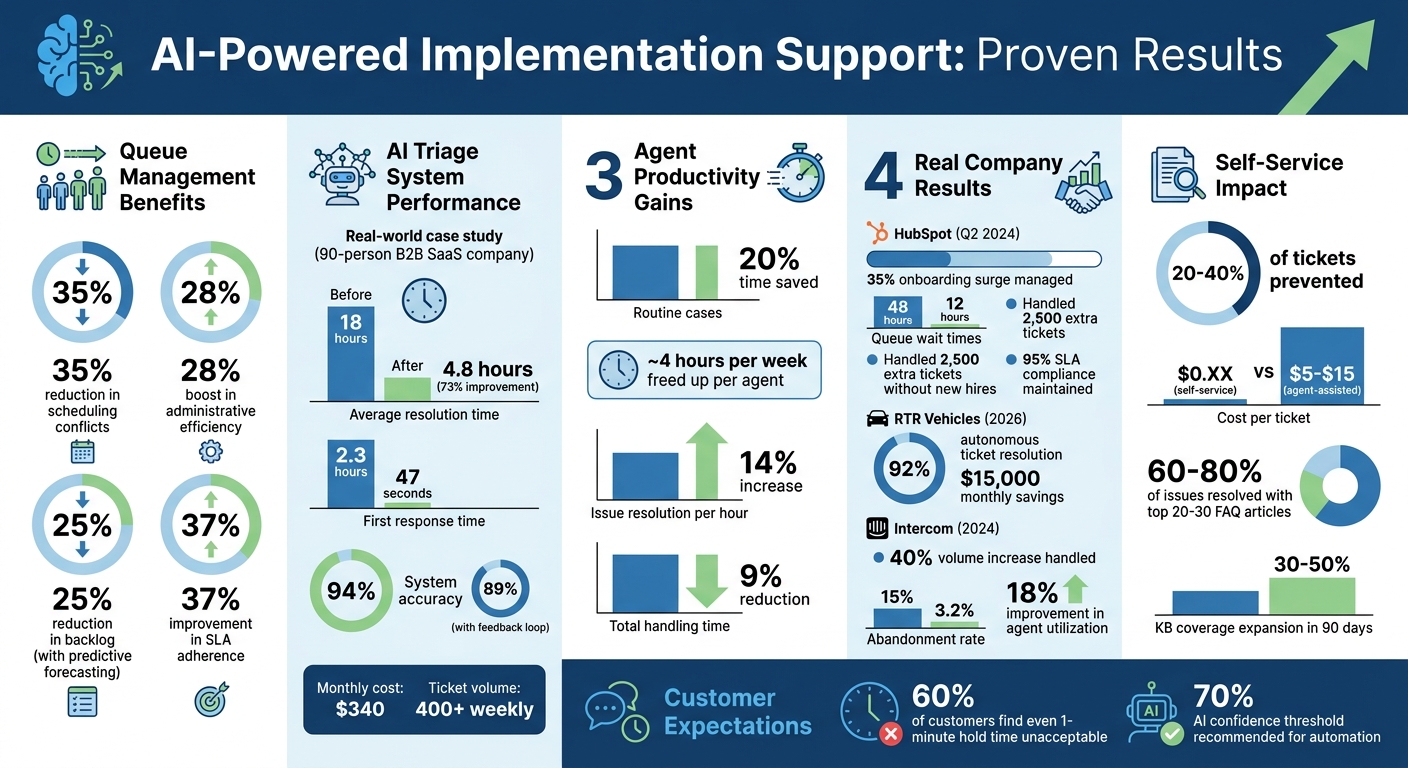
AI-Powered Implementation Support: Key Performance Metrics and Benefits
Separate Implementation from Standard Support Workflows
Keep implementation tasks separate from standard support to avoid a messy queue. When onboarding tasks – like setting up integrations – are mixed in with password resets and basic troubleshooting, both areas end up suffering. Companies that adopt advanced queue management often see up to a 35% drop in scheduling conflicts and a 28% boost in administrative efficiency [4]. This separation also lays the groundwork for using AI and predictive analytics later on.
Create Dedicated Queues for Implementation
Having dedicated queues ensures implementation tickets don’t get lost under the weight of simpler, high-volume requests. Instead of relying on a First-In, First-Out (FIFO) system where all tickets fight for the same resources, skills-based routing sends implementation tasks to agents with the right expertise. These specialists can handle account setups, integrations, and custom configurations with ease. This approach not only improves first-call resolution rates but also keeps your general support queue running smoothly.
To make this work, collect key details – like workspace IDs, user roles, and integration goals – before tickets even hit the queue. Early triage like this allows for accurate routing and avoids the back-and-forth that slows everyone down. As Apptension puts it:
"If a human agent needs three messages to get enough context, your bot will fail too unless you fix context collection first" [2].
Set Different SLAs for Implementation and Support Tickets
Implementation tasks often require more time than standard support requests. For instance, a database migration might take three days, while customers expect a password reset to be resolved almost immediately. By setting separate SLAs for these workflows, you can balance internal resources and meet customer expectations more effectively. Research shows that 60% of customers find even a one-minute hold time unacceptable [3]. However, those same customers are more patient with longer timelines for complex tasks – provided expectations are communicated clearly upfront. Tailored response and resolution goals for implementation tasks help avoid mismatched SLAs between quick fixes and in-depth projects.
Beyond just separating workflows, assigning the right expertise to each area is key to improving efficiency.
Assign Specialized Teams to Handle Onboarding
Having a dedicated implementation team prevents the "I thought someone else was handling that" confusion that can derail onboarding [5]. Without clear ownership, senior agents often get pulled into manual triage, costing mid-size companies 100–200 hours every week [6]. By assigning specific roles – like a project lead, technical integration specialist, and training coordinator – you create accountability and free up frontline agents to focus on quick-response support. This division of labor keeps the system running efficiently and ensures AI-driven support doesn’t overwhelm your primary queue.
Specialized teams also benefit from tailored training. Frontline agents need to master tools like macros and knowledge bases, while implementation specialists require in-depth knowledge of customer workflows, API configurations, and escalation paths. This separation ensures that complex setup issues are resolved quickly by the right person, rather than bouncing between agents.
sbb-itb-e60d259
Use AI for Triage, Routing, and Automation
AI can transform how businesses handle ticket intake, classification, and routing, eliminating bottlenecks caused by manual triage. Tasks like reading, categorizing, prioritizing, and routing tickets often slow down operations. A real-world example? Back in March 2026, Saksham Solanki, an AI Systems Architect, implemented an AI-driven triage system for a 90-person B2B SaaS company managing over 400 tickets weekly. The system, powered by Claude for classification and AWS Lambda for compute, delivered impressive results. Within two months, the company saw its average resolution time drop from 18 hours to just 4.8 hours – a 73% improvement. First response times also plummeted from 2.3 hours to 47 seconds. Initially, the system operated with 89% accuracy, but thanks to a feedback loop that allowed agents to refine classifications, accuracy improved to 94%. And the cost? Just $340 per month [6].
The secret to this success lies in keeping classification and routing separate. As Solanki puts it:
"The LLM handles classification. Business rules handle routing. Mixing these two responsibilities is the number one reason AI triage systems fail in production." – Saksham Solanki, AI Systems Architect [6]
Let’s dive into how AI can refine classification, manage repetitive tasks, and automate communication.
Automate Ticket Classification and Routing
AI triage systems excel at identifying key details like ticket intent, category, urgency, customer type, and sentiment. A three-layer architecture ensures efficiency:
- Unified Intake: Standardizes data from emails, chats, and web forms.
- LLM Classification: Analyzes and classifies tickets based on intent and priority.
- Deterministic Routing: Applies fixed business rules to direct tickets to the right team.
Normalizing input data can improve classification accuracy by 10–15%. Start with a streamlined taxonomy – 4–6 intent categories and 4 priority levels are ideal. For example, implementation-related tickets could fall into categories like API Integration, Data Migration, Custom Configuration, or Training Requests. If a ticket involves multiple issues, prioritize the most urgent one and tag secondary concerns.
This precise classification not only speeds up routing but also sets the stage for chatbots to handle routine queries effectively.
Deploy AI Chatbots for Repetitive Questions
Once tickets are properly classified and routed, AI chatbots can step in to handle repetitive tasks. These bots are great for addressing low-risk, routine issues such as password resets, API credential management, or directing users to relevant documentation. By surfacing knowledge base articles and suggesting responses, chatbots can assist without overwhelming support agents. Final actions can still be left to human representatives for added oversight.
Grounding chatbot outputs in approved documentation reduces the risk of errors. Additionally, proactive measures like suggesting articles as users type their questions can resolve many issues before a ticket is even created. To ensure quality, set a confidence threshold – typically around 70% – so only high-confidence responses are automated. Ambiguous queries can be flagged for human review. This approach can save service representatives up to four hours per week, freeing them to focus on more complex tasks [1]. Regularly auditing the knowledge base ensures it stays relevant and effective.
Automate Status Updates and Customer Notifications
Routine communications, such as progress updates and ETA notifications, can also be automated to keep customers informed without adding to agents’ workloads. AI copilots can pull relevant details – like reproduction steps and account context – into tools like Jira or Linear, streamlining both internal and external updates every 12–24 hours [7].
AI can also simplify technical jargon into customer-friendly updates. Using a blend of pre-defined templates and AI-generated personalization, businesses can deliver immediate and human-like responses, cutting response times to under 50 seconds. Incident detection clusters take things a step further by analyzing ticket patterns, timeframes, and volumes, enabling teams to alert customers about potential issues before they escalate.
Balance Team Capacity with Predictive Analytics
Building on earlier insights about AI triage, this section dives into predicting workload surges. Certain patterns – like end-of-quarter onboarding spikes, seasonal product launches, or post-renewal setup demands – can be anticipated with the right tools. By analyzing historical ticket data, teams can predict these peaks and adjust staffing before queues spiral out of control. The benefits are clear: Zendesk‘s 2024 Benchmark Report found that teams using predictive forecasting reduced backlog by 25% and improved SLA adherence by 37% [13]. This approach complements earlier methods like workflow separation and AI triage.
Use Historical Data to Forecast Workload
Start by gathering 6–12 months of ticket data, including ticket volumes, resolution times, and customer behavior patterns. Look for seasonal trends – B2B companies, for instance, often see ticket volumes jump by 30–50% during key onboarding periods [8]. HubSpot provides a great example: in Q2 2024, they used Zendesk Explore to predict a 35% onboarding surge. By staggering schedules across US and EU teams, they reduced queue wait times from 48 hours to just 12, managing 2,500 extra tickets without hiring more staff, all while maintaining a 95% SLA compliance rate [13]. Use analytics tools to establish a baseline forecast and add a 20% buffer to account for unexpected spikes [9][12].
Implement Staggered Schedules and Flexible Coverage
Once you’ve identified workload trends, use that data to optimize staffing. Staggered shifts – like 7–3, 11–7, and 3–11 EST – create overlapping hours that keep queues moving and reduce burnout. A "follow-the-sun" model takes this a step further: US teams hand off to EMEA at 5 PM EST, who then pass to APAC teams, ensuring round-the-clock coverage. Intercom’s support team nailed this strategy in 2024, using predictive analytics to manage implementation peaks across US, APAC, and EMEA regions. They handled a 40% volume increase during product launches, slashing abandonment rates from 15% to 3.2% while improving agent utilization by 18% [14]. Tools like When I Work can simplify scheduling, and rotating agents weekly helps prevent fatigue while keeping utilization around 80% [10].
Predict Escalations to Prioritize Complex Cases
After forecasting workload, the next step is using AI to predict escalations and focus on complex cases. AI tools can flag high-risk tickets early by analyzing factors like sentiment, complexity, and response delays. For example, machine learning models can detect negative keywords, multiple attachments, new customers (under 30 days), or response times exceeding four hours. Slack implemented this approach in 2023, using ServiceNow to identify 22% of tickets as high-risk. These were automatically routed to senior agents, reducing the mean time to resolution for complex cases by 41% – from 72 hours to 42 – and saving 1,200 senior hours per quarter [11]. Set confidence thresholds between 70–80% to ensure only genuine escalations are flagged, and refine your model weekly with new data [14].
Build Self-Service Resources for Implementation
Once you’ve optimized team capacity with predictive analytics, the next step is to tackle ticket volume at its root. A well-organized implementation knowledge base can prevent 20–40% of support tickets before they even begin. Plus, self-service is far more cost-effective, costing just pennies compared to the $5–$15 it takes to resolve an agent-assisted ticket [16]. The trick? Create resources that customers actually want to use – structured around how they think, not how your product is built.
Here are three strategies to build self-service tools that reduce tickets and empower users.
Create Complete Onboarding Documentation
Start by identifying the top 20–30 implementation questions from your ticket logs – these often make up 60–80% of the issues that can be resolved through self-service [16]. Organize your content by implementation stages: Pre-work, Configuration, Integration, Testing, and Go-Live. Tailor the materials to your audience: for example, create technical guides for developers covering API and webhook setup, while administrators get functional guides focused on user permissions and settings.
Aim to launch with at least 30–50 well-crafted articles to provide solid coverage. Use annotated screenshots and short videos for more complex steps. And remember, simplicity matters – use customer-friendly titles like "How do I cancel my subscription?" instead of jargon-heavy phrases like "Subscription Termination Protocol." Place solutions upfront in the content, avoiding long-winded introductions [16].
Add Contextual Help to the Customer Portal
Place documentation links where users are likely to need them – right next to complex features or common error triggers. Make sure your search function is user-friendly, handling typos, synonyms, and partial matches with ease [16]. Highlight frequently accessed articles prominently on the home page or at the top of category lists to save users time.
Each article should end with clear next steps, like links to related topics or a direct way to contact support [16]. Pay attention to "contact us" forms submitted after users view specific articles – this signals that the resource isn’t solving their problem and needs improvement [15].
Update Resources Based on Case History Data
Keep your knowledge base relevant by using insights from support ticket data. AI-powered ticket routing and prioritization can help analyze recurring keywords – like "webhooks", "billing", or "integrations" – to identify areas where documentation is needed or could be improved [2]. Follow the "Rule of Three": if agents have to manually type out the same answer three times in a week, it’s time to create a resource for it [15].
Make it easy for agents to flag potential knowledge base updates by tagging tickets with labels like kb-candidate or create-article directly in your helpdesk system [15]. AI can also pinpoint gaps by tracking when chatbots or search tools fail to find relevant answers, triggering a "Ticket-to-Article" workflow [15]. Monitor metrics like "wrong answer reports" and helpfulness ratings to identify outdated or ineffective content that needs refreshing [2][15].
Give Agents AI-Driven Context and Tools
With automated triage and predictive analytics in place, the next step is equipping agents with AI-driven tools to tackle complex cases. While self-service options handle straightforward queries, more intricate issues require agents to have immediate access to relevant case details. Without this, they waste time digging through scattered data while customers grow impatient. AI copilots address this challenge by pulling together fragmented information into a single, cohesive view. This solves what one developer tools founder described as the "context assembly problem", where vital details are trapped in various channels and systems [1]. For smaller teams with fewer than 50 agents, this approach is especially effective: AI speeds up human workflows without directly interacting with customers [1].
Surface Relevant Case Histories with AI
When agents face a tricky implementation ticket, AI steps in to provide a consolidated view of similar resolved cases, relevant knowledge base articles, and customer account details – all in one place. Tools like the "Customer Card" bring together CRM data, previous tickets, and account history, cutting routine case resolution times by 20% and saving agents around four hours per week [1].
A great example is Northflank, a developer infrastructure company. In 2025, they reduced their support response times by half by using tools that automatically surfaced relevant case histories [1]. The magic lies in Contextual Retrieval, which uses LLM-generated summaries of document snippets to boost retrieval accuracy by up to 67%. This ensures agents see the most relevant information first [17].
To make the most of these tools, classify tickets into three tiers: Tier 1 (simple/self-service), Tier 2 (multi-step/needs context assembly), and Tier 3 (novel/high-risk). This helps identify which cases benefit most from AI-assisted context surfacing [1].
Provide Suggested Responses and Next Steps
AI can also draft responses based on ticket history and internal documentation, drastically reducing resolution times. For instance, in early 2026, RTR Vehicles implemented an AI system that autonomously resolved 92% of incoming tickets, slashing their backlog and saving $15,000 monthly [22]. For the remaining 8% of more complex cases, agents fine-tune AI-suggested responses to ensure accuracy and maintain the right tone.
This human-in-the-loop workflow is essential for technical support, where precision is non-negotiable. Agents should always have the ability to accept, modify, or discard AI-generated suggestions [19][20]. Modern AI tools go beyond drafting text – they can also initiate "AI Actions", such as updating CRM records, retrieving order details, or making system calls to resolve issues faster [20]. For example, if a customer inquires about their API key, the AI can fetch it and draft a response in seconds.
"CoSupport AI takes care of nearly 70 percent of our support tickets and turns tasks that once took hours into minutes." – Yaro Burgman, Project Manager, ProjectFitter [18]
To ensure high-quality suggestions, train your AI on solved tickets, internal documentation, and public knowledge bases [18][19]. Use intent and sentiment analysis to identify urgent issues and craft empathetic responses [21]. For example, if a customer expresses frustration, the AI can flag the ticket for immediate human attention and draft a calming, solution-focused reply.
AI also learns from every interaction, helping your team refine its overall approach over time.
Identify and Share Best Practices with AI
AI doesn’t just help individual agents – it can analyze patterns from successful resolutions and share insights that improve the entire team’s workflow. When a complex issue is resolved without existing documentation, AI can draft a new knowledge base (KB) article for review [25]. This process can expand KB coverage by 30% to 50% in just 90 days without increasing editorial workload [25].
"One of the quiet wins of deploying an AI helpdesk agent is that it maintains the KB as a side effect of doing its job." – Aiinak Team [25]
Establish a feedback loop where every correction an agent makes to an AI-generated response or ticket classification feeds back into the system’s training data [6]. For example, a 90-person B2B SaaS company implemented a custom AI triage system using Claude in early 2026. Over 60 days, the system’s accuracy improved from 89% at launch to 94% as it learned from agent feedback [6]. Without this feedback loop, you risk leaving 5–10 percentage points of accuracy on the table [6]. These improvements not only enhance AI performance but also strengthen your overall support workflows.
Spend just 10 minutes daily reviewing resolved AI-assisted conversations to ensure quality and tone. When you notice recurring successes or failures, update your workflow guidelines immediately [23]. Use confidence thresholds (e.g., 70%) to flag tickets for human review. These "edge cases" often reveal gaps in documentation or training data [6]. Additionally, AI can analyze historical support messages, categorizing them into 5–7 groups to pinpoint which implementation steps cause the most friction. This insight helps prioritize process improvements [24].
Conclusion
Delivering effective implementation support hinges on smart workflows, leveraging AI for triage and automation, and equipping agents with tools that provide context – all while avoiding overwhelming queues.
The strategies outlined above aim to refine support operations. By using dedicated queues, tailored SLAs, and specialized teams, implementation tickets are kept separate from day-to-day tasks. AI steps in to manage classification, routing, and repetitive jobs like sending status updates. Predictive analytics further enhance operations by identifying workload spikes and potential escalations. Meanwhile, self-service resources – developed from historical cases and regularly updated – help deflect routine questions, letting agents focus on more intricate onboarding issues.
"The LLM handles classification. Business rules handle routing. Mixing these two responsibilities is the number one reason AI triage systems fail in production." – Saksham Solanki, AI Systems Architect [6]
The numbers speak for themselves: service reps using AI save about 20% of their time on routine cases, freeing up nearly four hours weekly for more complex tasks. Additionally, AI deployment boosts issue resolution by 14% per hour and cuts total handling time by 9% [1]. For example, RTR Vehicles achieved a 92% autonomous resolution rate, saving $15,000 monthly [22].
These techniques don’t aim to replace human expertise – they enhance it. Standardizing intake processes, setting confidence thresholds, and testing AI in shadow mode before full rollouts help build trust and ensure a seamless onboarding experience. This approach not only boosts efficiency but also empowers support teams to adapt and thrive in today’s AI-driven B2B landscape.
FAQs
How do I split implementation from regular support without confusing customers?
To make it easier for customers to distinguish between implementation support and regular support, it’s important to clearly outline and communicate the role of each. Implementation support is all about helping customers get started – covering onboarding and setup. On the other hand, regular support focuses on resolving day-to-day issues that arise after the initial setup is complete.
A practical way to separate these services is by using different ticket categories or dedicated support channels for each type. This way, customers know exactly where to go based on their needs. It’s also a good idea to proactively explain the scope of each support type to manage expectations upfront.
Additionally, having well-structured workflows and clear escalation processes ensures that customers always know who to turn to at any stage of their journey. This approach minimizes confusion and helps streamline the overall support experience.
What should I automate first to safely reduce implementation ticket volume?
Automating the triage process is the safest way to cut down on implementation ticket volume. By doing this, tickets are swiftly categorized and routed, significantly lowering the manual workload. With AI-assisted triage, you can evaluate urgency, analyze sentiment, and assign tickets more effectively. This not only speeds up response times but also helps prevent agents from becoming overwhelmed. Plus, it lays the groundwork for more advanced automation, such as integrating knowledge bases and handling escalations more smoothly.
How can I forecast onboarding spikes and staff for them with a small team?
To anticipate onboarding spikes with a lean team, start by digging into historical data. Look for recurring patterns – like seasonal trends or the timing of product launches – that could signal upcoming surges. This kind of analysis helps you predict busy periods and allocate resources ahead of time.
Leverage automation and self-service tools to take care of routine tasks. This reduces the need for manual intervention and frees up your team for more complex issues. Additionally, use workload forecasting techniques. Consider factors like ticket volume, average handling time (AHT), and your team’s capacity. By doing so, you can ensure your team is appropriately staffed during peak times without feeling stretched too thin.






