


Reducing support costs without lowering service quality is possible by combining automation and smarter resource allocation. Here’s how:
- Leverage AI for Routine Tasks: AI chatbots can manage repetitive queries like password resets and order tracking for under $1 per interaction, compared to $6–$12 for phone support.
- Automate Basic Support (Level 0): Automation can handle up to 80% of routine issues, freeing agents to focus on complex problems.
- Use Predictive Analytics: Identify and resolve issues before they escalate, cutting ticket volume and improving customer satisfaction.
- Modernize Systems: Replace outdated platforms that increase costs and frustrate agents with AI-powered tools that streamline workflows.
- Track ROI and KPIs: Measure success with metrics like cost per contact, containment rate, and customer satisfaction to ensure financial and operational gains.
Example: Unity Technologies saved $1.3M by deflecting 8,000 tickets through AI-driven workflows, while maintaining service quality. By adopting similar strategies, businesses can cut costs by up to 50% without sacrificing customer experience.
Proving AI’s ROI: How SAP Concur Transformed Customer Support & Reduced Costs
sbb-itb-e60d259
Why Cost Cuts Usually Hurt Service Quality
Many organizations still view customer support as nothing more than a cost center. This outdated perspective often results in hasty decisions, like cutting staff to meet short-term budget goals. But these moves can backfire. Overloaded agents struggle to keep up during ticket surges, leading to longer wait times and lower morale. Considering that 50% of consumers switch brands after just one poor service experience, such cost-cutting measures often end up costing more than they save.
High turnover rates in the support industry only add to the problem. With an average annual turnover of 35–40%, reducing training budgets or overburdening employees creates a vicious cycle. Burned-out agents leave, and the costs of rehiring and retraining quickly outweigh any short-term savings. Meanwhile, 65% of customers now expect better service than they did three to five years ago. For understaffed teams, meeting these rising expectations becomes an uphill battle.
Even so-called cost-saving measures like self-service tools can have the opposite effect. Poorly designed systems frustrate customers, increasing call volumes by as much as 66%. Instead of reducing workload, these tools can generate even more pressure on support teams. Combine this with outdated legacy systems, and the result is higher operational costs and diminished service quality.
How Legacy Systems Drive Up Costs
Old helpdesk platforms are a hidden drain on resources. They force agents to juggle multiple windows just to complete simple tasks, which increases Average Handle Time (AHT) and overall expenses. For example, phone support – already the most expensive channel – costs between $6.00 and $12.00 per interaction because agents can only handle one call at a time. By comparison, email costs $3.00 to $5.00 per interaction, and live chat ranges from $4.00 to $6.00. When agents are bogged down by inefficient systems, these costs add up fast.
Legacy platforms also create knowledge silos. Disconnected tools for email, phone, and chat mean agents often lack the full context of a customer’s issue. This forces customers to repeat themselves, causing frustration and wasting time. On top of that, outdated or inconsistent knowledge bases make it harder for agents to provide accurate answers, leading to longer resolution times and lower first-contact resolution rates.
Manual processes further drain resources. Take Peek, an online booking platform, as an example. Their team used to spend 15 hours a week manually managing workforce tasks like scheduling, tracking performance, and handling overtime. By switching to automated tools, they cut that time down to just one hour per day and significantly reduced overtime costs, according to Support Team Supervisor Erik Jansen.
How AI Reduces Costs While Improving Service
Modern AI-powered platforms offer a better way to balance cost efficiency and service quality. AI chatbots, for instance, can handle routine tasks like password resets, order tracking, and policy inquiries for less than $1.00 per interaction. This is a fraction of the cost of traditional support channels, and these bots are available 24/7 without breaks or overtime.
The real game-changer is Level 0 (L0) support automation. By managing basic troubleshooting and FAQs before a ticket even reaches a human agent, AI allows teams to focus on more complex issues that require empathy and critical thinking. This not only cuts costs but also improves resolution times and customer satisfaction. AI can reduce ticket volumes by 35% and lower average handle time by 40%.
A great example comes from Barking & Dagenham London Borough Council. Between 2023 and 2024, they used AI to handle 10,000 routine inquiries – about 6% of their total calls. This saved the council $60,000 in just six months and increased customer satisfaction by 67%. Ian Hunt, Director of Customer Services at Liberty London, highlighted the benefits of AI integration:
"I see AI enhancing that personal service because now our customers will be interacting with a human who’s being put in front of them at the right time with the right information."
AI doesn’t just deflect tickets; it delivers better results. Liberty London’s AI implementation led to a 9% boost in CSAT scores and a 73% reduction in first reply times, saving $21,461 on self-service costs alone. This shows how technology, when used effectively, can empower teams and elevate the customer experience.
Automating Repetitive Support Work with AI
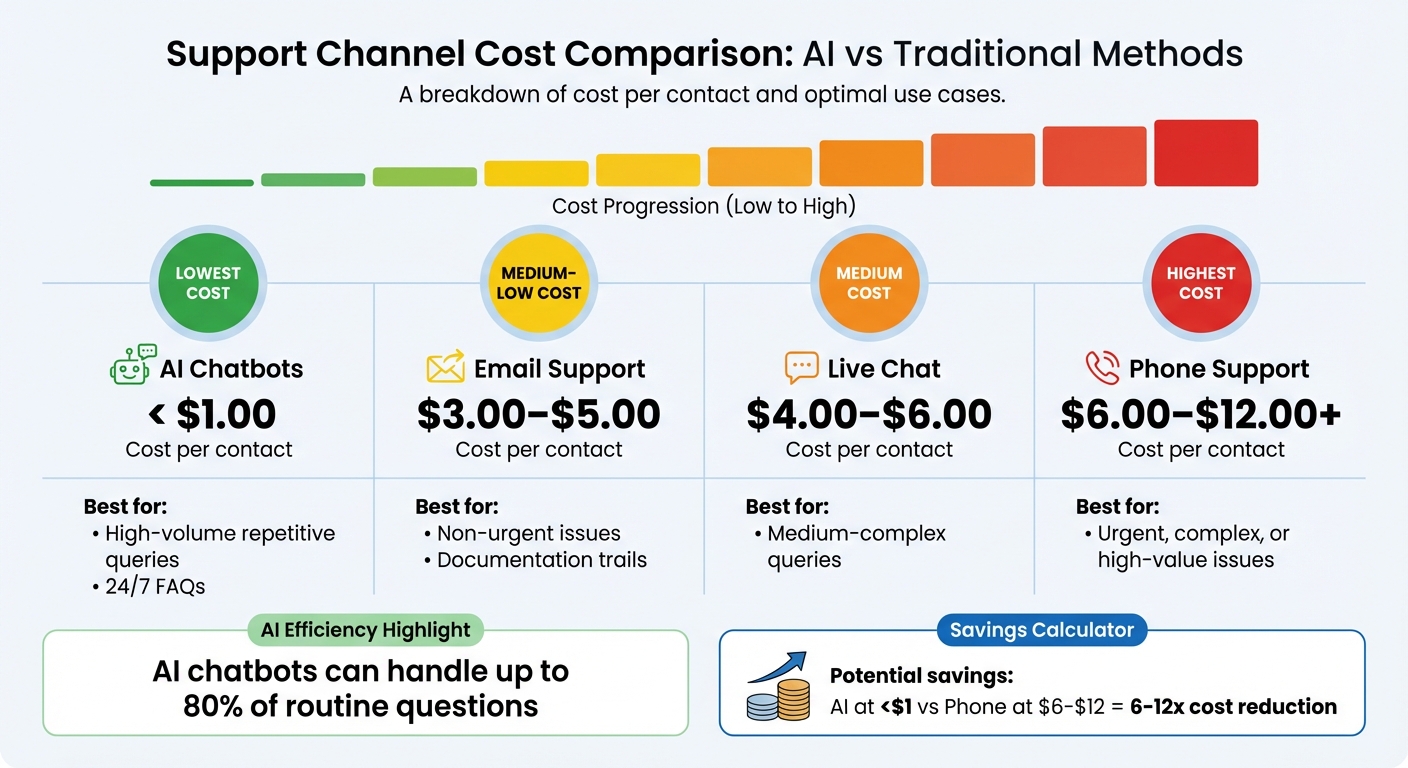
Customer Support Channel Costs: AI vs Traditional Methods Comparison
AI has already shown its ability to cut costs through process improvements. Now, let’s dive into how automating repetitive tasks can take support efficiency to the next level.
Tasks like password resets, tracking orders, or explaining policies often eat up a lot of agent time – time that could be better spent solving more complex problems. This is where AI steps in. By handling Level 0 (L0) support – those high-volume, low-complexity tasks – AI lightens the load for support teams. This shift allows agents to focus on tasks that require empathy, critical thinking, or creativity.
The numbers speak for themselves. AI chatbots cost less than $1.00 per interaction, compared to $6.00–$12.00 for phone support and $3.00–$5.00 for email. But it’s not just about cost – it’s about accuracy. Today’s AI uses Retrieval-Augmented Generation (RAG) to pull precise answers from verified knowledge bases, ensuring responses are both correct and consistent with the brand’s voice. And when things get tricky or a customer shows signs of frustration, the AI seamlessly escalates the issue to a human agent.
Using AI Chatbots for Common Questions
AI chatbots can handle up to 80% of routine questions. From “Where’s my order?” to “How do I reset my password?”, these bots work around the clock, delivering faster responses while keeping costs low.
To make this work, start by identifying tasks that are perfect for automation – those high-volume, low-risk scenarios that don’t need human judgment. Before rolling out an AI solution, take the time to clean up your knowledge base. Review your top 50 to 100 support articles, removing outdated or conflicting information. Remember, messy data leads to messy outcomes.
A great way to introduce AI is with an internal-first rollout. Use the AI as a support tool for your team before making it customer-facing. This lets agents test its accuracy, flag any gaps, and build trust in the system. Set confidence thresholds, so the AI knows when to pass a query to a human. Track metrics like AI Resolution % (aim for 70% or higher) and Overnight First Response Time (target under 30 seconds) to measure its success.
Take the example of Title, a styling app that launched its AI support agent, "Evly", in January 2026. Evly automated 64% of public replies, allowing the company to reduce its support team from 24 agents to just 8. This change slashed total support costs by 54%, all while maintaining high customer satisfaction and quality control scores. Valentyna, VP of Customer Support at EverHelp, summed it up well:
"Smart customer support automation transforms how teams handle repetitive work, giving agents room to focus on what machines can’t replicate: empathy, nuanced judgment, and creative problem-solving."
But AI doesn’t stop at customer-facing tasks – it also helps agents work smarter.
Automating Agent Tasks with AI
AI isn’t just about deflecting tickets; it’s about making agents more efficient. AI Agent Copilots work alongside human agents, summarizing long conversations, drafting responses, and suggesting relevant knowledge base articles in real-time. This reduces the back-and-forth and saves time searching for answers.
Intelligent triage is another game-changer. AI can classify and prioritize tickets based on intent, sentiment, and language. Instead of agents manually sorting through queues, the system routes tickets to the right specialist in seconds. This eliminates bias and the “cherry-picking” that sometimes happens with manual triage. By automating this process, companies can cut the time spent sorting tickets by 95%, reducing 2 to 3 hours of work per 100 tickets to just a few minutes.
AI can also handle tasks like transcribing calls, summarizing cases, and updating CRM records automatically. On average, professionals using generative AI save over 2 hours per day. Companies report a 37% decrease in first response times after implementing AI solutions.
| Support Channel | Average Cost per Contact | Best For |
|---|---|---|
| AI Chatbots | < $1.00 | High-volume repetitive queries, 24/7 FAQs |
| Email Support | $3.00–$5.00 | Non-urgent issues, documentation trails |
| Live Chat | $4.00–$6.00 | Medium-complex queries |
| Phone Support | $6.00–$12.00+ | Urgent, complex, or high-value issues |
This shift allows agents to focus on tasks that add more value. As Kirsty Pinner, Head of Product at SentiSum, put it:
"With AI these team members can work on tickets instead or work on more scalable things like developing new help center content."
Reducing Support Volume Through Predictive Support
While automation helps manage incoming tickets, predictive support takes things a step further by addressing issues before they even surface. This not only reduces ticket volume but also enhances customer satisfaction.
Predictive support uses data analytics, machine learning, and AI to foresee and resolve potential problems before they escalate. For example, instead of waiting for customers to report failed payments or shipping delays, the system identifies and resolves these issues proactively. This shift from reactive to proactive support doesn’t just cut down on tickets – it builds trust. In fact, 90% of consumers value proactive support efforts.
The financial benefits are clear. Cutting follow-up interactions by 2,000 out of every 10,000 tickets can save a business $60,000 per month. This proactive approach lays the groundwork for exploring predictive analytics techniques in greater depth.
Using Predictive Analytics to Prevent Issues
Predictive analytics processes customer data to detect patterns – like an increase in login failures after a software update – and alerts teams before minor issues turn into major problems. For instance, Visa managed to save $40 billion in fraud over a year by analyzing 500 attributes per transaction. This kind of foresight fits perfectly within AI-driven support systems, helping address issues before they drain resources.
Advanced tools like sentiment analysis and intent detection monitor real-time language cues, frustration levels, and repeated contact attempts to identify at-risk interactions. This means teams can step in before dissatisfaction grows.
Start by focusing on high-impact scenarios. Common triggers include failed payments, delivery delays, or declining product performance. While Visa’s example highlights large-scale applications, the same principles apply to smaller operations. Identify recurring patterns, set actionable thresholds, and address issues early.
Platforms like Supportbench take this a step further with features like AI Predictive CSAT and AI Predictive CES, which integrate directly into case management. These tools can estimate customer satisfaction – even without survey responses – helping teams identify and resolve potential problems before they escalate. By connecting AI to CRM systems, order management platforms, and knowledge bases, businesses can ensure predictions are both precise and actionable.
Getting started doesn’t require complex machine learning models. Begin with rule-based algorithms to predict a few specific behaviors, then scale as more data becomes available. To maintain accuracy, set confidence thresholds that trigger human review when predictions fall below a certain reliability level.
Reaching Out to Customers Before Problems Escalate
Predictive analytics isn’t just about identifying issues – it’s about acting on them early to prevent escalation.
This proactive approach can transform support by addressing triggers like shipping delays or billing errors before they affect customers. Not only does this reduce ticket volume, but it also strengthens customer loyalty. Companies that excel in personalization report 1.5 times higher loyalty rates than their competitors.
Take UPS’s ORION system as an example: it saved millions in operating costs by optimizing delivery routes. In the support world, the same principle applies – anticipate issues, act early, and avoid unnecessary escalations.
A German energy provider recently demonstrated this in a pilot project. Over 10 weeks, they developed a custom GenAI tool to automatically review supplier invoices against contract terms. The system flagged overcharges and uncovered potential savings worth tens of millions of dollars. Similar tools in customer support can identify billing errors or discrepancies before they lead to tickets.
To implement early intervention effectively, backend systems must be integrated so AI can take action – not just provide answers. For instance, if a payment fails, the system can retry the transaction, notify the customer, and update records automatically. This shifts support from being reactive to proactive and self-correcting, where AI resolves issues before customers even notice. By catching problems early, businesses can significantly lower ticket volume and reduce support costs.
Starting small is key. Conduct a content audit to ensure help articles and resources are accurate and up to date, as this will provide a solid foundation for AI systems. Focus on high-volume, low-complexity use cases to gain quick wins and build momentum. As Marcus Wittig from BCG explains:
"Agentic AI systems can perform real-time decision making, orchestrate end-to-end journeys, and evolve their approach over time, thanks to their advanced ability to observe, plan, and act."
Measuring Cost Savings and ROI
After understanding the AI in customer support, the next step is proving its value through measurable results. While deploying AI-driven support can streamline processes, demonstrating its financial impact requires a solid measurement framework. A study from MIT highlights that 95% of AI investments fail to yield measurable returns, often because of poor measurement practices rather than a lack of value. The lesson? Establish a framework for measurement before implementation, not after.
Start by creating a baseline. Track current KPIs – like average handle time, cost per contact, ticket volume, and error rates – over an 8–12 week period before introducing AI. This benchmark provides a foundation for comparison. Companies that use structured measurement frameworks report 40-60% higher returns compared to those relying on gut instincts.
But ROI isn’t just about cutting costs. As Nooshin Alibhai, Founder and CEO of Supportbench, puts it:
"For organizations where support quality and accuracy are paramount, simply automating agents away isn’t the goal… The true ROI encompasses empowerment and intelligence".
This means evaluating metrics like productivity gains, operational efficiency, self-service success, and customer retention – not just deflection rates. These KPIs give a more complete picture of AI’s impact.
Total Cost of Ownership and Financial Metrics
To calculate ROI, include the Total Cost of Ownership (TCO). This covers upfront costs – like licensing, implementation, infrastructure, and training – along with ongoing expenses such as subscription fees, API charges, maintenance, and AI tuning. Financial metrics like Net Present Value (NPV), Internal Rate of Return (IRR), and Payback Period can help assess the speed and value of your investment recovery.
How to Calculate Cost Savings
1. Productivity Savings
Use this formula:
(Average Time Saved per Interaction in Minutes) × (Number of Interactions) / 60 × (Average Fully Loaded Agent Cost per Hour).
For instance, if AI reduces handle time by 5 minutes per interaction across 10,000 monthly tickets, and your agents cost $30 per hour, that’s $25,000 in monthly savings.
2. Deflection Value
Multiply the number of inquiries handled by AI by the average cost of a human-handled interaction (typically $6–$20+). For example, if AI resolves 5,000 tickets at an average cost of $10 each, the monthly savings total $50,000.
Klarna provides a real-world example. In early 2024, their AI assistant managed 2.3 million conversations in its first month – handling two-thirds of all chats. This reduced resolution time from 11 minutes to under 2 minutes, producing a projected $40 million profit improvement for the year.
3. Retention Impact
Use this formula:
(Number of Customers) × (Estimated Churn Rate Reduction) × (Average Customer Lifetime Value).
Even a 5% increase in retention rates can boost profits by 25% to 95%. For example, since launching their AI assistant "nibby" in 2021, NIB Health Insurance has handled over 4 million queries with a 60% automation rate, resulting in $22 million in operational savings and a 15% reduction in phone call volume.
AI Success Benchmarks
Target benchmarks for AI-driven support include a 60-80% containment rate for Tier 1 issues and a 30-50% reduction in cost per contact. AI can also reduce Average Handle Time (AHT) by 20-40% compared to pre-AI levels. One e-commerce retailer achieved a 62% reduction in cost per contact and a 78% containment rate for Tier 1 inquiries within six months, leading to a 285% ROI over three years with a 7-month payback period.
However, realizing these savings depends on how you use the reclaimed agent hours. Will they be redirected to higher-value tasks, like generating additional proposals or speeding up service cycles? Without a plan, the savings remain theoretical.
Which KPIs to Track
To measure AI’s impact effectively, track these key metrics:
- Operational Efficiency Metrics: Containment Rate (percentage of issues resolved without human intervention), Average Handle Time (AHT), and First Contact Resolution (FCR). These indicate whether AI is genuinely reducing workloads or just redistributing them.
- Cost-Specific KPIs: Cost per Contact, Support Cost as a Percentage of Revenue, and reductions in overtime or staffing expenses.
- Customer Experience Metrics: Customer Satisfaction (CSAT), Net Promoter Score (NPS), Customer Effort Score (CES), and sentiment analysis. AI-only CSAT scores should stay within 5-10% of human agent scores to ensure quality.
For example, Liberty London used AI tools for intent classification and sentiment analysis, achieving a 9% increase in CSAT scores, a 73% reduction in first reply time, and $21,461 in self-service savings within a year.
Also, monitor AI-specific metrics like Recontact Rate (users returning with the same issue after an AI interaction) and Escalation Accuracy (how well AI identifies when to involve a human). A chat marked as "resolved" but leading to a second contact isn’t a true win – it’s a delayed cost.
Platforms like Supportbench can assist with tools like AI Predictive CSAT and AI Predictive CES, which estimate customer satisfaction without relying on surveys. This helps teams address potential issues proactively.
Dashboards and Real-World Examples
Use dashboards for ongoing tracking. The average ticket response time across industries is about 3 hours and 14 minutes, with a median of 1 hour and 56 minutes. Keep an eye on how AI affects these numbers. For instance, Lovevery, a subscription-based toy retailer, used AI to resolve 86% of tickets in a single touch, boosting agent productivity by 10-15%.
Finally, link support quality to long-term revenue by tracking Churn Rate and Customer Lifetime Value (CLV). Accurate measurement not only validates cost-saving efforts but also informs where to reinvest for better support outcomes. As Tom Eggemeier, CEO of Zendesk, says:
"100 percent of customer interactions will soon involve AI tools. AI will be able to resolve 80 percent of those interactions independent of any human intervention".
The real challenge isn’t whether AI will reshape customer support – it’s ensuring you’re measuring its impact effectively.
Conclusion
Cutting costs without compromising quality has become the cornerstone of modern B2B customer support. The secret lies in moving away from outdated processes and embracing AI-native platforms. These platforms automate repetitive tasks, anticipate customer needs, and allow support agents to dedicate their time to more complex challenges. By implementing strategies like automating Level 0 support, using predictive analytics, and tracking KPIs effectively, businesses can reduce costs by up to 50% while improving customer satisfaction.
Real-world examples highlight how AI-driven automation brings measurable cost savings and strong ROI. These systems handle routine inquiries with ease, ensuring that more intricate issues are quickly routed to the right experts.
A well-rounded support strategy doesn’t just cut costs – it also scales efficiently, prevents issues from escalating, and turns customer support into a key driver of retention. These efficiencies pave the way for a larger transformation in how support teams operate.
For organizations still relying on outdated systems, modernization is no longer optional. Tools like Supportbench’s AI-native platform – featuring AI Predictive CSAT, automated ticket triage, dynamic SLAs, and omnichannel integration – enable teams to deliver exceptional service while doing more with fewer resources.
FAQs
How can AI chatbots reduce support costs while keeping customers happy?
AI chatbots are a game-changer for reducing support costs while keeping customers happy. These bots handle routine, repetitive questions quickly and efficiently, offering round-the-clock responses. This means customers get faster answers and the convenience of self-service, cutting down on wait times and enhancing their overall experience.
When a more complicated issue comes up, chatbots can smoothly transfer customers to the right human agent. This ensures they get the personal touch exactly when it’s needed. By combining automation with human expertise, businesses can run their support operations more efficiently, scaling up without driving up costs or sacrificing service quality.
What metrics should you track to measure the impact of AI in customer support?
To understand how AI is transforming customer support, it’s important to focus on metrics that highlight both efficiency and customer experience. Start with operational efficiency metrics like ticket volume reduction, average handle time, and first contact resolution. These indicators show how AI streamlines workflows and reduces the burden on your team.
Next, consider customer satisfaction metrics such as CSAT (Customer Satisfaction Score) and NPS (Net Promoter Score). These scores reveal how AI impacts the overall experience for your customers, providing insight into its role in maintaining or improving satisfaction.
You should also keep an eye on agent productivity metrics, including agent utilization rates and escalation rates. These help measure how AI tools assist your team by reducing escalations and enabling agents to focus on more complex issues.
Lastly, track cost-related metrics like cost per ticket and total support costs. These figures highlight the financial advantages of incorporating AI into your support operations. When viewed together, these metrics paint a detailed picture of how AI enhances both service quality and operational efficiency while keeping costs in check.
How can predictive analytics help reduce customer support ticket volume?
Predictive analytics offers a powerful way to cut down on customer support ticket volume by spotting potential issues before they become bigger problems. By examining historical data and understanding customer behavior patterns, businesses can tackle common concerns ahead of time, eliminating the need for customers to seek assistance.
This method doesn’t just lower the number of support tickets – it also streamlines processes, enhances customer satisfaction, and trims operational expenses. Many companies using predictive analytics report noticeable improvements in efficiency while continuing to deliver excellent service.






