


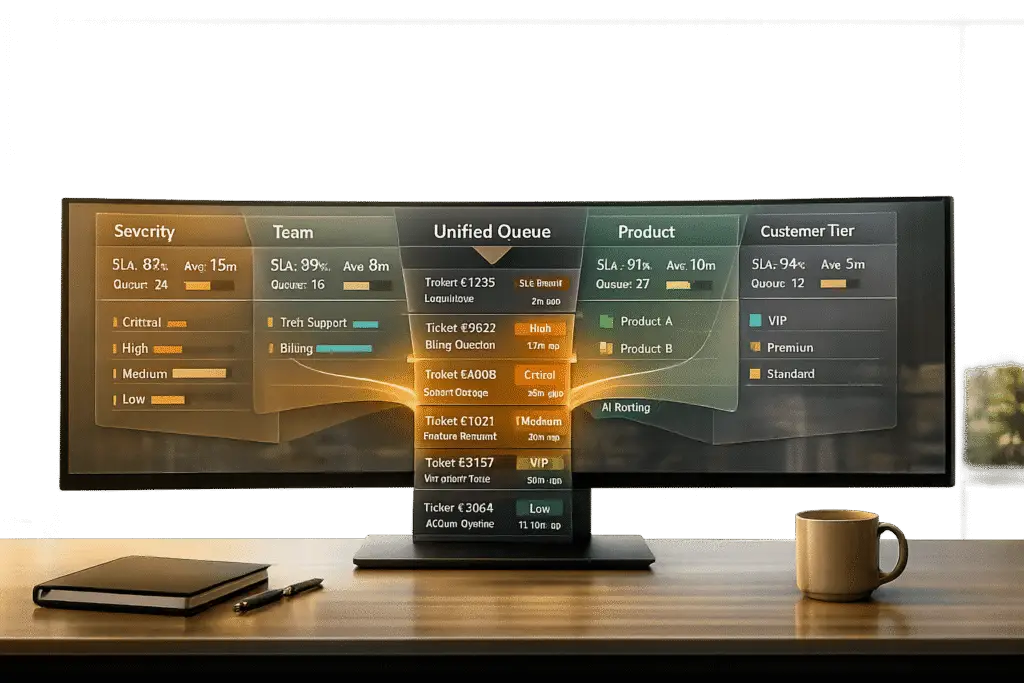
How should you structure your support queue? The way you organize tickets can directly impact your team’s efficiency and customer satisfaction. Businesses typically choose one of four models:
- Severity-based queues: Prioritize issues based on urgency and impact (e.g., major outages get handled first).
- Team-based queues: Route tickets to specialized teams (e.g., billing vs. technical support).
- Product-based queues: Assign tickets based on the product or service in question.
- Customer tier-based queues: Focus on high-value accounts first, ensuring VIPs get priority.
Each method has pros and cons. For example, severity-based queues are great for addressing critical issues but can delay lower-priority tickets. Team-based queues improve first-contact resolution but require significant setup. Product-based queues ensure expertise but demand constant updates to match product changes. Customer tier-based queues protect revenue but may leave lower-tier users waiting.
Quick Tip: Many companies use a hybrid approach, combining these models with AI-driven ticket routing to reduce bottlenecks. Whether you’re handling 50 tickets a day or 500, the right queue design depends on your team’s size, ticket complexity, and business goals.
1. Severity-Based Queue Design
Severity-based queues prioritize tickets based on business impact rather than the order they arrive. Using severity matrices, issues are classified by their impact and urgency, typically ranging from P1 (critical) to P4 (low) [5][6]. For instance, a P1 issue might demand acknowledgment within 15 minutes and continuous effort until resolved, while P3 tickets often have a 24-hour response target [5]. This system forms the foundation for more advanced routing methods, such as those tailored by team, product, or customer tier.
Implementation Complexity
Building a severity-based system requires a well-defined prioritization matrix and structured intake processes. One challenge is preventing agents from "cherry-picking" easier tickets over critical ones [5]. AI tools can assist by scanning ticket keywords like "down", "outage", or "urgent" to estimate severity, but human triage leads are essential to verify and avoid misclassification [5][4]. Structured contact forms with dropdown menus for Product Area and Issue Type help users self-categorize, enhancing AI automation [5]. These measures directly influence how quickly and efficiently tickets are resolved.
Impact on Resolution Speed
Manual triage can slow things down, but integrating AI-powered ticket routing and prioritization significantly reduces wait times – by as much as 30% on average [9]. This approach aligns with modern AI-driven support operations, improving prioritization while scaling seamlessly. The results are clear: automated systems can handle a tenfold increase in ticket volume (e.g., from 50 to 500 tickets daily) without compromising service quality [5].
Scalability
Ad-hoc triage methods may work for small volumes, like 50 tickets a day, but they tend to fail when volumes hit 500 [5]. Severity-based systems eliminate manual delays, making scaling much smoother. By avoiding the "everything is urgent" mindset, they highlight real risks instead of drowning them in noise [10]. AI models using reinforcement learning ensure consistent performance under pressure, delivering throughput rates 20–35% higher than traditional systems [9].
Customer Satisfaction
Severity-based design boosts satisfaction for customers facing urgent issues, but it comes with a trade-off: lower-priority customers may experience longer wait times as critical cases take precedence [4]. However, consistent prioritization builds trust over time, even if some customers wait longer for less critical resolutions [10]. The biggest risk lies in misclassification – if a high-value customer with a critical problem is overlooked in favor of less important tickets, trust can erode. AI systems help maintain fairness, ensuring that genuinely urgent issues are not overshadowed by louder but less impactful ones.
sbb-itb-e60d259
2. Team-Based Queue Design
Team-based queues direct customer tickets to the right departments based on the nature of the issue. For example, billing inquiries go to the finance team, while technical problems like API issues are handled by specialists. Nicole Robinson from ComputerTalk highlights the benefits of this approach:
"Skills-based routing leads to faster, more accurate resolutions by dividing customers into specialized queues, thus reducing wait times" [4].
Implementation Complexity
To get started, define 8–15 distinct, high-level intent categories that don’t overlap. Without AI, manually sorting tickets can create delays and increase stress for agents. Traditional keyword-based routing often struggles with vague or unclear messages. AI intent detection steps in to address these challenges by analyzing the context of tickets, not just keywords. A good starting point is to use AI in "assist mode", where it recommends the appropriate team, and human agents confirm the choice. This approach gathers valuable training data while minimizing routing mistakes. Begin by automating straightforward tasks like password resets, then gradually tackle more complex issues as the AI’s accuracy improves [3].
This method sets the stage for quicker resolutions and a smoother workflow.
Impact on Resolution Speed
Routing tickets to the right team from the start eliminates unnecessary internal transfers. This ensures the first agent handling the ticket has the expertise to resolve it, cutting down on resolution times [4][1]. It also improves First Call Resolution (FCR) rates by reducing repeat contacts and customer frustration. With research showing that 60% of customers find even a one-minute hold time too long [4], breaking a large queue into smaller, specialized ones can significantly shorten wait times. AI tools further enhance efficiency by generating ticket summaries and suggesting next steps, allowing agents to quickly understand the context and act without delays [3].
As resolution speeds improve, the system must be designed to handle growing demand.
Scalability
Team-based queue systems are inherently scalable when built on modular designs that support parallel processing [1]. Cloud-based platforms make it easy to scale up during demand surges, while configurable routing rules allow for adjustments as team structures change. Supervisors can use real-time monitoring dashboards to spot queue spikes and reallocate workloads as needed [4]. Advanced algorithms can also distribute tasks dynamically, taking into account agent availability and task complexity. This ensures the system can handle higher ticket volumes without a proportional increase in staff.
Customer Satisfaction
Customers benefit when their issues are quickly directed to the right specialist [1][4]. However, satisfaction depends heavily on accurate routing. Misrouted tickets can frustrate both customers and agents. AI-driven workflows improve accuracy by using feedback loops, where agents can correct misroutes with a single click. This ongoing feedback helps refine the AI model over time [3]. For sensitive matters like security or legal concerns, combining AI with manual review ensures careful handling. Regularly tracking metrics such as routing accuracy, reassignment rates, and SLA breach rates is crucial to maintain high system performance and customer satisfaction.
3. Product-Based Queue Design
Product-based queues sort incoming tickets based on the specific product or service involved. For example, a billing question about Product A is routed to its billing specialist, while a technical issue with Product B’s API goes directly to an expert in that area. This setup allows agents to focus on their specific product expertise, improving response accuracy and resolution speed [7].
Implementation Complexity
Setting up product-based queues can be tricky. You’ll need a detailed skills matrix that matches agents to products, and this matrix has to evolve as your product portfolio grows [7]. One of the biggest challenges is pinpointing the right product context before routing the ticket [4]. AI tools like natural language processing and intelligent IVR systems can help by identifying the product mentioned in the customer’s query [4]. To make routing consistent, start by standardizing ticket data – fields like product category, subscription level, and communication channel should be uniform [10]. Automated tagging workflows can also speed things up by instantly categorizing tickets, removing the need for manual sorting [10]. Once this system is in place, it sets the stage for quicker and more accurate resolutions.
Impact on Resolution Speed
Routing tickets directly to product specialists eliminates unnecessary internal transfers, which boosts First Call Resolution (FCR) rates. This is crucial because 60% of customers say even a one-minute hold feels too long [4]. When agents stick to their product expertise, they solve problems faster and with greater confidence [10]. Becky Roemen, a Customer Experience Transformation Strategist, highlights the importance of collaboration between support and product teams:
"By building a cadence of open communication [between support and product design], you are mitigating surprises or issues that will roll downhill to customer support" [2].
Additionally, when AI chatbots escalate cases to human agents, they can transfer the entire conversation history. This ensures the product specialist picks up right where the chatbot left off, avoiding the need for customers to repeat themselves [4].
Scalability
Product-based queue systems are highly flexible when it comes to scaling. Cloud-based platforms allow you to adjust both the number of queues and the agents assigned to them independently, based on the demand for specific products [11]. These systems use modular structures that support parallel processing, enabling efficient handling of different product lines [1]. To scale effectively, focus on monitoring queue latency – how long tickets wait before being addressed – rather than just server performance metrics like CPU usage [12]. For products requiring more complex support, creating dedicated queues prevents these tasks from slowing down simpler ones [12]. Cross-training agents on multiple products can also help address sudden spikes in ticket volume without creating bottlenecks [4]. Regularly reviewing performance metrics – weekly for quick checks, monthly for routing adjustments – ensures the system keeps up with your growing product portfolio [10].
Customer Satisfaction
When customers interact with agents who specialize in the product they’re asking about, they feel more confident in the solutions provided [7]. This not only minimizes frustration but also builds trust. However, accurate routing is critical – misrouted tickets waste time and irritate customers. To refine prioritization within each product queue, consider factors beyond just the product name, like subscription level, customer value, or even AI-driven sentiment [10]. Automating simple tasks, such as status updates or basic configurations, through IVR systems can also free up human agents to focus on complex issues requiring deeper product knowledge [4]. By combining these strategies with AI-driven insights, you can deliver support that’s both efficient and tailored to the customer’s needs.
4. Customer Tier-Based Queue Design
Customer tier-based queues prioritize tickets based on the value and importance of each account. This method ensures that support efforts align with revenue impact. For instance, a billing issue from a high-value enterprise client is addressed immediately, while a feature request from a free-tier user takes lower priority. By doing so, businesses can protect both revenue and customer retention, ensuring high-impact issues aren’t lost in a first-come, first-served queue [10]. Let’s dive into how to implement, scale, and measure the success of this approach.
Implementation Complexity
To set up a tier-based system, start by standardizing intake fields like subscription plans, recurring revenue, and account tiers. These fields feed into an automated scoring model. A weighted system – such as customer value (20%), impact (35%), and urgency (25%) – can help prioritize tickets automatically [10]. The key challenge lies in avoiding manual priority assignments, which can slow down intake and eat into time better spent resolving issues [8]. Experts highlight that manual prioritization often delays resolution [8]. Similar to AI-assisted triage in severity-based queues, automated scoring ensures support efforts align with business goals. For example, AI can identify a customer’s stage – whether they’re a trial user or at risk of churning – and assign priority levels accordingly, eliminating the need for manual intervention [8][10].
Impact on Resolution Speed
Tier-based routing significantly improves resolution times by enforcing strict service-level agreements (SLAs). High-value accounts might receive responses within 10 minutes, while free-tier users experience longer response times [10]. Layer 8 Labs underscores this point:
"Strong priority logic ensures teams spend time on the most business-critical work instead of reacting to whichever ticket is loudest" [8].
AI-driven ticket scoring, which factors in customer value and sentiment, helps teams focus on what matters most to the business, rather than being distracted by the most vocal or visible issues [10].
Scalability
To manage increasing ticket volumes, automate scoring and routing with AI. This allows the system to detect operational signals like failed payments, security-related keywords (e.g., "leak" or "breach"), or urgency indicators for trial accounts [10]. Regularly refine scoring weights and routing rules – monthly resets on the first Monday of the month work well – to account for product updates and shifting customer priorities [10]. Tracking metrics like weekly priority override rates against SLA performance ensures the system adapts without requiring constant manual adjustments [8]. This approach keeps the process efficient as the business grows.
Customer Satisfaction
Tier-based routing ensures high-value customers receive timely and consistent attention, safeguarding SLAs and enhancing satisfaction [10]. Incorporating factors like sentiment and SLA risk (often weighted at 10% each) ensures no customer feels ignored. Typewise emphasizes:
"Consistency beats heroics. A clear, daily-applied prioritization rubric keeps customers satisfied and loyal" [10].
Advantages and Disadvantages
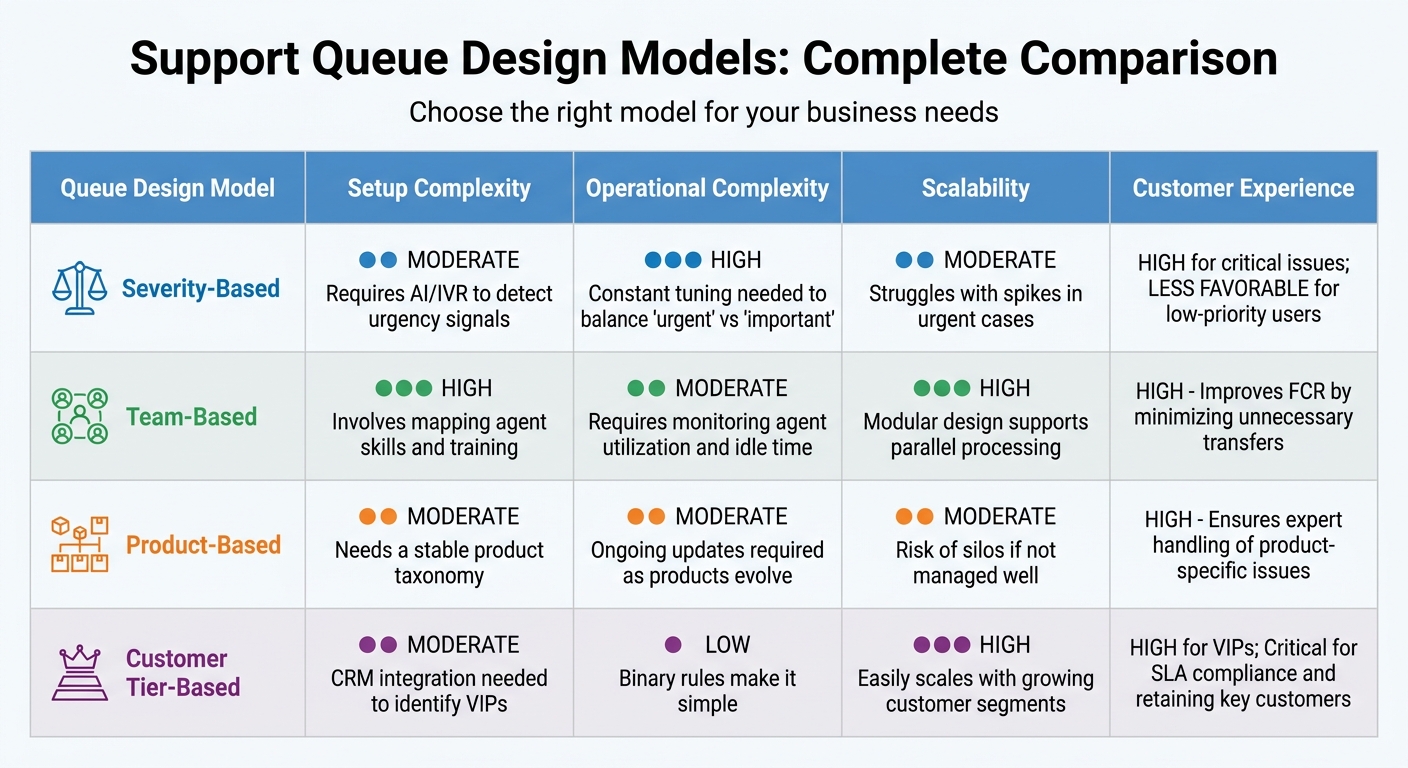
Support Queue Design Comparison: Severity vs Team vs Product vs Customer Tier
Every queue design comes with its own set of trade-offs, balancing setup effort, operational demands, and scalability. For instance, severity-based queues are excellent at addressing critical issues like security breaches or outages immediately. However, this can leave lower-priority tickets waiting much longer for resolution [4][3].
Team-based routing shines when it comes to improving first contact resolution (FCR) rates by reducing unnecessary ticket transfers [4][1]. That said, this method requires significant upfront investment and ongoing monitoring to ensure specialized teams aren’t left idle [1]. Nicole Robinson from ComputerTalk emphasizes the importance of effective queue management:
"The less effective your queue management strategy is, the more the customer experience suffers. You could even risk losing opportunities for sales and drive consumers away" [4].
Product-based queues are ideal for handling product-specific issues, as they ensure customers are connected with experts familiar with the relevant product. However, this approach demands a well-maintained taxonomy that evolves alongside the products themselves. Starting with 8–15 broad categories helps avoid the inefficiencies that arise from over-segmentation [3]. Meanwhile, customer tier-based routing offers a straightforward model with simple, binary rules. It’s particularly effective for protecting high-value revenue streams and meeting SLA commitments, though lower-tier customers may face longer wait times [4][3].
Here’s a quick breakdown of how these designs compare across key criteria:
| Queue Design | Setup | Operational Complexity | Scalability | Customer Experience |
|---|---|---|---|---|
| Severity-Based | Moderate; requires AI/IVR to detect urgency signals [4] | High; constant tuning needed to balance "urgent" vs "important" [3] | Moderate; struggles with spikes in "urgent" cases [4] | High for critical issues; less favorable for low-priority users [4] |
| Team-Based | High; involves mapping agent skills and training [4] | Moderate; requires monitoring agent utilization and idle time [1] | High; modular design supports parallel processing [1] | High; improves FCR by minimizing unnecessary transfers [4] |
| Product-Based | Moderate; needs a stable product taxonomy [3] | Moderate; ongoing updates required as products evolve [3] | Moderate; risk of silos if not managed well [3] | High; ensures expert handling of product-specific issues [3] |
| Customer Tier | Moderate; CRM integration needed to identify VIPs [4] | Low; binary rules make it simple [3] | High; easily scales with growing customer segments [1] | High for VIPs; critical for SLA compliance and retaining key customers [4][3] |
For many businesses, hybrid strategies that blend these approaches offer the best of both worlds. By incorporating AI, hybrid designs can improve prioritization and scalability while maintaining cost-efficient operations. This allows companies to tailor their queue strategies to align with their unique operational needs and growth goals.
Conclusion
Queue design should reflect your team’s size, the complexity of support needs, and the capabilities of AI tools. For high-stakes scenarios – like outages or security breaches – severity-based queues ensure immediate action. Larger organizations with specialized teams often thrive with team-based routing, as it reduces unnecessary transfers and allows experts to handle complex B2B issues. Multi-product companies, on the other hand, benefit from product-based queues, which leverage deep knowledge of specific features. Meanwhile, customer tier-based routing is a smart choice for safeguarding revenue and meeting SLA commitments for key accounts. A tailored approach is essential for integrating AI and monitoring processes effectively.
For small to mid-sized B2B teams, a hybrid model that combines AI-driven efficiency with human oversight can make a big impact. As freeservicedesk.com puts it:
"If you can explain your triage logic to a new hire in under five minutes, you’re probably ready to automate it. If not, simplify it first."
This highlights the importance of simplicity and clarity in automation. AI can handle initial classification – using tools like AI-driven sentiment analysis and CRM data enrichment – while predefined business rules manage ticket assignments. Human agents step in for about 20% of cases where AI confidence is low, ensuring quality and accuracy.
To fine-tune this system, start with AI in shadow mode to compare its classifications against actual decisions. Real-time dashboards can help you monitor wait times and agent workloads, allowing for quick adjustments. Simplify your taxonomy by eliminating categories that don’t directly impact SLAs or routing decisions.
As discussed earlier, queue designs must evolve with your business. A setup that works for a small, 5-person team won’t scale to a 50-agent operation. Likewise, strategies for single-product companies may not suit those with diverse product portfolios. Building a modular system that supports parallel workflows is key to staying flexible as your team grows. Incorporating AI ensures your support operations remain adaptable and efficient over time.
FAQs
Which queue design should we start with for our support team size?
For smaller support teams, starting with a tiered queue system – like Tier 1, Tier 2, and Tier 3 – can be a smart move. This setup categorizes issues by their complexity and matches them with agents who have the right expertise. The result? Better use of resources and faster resolution times.
As your team expands, you can take it a step further by incorporating AI-driven routing. This technology assigns tickets to the most suitable agents based on their skills and current workload, helping your team handle growth while keeping customers happy.
How do we prevent misclassification when using AI for routing and prioritization?
To avoid misclassification, it’s essential to set clear ownership boundaries and establish explicit intent criteria within your AI models. Implement safeguards like rule-based systems and human oversight to ensure decisions stay aligned with the intended outcomes. Regularly review your AI’s performance and actively use feedback from your team to fine-tune its accuracy. Instead of depending entirely on advanced natural language understanding (NLU) models, prioritize refining these boundaries to minimize errors more effectively.
What’s the simplest hybrid queue model that still improves SLAs and cost?
The most straightforward hybrid queue model blends prioritization by severity or customer tier with AI-powered routing. In this system, tickets are sorted to ensure high-priority issues are handled quickly. Meanwhile, AI steps in to assign these tickets to the most qualified team or agent, factoring in details like intent and complexity. This method helps maintain SLA compliance, lowers operational costs, and simplifies workflows by combining tiered prioritization with smart automation.






