
For B2B support teams with multiple products, using a single queue often leads to inefficiency – delays, frustrated customers, and overworked agents. A better solution is to organize support queues by product line. This approach uses skills-based routing to connect customer issues with the right specialists, cutting down on transfers and resolution times. However, while specialization improves efficiency, it risks creating isolated knowledge silos.
To balance speed and collaboration, follow these steps:
- Segment queues by product complexity: Use a matrix to identify which products need dedicated queues.
- Implement skills-based routing: Match tickets with agents based on their expertise.
- Encourage cross-team knowledge sharing: Build workflows and tools to share solutions across product lines.
- Leverage AI tools: Automate ticket assignment and create knowledge base articles from recurring issues.
- Track performance metrics: Monitor key indicators like resolution times, transfer rates, and ticket volumes to refine the system.
This framework ensures faster resolutions while keeping teams aligned and informed. Start small by piloting one or two product lines, then scale based on results.
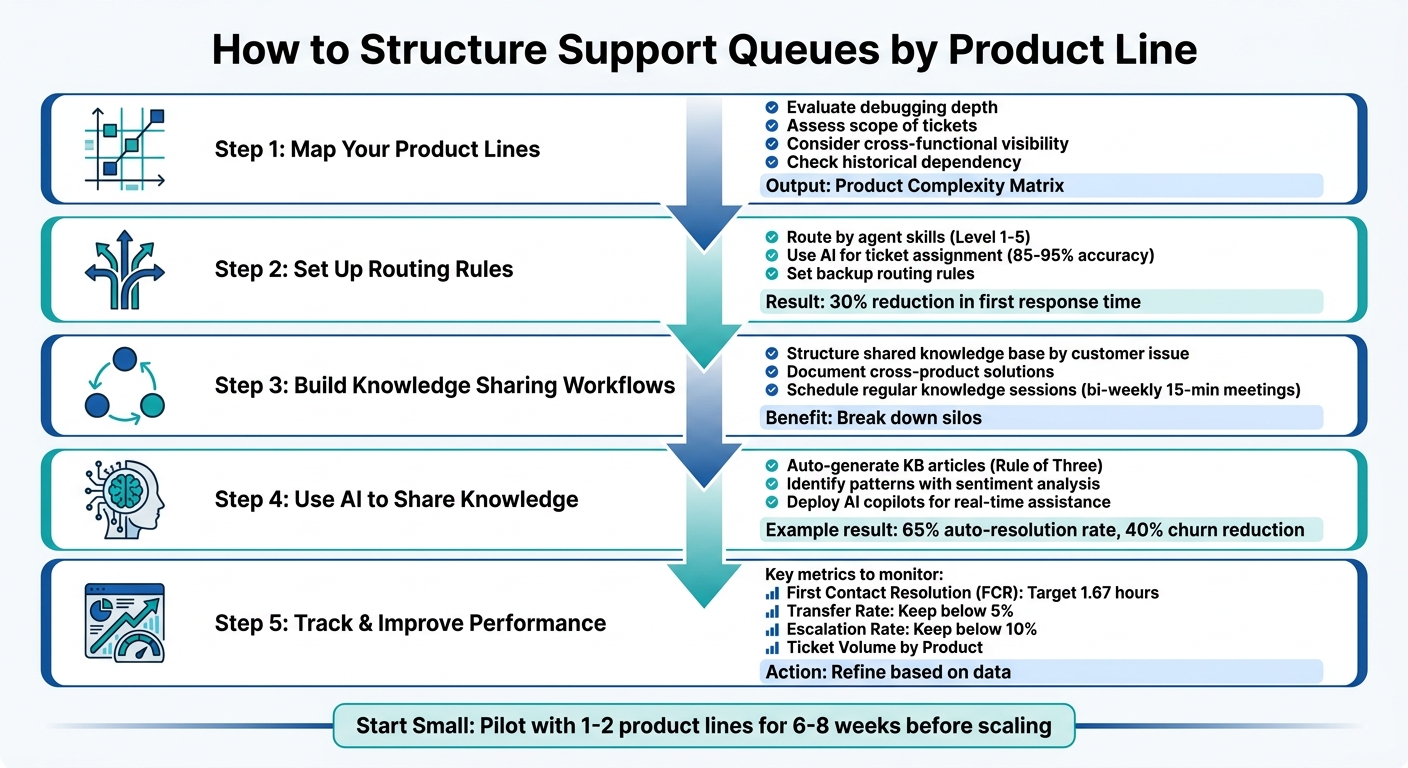
5-Step Framework for Structuring Support Queues by Product Line
Step 1: Map Your Product Lines for Queue Segmentation
Start by figuring out which products truly need their own dedicated support paths. Implementing ticket routing automation can help manage these paths efficiently. Not every product line will benefit from separate queues – some can share resources effectively. The trick is knowing where specialization boosts performance and where it just complicates things unnecessarily.
How to Decide Which Products Need Dedicated Queues
Begin by evaluating debugging depth. Products that require specialized tools, in-depth technical investigations, or frequent reviews of ticket history are prime candidates for dedicated queues [3].
Next, look at the scope of tickets. Products that generate emails with three or more questions can bog down general queues, causing delays in resolutions [3].
Also, think about cross-functional visibility. If product managers or engineers need a clear view of specific support issues to improve development, a dedicated queue can act as a valuable observation point. This is especially useful for newer products where user feedback drives quick updates [3].
Lastly, assess historical dependency. If agents need to frequently reference long interaction histories to resolve issues, it’s better to handle these tickets within a product-specific queue. Generalists shouldn’t have to repeatedly piece together context, especially when B2B teams already spend three hours coordinating for every hour of problem-solving [3].
Once you’ve considered these factors, organize your findings using a matrix to visualize the complexity of each product.
Create a Product Complexity Matrix
After assessing the challenges for each product, use a complexity matrix to prioritize segmentation. This tool helps you map product lines against key factors like:
- Debugging requirements: Standard troubleshooting vs. deep technical investigation.
- Tooling needs: General tools vs. specialized or engineering-specific tools.
- Context dependency: Standalone tickets vs. those requiring historical context.
- Inquiry volume: Single-question tickets vs. multi-question, complex cases [3].
The goal is to pinpoint products with a noticeable gap between "easy" and "hard" inquiries. When resolution times vary widely, AI-powered ticket routing and prioritization often beats a simple first-in, first-out approach [4]. Products in the high-complexity quadrant – those needing specialized tools, deep context, and handling multi-question cases – should be first in line for dedicated queues.
"Anytime there is a large gap between ‘easy’ and ‘hard’ inquiries is a great place to consider looking at skills-based support." – FlightCX [4]
A great example of this approach comes from Front’s "Hop in the Support Queue" program in late 2023. Spearheaded by Head of Support Kenji Hayward, the initiative aimed to help cross-functional teams understand support workflows. The program tagged simpler cases for new hires while setting aside complex tickets requiring deep debugging, extensive historical context, or multi-question inquiries. It achieved a 4.96/5 usefulness rating by recognizing that these tougher cases needed separate handling [3].
Your matrix doesn’t need to be overly complicated. A simple two-by-two grid plotting complexity against ticket volume can quickly show which products need dedicated resources and which can stay in shared queues.
sbb-itb-e60d259
Step 2: Set Up Routing Rules for Product Queues
With your product lines identified, the next step is to create routing rules that connect tickets to the right agents quickly and efficiently. The aim is to match each ticket with an agent who has the expertise to resolve it, while keeping wait times short and ensuring no one on your team is overwhelmed.
Route Tickets Based on Agent Skills
Assign tickets to agents based on their proficiency levels for each product line [8][9]. For instance, an agent with a Level 5 rating in your API product should handle complex integration queries, while someone rated at Level 2 can manage basic setup questions. This approach ensures that customers get the help they need without unnecessary delays.
Beyond technical skills, consider other qualifications like language fluency, experience with specific customer segments, or knowledge of particular integrations. These factors are especially important for backup routing when your top specialist isn’t available [1]. For example, if your primary billing expert is unavailable, tickets can be routed to an agent who has successfully resolved billing issues in the past, even if it’s not their main area of focus.
To streamline the process, use a tiered routing system. Start by directing tickets to high-proficiency agents. If no one responds within a set timeframe – say, 30 seconds – expand the routing to include intermediate-level agents [9]. This way, complex cases get the attention they need, while simpler issues are resolved more quickly.
Once these basic rules are in place, you can refine the process further by incorporating AI for ticket assignment.
Use AI to Automate Ticket Assignment
AI can take your ticket routing to the next level by analyzing entire tickets – text, attachments, and even sentiment – to make assignments in milliseconds [5]. While traditional rules-based systems typically achieve 40–50% accuracy, AI-powered systems can hit 85–95%, reducing reassignments and cutting first response times by about 30% [5].
"The defining shift is from deterministic rules to learned judgment. A rules-based system can only do what you’ve explicitly told it to do. An AI model learns from every resolved ticket in your history." – IrisAgent [5]
AI doesn’t just rely on preset rules. It evaluates historical resolution patterns to determine which agents or teams have the best track record for resolving specific types of issues. This ensures tickets are routed to the most suitable specialists while also considering real-time workloads to prevent overburdening top-performing agents [5].
To get started, focus on routing your three to five most common ticket types and aim for 90%+ accuracy before expanding [5]. Set a confidence threshold – typically around 80% – so the system redirects uncertain tickets to a human lead for review [5][6]. Use these manual reroutes as training data to improve the AI model on a weekly basis [5][6].
When your primary experts aren’t available, backup routing ensures that ticket flow doesn’t grind to a halt.
Set Up Backup Routing When Specialists Are Unavailable
Even the most advanced routing system needs a fallback plan for when specialists are offline or at capacity. Tickets shouldn’t sit idle in the queue while customers wait for help.
Set rules to automatically broaden routing after a delay [8]. For example, if no API specialist responds within 60 seconds, the system can escalate the ticket to your broader engineering support team. You can also implement skill relaxation, where the required proficiency level drops from "Expert" to "Intermediate" after a ticket has been waiting for a certain amount of time [8].
Workload balancing and a tiered triage structure can help maintain continuous support. If higher-level specialists are unavailable, Level 1 agents can step in to handle initial communication or basic troubleshooting while the ticket waits for expert attention [1][7].
Monitor real-time metrics like wait times, queue lengths, and agent utilization to ensure smooth operations. If automated systems can’t fully compensate for a specialist’s absence, manual adjustments may be necessary [1]. Additionally, deploying AI virtual agents to manage repetitive tasks can provide immediate assistance to customers, even when human specialists are offline [7].
Step 3: Build Knowledge Sharing Workflows Across Product Teams
Once your workflow automation and routing rules are up and running, it’s time to focus on sharing solutions across product teams. Picture this: an agent on your API team cracks a tough authentication issue that also affects your mobile app. That insight shouldn’t stay siloed – it needs to reach the mobile support team fast. Here’s how you can turn isolated solutions into shared knowledge that benefits everyone.
Structure a Shared Knowledge Base
Organize your knowledge base by customer issue, not by department. Think about it – agents search for solutions based on problems, not organizational charts. Structure your content around the tasks customers want to complete. Start by standardizing metadata across all product lines, including tags for Topic (like "Connectivity" or "Billing"), Product/Brand, Audience, Workflow Stage, and Review Date. This approach transforms your knowledge base into a dynamic, searchable system rather than a static archive.
Keep the folder structure simple – no more than three levels deep – and set permissions to be open by default, locking down only sensitive information.
Take HEINEKEN as an example. In April 2026, they implemented a "Collections" structure in their internal system, merging global and local insights. This helped product and regional teams align faster on market decisions. Similarly, La‑Z‑Boy streamlined their consumer insights knowledge base, making it instantly accessible to both product development and marketing teams. The result? Better collaboration and faster access to critical information [10].
"Most internal knowledge bases fail because they mirror org charts, not how people search or work." – Stravito [10]
Once your knowledge base is well-organized, integrate it into your resolution process to capture and share insights across products.
Create Workflows for Documenting Cross-Product Solutions
Make documenting cross-product solutions part of your ticket resolution process. Train agents to flag solutions that could apply to multiple products, and set up notifications for knowledge leads to review and share these insights.
Add a dedicated "Shared Solutions" category to your knowledge base for resources that span your product ecosystem. Use a modular approach: create comprehensive "Core" articles for shared features like authentication, billing, or API foundations, and supplement them with shorter "Edge" articles that address product-specific details.
Regularly audit the most-searched terms across product lines to identify duplicate content. Merge these into unified articles and assign ownership to a central documentation team or a rotating group of senior agents. This ensures global content stays accurate and up-to-date [10].
Schedule Regular Knowledge Sharing Sessions
Documentation is crucial, but it’s not enough on its own. Regular inter-team sessions are key to keeping knowledge flowing. Host bi-weekly meetings where each product team shares their three most challenging and broadly relevant tickets. Keep these sessions short – 15 minutes is ideal – and focus on practical, real-world issues.
To dig deeper, schedule monthly one-on-one brainstorming sessions between agents from different product lines. After major product launches or significant support challenges, hold project retrospectives to review successes and identify areas for improvement. These practices encourage a culture where sharing expertise is the norm, not the exception.
"Knowledge sharing is a practice, not a project." – Hannah Cohen, Content Marketing, Tango [11]
Step 4: Use AI to Share Knowledge Across Product Lines
Keeping up with the sheer volume of support queries can overwhelm manual documentation processes, leaving valuable problem-solving insights untapped. AI offers a game-changing solution by automating the capture, organization, and distribution of knowledge throughout your support ecosystem. Here’s how AI tools can streamline this process.
Auto-Generate Knowledge Base Articles with AI
AI can turn everyday support interactions into valuable, reusable knowledge assets. By scanning ticket histories, redacting sensitive information, and extracting key issues and solutions, AI creates standardized articles that are ready for review.
One effective method is the Rule of Three – flag any issue that requires a manual response three times as a candidate for a new article. A simple kb-candidate trigger can initiate the AI-driven article creation process automatically [12]. This "Ticket-to-Article" workflow transforms recurring issues into self-service solutions, reducing the burden on agents.
"Your support queue is a goldmine of customer insights and content ideas. Every ticket represents a question that needs an answer, a problem that needs a solution, and an opportunity to build a resource that serves everyone." – Intelligex [12]
After publishing an AI-generated article, close the loop by sending the original customer a link to the resource. This not only delivers immediate help but also encourages self-service in the future. Keep an eye on "Was this article helpful?" ratings – articles with high views but low ratings should be flagged for updates [12]. For context, resolving a recurring issue through an article can save hours of agent time. For example, a single issue generating 10 tickets per week at 15 minutes per resolution uses 2.5 hours weekly [12].
Identify Patterns with AI Sentiment and Intent Analysis
AI sentiment analysis goes beyond surface-level feedback, grouping customer input into themes such as billing issues, onboarding challenges, or delivery problems. This helps you pinpoint knowledge gaps before they become major obstacles.
For example, in early 2026, JustPark, a UK-based parking tech company, used sentiment analysis to uncover a hidden revenue leak. AI detected driver frustration over a missing license plate update feature, allowing the company to fix the issue quickly and avoid significant revenue loss [13].
The best approach combines "informational supply" (existing knowledge base articles) with "informational demand" (patterns in customer searches and tickets). Conduct brief weekly reviews to spot new ticket trends or language changes that might require updates to your AI prompts [14]. Sentiment analysis can also act as an early warning system, flagging negative feedback spikes tied to product updates or regional issues. AI can even identify customers at risk of canceling 30 to 60 days in advance [13].
Between February and April 2026, KwikUI, a SaaS platform with over 3,000 users, implemented AI-powered routing and classification. By mapping their top 20 most-asked questions to clear knowledge base answers and using AI to classify intent, they achieved a 65% auto-resolution rate, doubled their trial-to-paid conversion rate from 4% to 8%, and cut their churn rate by 40% [14].
Surface Relevant Solutions with AI Copilots
AI copilots integrate directly into your existing tools, helping agents find answers across product lines without tedious manual searches. Agents can ask plain-language questions like, "How was this resolved in another product line?" and receive context-aware answers instantly.
Real-time agent assistance simplifies workflows by providing customer history summaries, draft responses, and relevant solutions – all while the agent is actively working on a ticket. This reduces the mental effort of switching between different product contexts and prevents information overload by surfacing only the most relevant insights.
In 2026, Thompson Career College streamlined student inquiries from web, email, and phone into a single AI-powered pipeline. This reduced their average response time from 1–2 business days to under 60 seconds [14]. Their success hinged on a "human-in-the-loop" approach: automation handled repetitive queries, while complex issues were routed to human agents equipped with AI-generated summaries and transcripts, ensuring no context was lost.
"AI Copilots are designed to close the execution gap. They don’t just add automation; they embed intelligence into the daily workflows." – Kore.ai [15]
To maintain trust, always provide an option for human intervention. Every automated or AI-suggested response should include a clear path for customers or agents to connect with a human specialist immediately [14]. This ensures that AI supports human decision-making rather than replacing it.
Step 5: Track and Improve Queue Performance
Now that AI-powered knowledge sharing is up and running, it’s time to keep an eye on how well your queues are performing. Simply organizing queues by product line isn’t enough – tracking performance metrics is what separates efficient teams from those bogged down by backlogs. The right data can show whether your routing is effective, where your knowledge base needs work, and which product lines might be under-resourced. Without consistent monitoring, you’re essentially operating blind.
Measure Key Queue Metrics by Product Line
Start by focusing on First Contact Resolution (FCR) for each queue. High FCR rates suggest that agents have strong expertise in handling specific product-related issues. On the flip side, low FCR rates may point to gaps in training or documentation [17][18]. For context, top-performing teams aim for an average resolution time of 1.67 hours [18].
Another key metric is Transfer Rate, which measures how often tickets are passed around before reaching the right agent. Katarzyna Kornaga from Deviniti explains:
"A high transfer rate usually means a lack of agent knowledge. It can result from inadequate training or an overly complex issue routing system" [17].
If transfer rates vary significantly between queues, it’s a sign that your routing rules might need adjustment.
Keep an eye on Escalation Rate as well. High escalation rates often indicate that Tier 1 agents don’t have the tools or training to resolve common issues independently [17]. Additionally, tracking Ticket Volume by Product can reveal which product lines are generating the most support requests – and may require more resources [17]. For example, in 2025, a tech company using AssessTEAM‘s performance software saw a 20% boost in productivity and cut new hire training time in half by monitoring real-time metrics like goal completion rates [16].
Here’s a quick breakdown of useful metrics and what they tell you:
| Metric Category | Key KPI | What it Reveals about Product Queues |
|---|---|---|
| Speed | First Response Time (FRT) | How quickly initial triage is handled for a product line. |
| Quality | First Contact Resolution (FCR) | The depth of agent expertise for that product. |
| Knowledge | Self-Service Rate | How effective the product’s public documentation is. |
| Structure | Transfer Rate | Whether routing rules and queue segmentation are working. |
| Loyalty | CSAT, CES, and NPS | The long-term impact of support on customer satisfaction and brand perception. |
By accurately tracking these metrics, you can pinpoint weak spots and take action to improve.
Find Missing or Outdated Knowledge
Your support data can highlight gaps in your knowledge base. For instance, AI tools can analyze "no-result" searches, showing where customers’ queries aren’t being answered [20]. If users frequently search for a particular error and get no helpful results, it’s time to create a troubleshooting guide for that issue.
Use automated reminders to flag articles that haven’t been updated in six months [20]. Sara Richmond, an expert in internal communication, explains:
"AI works like a reasoning engine built on top of a knowledge base. If the facts are wrong, it collapses. When AI has verified, detailed content to draw from, it’s less likely to guess or ‘fill in the gaps’ incorrectly" [20].
Also, check Template and Macro Utilization by product line. If agents are repeatedly writing out similar solutions manually, it’s a sign that your knowledge base is missing key content [18][20].
It’s worth noting that only 27% of organizations review AI-generated content before using it, underscoring the importance of human oversight in knowledge management [20]. Assign specific team members to review flagged inaccuracies or gaps regularly [19][20].
Refine Queue Structure and Routing Rules
Use the performance data you’ve gathered to fine-tune your queue setup. If a particular product queue is consistently missing SLA targets, consider redistributing the workload by adding more agents or breaking the queue into smaller segments – for example, separating technical issues from billing questions.
Introduce priority overrides to fast-track urgent tickets, like critical bugs or customer feedback that needs immediate attention. Set up automated escalations for tickets that sit idle beyond a certain time limit, ensuring no issue falls through the cracks.
Monitor the ratio of "Opened vs. Solved" tickets for each product line. If a queue regularly has more incoming tickets than resolved ones, it’s worth revisiting your workflow. Jordan Miller from Gorgias highlights this connection:
"The amount of effort across your entire customer journey has a huge bearing on the success of your customer experience and, by extension, your brand’s revenue" [18].
Regularly review how work is distributed across your teams to keep workloads balanced. If certain product designs are causing recurring issues, consider flagging them for improvement. As customer expectations continue to rise, staying flexible with your queue structure is key [17].
Conclusion: Balance Speed with Collaboration
This guide has outlined a five-step framework that blends specialized queues, AI-driven routing, and integrated knowledge workflows. By structuring support queues around specific product lines, you can achieve both speed and teamwork. The ultimate goal? Faster resolutions fueled by specialized expertise and ongoing knowledge sharing that eliminates silos. As Cobbai Blog puts it:
"Skills-based routing directs tasks to agents with specific expertise to ensure faster, more accurate resolutions" [1].
When combined with AI-powered knowledge sharing and centralized documentation, this approach builds a support system that is both agile and collaborative.
Key Takeaways
The framework is simple but effective: map your products to determine which need dedicated queues, implement AI-powered routing to connect tickets with the right specialists, establish workflows for knowledge sharing to keep teams aligned, and track customer service KPIs to fine-tune the system. Each step works together – better routing improves knowledge sharing, which in turn sharpens performance metrics. Investopedia’s insights on queuing theory back this up:
"Queuing theory balances efficiency and cost-effectiveness in business operations, ensuring neither overcapacity nor excessive wait times" [2].
The same logic applies here – you’re creating a system that’s fast without compromising sustainability. With these principles in mind, you’re ready to launch a focused pilot program.
Start Small and Improve Over Time
Rather than overhauling your entire support operation at once, start with a pilot phase. Focus on one or two product lines to test the framework. Measure the impact on resolution times and agent satisfaction before scaling up. For instance, a recent pilot showed that an 8-week tuning phase can significantly improve auto-resolution rates and lower churn [14].
Here’s a suggested approach: dedicate 6 to 8 weeks to fine-tune classification prompts and routing rules using real ticket data. Conduct weekly reviews of misrouted tickets to identify trends, aiming for a misroute rate below 5% and an escalation rate under 10% [14]. As Velani highlights:
"You can’t improve what you don’t measure, and all four [metrics] are trackable from your help desk’s built-in analytics without extra tooling" [14].
Start with a pilot, track key metrics, and adjust as needed to refine your support system over time.
FAQs
How do I know which products need their own support queue?
To determine if a product requires its own support queue, think about whether it involves distinct support requirements, dedicated teams, or specific workflows. Having separate queues offers several benefits: it allows for precise performance tracking, allocates tailored resources, and enables more focused knowledge sharing. This approach can speed up resolution times, minimize cross-product complications, and boost customer satisfaction by ensuring inquiries are managed efficiently and with the right expertise.
What should happen when the right specialist isn’t available?
If the right specialist isn’t available, consider using fallback or default queues to manage requests temporarily. This helps avoid unnecessary delays and ensures inquiries are handled promptly. You can also implement automated routing rules and tiered support models to distribute workloads more effectively. These methods ensure requests are directed to the next available or most suitable team member, keeping response times steady and maintaining customer satisfaction, even while waiting for the appropriate expert.
How do we prevent product-based queues from creating knowledge silos?
To break down knowledge silos in product-based queues, focus on strategies that encourage teamwork and transparency. Start by implementing cross-team collaboration and shared workflows to ensure everyone stays aligned. AI-driven tools can help here – think automated routing systems that direct queries to the right team or tools that keep the knowledge base updated and accessible to all.
Beyond technology, consider adopting shared ownership models where multiple teams take responsibility for resolving issues. Establish clear escalation paths so that complex problems are efficiently handed off without confusion. A unified data structure can also streamline communication and ensure everyone is working from the same information. Lastly, make it a habit to update the knowledge base regularly with insights gained from support interactions. This way, everyone benefits from shared learning and improved processes.
Related Blog Posts
- How to Manage Customer Support Across Multiple Products with Different Complexity Levels
- How do you handle support for multiple products, tiers, or service levels in one help desk?
- Multi-Product Support Strategies: Managing Distinct Brands Under One Roof
- Omnichannel Routing Logic: Balancing Chat, Email, and Portal Loads