Scope creep in Support Ops happens when your team takes on tasks outside its original responsibilities – without extra resources. It drains time, causes burnout, and hurts client trust. To prevent this, you need clear boundaries and tools to manage requests effectively.
Here’s how to stay focused and avoid scope creep:
- Define roles clearly: Create a Support Scope Document outlining what your team handles and what it doesn’t.
- Use a decision framework: Evaluate requests based on impact, urgency, and client priority.
- Communicate boundaries: Share service catalogs and escalation workflows with stakeholders.
- Leverage AI tools: Automate ticket routing and prioritization and self-service to handle repetitive requests.
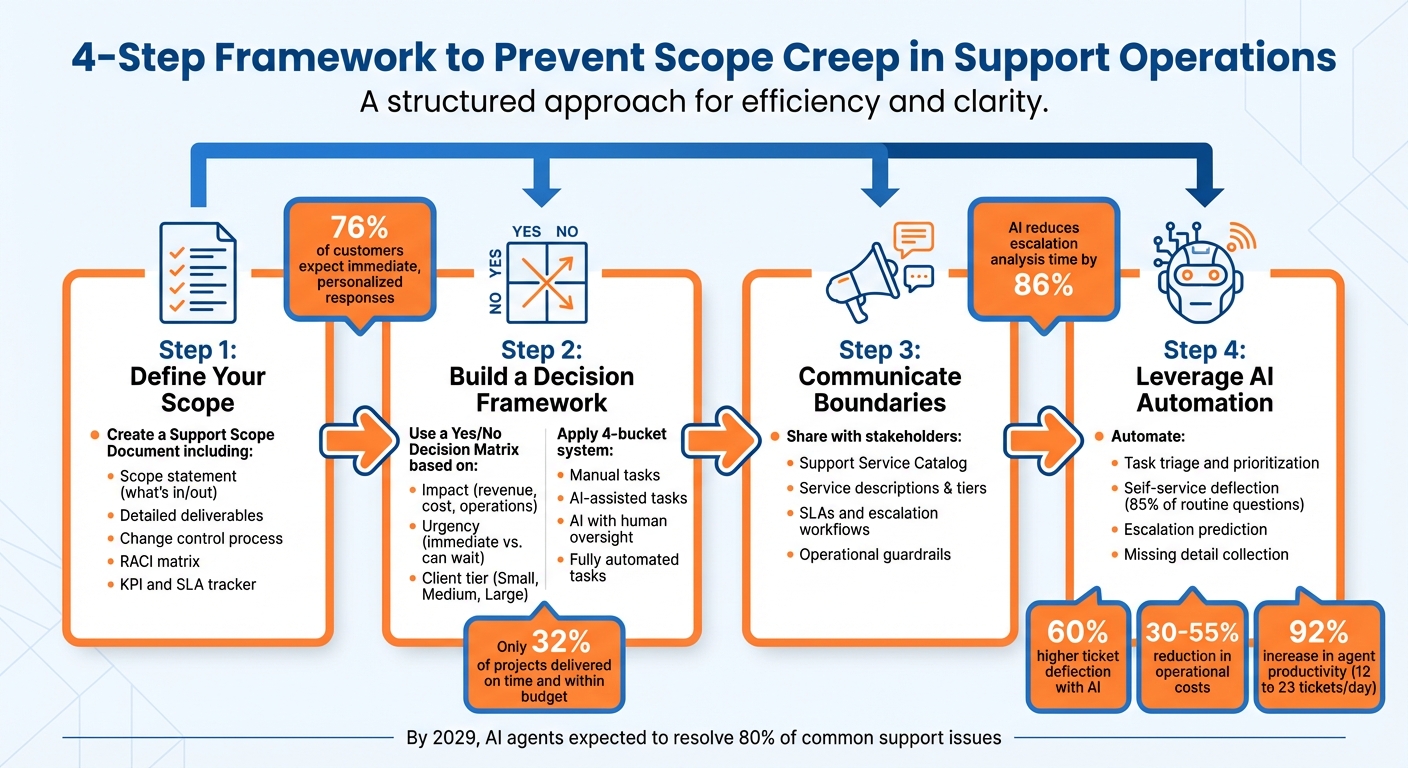
4-Step Framework to Prevent Scope Creep in Support Operations
What Causes Scope Creep in Support Operations
Scope creep sneaks into support operations through three main cracks: unclear roles, unregulated ad-hoc requests, and manual prioritization of tasks.
Vague Role Definitions
When your support team’s responsibilities aren’t clearly laid out, anything can seem like it’s your job. Without a detailed service catalog or an organizational chart, there’s no clear standard to evaluate new requests. A broad goal like "improve customer service" leaves too much room for interpretation. Suddenly, your team is juggling tasks like creating custom reports for Sales, running product training sessions for new clients, or handling engineering-related issues that should fall under DevOps.
This lack of clarity can lead to some troubling patterns. Team members might start adding unnecessary features that no one asked for, while Sales or project managers make unapproved commitments during onboarding – roping your team into tasks without consulting you first. The fallout? Your team ends up offering high-touch services to low-priority accounts, leaving your most important clients waiting. This role confusion not only disrupts workflows but also opens the floodgates for ad-hoc requests from other departments.
Here’s how vague versus clear scope requirements compare:
| Vague Scope Requirement | Clear Scope Requirement |
|---|---|
| Update the website | Redesign homepage CTA by October 1 |
| Enhance customer service | Reduce average email response time to under 4 hours by August 31 |
| Fix bugs | Resolve ticket IDs 101, 102, and 103 by next release |
| Improve site speed | Achieve homepage load time under 3 seconds by July 15 |
Ad-Hoc Requests from Other Teams
Support teams often find themselves bombarded with interruptions from Sales, Product, and Engineering. These requests bypass formal review processes, coming with no adjusted timelines, no extra resources – just an expectation of immediate action.
"Scope creep often begins innocently… These requests often seem minor in isolation, but they accumulate like snowflakes on a mountainside until you’re facing an avalanche of extra work you can’t outrun." – Allisa Boulette, Content Marketer
The situation is made worse by rising customer expectations: 76% of customers now expect immediate and personalized responses. When Sales promises a client that Support will handle something custom just to close a deal, your team inherits that commitment – often without being consulted. Different teams have conflicting ideas about what falls "in scope." Without a system to filter or manage these requests, your team’s resources are quickly depleted.
Manual Decision-Making on Task Prioritization
On top of unclear roles and unchecked requests, manual prioritization adds another layer of complexity. When your team has to manually triage every ticket, it’s a time-consuming and inconsistent process. Without automated tools to classify and prioritize tasks, such as AI agent copilots, agents are left making judgment calls all day long about what’s urgent and what can wait.
This reactive approach creates chaos. SLA risks go unnoticed, and priorities constantly shift to address the latest crisis. The result? Your team is buried in repetitive, low-value tasks, while critical issues aligned with your core goals remain unresolved.
The data speaks for itself: only 32% of projects are delivered on time and within budget. Manual prioritization simply doesn’t scale. Without automation to draw clear boundaries, every request feels equally important – and that’s how scope creep takes over.
sbb-itb-e60d259
How to Set Clear Boundaries: Frameworks for Saying Yes or No
When it comes to avoiding scope creep, having a clear, written framework is your best bet. This framework ensures your team knows exactly what falls within their responsibilities – and what doesn’t. Without it, every request becomes a subjective decision. With clear boundaries in place, you can consistently evaluate incoming tasks and redirect anything that doesn’t align with your team’s core focus.
Build a Support Scope Document
A Support Scope Document is your go-to tool for defining what your team handles and what’s outside their scope. It outlines your main responsibilities – like resolving tickets, updating knowledge bases, and managing escalations – while explicitly excluding tasks that aren’t part of your team’s role, such as product training, custom data pulls for Sales, or advanced engineering troubleshooting. Documenting these boundaries helps your team stay focused and prevents unnecessary distractions.
Here’s what a strong scope document should include:
- Scope Statement: A clear definition of what’s included and excluded in your team’s work.
- Detailed Deliverables: A breakdown of the specific tasks your team is responsible for.
- Change Control Process: A system for reviewing and approving new requests.
- RACI Matrix: A chart clarifying who is Responsible, Accountable, Consulted, and Informed for each task.
- KPI and SLA Tracker: Tools to monitor performance and ensure targets for response and resolution times are met.
"Scope creep can mess up relationships with clients and customers if it’s not accounted for and addressed by the professional or service provider handling the project." – Tim Brown, Owner, Hook Agency
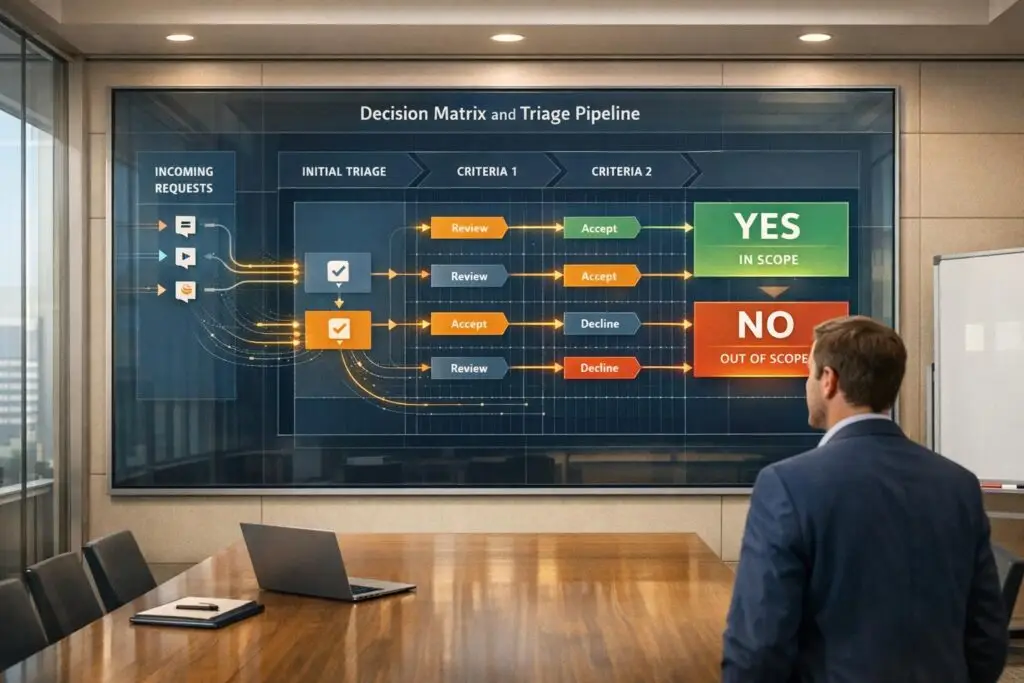
Use a Yes/No Decision Matrix
Once your scope is clearly defined, use a decision matrix to evaluate incoming requests. This tool removes any emotional bias from the decision-making process and focuses on objective criteria. The matrix is typically built around two main factors: Impact (e.g., does this affect revenue, cost the company money, or disrupt critical operations?) and Urgency (e.g., will this issue escalate if not addressed immediately, or can it wait?). You can also factor in client tiers (Small, Medium, Large) to prioritize requests with similar urgency and impact.
For example:
- A Level 5 request (critical, revenue-impacting, from a top-tier client) gets top priority.
- A Level 1 request (minor issue from a lower-tier client) is deprioritized but still handled within your SLA.
To streamline task management further, use a 4-bucket system to decide how requests should be handled:
- Tasks managed manually
- Tasks requiring AI assistance
- Tasks handled by AI with human oversight
- Tasks fully automated by AI
This system helps identify which requests can be deflected or automated, allowing your team to focus on high-priority work.
Communicate Boundaries to Stakeholders
Even the best internal guidelines won’t work if stakeholders aren’t aware of them. To minimize misdirected requests, communicate your boundaries clearly. A Support Service Catalog can help. This document should include service descriptions, support tiers, SLAs, and escalation workflows, giving stakeholders a clear understanding of what to expect before they even submit a request.
Operational guardrails are another key element. These define what your team can and cannot do – like updating user permissions versus deleting accounts or running custom reports for Sales. Include clear escalation criteria, such as using sentiment analysis to identify and escalate cases flagged for "high frustration" to a human specialist. You can also use automated triggers to collect missing details (like purchase order numbers or shipping addresses) before an agent reviews a ticket, cutting down on unnecessary back-and-forth.
"The best performing teams recognize the need for check-ins and discussions to identify what elements may cause scope creep, and what alternatives can be established for both parties to be successful." – Laura Desmarais, Public Relations Strategist, LTD Communications
How to Say No Without Damaging Relationships
Turning down requests doesn’t have to harm your relationships. Instead of flat-out refusals, think of it as redirecting to the right path. This way, you maintain trust while keeping your team focused on what matters most. Here are some ways to say no without burning bridges.
Focus on Requests That Drive Business Impact
Not all requests carry the same weight. Prioritize tasks that directly influence your key metrics, like First Contact Resolution (FCR), CSAT scores, and customer retention. When evaluating a request, ask: Does this affect revenue, customer churn, or SLA performance? If the answer is no, it’s likely a lower priority or better suited for another team.
Use a decision matrix and support level management to stay focused on high-impact tasks. For instance, a Sales request for a custom data pull might seem urgent, but if it doesn’t address active customer issues or revenue-at-risk accounts, it shouldn’t leapfrog tasks tied to paying customers. Sticking to this framework, outlined in your scope document, ensures consistency in prioritizing what truly matters.
Redirect Non-Support Requests to the Right Place
When a request doesn’t fall under your team’s responsibilities, redirect it with clarity and context. For example, if someone asks your team to update a customer’s email address – a task managed by IT or Security – set up a process to forward such requests automatically. Include details like the requester’s name, subject, and original message to streamline the handoff.
Try the "No, But…" approach to soften the refusal. Instead of saying, "We don’t handle product training", you could respond with: "Our team focuses on technical issues, but I’ve connected you with our Customer Success team. They’ll reach out within 24 hours to assist with training."
For frequently misdirected requests, build self-service tools. If Sales often asks for help with account provisioning, create a step-by-step guide in your knowledge base and share the link in your response. Over time, teams will learn to resolve these issues on their own, reducing the need for redirection.
Use AI to Streamline Task Deflection
When manual redirection becomes overwhelming, AI can step in to handle repetitive tasks. Pre-submission suggestions, for example, show users relevant articles as they type, helping them find answers before submitting a ticket.
AI-powered triage can also identify the intent behind a ticket and route it to the right team automatically. For example, if a customer submits a ticket about a feature that doesn’t exist, AI can respond with alternative solutions and close the ticket without any human involvement. This approach not only saves time but also ensures requests are handled efficiently.
Additionally, automated internal notes can notify agents with the right context for quick and accurate redirection. By integrating AI into your processes, your team can focus on solving the problems they’re meant to handle, while unnecessary tickets are filtered out. In some cases, response times have dropped from 15 minutes to just 23 seconds thanks to AI.
AI Tools That Prevent Scope Creep
AI has become a powerful ally in managing workloads by automatically enforcing boundaries. It uses natural language processing (NLP) to understand the intent behind requests, catching out-of-scope tasks – like job applications, billing inquiries, or feature requests – and redirecting them before they even reach your team’s queue.
AI-powered ticket triage speeds up processes by cutting out manual categorization, saving 30 to 60 seconds per ticket. For escalation prediction, AI reduces the time spent on manual analysis from 9 to 13 hours down to just 1 to 2 hours, a time savings of 86%. Handling high-risk tickets with AI also boosts customer satisfaction scores (CSAT) by as much as 18%.
Automate Task Prioritization with AI
AI doesn’t just enforce boundaries; it also fine-tunes task prioritization. Unlike traditional rule-based systems that struggle with ambiguous phrasing, AI considers the full context. It evaluates sentiment, urgency indicators like "outage", customer tier information, and interaction history to prioritize tickets accurately. For example, a ticket titled "Quick Question" but describing a system-wide issue won’t be overlooked – AI ensures it’s flagged as urgent.
"AI determines priority not just based on a selected field or a single keyword, but by analyzing a confluence of factors [including] sentiment analysis, urgency keywords, and customer value." – Nooshin Alibhai, Founder and CEO, Supportbench
AI also identifies missing details – like purchase order numbers or account information – and requests them before an agent even sees the ticket. This reduces unnecessary back-and-forth communication, leading to 32% fewer escalations and a 28% faster Mean Time to Resolution (MTTR).
Use AI for Self-Service and Escalation
AI plays a major role in deflecting non-support tasks before they even become tickets. Pre-submission suggestions guide users toward relevant articles, resolving up to 85% of routine questions without creating a ticket. This allows support teams to focus on more critical issues.
For tickets that do make it through, AI can detect intent and respond automatically. For example, if a ticket involves subscription cancellations or refund policies, AI can send a "Solved" response with links to the appropriate documentation, closing the ticket without human involvement. This approach has been shown to reduce support volumes by 20% to 60%.
When escalation is unavoidable, AI uses sentiment analysis to detect frustration and adjust ticket priority to "High" or "Urgent", ensuring critical issues are addressed promptly. Internal triggers can also notify agents when a ticket exceeds a set number of replies, signaling the need for escalation or a different course of action.
Improve Workflows with AI Integration
AI doesn’t just help with triage – it streamlines entire workflows. Dynamic Service Level Agreements (SLAs) adjust automatically based on the customer’s journey, tightening response times for accounts at risk or nearing renewal deadlines – all without manual updates.
It also identifies and removes operational inefficiencies. For instance, AI flags unused macros, triggers, and outdated business rules that may be slowing your team down, keeping your support system efficient and focused.
The shift from traditional rule-based systems to AI-driven solutions is game-changing. AI’s ability to understand context, learn over time, and scale effortlessly has enabled companies to achieve 60% higher ticket deflection rates and 40% faster response times compared to older methods. Alongside these improvements, operational costs drop by 30% to 55%, and agent productivity skyrockets – raising the average number of tickets handled per agent from 12 to 23 per day, a 92% increase.
Conclusion
Using structured frameworks alongside AI-driven workflows is a practical way to tackle scope creep and maintain your team’s focus on impactful work. When you rely on individual heroics to manage workloads, it’s neither scalable nor sustainable. Instead, setting clear boundaries allows human agents to handle complex, high-empathy tasks, while AI takes care of repetitive ones. This approach not only safeguards your SLAs but also preserves your team’s ability to achieve meaningful business results.
The strategies and tools discussed in this article can shift your support operations from reactive problem-solving to proactive resolutions. For example, these methods have been shown to reduce operational costs by 30%–55% and improve agent productivity by 92%, increasing daily ticket resolutions from 12 to 23. Looking ahead, AI agents are expected to resolve up to 80% of common support issues by 2029. However, this level of efficiency is only possible with well-defined automation boundaries and clear decision-making criteria. These elements are essential for creating a scalable and effective support system.
As Nooshin Alibhai, Founder and CEO of Supportbench, aptly states:
"Without a system, you’re relying on individual heroics, which isn’t scalable or sustainable".
The difference between support teams that thrive and those that falter lies in moving from ad-hoc decision-making to structured, AI-supported frameworks. The focus isn’t on automating everything but on understanding where to draw the line. By defining your scope clearly, implementing objective decision triggers, and letting AI enforce those boundaries, your team can spend less time on routine tasks and more time on strategic efforts that truly benefit your customers and business.
Start with a clear framework and adjust as your needs evolve. The clarity you establish today will determine how well your support operations can adapt and scale in the future.
FAQs
How can AI help prevent scope creep in Support Operations?
AI tools play a crucial role in keeping scope creep under control in Support Operations. They offer proactive monitoring, automation, and decision-making support to help teams stay on track. For example, AI can analyze patterns in support requests and monitor ticket changes in real time. This makes it easier to spot potential scope expansions early, giving teams a chance to tackle issues before they spiral into bigger problems.
On top of that, AI takes over repetitive tasks like categorizing tickets, routing them to the right team, and setting priorities. This reduces the chances of human error and helps maintain clear boundaries. AI-powered workflows can even adjust SLAs and escalation protocols on the fly, allowing teams to handle urgent cases without losing focus on their overall operations. By integrating AI into their processes, support teams can stay efficient, scale effectively, and align with business objectives while keeping scope in check.
How can I create a Support Scope Document to avoid scope creep?
A Support Scope Document plays a crucial role in setting clear boundaries for your support operations and preventing scope creep. It ensures that everyone involved has a shared understanding of expectations by clearly defining what is included and excluded in the support process. Here are the key elements to include:
- Specific tasks and deliverables: Clearly identify the responsibilities of the support team and what tasks are outside their scope.
- Service level agreements (SLAs): Outline measurable performance standards to track success and maintain accountability.
- Decision-making criteria: Provide guidelines for prioritizing requests and determining which tasks to accept or decline.
- Escalation procedures: Detail a structured process for handling complex or unresolved issues effectively.
By including these components, you establish a focused and efficient framework that aligns your support operations with your business objectives, minimizing the chances of scope creep.
How can I set clear boundaries to avoid handling off-scope requests in Support Operations?
The first step to avoiding off-scope requests is to clearly define what your team is – and isn’t – responsible for. Make sure these boundaries are well-documented and communicated to both your support team and your customers. Use training sessions, internal guides, and consistent messaging to ensure everyone is on the same page. This clarity helps reduce misunderstandings and keeps your team focused on tasks that truly matter.
AI-driven workflows can be a game-changer here. By analyzing the intent, urgency, and complexity of incoming requests, these systems can automatically route eligible inquiries to the right channels. For off-scope requests, AI tools can redirect customers to self-service options or other appropriate resources. This automation not only saves time but also ensures smoother operations.
Finally, equip your team with predefined response templates to handle off-scope requests professionally. These templates can help your team decline such inquiries politely but firmly, maintaining a positive customer experience while keeping your team’s priorities intact.
Related Blog Posts
- How to Create Your First Support Ops Role (What to Hire For, When, and a 90-Day Plan)
- How do you build an escalation framework that doesn’t overload Engineering?
- How do you build a support org chart that scales (roles, ratios, and when to hire ops)?
- How do you stop “drive-by” escalations from Sales/Execs (without politics)?