



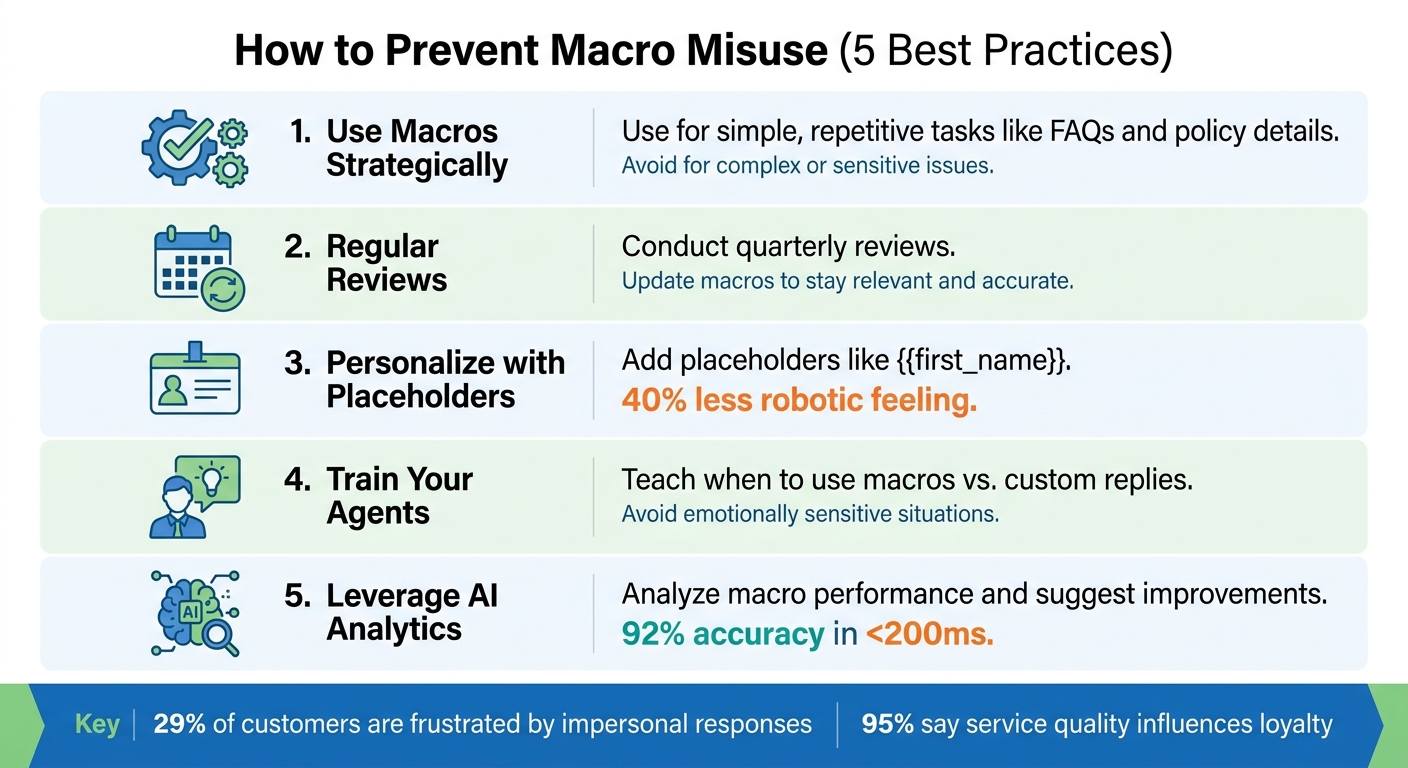
Macros can save time but misuse them, and you risk frustrating your customers. Here’s how to strike the right balance:
- Use macros for simple, repetitive tasks like answering FAQs or providing policy details. Avoid them for complex or sensitive issues.
- Regularly review and update macros to ensure they stay relevant and accurate.
- Add placeholders like
{{first_name}}to make responses feel personalized. - Train agents to know when to use macros and when to write custom replies.
- Leverage AI for customer support to analyze macro performance, suggest improvements, and even recommend the best macro for a situation.
The key is combining automation with a human touch. This ensures efficiency without sacrificing the quality of customer interactions.
5 Best Practices to Prevent Macro Misuse in Customer Support
How to use macros for customer support
sbb-itb-e60d259
Building a Macro Management System
Outdated or poorly utilized macros can quickly turn into obstacles instead of assets. But the answer isn’t to ditch macros altogether. Instead, treat them like any essential tool – manage them carefully while keeping the speed and efficiency that define modern AI-driven B2B support.
Define When Macros Should Be Used
Start by setting clear rules for when macros are appropriate. They work best for straightforward, informational tickets but should be avoided in complex or emotionally sensitive cases.
For example, steer clear of macros in situations involving bad news, cancellations, denials, or emotionally charged interactions [1]. Deon Nicholas, President of Forethought, puts it succinctly:
"The best tickets for macros are informational… Using macros to resolve action-based tickets — like ‘Please reset my password’ — is not an effective strategy" [2].
Leverage your intent classification data to identify the top 10 ticket categories and create high-quality macros for each [1]. This ensures your most common issues are addressed efficiently, while more nuanced cases still receive the human touch they deserve.
Create Approval and Update Processes
Once you’ve established guidelines for macro use, the next step is maintaining their quality.
Assign ownership of each macro set to specific individuals. These owners are responsible for ensuring accuracy, compliance, and relevance [3]. Use version control to track edits – this way, you can easily revert to a previous version if an update causes issues [3]. Additionally, set up a feedback loop so agents can report errors or broken links directly to the macro owners [3].
Plan quarterly reviews and stick to them. These sessions are an opportunity to clean house: delete unused macros, update product details, rewrite templates tied to poor customer satisfaction (CSAT) scores, and double-check that all links are functional [1][4]. As part of the review, read macros aloud – if they sound robotic or awkward, rewrite them before they go live [1].
Monitor Macro Performance
Keep a close eye on how macros impact customer satisfaction. If a macro feels overly scripted, it could frustrate customers – 29% of them report being annoyed by impersonal responses [4]. And since 95% of customers say service quality influences their loyalty, this isn’t something to overlook [4].
Set up audit trails to see which macros agents use most and which ones are gathering dust. If a frequently used macro correlates with low CSAT scores, address it immediately. If a macro hasn’t been used in three months, consider deleting it to reduce clutter and make it easier for agents to find what they need [1][4].
During your scheduled reviews, include agent feedback to identify outdated information, broken workflows, or missing templates before they cause bigger problems [3][4]. Regular performance checks help ensure macros remain effective and pave the way for ongoing improvements using AI insights.
Creating Macros That Work for Customers
A well-crafted macro does more than just save time – it helps build trust with your customers. The difference between a response that feels helpful and one that frustrates often lies in how the macro is structured. By using placeholders, customizable fields, and thorough testing, you can create macros that feel personal without slowing down your support team.
Add Placeholders with Fallback Text
Placeholders are a game-changer for making macros feel tailored. They automatically pull in customer-specific details like names, order numbers, or ticket IDs, eliminating the need for manual entry and reducing errors [1] [5]. For example, using variables such as {{first_name}} or {{product_name}} turns a generic response into something that feels like a real conversation. Customers notice these small touches – responses with placeholders like {{first_name}} feel 40% less robotic [1].
At the very least, include placeholders like {{first_name}} for personalization and {{order_number}} or {{ticket_id}} for quick reference. This ensures the macro directly addresses the customer’s issue. As Kayako Support puts it, placeholders "save precious time that would otherwise be spent manually retrieving unique customer information for every response" [5].
Mix Fixed Content with Customizable Fields
The best macros strike a balance between static information and customizable fields. Fixed content, like policy details or step-by-step instructions, ensures consistency and accuracy. Meanwhile, customizable fields give agents the flexibility to add context, adjust the tone, or address specific details unique to each situation.
Keep fixed content concise and approachable – avoid filler phrases that don’t add value to the conversation. If the macro is highly automated, consider closing with an invitation for the customer to reply if they need further assistance. This leaves room for a human agent to step in if necessary [2].
Once you’ve created a macro that balances fixed and customizable elements, test it across a variety of customer scenarios to ensure it works effectively.
Test Macros Across Different Customer Types
Testing is critical to making sure your macros hit the mark. Start by reading each macro aloud. If it sounds stiff or robotic, revise it [1]. Why? Because 29% of customers report being frustrated by scripted, impersonal responses [4].
Track satisfaction scores for tickets where macros were used to identify which templates might need improvement. During regular reviews – quarterly is a good benchmark – click through all the links in your macros to make sure they’re still active and point to the correct knowledge base articles [4]. Finally, test placeholders with different customer profiles to confirm that details like names and order numbers populate correctly. This step ensures your responses maintain their personal touch and are readable across platforms like SMS and mobile messaging.
Training Agents to Use Macros Correctly
Even the best macros can fall short if agents don’t use them properly. The goal isn’t to turn your team into a group of copy-pasting robots. Instead, it’s about giving them tools to handle repetitive tasks quickly while maintaining the personal touch necessary for more nuanced situations. In a fast-moving, AI-powered B2B support environment, proper training ensures macros boost efficiency without sacrificing the quality of personalized service. The key? Clear decision-making frameworks and ongoing feedback to keep your macro library relevant and effective.
Teach Agents When to Use Macros
Agents need clear instructions on when macros are appropriate. For instance, macros should generally be avoided in emotionally sensitive situations to prevent making customers feel dismissed or frustrated. Likewise, unique or one-off cases often require a custom response, as using a poorly matched template can come across as unprofessional. High-stakes interactions – like account closures, cancellations, or delivering bad news – also call for a personalized approach. A simple decision table can help agents quickly determine when to use a macro (e.g., for routine tasks like password resets) and when to craft a tailored reply [1].
To reinforce these guidelines, practical examples are essential for helping agents navigate complex situations.
Use Real Examples for Complex Cases
Role-playing and case studies are excellent tools to train agents for situations where macros might need adjustments. For example, reviewing cases where a customer explicitly asks not to receive a canned response highlights the importance of personalization. A helpful method here is the "Read Aloud" test: if a macro sounds unnatural or like something the agent wouldn’t say in a real conversation, it’s time to rewrite it. A simple three-step framework – acknowledge the question, provide the answer, and invite follow-up – can help keep responses efficient yet personable. This is crucial, as 71% of users say that getting a quick response significantly improves their experience [6].
Once agents are comfortable adapting macros to different scenarios, they should also feel empowered to report any issues they encounter.
Let Agents Report Macro Problems
Agents are on the front lines and often the first to notice when a macro is outdated or misses the mark. Make it easy for them to report these issues by providing a clear, integrated tool for feedback [7][8][11]. Responding to their input within 48 hours shows that their contributions are valued and encourages ongoing participation [8]. Closing the loop by updating agents on actions taken – or explaining why no changes were made – helps build a culture of continuous improvement [9][10]. As the Supp Blog notes:
"The issue is that most macros are written once by someone in a hurry, then copied verbatim for the next two years without anyone reconsidering whether they actually sound like something a human would say" [1].
Giving agents the ability to report problems ensures that macros remain effective and relevant. This feedback loop, powered by both human insights and AI analytics, is central to refining your macro strategy over time.
Using AI to Maintain and Improve Macros
In today’s B2B support world, AI is transforming how teams balance efficiency with effective communication. By automating routine macro reviews, AI can handle tasks like spotting outdated content, identifying gaps in your library, and drafting new responses based on proven successes. This frees up your team to focus on solving customer issues instead of constantly maintaining templates.
Use AI to Check Macro Quality
AI tools equipped with intent classification can pinpoint underperforming macros by analyzing tickets across hundreds of categories. For example, these systems can identify up to 315 intents with 92% accuracy in under 200 milliseconds [1]. With quarterly AI-assisted reviews, you can ensure your macro library keeps pace with emerging ticket trends. When a new, frequently recurring issue arises, AI can help you create macros tailored to it, ensuring your responses stay relevant.
On top of that, AI can take successful past interactions and use them to craft new, effective templates.
Create Macros from High-Performing Cases
Why guess what makes a macro effective when AI can do the analysis for you? By reviewing your best customer interactions, AI can turn high-performing responses into reusable templates. These AI-generated macros can include placeholders like {{first_name}} or {{order_number}} to keep things personal [1]. Plus, AI can tweak the tone, using contractions and conversational phrasing to make responses feel 40% more natural and less robotic [1]. To track success, tag these new macros and refine them based on performance data [12].
Get AI-Powered Macro Recommendations
AI doesn’t stop at creating and reviewing macros – it can also recommend the best ones in real-time. By analyzing ticket tags and context, AI suggests the most appropriate macro for each situation, helping agents work faster without compromising quality. Proper tagging of macros with intents and scenarios ensures agents can deliver accurate, personalized responses. For instance, in a pay-per-use model like Supp’s – charging $0.20 per classification and $0.30 per resolution [1] – you only pay for the AI support you use. This makes it a budget-friendly way to keep your macro strategy sharp and effective.
Combining Macros with Agent Customization
Merging reliable macro systems with agent input creates a winning formula for better support quality. The most efficient support teams strike a balance by using automated macros for routine tasks while allowing agents to fine-tune responses. This ensures accuracy, detail, and the right tone in every interaction.
Auto-Fill Macros with Agent Review
Design workflows where macros pre-fill responses but don’t send them automatically. AI can handle the heavy lifting, pre-loading macros with precision and keeping costs manageable (e.g., $0.20 per classification and $0.30 per resolution [1]). Agents then step in to review and personalize the response, adding details like {{order_number}} or {{first_name}} and tweaking the tone to suit the situation. This method keeps response times short while maintaining a human touch. Over time, these refined responses can expand into a library that adapts to a variety of support scenarios.
Create Different Macro Types for Different Needs
Not every ticket requires the same level of attention or customization. Build a macro library that caters to different needs:
- Shared macros: Perfect for standardized policies like refunds or privacy-related queries where consistency is key.
- Modular snippets: Handy for multi-issue tickets, these are reusable phrases agents can mix and match.
- Personal macros: Tailored to individual agents, these address their specific workflows or frequently used responses.
This layered system helps agents quickly choose the right template for any situation, ensuring efficiency and flexibility.
Track Workflow Performance
Keep an eye on key customer service metrics to see how well these hybrid workflows are working. For example:
- Ticket reopening rates: High rates might indicate macros are too generic, prompting customers to ask follow-up questions.
- Macro-level CSAT scores: Low scores could signal that some templates feel impersonal or fail to build trust [1][2].
- Intent classification data: Use this to identify which common ticket categories can be automated and which require a personal touch [1].
Conclusion
Macros play a crucial role in maintaining efficiency in high-volume support settings, but misuse can harm customer trust. The solution isn’t to abandon automation but to establish systems that keep macros accurate, conversational, and adaptable for agents.
The first step is strong governance. Assign clear ownership, use structured naming conventions, and conduct regular audits. Quarterly reviews can help eliminate outdated templates and refresh language to reflect changes in products or policies. Adding version control ensures every change is trackable and reversible if needed.
Proper training is just as important. Agents need to know when not to rely on macros, especially in complex or sensitive situations. Real-world examples and consistent feedback can help agents make better decisions about when to personalize responses.
AI can also boost efficiency without sacrificing quality. For example, AI tools can classify customer intent with 92% accuracy in under 200ms [1]. This allows agents to spend less time searching for the right response and more time personalizing interactions. The pay-per-use pricing – $0.20 per classification and $0.30 per resolution [1] – keeps costs manageable while ensuring high-quality support.
The key is balance. Macros are great for routine tasks, but agents must have the freedom to customize responses, skip templates when necessary, and report problems. By combining strong governance, effective training, and AI-driven tools, organizations can enjoy the benefits of automation while maintaining genuine, human-centered customer interactions.
FAQs
How do I decide when a macro is risky to use?
Macros can become risky when they undermine personalization, accuracy, or relevance. For instance, avoid using macros that come across as robotic, include outdated or inappropriate details, or rely on overly generic phrases like "Dear valued customer." Applying macros without considering the specific context of a ticket can also lead to problems.
To keep macros effective and customer-friendly, it’s essential to regularly review and update them. Tailor them to align with current policies and ensure they address the unique needs of each situation. This helps prevent negative customer experiences and operational hiccups.
What metrics should I track to spot bad macros fast?
To spot underperforming macros, keep an eye on key metrics like how often they’re used, how relevant they are to tickets, and how consistent the responses are. It’s also important to gather agent feedback and review customer satisfaction scores to identify macros that might be causing problems or slowing things down. By analyzing these factors, you can ensure your macros stay effective and support your team’s goals.
How can AI recommend the right macro without sounding robotic?
AI can suggest macros that feel more natural by prioritizing contextual relevance and maintaining a conversational tone. For instance, start with personalized touches like addressing customers by name. Write macros that sound like real conversation, steering clear of stiff or overly scripted phrases. On top of that, AI tools can analyze the context of tickets to recommend fitting responses, allowing agents to work efficiently while keeping interactions genuine, approachable, and far from robotic.






