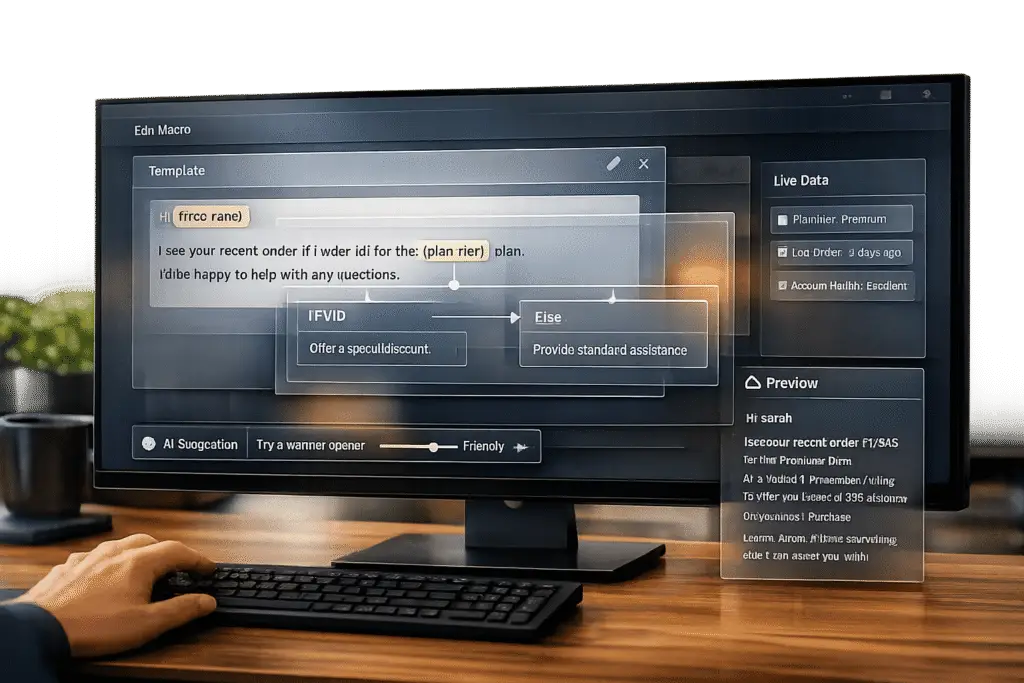
Building macros that save time without feeling robotic boils down to three key practices:
- Personalization: Use placeholders to insert customer-specific details (e.g., name or order info). This makes responses feel tailored, not generic.
- Dynamic Adjustments: Add conditional logic or integrate with tools like CRMs to adapt messages based on customer context (e.g., subscription type or issue severity).
- Conversational Tone: Avoid stiff, formal language. Use simple, friendly wording to make responses sound human and empathetic.
Pro Tip: AI tools can refine macros further by adjusting tone, pulling real-time data, and even suggesting new templates based on past cases. Regularly test and update your macros to keep them relevant and accurate.
Macros are great for repetitive, simple queries like FAQs or order updates but should be avoided for complex or sensitive issues where a personal touch is needed.
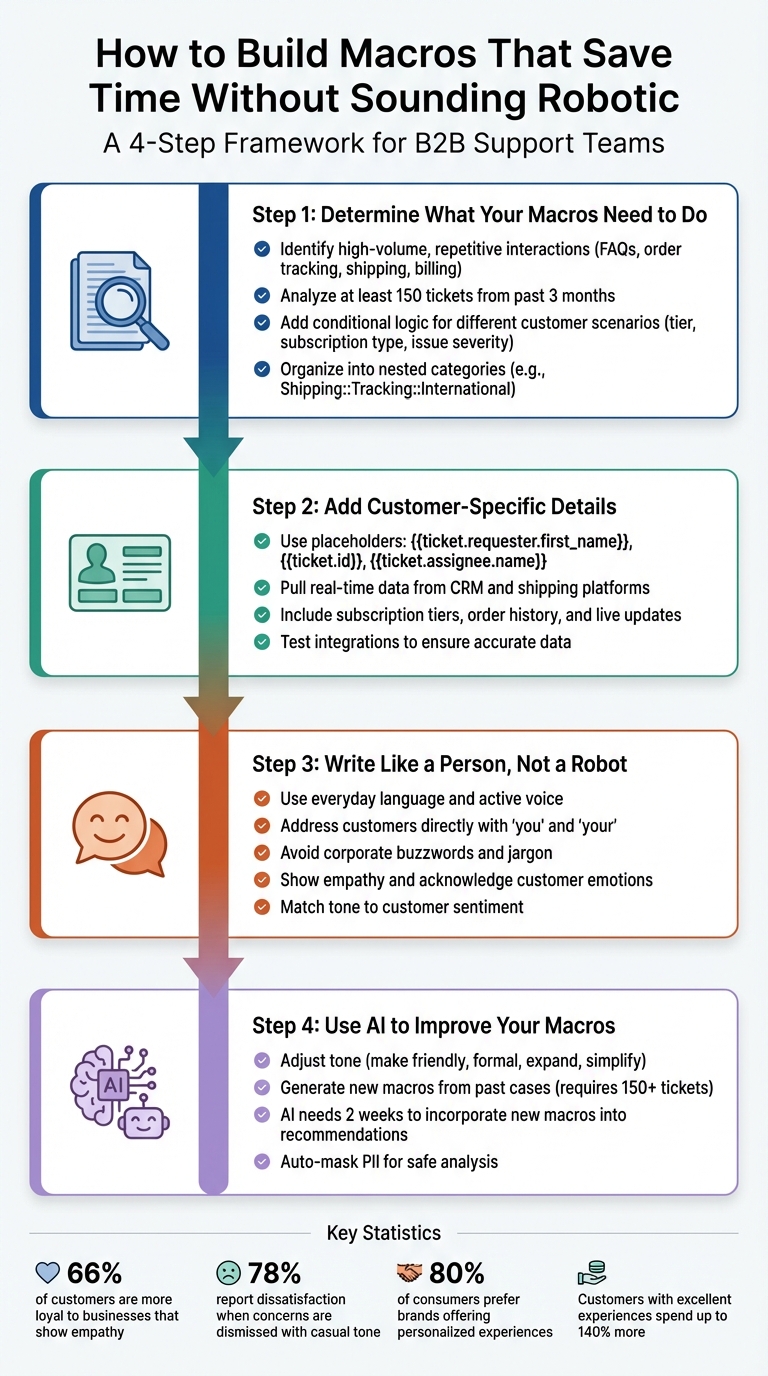
4-Step Process for Building Non-Robotic Customer Support Macros
Step 1: Determine What Your Macros Need to Do
Start by identifying repetitive customer interactions that are perfect for templates. Save the more nuanced, detailed responses for complex cases. The idea is to streamline frequent queries that consume your agents’ time.
Find High-Volume, Repetitive Interactions
Dive into your past ticket data to pinpoint patterns. Focus on straightforward, informational queries – things like refund policies or return instructions. These kinds of requests don’t require in-depth troubleshooting. As Deon Nicholas, President of Forethought, explains:
"The best tickets for macros are informational, like when a customer asks, ‘Do you offer refunds?’ Using macros to resolve action-based tickets — like ‘Please reset my password’ — is not an effective strategy."
Zero in on frequently asked questions. Common examples include order tracking, shipping timelines, billing details, and general FAQs. If your platform uses machine learning, leverage it to analyze agent comments across tickets to uncover patterns that might not be obvious. For this to work effectively, you’ll typically need at least 150 tickets from the past three months. Look for responses that multiple agents are repeatedly drafting – this is a clear sign you’ve found a macro-worthy query.
Once you’ve identified these repetitive interactions, prioritize them by how often they’re used, if your system allows. Organize your macros into nested categories – like Shipping::Tracking::International or Billing::Refunds::Policy – to make it easier for agents to locate the right response quickly.
After narrowing down these high-volume queries, take it a step further by adding conditional logic to make your macros more dynamic.
Add Conditional Logic for Different Situations
Static macros have limitations – they can’t adjust to different customer scenarios. For instance, a refund request from an enterprise client with a custom contract might need a different tone or process than one from a small business on a standard plan. This is where conditional logic comes in. It allows macros to adapt based on specific inputs like customer tier, subscription type, or issue severity.
AI can help pull real-time data from your CRM or order system to tailor responses dynamically. For example, a shipping inquiry macro could check the order status and provide a customized reply depending on whether the package is delayed, in transit, or delivered. Without this kind of flexibility, agents would still need to tweak responses manually, slowing everything down.
Step 2: Add Customer-Specific Details to Each Response
Once you’ve streamlined repetitive queries, the next step is to make your responses more personal by including customer-specific details. Generic greetings or vague responses can feel impersonal, but adding tailored information makes a big difference. Dynamic placeholders are a great way to achieve this without increasing your workload.
Use Placeholders for Customer Information
Placeholders are like shortcuts that automatically insert customer-specific data into your responses. Instead of manually looking up and typing details like names or ticket numbers, placeholders handle it for you. For example, using {{ticket.requester.first_name}} will automatically pull in the customer’s first name, while {{ticket.id}} provides the unique ticket reference number. Boris, CEO of Zendesk Consulting, highlights the value of this:
With placeholders, the agent sends a personalized, accurate message instantly, without needing to look up details manually.
Here’s how placeholders can be used effectively:
| Placeholder Example | Data | Usage |
|---|---|---|
{{ticket.requester.first_name}} | Customer’s first name | Personalized greeting |
{{ticket.id}} | Unique ticket reference number | Reference for customer communication |
{{ticket.ticket_field_<ID>}} | Custom field data (e.g., Order #) | Transaction-specific troubleshooting |
{{ticket.assignee.name}} | Name of the agent handling the ticket | Professional and personalized sign-off |
For tickets marked as "Problem" that impact multiple users, use a backslash before the placeholder (e.g., {{ticket.requester.name}}). This ensures the correct name displays for each linked "Incident" ticket when submitted, rather than when the macro is applied. If certain data isn’t available, leave a manual placeholder like [INSERT DATE] to fill in later.
Pull in Data from Your Systems
You can take personalization a step further by integrating real-time data from your systems. Modern macros can pull live information from tools like your CRM or shipping platforms. This might include subscription tiers (e.g., "Enterprise" or "Pro"), order history, or real-time updates on shipping or bug fixes. For instance, a billing-related macro could automatically include the customer’s account tier, making the response more relevant.
AI-powered integrations enhance this process by using API calls to fetch up-to-the-minute details, like package delivery status or deployment timelines for bug fixes. This reduces the need for agents to switch between tools, ensuring customers get accurate and timely updates. Always test these integrations to confirm they’re pulling the right data.
Step 3: Write Like a Person, Not a Robot
Once you’ve added dynamic data, make sure your macros feel personal and relatable. Use an active voice and address customers directly with words like "you" and "your." For instance, instead of saying, "Firewall settings must be configured…", try something like, "Make sure your firewall allows traffic through ports 80 and 443 so your connection works smoothly."
Use Everyday Language
Ditch stiff, formal phrases in favor of a conversational tone. For example, replace "We shall make every effort to provide you with the assistance you require" with something simpler like, "We’re here to help and will do our best to assist you." Skip unnecessary transitions like "In conclusion" or "To summarize", and swap negative words like "unfortunately" with neutral ones like "currently" to keep things positive and encouraging.
Avoid overused corporate buzzwords and complicated industry jargon. Phrases like "game-changer" or "groundbreaking" can make responses feel impersonal or automated. Instead, stick to straightforward greetings like "Hi" or "Hello", and explain technical steps in plain, easy-to-follow terms. This kind of natural tone helps you connect with customers and shows genuine empathy.
Show You Understand Their Situation
Start by acknowledging the customer’s concern in a brief, empathetic way before jumping into the solution. If someone is upset, recognize their frustration with a single sentence, then focus on resolving the issue.
As Colleen Hall from Zendesk’s Documentation Team puts it:
Customer empathy is always prioritized. For example, if you include a ‘happy tone’ guideline, the system might not follow this instruction if the user is upset.
Tailor your tone to match the customer’s mood. If they seem confused, respond with kindness and reassurance. If they’re frustrated about a service outage, express understanding and explain clearly what steps you’re taking to fix the problem. For tricky technical issues, adopt a patient tone and offer to guide them through the process step-by-step if needed.
Combining dynamic data, personalized details, and a tone that matches the customer’s sentiment ties everything together, making your macros feel truly human.
Step 4: Use AI to Improve Your Macros
Taking personalized and dynamic macros a step further, AI can refine your responses to feel more natural and engaging. It simplifies the process by analyzing context, adjusting tone, and even creating new templates based on successful past interactions. With tools like Supportbench, these AI features are built-in, saving you from the expense of additional software.
Use AI to Adjust Tone
AI makes it easy to tweak your macros to suit the situation. For instance, if a response feels too rigid, the "Make more friendly" feature can rephrase it into a conversational tone that fosters a better connection. A technical reply such as, "The configuration must be updated to resolve the issue", can be transformed into something more approachable: "Let’s update your configuration to fix this." On the flip side, the "Make more formal" option ensures a polished tone for executive-level communication, helping maintain a professional image.
Another handy feature is "Expand," which adds depth to brief templates. For example, a simple "We’re looking into it" could be enriched into, "We’re reviewing your account now and will have an update for you within two hours", setting clear expectations. If clarity is your goal, the "Simplify" tool cuts through technical jargon, making complex instructions easier for customers to understand. These tools allow you to instantly fine-tune responses, ensuring they feel tailored and relevant.
Generate Macros from Past Cases
AI doesn’t just refine existing macros – it can also create new ones by analyzing your ticket history. It identifies patterns in how agents respond and flags commonly repeated replies as candidates for templates. This means your macros evolve based on proven, real-world interactions, ensuring they stay relevant and effective.
For AI to suggest new macros, your system typically needs at least 150 tickets received in the past three months. To recommend existing templates to agents, it requires 100 tickets created in the last nine months where shared macros were applied. Once a new macro is added, it takes about two weeks for the AI to incorporate it into future recommendations. Importantly, the system automatically masks any personally identifiable information (PII), so you can safely analyze past cases without compromising customer privacy.
Supportbench’s AI Agent-Copilot takes things even further by pulling insights from previous cases, internal knowledge bases, and external resources. Instead of relying on static templates, the AI crafts responses that match the customer’s tone, urgency, and history. This ensures every interaction feels personalized, without adding extra work for your team. By refining tone, context, and efficiency, AI becomes a powerful tool to enhance your support operations seamlessly.
sbb-itb-e60d259
Common Mistakes to Avoid When Building Macros
When fine-tuning your macro strategy, it’s important to steer clear of common missteps that can hinder both efficiency and customer satisfaction. While macros are great for straightforward queries – like refund policies or business hours – they fall short when dealing with more complex or emotionally charged situations. Macros work best for simple, repetitive questions, but they can backfire when customers require personalized problem-solving. For instance, when emotions run high, a generic response can feel dismissive. And considering that 66% of customers are more loyal to businesses that show empathy, relying on rigid templates in these cases can erode trust instead of building it.
Another common issue arises when businesses fail to keep their macro library up to date. Policies, products, and promotions change over time, and outdated macros can lead to misinformation. As Stevia Putri from eesel AI highlights:
If macro templates contain outdated information, customers will receive incorrect details about policies, products, or services. This can lead to frustration, increased follow-up tickets, and damage to customer trust.
The time saved by macros is wasted if customers have to reach out again because they were given the wrong information. Keeping macros current avoids this frustration and ensures smoother interactions.
Don’t Use Macros for Complex or Sensitive Issues
One key limitation of macros is their inability to handle nuanced or high-stakes situations. Macros lack the flexibility to adjust tone or context, which can lead to awkward interactions. For example, a cheerful template during a service outage can come across as insensitive. In fact, 78% of customers report dissatisfaction when their concerns are dismissed with a casual tone. For issues like cancellations, complaints, or escalations, personalized responses are essential. These situations demand a human touch to acknowledge specific concerns and demonstrate genuine understanding.
Macros also struggle with action-based requests. Tasks like password resets, account access issues, or technical troubleshooting often require security checks or tailored steps that a pre-written template can’t provide. Deon Nicholas from Forethought explains:
The best tickets for macros are informational… Using macros to resolve action-based tickets – like ‘Please reset my password’ – is not an effective strategy.
In short, macros are great for simple FAQs but should be avoided when judgment, flexibility, or empathy is required.
Keep Your Macros Updated
Regular updates are crucial to maintaining a useful and accurate macro library. Outdated macros not only confuse agents but also risk providing customers with incorrect information. For example, an agent might accidentally use a template referencing a discontinued product or an old pricing model. To prevent this, establish a quarterly review process to audit your macros. This includes removing duplicates, updating outdated content, and tracking performance metrics like customer satisfaction scores or reply rates. Templates that lead to poor outcomes should be rewritten to improve clarity and usefulness. A streamlined, up-to-date macro library ensures agents can quickly find the right responses, giving customers accurate and timely information every time.
Test and Improve Your Macros Over Time
Creating macros is just the beginning. The real magic happens when you test and refine them, ensuring they align with customer needs and adapt to changes in your products.
Test Macros with Real Cases
Start by testing your macros with a small group of agents. This approach helps catch potential issues early and confirms the tone and clarity of your templates. Focus on your top 5–10 most-used macros first, as these are likely to have the biggest impact on team efficiency.
You can also use AI simulations on past tickets to identify trends. For example, if a macro leads to a high reopening rate, it might be too vague or incomplete. This kind of iterative testing ensures your responses remain personal and effective while streamlining the support process.
Finally, set up feedback loops with both agents and customers. These insights will help you adjust and improve your macros over time.
Collect Feedback from Agents and Customers
Beyond testing, direct feedback from agents and customers is invaluable. Assign unique tags to each macro so your support platform can track usage and link it to performance metrics like Customer Satisfaction (CSAT) and First Contact Resolution (FCR). If a macro consistently results in lower CSAT scores or requires multiple follow-ups, it’s a clear candidate for revision.
Encourage agents to flag outdated macros or suggest improvements. Many modern systems even allow agents to dismiss suggested macros and explain why, which helps fine-tune the underlying machine learning models. Nouran Smogluk, People Manager, highlights the value of this process:
Using analytics on your macros means you can… Identify macros that often lead to more replies per ticket or a lower first contact resolution rate. You can then rewrite these and see if there’s an improvement.
Additionally, Forethought suggests ending macros with a friendly note inviting feedback, such as: "If this is not helpful, please respond, and one of my human colleagues will get back to you shortly!". This small touch makes the interaction feel more personal and encourages customers to share their thoughts.
Examples of B2B Macros That Work
Here are some examples of macros that strike the perfect balance between speed and personalization. They show how AI-powered macros can combine efficiency with a human touch to elevate customer interactions.
Example 1: Onboarding New Customers
An effective onboarding macro sets the tone for a positive customer experience. Start with a warm, personalized greeting like, "Hi {{customer.first_name}}, welcome to {{product_name}}!" Follow this with a clear purpose statement, such as: "We want to ensure you’re set up and running smoothly as soon as possible." Then, outline a few key steps for getting started, such as logging in, configuring initial settings, and inviting team members. Include a link to detailed onboarding resources for easy access.
Behind the scenes, automation can handle tagging, task assignments, and status updates to keep the process seamless. Wrap up with a supportive message like, "If you run into any issues, just reply here – we’re happy to help." This method ensures the customer feels guided and cared for, not just processed through an automated system.
Example 2: Troubleshooting Technical Problems
Macros can also simplify technical troubleshooting while maintaining empathy. Start by acknowledging the issue: "I see you’re experiencing trouble connecting to our API." Be transparent about the automated nature of the response, emphasizing that it’s designed to help resolve the issue quickly.
Break the solution into easy-to-follow steps. For example:
- Ensure your firewall allows traffic through ports 80 and 443.
- Check that your API key is active in your dashboard.
- Use our diagnostic tool to test the connection.
Avoid overly technical language – keep it simple and clear. Instead of saying, "Verify TCP/IP configurations are aligned with RFC standards", say, "Make sure your firewall is set to allow traffic through ports 80 and 443 so everything works correctly."
End with a human fallback option, such as:
"If you still need help, feel free to reply, and one of my teammates will assist you shortly!" – Deon Nicholas, President, Forethought
Example 3: Discussing Renewals and Upgrades
When it comes to renewals, macros can be a powerful tool for maintaining relationships while streamlining the process. Start the conversation early – about 60 to 90 days before the renewal date – to avoid last-minute stress. Use dynamic fields to highlight the customer’s success, such as: "Since you started using {{product_name}}, your team has saved {{hours_saved}} hours and reduced support tickets by {{percentage_reduction}}%." These specific metrics make the value proposition feel tangible and tailored.
For accounts in good standing, the macro can suggest a modest upsell or upgrade (e.g., 10–20%). For accounts with lower engagement, the focus should shift to reinforcing the value they’ve already gained. You might also include options like extending payment terms from net 30 to net 45 days or offering early-renewal discounts to make the process smoother.
For example, in January 2025, Falkonry introduced automated renewal workflows that integrated real-time contract utilization metrics. This allowed them to assess the value of their tools before renewals, cutting over $400,000 in annual costs by eliminating unused software and negotiating better terms.
Encourage scheduling a call to discuss their goals further. These examples highlight how macros can deliver quick, efficient responses while still maintaining a personal, customer-focused approach in B2B support.
Conclusion
Creating effective macros hinges on four key elements: personalized placeholders, everyday language, AI-adjusted tone, and continuous refinement. These elements ensure your responses are genuinely helpful and aligned with customer expectations.
AI has completely changed how support teams design and manage macros. Modern tools can pull information from knowledge bases, analyze past cases, and even suggest contextually appropriate responses in real time. They also take over the tedious task of manual ticket reviews, offering automated quality checks for empathy and accuracy. This means your macros stay relevant and consistent with your brand voice – without requiring constant manual updates.
The takeaway? Macros aren’t static tools – they’re evolving resources. Testing them with real-world cases helps identify and fix overly rigid responses. As Nouran Smogluk from Supported Content explains:
The proof is in the pudding. The only way to see how effective macros can be is to create them, use them, and apply your practical experience to continually improve them.
Here’s why this matters: 80% of consumers are more likely to buy from brands that offer personalized experiences, and customers with excellent experiences can spend up to 140% more. Macros directly impact these numbers. When done right, they don’t just save time – they deepen relationships and protect your bottom line.
Start small, test often, and let AI handle the fine-tuning. This approach helps your team respond faster, ensures customers feel valued, and allows your support operations to grow without losing the personal touch that builds loyalty. By adopting these AI-driven practices, you can scale efficiently while keeping customer connections at the heart of your strategy.
FAQs
How can I keep my macros up-to-date and effective?
To keep your macros useful and efficient, it’s important to review and update them regularly. Customer feedback, product updates, and evolving needs should guide these adjustments. Think of macros as adaptable tools that can change with the situation, rather than fixed scripts.
Using AI tools can make this process even smoother. AI can help fine-tune macros by tweaking the tone, simplifying the language, or tailoring responses to fit specific contexts. At the same time, setting clear guidelines for tone and style ensures a consistent voice while still allowing agents to add a personal touch when handling more complex or sensitive interactions.
Don’t forget to track how your macros are performing. Analyze their effectiveness to spot outdated or underperforming templates. This data-driven approach ensures your macros stay relevant, meet customer expectations, and maintain efficiency.
What mistakes should I avoid when creating and using macros?
When designing and using macros, it’s important to aim for responses that fully address customer concerns. A macro should provide enough detail to resolve the issue without leaving the customer confused or forcing them to reach out again. Clear and complete answers go a long way in reducing unnecessary back-and-forth.
Another pitfall to avoid is unnecessarily redirecting customers to other teams. This can lead to delays and frustration. Instead, ensure that your macros are equipped to handle the issue directly whenever possible, keeping the process smooth and efficient.
Finally, avoid creating responses that feel generic or robotic. Customers appreciate a personal touch, so craft macros that are concise, relevant, and written in a conversational tone. Incorporating AI tools can be a great way to refine tone and context, making the interaction feel more natural and tailored to the individual.
How can AI make customer support macros more personalized and natural?
AI takes customer support macros to the next level by tailoring responses to match the context and tone of each interaction. Gone are the days of stiff, robotic replies – AI tools can tweak macros to sound more friendly, formal, or empathetic, depending on the situation. This helps responses feel natural and in sync with the customer’s emotions and needs.
On top of that, AI dives into ongoing conversations and customer data to craft macros that are dynamic and context-aware. These smarter macros might include details from past interactions or use personalized language, making replies more relevant and engaging. The result? Support teams can respond faster, with a human touch, while keeping things efficient and smooth.