


Context switching – frequently shifting between tasks, tools, or tickets – can drain productivity, increase errors, and frustrate both agents and customers. In high-pressure support roles, especially in B2B environments, the effects are magnified. Agents lose focus, spend hours regaining context, and struggle to maintain efficiency. Studies show interruptions can cost up to 40% of productivity, equating to nearly five weeks of work lost annually per employee.
Key Takeaways:
- Impact on Productivity: Switching tasks takes 23 minutes to refocus, with agents spending 3.3 hours daily gathering context.
- Financial Costs: For a 10-person team, this loss can amount to $276,000 annually.
- Customer Experience: 56% of customers report repeating themselves due to fragmented tools.
- Error Rates: Frequent interruptions double task errors and slow resolution times.
Measuring Context Switching:
- Track Switch Frequency: Use tools like RescueTime to log app/tool switches.
- Calculate Refocus Time: Measure time lost per switch (average: 23 minutes).
- Estimate Productivity Loss: Use the formula:
(Switches × Refocus Time) × Hourly Agent Cost. - Assess Team-Wide Impact: Scale individual losses to team size.
- Monitor Quality Metrics: Link switching data to CSAT, error rates, and escalations.
Solutions to Reduce Switching:
- AI Tools: Automate ticket routing and prioritization, generate case summaries, and retrieve knowledge instantly.
- Unified Platforms: Minimize tool toggling by consolidating workflows.
- Workload Balancing: Use predictive analytics to prioritize and distribute tasks efficiently.
By tracking context switching and implementing AI-driven solutions, support teams can reclaim lost productivity, reduce errors, and improve customer satisfaction.
The Cost of Context Switching
sbb-itb-e60d259
How Context Switching Affects Support Operations
Context switching isn’t just a minor inconvenience for support agents – it disrupts the entire workflow. Every time an agent switches between tickets, tools, or communication channels, they lose more than just a few seconds. They have to rebuild the context of the customer’s issue from scratch. This is particularly challenging in B2B support, where multiple stakeholders – like end users, procurement teams, and executives – are often involved. The mental effort required to reset can significantly impact efficiency.
The effects of context switching show up in three key areas: productivity loss, quality issues, and agent burnout. On average, support agents spend 3.3 hours each day just gathering context across multiple tools [2]. That’s nearly half of their workday spent searching for information instead of solving problems. Ticket reassignment adds to the complexity – when about 30% of tickets are transferred, each one comes with an average delay of 15 minutes as the new agent catches up on the issue [2].
This inefficiency doesn’t just frustrate agents – it frustrates customers too. Roughly 56% of customers say they have to repeat themselves because their information isn’t consistent across the tools agents use [2]. These gaps in communication often lead to more escalations. Frontline agents, lacking a unified view of the issue, are forced to pass cases to higher support tiers. The result? Longer resolution times, increased frustration, and a drop in customer satisfaction. Over time, these constant disruptions create a ripple effect that impacts the entire operation.
Main Consequences of Context Switching
The fallout from context switching isn’t limited to slower workflows – it leads to more mistakes and longer task completion times. Studies show that interruptions can increase error rates by 50% and double the time it takes to complete a task [2][5]. These inefficiencies aren’t just frustrating; they highlight deeper problems in the workflow. And when internal productivity suffers, customer experiences take a hit too.
The financial impact is striking. For the average worker, toggling between applications eats up about four hours of productive time every week [2]. On top of that, employees dealing with constant context switching report feeling 43% more tired and 45% less productive [8].
Consider how this plays out in IT support: a technician starts with a ticket, shifts to a chat for additional details, opens a remote tool to troubleshoot, and then returns to the ticket to document the session. Each switch introduces opportunities for errors, information loss, and delays. Without focused attention, agents risk overlooking key details, which can lead to inconsistent responses and longer customer wait times.
Why You Need to Measure Context Switching
If you don’t measure context switching, you can’t address it. The disruptions caused by constant task-switching may feel overwhelming, but without data, they remain intangible. Tracking these costs makes it possible to turn an invisible problem into actionable insights that can drive change.
Measuring context switching shines a light on inefficiencies. Are agents spending 15 minutes per ticket transfer rebuilding context? Does your tech stack force 1,200 app switches every day? These numbers reveal exactly where processes break down and highlight opportunities for improvement. They also help create benchmarks to evaluate whether solutions – like consolidating tools or using AI-driven summaries – are making a difference.
Perhaps most importantly, data makes the case for investment. If context switching costs your team the equivalent of five working weeks per agent each year, that’s a powerful argument for streamlining workflows, integrating platforms, or adopting AI solutions. By quantifying the problem, you transform context switching from an abstract frustration into a strategic priority with measurable returns on investment.
How to Measure Context Switching Costs
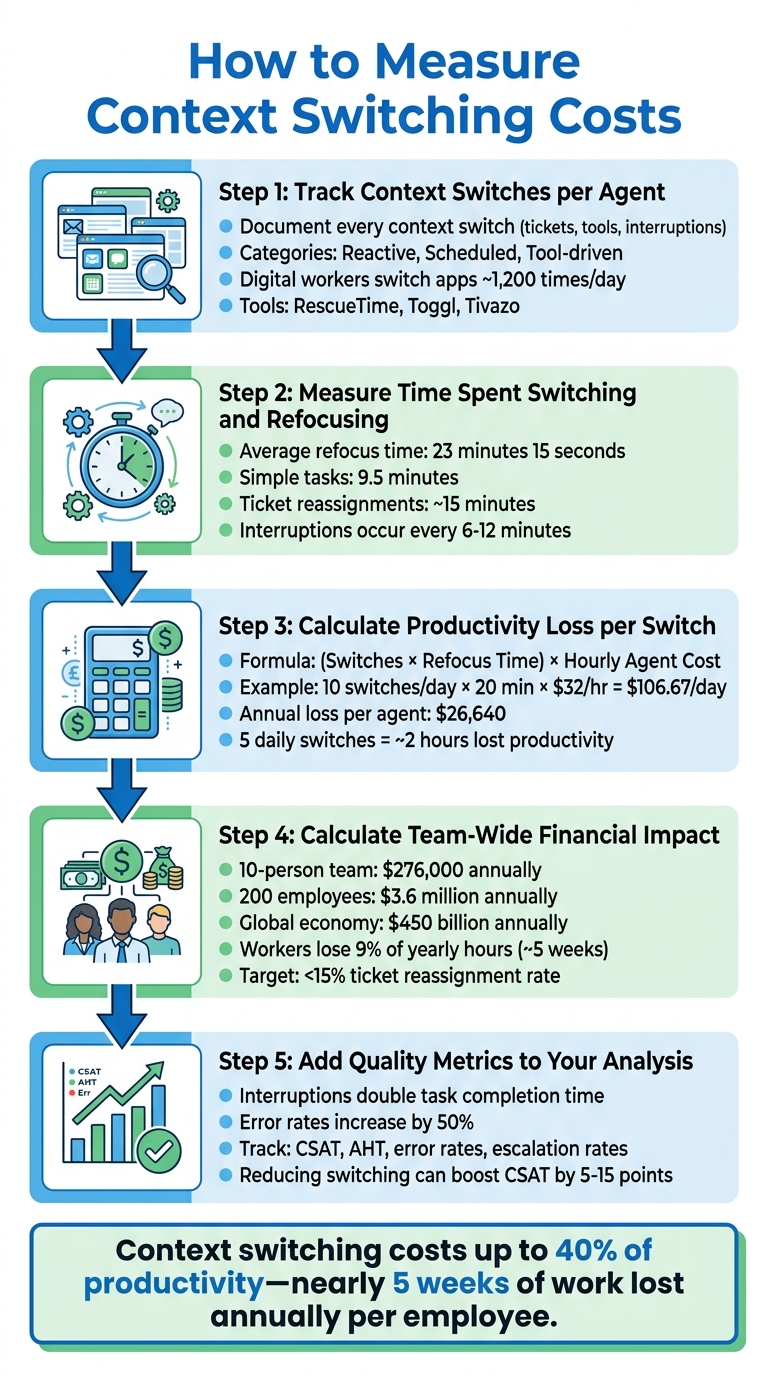
5-Step Framework to Measure Context Switching Costs in Support Teams
Measuring the cost of context switching requires a clear and methodical approach. By identifying how often switches occur and calculating their financial impact, you can uncover inefficiencies that drain time and money in your support operations. Here’s a five-step framework to help you quantify these costs.
Step 1: Track Context Switches per Agent
Begin by documenting every context switch agents make during their workday. This includes moving between tickets, toggling through tools like CRMs, Slack, and email, or responding to interruptions like meetings and messages. Break these into categories: reactive (unexpected interruptions), scheduled (meetings), and tool-driven (switching between systems) [2][10].
Tools like RescueTime, Toggl, or Tivazo can automatically track task-switching frequency and time spent in each application [5][8]. These tools have shown that digital workers switch apps nearly 1,200 times a day [2][9]. If automated tracking isn’t an option, consider manual self-reporting. For example, agents could log their context switches over a week, noting categories like meetings, Slack messages, incident handling, or ticket transfers, and flagging unnecessary interruptions [11].
Step 2: Measure Time Spent Switching and Refocusing
Every switch requires refocusing time. Research shows it takes an average of 23 minutes and 15 seconds to fully regain focus after an interruption [1][5]. For simpler tasks, this refocus time can be closer to 9.5 minutes [8]. Pay attention to time lost after ticket reassignments – often around 15 minutes. Also, track how often workers switch between apps, as interruptions occur every 6 to 12 minutes on average [11].
Step 3: Calculate Productivity Loss per Switch
To estimate productivity loss, use this formula:
(Switches × Refocus Time) × Hourly Agent Cost [9][11].
Here’s an example: If an agent earning $32 per hour experiences 10 switches daily, with each switch requiring 20 minutes to refocus, the daily loss is:
(10 × 20 minutes ÷ 60) × $32 ≈ $106.67 per day – or about $26,640 annually. Even just five daily switches can eat up nearly two hours of productivity [2]. For roles like software development, interruptions can cost 15 to 30 minutes and as much as $108 per incident [5]. These lost hours represent time that could be spent resolving customer issues or improving support workflows.
Step 4: Calculate Team-Wide Financial Impact
Expand this calculation to your entire team. For a 10-person team losing $106.67 per agent daily, the total loss is $1,066.70 per day – adding up to nearly $276,000 annually, assuming 250 workdays. For a mid-sized company with 200 employees, the annual cost of context switching could climb to $3.6 million [9]. On a global scale, context switching is estimated to cost the economy $450 billion annually [5]. Individual workers lose about 9% of their yearly work hours – roughly five weeks – just reorienting after task switches [1][2]. Keep an eye on ticket reassignment rates, too. Rates above 30% suggest a "ping-pong" issue; aim for less than 15%.
Step 5: Add Quality Metrics to Your Analysis
Context switching doesn’t just waste time – it also impacts the quality of work. Frequent interruptions can double task completion times and increase errors by up to 50% [2][5]. Track quality metrics such as Customer Satisfaction (CSAT) scores, error rates, and escalation rates alongside switching data. For instance, monitor Average Handle Time (AHT) to see if frequent switching slows ticket resolution [1][2]. Studies indicate that reducing context switching can boost CSAT by 5 to 15 points [1]. Additionally, account for costs tied to rework and escalations caused by lost focus [1][9]. Together, these metrics highlight how context switching not only drains productivity but also damages customer relationships and increases operational expenses.
Metrics and Benchmarks for Context Switching
Metrics to Track in Support Operations
To understand how context switching impacts support operations, you need to track specific metrics. Start with Average Handle Time (AHT). Tasks interrupted by context switching often take twice as long to complete compared to uninterrupted ones [2]. However, AHT alone doesn’t tell the whole story. If AHT decreases but First Contact Resolution (FCR) also drops, it may mean agents are rushing through tickets, leading to repeat contacts [13]. In fact, 56% of customers report needing to repeat themselves when information across platforms is inconsistent [2].
Another useful metric is Tools Accessed per Ticket, which highlights inefficiencies caused by context switching. If agents need to access a wide range of tools or files for each ticket, it could indicate poor system integration [7]. Similarly, keep an eye on Escalation and Reassignment Rates. Rates above 30% suggest inefficiencies like "ping-ponging" tickets between agents. Ideally, this rate should be under 15% [2]. Implementing AI-powered ticket routing can help maintain these targets by ensuring tickets reach the right agent immediately.
Mean Time to Acknowledge (MTTA) is another critical metric. When agents switch between tools like chat, ticketing systems, and dashboards to gather context, MTTA tends to rise [2]. On average, support agents spend about 3.3 hours daily just gathering context from various tools instead of solving problems [2]. Lastly, track error rates, as tasks interrupted by context switching typically result in twice as many errors [2]. These metrics not only reveal inefficiencies but also highlight the direct impact on productivity.
Once you’ve gathered these metrics, compare them against industry benchmarks to identify areas for improvement.
Industry Benchmarks for Comparison
Industry benchmarks provide a baseline to evaluate your team’s performance and identify whether inefficiencies stem from task complexity or excessive tool switching [13]. For AHT, benchmarks vary by industry. SaaS and software companies average 4–6 minutes, with top performers managing under 3.5 minutes. E-commerce ranges from 5–7 minutes, while financial services, due to compliance needs, average 8–12 minutes. Healthcare support typically takes 10–15 minutes, and telecommunications averages 7–10 minutes [13].
For First Contact Resolution (FCR), aim for a rate between 72–78% across industries [12][13]. Regarding First Response Time, email responses should be under 4 hours, while chat responses should be under 60 seconds [12][2]. Escalation rates should stay between 15–25%, and reopen rates should remain below 10%, as higher rates often indicate agents are rushing due to mental fatigue [12][2].
Context switching can significantly impact productivity, costing up to 40% of an individual’s productive time [2][6][14]. This loss translates to annual productivity costs of $38,000 to $47,000 per employee [7][14]. By using these benchmarks, you can pinpoint where your team is losing efficiency and focus on reducing the costs of context switching.
AI Solutions to Reduce Context Switching
After understanding the cost of context switching, the next logical step is finding ways to reduce it. AI-powered tools can help lighten the mental load on support agents by automating repetitive tasks, instantly surfacing critical information, and intelligently distributing workloads. These tools streamline workflows, making life easier for agents.
Platforms like Supportbench embed these AI features directly into the support process, removing the need for agents to juggle multiple tools. Instead of wasting 3.6 hours per week switching between apps, agents can dedicate more time to resolving customer issues [3]. This shift to AI-driven processes opens the door for better routing, case management, and workload distribution.
Automated Ticket Routing and Assignment
Traditional keyword-based routing often misdirects tickets, especially urgent ones. AI-based intent routing changes the game by analyzing factors like sentiment and urgency to ensure tickets land with the right agent immediately. For instance, a ticket about a "missing package" can be routed to an "urgent/lost" queue instead of a generic "shipping" category, preventing delays caused by unnecessary ticket transfers [17].
AI also pairs tickets with agents based on their expertise and availability. Instead of letting agents pick tickets at random or assigning them tasks outside their skillset, AI evaluates case complexity and assigns it to the best-suited agent [16][17]. This automated triage reduces the time agents spend sorting through their inboxes, allowing them to focus on solving issues, cutting down on the interruptions discussed earlier [3][17].
AI Case Summaries and Knowledge Retrieval
AI-generated case summaries are a game-changer, offering agents a quick snapshot of a customer’s issue, including their previous interactions and the current status. This eliminates the need to manually sift through lengthy email threads or chat logs, enabling agents to dive straight into resolving the problem.
Supportbench’s AI Agent-Copilot takes it a step further by automatically pulling relevant knowledge from past cases and internal documents using knowledge-centric support principles. Phillip Rickett, VP of IT at Fundrise, highlighted its value:
"The killer feature for us was that it could effortlessly learn and capture knowledge that our team creates every day in Slack… our team can answer questions while the AI continuously learns" [15].
With this integration, agents no longer need to jump between the ticketing system and external knowledge bases. Everything they need is right in front of them, reducing the 23-minute refocusing time lost with each context switch [3].
Workload Balancing and Predictive Analytics
AI doesn’t just make work faster; it makes it smarter. By predicting which cases are likely to escalate, AI helps agents prioritize tasks before they become bigger problems. Supportbench’s AI Predictive CSAT and AI Predictive CES tools analyze case histories to forecast customer satisfaction and effort scores, giving managers the chance to step in early and prevent disruptions.
AI also ensures balanced workloads. By analyzing real-time data on skills, capacity, and availability, it evenly distributes cases across the team [18]. Companies using AI-driven workload balancing have reported a 27% increase in DevOps productivity and up to 43% savings in operational expenses [19]. Instead of manually reassigning tickets during busy periods, AI adjusts workloads automatically, keeping agents focused and minimizing context switching. This proactive approach not only reduces interruptions but also supports a more efficient and seamless support operation.
Conclusion
Context switching can sap up to 40% of productivity – equivalent to nearly five work weeks lost per year[1][2][5]. This loss directly affects support teams, leading to longer handle times, more errors, and increased operational expenses.
The first step in tackling this issue is recognizing its impact. Measuring context switching helps identify its root causes, such as fragmented workflows and an overload of tools[1][4]. By tracking how often agents switch tasks, calculating the time lost in refocusing, and quantifying the financial toll, you can build a strong case for investing in AI and unified platforms. The five-step process outlined earlier provides a clear roadmap to pinpoint inefficiencies and calculate the stakes.
With these insights, AI-driven solutions become a practical way forward. Automated routing ensures that cases are directed to the right agent immediately, while AI-powered summaries and knowledge retrieval cut down on time wasted searching through multiple systems. Workload balancing tools help prevent bottlenecks, enabling teams to focus on resolving issues effectively. As McKinsey puts it:
"The organizations seeing the biggest performance improvements are not just automating tasks with AI – they are fundamentally reimagining processes and workflows"[1].
The results speak for themselves. Teams that minimize context switching often see Average Handle Time drop by 20–30%, error rates decrease by half, and CSAT, CES, and NPS scores rise by 5–15 points[1][2][5]. They also avoid the steep $10,000–$20,000 cost of replacing burned-out agents[1]. By auditing workflows, identifying wasted time, and piloting AI tools to unify data sources, your support operations can shift focus to what truly matters: delivering outstanding service.
FAQs
What counts as a “context switch” in support work?
A “context switch” in support work occurs when an agent shifts their attention between different tasks. This could mean jumping from one support ticket to another, toggling between tools, switching communication channels, or navigating through knowledge bases. These transitions can break an agent’s focus and add to their mental workload, which often leads to decreased productivity and efficiency. Reducing context switching is a key way to ease these challenges and boost team performance.
How can I measure context switching without invasive monitoring?
Tracking context switching doesn’t have to involve intrusive monitoring. Instead, focus on metrics like average handle time (AHT), resolution times, and the number of tool interactions per ticket. These can highlight inefficiencies in workflows without singling out individual team members.
Another useful approach is examining refocus time – the average time it takes to regain focus after an interruption, which research suggests is often around 23 minutes. By studying this, you can estimate how much context switching impacts productivity.
Aggregated activity logs are also valuable. They can uncover workflow bottlenecks and help you calculate the cost of frequent task-switching. This method provides actionable data while respecting privacy, offering a balanced way to improve efficiency.
Which metrics prove context switching is hurting CSAT and resolution time?
Metrics that reveal how context switching affects Customer Satisfaction (CSAT) and resolution time include:
- Increased Average Handle Time (AHT): Frequent switching forces agents to spend more time recalibrating and catching up, dragging out the time it takes to handle each case.
- Higher Error Rates: Switching between tasks can lead to mistakes, such as missing key details or making incorrect updates.
- More Repeat Contacts: Errors and incomplete resolutions often result in customers needing to follow up, which not only frustrates them but also adds to the workload.
These inefficiencies create a ripple effect. Agents lose focus, responses slow down, and mistakes pile up – all of which directly impact CSAT and stretch out resolution times. Customers end up waiting longer, and their trust in the service diminishes.
Related Blog Posts
- How to Reduce Support Costs Without Cutting Service Quality
- Cost Per Ticket Analysis: How to Lower Costs Without Cutting Headcount
- Justifying the Switch: How to Prove Tool Inefficiency to Leadership
- How to quantify “time lost to tool friction” in support teams
Evaluating help desks for a B2B team?
Supportbench is all-inclusive from $32 per agent per month, with migration and onboarding included. See pricing or book a 20-minute demo.






