


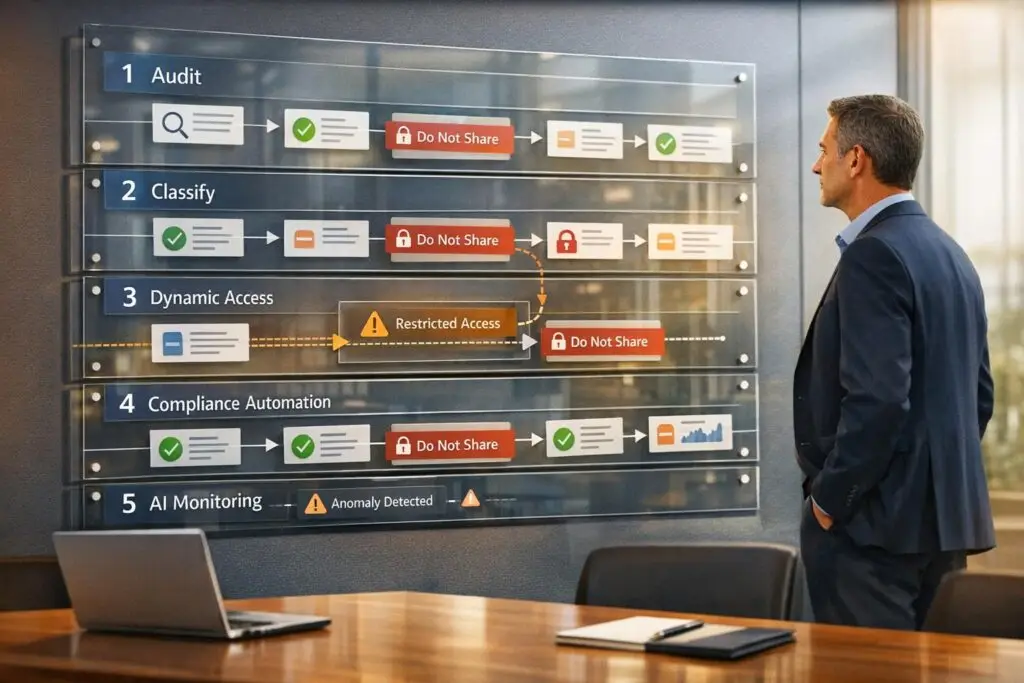
Enterprise data often contains sensitive information like personal details, payment data, or even health records. Mishandling this data – especially when using AI – can lead to compliance risks, breaches, and hefty penalties. Managing "do not share" rules effectively requires a proactive, structured approach. Here’s how you can safeguard sensitive information:
- Audit Your Data: Identify, categorize, and map sensitive data across all systems, including unstructured sources like emails and chat logs.
- Enforce Access Policies: Use role-based and dynamic permissions to limit data access based on roles, tasks, and contexts.
- Automate Compliance: Build workflows for opt-out requests, data deletion, and lifecycle management to avoid manual errors.
- AI for Monitoring: Employ AI to detect violations, assign risk scores, and prevent sensitive data from appearing in outputs.
- Train and Audit: Regularly train your team and conduct access reviews to prevent issues like permissions drift and shadow AI risks.
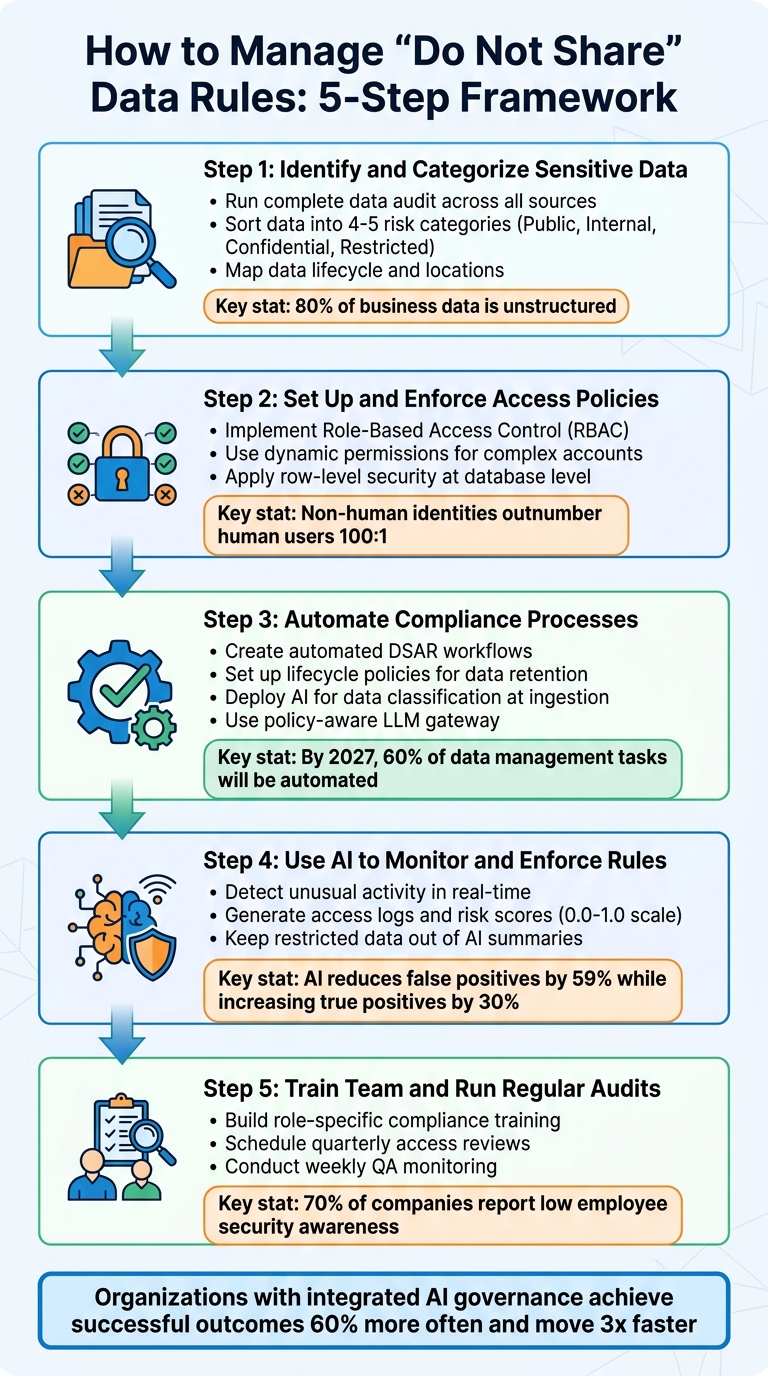
5-Step Framework for Managing Enterprise Do Not Share Data Rules
How Can Enterprises Secure AI When Data Moves Faster Than Humans Can Track?
sbb-itb-e60d259
Step 1: Identify and Categorize Your Sensitive Data
To enforce "do not share" rules effectively, you first need a clear picture of what data you have and where it resides. This means conducting a thorough audit of all data sources, including support tickets, chat logs, and internal documentation.
Run a Complete Data Audit
Start by inventorying all your data sources, even unstructured ones. This includes on-premises servers, cloud storage, SaaS tools like Slack and Jira, APIs, shared drives, and communication platforms [7]. Pay special attention to unstructured data – like PDFs, Word documents, emails, and chat logs – since about 80% of business data exists in these formats, often posing the highest risks [2][5].
Don’t overlook metadata and access logs during your audit. These can contain sensitive details and show who accessed specific data and when [9]. As Concentric AI highlights:
"You can’t protect what you can’t identify – and most organizations can’t identify half of what’s sitting in their environment" [5].
Once your audit is complete, the next step is to classify your data based on its risk level.
Sort Data by Risk Level
Organize your data into 4–5 clear categories to avoid confusion among employees. A common structure might include Public, Internal, Confidential, and Restricted [5][7]. High-risk data – like payment information, government IDs, or health records – needs encryption (both at rest and in transit), strict role-based access controls, and continuous monitoring. Lower-risk data, such as training materials or press releases, can be managed with simpler measures like baseline logging and SSO.
Assign specific roles – Data Owner and Data Steward – to each category. These individuals ensure labels are accurate and handle alerts, creating accountability within your organization [7]. Aatish Mandelecha, Founder of Strac, emphasizes:
"A data classification matrix is more than a compliance checkbox; it’s a risk mitigation engine for the entire organisation" [7].
Map Where Data Lives
Trace the lifecycle of your sensitive data, from how it’s ingested (via forms, APIs, or event streams) to where it’s stored (data warehouses, lakes, or vector databases) and how it’s processed (ETL pipelines, AI embeddings, or fine-tuning) [9]. Be sure to include AI-specific locations like model registries, orchestration platforms, training snapshots, and prompt/output logs [8]. Don’t forget about exfiltration risks in less obvious places like caches, backups, and third-party vendor systems [2][8].
To better understand your workflows, create visual data lineage maps for critical processes – like your AI-powered support assistant. These maps can uncover dependencies and potential vulnerabilities [8]. Update your audit quarterly or after major changes within your organization to account for "data drift" [5][7]. Regular reviews ensure your map reflects the current state of your data, not an outdated snapshot from months ago.
A precise understanding of where your data lives and how it flows sets the stage for dynamic access controls and automated compliance in the next steps.
Step 2: Set Up and Enforce Access Policies
Managing access effectively starts with enforcing least-privilege policies – granting only the permissions necessary to perform specific tasks.
Set Up Role-Based Access Controls
Role-Based Access Control (RBAC) organizes permissions based on job roles rather than individuals. For instance, a support agent might only have "viewer" access to customer tickets, while a billing specialist could have "editor" access to payment records. This method helps create clear boundaries and reduces the chances of accidental exposure.
For more intricate setups, consider layered classifications that factor in vertical (data sensitivity), horizontal (departmental scope), and temporal (time-based) dimensions [10].
It’s also crucial to avoid shared service accounts, which can obscure user attribution [11]. Instead, create distinct identities tailored to specific tasks (e.g., "Refund Worker" or "Account Access Worker") with only the permissions required for their roles [3].
Use Dynamic Permissions for Complex Accounts
Managing enterprise accounts often involves balancing the needs of multiple stakeholders. For example, a vendor partner might need access to support tickets related to their product integration but should not see billing issues or internal escalations. Dynamic permissions solve this by adjusting access in real-time based on context.
Implement a delegated identity model that uses short-lived, scoped tokens embedding the user’s identity. This ensures access is granted only for authorized actions [10]. Alarmingly, about 68% of organizations struggle to distinguish between human and AI agent actions in their access logs, making this approach critical for accountability [10].
To enforce these permissions, use pre-retrieval metadata filters and fine-grained post-retrieval checks. For instance, if an AI assistant searches for customer data, it should first filter results by the user’s department and then exclude any information restricted by "do not share" rules. At the database level, apply row-level security (RLS) to ensure unauthorized rows can’t be accessed, even if queried [10].
By combining static RBAC with dynamic permissions, you can significantly reduce risk while preparing for AI-driven operations.
Comparison: Role-Based vs. Open Access
When comparing RBAC to open access, the difference in security impact is stark. With open access, a single compromised credential could expose your entire database. RBAC, on the other hand, limits the damage to the specific role’s permissions.
| Feature | Traditional RBAC | Open/Broad Access | Agent-Aware Permissions |
|---|---|---|---|
| Assignment | Static roles (admin, editor, viewer) | Shared credentials | Dynamic, context-dependent scoping |
| Identity | Clear human identity | Obscured/Shared | Delegated user identity |
| Enforcement | Enforced at the UI or API gateway | Minimal/None | Propagated through the entire pipeline |
| Risk Level | Moderate | High | Controlled via least privilege |
In modern enterprises, non-human identities – such as service principals, API tokens, and autonomous agents – outnumber human users by roughly 100 to 1 [10]. This makes agent-aware permissions, which extend access controls across the entire data pipeline, indispensable for secure, AI-driven operations.
As Ameya Deshmukh, Director of Customer Support, aptly states:
"The real security question isn’t ‘Is AI safe?’ It’s ‘Is this AI implementation designed to prevent leakage, misuse, and unauthorized actions?’" [3].
The foundation of secure operations lies in treating every identity – whether human or machine – as a potential risk that must be carefully scoped and monitored.
Step 3: Automate Your Compliance Processes
Handling compliance manually just doesn’t cut it when you’re managing hundreds of enterprise accounts. Relying on spreadsheets and email chains often leads to compliance gaps. The smarter approach? Build automated workflows to handle opt-out requests, retention schedules, and data deletion without constant human intervention.
Create Automated Compliance Workflows
Automating Data Subject Access Requests (DSARs) is a game-changer. You can streamline the process by automating identity verification, searching across all data repositories (like CRM systems and support logs), and generating structured reports or deletion proofs. This eliminates the need for time-consuming manual checks [14][15].
Another key step is setting up lifecycle policies. For example, you could automatically archive or delete data based on its age and sensitivity. Let’s say raw AI prompts are moved to archival storage after 7–30 days, while decision evidence is retained for 6–24 months [14]. Keep in mind that standard soft-delete mechanisms often remove data from active systems but keep it in backups for about 30 days. Plan your workflows to account for this [15].
If you’re dealing with annotated messages used for AI training, you’ll need a separate "untrain" action beyond the usual deletion APIs [15]. Make sure to integrate this step into your workflows to avoid compliance gaps.
When rolling out AI agents to assist with compliance, start by deploying them in a non-blocking mode. This lets you flag potential violations without enforcing actions right away, giving you time to validate accuracy and reduce false positives. According to Gartner, by 2027, 60% of data management tasks will be automated, and 75% of new data flows will be created by non-technical users [12]. Automating now helps you stay ahead of the curve.
Once you’ve got workflows in place, take it a step further by using AI to classify and protect data as it enters your system.
Leverage AI for Data Classification
AI can make sense of unstructured data like support tickets, PDFs, and chat transcripts by applying semantic intelligence to understand the context [5][16]. Automate the process of discovery and tagging at the point of ingestion, assigning labels for sensitivity (such as PII or PHI), purpose (like support or billing), and legal residency [9].
Keep your classification system simple – stick to 4 or 5 levels (Public, Internal, Confidential, Restricted). This minimizes human error and ensures consistency. As Mark Stone, Senior Technical Writer at Concentric AI, explains:
"A classification policy is the best way to protect your information. When classification works, everything downstream works. When it doesn’t, everything downstream is guessing" [5].
For AI-powered operations, consider contextual redaction. This process removes sensitive details from free text before it reaches your vector store or large language model (LLM). By using deterministic tokenization, you can replace raw identifiers like emails, phone numbers, or account IDs with consistent tokens. This ensures your analytics can run without exposing sensitive information [9][13]. Plus, it prevents your AI from accidentally repeating personal details in future responses.
Another safeguard is deploying a policy-aware LLM gateway. This tool scans both prompts and outputs in real time, applying actions like masking, throttling, or blocking when sensitive data is detected [9][16]. Considering that over 50% of employees use generative AI tools without prior security approval [16], this gateway is crucial. It ensures that even if someone pastes restricted data into a prompt, the information won’t leak into model outputs or training datasets.
Here’s how automation stacks up against manual governance:
| Feature | Manual Governance | AI-Driven Governance Enforcement |
|---|---|---|
| Response Time | Days or weeks (due to review cycles) | Milliseconds (real-time blocking) |
| Coverage | Limited (sampling or high-priority assets) | Comprehensive (all monitored assets) |
| Scalability | Linear (requires more staff) | Exponential (scales with software) |
| Action | Passive (tickets/emails) | Active (block, fix, rollback) |
Automating your compliance processes not only saves time but also ensures better coverage and faster responses. It’s a win-win for staying compliant while scaling your operations.
Step 4: Use AI to Monitor and Enforce Rules
After automating your compliance workflows, the next step is integrating AI to actively monitor and enforce your "do not share" policies in real time. Unlike traditional governance methods, which rely on periodic manual checks, AI enables real-time enforcement, addressing violations as they occur. This real-time capability strengthens your overall data governance strategy by combining automated workflows with proactive risk management [12].
Detect Unusual Activity with AI
AI continuously analyzes metadata, access logs, and data lineage to detect and address policy violations the moment they happen. For example, if a system tries to store personally identifiable information (PII) in an unsecured location, AI can step in and block the action immediately [12].
Beyond immediate violations, AI also identifies subtle, incremental changes – often referred to as "drift" – that traditional methods might miss. This could include renaming a column from "email" to "contact_string" or patterns indicating a gradual expansion of data access [12]. Using natural language processing (NLP) and pattern recognition, AI can pinpoint sensitive data like Social Security numbers, credit card details, or health information hidden within unstructured data like logs or conversation text [4].
To ensure accuracy and minimize disruption, start by deploying AI agents in shadow mode, where they flag violations without taking action. This allows you to fine-tune the system and reduce false positives before enabling active enforcement [12].
Generate Access Logs and Risk Scores
AI doesn’t just monitor activity – it also quantifies risk. Effective AI monitoring captures not only the events but also the reasoning behind enforcement actions. For instance, audit logs should document why specific actions, such as redacting or blocking data, were taken. This is especially crucial in regulated sectors. For example, HIPAA mandates that all access to Protected Health Information (PHI) be logged and retained for six years [4].
AI assigns risk scores by evaluating factors such as user role, data sensitivity, query intent, IP reputation, and device compliance [16][17]. Adaptive AI models can significantly improve detection accuracy, reducing false positives by 59% while increasing true positives by 30% [17]. Scores are typically normalized on a scale from 0.0 to 1.0, with thresholds indicating Low (0.0–0.3), Moderate (0.3–0.6), or High (0.6–1.0) risk levels. These thresholds can trigger automated investigations [17].
Here’s how different factors influence risk scores:
| Risk Factor | Condition | Impact on Risk Score |
|---|---|---|
| User Privilege | Admin vs. Guest | Multiplier (e.g., 1.1x for low-privilege users) |
| Activity Type | File deletion vs. creation | High impact (+8) vs. Low impact (+2) |
| IP Reputation | Unknown or blacklisted IP | Significant increase (+5) |
| Business Hours | Activity outside 9 AM–5 PM | Moderate increase (+5) |
| Device Compliance | Non-compliant device | Moderate increase (+5 per device) |
To refine these models, establish a feedback loop where analysts can adjust AI-generated risk scores. These adjustments can retrain the AI, aligning its actions with your organization’s specific risk tolerances [17]. For systems using Retrieval-Augmented Generation (RAG), log details on which data chunks were accessed, authorized, or filtered out. This helps troubleshoot "missing" answers without exposing sensitive data [10].
Keep Restricted Data Out of Summaries
AI tools must also ensure that restricted information doesn’t appear in generated summaries. One major risk is that sensitive data could accidentally slip into outputs. To prevent this, implement pre-retrieval filtering, where data chunks are tagged with permission metadata (e.g., classification level or department) during ingestion. This ensures only authorized data is retrieved and processed [10].
For more complex permissions, use a hybrid filtering approach. Combine broad pre-retrieval filters (like "Internal" vs. "Public") with fine-grained checks after retrieval [10]. Automated PII detection and masking can scan for sensitive details like names, emails, and account numbers, and tokenize this data in logs and summaries [12][4]. Additionally, configure AI to clear sensitive data from its context once a session ends, preventing leaks into future interactions [4].
For high-risk scenarios, AI-generated summaries can be posted as "internal notes" first, allowing human review before sharing with customers [1]. As Antonella Serine, Founder of KLA Digital, notes:
"Prompt instructions are mistaken for controls: telling a model ‘do not send payments’ is not enforcement" [11].
Finally, use the delegated identity pattern, where the AI temporarily assumes the user’s identity through short-lived tokens. This ensures logs accurately reflect the actual requester, rather than a generic service account with excessive access permissions [10].
Step 5: Train Your Team and Run Regular Audits
While automated controls are a great start, they’re not enough on their own. Training your team and conducting regular audits are critical steps to guard against permissions drift. Even the best technology relies on human oversight to fill in the gaps. Here’s a striking fact: 70% of companies report low employee security awareness, and 77% admit they’re falling short when it comes to AI data security[2][8]. The takeaway? Better tools alone won’t solve the problem – you need better training and consistent checks.
Build a Compliance Training Program
Training needs to be tailored to specific roles, focusing on how to handle restricted data and what to do when violations occur. For example, support agents should know how to identify and classify sensitive data like personally identifiable information (PII), protected health information (PHI), and financial records before allowing AI tools to process it[3].
To avoid shadow AI – where employees use unapproved tools for sensitive tasks – don’t just issue warnings. Instead, offer efficient, approved alternatives that meet their needs. As Ameya Deshmukh, Director of Customer Support, puts it:
"The strongest support organizations don’t rely on ‘please be careful’ guidance – they bake constraints into workflows, permissions, and data handling"[3].
Training should also reinforce the principle of least-privilege access. Employees need to understand why their access is limited and why expanding it requires formal approval. This also ties into compliance with regulatory logging requirements. To streamline governance, appoint a Data Protection Officer (DPO) to oversee AI-related policies and handle complex issues[3][4].
By building this kind of training program, you’re laying the groundwork for effective audits, which are the next piece of the puzzle.
Schedule Regular Access Reviews
Quarterly access reviews are a must for staying ahead of permissions drift. These reviews help identify issues like former employees still having active credentials, contractors retaining access after their projects are done, or AI models operating without updated controls[2].
Make sure to audit everything – production systems, backups, development environments, and any third-party tools[18]. For AI-powered support systems, it’s especially important to confirm that audit logs document exactly which knowledge base articles or policies were referenced for each response. This ensures the AI isn’t pulling information from restricted sources[13].
Here’s a quick breakdown of how to structure your audit schedule:
| Audit Component | Frequency | Key Focus Area |
|---|---|---|
| Access Reviews | Quarterly | Check RBAC (role-based access control) and remove access for former employees. |
| QA Monitoring | Weekly | Review AI-customer interactions for compliance with policies. |
| Vendor Assessment | Annual/Post-Update | Evaluate SOC 2 reports and data handling practices of AI providers. |
| DPIA | Per Use Case | Examine risks for high-impact AI processing, like health or financial data. |
| Compliance Testing | Continuous | Detect unauthorized data access or prompt leakage in real time. |
In addition to these scheduled reviews, it’s smart to simulate attack scenarios regularly. These exercises can uncover hidden vulnerabilities and help fine-tune your incident response plans[3]. By keeping up with audits and readiness drills, your compliance framework can adapt to new challenges as they arise.
Common Mistakes to Avoid
Even with solid policies and training in place, companies often falter when managing "do not share" rules. Here are some common missteps and how to address them.
Collecting More Data Than Necessary
Support teams often gather more customer data than needed, which increases the risk of breaches and makes compliance much harder.
Consider this: employees paste data into non-corporate AI accounts 14 times a day on average, with at least 3 of those pastes containing sensitive information[22]. On top of that, 63% of organizations lack AI governance policies[22]. Breaches involving "shadow AI" – where employees use unsanctioned tools – cost an additional $670,000 on average, bringing the total breach cost to $4.63 million[22].
The solution? Data minimization. Only collect what’s absolutely required for a task. For instance, if a support agent doesn’t need a full credit card number to issue a refund, use tokenization or masking to protect the data.
Ameya Deshmukh, Director of Customer Support, highlights the importance of secure AI practices:
"The real security question isn’t ‘Is AI safe?’ It’s ‘Is this AI implementation designed to prevent leakage, misuse, and unauthorized actions?’"[3]
To tighten data practices, document all personally identifiable information (PII) in your data catalogs with clear usage notes, like "Email collected for delivery notifications only"[21]. Set up automated deletion schedules to remove outdated data[6]. Regularly audit your AI tools to identify potential leaks through unsanctioned software[22]. AI-driven classification tools can also help enforce these protocols.
Another frequent issue lies in outdated access controls.
Failing to Revoke Access for Former Employees
Former employees can pose a serious security threat if their access isn’t revoked immediately. Whether intentional or accidental, they might leak or misuse sensitive data. For instance, an IT admin could exploit their access, or a salesperson might unknowingly email confidential information to the wrong recipient[20].
Even without malicious intent, lingering access to shared resources or unsanctioned tools creates vulnerabilities. Automating access revocation is critical. Tools that continuously scan for misconfigurations and shut down risky connections in real time can help[20]. Use role-based access controls to simplify offboarding and eliminate shared credentials entirely. Each user or AI worker should have a unique identity for better accountability through audit logs[3].
Snowflake emphasizes the importance of proactive measures:
"The job will only get tougher as your data volumes climb and threats evolve. Point-in-time fixes or once-a-year audits won’t cut it."[20]
Perform regular access reviews to catch any overlooked accounts and enforce the principle of least privilege (PoLP) to limit exposure if an account is compromised[20].
Beyond internal practices, external vendors introduce their own challenges.
Overlooking Risks from Third-Party Vendors
Third-party vendors can be just as risky – or even riskier – than internal users. If a vendor mishandles your sensitive data, your compliance efforts could be jeopardized.
Too many companies treat vendor security as a formality, collecting a SOC 2 report once a year without further follow-up. Instead, verify that vendors actively monitor access, enforce encryption, and maintain detailed audit logs. Request evidence of their data handling practices, and ensure contracts clearly define data ownership, usage restrictions, and breach notification requirements.
Pay close attention to shadow AI risks with vendors. If your team uses a third-party AI tool, confirm that it’s an enterprise-tier version where customer data is not used for model training[22]. A cautionary tale: In 2023, Samsung employees leaked sensitive data – including semiconductor source code and confidential meeting recordings – by pasting it into ChatGPT. Because they used the public version of the tool, the data was retained for training purposes, leading Samsung to ban generative AI tools company-wide[19].
To avoid similar incidents, require vendors to use dedicated business AI tiers where data is isolated and not used for training. Conduct annual vendor assessments – or more frequent reviews after major updates – and use Data Protection Impact Assessments (DPIAs) for high-risk data processing like financial or health information[3]. Remember, even when data leaves your environment, you’re still responsible for its security.
Conclusion
To truly safeguard sensitive data, organizations need to adopt a disciplined, ongoing compliance framework. Managing "do not share" data rules isn’t a one-and-done task – it demands constant vigilance and structured oversight. The five key steps – auditing and categorizing data, enforcing dynamic access policies, automating compliance workflows, deploying AI monitoring, and continuous team training – create a comprehensive path to secure operations. Together, these steps form a practical, scalable approach to protecting sensitive information.
A critical component of this framework is the shift from static role-based access to Purpose-Based Access Control (PBAC). Unlike traditional methods, PBAC ensures that data is accessed only for specific, consented business activities. This is especially important given that roughly 80% of business data is unstructured, including support transcripts and call recordings that often harbor sensitive details[2].
Steps 3 and 4 highlight how integrating governance into data and AI processes can yield significant benefits. Organizations that embrace these practices achieve successful outcomes 60% more often and move three times faster[2]. Tools like automated data classification, real-time consent syncing, and tamper-evident audit logs make it possible to scale AI-powered support securely without compromising on compliance.
"The real security question isn’t ‘Is AI safe?’ It’s ‘Is this AI implementation designed to prevent leakage, misuse, and unauthorized actions?’"[3]
The solution lies in treating AI systems as governed entities. This includes scoped identities, progressive disclosure of sensitive data, and human oversight for critical actions. By implementing these safeguards, enterprises can scale AI support operations securely and cost-effectively.
With 90% of large enterprises investing an average of $6.5 million annually in AI[2], the need for robust controls has never been greater. Establishing these measures now not only protects sensitive data but also builds customer trust, enabling organizations to deliver modern, AI-driven support with confidence and compliance at the forefront.
FAQs
What counts as “do not share” data in enterprise support?
In enterprise support, "do not share" data refers to sensitive or restricted information that needs to be safeguarded against unauthorized access or distribution. This can include:
- Personally Identifiable Information (PII): Names, addresses, payment details, or other data that can identify an individual.
- Proprietary Business Data: Confidential company information, trade secrets, or internal strategies.
- Regulated Information: Data governed by laws like GDPR or CPRA.
Protecting this type of data involves implementing strict access controls, using encryption, and following compliance workflows. These measures help prevent data breaches, privacy violations, and potential regulatory penalties.
How can we prevent AI from exposing restricted data in responses?
To keep AI from revealing sensitive data, it’s crucial to put strong data governance practices in place. Start by using data redaction and masking techniques to anonymize any confidential information. Implement strict access controls to restrict who can view the data, and apply encryption to safeguard it during storage and transmission.
Regular audits of AI systems are a must, along with deploying security tools such as anomaly detection to catch unusual activity. Additionally, make sure vendor contracts clearly prohibit any unauthorized data sharing. These measures work together to protect sensitive information and ensure compliance with regulations.
How can we prove compliance during a customer or regulator audit?
To stay prepared for audits, it’s crucial to keep detailed, auditable records of your data governance practices. This includes tracking how data is accessed, used, and shared. Using immutable audit trails can help ensure these records remain tamper-proof and reliable.
Make sure to document key processes such as data classification, consent management, and purpose limitations to demonstrate alignment with regulations. Regular audits of controls, vendor agreements, and security protocols are essential. Additionally, leveraging AI tools for continuous monitoring and automated compliance checks can enhance your overall audit readiness.






