



Building a contact governance model ensures clear rules for customer communication, avoiding overlaps, mixed messages, and inefficiencies across teams. This is especially crucial for enterprise accounts, where multiple stakeholders interact with the same customers. Here’s a quick summary of the key steps:
- Define Stakeholders and Roles: Map internal and external stakeholders, then assign clear responsibilities using tools like the RACI framework to avoid confusion and duplication.
- Set Permissions: Use a role-based access control (RBAC) system to limit data access and reduce security risks. Focus on object, record, and field-level permissions.
- Establish Escalation Paths: Create structured workflows with defined triggers and response timelines to handle issues efficiently.
- Leverage Tools and Automation: Implement CRM and AI tools to enforce rules, streamline processes, and maintain compliance.
- Track Performance: Use metrics like response times, escalation rates, and customer satisfaction to refine and improve governance over time.
This framework ensures consistent, secure, and efficient communication while maintaining customer trust and operational clarity.
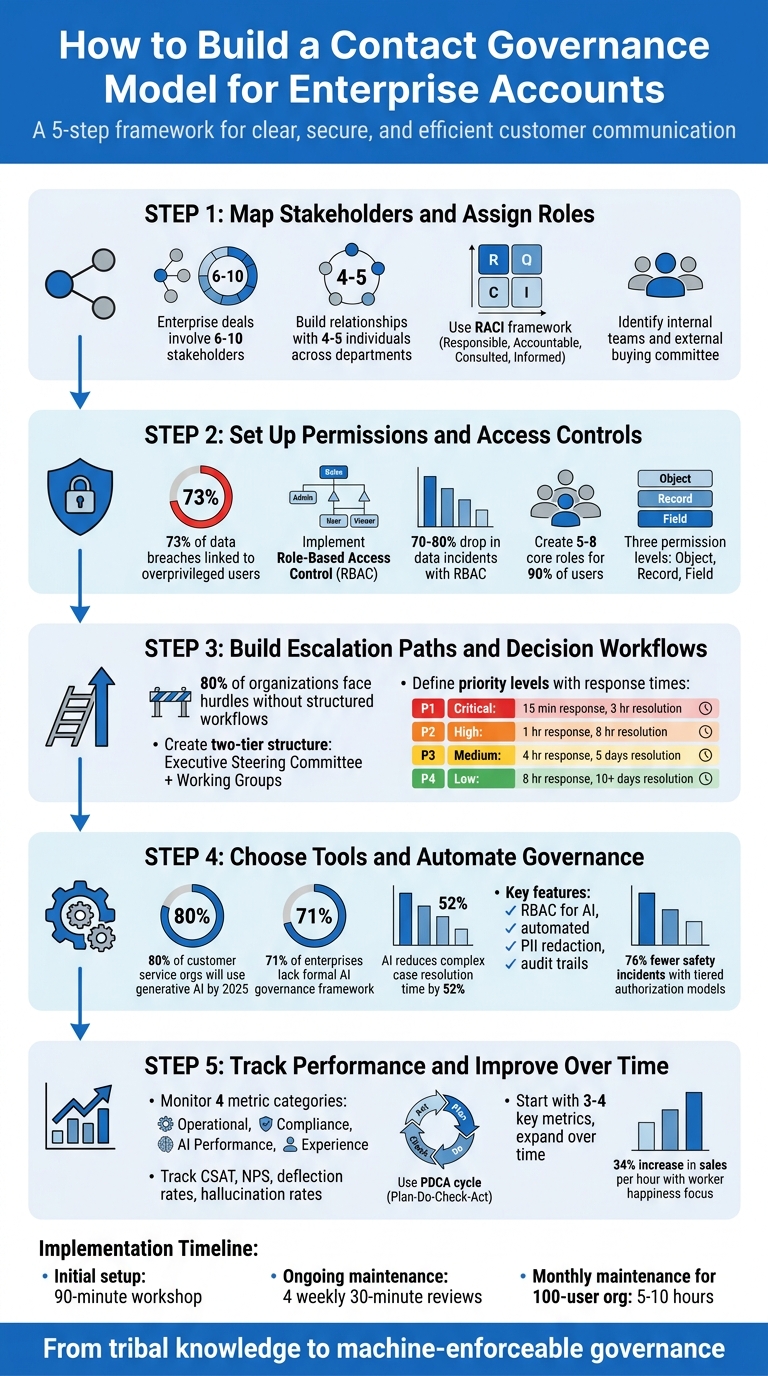
5-Step Contact Governance Model for Enterprise Accounts
Step 1: Map Stakeholders and Assign Roles
How to Map Stakeholders in Enterprise Accounts
Enterprise deals often involve 6–10 stakeholders [5]. To start, pinpoint your desired business outcome – whether it’s reducing onboarding time or improving escalation response – and identify all relevant departments. Your stakeholder map should include both internal and external players. Internally, this might mean account managers, support agents, customer success managers, and executives. Externally, focus on the customer’s buying committee, such as:
- Champions: Advocates for your solution.
- Economic Buyers: Those who control the budget.
- Blockers: Potential sources of objections.
Don’t overlook hidden stakeholders like InfoSec, Compliance, and Finance, as they can later influence support workflows.
To minimize the risks of relying on a single point of contact, aim to build relationships with 4–5 individuals across departments. Use tools like LinkedIn Sales Navigator, company reports, and B2B intelligence platforms to identify decision-makers and understand the organizational structure. Once you’ve created your stakeholder map, validate it with your primary advocate to confirm roles, particularly who has the final say on budget or technical approvals.
A clear stakeholder map sets the foundation for defining roles and maintaining smooth communication.
How to Define and Assign Roles
Once stakeholders are identified, assign roles systematically using the RACI framework. This framework ensures clarity and accountability by defining who is:
- Responsible: Task executors.
- Accountable: Final decision-makers.
- Consulted: Those providing input.
- Informed: Individuals kept in the loop.
This structure prevents overlapping responsibilities and keeps accountability clear.
To streamline communication, create a decision table in a centralized tool like Confluence. Map customer states (e.g., active trial, renewal at risk, or open escalation) to specific communication channels and assigned owners. Standardize key CRM fields to ensure everyone works from a single source of truth. If a stakeholder is temporarily blocked from contacting an account, document the reason and specify the next eligible contact date. This approach ensures every outreach decision meets a simple "Allowed or Blocked" checkpoint, keeping actions consistent and well-documented.
sbb-itb-e60d259
Step 2: Set Up Permissions and Access Controls
Once you’ve mapped stakeholders and assigned roles, the next step is to define who gets access to what data. Without a clear permissions structure, you risk exposing sensitive information or running into compliance issues. Here’s a startling fact: 73% of data breaches and compliance failures are linked to overprivileged users [6].
Let’s dive into how to set up a role-based permissions matrix to keep things secure and efficient.
How to Create a Role-Based Permissions Matrix
The key is to follow the principle of least privilege – only grant users the permissions they absolutely need. Organizations that adopt role-based access control (RBAC) often experience a 70–80% drop in data incidents caused by user mistakes [6].
Your permissions model should address three areas:
- Object-level permissions: Define access to broad categories like Contacts, Companies, or Deals.
- Record-level permissions: Control which specific records users can see – such as only their own accounts, their team’s accounts, or the entire system.
- Field-level permissions: Restrict visibility or editing of specific fields within a record, like discount percentages or contract values.
Next, create a role hierarchy that reflects your company’s structure. For example, a Customer Success Manager might inherit the permissions of a Support Agent but also gain access to metrics like account health scores and renewal forecasts. For unique needs that don’t fit neatly into the hierarchy (e.g., "Report Builders" or "Data Exporters"), use specialized permission groups.
Here’s an example of a permissions matrix:
| Field | Support Agent | CS Manager | Finance |
|---|---|---|---|
| Deal Amount | Read-only | Editable | Read-only |
| Discount % | Hidden | Editable | Read-only |
| Commission | Hidden | Read-only | Editable |
| Health Score | Read-only | Read-only | Hidden |
For high-stakes actions like deleting closed deals or exporting large datasets, implement approval workflows. These workflows ensure that such actions require manager or admin approval instead of permanent permissions.
How to Balance Security with Accessibility
Security is important, but it shouldn’t slow your team down. Unfortunately, many organizations grant "admin" access to 40–60% of users because they find granular permissions too complicated to configure [6].
Instead, start by mapping out job functions. Spend one to two weeks observing how users interact with the system to understand their actual needs and improve your customer management process. This way, you can design roles based on real workflows instead of just copying the org chart.
Aim to create five to eight core roles that cover around 90% of your users. If you end up with more than 50 roles, managing them becomes a headache, and RBAC-related support tickets could make up 15–25% of your CRM support requests [6]. A well-structured model for a 100-user organization might only require five to ten hours per month to maintain [6].
For temporary access, use record sharing with expiration dates (e.g., 30 days or until a deal closes). Ensure that users can only share records they fully control and can’t grant permissions beyond their own level.
To keep things running smoothly, use permission caching. While simple object-level checks might take 5–10ms, more complex field-level checks – like those tied to territory hierarchies – can add 100–200ms of latency per query. Caching permissions for 5–15 minutes can help prevent database slowdowns [6].
Finally, roll out your permissions model gradually. Start with departments handling less sensitive data, like Sales Ops, and move to areas like Customer Success and Sales. This phased approach allows you to catch and fix issues before they affect critical teams.
Step 3: Build Escalation Paths and Decision Workflows
Once roles and permissions are set, the next step is creating clear escalation paths to ensure accountability and quick problem-solving. Without structured workflows, 80% of organizations aiming for digital growth encounter hurdles due to outdated governance methods [2].
The goal here is simple: design a system where everyone knows exactly when to escalate, who is responsible, and how quickly decisions need to be made.
How to Build Multi-Level Escalation Procedures
Start with a two-tier structure: an Executive Steering Committee (around 10 members) for major decisions and Specialized Working Groups (3–6 experts) for operational issues [3].
To avoid confusion, use a RACI chart to assign roles – Responsible, Accountable, Consulted, and Informed. For example, a Data Steward might handle quality checks, while the Head of Analytics is accountable, and IT Security is kept informed [4]. This ensures everyone understands their responsibilities.
Next, define escalation triggers based on measurable events rather than subjective calls. These triggers could include breaches in data quality thresholds, unauthorized access attempts, or deviations in AI model performance [2]. For enterprise clients, you might also include business-specific triggers, like upcoming contract renewals. These triggers feed directly into a priority matrix, aligning the urgency of responses with the potential business impact.
Here’s a commonly used priority matrix for enterprise support teams:
| Priority Level | Response Time Target | Resolution Time Target | Typical Impact |
|---|---|---|---|
| P1 – Critical | 15 Minutes | 3 Hours | Critical systems down; revenue impact |
| P2 – High | 1 Hour | 8 Hours | Major disruption to key operations |
| P3 – Medium | 4 Hours | 5 Business Days | Routine issues; partial functionality loss |
| P4 – Low | 8 Hours | 10+ Business Days | Minor or cosmetic issues |
To prevent delays, require receiving teams to acknowledge handoffs within two hours. For instance, if a ticket moves from Support to Engineering, the Engineering team must claim it within this timeframe. If they don’t, a secondary escalation to management should be triggered [7]. This approach ensures tickets don’t linger in queues while SLA timers keep ticking.
How to Use AI and Dynamic SLAs
AI can take these workflows to the next level by making real-time adjustments and speeding up decision-making. For instance, AI can modify P2 priorities based on factors like account health, renewal timelines, or ARR tier [12].
By combining signals – such as customer sentiment, technical severity, and account tier – AI can identify potential issues before they escalate [12]. This goes beyond traditional automation, which often relies on rigid "if-then" rules.
For complex cases, AI can create decision-ready briefs that include customer history, relevant logs, reproduction steps, and suggested actions [12]. This eliminates the need for Tier 2 or Tier 3 teams to start from scratch, saving valuable time. In fact, ServiceNow reported in June 2025 that their AI agents cut the time needed to resolve complex support cases by 52% through automated context gathering and routing [11]. Similarly, Systalyze used AI workflows with Google Kubernetes Engine and reduced AI deployment costs by 90%, all while improving performance [10].
"AI escalation handling is the use of AI to detect high-risk customer interactions early, route them to the right people, and orchestrate next steps… so escalations resolve faster and more consistently." – Ameya Deshmukh, Customer Support Leader [12]
Dynamic SLAs also adjust in real time based on account conditions. For example, if a renewal is near or an account shows signs of churn risk, SLA timers tighten to ensure faster responses. AI can also prioritize tickets, auto-assign issue types, and tag cases, sparing agents from manual categorization.
However, it’s essential to set guardrails for AI. While AI might route tickets or suggest responses autonomously, critical decisions – like issuing service credits or escalating to senior leadership – should always require human approval [12]. This balance allows AI to handle routine tasks while keeping humans in control of judgment calls.
Lastly, avoid the "watermelon effect" – where metrics look great on the surface but customers are dissatisfied underneath [9]. Shift from technical metrics like "99.99% uptime" to outcome-based SLAs that measure real business impact. For example, instead of tracking uptime, measure whether a customer’s checkout process remained functional during peak sales hours [8]. Metrics tied to customer experience are twice as effective at predicting churn compared to traditional uptime metrics [8].
Step 4: Choose Tools and Automate Governance Processes
Once your escalation workflows are in place, the next step is choosing a platform that supports and automates your governance model. The goal is to reduce the burden on your team while ensuring compliance and efficiency.
Key Features to Look for in Governance Tools
Your governance tools should do more than rely on documentation or training – they need to enforce rules programmatically. By 2025, it’s expected that 80% of customer service organizations will use generative AI in some form [13]. However, a 2026 survey revealed that 71% of enterprises still lack a formal governance framework for autonomous agents [17]. This gap creates significant risks.
One essential feature is extending Role-Based Access Control (RBAC) to AI. This ensures that if a support agent can’t access specific customer data, the AI can’t reference it either [18]. This inheritance model minimizes the risk of accidental data leaks and ensures compliance without constant manual checks.
Another critical feature is policy enforcement points – a mechanism that evaluates AI actions against pre-defined, code-based rules before they’re executed [14]. For instance, you could block AI-generated refunds over $500 or require human approval for responses involving legal topics. These hard controls provide a stronger safety net than simple prompt instructions.
Your tools should also include automated audit trails. These logs should capture every AI call, model version, confidence score, and escalation trigger, using correlation IDs to recreate decision paths for at least 90 days [17]. This level of detail is crucial for accountability and compliance.
Other must-have features include:
- Automated PII redaction to remove sensitive data before it reaches external AI providers [15][18].
- Cost governance controls to avoid unexpected API charges caused by recursive loops.
- Environment separation to test prompt changes in a staging environment before deploying them to production [14].
| Feature Category | Specific Capability | Governance Purpose |
|---|---|---|
| Security | Role-Based Access Control (RBAC) | Ensures only authorized users/agents can modify governance rules |
| Compliance | PII Redaction & Filtering | Protects customer privacy and ensures GDPR/CCPA compliance |
| Operations | Human-in-the-Loop (HITL) | Provides a safety net for high-risk or high-value decisions |
| Financial | Token/Cost Envelopes | Prevents unexpected API billing spikes from recursive loops |
| Quality | Automated Response Scoring | Maintains brand voice and accuracy at scale without manual QA |
With these features in place, your governance framework becomes a strong foundation for AI-driven efficiency and decision-making.
How AI Enhances Governance Efficiency
Once clear permissions and escalation workflows are established, AI can take over many repetitive tasks, streamlining operations and reducing manual effort.
For example, AI can perform automated quality scoring by having a secondary model review AI-generated responses. This model evaluates accuracy, tone, and completeness, flagging only the cases that fall below standards for human review [15]. This way, you maintain high-quality responses without dedicating full-time staff to quality assurance.
AI also enables dynamic escalation routing. By analyzing signals like customer sentiment, restricted topics (e.g., legal threats), or low confidence scores, AI can automatically route cases to the appropriate human stakeholder in real time [13][15]. This eliminates the need for agents to manually sort or escalate cases.
Another advantage is automated compliance audits. AI can compare granted permissions to actual usage and flag unused permissions for removal after 30 days [14]. This helps prevent permission creep and reduces potential security risks.
AI supports tiered authorization models that balance safety and autonomy. For instance, AI agents can start at "Tier 1", where every action requires human approval. After maintaining an error rate below 2% for 30 days, they can be promoted to higher autonomy levels [17]. Organizations using tiered models report 76% fewer safety incidents compared to those relying on binary (autonomous/non-autonomous) systems [17].
"Governance is not bureaucracy. It is the structural layer that makes those agents safe to operate." – Harness Engineering [14]
However, automation works best when built on standardized processes. Fix any inefficiencies in your workflows first – automating a flawed process only makes problems worse [16]. Additionally, always design for human intervention, as 5–10% of cases will likely require manual handling [16].
The stakes couldn’t be higher. Roughly 50% of consumers say they would switch providers if they don’t trust a company’s AI or data practices [13]. Your governance tools aren’t just about improving efficiency – they’re critical to maintaining the trust that keeps your customers loyal.
Step 5: Track Performance and Improve Over Time
Once roles, permissions, and escalation workflows are in place, the next step is tracking performance. This ensures your governance model keeps pace with your business needs. Without clear metrics, decisions risk being based on guesswork rather than solid data. Regular measurement and refinement are essential for long-term success.
Key Metrics for Measuring Governance Performance
A strong governance model should be evaluated across four main areas: operational efficiency, compliance and risk, AI-specific performance, and customer and employee experience. Let’s break these down:
- Operational Metrics: Keep an eye on abandonment rates, average speed of answer (ASA), and average handle time (AHT). These metrics highlight bottlenecks or areas where workflows are running smoothly. For AI-driven systems, track deflection rates (cases resolved by AI vs. those escalated to human agents) and hallucination rates (instances of inaccurate or irrelevant responses). High escalation rates might indicate issues with your knowledge base or guardrails.
- Compliance Metrics: Monitor data incident rates, compliance audit scores, and training completion percentages. For AI systems, traceability gaps are a critical metric – this refers to how well you can link AI-generated interactions back to specific configurations or versions. This is especially important during audits or when addressing customer complaints.
- Experience Metrics: Use tools like CSAT, CES, and NPS, as well as attrition rates, to assess the impact on both customers and employees. For example, Hitachi improved its call center performance by focusing on "worker happiness", leading to a 34% increase in sales per hour and a 15% boost in retail sales [19].
Here’s a quick summary of these metrics:
| Metric Category | Key Performance Indicators (KPIs) | Purpose |
|---|---|---|
| Operational | Abandonment Rate, ASA, AHT, Resolution Rate | Tracks speed and efficiency of handling interactions |
| Governance | Data Incident Rate, Compliance Audit Score, Training Completion Percentage | Measures adherence to security and regulatory requirements |
| AI/Technical | Hallucination Rate, Deflection Rate, System Uptime, API Latency | Evaluates reliability and accuracy of automated systems |
| Experience | CSAT, NPS, eNPS, Sentiment Analysis | Gauges the impact on customers and employees |
Start small – choose three or four key metrics to focus on initially. Once you’ve built a baseline understanding, you can expand your tracking efforts.
How to Use AI-Driven Insights for Improvement
Once you’ve established baseline metrics, AI can help identify areas for improvement. Tools like automated quality scoring and drift detection can flag when response quality starts to slip, enabling you to make adjustments before customers are affected. Secondary AI models can evaluate responses for accuracy, tone, and completeness, ensuring they meet your standards.
Analyzing escalation patterns is another useful approach. AI can reveal gaps in your knowledge base or guardrails, helping you refine them as your products or policies evolve. For instance, if response quality begins to degrade after a policy update, AI can pinpoint the issue, allowing you to address it proactively.
Implementing a PDCA (Plan-Do-Check-Act) cycle is a structured way to compare actual performance against your targets. This can help identify where assumptions – like risk levels or contact volumes – might need to be revisited. For example, if a supposedly low-risk contact type starts generating frequent escalations, it’s a sign to adjust your governance strategy.
"AI Governance without measurement is governance by assumption." – Morne Wiggins [20]
To make metrics actionable, ensure that every dashboard alert or breach of a threshold is tied to a specific remediation plan. Numbers alone don’t lead to improvement – action does. Regular cross-functional reviews with leadership, including CIOs, CISOs, and CROs, are also essential. These reviews provide an opportunity to assess usage data and refine policies based on actual performance.
One important tip: introduce changes one at a time. This allows you to clearly measure the impact of each adjustment. Making multiple changes simultaneously can muddy the waters, making it hard to pinpoint what’s working – or what’s not.
Ultimately, governance metrics are more than just internal scorecards. They act as early warning systems, helping you safeguard the customer relationships that are at the heart of your business.
Conclusion
In the fast-changing world of AI-driven support, having a structured contact governance model is key to scaling enterprise operations effectively. This model is built through five essential steps: mapping stakeholders, assigning roles, setting permissions, creating escalation paths, selecting a modern support CRM, and tracking performance. These steps help transition from informal, tribal knowledge to a clear, machine-enforceable system that grows seamlessly as your account base expands [1].
Integrating AI into this model not only ensures compliance but also boosts operational efficiency. By combining these structured steps with automation, you can eliminate redundant outreach and ensure every customer interaction is properly logged and approved. This shift fosters a culture of clear ownership and accountability, replacing ambiguity with traceable decision-making.
Given that enterprise accounts often involve substantial six-figure investments, maintaining stable and governed communication is critical [21]. Implementing this framework doesn’t require a huge time commitment – a 90-minute initial workshop followed by four weekly 30-minute reviews is typically enough to get started [1]. The time spent is more than justified by the resulting efficiency improvements, reduced customer churn, and better overall experiences for your clients. This approach not only strengthens customer satisfaction but also promotes revenue stability.
Treat exceptions as opportunities to improve rather than setbacks. By requiring reason codes for policy overrides and analyzing this data during regular reviews, your governance model evolves alongside your business. This ensures your operations remain efficient, scalable, and accountable over time.
FAQs
What should I do first to stop multiple teams from contacting the same enterprise stakeholder?
To avoid multiple teams reaching out to the same enterprise stakeholder, it’s crucial to set up clear contact governance policies. Start by defining ownership rules, outlining contact protocols, and establishing decision-making processes. Then, enforce these policies automatically to ensure consistency.
One effective approach is to create a single source of truth – such as a decision table – that clearly outlines contact rules. By automating enforcement at the outreach stage, you can ensure that only authorized teams engage with stakeholders under predefined conditions. This reduces overlaps in communication and avoids sending mixed messages.
How do I set RBAC permissions without making the CRM unusable for frontline support?
To set up RBAC permissions effectively, begin by applying the principle of least privilege. This means granting users only the access they need to perform their specific tasks, with the option to adjust permissions if necessary. Make it a habit to regularly review and update access levels to avoid creating roles with excessive privileges.
When designing roles, base them on actual job responsibilities rather than assumptions, ensuring they are neither too restrictive nor overly permissive. Additionally, consider using AI tools to make the process more efficient. These tools can help automate provisioning, identify unusual activity, and streamline audits, keeping your CRM secure and functional for frontline support teams.
Which metrics best show that contact governance is improving enterprise renewals and CSAT?
When it comes to evaluating the success of contact governance, two key metrics stand out: customer satisfaction (CSAT) scores and renewal rates.
CSAT scores provide a clear picture of how happy customers are with your services, while renewal rates reveal how likely they are to stick around. Together, these metrics paint a vivid picture of customer loyalty and satisfaction – key elements in enterprise account management.
Related Blog Posts
- How do you operationalize AI in support safely (governance, risk, and quality controls)?
- Mapping Complex Organizational Structures (Parent/Child Accounts) in Support
- The “Red Account” Protocol: Coordinating Swarms on At-Risk Clients
- How to design a customer portal that supports parent/child (multi-entity) accounts






