


Navigating customer internal politics in support tickets can be tricky, but it’s manageable with the right approach. Internal disagreements among stakeholders – like conflicting priorities or unclear authority – can delay ticket resolutions and strain relationships. Here’s how you can handle these situations effectively:
- Spot conflicts early: Use tools like sentiment analysis to identify tension or conflicting priorities.
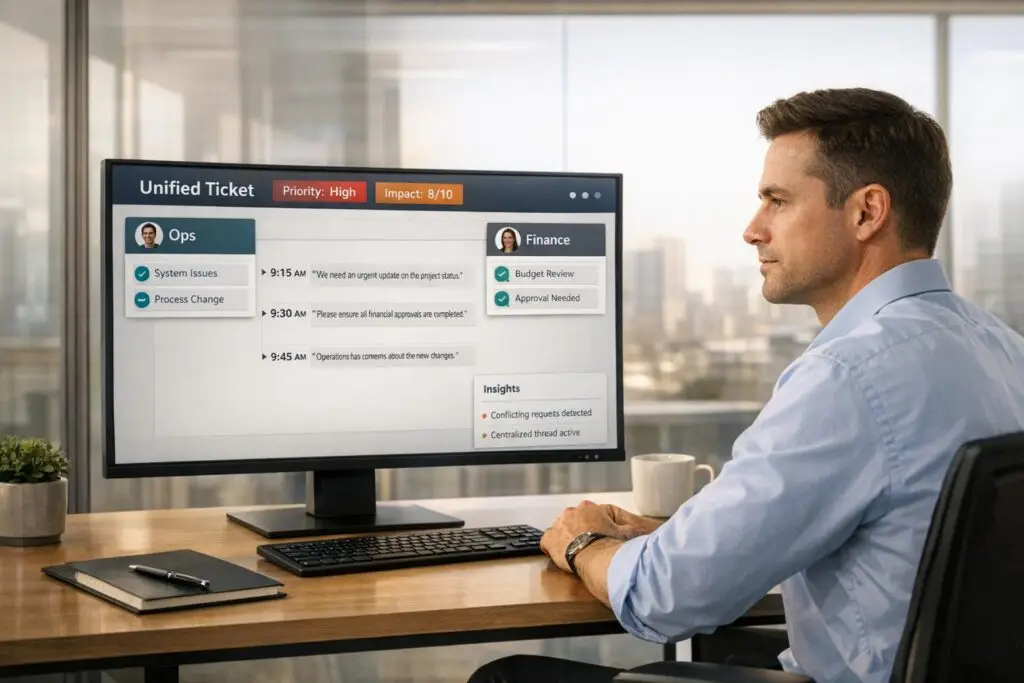
- Centralize communication: Keep all conversations in one unified ticket thread to avoid miscommunication.
- Align stakeholders: Acknowledge differing perspectives and focus on shared goals to reduce friction.
- Prioritize based on impact: Use a clear priority system (like P1-P4) to address critical issues first, not just the loudest voices.
- Stay neutral and professional: Focus on solutions and avoid taking sides in internal disputes.
- Leverage AI tools: Platforms like Supportbench automate tasks like identifying conflicts, prioritizing tickets, and suggesting neutral responses, saving time and reducing errors.
What Customer Internal Politics Means in Support Tickets
What Counts as Customer Internal Politics
Customer internal politics comes into play when conflicting priorities, power struggles, or misaligned goals among stakeholders slow down ticket resolution. In the world of B2B support, you’re rarely dealing with just one decision-maker. Instead, you’re navigating a web of departments – IT, operations, executives, and end users – each with its own objectives.
Understanding the hierarchy of influence is key to uncovering the real issues behind a support ticket [2]. Often, the technical problem described is just the tip of the iceberg. Beneath it, there could be disputes over budgets or differing perceptions of urgency.
"In B2B, the absence of negative feedback does not mean customers are satisfied. It usually means they do not believe it is safe or productive to be fully candid." – Evan Klein, Founder, Satrix Solutions [3]
Power dynamics also play a big role in how customers communicate. Stakeholders might sugarcoat or hold back feedback to preserve the business relationship, making it harder to pinpoint the real problem [3]. For example, a VP might downplay a major issue to avoid looking incompetent, while an end user might escalate a minor inconvenience because they don’t see the bigger picture, often dealing with angry customers who feel their specific needs aren’t being met. Your support team becomes the go-between, tasked with deciphering these signals and delivering solutions that work for everyone – without playing favorites.
This insight sets the stage for managing the complex scenarios you’re likely to encounter.
Common Scenarios You’ll Encounter
At its core, customer internal politics is about navigating conflicting demands from different stakeholders.
One scenario you’ll run into is when multiple departments submit competing requests within the same ticket thread. For instance, IT might push for strict security protocols that slow down workflows, while sales demands faster access. Both claim their needs are urgent, and without a clear authority, you’re left guessing whose instructions to prioritize.
Another tricky situation involves unclear authority. A junior employee might submit a ticket for a configuration change, only for their manager to later contradict it. Or, an executive could bypass standard processes, demanding immediate action that conflicts with priorities set by another department. These mixed signals can stall progress and create confusion.
To handle these challenges, it’s crucial to map out your customer’s internal structure. Identifying key players – like decision-makers, champions, and blockers – helps you anticipate and navigate these hurdles more effectively [2].
sbb-itb-e60d259
How to Handle Customer Internal Politics: Step-by-Step
Spot Political Dynamics Early
Look out for signs of conflicting priorities among stakeholders or inconsistent feedback across communication channels. These often stem from poor communication within the customer’s organization and can quickly lead to bigger issues if ignored [4].
To tackle this, consider using AI tools like sentiment analysis and natural language processing (NLP). These tools can identify frustration, urgency, or shifts in tone, helping you route sensitive issues to experienced agents without delay [5][7][8]. Catching these signals early allows you to address communication gaps and align perspectives before things spiral out of control.
Keep All Communications in One Place
When multiple stakeholders are involved, it’s easy for communication to become fragmented. Avoid this by consolidating all conversations into a single ticket thread. Use a "parent-child" ticketing system, where related tickets from different departments are linked under one main ticket. This approach keeps everyone on the same page and ensures consistent messaging across all parties [6].
Get Stakeholders on the Same Page
Start by acknowledging that differing perspectives exist. This shows respect for all parties and helps diffuse any tension. Clinical Psychologist Dr. Barbara Nusbaum recommends framing the conversation in a way that emphasizes understanding and collaboration:
"I think we (may) see things differently, and that’s fine and expected. What I’m most interested in are your thoughts and feelings so I can be helpful and supportive" [1].
For example, you might say:
"These issues are important to both of us… but I value our relationship most. My thought is to go back to the areas we feel in sync and work on the issues where I can be most helpful" [1].
This approach reinforces your role as a neutral mediator, ensuring all stakeholders feel heard while steering the conversation toward shared goals.
Prioritize Tickets by Impact and Urgency
When deciding which issues to tackle first, avoid letting the loudest voice dictate priorities. As Radu Dumitrescu, Head of Presale & Digital Transformation at BlueTweak, explains:
"The most common mistake I see in help desk operations isn’t a bad tool or an undertrained team but the absence of a shared definition of urgency. When ‘critical’ means something different to every agent, priority becomes whoever shouts loudest, and the queue reflects politics rather than risk" [6].
A better approach is to use a P1-P4 priority matrix:
- P1: Issues that pose revenue or data risks.
- P2: Problems affecting broader functionality.
- P3: Issues with available workarounds.
- P4: Informational concerns [6].
AI tools can help automate this process by using emotional scoring and predictive CSAT metrics [5]. This not only ensures fair prioritization but also leads to measurable improvements – companies leveraging analytics in customer support report cost savings of 20–30% and a boost in customer satisfaction by over 10% [8].
Resolve and De-escalate Without Taking Sides
When addressing conflicts, focus on active listening. Reflect stakeholders’ concerns back to them to show you understand, but avoid validating one side over another [1]. If pushed to take sides, explain your commitment to maintaining strong relationships with all parties. As Dr. Nusbaum advises:
"I appreciate your asking about my perspective… I’ve personally found these conversations can create distance between some clients and me. I value our relationship and don’t want to risk changing it" [1].
Your role is to listen, understand, and find ways to assist – not to pick sides or prove someone right. By staying neutral and solution-focused, you can help resolve conflicts while preserving relationships [1].
Using AI-Native Tools to Manage Political Tickets
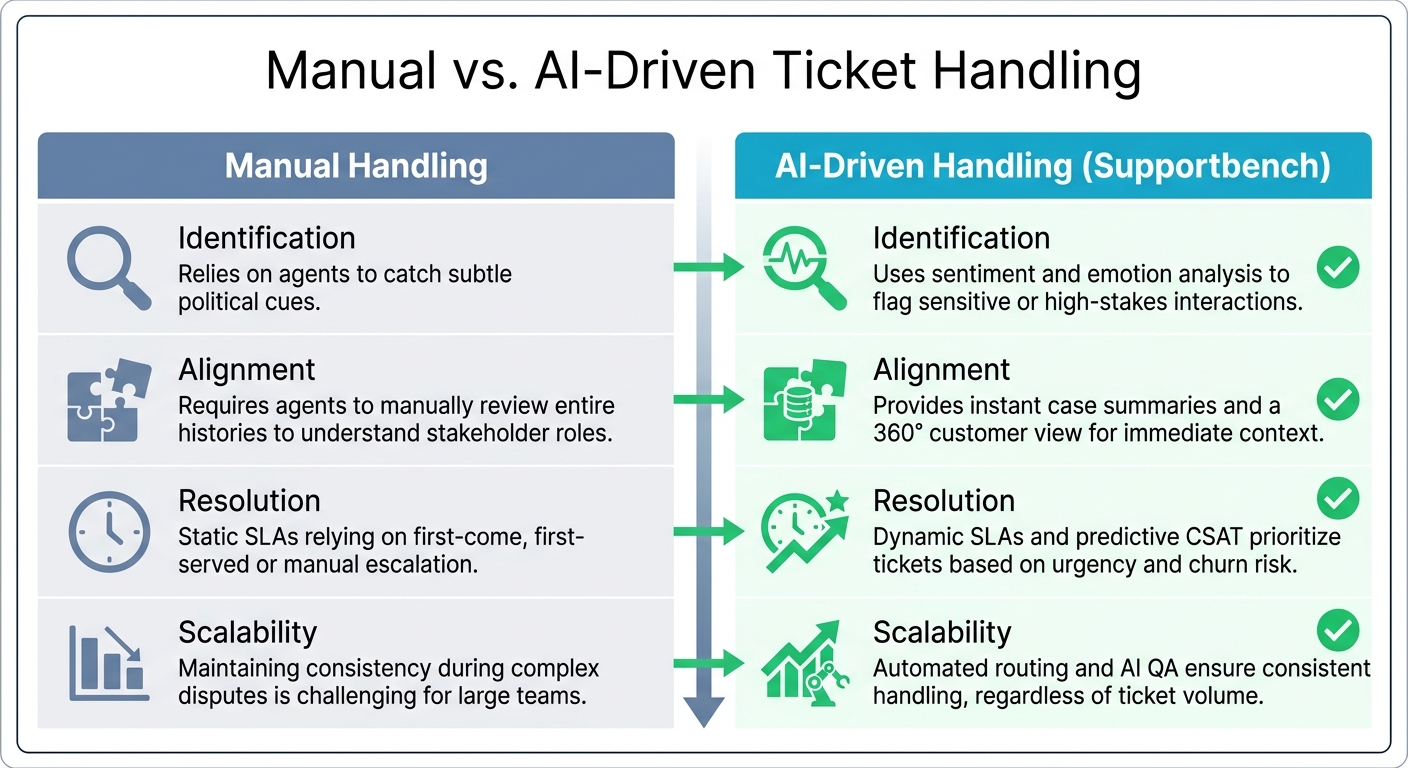
Manual vs AI-Driven Customer Support Ticket Handling Comparison
Manual vs. AI-Driven Ticket Handling
When it comes to addressing political tensions in support scenarios, using AI-native tools like those in Supportbench can make a huge difference in scaling your efforts effectively.
Manual ticket handling often leaves agents wading through lengthy threads, trying to decode stakeholder motives, and risking errors in prioritization. On the other hand, AI-driven platforms streamline the entire process by automating the detection, alignment, and resolution of politically sensitive situations.
Here’s a quick comparison:
| Feature | Manual Handling | AI-Driven Handling (Supportbench) |
|---|---|---|
| Identification | Relies on agents to catch subtle political cues. | Uses sentiment and emotion analysis to flag sensitive or high-stakes interactions. |
| Alignment | Requires agents to manually review entire histories to understand stakeholder roles. | Provides instant case summaries and a 360° customer view for immediate context. |
| Resolution | Static SLAs relying on first-come, first-served or manual escalation. | Dynamic SLAs and predictive CSAT prioritize tickets based on urgency and churn risk. |
| Scalability | Maintaining consistency during complex disputes is challenging for large teams. | Automated routing and AI QA ensure consistent handling, regardless of ticket volume. |
Supportbench takes these advantages and builds on them to simplify the resolution of politically sensitive tickets.
How Supportbench Handles Political Tickets
Supportbench’s tools are specifically designed to address the unique challenges of politically charged support scenarios, turning potential headaches into manageable workflows.
The platform excels at flagging sensitive tickets while offering tools to speed up resolution. For instance, AI-powered case summaries condense long, multi-stakeholder threads, helping agents quickly grasp the situation without wasting time. Its sentiment and emotion analysis identifies frustration or conflict in messages, routing these tickets to the most experienced agents.
Supportbench also uses dynamic SLAs that adapt in real-time based on customer value and urgency, ensuring the most critical issues are addressed first. With predictive CSAT and CES scores, the platform flags tickets at risk of escalation, allowing teams to take proactive measures. The AI Copilot further enhances efficiency by suggesting responses that align with case history and the knowledge base, helping agents maintain professionalism, even in high-pressure situations. And with 100% automated QA, every response is reviewed for tone and empathy, preventing missteps that could harm relationships.
Once political tickets are resolved, Supportbench simplifies knowledge sharing by turning them into knowledge base articles with a single click. This ensures future agents have a clear roadmap for navigating similar situations. As Jonathan Pasquel, Personnel Manager, highlights:
"Since everything is one platform, we have a clear overview of all client and team interaction" [9].
Tracking Performance and Improving Over Time
Metrics to Track
To refine your approach and ensure sensitive tickets are handled effectively, tracking the right metrics is essential. These indicators help you measure both immediate performance and long-term trends, ensuring that sensitive issues are resolved efficiently and fairly.
For example, resolution time is critical for managing multi-stakeholder delays. The goal? Aim to resolve issues within 24–48 hours, depending on complexity [11]. A CSAT score (Customer Satisfaction) above 85% reflects professionalism and customer trust [10]. Keep escalation rates below 10%; higher rates (above 20%) often point to deeper issues [10]. Additionally, SLA compliance should remain between 90% and 100%, ensuring no sensitive tickets are overlooked [10].
Advanced metrics like predictive CSAT and Customer Effort Scores (CES) can flag at-risk tickets, emphasizing the need for swift action [13]. Eric Klimuk, Founder and CTO of Supportbench, highlights the importance of proactive metrics:
"The best metrics don’t just track history – they change what happens next" [10].
Here’s a quick breakdown of the key metrics and their benchmarks:
| Metric | Purpose in Political Context | Target Benchmark |
|---|---|---|
| Escalation Rate | Indicates agents’ ability to handle sensitive issues | < 10% for sensitive tickets [10] |
| Resolution Time | Tracks delays involving multi-stakeholder approvals | 24-48 hours (varies by complexity) [11] |
| CSAT | Reflects customer perception of agent professionalism | > 85% [10] |
| SLA Compliance | Prevents sensitive tickets from being overlooked | 90% – 100% [10] |
When these metrics reveal areas for improvement, dive deeper using post-resolution reviews to sharpen your team’s approach.
Learn from Post-Resolution Reviews
Post-resolution reviews turn past tickets into learning opportunities. By leveraging AI-powered dashboards, you can uncover recurring issues – whether it’s features that frustrate customers, stakeholders prone to escalation, or language patterns that hint at potential conflicts [12]. Tools like Supportbench’s automated QA and sentiment analysis simplify this process, eliminating the need for manual ticket reviews.
Document what works and what doesn’t. Open communication plays a huge role here, boosting team productivity by 25% [14]. Plus, employees who receive timely feedback are 2.8 times more engaged [14]. After resolving a ticket, confirm that all parties are still aligned and satisfied [1]. Craig Nagovan, Customer Support Executive at Close.io, stresses the importance of teamwork:
"Individual metrics are a waste of time. If you call yourselves a team, act like it" [12].
Conclusion
Using AI-native tools to navigate internal politics in support operations simplifies the process and ensures a neutral, professional approach. The key lies in sticking to proven methods: spotting political dynamics early, using centralized communication, aligning stakeholders with impartial language, prioritizing by impact rather than volume, and resolving disputes with data-driven insights. These strategies can address up to 90% of cases effectively, according to internal benchmarks, while avoiding bias and keeping ticket resolutions on track [15][16].
Manual processes often lead to errors and unintentional bias. In contrast, AI-powered solutions handle the heavy lifting – identifying conflicting comments, summarizing alignments, and generating de-escalation scripts. Research shows that AI can cut resolution times by 40% in complex cases and automate 70% of routine tasks in politically sensitive tickets. This allows teams to scale operations without needing to proportionally increase staff [15][18].
Supportbench offers an AI-native platform priced at $32 per agent per month. It includes features like auto-tagging multi-stakeholder conflicts, prioritization through impact algorithms, and neutral response templates – all designed to help teams scale while maintaining professionalism. Best of all, these AI tools are available from day one [15][18].
Once these strategies are implemented, tracking key metrics ensures their effectiveness. Focus on resolution times (aiming for under 48 hours), stakeholder satisfaction (with a Net Promoter Score above 8), and reduced escalation rates (targeting a 20% year-over-year decrease). Post-resolution reviews can help identify recurring issues, reducing repeat escalations by 30%. The ultimate goal isn’t perfection in every case but consistent, professional handling that fosters trust among all stakeholders [15][17].
FAQs
How do I identify the real decision-maker on a ticket?
To figure out who the decision-maker is on a support ticket, start by examining the customer’s internal dynamics. Pay attention to who initiates requests, gives feedback, or signs off on decisions. You can also ask specific, targeted questions to better understand their role – questions like, "What’s your involvement in this process?" or "Who are the key stakeholders we should be aware of?"
Identifying the decision-maker is crucial. It ensures you’re focusing your efforts on the right person and helps you navigate any internal politics more effectively.
What should I say when stakeholders demand conflicting actions?
When stakeholders push for conflicting actions, it’s essential to keep your cool and aim for alignment. Start by clarifying priorities using clear, objective criteria such as impact and urgency to guide decision-making. Recognize the differing viewpoints in the room, but steer the conversation toward shared goals to encourage teamwork.
For instance, you might say: "I see that there are varying priorities here. Let’s take a moment to review our objectives and the impact criteria together so we can identify the best solution that aligns with our goals."
When should a political ticket be escalated to leadership?
A political ticket needs to be escalated when it presents risks or complications that go beyond what the support team can handle. Some common reasons for escalation include:
- The possibility of missing an SLA (Service Level Agreement) deadline.
- Increased customer frustration that could damage relationships.
- Internal political challenges or sensitivities requiring higher-level intervention.
To handle these situations effectively, it’s crucial to have clear escalation criteria. Factors like urgency, level of impact, and stakeholder influence should guide when to involve leadership. This ensures swift action, avoids unnecessary delays, and helps protect against potential revenue loss.
AI tools can also play a role by flagging high-risk cases early. For example, they can analyze customer sentiment and case history to identify problems before they escalate further.






