



Identity verification is critical for handling sensitive support requests like account recovery, billing changes, and data access. Weak processes can lead to breaches, fraud, and compliance issues.
Here’s what you need to know:
- Risk-based verification: Match security checks to the sensitivity of the request (e.g., MFA resets need stricter checks than simple updates).
- Modern methods: Use AI-driven tools like document verification, liveness checks, and real-time risk scoring. Avoid outdated methods like knowledge-based authentication.
- AI for risk detection: Leverage AI to flag suspicious patterns, detect emotional manipulation, and automate secure workflows.
- Audit and compliance: Document every verification step and follow privacy laws by limiting and securely deleting sensitive data.
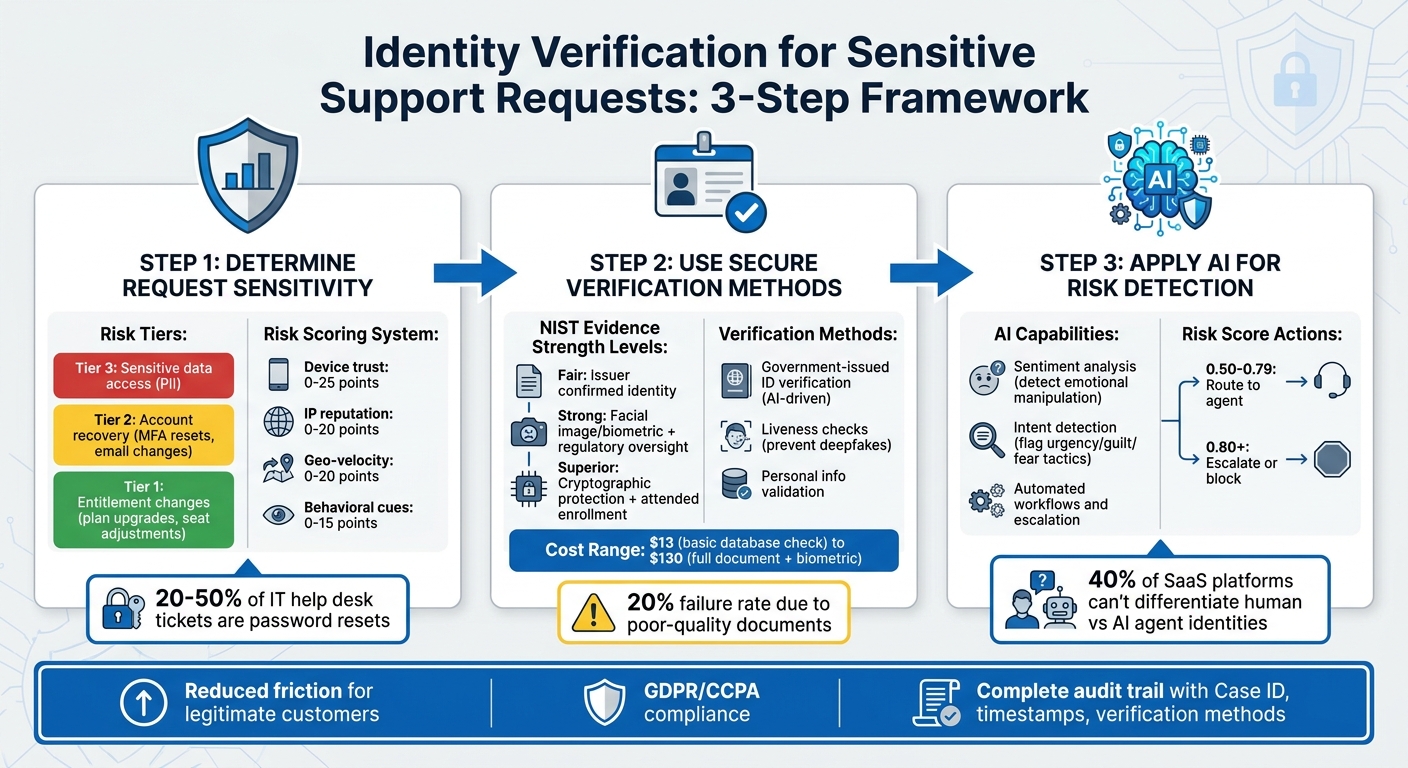
3-Step Identity Verification Process for Sensitive Support Requests
Step 1: Determine Request Sensitivity and Start Verification
Recognizing High-Risk Requests
The first step in handling support requests is to sort them by their risk level, ensuring that higher-risk actions are met with tighter security measures. Support teams should align specific actions with defined risk tiers, depending on what the customer is requesting and which systems are affected [2].
Risk Tiers:
- Tier 1: Actions like entitlement changes, such as plan upgrades, seat adjustments, or feature flag modifications.
- Tier 2: Account recovery tasks, including MFA resets or email address changes.
- Tier 3: Requests involving access to sensitive data, such as personally identifiable information (PII).
Interestingly, password resets alone make up between 20% and 50% of IT help desk tickets annually, making them a frequent target for attackers [8].
To refine risk assessments, consider contextual signals like whether the request originates from a known device or trusted IP versus a cloud host or Tor exit node. Behavioral anomalies, such as unusual typing speed or erratic navigation patterns, should also prompt additional security checks [6][7].
"Support is a prime target for attackers because it’s easier to trick a human than to break encryption." – fitgap [5]
Once risk levels and contextual signals are identified, you can implement tailored verification workflows to address the specific needs of each tier.
Activating Verification Workflows
When a high-risk request is flagged, the next step is to initiate the appropriate verification workflow. Start by using standardized ticket templates within your ticketing system. These templates should include all essential details, such as the reason for the request, the associated customer or tenant information, and the expected time frame for the action [2][5].
To ensure consistency and efficiency, create specific service catalog items for sensitive actions like "MFA Reset" or "Billing Owner Change." These catalog items help automate policy decisions and maintain uniformity across agents and support channels [2]. Additionally, enforce fail-closed logic, which automatically blocks actions if identity verification is incomplete, expired, or inconsistent with the request type [2].
For real-time risk assessments, assign numerical scores to various signals:
- Device trust: 0–25
- IP reputation: 0–20
- Geo-velocity: 0–20
- Behavioral cues: 0–15
This scoring method, which is more adaptable than static rules, helps detect and respond to evolving threats [6][7]. If the cumulative score exceeds a set threshold, trigger additional verification steps or escalate the request for human review. By linking this scoring system to the risk tiers, you ensure that Tier 3 requests undergo the most rigorous verification processes before any action is taken.
sbb-itb-e60d259
Step 2: Use Secure Identity Verification Methods
Once you flag a high-risk request, the next step is to verify the identity using trusted methods. A modern approach involves a three-step framework: resolution, validation, and verification. This process keeps things efficient while balancing strong security with a smooth customer experience.
Instead of applying the same level of checks to every request, use risk-based decisioning. Start with simpler database checks and escalate to more advanced methods like document or biometric verification only when necessary. This "waterfall" approach ensures security without frustrating users. It’s worth noting that around 70% of financial institutions globally lost clients in 2025 due to delays or inefficiencies during onboarding [13].
Requesting and Checking Government-Issued IDs
Document verification offers solid proof of identity and builds on the initial verification framework. For high-risk requests, request a clear photo of a government-issued ID, such as a passport or driver’s license. AI-driven systems can analyze these documents for security features like holograms or barcodes and compare them with known fraudulent templates [10].
The National Institute of Standards and Technology (NIST) outlines three levels of evidence strength [9]:
| Evidence Strength | Key Requirement |
|---|---|
| Fair | Issuer reasonably confirmed identity (e.g., bank or mobile network operator) |
| Strong | Includes a facial image/biometric and oversight by regulatory or public institutions |
| Superior | Involves cryptographically protected data and an attended enrollment process |
For high-risk cases, aim for Strong or Superior evidence. To improve success rates, use real-time guidance during image capture, as poor-quality or expired documents contribute to a 20% failure rate industry-wide [13]. Cross-check key details like name, date of birth, and ID number with trusted sources, such as the DMV or Social Security Administration [9].
"Traditional methods such as personally identifiable information (PII) and knowledge-based authentication are no match for today’s sophisticated attackers, who use phishing, social engineering, and even AI-powered voice cloning to bypass defenses." – Microsoft [1]
One critical point: avoid using knowledge-based verification (KBV). NIST explicitly states that "Knowledge-based verification (KBV) or knowledge-based authentication SHALL NOT be used for identity verification" [9].
Conducting Liveness Checks
Liveness detection is vital for stopping presentation attacks, where fraudsters use photos or videos of stolen documents instead of appearing live. With the rise of deepfake fraud, active liveness checks are a must.
Computer vision technology can confirm a user’s live presence. For instance, Microsoft Entra Verified ID Face Check allows you to set a match confidence threshold (e.g., 70) to balance security and user convenience [1]. The system compares a live selfie to the ID’s facial image or authoritative records [9].
To reduce risks, keep verification sessions under one hour [12]. Additionally, use idempotency keys when creating verification requests to prevent duplicate sessions for the same user [11].
Validating Personal Information
Once identity is documented, validate the personal details by cross-referencing them with internal records and third-party sources. Phone-based signals can help auto-populate data for faster processing [14].
Identity checks can range from $13 for basic database verification to $130 for a full document and biometric check [13]. To manage costs, start with lower-cost database checks and escalate only when risk factors demand a deeper investigation. For business-related cases, such as beneficial owner investigations, use more thorough workflows to meet higher scrutiny levels.
Finally, ensure all verification pages are secured with Transport Layer Security (TLS) to protect data during transmission [11].
Step 3: Apply AI for Verification and Risk Detection
Once secure identity checks and risk-based assessments are in place, AI takes the verification process to the next level. By automating workflows, detecting unusual activity, and ensuring compliance, AI not only enhances security but also simplifies customer interactions. It identifies suspicious patterns without immediately altering accounts, leaving high-risk actions to be verified through deterministic checks like device trust or rate limits. This layered approach ensures even advanced social engineering tactics are thwarted [16].
AI Sentiment and Intent Detection
AI’s ability to analyze sentiment plays a crucial role in identifying risks. It picks up on emotion vectors – signals like urgency, guilt, or fear – that attackers often use to manipulate agents into bypassing security measures [16]. For instance, repetitive or emotionally charged conversations about "manual overrides" or "exceptions" can trigger system alerts for heightened scrutiny.
The distinction between safe and risky behavior is often subtle. A fraudster might pressure with phrases like, "Act now or you could lose access forever", while legitimate prompts are more neutral, such as, "Complete the verification steps to continue" [16]. AI classifiers trained on these nuances can assess conversations in real time, flagging emotional manipulation while distinguishing it from genuine distress.
"In an identity system, emotional warmth can become an attack vector or a compliance failure if it influences user consent." – theidentity.cloud [16]
Tools like Supportbench integrate sentiment analysis to score emotional intensity and intent alongside standard verification checks. This not only generates an auditable transcript but also assigns risk scores for post-incident reviews and system adjustments. For example, cases with a risk score between 0.50 and 0.79 might be routed to an agent, while anything above 0.80 could be escalated or blocked [15]. These insights feed into automated workflows, ensuring appropriate escalation when necessary.
Automated Verification and Escalation
AI-driven automation streamlines repetitive tasks while maintaining consistency. Platforms like Supportbench handle document requests, classify cases by risk level, and route high-risk issues to senior staff. The system also monitors anomalies, such as multiple failed verification attempts followed by a sudden success or high-risk actions occurring outside an agent’s usual working hours.
Implementing just-in-time access models further strengthens security. Agents are granted temporary, case-specific permissions for sensitive tasks, with every action tied to a case ID and verification outcome. This creates a tamper-evident audit trail, ensuring no single individual can execute a high-risk action without oversight.
For step-up verification, reserve automated one-time passcodes (OTPs) for actions that exceed a predefined risk threshold. This minimizes friction for legitimate users while maintaining robust security. Additionally, set up automated alerts for unusual spikes in account recoveries or entitlement changes per agent – key for spotting potential internal credential compromises. With 40% of SaaS platforms unable to differentiate between human and AI agent identities [3], these controls are critical for modern support operations.
Avoiding Common Verification Mistakes
Creating secure and automated verification processes is only part of the equation – avoiding common pitfalls is just as important for protecting sensitive data and ensuring a smooth customer experience. Even the most advanced systems can fall short if basic principles are overlooked. For example, a 2019 security study found that 25% of organizations relied solely on an email and phone number to grant access to sensitive data like Social Security numbers and passwords. Another 16% accepted easily forged ID documents for verification [18]. These shortcuts not only put customers at risk but also increase legal liabilities and erode trust.
Reducing Friction for Legitimate Customers
Verification processes should match the risk level of each request. For instance, requiring a government-issued ID for something as simple as updating marketing preferences creates unnecessary hassle. On the other hand, allowing minimal proof for high-stakes actions like financial changes can open the door to fraud. A balanced approach, known as step-up verification, uses stronger checks – such as liveness scans or document uploads – only for high-risk actions like resetting multi-factor authentication or changing payout details [19][2].
If a customer is already logged into a secure account, demanding additional ID documents often adds friction without improving security [18]. This strategy ensures a seamless experience for low-risk tasks while reserving more rigorous checks for situations that warrant them. It aligns perfectly with AI-driven strategies, keeping the user experience smooth while maintaining strong security where it matters most.
Following Data Privacy Regulations
Compliance with laws like GDPR and CCPA requires teams to collect only the bare minimum of information for verification and to delete identity documents immediately after use [18][17]. For example, GDPR’s one-month deadline for responding to requests starts only after the requester’s identity has been verified [18]. Automated tools can help by redacting sensitive information – such as credit card numbers, national IDs, or biometric data – from support tickets and chat logs [19][20]. Retaining unnecessary raw images or biometric data not only increases the risk of breaches but can also lead to violations of privacy laws [17]. By critically evaluating every data field and discarding anything nonessential, teams can reduce liability while staying compliant [17].
Recording and Auditing Verification Steps
While complying with privacy regulations reduces data risks, maintaining detailed audit trails is essential for accountability. Relying on informal communication like emails or chats as the sole record of verification can lead to fragmented and inconsistent documentation [4]. Each verification event should include standardized data points such as a Case ID, subject ID, timestamp, verification method, and reason codes for any overrides [4].
"A reviewable decision should be explainable in one sentence and verifiable in one click." – Approvals.us [4]
Overrides of verification failures should never happen without documenting a reason code, the approver’s identity, and supporting evidence [4][17]. Additionally, preserving versions of forms, notes, and policy references ensures a defensible record in case of legal disputes [4]. Enforcing separation of duties – so the person initiating a request isn’t the same as the one approving a high-risk override – also helps prevent internal fraud. A robust audit trail allows reviewers to fully reconstruct the decision-making process, from who initiated the check to what attributes were verified, without relying on memory [4].
Conclusion
Ensuring identity verification and authorization for sensitive support requests is key to maintaining customer trust and meeting regulatory requirements. The best strategy blends risk-based tiering, which adjusts verification intensity to match threat levels, AI-driven automation for detecting fraud signals in real time, and human oversight for critical decisions.
By using tools like step-up verification, just-in-time access, and automated risk scoring, support teams can handle routine requests efficiently while safeguarding high-risk actions like MFA resets or billing updates with stronger measures – such as liveness checks or dual approvals. This approach strikes a balance between frustratingly excessive security and dangerously lax controls that could lead to fraud.
A strong verification framework also requires thorough documentation. Every verification step, override, and escalation should produce an unchangeable log with standardized details – like Case ID, timestamps, verification methods, and reason codes. This creates a clear, defensible record for regulators and helps security teams identify and address abuse patterns early.
"If a reviewer cannot explain a decision in one sentence and prove it in one click, your trail is probably not audit-ready yet." – Approvals.us [4]
Platforms such as Supportbench simplify these processes by centralizing authentication, automating verification, and maintaining detailed audit trails [21][22]. This allows support teams to act swiftly without compromising security while enabling compliance teams to trace decision paths effortlessly.
FAQs
What proof is needed for an MFA reset?
When performing an MFA reset, users need to provide additional trusted authentication methods they’ve already registered. These could include options like SMS codes, email verification, or authenticator apps. Registering multiple methods is crucial – it ensures that identity can still be verified if the primary method becomes unavailable.
In situations involving higher security risks, extra precautions might be implemented. For example, step-up verification or relying on trusted devices can add an extra layer of protection to confirm the user’s identity and maintain secure access.
How do we verify a requester is authorized for billing changes?
To ensure a requester is authorized to make billing changes, follow a secure, multi-step process:
- Verify Identity: Use strong authentication methods like multi-factor authentication to confirm who they are.
- Check Authorization: Confirm their access level to ensure they have the authority to make such changes.
- Keep Detailed Logs: Record all actions for auditing purposes.
Additionally, set up approval workflows and provide just-in-time access with the least privilege necessary to complete the task. Regularly review access permissions and maintain tamper-evident logs to ensure only authorized personnel can make changes, helping you stay compliant with security standards.
How can we stay GDPR/CCPA-compliant when collecting IDs?
When collecting IDs while adhering to GDPR and CCPA regulations, it’s critical to prioritize security and privacy. Opt for secure, multi-factor authentication methods instead of relying on easily forged documents or basic details like emails or phone numbers.
To safeguard sensitive data, implement automated workflows that can redact confidential information, enforce least privilege access, and maintain detailed audit trails for all verification actions. Additionally, leveraging AI-powered fraud detection and phish-resistant authentication methods can significantly bolster security. These measures help minimize the risk of data breaches or unauthorized disclosures during the ID collection process.






