


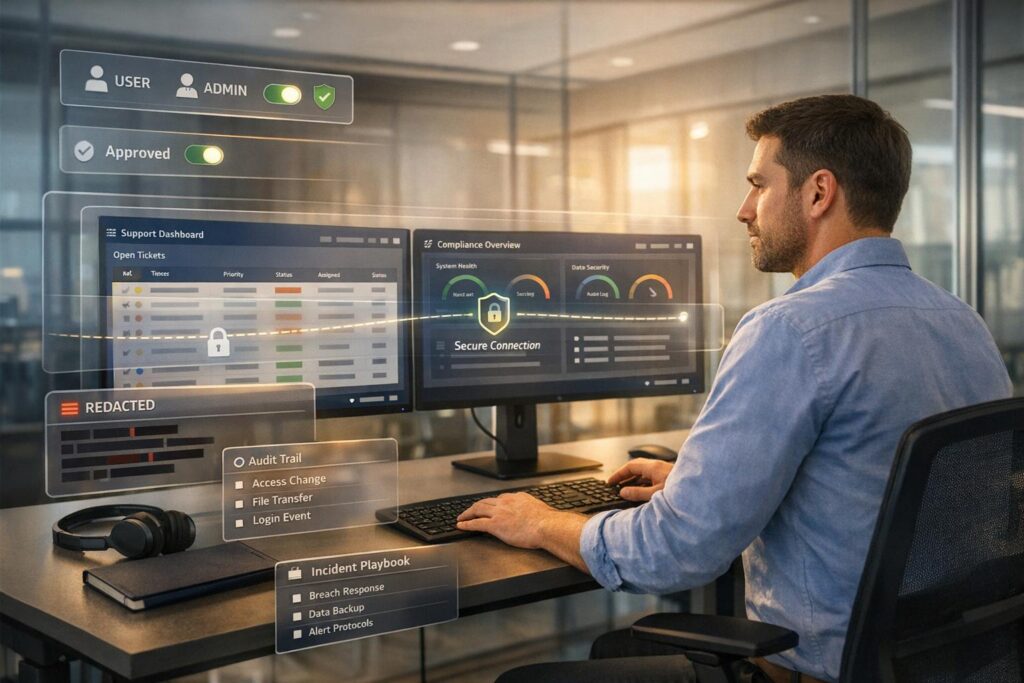
Handling sensitive client data in support operations requires strict security measures. With insider threats rising – 83% of organizations reported incidents in 2024 – and breaches costing millions, securing data is non-negotiable. Here’s how your team can protect sensitive information effectively:
- Access Control: Use Role-Based Access Control (RBAC) to limit permissions based on job roles, and review access quarterly to prevent over-granted privileges.
- Data Encryption: Encrypt data at rest with AES-256-GCM and in transit with TLS 1.3. Use secure key management practices like Hardware Security Modules (HSMs).
- Data Loss Prevention (DLP): Deploy AI-powered DLP tools to monitor and prevent leaks during support interactions, including chats, tickets, and file uploads.
- AI Safeguards: Implement AI-driven ticket triage and redaction for anomaly detection, ensuring sensitive data is protected during live workflows.
- Compliance and Incident Response: Regularly audit security measures, adhere to regulations like GDPR, and establish clear incident response protocols.
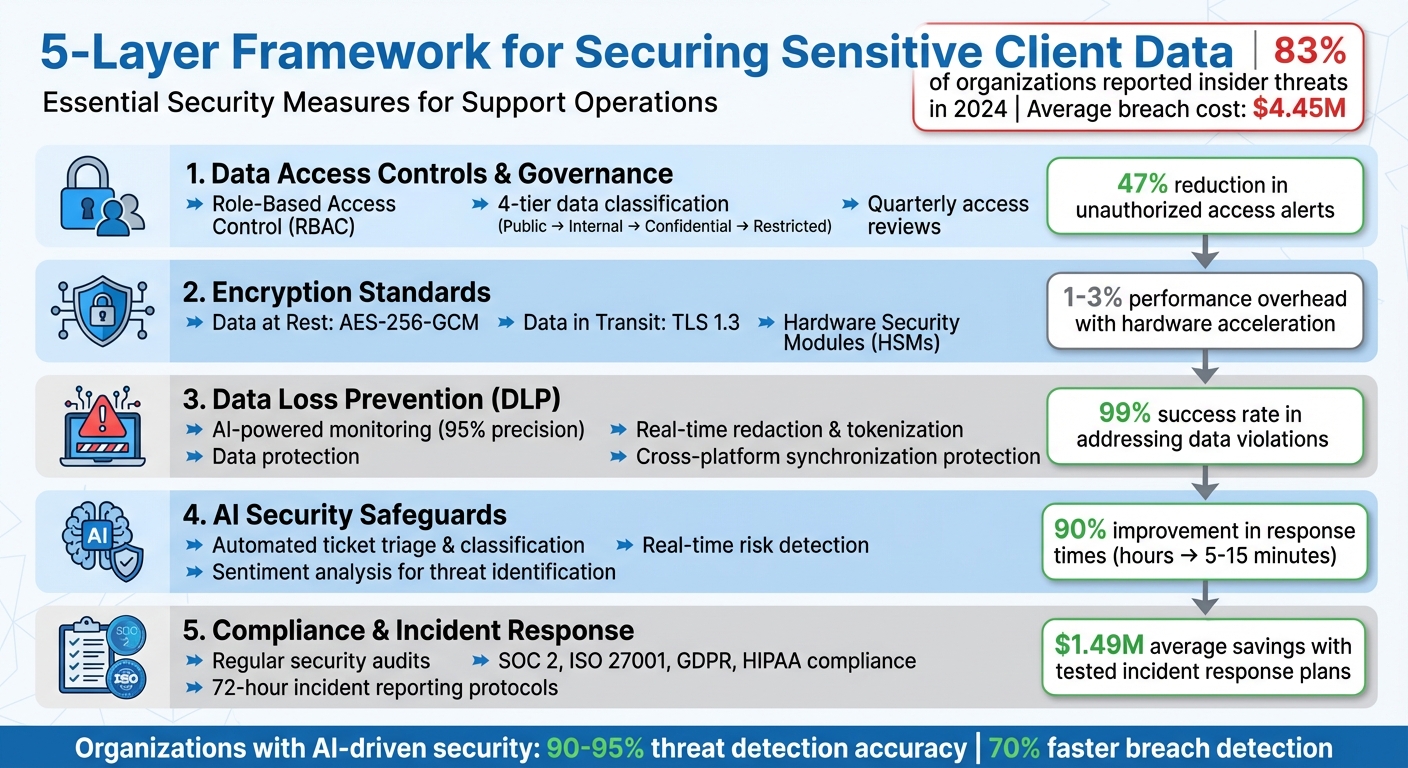
5-Layer Framework for Securing Sensitive Client Data in Cybersecurity Support
Why B2B Cyber Security is Failing: The Truth About MSPs & Human Error
sbb-itb-e60d259
1. Setting Up Data Access Controls and Governance
Securing support operations starts with tightly managing who can access what. Without clear policies in place, teams risk falling prey to insider threats. The key is ensuring permissions align strictly with job responsibilities.
Role-Based Access Control (RBAC) for Support Teams
RBAC works by assigning specific permission sets to roles. For instance, an "L1 Support Agent" role might only allow read-only access to ticket data, ensuring they handle only what’s necessary for their tasks. Support tiers can guide this structure: L1 agents focus on initial triage and have limited access – like masked personal data and public knowledge base articles – while L2 and L3 agents handle more complex issues, needing access to full ticket histories and system logs. Managers, on the other hand, require access to analytics and SLA configurations but with the least permissions necessary.
"RBAC isn’t just about restricting access – it’s about empowering teams with the right permissions to perform their jobs effectively." – HappyFox [7]
For AI agents, assign unique service identities with narrowly defined roles, such as a "Refund Worker" role limited to refund-specific workflows. Never rely on shared credentials for AI agents [1]. Additionally, RBAC should extend to the API level, not just the user interface. Apptension emphasizes this point:
"If your access control lives in the frontend, you do not have access control. You have a nicer looking incident." – Apptension [8]
Data Classification for Support Operations
Effective security policies rely on clear data classification, turning broad guidelines into actionable rules for handling information. A four-tier system – Public, Internal, Confidential, and Restricted – is a practical approach [9].
- Public data: Includes website content and marketing materials.
- Internal data: Covers items like organizational charts and non-sensitive metrics.
- Confidential data: Encompasses customer PII, contracts, and pricing details.
- Restricted data: Applies to sensitive information such as payment data, health records, and authentication secrets.
Label data at the point of creation, whether it’s through forms, tickets, or chats [9]. Use Data Loss Prevention (DLP) tools to automate the discovery of sensitive data like PII, PHI, or PCI in real time. For example, a fintech company adopting a similar four-tier system reduced unauthorized access alerts by 47% within a quarter and cut audit prep time from six weeks to just eight days [9].
Each classification tier should dictate specific security measures. Confidential data might require AES-256 encryption and DLP monitoring, while Restricted data demands stronger safeguards like tokenization, hardware security module (HSM) key management, and network segmentation [9]. Ensure systems handle only appropriately classified data; for instance, Restricted data from a secure ticketing platform should never end up in a collaboration tool meant for Internal data [10].
Regular Access Reviews and Updates
Permissions tend to pile up as employees change roles or contractors finish projects, leaving dormant accounts that could be exploited [11]. For instance, one healthcare organization found that 10% of contractor accounts still had access to sensitive data months after their projects ended [11].
Conduct quarterly access reviews using automated tools to flag over-granted roles, unused permissions, and excessive access. Tie de-provisioning workflows to your HRIS system so access is revoked immediately when someone leaves [12]. For high-risk actions like bulk data exports or account ownership changes, enforce just-in-time access, which automatically expires after a set period [8][12].
Organizations that prioritize regular access reviews see faster audit completions – up to 25% quicker – and resolve misconfigurations 90% faster [11]. Keep audit logs centralized and immutable to track every role change, invite, or removal. These records are critical for meeting SOC 2 and GDPR compliance requirements [8]. AI-driven governance tools can further enhance security by monitoring access patterns in real time and flagging unusual activity before it escalates [11].
With these access controls in place, the next focus shifts to protecting client data through advanced encryption methods.
2. Encrypting Client Data at Rest and in Transit
Once strict data access controls are in place, encryption becomes the next critical safeguard. Without it, data stored in databases or transmitted across networks remains vulnerable. The average cost of a data breach now stands at $4.45 million per incident [13].
Encryption Standards for Support Systems
When it comes to securing data at rest – like information stored in databases, backups, or archives – AES-256-GCM is the go-to choice. The GCM mode not only encrypts data but also ensures its integrity, making it impossible for attackers to tamper with encrypted files without detection. Avoid using ECB mode, as it exposes data patterns and weakens security.
For data in transit, TLS 1.3 should be your default protocol. It’s faster, more secure, and supports only modern AEAD ciphers. If older systems require compatibility, TLS 1.2 can be used as a fallback, but only with strong ciphers like ECDHE to maintain forward secrecy. To further secure support portals, enable HTTP Strict Transport Security (HSTS) to guard against protocol downgrade attacks.
For service-to-service communication, implement Mutual TLS (mTLS). Additionally, for highly sensitive information – such as Social Security numbers or API keys – use field-level encryption or tokenization. This ensures downstream systems only handle anonymized data.
| Algorithm/Protocol | Use Case | Recommended Standard |
|---|---|---|
| Data at Rest | Databases, Backups, Archives | AES-256-GCM |
| Data in Transit | Web Traffic, API Calls | TLS 1.3 |
| Key Exchange | Establishing Secure Channels | X25519 (ECDH) or RSA-OAEP (4096-bit) |
| Mobile/ARM | Resource-Constrained Devices | ChaCha20-Poly1305 |
| Password Hashing | User Authentication | Argon2id |
Modern encryption software generally introduces a 5-10% performance overhead, but with hardware acceleration like AES-NI, this drops to just 1-3% [13].
Managing Encryption Keys Securely
Encryption is only as strong as the keys protecting it. Use Hardware Security Modules (HSMs) – devices designed to handle cryptographic operations securely. These devices, validated to FIPS 140-2 Level 3, ensure encryption keys never leave the HSM in plaintext, safeguarding them even if other systems are compromised.
"The strongest encryption algorithm is rendered useless if the keys that lock and unlock your data fall into the wrong hands." – Whisperit
Adopt envelope encryption, where a Key Encryption Key (KEK) secures multiple Data Encryption Keys (DEKs). This approach simplifies master key rotation without requiring re-encryption of all stored data. Assign distinct roles: Cryptographic Officers manage the keys, while Support Agents or Service Accounts use them with minimal permissions. Use managed identities for authentication, avoiding the need to store sensitive credentials in code.
Centralize key management in a separate project or account from support operations. Apply project liens to prevent accidental deletion of key infrastructure, and enable detailed logging for all key activities – generation, access, and rotation. Multi-Factor Authentication (MFA) should be mandatory for administrative actions like key deletion or policy changes.
Encrypting Backups and Archives
Backups are often targeted due to weaker access controls, making encryption a must. Use AES-256 with client-side tools like GPG, OpenSSL, or Age to secure backup data, ensuring it remains unreadable even if cloud storage is breached.
"Unencrypted backups are a data breach waiting to happen. They contain the same sensitive data as your production systems but often with weaker access controls." – Nawaz Dhandala, OneUptime
For password-based key derivation, leverage PBKDF2 with at least 100,000 iterations or Argon2 to defend against dictionary attacks. Configure backup vaults with lock features to make backups immutable for a set period, protecting them from ransomware attacks. Enable soft delete and purge protection in cloud environments to safeguard against accidental or malicious deletion of encryption keys or backup data. Always store encryption keys in a separate environment, such as a dedicated HSM or centralized Key Management Service (KMS).
Regularly test decryption – ideally once a month. An encrypted backup is useless if it can’t be decrypted when needed. Use techniques like Shamir’s Secret Sharing for key escrow, requiring multiple authorized individuals to reconstruct keys during disaster recovery. Before archiving, eliminate unnecessary fields from client data to limit the amount of sensitive information stored.
3. Preventing Data Leaks During Support Interactions
In the world of support operations, safeguarding sensitive information is a constant challenge. Agents routinely handle confidential data through tickets, chats, file uploads, and screen shares. Even minor mistakes can lead to serious breaches. That’s why protecting data during live interactions is just as important as securing it when stored or transmitted.
Implementing Data Loss Prevention (DLP) Tools
Modern DLP tools are designed to monitor data across all support systems. Unlike older regex-based systems, which can generate up to 95% false positives and overwhelm teams with unnecessary alerts, AI-powered tools achieve 95% precision when detecting sensitive content in tickets, comments, and attachments [15].
One critical feature is cross-platform synchronization protection. For example, if an agent copies data from a ticket into Slack or Salesforce, DLP tools ensure that "shadow copies" are tracked and governed by the same security policies [15]. Browser-level DLP also plays a vital role by blocking agents from pasting sensitive information into unauthorized tools or personal apps [16]. Some organizations report a 99% success rate in automatically addressing monthly data violations using these AI-driven solutions [15].
"The goal of DLP in customer support isn’t to slow down work – it’s to enable compliant, efficient customer service at scale." – Anant Mahajan, Nightfall AI [15]
A good starting point is to operate in "warn" mode. This approach allows teams to fine-tune detection systems and observe agent behavior before implementing stricter enforcement measures that could disrupt workflows [20]. Advanced features like Optical Character Recognition (OCR) are also essential for identifying sensitive data hidden in images, PDFs, and screenshots [16].
Using Data Redaction and Tokenization
Redaction and tokenization should occur as soon as data enters the system – whether through API gateways, file uploads, or streaming services [17]. For unstructured text, regex-based redaction can effectively mask sensitive details like emails, phone numbers, and Social Security numbers [18]. For structured data, such as JSON files, tokenization can automatically replace sensitive fields like customerEmail or creditCardNumber with secure placeholders [18].
Format-preserving tokenization is particularly useful for legacy systems that require data to adhere to specific formats. For instance, a phone number’s structure can remain intact while its digits are replaced with tokens [17]. Access to detokenized data should be strictly limited to authenticated users with clear justifications, and all actions should be logged [17]. To prevent data from being linked across different business units, deterministic tokens should be scoped by region or tenant [17].
"Tokenize at ingestion, not after data has already sprawled across systems." – Protecto [17]
For AI-powered support tools, it’s important to implement guardrails that monitor tool interactions in real-time. These guardrails can strip sensitive fields, such as account IDs or emails, before they are transmitted to third-party systems like Jira or Slack [14].
Monitoring and Auditing Agent Activities
Comprehensive audits are essential for tracking every action taken by agents. Logs should detail who accessed data, what security policies were triggered, the exact timestamps, and any remediation steps taken [20][16]. These logs must be immutable to meet regulatory requirements [2]. Context-aware monitoring can also adjust its approach based on ticket status – such as New, Open, or Solved – applying tailored visibility or scanning rules [15].
Switching from manual audits to automated evidence collection can save time and improve accuracy. For example, "Evidence Packs" compile details like actor, action, and access changes, simplifying compliance reviews into straightforward queries [16]. A daily/weekly/monthly cycle can help streamline operations: daily scans for new exposures, weekly adjustments to reduce false positives, and monthly privilege reviews for support teams [16].
"SaaS DLP is not a perimeter project. It is a workstream discipline." – Aatish Mandelecha, Founder, Strac [16]
Monitoring should extend beyond browsers to include local file activities, such as copying data to USB drives, printing, or sharing via Bluetooth [19]. For more complex scenarios, a "human-in-the-loop" approach can allow compliance teams to manually review flagged issues [15]. Additionally, configuring "fail-open" settings ensures that operations can continue during cloud outages, while still logging activities for later review [19]. These measures provide a solid foundation for incorporating AI-driven security tools into support workflows.
4. Using AI to Improve Security in Support Workflows
AI is stepping up to make support workflows more secure without slowing things down. By enforcing security policies automatically, AI reduces the burden on agents to remember every protocol. This allows agents to focus on customer issues while sensitive data stays protected. Think of AI as an extra layer of defense, extending security from static data storage to live, dynamic interactions.
AI-Powered Ticket Triage and Classification
Manual ticket triage can be risky – about 30% of tickets require reassignment[21], which increases unnecessary exposure to sensitive data. AI-powered classification tackles this by automatically routing tickets to the right queues based on sensitivity, keeping data more secure.
One standout feature is redaction at ingestion, where sensitive information is stripped out before a ticket even reaches an agent. This ensures private data isn’t unnecessarily exposed. For organizations dealing with regulated data, deploying small language models like Phi-3-mini (3.8B parameters) on self-hosted infrastructure ensures data stays on-premise, avoiding external cloud storage risks.
Another safeguard is progressive disclosure. AI provides agents with redacted ticket details initially, only revealing sensitive information after specific validation steps in the workflow.
"The real security question isn’t ‘Is AI safe?’ It’s ‘Is this AI implementation designed to prevent leakage, misuse, and unauthorized actions?’" – Ameya Deshmukh, EverWorker[1]
AI also excels at identifying high-risk interactions, such as legal threats or breach reports, and escalating them directly to the right teams. This risk-based prioritization can slash response times from hours to just 5–15 minutes, improving efficiency by 90%[3].
| Task | Recommended Model | Security Benefit |
|---|---|---|
| Ticket Classification | Phi-3-mini (3.8B) | Self-hosted option to keep data on-premise |
| PII Redaction | Advanced Data Privacy AI | Obscures sensitive data before agents can see it |
| Response Drafting | Mistral 7B | Uses internal knowledge base, avoiding misinformation |
| Complex Escalation | Llama 3.3 (70B) | Excellent for handling high-risk legal/security cases |
Automated Knowledge Base Creation and Redaction
Turning resolved tickets into knowledge base articles is common, but it can expose sensitive client data. AI can generate these articles while redacting private details in real time. Using pre-processing redaction, sensitive data is cleaned as soon as it’s received, ensuring AI only learns from anonymized information[22].
Instead of just deleting sensitive data, placeholders can be used to maintain context while keeping privacy intact. This approach ensures the text remains readable and grammatically correct.
"A smart workflow will have the AI redact the incoming message before that same message is used to suggest a response. This keeps your entire support system secure." – Stevia Putri, eesel AI[22]
To further secure outputs, AI-generated articles are scanned for sensitive information before publication. For businesses handling unique data – like subscription codes or internal identifiers – custom redaction rules are essential[22].
Before rolling out these systems, test them on historical tickets to fine-tune detection rules and minimize false positives. This step is crucial, especially since 76% of US consumers are hesitant to share personal data with AI providers[23].
Real-Time Risk Detection and Sentiment Analysis
AI takes data security a step further by monitoring interactions in real time, catching threats that human agents might miss. For example, it can spot prompt injection attempts designed to bypass safety protocols or redact sensitive information like API keys, tokens, and passwords from uploaded files.
Sentiment analysis adds another layer of protection by identifying high-frustration interactions, which could indicate social engineering attempts. When these patterns are detected, AI can trigger immediate human oversight through human-in-the-loop (HITL) protocols. For instance, the system might auto-approve refunds under $50 while requiring supervisor approval for larger amounts.
Anomaly detection is another powerful tool. It flags unusual behaviors, such as after-hours system access, unusually large inputs, or unexpected data export requests. Virgin Media O2’s AI systems, for example, have identified 1 billion suspected scam calls before they were answered[4].
To limit risks, set action thresholds for AI-driven decisions and create separate AI service identities with specific roles, like "Refund Worker" or "Account Access Worker." This segmentation ensures that even if one identity is compromised, the damage is contained. Additionally, all AI actions should be logged in an immutable audit trail, providing transparency and accountability. These real-time monitoring features work hand-in-hand with broader compliance processes to maintain ongoing protection.
5. Maintaining Security and Compliance Standards
When it comes to AI-powered support operations, keeping security and compliance measures up to date is just as important as the daily safeguards you have in place. For teams handling sensitive client data, this means regular evaluations, clear compliance frameworks, and a well-thought-out plan for responding to incidents. The difference between a manageable issue and a full-blown crisis often hinges on preparation.
Conducting Regular Security Audits
Security audits are like stress tests for your defenses – they simulate real-world conditions to identify vulnerabilities. Start with access controls: make sure former employees no longer have access and current staff only have permissions they absolutely need (the Principle of Least Privilege). Add vulnerability scans to catch outdated software and run penetration tests to mimic real-world attacks[24][25].
The stakes are high. Cybercrime is expected to cost $9.5 trillion by 2025, with the average breach costing $4.88 million[24][31]. However, organizations leveraging AI-driven security tools see a significant edge: threat detection accuracy can jump from 70-80% to 90-95%, and breach detection times can be reduced by as much as 70%[25][6].
"An audit differs from a cybersecurity plan: while a plan maps out your strategy, an audit tests it in the heat of battle." – Jim Bourke, HLB Global Technology & Advisory Services Leader[24]
To stay ahead, move from one-time checks to continuous validation. Automate quarterly reviews to eliminate unused accounts, rotate encryption keys annually, and patch critical vulnerabilities within 72 hours[26]. While audit costs vary – starting around $5,000 for small businesses and exceeding $100,000 for large enterprises – they’re an investment in long-term resilience[25].
These audits are the backbone of strong compliance and swift incident management.
Meeting Industry Compliance Standards
For cybersecurity support teams, adhering to standards like SOC 2, ISO 27001, and HIPAA is non-negotiable. These frameworks ensure that systems and processes meet stringent security and privacy requirements. For example, under GDPR Article 28, you’ll need Data Processing Agreements (DPAs) with every third-party tool you use, from ticketing systems to analytics platforms[28]. Systems must also support data subject rights, such as enabling data exports and setting up automated deletion schedules to align with data minimization rules[29].
Data residency is another key consideration. Hosting data in specific regions – like the US, UK, or Germany – ensures compliance with local privacy laws[29][30]. Tools like automated redaction can help by identifying and masking sensitive information, such as Social Security Numbers or credit card details, before it reaches support agents[2][29].
For enterprise clients, SOC 2 Type II certification is often preferred over Type I. While Type I evaluates design at a single point in time, Type II assesses the effectiveness of controls over 3-12 months[27]. To maintain compliance, use automated scanners to detect hidden violations, such as trackers that activate before user consent is given[28].
Meeting these standards is just the start. A well-prepared incident response protocol ensures you’re ready when the unexpected happens.
Setting Up Incident Response Protocols
The first 15 minutes after a breach are critical. Your team needs to act immediately, without wasting time on questions like "Who’s in charge?" Clearly define who can declare an incident and authorize containment measures[33]. Follow the NIST framework: Preparation, Detection & Analysis, Containment/Eradication/Recovery, and Post-Incident Activity[31].
Assign specific roles to your team: an Incident Commander for coordination, a Technical Lead for execution, a Communications Lead for updates, and a Legal/Compliance Lead to ensure regulatory requirements are met[33]. Organizations with tested incident response plans save an average of $1.49 million per breach, yet 77% of companies still don’t have a formal plan in place[31][32].
"A mature incident response program is one where teams can execute the first hour without debate over ownership, authority, or communication paths." – Valydex Implementation Guide[33]
Regular practice is essential. Conduct quarterly tabletop exercises to simulate scenarios like ransomware attacks or data leaks. Keep a digital "jump kit" ready, containing forensic tools, backup credentials, contact lists, and network diagrams that are accessible even if your primary systems are compromised[31]. And don’t forget about reporting: under CIRCIA (expected May 2026), significant cyber incidents must be reported to CISA within 72 hours, and ransom payments within 24 hours[33].
After every incident, hold blameless reviews to refine your playbooks and detection rules. Each breach is an opportunity to improve your defenses[31].
Conclusion
Handling sensitive client data in cybersecurity support goes far beyond just meeting basic requirements – it’s about creating a multi-layered defense system. Start with the basics: apply least-privilege access so agents only view data relevant to active cases, use automated redaction to remove personally identifiable information at the source, and enforce data minimization to collect only what’s absolutely necessary for resolving issues [1][2].
AI is reshaping support workflows, but its power lies in how it’s implemented. Instead of relying on generic chatbots, focus on AI Workers with clearly defined roles and traceable actions. For industries with strict regulations, self-hosted models like Mistral 7B or Llama 3 offer a way to avoid risks tied to third-party data retention or exposure under laws like the US CLOUD Act [3]. By adopting private AI infrastructure, organizations have seen first response times drop by 90% and ticket handling times reduced by 40% [3].
"The real security question isn’t ‘Is AI safe?’ It’s ‘Is this AI implementation designed to prevent leakage, misuse, and unauthorized actions?’" – Ameya Deshmukh, EverWorker [1]
Strengthening security means integrating AI-driven controls with continuous monitoring. Every data pathway must be mapped – from where information originates to who accesses it and which systems store logs. This creates a solid framework for making informed privacy decisions [5]. With GDPR fines reaching €1.2 billion in 2024, the risks of neglecting security are too high to ignore.
Forward-thinking support teams will prioritize systems that prevent data leaks, streamline compliance, and turn security into a competitive edge.
FAQs
What data should support agents never request or store?
Support agents must avoid requesting or storing sensitive information unless it’s absolutely necessary to resolve an issue. This includes details like full names, addresses, phone numbers, dates of birth, Social Security numbers, passport or driver’s license numbers, financial information such as credit card details, or any other personally identifiable information (PII). Keeping data collection to a minimum helps protect client privacy and lowers the risk of security breaches.
How do we use AI in support without leaking client data?
To use AI securely in support roles, it’s crucial to follow a few key practices. Start with data minimization, only collecting what’s absolutely necessary. Pair this with anonymization to strip data of personally identifiable information and encryption to safeguard it during storage and transmission.
Control access by implementing multi-factor authentication and maintaining audit logs to track who accesses sensitive information. Hosting AI systems in secure environments, such as private clouds, can help manage data flow effectively.
Regular system monitoring is essential. Adhere to established standards like NIST (National Institute of Standards and Technology) or GDPR (General Data Protection Regulation) to identify and address potential vulnerabilities. By taking these precautions, you can ensure that AI-driven support remains efficient while maintaining strict client confidentiality.
What should our incident response ‘first hour’ checklist include?
Your incident response checklist for the critical first hour should emphasize these essential steps:
- Contain the breach: Quickly isolate compromised systems to prevent further damage and safeguard evidence for investigation.
- Document the incident: Note the exact time the breach was detected and any initial observations or findings.
- Activate response roles: Assign team members to handle specific areas like legal compliance, technical investigation, and public or internal communication.
- Log all actions: Maintain a precise, timestamped record of every action taken during the response process.
- Assess the impact: Determine the extent of the breach, including which systems and data have been affected.
These actions set the foundation for effective incident management and future recovery efforts.
Related Blog Posts
- How do Canadian data residency requirements affect helpdesk selection?
- What security requirements matter for Canadian public sector SaaS (ITSG-33 explained)?
- Is PIPEDA compliance enough if your helpdesk data is processed outside Canada?
- How do you evaluate “foreign access risk” when choosing a US vs non-US helpdesk?






