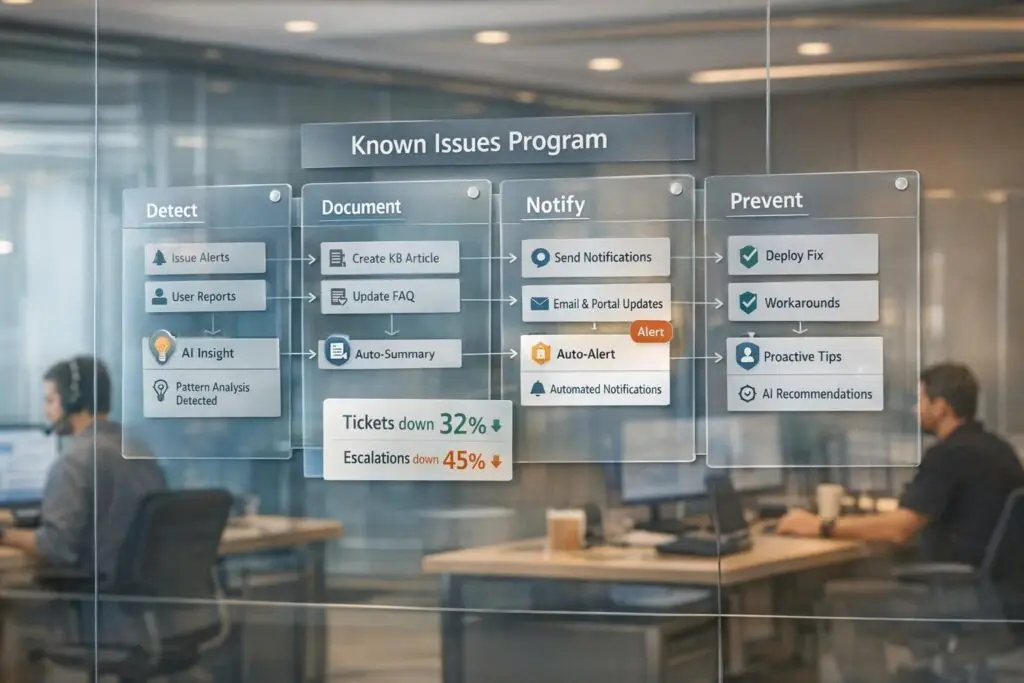
A Known Issues program helps your support team handle recurring problems efficiently. By documenting common issues and solutions in a centralized, accessible system, you empower both agents and customers to resolve problems faster. This approach reduces ticket volumes, minimizes escalations, and improves customer satisfaction.
Here’s how you can build one:
- Identify recurring issues: Use AI tools to analyze ticket data, detect patterns, and predict escalations.
- Document solutions effectively: Create standardized templates for issues, including symptoms, causes, and fixes.
- Communicate clearly: Share updates with customers and teams using automated notifications and a well-maintained knowledge base.
- Measure results: Track metrics like deflection rates, CSAT, and escalation reduction to refine your program over time.
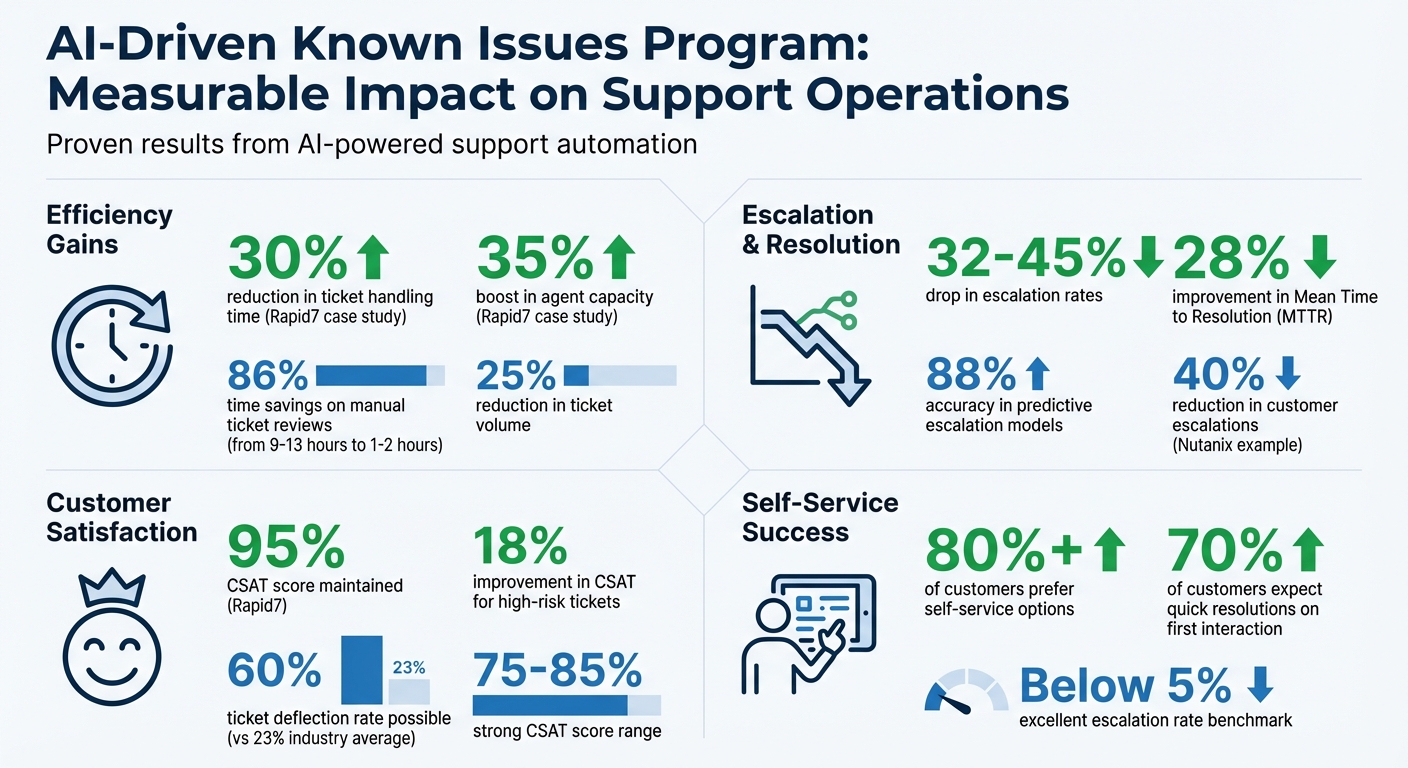
AI plays a key role in automating processes, spotting trends, and maintaining up-to-date documentation. Companies like Rapid7 have cut ticket handling times by 30% and boosted agent capacity by 35% with AI-driven programs. A well-executed system not only saves time but also ensures customers can find solutions quickly – before frustration escalates.
AI-Driven Known Issues Program: Key Performance Metrics and Impact Statistics
Step 1: Find Recurring Issues Using AI Analytics
The first step in creating a Known Issues program is to identify recurring problems – not based on hunches or anecdotal feedback, but by leveraging AI to analyze your ticket data. AI tools can process thousands of support tickets in minutes, uncovering patterns and trends that traditional reviews might miss. These tools reveal sentiment shifts, group similar issues, and even predict escalations, turning raw data into a clear guide for what needs to be documented. Let’s break down how AI features like sentiment detection and escalation prediction can help pinpoint critical issues.
Use Sentiment Detection and Escalation Prediction
AI sentiment analysis scans the text of incoming tickets to detect emotions like frustration, anger, or dissatisfaction. By identifying these emotional cues, you can prioritize urgent issues and uncover recurring pain points before they become bigger problems. For instance, if multiple customers express frustration about a specific feature or workflow, sentiment detection highlights those issues so you can address the root cause instead of just patching individual complaints.
Escalation prediction takes this a step further by assigning a risk score to tickets based on factors like sentiment changes, response delays, prior issue severity, product context, and customer history. This real-time scoring helps teams identify tickets likely to escalate. Organizations using this approach report a 32% to 45% drop in escalation rates, with predictive models achieving about 88% accuracy when trained on historical data. Moreover, AI-driven escalation prediction can slash the time spent on manual ticket reviews from 9–13 hours to just 1–2 hours – a time savings of 86%. This allows teams to act quickly, routing high-risk tickets to senior agents, triggering relevant knowledge base snippets, or flagging issues for immediate documentation.
Review Historical Ticket Data for Patterns
Once AI has streamlined ticket triage, the next step is to analyze historical ticket data to identify recurring issues. AI tools use clustering and pattern recognition to group similar tickets, turning raw feedback into actionable insights. This analysis lays the groundwork for your Known Issues program.
Start by categorizing tickets with custom fields like "Issue Type" to create structured data for analysis. Then, use AI enrichment to automatically detect intent, sentiment, and language, converting unstructured text into searchable data points. Allow at least two weeks or collect 500–1,000 tickets to ensure you have enough data for meaningful trend analysis.
Focus on specific ticket types for deeper insights:
- Group transfers: Tickets that move between teams (e.g., from Tier 1 to specialists) often highlight complex, recurring problems that need better documentation or escalation paths.
- One-touch tickets: These are resolved in a single reply and often represent simple, high-frequency issues – perfect for self-service documentation.
- Macro usage: Reviewing frequently used macros can reveal common customer concerns.
As one expert points out:
"Your tickets will probably be your best resource for finding common customer issues and determining what to put in your knowledge base".
Finally, combine sentiment data with operational metrics. For example, pair negative sentiment signals with specific product categories or "About" fields to identify features causing the most frustration. This blend of AI insights and structured ticket data provides a clear roadmap for what to document, helping reduce ticket volume and prevent escalations.
sbb-itb-e60d259
Step 2: Document and Structure Known Issues
After identifying recurring problems through AI analytics, the next move is to organize and document these issues for both agents and customers. The aim is to create clear, standardized records that AI can easily reference to provide quick solutions.
Create Standard Issue Templates
Every documented issue should follow a consistent format to ensure clarity and make it easier for AI to retrieve relevant information. A good template includes:
- Action Title: Use primary keywords (e.g., "Reset VPN Password").
- One-Sentence Summary: Provide a concise explanation for chatbots.
- Description of Symptoms: Detail the problem as experienced by users.
- Root Cause: Explain why the issue occurs.
- Specific Workarounds: Offer actionable steps to resolve the issue.
It’s also crucial to differentiate between customer-facing help center articles and internal notes for agents. For example, while customers might see a guide to fix login errors, agents should have access to more detailed resources like escalation steps or compliance guidelines.
For unresolved issues, use tags such as doc_needed or agent_esc_notified to flag problems that require formal documentation. Maintain a shared tracking document to capture these issues, ensuring nothing gets overlooked before they’re added to your knowledge base. This process helps your team build a more thorough and reliable documentation system.
Use AI for Automated Summaries
Manually documenting issues can take a lot of time, but AI tools can simplify this process by generating concise summaries from ticket data. These tools can analyze historical tickets – often from the last 30 days – and group similar problems to create a structured hierarchy of help center articles. What might have taken 9–13 hours of manual effort can now be completed in just 1–2 hours, cutting the time by up to 86%.
When using AI for documentation, ensure that it automatically redacts personally identifiable information (PII) to maintain security and compliance. AI can also expand bullet points into full articles, refine the tone for publication, and generate "resolution snippets" that provide agents with immediate context and solutions. For instance, tools like Supportbench’s AI KB Article Creation feature can analyze the history of a resolved case and generate a complete knowledge base article, including the subject, summary, and keywords based on the issue and its resolution.
To maintain accuracy, always include a human-in-the-loop review process. This ensures that low-confidence AI predictions and all drafts are evaluated and edited by a person before being published. Combining standardized templates with AI-generated summaries creates a scalable documentation system that can grow with your product while keeping your team from feeling overwhelmed. This structured approach not only speeds up issue resolution but also reduces ticket volumes and minimizes escalations.
Step 3: Communicate Known Issues to Customers and Teams
Once you’ve documented issues in a structured way, the next step is clear: communicate effectively. Keeping both customers and internal teams informed can significantly reduce the volume of support tickets and prevent unnecessary escalations. Let’s dive into how AI-powered workflows can streamline these communications and make issue resolution faster.
Automate Notifications with AI-Powered Workflows
AI workflows can automatically identify the intent behind tickets and send targeted notifications. For instance, if a ticket relates to a known issue – like a software bug or a refund request – the system can instantly share troubleshooting steps or direct the customer to relevant documentation. For internal teams, AI can add notes to tickets when specific triggers occur, such as multiple replies or the detection of high-risk intent. These notes might include handling instructions or links to key resources. Additionally, webhooks can forward ticket details to engineering or compliance teams, cutting out manual processes and ensuring the right people are informed without delay.
| Notification Type | AI Workflow Trigger | Target Audience | Purpose |
|---|---|---|---|
| Internal Note | Intent detection or reply count | Support Agents | Share handling instructions/KB links |
| Automated Reply | Intent (e.g., "Refund") | Customers | Deflect to self-service or provide status |
| Webhook/Forward | External team requirement | Internal Teams | Pass data to engineering or compliance |
| Proactive Request | Missing metadata/details | Customers | Gather required info before agent review |
| Recommended Action | High escalation risk score | CS/Support Teams | Recommend outreach templates or swarming |
To ensure accuracy, set confidence thresholds for customer-facing automation. This minimizes the risk of sending irrelevant responses. AI can also monitor sentiment changes in real time, triggering alerts for high-risk cases. For issues likely to escalate, AI tools can recommend specific playbooks or outreach strategies.
Add Known Issues to Customer-Facing Knowledge Bases
Automated notifications are just one part of the equation. Adding known issues to your knowledge base provides customers with another avenue for self-service, reducing the need to contact support. When AI identifies a customer’s intent – like canceling a subscription or troubleshooting a login error – it can send them a link to the relevant article, often resolving the issue before an agent gets involved.
Each article about a known issue should be clearly structured. Include sections that outline the problem, root cause, symptoms, and any available workarounds. Mark the issue’s status – such as "Investigating", "Workaround Available", or "Resolved" – to manage customer expectations effectively.
"Great AI support starts with great documentation. To train Fin effectively, you need more than just a Help Center; you need a living, evolving knowledge management system that keeps pace with your business." – Beth-Ann Sher, Intercom
Support agents should have an easy way to flag outdated or missing content through a ticket form or macro. If customers frequently report confusion over a design choice that’s functioning as intended, update the knowledge base to clarify this behavior and prevent future escalations. Modern AI tools can even analyze ticket data from the past 30 days to generate up to 40 help center articles, grouping content by common customer pain points. This makes it much easier to keep your documentation current while reducing manual effort.
Step 4: Measure Results and Improve Over Time
To keep a Known Issues program effective, it’s essential to regularly measure its performance and adapt using real-time AI insights. AI dashboards can provide valuable, up-to-the-minute data on ticket patterns, customer sentiment, and escalation risks, helping you address potential problems before they escalate. These measurable gains build on earlier documentation and communication strategies, ensuring continuous improvement.
Track Deflection Rates, CSAT, and Escalation Reduction
Keep an eye on key metrics like ticket deflection, CSAT, escalation rate, FCR (First Contact Resolution), and MTTR (Mean Time to Resolution) to evaluate the success of your Known Issues program.
- Ticket deflection rate measures how many inquiries your program resolves before they turn into formal tickets. In the tech industry, the average deflection rate is 23%, but AI-powered support platforms can push that number as high as 60%.
- Customer satisfaction (CSAT) scores, gathered through post-resolution surveys, indicate how well customers feel their issues were handled. A strong CSAT score typically falls between 75% and 85%, and AI-driven tools can improve CSAT for high-risk tickets by 18%.
- Escalation rate – the percentage of tickets that require higher-tier support – should decrease over time. An excellent escalation rate is below 5%, while 5% to 20% is average. Predictive AI has helped some organizations reduce escalation rates by 32% to 45%.
- FCR tracks how often issues are resolved in a single interaction, while MTTR measures the time it takes to resolve problems. AI-enhanced workflows can cut MTTR by 28% for high-risk cases.
"The best metrics don’t just track history – they change what happens next." – Eric Klimuk, Founder and CTO, Supportbench
Instead of relying on static weekly reports, use real-time dashboards. AI can automatically group tickets by intent, helping you pinpoint which known issues are generating the most activity and where documentation falls short. Review "one-touch" tickets – cases resolved with a single reply – as these are prime candidates for inclusion in your Known Issues program.
Use Predictive AI Insights to Refine Processes
Tracking performance is just the start. Predictive AI takes it a step further by helping your team anticipate and address future problems. AI models can analyze ticket language, shifts in sentiment, response times, and account details to assess escalation risks, achieving up to 88% accuracy. When high-risk tickets are flagged, AI can activate automated playbooks, such as routing the ticket to senior agents or initiating proactive outreach.
For example, in 2025, Rapid7 used Mosaic AI to support its 11,000+ customers and 500+ agents, cutting ticket handling time by 30%, increasing agent capacity by 35%, and maintaining a 95% CSAT score. Similarly, Nutanix, under Chad Singleton’s leadership, leveraged predictive AI to analyze over 40 signals like urgency and sentiment, reducing customer escalations by 40%.
AI also helps identify recurring issues by clustering similar tickets, revealing product gaps or emerging problems that need immediate attention. If a specific issue arises more than three times, prioritize it for a permanent fix with your product team. To calculate the ROI of AI interventions, use holdout queues – control groups of tickets handled manually – and compare outcomes. Tag actions such as sending a Known Issues snippet or routing to an expert, linking them directly to resolution success.
Regularly review SLA and CSAT trends to fine-tune AI risk thresholds and ensure they align with customer expectations. Retrain your AI models every quarter to maintain accuracy as your products and customer behaviors evolve. By streamlining workflows, AI can significantly reduce the time spent on manual reviews, saving your team valuable resources.
Common Pitfalls and How to Avoid Them
Known Issues programs can stumble when teams fall into familiar traps. One of the biggest missteps is addressing symptoms instead of root causes – focusing solely on restoring service without digging into why the issue happened. This creates a cycle of "firefighting", where the same problems resurface repeatedly. Another common challenge is data silos, which fragment information and make it harder to track issues effectively. Similarly, poor documentation standards can derail efficiency. Articles with vague titles or filled with jargon become nearly impossible to find and use consistently. On top of that, outdated documentation – a knowledge base that hasn’t kept up with product updates – leads to frustration for users. With 70% of customers expecting quick resolutions or solutions during their first interaction, outdated resources directly harm customer satisfaction.
A lack of visibility is another pitfall. Often, teams document known issues internally but fail to communicate them proactively to customers. This forces users to submit tickets for problems the team already knows about. Considering that over 80% of customers prefer self-service options to handle issues on their own, proactive communication becomes a must. Steering clear of these pitfalls is essential for reducing ticket volume and avoiding unnecessary escalations. The table below outlines these common pitfalls and actionable solutions.
Pitfalls vs. Solutions Table
| Common Pitfall | Impact | Actionable Solution |
|---|---|---|
| Data Silos | Fragmented tracking leads to lost context. | Unified Platforms: Implement centralized systems with AI-powered search to consolidate issue tracking. |
| Reactive Support | Teams spend 9–13 hours manually analyzing patterns instead of preventing issues. | AI Risk Scoring: Use AI to score tickets for escalation risk based on sentiment, history, and SLA indicators. |
| Vague Documentation | Hard-to-find articles force customers to contact support. | Standardized Templates: Create keyword-rich titles (e.g., "Email Response Rate Report" vs. "Email Report") and consistent article formats. |
| Information Decay | Outdated articles frustrate users and no longer align with current products. | Scheduled Reviews: Set quarterly or biannual audits with automated reminders to update the knowledge base. |
| Manual Bottlenecks | Agents waste time on repetitive tasks instead of solving complex issues. | AI Automation: Leverage AI for ticket routing, sentiment analysis, and response suggestions. |
| Lack of Proactive Communication | Known issues remain internal, driving up unnecessary tickets. | Proactive Messaging: Send automated notifications to inform customers of delays or issues in advance. |
To sidestep these pitfalls, create Known Error Records to document root causes and verified workarounds as soon as problems are identified. Assign unique IDs (e.g., TECH-SUP-001) to each issue so both agents and customers can easily reference them. Enhance clarity by including annotated screenshots, diagrams, or short tutorial videos to explain complex troubleshooting steps. Finally, consider adopting a ticket swarming approach, where frontline agents collaborate directly with specialists to resolve issues efficiently from start to finish.
Conclusion: Build a Scalable, AI-Driven Known Issues Program
A well-designed Known Issues program shifts your support strategy from reactive problem-solving to proactive prevention. By using AI, you can identify patterns, document recurring issues, notify customers in advance, and measure success – leading to up to a 25% reduction in ticket volume while boosting customer satisfaction. AI’s ability to predict escalations has shown impressive results, including a 32% decrease in escalations and a 28% improvement in mean time to resolution (MTTR) through tools like sentiment analysis, intent detection, and predictive risk scoring.
Eric Klimuk, Founder and CTO of Supportbench, highlights this shift perfectly:
"The Knowledge Base is no longer just a repository of information, but a dynamic, evolving tool that can drive efficient customer support and enhance the customer experience."
This emphasizes the value of scalable automation in support operations. AI-native platforms, such as Supportbench, integrate case management, documentation, and routing seamlessly – removing the need for heavy IT involvement or costly add-ons. Their modular design enables individual components to scale independently as your customer base grows, while centralized data ensures AI models remain accurate and free from silos.
To ensure long-term success, it’s essential to establish a feedback loop where resolved cases continuously refine your AI models. Monitor key metrics like deflection rates, customer satisfaction for high-risk tickets, and escalation reductions to measure your return on investment. Regularly audit your knowledge base to eliminate outdated content and create new articles based on emerging trends. These ongoing updates, paired with continuous AI improvements, will keep your support system agile and focused on customer needs.
A Known Issues program isn’t static – it evolves with your operations. By letting AI handle repetitive tasks, your team can zero in on complex problems and deliver the personalized experiences that foster customer loyalty and drive revenue. Start implementing these strategies today to transform your support operations into a proactive, adaptive powerhouse.
FAQs
How can AI make a ‘Known Issues’ program more effective?
AI can play a powerful role in boosting the efficiency of a "Known Issues" program by spotting and addressing recurring customer problems. By analyzing support ticket data, AI can identify patterns, categorize issues, and even create knowledge base content. This allows customers to solve common problems on their own, cutting down on the need for direct support.
It also simplifies operations by automating tasks like ticket triage, sentiment analysis, and escalation prediction. These tools ensure tickets are routed to the right teams, predict potential escalations, and even suggest fixes before similar issues arise again. On top of that, AI helps keep your knowledge base current by spotting content gaps and recommending updates based on new trends. This proactive system not only reduces ticket volume but also speeds up resolution times, leading to happier customers.
What are the key mistakes to avoid when managing a Known Issues program?
Managing a Known Issues program comes with its challenges, and there are a few missteps that can derail its success. One major problem is failing to properly identify and prioritize recurring issues. This can lead to incomplete documentation and missed chances to lower ticket volumes. Another common mistake? Linking the wrong type of articles to support cases. For instance, relying on reference materials instead of actionable solutions can leave customers struggling to resolve their issues independently.
Another area where programs often stumble is in keeping things current. If you’re not regularly analyzing ticket trends, gathering feedback, and reviewing how articles perform, your program can quickly lose its relevance and effectiveness. Communication is another sticking point. Without clear updates on known issues or proper training for support agents, the program’s potential impact is significantly reduced.
To steer clear of these challenges, focus on getting the basics right: identify issues accurately, link the right resources, analyze data consistently, and communicate updates clearly. These steps will help ensure your program stays useful and meets customer expectations.
How can you measure the effectiveness of a Known Issues program?
The success of a Known Issues program can be measured by keeping an eye on key metrics like lower ticket volumes, reduced escalations, and quicker resolution times. Positive changes in customer satisfaction and feedback scores also serve as strong indicators of progress.
Pay close attention to trends such as how often issues resurface and how frequently they escalate. By regularly analyzing these metrics, you can ensure the program is effectively tackling customer pain points and consistently improving over time.