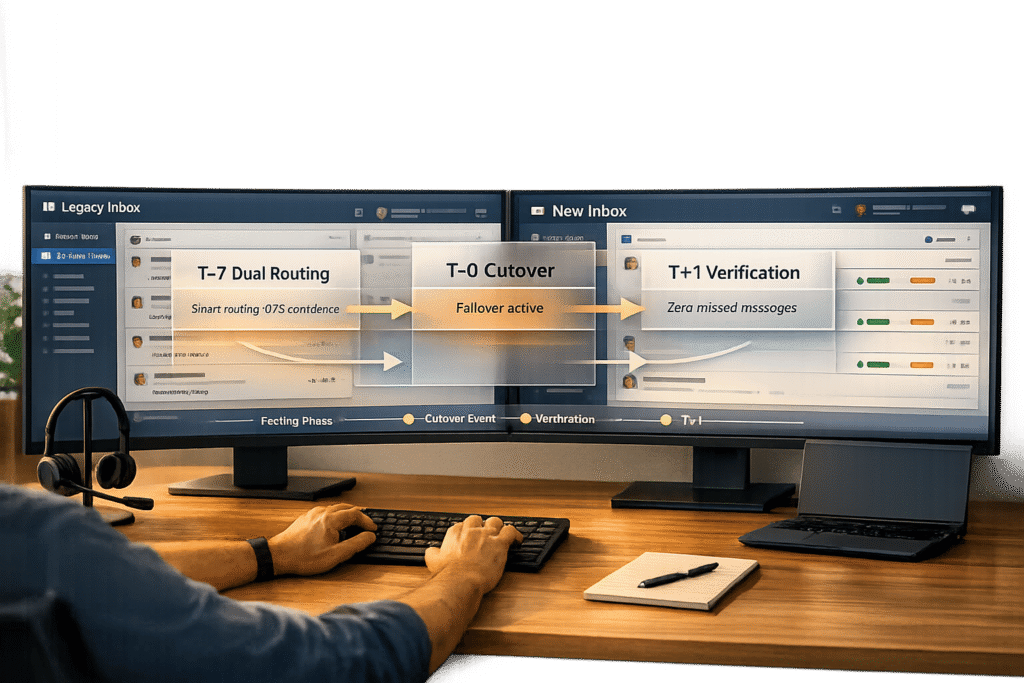
Switching from Intercom to a new customer support platform can be risky if not planned carefully. The stakes? Missed messages, duplicate tickets, and frustrated customers. Here’s how to ensure a smooth transition:
- Audit your current setup: Catalog all data, workflows, and automation rules to avoid gaps during migration.
- Use parallel message routing: Set up systems to run side-by-side, ensuring no messages are lost.
- Leverage AI: Use AI-powered ticket routing and prioritization for triaging, duplicate detection, and monitoring to catch issues early.
- Backup and rollback plans: Always have a backup of your data and a clear rollback strategy in case of problems.
- Monitor in real time: Track message delivery, response times, and workflow performance during the cutover.
- Validate post-cutover: Reconcile message logs and optimize workflows after the switch.
- Avoid common mistakes: Clean up data, test workflows, and schedule the cutover during low-traffic hours.
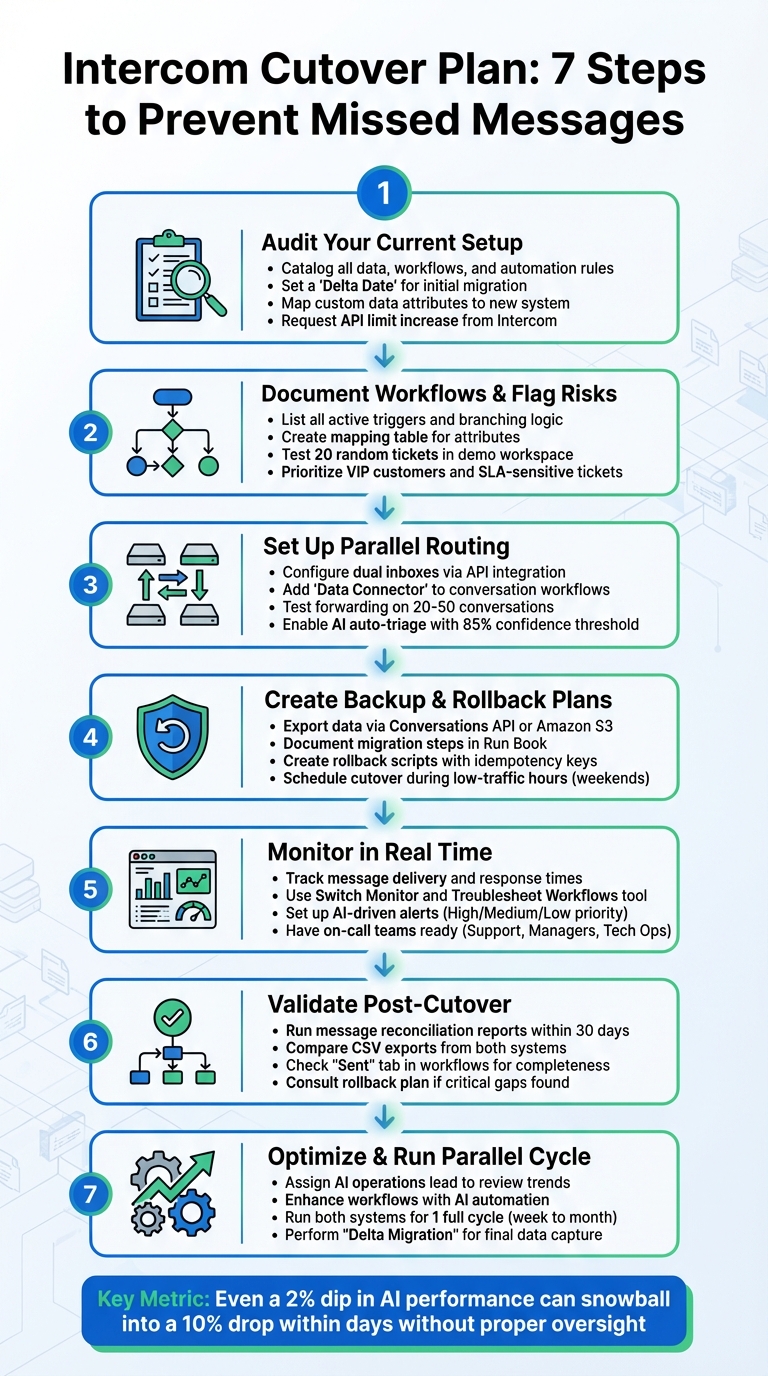
7-Step Intercom Cutover Process to Prevent Missed Messages
Audit and Map Your Current Intercom Setup
Before making the switch, take stock of everything in your current Intercom setup. This means cataloging every contact record, conversation type, workflow trigger, and routing rule. Missing any automation could lead to gaps in messaging and functionality.
Start by setting a "Delta Date" – a specific point in time to gather closed tickets for your initial migration. At the same time, log all identifiable end-user records, ensuring each record includes at least a user_id or an email address. To maintain consistency, map your existing custom data attributes to their equivalents in the new system you’re moving to.
"Understanding the ‘why’ of the switch should make your priorities for a new platform clearer – and put the scale of the switch in perspective." – Intercom Blog
Review Your Inbox and Conversation History
Run a detailed report of active conversations. Identify which are temporary chats and which are formal tickets, and determine how these should be migrated. Document critical details like message volumes, customer service SLA policies, and integration points – especially connections to CRMs or analytics dashboards – to ensure reporting continuity.
To speed up the process, request an API limit increase from Intercom’s support team before starting the full migration. If you’re using phone support through "Switch", review your IVR editor to confirm that the original caller ID is forwarded correctly for SMS delivery.
Once this review is complete, move on to documenting your workflows and routing rules.
Document Your Workflows and Routing Rules
Make a comprehensive list of all active triggers, such as new conversations, and include the branching logic. For example, workflows might depend on attributes like "Plan" or "Language" and perform actions like tagging, snoozing, or marking tickets as high priority. Keep in mind that while only one customer-facing workflow can run at a time, multiple background automations can function simultaneously.
Use a mapping table to link each source attribute to its equivalent in the new system. Before fully committing, run a demo migration of 20 random tickets into a test workspace. Carefully check that comments, authors, team assignments, and attachments are mapped correctly. Pay extra attention to attachments to ensure they remain intact.
Flag High-Risk Areas
Identify tickets and customers that need immediate attention during the transition. For example, VIP customers or SLA-sensitive tickets nearing a breach should be prioritized for live cutover rather than gradual migration. Also, double-check relational data, like the link between tickets and user profiles, to avoid losing important context.
"Workflows has revolutionized our routing! It’s greatly improved our first response times and time to resolution." – James Laurie, CX Operations Specialist, Up Learn
Lastly, have a knowledge manager clean up duplicate or outdated articles to ensure accurate AI responses during and after the migration. Disable phone number validation and adjust notifications to prevent import issues during the process.
sbb-itb-e60d259
Set Up Parallel Message Routing
To ensure a smooth migration, it’s crucial to implement parallel routing. This setup captures every customer message during the transition, reducing the chances of losing important communication. Running both systems simultaneously ensures that new messages are mirrored seamlessly between platforms.
Configure Dual Inboxes or Message Forwarding
Use API integration to mirror conversations effectively. In Intercom, add a "Data Connector" step to your "Start of Conversation" workflow. Configure it to send an HTTP POST request to your new platform’s endpoint. This ensures that every new message automatically creates a corresponding record in the destination system. This method works across various channels, including web chat, email, SMS, WhatsApp, and Facebook Messenger.
For email-based support, set up omnichannel workflows using criteria like "Email To" or "Email Cc." This ensures messages sent to specific addresses (e.g., billing@yourcompany.com) are routed correctly. Design these workflows as "background-only" automations to avoid triggering customer-facing replies or creating unnecessary notification loops.
Before going live, silently test the forwarding rule on a small sample batch (20–50 conversations). This helps verify that user profiles, conversation histories, and attachments are accurately mapped to the new system.
Use AI for Auto-Triage and Duplicate Detection
Once message forwarding is operational, AI can simplify triage and help prevent duplicate records.
AI triage systems analyze message content, contact history, and intent in real time. This allows for accurate categorization and routing, ensuring that conversations are handled efficiently – even during peak traffic periods. By leveraging natural language processing (NLP), you can assess message urgency and context more effectively than with static keyword rules.
Duplicate detection is another critical feature during parallel routing. AI can identify when a customer sends messages across multiple channels – like a web chat followed by an email – and link them to a single parent ticket. This prevents redundant work and improves efficiency. Many organizations have reported significant time and cost savings by implementing AI-powered duplicate detection.
"AI Triage analyzes ticket content, contact history, and context to deliver consistent categorization that matches your SOPs." – MSPbots
Set an 85% confidence threshold for AI routing. Messages falling below this threshold should be flagged for manual review. To prepare your AI model, train it on six to twelve months of historical ticket data. This ensures it recognizes patterns and recurring issues before the migration is complete. Additionally, use structured custom attributes, like plan level or signup date, instead of basic tags. This allows the AI to route messages more accurately based on customer value and urgency.
Create Backup and Rollback Plans
Even the most carefully planned migrations can hit unexpected snags, making verified backups and rollback strategies essential safeguards. These steps will help ensure your data stays secure and recoverable throughout the process.
Back Up Your Messages
Start by choosing the right method to export your data. The Intercom Conversations API is a great option for retrieving bulk content, though keep in mind it only supports 90-day windows per request. For accessing longer historical records – up to two years – Amazon S3 Export is your best bet. If you only need metadata and reporting details, CSV Exports can suffice, but they won’t include actual message content.
It’s crucial to confirm that your backup can be restored successfully right away. As Eric Klimuk, Founder and CTO at Supportbench, puts it:
"Data migration is more than just copying files from one system to another – it’s a delicate, high-stakes process that can affect everything from day-to-day operations to long-term compliance".
Define When and How to Roll Back
Document every migration step in a detailed Run Book that includes specific rollback procedures. Establish clear criteria for stopping the migration if critical issues arise, and create rollback scripts that can reverse the process without duplicating records.
To avoid duplication during a restart, use unique IDs from your source data as idempotency keys in your migration scripts. Also, freeze updates to the original Intercom system during the migration to prevent data mismatches.
Schedule the Cutover During Low-Traffic Hours
Plan the cutover during low-traffic periods, such as weekends, to reduce customer impact and allow time for rollback if needed. Be prepared for possible latency spikes – sometimes lasting up to 20 minutes – as the new system’s caches warm up and data loads into memory.
"Maintenance windows are something we’ve avoided unless absolutely necessary and when needed, run the majority of them at the weekend in order to reduce the impact for our customers".
Monitor the Cutover in Real Time
With your parallel routing setup in place, the next step is to monitor the cutover process in real time. This ensures that messages maintain their integrity throughout the transition. A smooth cutover often hinges on how quickly your team can detect and address issues like routing errors, delivery delays, or workflow mismatches.
Track Message Delivery and Response Times
Keep a close eye on key metrics to ensure messages are delivered as expected. Use the Switch Monitor (Settings > Channels > Switch > Monitor) to confirm that "Switched" calls are converting into "Conversations Started", minimizing the risk of lost messages. Real-time reporting tools can help track responsiveness, SLA adherence, and Team Inbox performance, allowing you to identify and resolve delivery bottlenecks as they occur.
For automation issues, the Troubleshoot Workflows tool is invaluable. It provides a detailed timeline of trigger events, making it easier to pinpoint and fix automation failures instantly. Pin this tool to your Inbox sidebar so your team can debug problems directly from ongoing conversations without interrupting their workflow. Keep in mind that workflow matching data is only stored for 30 days, so timely monitoring is essential.
To stay ahead of potential problems, integrate AI-driven alerts into your system.
Set Up AI-Driven Alerts for Problems
AI-powered anomaly detection can recognize normal message flow patterns and flag unusual deviations in real time – like sudden spikes in message volume that might indicate routing issues. These systems are designed to reduce false positives by up to 70% and enhance response times by 30% to 60%. During high-traffic events, such as cutovers, AI can group related alerts into a single actionable incident, preventing team burnout from excessive notifications.
Set up tiered alerts to classify issues by their severity. For example:
- High Priority: Critical issues like data breaches or routing errors that could impact revenue.
- Medium Priority: Performance slowdowns.
- Low Priority: Routine maintenance tasks.
Ensure critical alerts are sent via SMS, push notifications, or even voice calls to guarantee immediate attention from on-call teams. Automated escalation protocols should also be in place. For instance, if a high-priority alert isn’t acknowledged within five minutes, the system can escalate it to a secondary responder or supervisor.
Create triggers for scenarios where messages fail to match any workflow branches or remain unassigned for too long. If multiple workflows meet the same conditions, only the highest-priority one will execute, so review and prioritize these workflows before the cutover to avoid conflicts. For cutovers involving email-to-ticket conversions, double-check that the "Email" channel is selected in the workflow trigger settings.
Have On-Call Teams Ready
Your on-call team should be a mix of roles to cover all bases:
- Support Agents: Handle the unified inbox and respond to customer inquiries.
- Support Managers: Monitor live dashboards and manage workload distribution.
- Technical/Operations Specialists: Ensure all system connections are functioning properly.
For high-tier accounts or specialized segments, such as those requiring specific languages, have dedicated routing teams available. This level of preparedness helps maintain customer confidence during the transition.
Establish clear escalation procedures before the cutover begins. For example, define when the Fin AI bot should escalate a conversation to a human – this might be triggered by specific keywords or when sentiment analysis detects customer frustration. Be ready for manual overrides, with team members prepared to reassign conversations if automated routing fails. Use internal notes and @mentions to facilitate private discussions within customer threads, ensuring smooth teamwork.
Finally, equip your on-call team with the Intercom Conversations App (available for iOS and Android), so they can address urgent issues and receive push notifications while away from their desks.
Validate and Optimize After the Cutover
After the cutover, the real work begins. It’s time to ensure every message made it through and fine-tune the new system for peak efficiency. This validation phase is what separates a smooth migration from one riddled with communication gaps.
Run Message Reconciliation Reports
Start by comparing message logs from both systems. Use CSV exports or the admin interface to confirm that user profiles are mapped correctly, conversation histories are intact, and organization details are accurate. Within the Inbox, the "Show conversation events" feature can help trace the flow of events, making it easier to confirm if workflows and messages were triggered as expected.
Check the "Sent" tab in each Workflow to verify all conversations where automation was applied. This ensures no messages were missed due to routing logic issues. Keep in mind, this validation must be completed within 30 days, as workflow matching data expires after that window. If you uncover any critical gaps during this process, consult your Roll Back Plan to determine whether to revert or address the issues with a delta migration.
Once you’re confident in the integrity of the messages, it’s time to shift gears and optimize workflows with AI.
Improve Workflows with AI Automation
With data integrity in place, focus on refining system performance through AI automation. Assign an AI operations lead to review trends, identify content gaps, and make updates. Look at common points where queries are handed off to human agents or left unresolved, and use that insight to prioritize content updates and system improvements.
Take inspiration from companies like Dotdigital, which created a Support Operations Specialist role to refine snippets and improve content, breaking through a plateau of 2,800 monthly resolutions. Similarly, Anthropic ran a "Fin hackathon" to audit unresolved queries, fill content gaps, and turn frequently used macros into AI-ready snippets. Intercom also revamped its New Product Introduction process, aligning R&D with a single source of truth. This allowed their AI agent to achieve resolution rates of over 50% for new features right after launch.
"Your AI Agent is only as good as what it knows. This makes content strategy a competitive advantage, not just a support function."
– Intercom Blog
Enhance background workflows to tag, apply SLAs, and route issues based on customer data. Consider integrating the AI agent with external APIs, like Shopify or Stripe, so it can provide personalized responses about order statuses or subscription details. Regularly review customer satisfaction feedback, particularly for AI-resolved conversations, to pinpoint and address any accuracy issues.
Run Both Systems in Parallel for One Full Cycle
Once validation and optimization are complete, run both systems side by side for one full operational cycle – this could range from a week to a month. This strategy, known as "drain and fill", involves switching all new requests to the new system while the support team works on closing out any remaining tickets in the old platform.
This parallel run minimizes disruptions and gives your team time to adjust to the new system. Keep an eye on the "Unassigned" folder during this phase; if conversations end up there, it might indicate a missing "Assign to team" step or conflicts between overlapping automations.
When all legacy tickets are closed, perform a "Delta Migration" to capture any tickets resolved in the old system after the initial migration date. This final step ensures no data is left behind, confirming the transition is fully complete.
Common Mistakes and How to Avoid Them
Even the best-laid plans can go awry during a cutover. The difference between a seamless transition and a chaotic support experience often lies in sidestepping a few critical missteps. Below are some common pitfalls and how to avoid them to ensure your cutover stays on track.
Missing Messages in Your Inventory
Migrating irrelevant or incomplete data can derail your cutover efforts. Duplicates, outdated records, and missing fields don’t just clutter your new system – they can actively disrupt workflows and routing logic. For instance, if relational links between records (like tickets tied to users) aren’t preserved, you may end up with orphaned conversations that fail to reach the right team.
To prevent this, conduct a comprehensive data audit before migration. Remove duplicates, update incomplete fields, and ensure your data is clean and reliable. Use automated spot checks to confirm ticket, contact, and organization record counts, and perform manual quality assurance on more complex tickets.
No Backup Plan
Skipping a backup plan is a risky move that can lead to extended downtime and frustrated customers. Without a fallback or rollback strategy, you could find yourself troubleshooting live issues while messages pile up. This not only jeopardizes customer trust but also adds unnecessary stress to your team.
Assign a dedicated Cutover Manager to oversee the process and set up a steering committee for decision-making. Clear ownership ensures no task is overlooked, avoiding silos and conflicting priorities. For guidance on creating a backup and rollback plan, refer to the "Create Backup and Rollback Plans" section mentioned earlier.
Routing Errors and Data Gaps
Routing errors often stem from insufficient workflow testing. If workflows aren’t mapped or tested properly, conversations can end up in the wrong place. A common issue is failing to account for exceptions like "Created via API", which can trigger live automated replies or routing actions for historical data. This leads to misdirected conversations and duplicate messages.
To avoid this, perform dry runs in a test environment well before the go-live date. Implement a code and configuration freeze at least 48 hours prior to the cutover to minimize unexpected errors. Start with a small data subset to validate routing rules and attributes, then scale up gradually. Running both systems in parallel for at least one full cycle can also help catch any routing issues without disrupting live operations.
| Mistake | Impact | Prevention |
|---|---|---|
| Migrating Junk Data | Broken workflows, orphaned conversations | Audit and clean data before migration |
| Lack of Rollback Plan | Prolonged downtime, lost messages | Develop and test rollback scripts |
| Routing Logic Errors | Misrouted conversations, duplicate replies | Disable workflows and run dry runs |
Conclusion
A successful Intercom cutover rests on three key pillars: careful preparation, active monitoring, and thorough post-switch checks. Every step in the process matters.
To put these into action, start with a comprehensive audit of your system. Use dual routing with AI triage to detect issues in real time, and have a solid rollback plan ready in case of unexpected disruptions. As Supportbench advises, "Identify a clear fallback method – such as reactivating legacy access or using backup email routing – if critical failures occur".
During the cutover, keep a close eye on message delivery and response times. Schedule the transition during off-peak hours to minimize risks and make troubleshooting more manageable. Even a small 2% dip in AI performance can snowball into a 10% drop within a few days without proper oversight.
Once live, verify message accuracy through reconciliation and track critical performance metrics. Running both platforms side by side for a full cycle helps catch routing issues early with minimal impact. Throughout the process, AI-driven insights can enhance efficiency while maintaining a high standard of support. This methodical approach safeguards customer trust and ensures your operations remain steady and reliable.
The aim isn’t just to prevent missed messages – it’s to uphold customer confidence during the transition. With the right planning and oversight, your team can deliver a seamless cutover that keeps customers happy and positions your support system for long-term success.
FAQs
How long should I run both systems in parallel?
Running both systems in parallel ensures a smoother transition by allowing the new system to be thoroughly tested while maintaining the old one as a safety net. During this phase, data integrity is carefully verified, and workflows are monitored to ensure everything functions as intended. This step typically represents around 60% of the migration effort, reducing the risk of disruptions and safeguarding against potential data loss.
What’s the minimum data I must migrate to avoid lost context?
To ensure a seamless transition, it’s important to migrate customer information, support tickets, and related interactions. These elements are key to maintaining conversation history and keeping operations running smoothly without any disruptions.
What cutover metrics should trigger an immediate rollback?
When it comes to deciding if a rollback is necessary, certain metrics should set off immediate alarms. These include sharp declines in system health indicators, like failed heartbeat checks, or falling short on essential KPIs tied to responsiveness or customer satisfaction. Keeping a close eye on these metrics is crucial for spotting operational problems early and reducing any negative effects on customers during the transition.
Related Blog Posts
- How do you run a parallel cutover from Service Cloud (agents + customers + reporting)?
- How do you move from Freshdesk to a multi-inbox B2B workflow without breaking email?
- Freshdesk migration checklist: timeline, risks, and rollout plan
- HappyFox cutover checklist: parallel run, training, and customer comms