
Which is better for B2B support: HubSpot Service Hub or Supportbench?
If you’re deciding between HubSpot Service Hub and Supportbench for your support needs, here’s the bottom line:
- HubSpot Service Hub: Best for companies already using HubSpot’s ecosystem (marketing, sales, and service). It offers unified CRM tools, automation, and AI features for standard workflows. However, it struggles with complex B2B needs like multi-stakeholder accounts, long-term cases, and advanced SLA management. Costs can increase significantly as you scale, especially with its tiered pricing and setup fees.
- Supportbench: Built specifically for B2B support teams managing complex accounts, technical products, and renewal-sensitive SLAs. It includes robust AI tools, dynamic SLA management, and predictive analytics at all pricing levels. Its flat pricing model avoids hidden fees, making it more cost-efficient for businesses with intricate workflows.
Key Takeaways:
- HubSpot integrates well with its ecosystem but may feel limited for complex B2B operations.
- Supportbench focuses entirely on B2B support, offering advanced features like AI-driven case management and predictive tools at a lower cost.
Quick Comparison:
| Feature | HubSpot Service Hub | Supportbench |
|---|---|---|
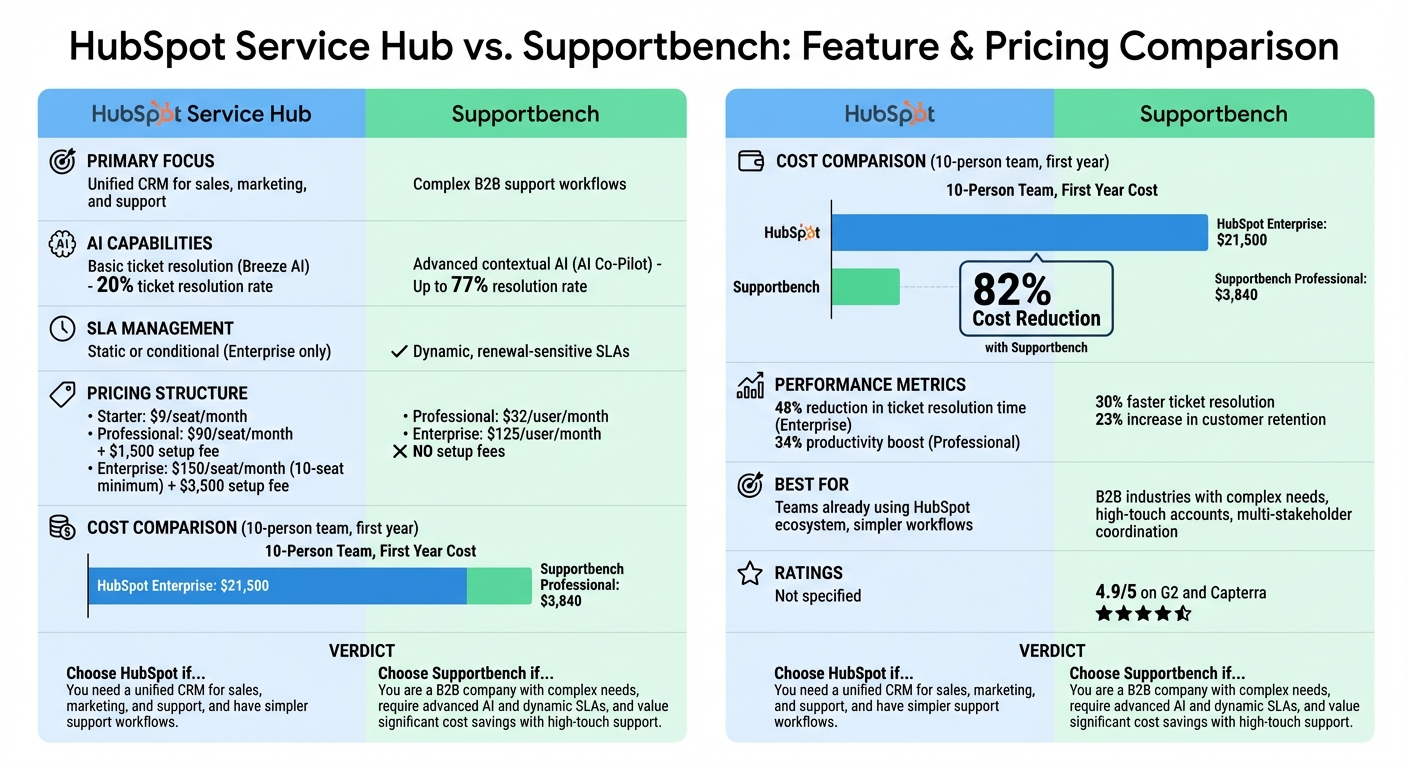
| Primary Focus | Unified CRM for sales, marketing, and support | Complex B2B support workflows |
| AI Tools | Basic ticket resolution (Breeze AI) | Advanced contextual AI (AI Co-Pilot) |
| SLA Management | Static or conditional (Enterprise only) | Dynamic, renewal-sensitive SLAs |
| Pricing | $9–$150 per seat/month + setup fees | $32–$125 per user/month, no setup fees |
| Best For | Teams using HubSpot tools | B2B industries with complex needs |
If your support team handles high-touch accounts, long-term cases, or multi-stakeholder coordination, Supportbench is likely the better choice. For simpler workflows or existing HubSpot users, Service Hub may suffice.
HubSpot Service Hub vs Supportbench: Feature and Pricing Comparison
HubSpot Service Hub: All-in-One CRM Overview
HubSpot Service Hub combines support tickets with marketing and sales data, giving agents a complete view of each customer’s journey. For teams already using HubSpot’s Marketing or Sales Hubs, this integration eliminates fragmented data and creates a unified system across departments.
Agents can manage tickets in a single workspace that automates routing, prioritization, and status tracking. Customers also benefit from self-service tools like a knowledge base and customer portal, where they can monitor ticket progress. Meanwhile, the Breeze AI Suite helps resolve tickets autonomously, assists in drafting knowledge base articles, and offers real-time suggestions for agents.
Core Features and Capabilities
HubSpot Service Hub offers four pricing tiers to suit different needs:
- Free Plan: Includes basic ticketing and a shared inbox for up to two users at no cost.
- Starter Plan: Priced at $9 per seat/month (billed annually), it removes HubSpot branding and adds 500 calling minutes.
- Professional Plan: Costs $90 per seat/month (billed annually) with a $1,500 onboarding fee. This plan unlocks advanced features like the help desk workspace, knowledge base, customer portal, and SLA management.
- Enterprise Plan: At $150 per seat/month (10-seat minimum, billed annually) with a $3,500 onboarding fee, this tier includes Breeze AI agents, skill-based routing, conditional SLAs, and IVR.
HubSpot reports impressive results: users experience a 72% faster ticket resolution rate and close 28% more tickets after adopting Service Hub. Professional plan users see a 34% productivity boost, while Enterprise users leveraging AI tools report a 48% reduction in ticket resolution time. Additionally, organizations using omnichannel ticketing improve reply times by an average of 61%. The platform integrates with over 1,500 apps, including JIRA, Microsoft Teams, Aircall, and Slack.
Other standout features include built-in feedback tools for NPS, CSAT, and CES surveys, as well as customer health scoring to identify potential churn risks or upsell opportunities. Workflow automation can also trigger cross-department actions, like notifying a sales rep when a high-value customer submits a critical support ticket.
These features make HubSpot Service Hub a strong choice for straightforward support workflows, but let’s dive into who benefits most from this platform.
Target Audience and Use Cases
The Service Hub’s unified dashboard and automation capabilities are particularly appealing to teams already using HubSpot’s ecosystem. When businesses purchase the Marketing, Sales, and Service Hubs together, they typically receive a 25% discount compared to buying them individually. Companies using the full platform report a 31% increase in deals closed compared to those relying solely on the Sales Hub. On average, integrated users achieve 107% more inbound leads and 35% more closed deals within six months.
Several success stories highlight its effectiveness:
- DoorDash resolves 80% of support tickets within 24 hours using HubSpot Service Hub.
- Shopify achieved a 45% increase in email open rates and an 18% boost in conversions by delivering personalized email sequences based on CRM-tracked user behavior.
- UNICEF centralized customer interactions, leading to a 70% increase in donation form completions.
The platform is ideal for companies with high-volume ticket queues and straightforward workflows. Teams that rely on seamless collaboration between marketing, sales, and support will find the unified CRM structure particularly beneficial. However, businesses with more intricate B2B needs – such as managing multi-stakeholder accounts or handling long-term technical cases – might encounter limitations.
Limitations for Complex B2B Support
While HubSpot Service Hub excels at handling standard support processes, it’s often seen as an extension of HubSpot’s marketing and sales tools rather than a dedicated support platform. Its ticketing system may feel basic compared to specialized B2B solutions, which are designed to manage multi-stakeholder cases and complex account relationships more effectively.
For instance, HubSpot’s AI automation resolves about 20% of tickets, whereas AI-native platforms can achieve resolution rates of up to 77%. This gap is significant, especially as 75% of CX leaders expect 80% of customer interactions to be handled without human intervention by 2025. Additionally, B2B deals typically involve over 62 touchpoints across six months or more, requiring advanced tracking that basic ticketing systems might struggle to support.
Another drawback is the lack of deep, native integrations for key communication tools like Slack Connect, Microsoft Teams, and Discord. While these integrations are available, they feel more like add-ons than seamless features, which can hinder efficiency for B2B teams.
As Eric Klimuk, Founder and CTO of Supportbench, puts it: "HubSpot might’ve been a solid choice at first, but as you grow, it can feel like it’s more hassle than help. The costs add up, and the complexity begins to slow you down".
Although HubSpot Service Hub provides clear advantages for standard workflows, businesses with complex B2B needs may require a more specialized solution.
sbb-itb-e60d259
Supportbench: AI-Native Platform for Complex B2B Operations
Supportbench is specifically designed to address the challenges of post-sale support and customer retention in complex B2B environments. Unlike traditional CRMs that merge marketing and sales tools into support systems, Supportbench zeroes in on the unique demands of B2B customer service. This includes managing technical products, multi-stakeholder accounts, and cases that can stretch over weeks or even months.
The platform simplifies B2B2B operations by unifying relationships between customers, partners, and vendors into a single system. Support teams can easily track contracts, licensing, product usage, and case history without toggling between tools. For teams juggling numerous emails or cases with multiple decision-makers, Supportbench’s AI provides instant summaries of past interactions, giving agents the context they need to act quickly and effectively. Its focus on handling complex scenarios is evident in its advanced AI tools and streamlined workflows.
"Supportbench stands out for post-sale care. With AI-driven automation and retention tools, it helps teams manage customer relationships effectively – without the complexity or high cost of HubSpot." – Eric Klimuk, Founder and CTO of Supportbench
One of its standout features is the "no IT required" configuration, which allows operations teams to manage workflows, automations, and SLAs without relying on developers or technical staff. With a 4.9/5 rating on G2 and Capterra, users consistently highlight its ability to tackle complex customer issues more efficiently than enterprise helpdesk platforms.
Key Features and Benefits
Supportbench offers an array of AI-powered features tailored for B2B support teams. The AI Copilot provides agents with contextual recommendations and pre-drafted responses based on past cases and knowledge bases, cutting down response times without requiring manual setup. Its automated knowledge management transforms static documentation into a living resource by analyzing resolved cases to create or update knowledge base articles with a single click. This Knowledge Centered Service (KCS) methodology helps teams build and maintain institutional knowledge faster.
The platform also includes predictive analytics, delivering insights like predictive CSAT and CES modeling without manual surveys. It uses natural language processing for sentiment and intent analysis. A real-world example is Jenzabar, a software provider for higher education, which replaced its legacy CRM helpdesk with Supportbench in October 2025. By leveraging AI-driven automation for routing, escalation, and summarization, Jenzabar improved resolution times and ensured consistent communication across hundreds of products and diverse SLAs.
Dynamic SLA management is another highlight. Supportbench’s AI engine adapts SLAs based on customer context and contract milestones, automatically prioritizing high-value accounts when renewals or risk signals arise – no manual adjustments needed. Its smart routing and triage feature eliminates manual ticket assignments, directing cases to the most qualified agents based on skill, workload, and issue type. Proactive escalations ensure SLA breaches are avoided.
"The method of SLAs of Supportbench works well with our complex workflows." – Verified Reviewer, Business Supplies and Equipment Industry
Supportbench users have reported a 23% increase in customer retention shortly after implementation. This combination of advanced AI tools and ease of use makes it a powerful solution for B2B teams managing renewal-driven workflows and long-term customer relationships.
Target Audience and Use Cases
Supportbench caters to B2B industries such as manufacturing, logistics, supply chain, and managed service providers (MSPs). These sectors often deal with technical products, relationship-based support needs, and multi-stakeholder accounts – areas where high-volume B2C helpdesks typically fall short.
With a customer base of 9,000 businesses worldwide, Supportbench is trusted by companies managing intricate accounts with multiple decision-makers, long sales cycles, and contract-based SLAs. Teams handling high-touch accounts with custom implementations, technical escalations, or multi-tier support structures benefit from its 360-degree customer visibility, which consolidates performance metrics, product details, and contract renewals into a single view.
"Using Supportbench has provided our department with a complete client management system. Since everything is one platform, we have a clear overview of all client and team interaction." – Jonathan Pasquel, Personnel Manager
The platform also ensures data security with its multi-tenant architecture and role-based access control (RBAC), which limits access to relevant information for each stakeholder. Additionally, it is HIPAA-compliant and ISO 27001 certified, making it suitable for enterprises handling sensitive data.
For companies transitioning from outdated CRMs or outgrowing basic helpdesks, Supportbench offers a rapid implementation timeline measured in weeks, not months. Its free migration and onboarding services simplify the switch from other systems, and users report an average of 30% faster ticket resolution thanks to AI automation.
"Supportbench outperforms traditional solutions in resolving end-user difficulties." – Caitlyn Langston, Chief Technology Officer
This specialized focus on complex B2B operations addresses the gaps that all-in-one CRMs often fail to fill.
Pricing and Cost Efficiency
Supportbench offers a transparent pricing model starting at $32 per user per month, with Professional plans at $40 per user per month and Enterprise plans at $125 per user per month. Unlike many all-in-one CRMs that lock advanced features behind premium tiers or require costly onboarding fees, Supportbench provides full access to all features, AI tools, and live support from the outset.
This approach avoids the common "add-on pricing trap" seen in CRM ecosystems, where advanced capabilities like SLA automation or analytics often require expensive upgrades. For comparison, HubSpot Service Hub Professional costs $90–$100 per seat per month (billed annually) with a $1,500–$1,470 setup fee, while the Enterprise plan is priced at $150 per seat per month with a 10-seat minimum and a $3,500–$3,420 setup fee.
Supportbench’s cost efficiency is further boosted by its built-in AI features, which reduce the need for specialized administrators or IT teams, lowering the total cost of ownership. By integrating contracts, licensing, and product usage data into the support workspace, its Customer 360 view minimizes the need for multiple tools and subscriptions while improving agent productivity. Startups and non-profits can also take advantage of discounted pricing.
"SLAs automatically adjust when renewals or risk signals appear – no manual intervention needed. Your high-value accounts always get priority." – Supportbench
For B2B teams focused on renewal-driven workflows, Supportbench’s transparent pricing, integrated AI, and operational efficiency deliver exceptional long-term value compared to CRMs that rely on costly add-ons and complex configurations. These strengths make Supportbench a compelling choice for businesses navigating the challenges of multi-stakeholder support.
Feature Comparison: HubSpot Service Hub vs. Supportbench
Comparison Table: Key Features
Here’s a side-by-side look at how HubSpot Service Hub and Supportbench stack up across key features:
| Feature | HubSpot Service Hub | Supportbench |
|---|---|---|
| Primary Focus | High-volume deflection and CRM unity | Complex B2B accounts and retention |
| AI Implementation | Breeze Customer Agent (handles basic inquiries) | AI Co-Pilot (manages complex interactions) |
| Case Summarization | Summarizes conversations | Summarizes cases and long email threads |
| Knowledge Base Automation | Drafts articles from tickets | Creates KCS articles with one click from resolved cases |
| SLA Management | Static timers (Professional); rules-based enforcement (Enterprise) | Dynamic SLAs adapting to renewals or risk signals |
| Customer Health Scoring | 1 score (Professional); up to 10 scores (Enterprise) | Advanced insights with predictive analytics and KPI scorecards |
| Escalation Tools | Workflow-based routing and logic | Multi-tier escalation management with tracking |
| Multi-Stakeholder Collaboration | Shared inbox and CRM timeline | Role-based portals and multi-department visibility |
HubSpot Service Hub shines with its deep integration into the HubSpot ecosystem, connecting marketing, sales, and service data. This makes it a natural fit for businesses already using HubSpot tools. However, its support features often feel like an add-on to its CRM rather than a fully dedicated helpdesk. As one analysis points out, "HubSpot built its reputation on marketing and sales. Service Hub came later, and it shows. The feature depth doesn’t match dedicated helpdesk platforms".
Supportbench, on the other hand, focuses entirely on post-sale B2B support. Its tools are tailored for handling complex technical products, long-term cases, and multi-stakeholder accounts. A standout feature is its "Customer 360" view, which consolidates contracts, licensing, and product usage into a single workspace. This eliminates the need to toggle between systems, giving agents all the context they need in one place.
Next, let’s dive into how their AI tools and customization capabilities impact B2B support.
AI Capabilities and Customization
HubSpot’s AI platform, Breeze, includes three main components: Breeze Copilot (assistant), Breeze Agents (autonomous workers), and Breeze Intelligence (data enrichment). Its strength lies in automating high-volume tasks. Some teams report cutting support volume by as much as 77% using Breeze’s automation tools. Additionally, the Breeze Knowledge Base Agent can convert successful interactions into help articles, making it easier for teams to build a library of resources over time. However, full access to these features requires the Enterprise plan.
Supportbench’s AI Co-Pilot, available at all pricing levels starting at $32 per user per month, focuses on helping agents with complex support scenarios. The AI offers contextual recommendations and drafts responses based on past cases and knowledge bases, which can significantly reduce response times. For B2B teams managing technical products and lengthy email threads, the AI provides automatic case summaries, giving agents quick context when dealing with long-running issues.
Supportbench also goes beyond basic sentiment analysis with predictive tools. These include predictive CSAT and CES modeling, emotional scoring, and intent analysis to flag at-risk accounts. This allows teams to prioritize high-value accounts, especially during renewal periods or when risk signals emerge. As Supportbench explains, "SLAs automatically adjust when renewals or risk signals appear – no manual intervention needed. Your high-value accounts always get priority".
While both platforms offer robust AI tools, their differences highlight the specific needs of B2B workflows.
Operational Gaps in All-in-One CRMs
All-in-one CRMs like HubSpot Service Hub often fall short when it comes to meeting the nuanced demands of B2B support.
For example, HubSpot’s tiered pricing structure can create challenges for growing teams. The Professional tier includes SLA tracking and reporting but lacks automation and escalation workflows, which are only available in the Enterprise plan. This forces teams to either upgrade to a more expensive plan or rely on manual processes.
Another limitation is static SLA timers. While HubSpot’s Enterprise plan offers conditional SLAs, they don’t automatically adapt to changes in customer context, such as upcoming renewals or declining account health. For B2B teams managing high-value accounts, this lack of flexibility can jeopardize renewals and revenue.
Escalation tools are another weak point. HubSpot’s workflow-based approach works for simple routing but struggles with the layered escalations typical in B2B scenarios. Complex cases often involve multiple departments, technical teams, or external vendors, requiring tools that can track escalation history, assign clear ownership, and ensure resolution across various stakeholders.
Supportbench addresses these issues with advanced escalation management that tracks every step of the process. Teams can add notes, de-escalate cases, and monitor performance through integrated scorecards. Its user-friendly configuration means that operations teams can manage workflows and SLAs without needing technical expertise. This flexibility is especially valuable for teams transitioning from all-in-one CRMs to a more specialized B2B support platform.
Pricing and ROI: Hidden Costs and Long-Term Value
Let’s dig deeper into how pricing structures, hidden costs, and ROI impact B2B support operations, building on the earlier pricing comparison.
Pricing Structures
HubSpot follows a tiered pricing model where advanced features are locked behind higher-priced plans. Here’s how it breaks down:
- Starter tier: $9 per seat per month (billed annually), but AI and SLA capabilities are not included.
- Professional tier: $90 per seat per month with a $1,500 setup fee, but it doesn’t grant access to the full Breeze AI suite.
- Enterprise tier: Starts at $150 per seat per month, requires a 10-seat minimum, and includes a $3,500 setup fee.
Supportbench, on the other hand, opts for a flat pricing model:
- Professional plan: $32 per agent per month (billed annually), offering AI Co-Pilot, GenAI bots, sentiment analysis, dynamic SLAs, health scoring, and surveys – all features HubSpot reserves for its higher tiers.
- Enterprise plan: $100 per agent per month, adding sandbox environments, single sign-on, and a dedicated success manager. There are no setup fees, seat minimums, or hidden charges.
This straightforward pricing makes it easier to predict costs, setting the stage for a deeper dive into hidden expenses and ROI.
Hidden Costs and Long-Term Value
The upfront price is only part of the story. HubSpot’s costs can rise unexpectedly due to its use of HubSpot Credits for certain Breeze AI features, creating variable expenses that aren’t immediately obvious. Add-ons for third-party integrations further complicate budgeting. As Eric Klimuk, Founder and CTO of Supportbench, puts it:
"HubSpot’s pricing structure can be expensive, especially for small to mid-sized businesses (SMBs) or teams that only need specific CRM features."
Supportbench avoids these pitfalls with an all-inclusive pricing model. From the start, the Professional plan includes advanced AI tools, reporting, and workflow automation, plus free onboarding and training. Cost scaling is predictable – just $2.50 per agent after the first 15 users, capped at $150 per agent. This eliminates surprise fees, reducing upfront costs while boosting ROI.
ROI Analysis
HubSpot emphasizes efficiency improvements at its Enterprise level. For example, users have reported a 48% reduction in ticket resolution times using AI tools, and Service Hub Professional has been linked to a 34% increase in agent productivity. However, these benefits come with a hefty price tag – a 10-person team on HubSpot Enterprise would spend about $21,500 in the first year. In contrast, the same team on Supportbench Professional would pay only $3,840 annually, an 82% cost reduction while still accessing advanced AI features.
For teams handling complex accounts or long-term cases, Supportbench offers even greater ROI advantages. Features like predictive CSAT, emotional scoring, and dynamic SLAs are included from day one, allowing for faster implementation and measurable efficiency gains. This mix of lower upfront costs, transparent scaling, and immediate access to advanced tools positions Supportbench as a budget-friendly option for businesses aiming for operational efficiency over the long haul.
Migration Considerations: Risks and Strategies
Switching support platforms isn’t just a technical upgrade – it’s a shift that can disrupt workflows and productivity if not handled carefully. A smooth migration process is essential to reduce risks and maintain service quality during the transition.
Data Synchronization and Integration
One of the biggest challenges during migration is ensuring no loss of customer context. HubSpot Service Hub supports over 1,500 app integrations, including native connections to tools like Salesforce, Jira, and Microsoft Teams. However, setting up these integrations to retain custom fields and case histories often requires expert intervention. On the other hand, Supportbench offers deep, native Salesforce integration, allowing synchronization of data points like licensing details, contracts, and interaction histories. This ensures teams have full customer context from day one.
While both platforms support key B2B integrations, the complexity of setup differs. HubSpot’s all-in-one CRM model often involves configuring multiple systems, which can stretch implementation timelines to several months for complex setups. In contrast, Supportbench’s design allows operations teams to handle data migration and integration setup without IT involvement, cutting the process down to just weeks. To avoid surprises after paying setup fees, it’s wise to use free trials to test whether your Salesforce data, custom fields, and case histories sync properly.
Next, let’s look at how setup and configuration impact migration speed.
Setup and Configuration Requirements
The complexity of setup and configuration is another key factor to consider. HubSpot’s Professional and Enterprise tiers require mandatory guided onboarding, with one-time fees of $1,500 and $3,500, respectively. While this guided approach helps define business rules for ticket handling and escalation, advanced workflows aren’t accessible until the configuration is complete. HubSpot itself notes:
"Professional is the plan where true service automation begins… It requires onboarding and configuration setup".
In contrast, Supportbench’s operations-led configuration avoids this bottleneck. The platform is designed for support operations teams to manage setup, customize workflows, and deploy the system without relying on IT resources. This not only eliminates onboarding fees (Supportbench offers free migration and onboarding) but also speeds up deployment. For smaller teams, this difference can mean the choice between a two-week rollout versus a multi-month implementation.
Once the system is configured, the next challenge is getting your team up to speed quickly.
Agent Training and Team Adaptation
One often-overlooked cost of migration is the temporary drop in productivity as teams adjust to the new platform. HubSpot’s complexity can lead to a steeper learning curve.
Supportbench minimizes training needs with a user-friendly interface and AI-driven features. For example, automatic case summaries save agents from digging through lengthy email threads, giving new team members instant context on ongoing cases without manual handovers. This streamlined design helps teams adapt faster and reduces disruptions during the transition.
Regardless of the platform you choose, there are steps you can take to reduce migration risks. Start with low-risk AI workflows, such as internal ticket categorization, before moving to customer-facing automation. Keep a close eye on CSAT scores during the first 30–60 days; if satisfaction drops while resolution times improve, it might mean the AI’s tone or responses need tweaking. Lastly, establish clear escalation protocols from the start, especially for sensitive issues like billing disputes or high-stakes interactions, so your team knows when to intervene manually.
Conclusion: Choosing the Right Solution for B2B Support
Deciding between an all-in-one CRM and a specialized support platform boils down to your organization’s complexity and long-term goals. An all-in-one CRM integrates sales, marketing, and service data into one system, which can be ideal for teams focused on maintaining a unified customer view. On the other hand, businesses handling high-touch enterprise accounts, long-running cases, multi-stakeholder coordination, and renewal-sensitive SLAs often find that a specialized support platform better meets their operational demands.
Cost considerations are just as important as functionality. All-in-one CRMs often require costly upgrades to access advanced AI tools and SLA automation. Specialized platforms, however, typically offer transparent pricing with an "everything included" approach, covering free migration and onboarding to ensure predictable costs.
AI capabilities also set these solutions apart. While all-in-one CRMs focus on automating resolution for common issues, specialized platforms provide an AI co-pilot designed to handle complex, technical interactions with speed and precision. This distinction highlights the importance of testing solutions in real-world scenarios to determine what works best for your team.
Testing the migration process is critical. Ensure integrations function smoothly, data transfers accurately, and your team adapts quickly. Keep an eye on performance during the transition to address any hiccups early on. As Eric Klimuk, Founder and CTO of Supportbench, points out:
"HubSpot might’ve been a solid choice at first, but as you grow, it can feel like it’s more hassle than help. The costs add up, and the complexity begins to slow you down."
These insights can guide you toward a solution that aligns with your organization’s unique needs and growth trajectory.
FAQs
When is an all-in-one CRM not enough for B2B support?
When it comes to B2B support, an all-in-one CRM like HubSpot Service Hub might not always meet the mark, especially for operations that demand complex workflows. Scenarios like long-term case resolution, managing multiple stakeholders, or implementing advanced automation often require more tailored solutions. This is where platforms like Supportbench shine. They provide features such as a Customer 360 view, AI-powered automation, and tools for multi-department collaboration. These capabilities are designed to handle high-value accounts and intricate support processes with both scalability and efficiency.
What are dynamic SLAs, and why do renewals change priorities?
Dynamic SLAs are agreements powered by AI, designed to adapt in real time to factors such as customer sentiment, urgency, and the overall business impact of an issue. Unlike traditional SLAs that follow fixed rules, dynamic SLAs use live data to prioritize tickets more effectively. For instance, when customer needs or expectations change – like during a renewal period – these SLAs adjust their targets to reflect evolving priorities. This ensures resources are allocated efficiently, keeping service quality consistent in environments where AI plays a key role.
What should I check before migrating my support data and workflows?
Before making the switch, it’s important to weigh a few critical factors to keep the transition as seamless as possible. Start by checking data compatibility – make sure ticket histories, customer profiles, and custom fields can transfer over without a hitch. A thorough review of the migration process is essential to ensure secure data transfers, limited downtime, and opportunities for automation.
Take a close look at your workflows, SLAs, and any AI-powered features to see how they’ll adapt to the new system. Once the migration is complete, plan for post-migration testing to confirm everything works as expected. Finally, don’t forget to train your team so they can make the most of the new platform’s tools and features.
Related Blog Posts
- Zendesk vs Freshdesk vs Supportbench: Which Support Platform is Better and for who in 2026?
- HappyFox alternatives for B2B: what platforms support complex workflows best?
- Freshdesk vs. Supportbench: Why B2B Teams Outgrow Freshdesk’s Ticket Model
- Help Scout vs. Supportbench: The Gap Between Shared Inboxes and Enterprise Helpdesks