
ChatGPT can transform customer support by automating repetitive tasks, speeding up response times, and reducing costs by up to 30%. It handles routine inquiries, drafts replies, and summarizes conversations, allowing agents to focus on complex issues. However, to use it effectively, you must prioritize security, ensure human oversight, and train it with accurate company data.
Key Takeaways:
- Efficiency Boost: Automates ticket triage, drafts responses, and reduces drafting time by 50–70%.
- Improved Workflow: Summarizes threads for seamless handoffs and supports over 50 languages.
- Cost Savings: Cuts labor costs while improving resolution times.
- Security First: Protect sensitive data with anonymization and strict permissions.
- Human Oversight: Use AI as a support tool, not a replacement for human judgment.
- Measure Impact: Track metrics like resolution time, cost per ticket, and customer satisfaction.
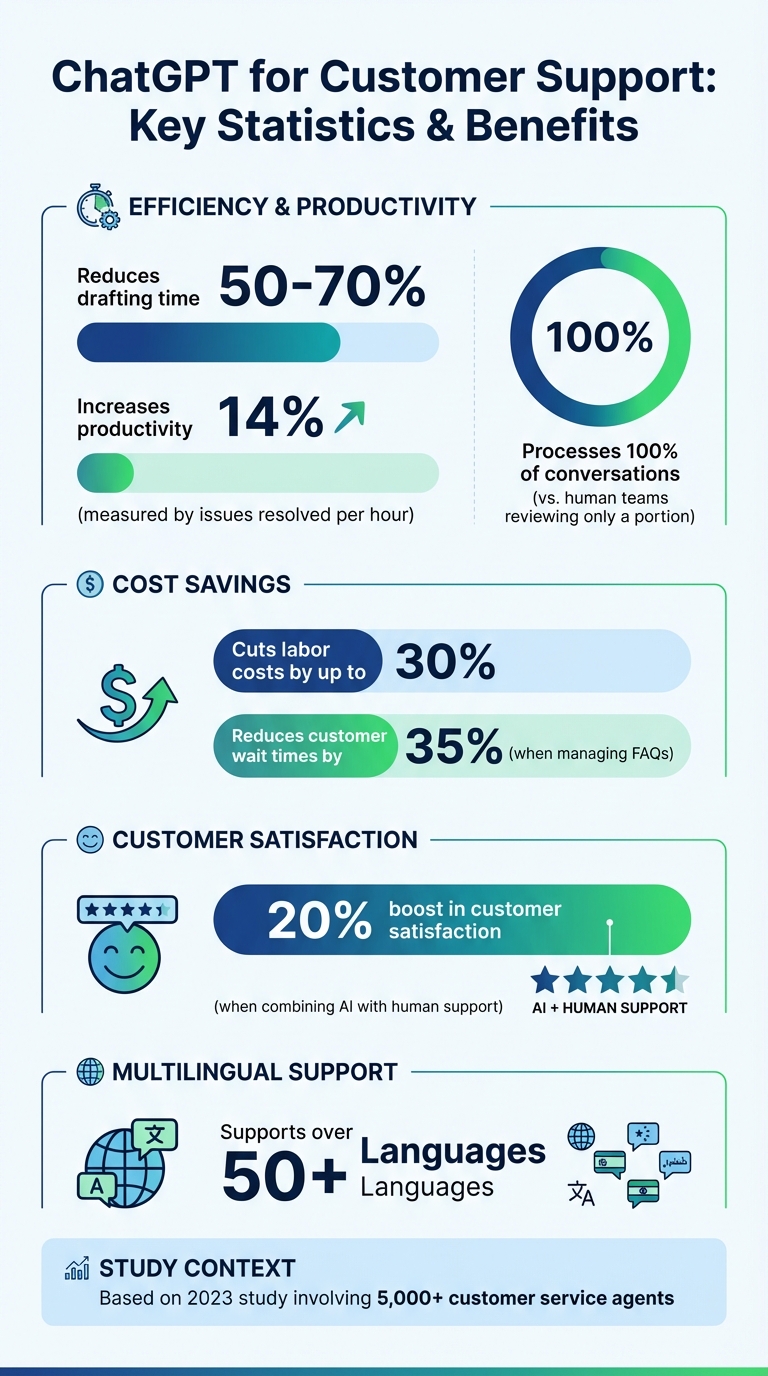
ChatGPT Customer Support Impact: Key Statistics and Benefits
ChatGPT For Customer Support Crash Course | How To Use ChatGPT For Customer Service | Simplilearn
Where to Use ChatGPT in Customer Support
ChatGPT enhances customer support by tackling repetitive tasks and clearing bottlenecks, all while maintaining quality. Here’s how it can improve ticket triage, assist agents with responses, and simplify case handoffs.
Ticket Triage and Priority Assignment
ChatGPT takes ticket triage to the next level by analyzing incoming inquiries, categorizing them, and determining their urgency. It sorts tickets into groups like technical issues, billing concerns, or feature requests by examining the intent and content of each message . Sentiment analysis and business impact assessments allow ChatGPT to assign priority levels – ranging from Low to Critical – ensuring high-priority issues are flagged and routed immediately .
A 2023 study involving over 5,000 customer service agents showed that AI tools increased productivity by 14%, as measured by issues resolved per hour.
"AI could review everything, and therefore it may detect patterns and groupings that are not easily visible to people."
– Mathew Patterson, Help Scout
While human teams can only review a portion of incoming data, ChatGPT processes 100% of conversations, identifying trends and patterns. These AI-generated insights can be stored in ticket fields within your support platform, enabling automated reporting and workflow triggers. Starting with a human-in-the-loop approach – where AI suggestions are reviewed by agents – can help build confidence in the system’s accuracy . This streamlined triage process reduces resolution times and boosts operational efficiency.
Agent Response Assistance
Once tickets are prioritized, ChatGPT steps in to assist agents with drafting responses. By generating context-aware replies, it cuts drafting time by up to 70%, giving agents a head start on their communication. Importantly, these drafts are reviewed and edited by agents, ensuring the final message aligns with company standards.
To make the most of ChatGPT, integrate your company’s knowledge base and FAQs into its system prompts. For instance, you could use a prompt like, "You are a professional B2B support agent specializing in enterprise SaaS troubleshooting" .
"Support agents can leverage generative AI tools to enhance the quality of their replies and customer-facing ticket comments without spending too much time writing a custom reply for every customer."
– Candace Marshall, Vice President of Product Marketing, AI and Automation, Zendesk
For complex issues, increasing the reasoning_effort parameter ensures the AI thoroughly analyzes multi-step problems before offering solutions. Reusable prompt templates for common scenarios, such as "Apologizing for Service Delays" or "Troubleshooting Authentication Errors", help maintain consistency. Additionally, ChatGPT supports over 50 languages, enabling agents to craft culturally appropriate responses for diverse audiences . By handling the time-consuming task of drafting, ChatGPT lets agents focus on solving intricate problems and building customer relationships.
Case Summaries for Handoffs and Escalations
When tickets are escalated or handed off to another team, ChatGPT creates concise summaries that capture the key details, making transitions seamless . These summaries distill lengthy conversations into essential points, such as identifying defective products or summarizing requested resolutions.
For internal use, ChatGPT-generated summaries are a safer option, as they reduce the risk of inaccuracies in customer-facing communication . Adjusting parameters like verbosity allows summaries to be tailored to the complexity of each case. For escalations to specific teams, such as account managers or engineers, prompts can be customized to include details like renewal risks, usage trends, or sentiment analysis.
Businesses using AI chatbots to manage FAQs have seen a 35% drop in customer wait times, while those combining AI with human support report a 20% boost in customer satisfaction. ChatGPT’s ability to detect sentiment and escalation risks in real time ensures high-risk cases are prioritized, helping to prevent customer churn. However, it’s crucial to avoid inputting sensitive customer data or payment details into ChatGPT to maintain security . These summaries ensure smooth collaboration across teams while upholding the security and precision required for AI-driven support systems.
How to Implement ChatGPT in Your Support Workflow
To successfully integrate ChatGPT into your support workflow, you’ll need to focus on building a solid knowledge base, connecting it to your support system, and refining its performance through real-world testing. Here’s how you can make it work.
Building a Knowledge Base for ChatGPT
The quality of ChatGPT’s responses depends heavily on the knowledge base it’s trained to use. One effective approach is Retrieval-Augmented Generation (RAG). This method ensures the AI references your company’s private documents first, reducing the likelihood of inaccurate or irrelevant responses.
"RAG is almost always the better choice for building a knowledge base… it’s far less likely to make things up or go off-script. Its answers are grounded in your company’s truth."
– Kenneth Pangan, Writer, eesel.ai
Start by identifying and organizing critical resources like FAQs, technical manuals, troubleshooting guides, and policy documents. Categorize these based on their purpose – such as internal policies versus customer-facing materials – to streamline navigation. For better processing, convert these documents into formats like Markdown or plain text.
A practical example of this is Autodesk’s virtual assistant, AVA. It uses a structured knowledge base to provide accurate answers to technical questions and directs users to relevant resources for software like 3Ds Max.
To keep your knowledge base current, integrate ChatGPT with platforms like Google Docs, Confluence, or your help center. This allows for automatic updates whenever source documents are revised. For added precision, assign specific bots to specific datasets – like restricting a customer-facing bot to Help Center articles while an internal bot accesses the company wiki.
Once your knowledge base is ready, the next step is securely linking ChatGPT to your support platform.
Connecting ChatGPT to Your Support Platform
With a well-prepared knowledge base, the next move is integrating ChatGPT into your support system. Begin by setting up secure authentication, such as Single Sign-On (SSO) with SCIM for Enterprise plans, and configuring global settings in your admin dashboard. Use the Responses API to connect ChatGPT to your ticketing system, enabling it to maintain context across multiple interactions.
Equip ChatGPT with three essential tools:
- Data tools for accessing CRMs or databases
- Action tools for tasks like sending emails or updating tickets
- Orchestration tools for escalating tasks to human agents when needed
You can also use the "Developer" message role to establish high-level rules, tone preferences, and goals, ensuring these guidelines take precedence over user inputs. To safeguard customer data, implement filters for personally identifiable information (PII), safety classifiers to prevent misuse, and "tripwires" that flag potential violations. Define clear escalation triggers, such as when the AI struggles to understand intent or when handling sensitive tasks like approving large refunds.
"The path to successful deployment isn’t all-or-nothing. Start small, validate with real users, and grow capabilities over time."
– OpenAI
Before going live, test the AI in a sandbox environment using historical support tickets to evaluate its performance and accuracy.
Testing and Improving Your Prompts
The quality of your prompts plays a huge role in ensuring accurate responses and positive customer experiences. Regularly evaluate prompt performance and monitor how updates to the model affect outcomes. To avoid unexpected behavior, pin your application to a specific model version (e.g., gpt-4.1-2025-04-14) instead of relying on generic pointers.
Craft prompts with clear headings and markers to separate instructions from data. Include 3–5 diverse examples of input/output scenarios to guide the model toward the desired response style. This technique, known as few-shot learning, eliminates the need for extensive fine-tuning.
A study involving over 5,000 agents showed that generative AI tools improved productivity by 14% on average, with the greatest benefits seen among less experienced workers. However, ChatGPT can still produce incorrect but convincing answers. To address this, use the Responses API to generate reasoning summaries for failed cases, helping you identify areas for improvement.
Fine-tune parameters like reasoning_effort and set strict thresholds for escalation – for instance, escalate to a human after three failed attempts. Place static instructions at the beginning of your prompts to reduce costs and latency through caching.
Keep a record of both successful and unsuccessful outputs to refine your prompts over time. Start with the most advanced model, such as GPT-5, to establish a baseline, and later optimize for cost or speed using smaller models.
sbb-itb-e60d259
Safety and Security Guidelines for ChatGPT
When integrating ChatGPT, it’s crucial to prioritize the security of customer data and ensure the accuracy of its responses. Once prompt optimization is complete, focus on maintaining secure operations through strong safety measures.
Setting Limits and Requiring Human Review
Establish clear boundaries for what ChatGPT is allowed to do. The AI should assist your team but not replace human judgment, especially in sensitive or high-stakes situations. For such cases, ensure human review is part of the process.
Restrict the AI’s permissions carefully. For instance, it might access basic customer contact details but should be blocked from exporting full datasets or altering user access settings. Create automatic escalation triggers for queries that fall outside predefined workflows or when customers express frustration.
To further minimize risks, limit the number of output tokens. This reduces the likelihood of the AI generating irrelevant or off-topic responses.
Protecting Customer Data and PII
Protecting sensitive customer information is non-negotiable. Regulations like GDPR and CCPA mandate strict protocols for handling personally identifiable information (PII). Before feeding customer data into ChatGPT, anonymize it using techniques like tokenization, masking, or differential privacy.
"For enterprises handling confidential or regulated data, consider deploying private, self-hosted versions of LLMs. These instances operate within your network and offer full control over data handling and security configurations."
– Steve Moore, Vice President and Chief Security Strategist, Exabeam
For added security, hash usernames or email addresses in API requests to shield actual identifiers. If your organization deals with highly regulated data, such as healthcare records or financial information, opt for enterprise-grade solutions that provide contractual guarantees against using your data to train public models.
Monitor all interactions involving ChatGPT through Security Information and Event Management (SIEM) systems. This helps identify unusual query patterns that could indicate a potential data breach. Create a clear organizational policy outlining acceptable use cases, prohibited data types (like passwords or health records), and the steps for vetting any third-party plugins or APIs connected to ChatGPT.
Avoiding Inaccurate AI Responses
One challenge with ChatGPT is its tendency to generate responses that appear credible but are factually incorrect, a phenomenon known as "hallucination." To address this, ground the AI’s responses in a verified knowledge base using Retrieval-Augmented Generation (RAG) instead of relying solely on generated content.
"ChatGPT sometimes writes plausible-sounding but incorrect or nonsensical answers."
– OpenAI
Use automated content filters, such as the Moderation API, to reduce the risk of unsafe outputs. Regular adversarial testing can help identify vulnerabilities, including susceptibility to prompt injections.
Implement a verification process requiring that all significant AI-generated citations or factual claims be traced back to primary sources. Ensure human review before sharing this information with customers. To maintain clarity, use XML tags (like <context></context>) or Markdown headers in prompts to separate instructions from customer data. Additionally, provide a straightforward reporting system for agents and customers to flag questionable AI behavior, ensuring these reports are reviewed by a human promptly.
Tracking ChatGPT’s Impact on Support Metrics
Once ChatGPT becomes part of your support workflow, it’s crucial to measure its effect. Without clear data, you’re left guessing about its true value. The goal? Focus on metrics that provide a clear picture of efficiency, costs, and customer experience, while comparing them to your pre-implementation performance.
Which Metrics to Track
Start with metrics that highlight operational efficiency and cost savings. For instance, track average resolution time (ART) and issues resolved per hour. Research shows that AI integration can boost productivity by 14%.
On the cost side, measure cost per ticket and labor expenses, as ChatGPT implementations have been shown to cut labor costs by up to 30%. Also, monitor first-contact resolution (FCR) to see how often issues are resolved without escalation, and the deflection rate, which indicates how many routine queries the AI handles independently.
Customer experience is just as important. Keep an eye on customer satisfaction (CSAT) and Net Promoter Score (NPS) to ensure the AI delivers quality responses. Tools like sentiment analysis can help detect signs of frustration or potential churn. Internally, track how well your team adopts ChatGPT by measuring the number of active users, frequency of use, and the total messages sent by agents. These metrics will help you establish a baseline for comparison.
Comparing Performance Before and After Implementation
Once you’ve identified the metrics, compare your performance before and after implementing ChatGPT. Start by establishing a baseline – measure how your team performs without ChatGPT, focusing on metrics like ticket resolution time, hours spent on research, and time spent drafting responses. Without this baseline, it’s impossible to measure progress accurately.
Monitor progress at 30-, 60-, and 90-day intervals. Consider rolling out ChatGPT to a pilot group first and comparing their results with a control group that doesn’t use the tool. You can also categorize agents based on their ChatGPT usage – heavy, frequent, or non-users – and analyze how usage correlates with productivity.
To quantify the benefits, calculate the total hours saved and translate that into cost savings. For example, determine your "cost per inquiry handled" by dividing labor costs by the higher volume of tickets resolved with AI assistance. Finally, combine this hard data with qualitative insights from impact surveys to get a full picture of how ChatGPT affects work quality.
Conclusion
ChatGPT has the potential to reshape B2B customer support by combining automation with human oversight. The secret lies in using it as a copilot, not a replacement. This means leveraging AI for tasks like drafting responses, summarizing ticket histories, and categorizing inquiries, while ensuring human agents retain control over final decisions.
To get started, consider focusing on internal applications before deploying customer-facing automation. For example, use ChatGPT to assist agents in drafting replies, creating knowledge base articles, or onboarding new team members. Fine-tune prompts and workflows during this phase, then expand its role to include triaging, routing, and powering customer chatbots. To maintain accuracy and brand consistency, connect ChatGPT to your proprietary knowledge base via API, which helps minimize errors and hallucinations.
Security and accuracy should always take center stage. Remove any personally identifiable information from prompts, require human review for complex or sensitive issues, and establish clear policies defining what tasks can be automated and what require human input. As OpenAI emphasizes, ChatGPT can sometimes produce "plausible-sounding but incorrect or nonsensical answers", making fact-checking an essential step before responses are shared with customers. This cautious approach protects customer data while improving efficiency.
Finally, measure the impact by tracking performance metrics like productivity gains and reductions in labor costs. These benchmarks will help confirm whether your integration efforts are driving meaningful improvements.
FAQs
How can I ensure data security when using ChatGPT for customer support?
To ensure data security when using ChatGPT for customer support, it’s important to put strong safeguards in place and stick to smart practices. Start by restricting access through strict authentication controls and encrypt any sensitive data before it’s processed. Avoid sharing confidential or personal information with the AI unless it’s absolutely unavoidable.
Using secure APIs is another key step, along with implementing solid data loss prevention (DLP) policies to reduce potential risks. Make it a habit to review workflows regularly to stay in line with privacy laws and your company’s guidelines. By blending secure tools with careful data handling, you can protect sensitive information while making the most of ChatGPT’s capabilities.
What are the best practices for safely and effectively using ChatGPT in customer support workflows?
To make the most out of ChatGPT in customer support, focus on assigning it tasks where it can really shine – like handling routine queries, organizing incoming tickets, or summarizing customer interactions. Start by crafting clear and specific prompts to help the AI generate responses that fit seamlessly into your workflow.
For more complex or sensitive issues, ensure human oversight is in place to review and manage these cases. Set clear guidelines for the AI to minimize errors or inappropriate replies. You can also integrate ChatGPT with your existing tools using APIs, which can streamline processes like ticket routing or predicting when an issue needs escalation.
Keep a close eye on how it’s performing – track its effectiveness, listen to customer feedback, and fine-tune its role as needed. This approach ensures the AI supports your team efficiently while keeping data secure and meeting compliance requirements.
How can I evaluate ChatGPT’s impact on my customer support performance?
To gauge how ChatGPT is influencing your customer support, keep an eye on critical metrics such as average response time, resolution rate, and customer satisfaction scores (CSAT). Tools like ChatGPT are often praised for helping teams respond faster, simplify workflows, and enhance the overall customer experience.
You can track these benefits by reviewing customer feedback, analyzing operational data, and comparing key metrics from before and after implementing ChatGPT. Focus on areas like ticket resolution times, first-contact resolution rates, and overall cost reductions to determine how well it’s improving efficiency and customer satisfaction.