


Runbooks are essential for resolving incidents quickly and consistently, but they can become outdated as engineering processes evolve. This leads to delays and errors during incidents. To keep runbooks accurate and effective:
- Detect changes early: Integrate runbook reviews into deployment workflows and use automation (e.g., CI/CD tools) to flag updates.
- Assess impact: Use a structured approach (like Semantic Versioning) to determine if changes require minor edits or a full rewrite.
- Assign ownership: Link runbooks to specific teams and services, ensuring accountability and regular reviews.
- Standardize templates: Create clear, consistent formats for easy use during incidents.
- Use version control: Treat runbooks like code – track changes, require peer reviews, and maintain a changelog.
- Leverage AI: Automate detection of outdated steps and draft updates to reduce manual effort.
- Test regularly: Conduct simulations and use feedback from incidents to improve runbooks.
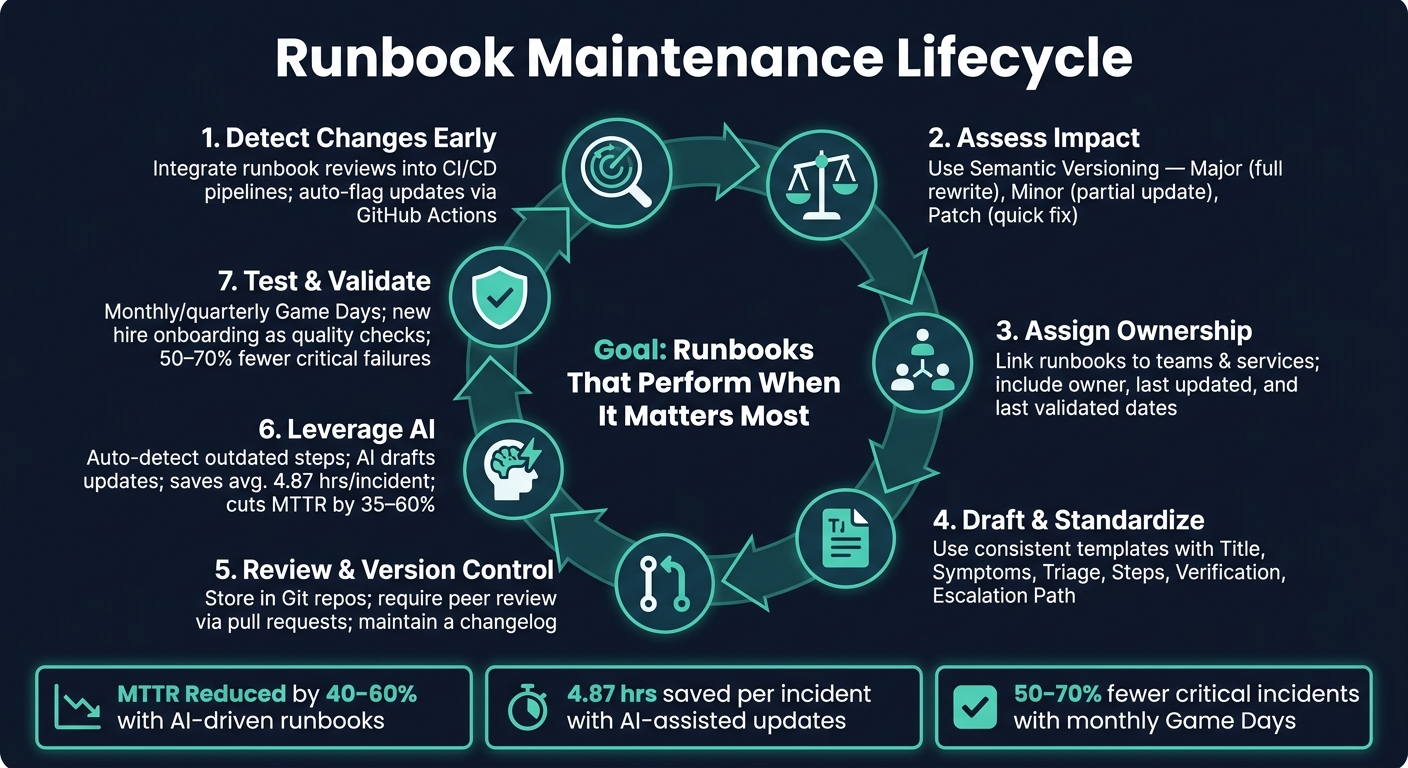
Runbook Maintenance Lifecycle: Keep Docs Accurate as Engineering Evolves
Incident Runbooks: Step-by-Step Response Guide
sbb-itb-e60d259
Mapping Engineering Changes to Runbooks
Keeping runbooks up-to-date is no small task. With constant engineering updates, it’s easy to overlook critical changes unless there’s a system in place to connect those updates directly to the documentation. Below, we explore practical ways to stay ahead of these challenges.
Detecting Process Changes Early
To avoid surprises, make runbook reviews a standard part of the engineering workflow. Require teams to verify runbooks before any production deployment. This ensures documentation is accurate and ready to handle issues before they impact users [1].
Another smart move? Link your CI/CD pipeline to your runbook library. For example, you can set up GitHub Actions to monitor key infrastructure directories and automatically flag runbooks that might need updating [5][6]. By automating this process, you reduce the risk of manual errors and missed updates.
"Runbooks rot because they sit outside normal ownership and change control. Without a clear owner and a way to detect drift, a runbook becomes a document anyone can edit and no one must maintain." – Geert P. Thiemens, The Moai team [4]
This kind of early detection lays the groundwork for keeping runbooks reliable.
Assessing the Impact on Runbooks
Not every engineering tweak calls for a complete overhaul. A structured approach – like one inspired by Semantic Versioning (SemVer) – can help you quickly determine the level of updates required [2]:
| Change Type | Impact | Action Required |
|---|---|---|
| Major (X.0.0) | Breaking change (e.g., migrating from VMs to Kubernetes) | Full rewrite and staff retraining |
| Minor (1.X.0) | Backward-compatible addition (e.g., new diagnostic steps) | Partial update or added details |
| Patch (1.0.X) | Minor fix (e.g., updated URL or corrected command syntax) | Quick correction; no major logic change |
This process should bring together both support and engineering teams. Support teams know which runbook steps are essential during incidents, while engineering teams understand the technical changes behind the scenes. By working together, they can decide if a change calls for a quick fix, a partial update, or a complete rewrite. This collaboration ensures updates meet both operational and technical needs.
Using AI to Detect Changes
Manual tracking has its limits. That’s where AI can step in. AI tools analyze support cases and runbook execution histories to flag outdated or mismatched documentation [7]. For instance, if a procedure requires frequent manual workarounds, it’s a clear sign the runbook needs attention.
Tools like Supportbench can even scan incoming support cases to identify inconsistencies between actual workflows and documented procedures, automatically marking runbooks for review [6]. This shifts runbook maintenance from a reactive task to a continuous, background process. Some enterprise organizations using AI-driven operational documentation have reported reducing Mean Time to Resolution (MTTR) by 40–60% [7]. That kind of improvement depends on keeping runbooks accurate as systems evolve.
Building a Consistent Runbook Lifecycle
Keeping runbooks current requires more than just early detection of changes – it demands a well-structured lifecycle. This ensures long-term accuracy and supports the kind of dependable documentation that AI-driven, cost-efficient B2B customer support operations rely on.
Defining Ownership and Roles
Runbooks often fall out of date due to one simple issue: unclear responsibility. If no one knows who’s in charge of updates, they simply don’t happen. The solution? Assign ownership to teams instead of individuals. When ownership rests with a team, continuity is maintained even as individual members change roles or leave. To make this work, link each runbook to the service it supports in your service catalog. For instance, the team managing the API Gateway should also own its associated runbooks.
Every runbook should include key details in its header: owner, last updated date, and last validated date. Knowing when a runbook was last tested (not just edited) is crucial for trusting its reliability during an incident.
"A runbook needs the same kind of ownership as the service it supports." – Geert P. Thiemens, The Moai team
Regular reviews should be part of the ownership model. For stable services, quarterly reviews may suffice, while more volatile services should be reviewed monthly. Once ownership is clear, the next step is to standardize how runbooks are structured.
Standardizing Runbook Templates
A consistent format across all runbooks saves time and reduces stress during high-pressure situations. Engineers can quickly find the information they need – whether it’s commands, escalation contacts, or verification steps. A well-designed runbook template should include the following sections:
| Section | Purpose |
|---|---|
| Title & Metadata | Service name, owner, last updated date, and last validated date |
| Symptoms & Triggers | Alerts or errors that indicate when the runbook is needed |
| Quick Triage | A checklist to help categorize the root cause |
| Step-by-Step Procedure | Detailed commands with expected outputs for each step |
| Verification | Metrics or checks to confirm the fix worked |
| Escalation Path | Contact details for escalation, such as phone numbers or Slack handles |
Write every step in a clear, imperative voice. Use direct commands like “Run: kubectl get pods” instead of vague suggestions. Include commands that can be copy-pasted, along with their expected outputs, so engineers don’t have to guess or interpret placeholders – especially during a 2 AM outage.
"If a runbook cannot be executed by a capable engineer who was not involved in writing it, it is not finished." – Daniel Mercer, Senior Technical Editor
A good test of a runbook’s quality is whether a new team member can follow it during a late-night incident without needing to ask for clarification. If they can, the runbook is doing its job.
Implementing Version Control
Runbooks should be treated like code. Store them in a Git repository alongside infrastructure files to ensure a clear history of changes, accountability, and the ability to roll back if needed. Use Semantic Versioning to indicate the scope of changes, and maintain a detailed changelog that explains what was updated, why it was done, and who made the changes. This audit trail is invaluable for compliance and postmortem reviews.
"Versioning transforms runbooks from static documents into managed artifacts that evolve safely alongside systems." – Upstat
Finally, make peer reviews a mandatory step for any runbook updates via pull requests. This process not only helps catch mistakes before they’re implemented but also spreads knowledge about critical procedures across the team.
Building a Repeatable Runbook Update Process
Once you’ve nailed down ownership and standardized your templates, the next hurdle is ensuring that updates happen consistently. A solid process keeps runbooks aligned with engineering changes, enabling faster incident response and ongoing improvements.
Creating a Lightweight Update Workflow
An update workflow doesn’t have to be overly complex. When an engineering change is identified, use these four simple steps:
- Triage the impact
- Draft the update using a standardized template
- Review via pull request
- Publish with automated notifications
The review process ensures a peer double-checks the changes before merging, while automated notifications keep on-call engineers and support leads in the loop before the next incident.
"When a change affects paging, dashboards, access, or mitigation steps, the runbook update ships with the same pull request." – Geert P. Thiemens, The Moai Team [4]
This "ship docs with code" mindset is key to avoiding outdated documentation. If the runbook update isn’t bundled with the infrastructure change, it’s all too easy for it to slip through the cracks.
By embedding these steps into your current workflows, you can make the update process feel natural and seamless.
Embedding Updates into Existing Workflows
The best way to keep runbooks up-to-date is by tying their updates to the work your team is already doing. Here are some triggers that naturally prompt updates while reinforcing version control and ownership:
| Update Trigger | Where It Lives | What Happens |
|---|---|---|
| Code Deployment | CI/CD / Pull Request | Runbook update ships in the same PR as the code change [2][4] |
| Incident Resolution | Post-Incident Review | Compare incident logs to runbook steps; identify and fix gaps [1][5] |
| New Hire Onboarding | Training Checklist | New hires execute runbooks and surface overlooked gaps [3][8] |
| Scheduled Review | Quarterly Calendar | Validate critical runbooks, even if no changes occurred [1][6] |
Post-incident reviews are especially valuable. If an incident highlights where a runbook fell short – like a missing step, an outdated command, or a changed escalation path – address those gaps immediately. Similarly, having new hires execute runbooks can reveal "tribal knowledge" that more experienced team members might take for granted.
Using AI to Speed Up Updates
While a manual workflow works well, AI can make the process faster and more efficient. For instance, manual reviews across 1,000 applications can add up to 2,000 hours annually – just for maintenance [9].
Platforms like Supportbench use AI to monitor runbook usage patterns, flagging steps that repeatedly fail or require manual adjustments during incidents. Instead of waiting for a quarterly review, the system identifies issues as soon as they arise.
AI can also streamline drafting. When a CI/CD pipeline detects a change – like a modified Terraform configuration for a database cluster – it can generate a draft update pre-filled with relevant commands and metadata. A human reviewer still approves the update, but the initial drafting work is already done. Teams using AI-assisted tools report saving an average of 4.87 hours per incident, and standardized templates help cut MTTR by 35% [7].
"Outdated runbooks are worse than no runbooks at all. They create false confidence, waste precious incident time, and train teams to ignore documentation entirely." – Upstat [1]
Automated reminders close the loop by ensuring runbooks don’t go stale. If a runbook hasn’t been tested in 90 days, the system notifies the owning team – no manual tracking needed. Using a two-date tracking system (a "Last Updated" date for content changes and a "Last Validated" date for successful tests), teams can quickly gauge a runbook’s reliability during critical incidents.
Measuring Runbook Effectiveness and Improving Over Time
Once you’ve streamlined runbook updates, the next step is to measure how effective those updates are when put to the test. Updating a runbook is only part of the process; you also need to confirm that it performs well during real-world incidents. This evaluation is crucial for maintaining a dependable, AI-integrated support system.
Defining Success Metrics
One of the clearest indicators of effective runbooks is a lower Mean Time to Resolution (MTTR). Organizations combining well-structured documentation with AI-driven observability have reported impressive MTTR reductions of 40–60% [7]. But MTTR alone doesn’t tell the whole story. Other metrics can provide deeper insights into runbook performance.
- Procedure Success Rate: Tracks how often runbook steps lead to resolution without requiring manual workarounds.
- Step Skip/Modification Rate: Flags steps that are frequently skipped or modified during incidents, suggesting they may be outdated or unclear.
- Validation Age: Measures how long it’s been since the runbook was last successfully tested.
- Rollback Rate: Indicates how often actions prescribed by the runbook had to be reversed.
| Metric | What It Signals |
|---|---|
| MTTR | Speed of resolution after a runbook update |
| Procedure Success Rate | Effectiveness of steps as written |
| Step Skip/Modification Rate | Potentially outdated or unclear steps |
| Validation Age | Time since last successful test |
| Rollback Rate | Frequency of reversing prescribed actions |
To act on these metrics, focus on rigorous testing and regular validation.
Testing and Validating Runbooks
Runbooks should be tested proactively, not just during outages. Monthly or quarterly "Game Days" – simulated scenarios where teams execute runbooks in a controlled environment – are a great way to uncover errors before they impact production. Teams that hold these simulations monthly report 50–70% fewer critical incidents where runbooks fail [10].
Another valuable practice is using new hire onboarding sessions as an opportunity to identify gaps or confusing steps in the documentation. These training sessions double as quality checks [3][5].
"A runbook you’ve never used is a runbook you don’t trust." – Incident Copilot [10]
The insights gained from these tests should directly inform updates to ensure continuous improvement.
Closing the Feedback Loop
Even with regular testing, some issues will only surface during real incidents. That’s why creating a direct feedback loop between support and engineering is essential. Adding "Runbook Accuracy" as a recurring topic in post-mortem meetings ensures that any gaps discovered during incidents are formally documented and treated like technical debt, not overlooked as informal notes [1][9].
Encourage engineers to flag inaccuracies in real time, rather than relying solely on post-incident reviews [1]. Integrating these reports into tools like Jira ensures that no issues are forgotten. As Matthew Helmke, Technical Writer at Gremlin, explains:
"The biggest reason that documentation doesn’t get updated is that time was never scheduled to update it." [3]
Scheduling time for updates – whether through post-mortems, quarterly reviews, or automated reminders – is what separates teams that maintain truly reliable runbooks from those that rely on outdated ones, risking a false sense of security.
Conclusion: How to Keep Runbooks Accurate as Engineering Evolves
Maintaining accurate runbooks as systems grow and change requires a well-structured approach. The key is to treat runbooks like code – this means assigning clear ownership, using version control, and continuously testing to ensure the documentation reflects the current state of your systems.
The steps outlined earlier form a cohesive framework. Spotting process changes quickly, assigning ownership at the team level, using standardized templates, integrating updates into workflows, and following up after incidents all work together. Skipping any one of these steps can weaken the entire system.
"When runbooks become part of your operational system, they stop being ‘docs’ and start acting like tools." – Geert P. Thiemens, The Moai Team [4]
Upstat captures it perfectly: "Outdated runbooks are worse than no runbooks at all. They create false confidence, waste precious incident time, and train teams to ignore documentation entirely." [1] By syncing updates with real-time feedback and leveraging AI insights, teams can dramatically reduce MTTR and recover 50–70% of the labor hours often lost to manual troubleshooting [7].
The ultimate aim is to have documentation that performs when it matters most. By following these practices, runbooks become indispensable tools that adapt effortlessly to the ever-changing demands of engineering.
FAQs
How do I know which runbooks a change will break?
To figure out which runbooks a change might disrupt, conduct a change impact analysis (CIA). This process involves examining the systems, workflows, and documentation that the change touches. By assessing the change’s scope, you can identify outdated or vulnerable runbooks and update them as needed to avoid potential operational hiccups.
Who should own runbook updates in a fast-changing org?
Runbook updates should be managed by the team responsible for the specific service or system. This approach ensures the documentation stays current and reflects any changes made to the infrastructure or processes. When ownership is clearly defined, it promotes accountability, encourages regular reviews, and helps avoid outdated or neglected documentation. Integrating updates into existing workflows – like pull requests – makes it easier to keep runbooks accurate and dependable, even in fast-changing environments.
What’s the safest way to use AI to update runbooks?
The best way to safely use AI for updating runbooks is by leveraging tools that handle automated change detection, version control, and update notifications. AI can spot discrepancies, create draft updates based on incidents, and recommend changes. When combined with version control, it becomes easier to track edits, revert updates if needed, and confirm the accuracy of modifications. Automated notifications ensure stakeholders stay in the loop, minimizing mistakes and keeping processes reliable during crucial incidents.






