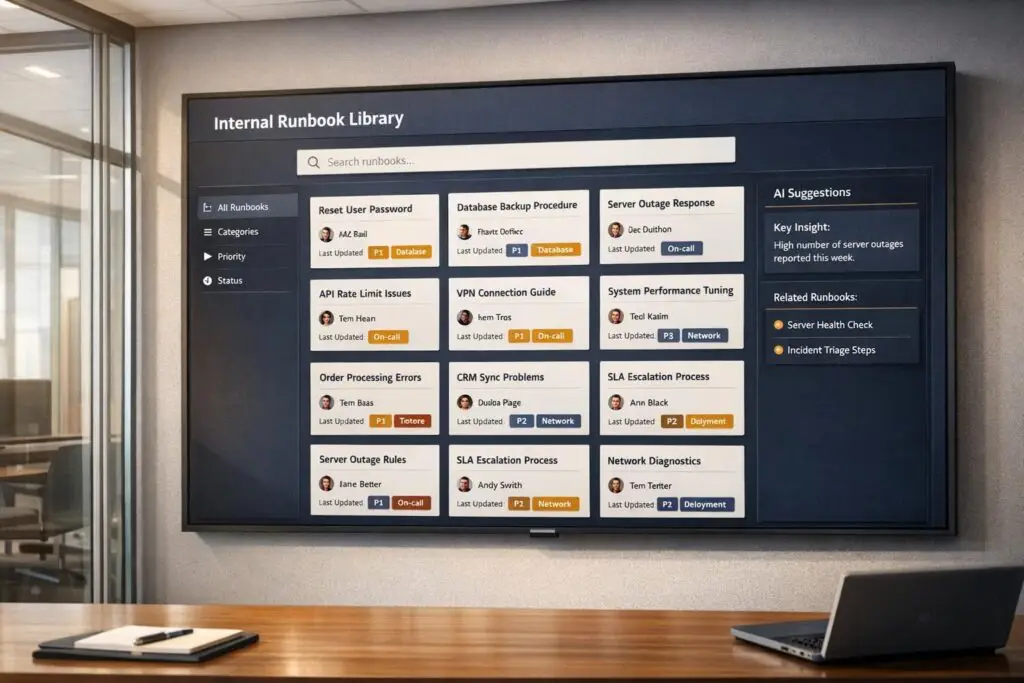
When your support team can’t find the right information during a critical issue, it wastes time and erodes customer trust. A well-organized runbook library solves this by providing a centralized, structured resource with step-by-step instructions for resolving recurring problems quickly and consistently.
Here’s how to create a runbook library that actually works:
- Set Search Standards: Ensure agents can locate documents in under 30 seconds with metrics like search success rate (>90%) and regular reviews (every 90 days).
- Organize Intuitively: Use clear folder structures (e.g.,
/runbooksby service or issue type) and descriptive naming conventions (service-issue-environment.md). - Use Templates: Standardize runbooks with clear sections (e.g., prerequisites, step-by-step procedures, escalation paths).
- Leverage Metadata and Tags: Add fields like severity, symptoms, and ownership to make documents searchable and machine-readable.
- Prioritize with Case Data: Start with runbooks for the top 20 most frequent ticket categories.
- Maintain Accuracy: Assign ownership, schedule quarterly reviews, and encourage feedback for updates.
- Integrate AI Tools: Use AI for tagging, search optimization, and even auto-generating runbooks from case history.
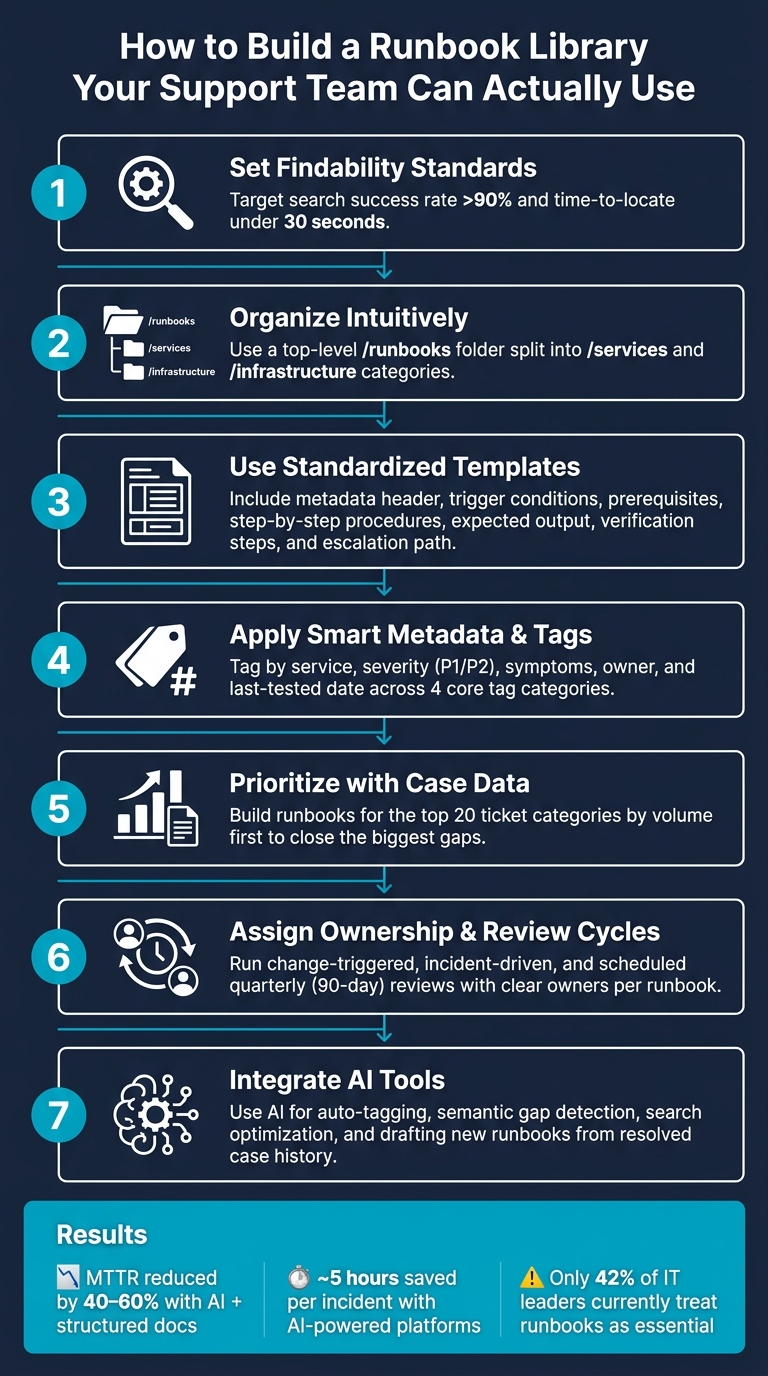
How to Build a Runbook Library Your Support Team Can Actually Use
Incident Runbooks: Step-by-Step Response Guide
sbb-itb-e60d259
How to Set Findability Standards for Your Runbook Library
Building a runbook library is just the first step. The real challenge is making sure support agents can find the right information fast – especially during high-pressure incidents.
A runbook library’s usefulness boils down to how quickly agents can locate what they need. If it takes longer than 30 seconds to find the right document during a live issue, the library isn’t doing its job.
"Documentation that exists but cannot be found is useless." – Docuscry [2]
To avoid this, treat findability as a measurable standard – not something that happens automatically.
How to Measure Findability
Too often, teams assume agents will locate runbooks when they need them. A better approach is to track whether they actually do. Focus on these key metrics:
- Search success rate: Aim for above 90%.
- Time to locate a runbook: Keep it under 30 seconds.
- Usage frequency: Ensure at least one view per incident.
- Critical service coverage: Target 100%.
- Recent reviews: At least 80% of runbooks should have been reviewed within the last 90 days [2].
| Metric | Target Benchmark |
|---|---|
| Search success rate | > 90% |
| Time to locate a runbook | < 30 seconds |
| Doc views per incident | > 1 |
| Critical service coverage | 100% |
| Docs reviewed in last 90 days | > 80% |
Start by monitoring search success rates and time-to-locate. These will quickly reveal where agents are running into trouble.
Once you’ve established clear benchmarks, focus on organizing your library in a way that makes navigation intuitive and fast.
How to Organize Your Library So Agents Can Navigate It
The biggest findability issue isn’t bad content – it’s disorganized content. Runbooks scattered across tools like Confluence, Slack, and shared drives force agents into a frustrating scavenger hunt during incidents [2].
Here’s a better approach: organize your library by document type. Group files into folders like /runbooks, /playbooks, and /onboarding instead of sorting them by team. This avoids silos and makes it easier to find procedural documents under pressure. Within these categories, add filters like product area, customer tier, issue type, or workflow stage to help agents drill down quickly.
Using Case Data to Decide Which Runbooks to Build First
To make your runbook library effective from day one, prioritize based on case data. Start by analyzing the top 20 ticket categories by volume – these represent your biggest gaps and the areas where runbooks can immediately reduce resolution times [9].
Supportbench’s AI tools can simplify this process. By analyzing case tags, escalation paths, and ticket metadata, the platform highlights recurring issues that lack proper documentation. This allows your team to focus on closing the most critical gaps without manually sifting through hundreds of tickets [9][4].
"The worst time to write a runbook is during an incident. You’re stressed, you’re in a hurry, you’ll write something incomplete." – Samson Tanimawo, Founder & CEO, Nova AI Ops [1]
How to Structure Runbooks for Better Search Results
When incidents occur, your support team needs quick access to reliable solutions. Structuring your runbooks effectively ensures they can find the right procedures instantly. A consistent format can make all the difference in surfacing the correct information at the right time.
A Standard Runbook Template You Can Use Today
Every runbook should follow a standardized template. Why? It makes scanning faster and helps establish trust in the document’s reliability.
"A runbook is only as good as its structure. Without a consistent template, runbooks become scattered notes that nobody trusts during incidents." – Stew [10]
Here’s a template to consider, with the essential parts in order:
- Metadata Header: Include details like ID, version, owner, last updated date, severity, and estimated duration.
- Trigger Conditions: Specify alerts, error messages, or symptoms that prompt the use of the runbook.
- Prerequisites: List necessary access, tools, or permissions in a checklist format.
- Step-by-Step Procedures: Use clear, imperative language for each step.
- Expected Output: Provide details (use code blocks if needed) to help agents confirm they’re on the right track.
- Verification Steps: Outline how to confirm the issue is resolved.
- Escalation Path: Clearly define who to contact and when if the runbook doesn’t work.
Including expected output not only guides agents but also builds confidence that they’re following the correct procedure [7][10].
How to Write Titles and Summaries Agents Will Actually Search For
A clear, descriptive title can make or break a runbook’s findability. Generic names like notes.md or database-fix.md don’t help anyone. Instead, use titles like db-connection-pool-exhaustion.md that immediately convey the issue [2][6].
Adopt a naming convention such as [service]–[issue/action]–[environment]. For example:
auth-service-token-expiry-prodpayment-api-restart-pod
Pair the title with a one-sentence summary at the top of the runbook. This helps agents quickly verify they’ve found the right document. Additionally, include a brief "When NOT to use this runbook" section. This prevents confusion when multiple issues share similar symptoms [2][8].
How to Set Up Metadata and Tags Consistently
Metadata is crucial for making runbooks machine-readable, especially when AI tools are involved. Structured metadata ensures accurate search results and makes finding the right runbook easier.
| Metadata Field | Purpose | Example |
|---|---|---|
| Service | Identifies the system | auth-service |
| Type | Categorizes the procedure | incident-response |
| Owner | Responsible team/person | platform-team |
| Symptoms | Searchable user-facing issues | slow-login, timeout |
| Severity | Indicates impact level | P1 or Critical |
| Last Tested | Confirms steps still work | 01/15/2026 |
Tagging by symptoms, rather than just service names, aligns with how agents search. For example, they’re more likely to look for terms like "500 errors" or "slow response time" than for the root cause [1][8].
To further improve searchability, add a Keywords section at the bottom of each runbook. Include exact alert names and error strings to capture queries that don’t match the title perfectly [7][5].
Platforms like Supportbench offer AI-powered tagging tools to maintain consistency. These tools analyze runbook content and metadata to suggest and apply relevant tags automatically, saving time and ensuring your library stays organized as it grows.
"A stale runbook is worse than no runbook – it wastes time during incidents and may contain wrong instructions." – Samson Tanimawo, CEO, Nova AI Ops [1]
To avoid outdated instructions, set a 90-day review cycle for all runbooks. Flag documents that haven’t been tested within that period so owners can verify their accuracy in the current environment [1][5].
A well-structured runbook library not only simplifies searches but also creates a solid foundation for managing your entire collection effectively.
How to Organize and Name Your Runbook Library
Choosing a Library Structure That Works for Your Team
When creating a runbook library, it’s essential to prioritize the type of document over the team responsible for it. Why? During an incident, responders need to quickly locate the right runbook without worrying about which team owns it. A well-organized structure starts with a top-level /runbooks folder, divided into /services and /infrastructure. This setup provides a clear, predictable starting point for everyone involved [2].
| Folder Level | Sub-Folder | Example Content |
|---|---|---|
| Level 1: Type | /runbooks | All troubleshooting procedures |
| Level 2: Category | /services | auth-service.md, payment-api.md |
| Level 2: Category | /infrastructure | kubernetes.md, database.md |
| Level 1: Type | /architecture | system-overview.md, service-diagrams.md |
Equally important is ensuring the library is housed in one searchable location that every on-call agent can access. If your runbooks are scattered across shared drives, chat threads, and wikis, they’ll be practically useless during a high-pressure situation [12][6].
Once the folder structure is in place, the next step is to establish precise naming conventions that make finding the right document even easier.
Naming Conventions That Reduce Confusion
A good name should immediately tell responders what the runbook is about. A format like {service}-{action}-{scope}.md works well because it’s descriptive and easy to follow. For example:
kubernetes-restart-deployment.mdauth-service-latency-runbook.md
This naming pattern keeps files logically ordered in directories and eliminates the need for guesswork during critical moments [8][7].
Here are a few rules to follow when naming runbooks:
- Avoid special characters.
- Skip vague names like
fix.mdornotes.md. - Use the official service catalog name instead of informal nicknames.
These guidelines help agents find the right document quickly, often without needing to rely on search functionality [6].
"Outdated runbooks are worse than no runbooks. They create false confidence, waste precious incident time, and train teams to ignore documentation entirely." – Upstat.io [6]
Linking Runbooks to Related Resources
Once you’ve established a structured library and clear naming conventions, the next step is to ensure your runbooks are interconnected. Each runbook should include links to related procedures. For example, a runbook addressing database connection issues might link to another that covers query performance problems. Adding a "Related Runbooks" section ensures responders can easily navigate to adjacent resources when troubleshooting [3][2].
Beyond linking runbooks to each other, embed links to these documents within the tools your team already uses. For instance, include runbook links directly in monitoring alerts from tools like Prometheus or Datadog. This way, responders don’t waste time searching – the relevant runbook appears alongside the alert itself [12][6].
As one technical editor noted:
"The runbook that exists but cannot be found in the first two minutes of an incident is operationally equivalent to a runbook that does not exist." – The Good Shell [14]
To further improve usability, include a link at the bottom of each runbook for agents to report inaccuracies. This encourages quick feedback and ensures that errors are fixed promptly, keeping your library accurate and reliable [14].
How to Make Runbooks Easier to Find with AI and Search Optimization
Writing Runbook Content That Shows Up in Search
A solid folder structure and clear naming conventions help agents navigate, but search tools are what truly guide them to the right solution – especially during those stressful, late-night incidents.
One common mistake teams make is crafting runbooks for linear reading instead of optimizing them for AI-powered search. Unlike traditional search engines, AI search tools don’t scan entire documents. Instead, they pull specific snippets to answer queries [15]. If your critical troubleshooting step is buried deep within a document, it might never show up in search results.
To avoid this, place the most important resolution steps at the very top of the runbook. Use headings that reflect how agents think and search – questions like “Why is the auth service returning a 401?” work better than vague titles like “Auth Service Errors.” Include exact error messages, alert names, and commonly used symptom phrases in your content. You can even add a dedicated “keywords” section at the bottom of each runbook to capture alternate terms and variations. For example, a heading like Error: Query defined in resolvers, but not in schema ensures that agents can find the runbook when they paste that specific error into the search bar [13].
"If your key information is buried mid-paragraph, it may not get selected [by the AI]." – Pilot Digital [15]
Another handy tip? Add a short “Also Known As” section near the top of each runbook. This simple addition can significantly expand the range of search terms that will surface the document [2].
Finally, once your content is optimized, an organized tagging system ensures that AI search tools can index and retrieve your runbooks efficiently.
Building a Tagging System That Actually Works
Tagging only works if it’s consistent. When agents use different tags for the same type of runbook, faceted search becomes unreliable, and your runbook library can turn into a chaotic mess.
To keep things streamlined, enforce these four core tag categories across all runbooks:
| Tag Category | Purpose | Examples |
|---|---|---|
| Alert/Trigger | Matches the exact alert or error that fires | CPUUsageCritical, 500-Error |
| Service/Component | Identifies the affected system | API, SSO, Database |
| Severity/SLA | Drives automated routing and prioritization | SEV1, SEV2, SLA-Critical |
| Ownership/Metadata | Tracks accountability and freshness | SRE-Team, Last-Tested-2026 |
Severity tags are particularly valuable. Incident management platforms can use them to automatically attach the correct runbook when a ticket or alert reaches a specific severity level [11]. This eliminates the need for agents to manually search for the right document.
Keep your taxonomy lean. Research shows that a concise set of around 12 tag categories is far more effective than a sprawling list of 50 vague ones [9]. More tags often lead to inconsistency, not better search results.
How Supportbench‘s AI Tools Improve Runbook Access
Once you’ve established a strong tagging system, AI tools like those from Supportbench can take your runbook management to the next level. These tools make it easier for agents to find the right information quickly, cutting down resolution times.
The Agent Knowledgebase AI Bot is a standout feature. It scans both internal and external knowledge bases, providing direct, natural language answers to agent questions. Agents can ask the bot a question during a case and get a synthesized response from the relevant runbook, complete with source citations. This complements the structured practices mentioned earlier and is especially helpful in complex B2B environments where resolving a single issue might require referencing multiple runbooks.
Supportbench also offers an AI Automation layer that auto-tags incoming cases based on their content and intent. This aligns with the same tagging system used in your runbook library, clustering similar cases and automatically suggesting the right runbook [8]. Teams that combine this kind of automation with well-organized runbooks report significant reductions in Mean Time to Resolution (MTTR), often by as much as 30–70% [8]. The reason? Agents spend less time searching and more time solving problems.
In short, better tagging and content organization make AI tools smarter. Supportbench’s features enhance a well-built library – they don’t replace the need for one.
How to Maintain Your Runbook Library and Track Its Impact
Setting Up Roles, Reviews, and Approval Workflows
Without proper management, a runbook library can quickly lose its value.
Start by assigning clear ownership for each runbook. This ensures someone is always responsible for keeping it up to date. If a runbook doesn’t have an owner, it might be time to consider removing it.
Use a three-tier review process to keep your runbooks relevant:
- Change-Triggered Reviews: Revisit runbooks whenever there are infrastructure updates.
- Incident-Driven Reviews: After an incident, review the runbook to document deviations or improvements discovered during the resolution.
- Scheduled Quarterly Reviews: Regularly check all runbooks to avoid outdated information creeping in.
To differentiate between edits and real-world validation, track both "Last Validated" and "Last Updated" dates. Include key governance details – like Last Updated, Last Tested, Owner, and Risk Level – in the header of each runbook for easy reference.
You can also test your documentation by running "Game Days", where agents simulate failures and follow the runbooks in a controlled environment. Another great way to validate runbooks is by having new hires use them for tasks. If they struggle, it’s a clear signal that updates are needed.
Once your review structure is solid, you can start measuring how well your runbook library is actually working.
Metrics to Track Whether Your Library Is Working
Good metrics show whether your runbooks are making a real difference. These metrics don’t just gauge the quality of the documentation – they also connect directly to faster incident resolution and better team performance.
| Metric Type | KPI | What It Tells You |
|---|---|---|
| Adoption | Runbook Usage Rate | Are agents using runbooks during incidents? |
| Quality | Success Rate | How often do runbooks resolve issues without escalation? |
| Efficiency | Time-to-Resolution (TTR) | Are runbooks helping to resolve incidents faster? |
| Completeness | Coverage Metric | Do recurring incidents have associated runbooks? |
| Governance | Maintenance Health | Are runbooks actively owned and validated? |
For example, standardized templates can cut Mean Time to Resolution (MTTR) by about 35%. Teams combining structured documentation with AI-driven tools have reported even greater gains, with resolution times dropping by 40–60% [8]. On top of that, AI-powered incident management platforms can save nearly 5 hours per incident [8], giving agents more time for other tasks.
Supportbench offers dashboards that make it easier to track these metrics. Features like AI Predictive CSAT and AI First Contact Resolution (FCR) detection provide real-time insights into how well runbook-guided resolutions are working.
AI tools can also help identify gaps in your documentation, streamlining the process of keeping your library current.
Using AI to Keep Your Library Accurate Over Time
With governance and metrics in place, AI can take your runbook library to the next level by keeping it accurate and effective as your operations evolve.
One useful AI application is semantic gap detection. If agents search for terms and find no relevant results, it’s a sign that either the runbook doesn’t exist or it’s not indexed correctly. Modern platforms can flag these failed searches and prioritize them, helping you identify where new documentation is needed.
AI can also monitor for outdated content. Systems can automatically flag runbooks that haven’t been reviewed in 90 days, prompting owners to refresh them before they cause issues [2]. Pair this with metadata in YAML headers – fields like last_updated, last_tested, and owner – and your AI tools can generate detailed health reports for your library on demand.
Over time, you can aim for progressive automation. Runbooks often start with simple, manual steps but can evolve into fully automated workflows. At the highest level, systems can even self-heal by triggering automated responses [8]. While human judgment will always play a role, AI can speed up this evolution by highlighting the most frequently used runbooks, which are prime candidates for automation.
"The goal is not documentation for its own sake. The goal is faster incident resolution with less stress." – Nawaz Dhandala, OneUptime [5]
Supportbench’s AI KB Article Creation from Case History feature can also help. When a resolved case highlights a gap in your library, the AI can draft a new runbook based on the case’s details. This turns every incident into an opportunity to improve your documentation, making your library stronger with each use.
Conclusion: Steps to Build a Runbook Library Your Team Will Use
A runbook library only works when agents can find what they need in seconds – not minutes. To make that happen, focus on consistent habits: use standardized templates, assign clear ownership, apply smart tagging, and schedule regular reviews.
Start with your most pressing issues. Build runbooks for the top 20 ticket categories first, then expand as needed. Use a straightforward naming convention like [service]-[action]-[scope].md, assign each runbook to a specific owner, and stick to a 90-day review cycle. This structured approach keeps your library dependable and ready to grow alongside your support operations.
"Every incident should result in a runbook update – either adding a new scenario or improving an existing one." – Docuscry [2]
These practices can lead to noticeable performance gains. For example, organizations that pair knowledge-centric solutions with AI tools report cutting MTTR by 40–60%. AI-powered platforms also save an average of 4.87 hours per incident [8]. Despite these benefits, only 42% of IT leaders currently view runbooks as essential for production readiness [2]. That means many teams are still missing out on significant efficiency improvements.
FAQs
What’s the best tool or place to store runbooks?
When it comes to storing runbooks, the key is ensuring they are easy to access, searchable, and simple to maintain. Centralized repositories and structured knowledge bases are excellent options for this purpose.
For example, version-controlled systems like GitHub provide a reliable way to manage updates and track changes over time. Similarly, internal wikis such as Confluence, Notion, or even Google Docs allow teams to organize information efficiently. These platforms excel in offering features like version control, quick updates, and powerful search capabilities – making them a dependable choice for support teams, especially during high-pressure incidents.
How do we enforce consistent tags and naming across teams?
To keep things organized and consistent, store all runbooks in a single, version-controlled repository. Establish clear naming and tagging protocols within this centralized system to minimize confusion and make finding information easier. By introducing simple review workflows, you can encourage regular updates and ensure everything stays accurate and up-to-date. This approach creates a reliable, go-to resource that simplifies documentation management and keeps everyone on the same page.
How can AI keep runbooks accurate without extra work?
AI makes maintaining accurate runbooks easier by automating updates and verifying content. It can swiftly incorporate lessons from incidents into runbooks, ensuring the information stays current. On top of that, AI tools simplify review processes and conduct regular checks to keep everything accurate. By organizing runbooks in a centralized, searchable system, teams can cut down on manual work while keeping the library dependable and up-to-date.