



Providing top-tier support for VIP accounts is challenging, especially when trying to balance personalized service with operational efficiency. The key is to streamline processes without compromising quality. Here’s how you can achieve that:
- Define VIP Criteria: Use measurable factors like annual spend, order frequency, or subscription tier to identify high-value customers.
- Automate Recognition: Replace manual tagging with CRM-integrated systems to consistently flag VIP accounts.
- Leverage AI for ticket prioritization: AI tools can analyze ticket context, sentiment, and urgency to ensure VIP issues are addressed promptly.
- Dynamic SLAs: Adjust response times based on ticket complexity and customer sentiment to maintain service quality.
- Escalation Management: Use AI to simplify and optimize escalation paths, ensuring tickets reach the right specialists quickly.
- Centralize Data: Integrate CRM and helpdesk platforms to give agents a complete view of customer information.
- Measure Performance: Track metrics like CSAT, resolution rates, and sentiment trends to continuously improve VIP support.
How to Identify and Tier VIP Accounts
Set Clear Tiering Criteria
Defining clear, measurable criteria is crucial for identifying VIP accounts effectively. Vague standards can lead to inconsistencies and wasted resources. Instead, focus on quantifiable factors that directly impact your business, such as Annual Contract Value (ACV), total lifetime spend, order frequency, subscription tier, or renewal risk. For example, an e-commerce team might classify customers who spend over $500 or place three or more orders as VIPs. In contrast, B2B teams might prioritize accounts based on subscription levels, product complexity, or even strategic considerations like brand influence[1].
Another effective method is grouping enterprise accounts by email domains (e.g., "@majorclient.com"). This ensures all users tied to a key account receive priority service, reducing the chance of misclassification[2][4].
Once your criteria are set, use your CRM data to automate the process of identifying high-value accounts.
Use Data to Find High-Value Accounts
Manual tagging can be inefficient and error-prone. Instead, let your CRM serve as the single source for VIP status. By syncing custom fields or tags – like a "vip_customer" flag – from platforms such as Salesforce or HubSpot into your helpdesk system, you can ensure consistent recognition of VIP accounts[3].
Set up triggers to automatically tag tickets from specific domains or organization IDs as "High" or "Urgent" for immediate prioritization[2][4]. Additionally, organize ticket views by the next SLA breach to ensure your team addresses the most time-sensitive VIP issues first[1][2]. AI tools can further enhance this process by performing real-time CRM lookups, keeping customer status up-to-date[3].
sbb-itb-e60d259
Set Up AI-Powered Prioritization and SLAs
Automate Case Prioritization
Manual triage often leads to delays and missed details. AI changes the game by analyzing the entire context of a support ticket – not just the keywords or subject line.
Take this real-world example from May 2025: Supportbench recorded a case where a Premier-tier customer submitted a ticket with the subject "Quick Question." The body, however, described a "full production outage." A traditional system, relying solely on the subject line, tagged it as "Low" priority. In contrast, the AI-powered system reviewed the body, identified terms like "cannot access" and "urgently", checked the customer’s Premier status in the CRM, and immediately flagged it as "Critical", routing it to the P1 Incident Management queue[5]. This approach ensures that urgent issues are prioritized correctly, avoiding costly delays and keeping top-tier clients satisfied.
"AI cuts through the noise to identify truly urgent issues requiring immediate attention, regardless of how poorly the initial request might have been phrased or categorized by the user." – Nooshin Alibhai, Founder and CEO, Supportbench[5]
AI doesn’t stop at prioritization – it also ensures tickets are routed to the right people. For VIP cases, it matches tickets to agents based on skills, language, and workload[4][5]. This eliminates the inefficiencies of "ticket tennis", where cases bounce between teams, delaying resolutions. Additionally, AI tracks patterns like repeated follow-ups from VIP accounts and escalates urgency automatically, ensuring critical issues are addressed promptly[5].
By automating these steps, AI creates a foundation for smarter, more adaptable service level agreements (SLAs).
Apply Dynamic SLAs for VIP Support
Static SLAs often fail to account for the nuances of VIP cases. Dynamic SLAs solve this by adjusting response and resolution times based on factors like sentiment, ticket complexity, or even renewal deadlines[5].
For instance, if a VIP customer’s sentiment shifts negatively during a conversation, AI can trigger faster response times and notify a manager[5]. This allows your team to step in when it matters most, without relying on manual tracking or escalation efforts. AI also keeps VIPs informed with automated status updates, delivering a high-touch experience while your team focuses on resolving the issue[4].
This system scales personalized service without adding complexity to your workflow, ensuring VIP clients feel prioritized and valued every step of the way.
Use AI for Sentiment Analysis and Risk Detection
Monitor Sentiment and Intent in Real Time
AI has become a powerful tool for understanding customer sentiment as it happens. It doesn’t just interpret what a VIP customer says – it digs deeper, analyzing how they feel and what they might need. Advanced NLP models evaluate word choices, sentence structure, and even punctuation to assign an emotional intensity score. For example, a comment like, "Great, another delay", might seem polite at first glance, but AI can pick up on the sarcasm and flag it as negative sentiment.
When you combine these sentiment scores with customer tier data from your CRM, the system can instantly prioritize tickets. Even if a high-value customer phrases their complaint diplomatically, the AI ensures their issue doesn’t go unnoticed. It also tracks patterns over time, such as frequent follow-ups from the same VIP, and flags those tickets for immediate attention.
This real-time sentiment tracking paves the way for identifying potential risks before they escalate.
Track Predictive Metrics to Spot Risks
Sentiment analysis is just the beginning – predictive metrics take risk detection to the next level. These metrics can forecast outcomes like CSAT, CES, and first-contact resolution, even before a case is resolved. By analyzing a mix of data points – such as changes in sentiment, response times, case severity, and customer history – the system builds a detailed risk profile. For instance, if a VIP’s sentiment turns negative, the system can automatically shorten dynamic SLAs or notify a manager to intervene.
The results speak for themselves: organizations have reported an 86% reduction in manual analysis time and a 32% decrease in escalation rates. Proactive measures for high-risk tickets have also led to an 18% boost in CSAT and a 28% faster Mean Time to Resolution[7].
"CX leaders rank AI-inferred sentiment of customer interactions as the single biggest driver of CSAT improvements." – Zoom[6]
To get the most out of predictive metrics, it’s essential to integrate multiple data streams. By combining ticket-level details like sentiment and keywords with entitlement data, SLA timelines, and product information – and continuously feeding resolved case outcomes back into the AI – the system becomes smarter over time. This ensures your VIP support stays ahead of potential risks, delivering a seamless and proactive experience.
Build Scalable Escalation Management with AI
To keep your high-touch support standards intact while expanding operations, it’s critical to design escalation paths that seamlessly integrate with automated agent support.
Design Multi-Level Escalation Paths
An effective escalation path ensures tickets are routed to the right specialist, factoring in both complexity and urgency. Many modern workflows use a tiered structure: Tier 0 relies on AI for self-service, Tier 1 involves frontline agents, Tier 2 directs issues to technical specialists, and Tier 3 escalates to subject matter experts or engineering teams [8]. For VIP accounts, AI can automatically identify high-value customers based on domain, client ID, or user profile, prioritizing their concerns [4].
It’s important to incorporate functional escalation alongside hierarchical escalation. Rather than escalating issues solely upward, AI can redirect them laterally to specialized teams when the complexity exceeds the scope of frontline agents [8].
| Escalation Type | Direction | Primary Trigger |
|---|---|---|
| Hierarchical | Vertical (Up the chain) | Managerial approval or sensitive relationship handling [8] |
| Functional | Lateral (To specialists) | Technical complexity beyond frontline expertise [8] |
| External | Outward (To vendors) | Issues involving third-party services or systems [8] |
When a ticket escalates, AI copilots summarize past interactions, pull CRM and product data, and ensure specialists have all the context they need. These updates also enrich the knowledge base automatically [8].
"Escalations have a much more significant impact than they realize. It’s a bottleneck that can be removed rather easily." – Tina Grubisa, Value Consultant, Mosaic AI [8]
With clear escalation paths, agents can address issues faster and with better context.
Support Agents with AI Copilots
Once escalation paths are streamlined, AI copilots can further empower agents by providing context-rich, real-time assistance. Instead of manually searching through past tickets or knowledge bases, these tools offer drafted responses in your brand’s voice, enable instant order or shipping lookups, and generate concise briefings that cut ramp-up time to just 30 seconds [1][10]. When escalations occur, the AI copilot creates a 200-word summary detailing the issue, attempted resolutions, and customer sentiment [10].
AI copilots also monitor dynamic SLAs, triggering escalations as deadlines approach [9]. For high-MRR accounts, automated alerts can notify teams via Slack or SMS the moment a Level 3 sentiment threshold is detected [10]. This proactive approach has shown measurable success, with companies reporting a 14-point increase in CSAT scores and a 47% drop in ticket volume reaching human agents, thanks to effective Tier 1 deflection [8].
Before deploying AI copilots, run simulations using historical ticket data to evaluate system responses and identify gaps in knowledge [1]. Configure copilots to leave internal notes explaining the reason for escalation and capturing customer sentiment, ensuring a seamless transition for the next agent [1].
Create a 360-Degree Customer View
To effectively support VIP accounts, agents need a complete picture of the customer’s journey. This includes account history, product configurations, and recent interactions – all accessible without jumping between tools. When your CRM and helpdesk operate in isolation, agents waste valuable time searching for information, leaving high-value customers waiting.
Centralize Customer Information
Your CRM should act as the central hub for customer data, consolidating inputs from sales, marketing, and customer success teams. By integrating your CRM with your AI-powered helpdesk, you eliminate the need for agents to manually switch between platforms. The secret? Bi-directional synchronization. This ensures CRM data like account tiers, SLAs, and product licenses flows seamlessly into the helpdesk, while ticket updates, AI-generated summaries, and predictive CSAT scores flow back to keep the rest of your team informed [11].
To simplify this process, use native OAuth 2.0 connectors and map only the most critical fields. Avoid overloading the interface by syncing only essential data, such as recent sales activity or renewal opportunities [11].
"In the complex world of enterprise customer support, context is everything." – Eric Klimuk, Founder and CTO of Supportbench [11]
Custom data tables can also be invaluable. These allow you to attach specialized information – like training records, login credentials, or equipment specifications – directly to customer profiles. This creates a single source of truth that agents can access instantly, cutting down on time spent searching for details [11].
This centralized data approach lays the groundwork for proactive, AI-driven support.
Enable Proactive Support with AI Insights
Once customer data is centralized, AI can turn it into actionable insights. For example, Natural Language Processing (NLP) can instantly identify VIP customers using CRM data, removing the need for manual tagging [12]. Companies like LuxBank reduced VIP wait times to just 30 seconds, while Radix Telecom improved retention by 25% through AI-powered prioritization [12].
AI dashboards can analyze key metrics – like lifetime value, recent interactions, and product usage patterns – to predict churn risks before they escalate [11]. If AI detects sentiment changes or unusual usage patterns, it can trigger automated alerts, giving Customer Success Managers (CSMs) the chance to step in and resolve issues proactively. Paragon Healthcare, for instance, saw a 15% boost in patient loyalty after adopting AI-prioritized communication [12].
Additionally, syncing AI-predicted CSAT and CES scores back to your CRM gives your entire organization visibility into customer sentiment. This enables the creation of data-driven playbooks, helping CSMs tackle potential challenges before they affect renewals. By shifting from reactive problem-solving to strategic relationship management, you can strengthen customer loyalty and improve outcomes [11].
| Data Flowing FROM CRM TO AI Helpdesk | Data Flowing FROM AI Helpdesk TO CRM |
|---|---|
| Account Tier/Segment | Case/Ticket Status & Priority |
| Entitlements & SLAs | AI-Generated Interaction Summaries |
| Product & License Information | Key Support Metrics (FCR, Resolution Time) |
| Recent Sales/Success Activity | AI Predictive CSAT/CES Scores |
| Custom Infrastructure Details | Links to Full Ticket Transcripts |
Measure and Improve VIP Support Performance
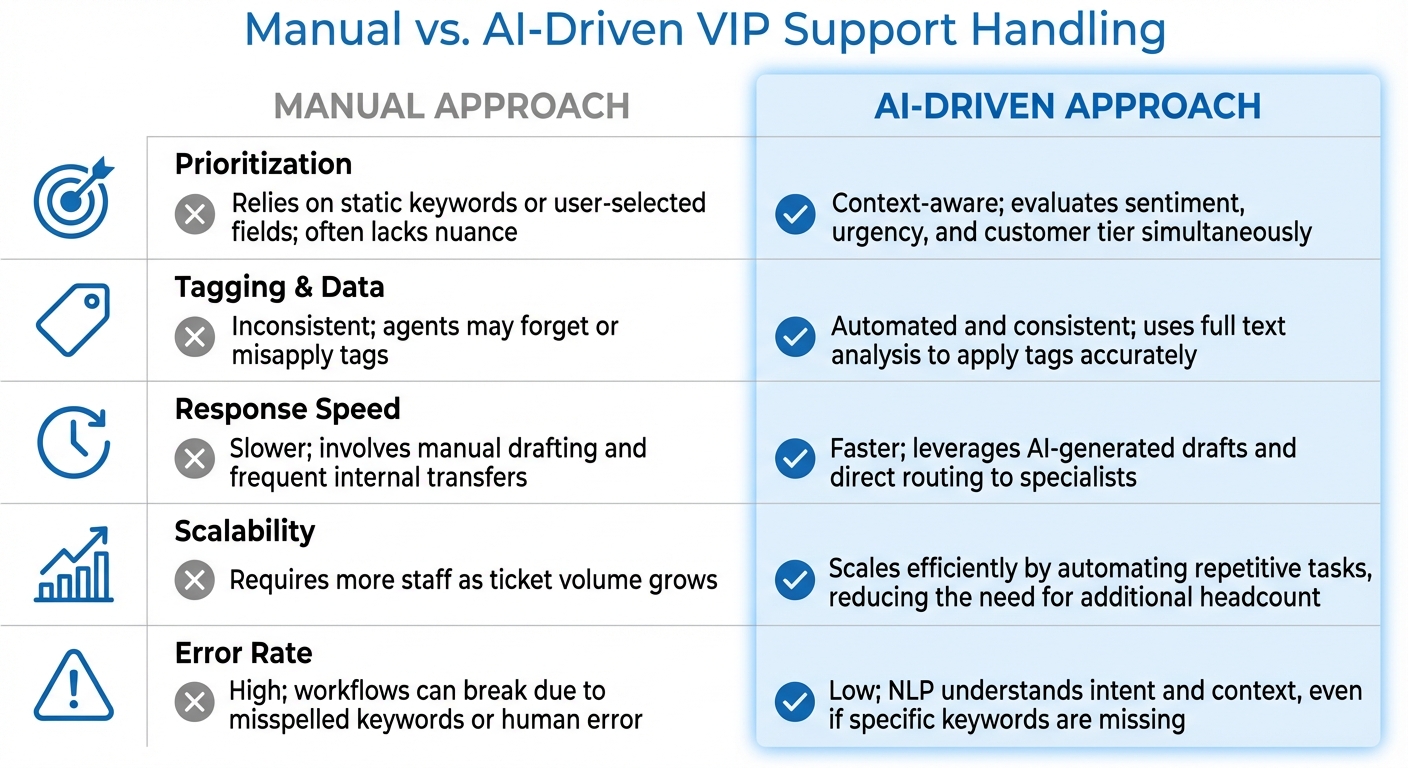
Manual vs AI-Driven VIP Support: Performance Comparison
Delivering top-tier support isn’t a one-and-done deal – it’s an ongoing process of evaluation and fine-tuning. To ensure your white glove service truly delivers value (and doesn’t just add unnecessary complexity), you need to measure the right metrics and use tools like AI dashboards to identify and address inefficiencies early.
Track VIP-Specific Metrics
Building on automating customer support workflows, tracking performance is essential for fine-tuning your VIP support. Focus on metrics that matter most for high-value accounts, like response time, resolution rates, and CSAT (Customer Satisfaction) scores. Keep these metrics separate from general support data to get a clear picture of how well you’re serving your VIPs. For instance, analyzing escalation patterns can help identify where agents need additional training or where processes might be falling short [14].
"Analyzing escalation patterns can highlight areas where frontline agents need more training or where processes need refinement." – Nooshin Alibhai, Founder and CEO of Supportbench [14]
Pay close attention to CSAT scores for escalated tickets. This helps you determine if your escalation process is actually improving customer satisfaction or just shifting problems around [14]. Additionally, tracking sentiment trends can help you move from a reactive approach (fixing problems as they come up) to a proactive one (addressing potential issues before they arise) [13].
Use Dashboards for Continuous Improvement
AI-powered dashboards turn raw data into actionable insights by automatically organizing tickets for accurate trend tracking [5]. This allows you to confidently pinpoint recurring issues, whether they’re technical glitches or process bottlenecks.
Live sentiment dashboards are especially useful for managers, offering real-time insights into customer mood [13].
"This feature [sentiment analysis] transforms support from reactive to proactive. Instead of waiting for complaints to pile up, you can see issues emerging in real time." – Duy Vu, Internal Tool Designer at Retoolers [13]
Set up your dashboard to prioritize VIP tickets by "Next SLA Breach" time, ensuring agents always handle the most urgent requests first [2]. Regularly review the accuracy of AI-driven categorization, prioritization, and routing, and provide feedback to improve the system over time [5]. To stay on top of things, schedule monthly or quarterly reviews with team leads to evaluate escalation metrics and refine your support tiers as needed [14].
These insights not only help improve current operations but also align perfectly with scalable, AI-enhanced support strategies.
Comparison Table: Manual vs. AI-Driven VIP Handling
| Feature | Manual Approach | AI-Driven Approach |
|---|---|---|
| Prioritization | Relies on static keywords or user-selected fields; often lacks nuance [5]. | Context-aware; evaluates sentiment, urgency, and customer tier simultaneously [5]. |
| Tagging & Data | Inconsistent; agents may forget or misapply tags [5]. | Automated and consistent; uses full text analysis to apply tags accurately [5]. |
| Response Speed | Slower; involves manual drafting and frequent internal transfers [13]. | Faster; leverages AI-generated drafts and direct routing to specialists [13]. |
| Scalability | Requires more staff as ticket volume grows [13]. | Scales efficiently by automating repetitive tasks, reducing the need for additional headcount [13]. |
| Error Rate | High; workflows can break due to misspelled keywords or human error [5]. | Low; NLP (Natural Language Processing) understands intent and context, even if specific keywords are missing [5]. |
Conclusion
Scaling VIP support effectively combines personalized care with operational efficiency. By automating tasks like identification, tagging, routing, and prioritization, your team can dedicate more time to nurturing relationships with high-value accounts and resolving complex issues swiftly.
The strategies discussed – such as automated tiering, dynamic SLAs, sentiment analysis, and AI-driven escalation paths – offer a scalable framework that doesn’t require increasing headcount. This AI-driven approach supports every level of your support system, turning what might traditionally be a resource-heavy service into a strategic advantage.
"By automating VIP prioritization, MSPs can deliver a premium client experience without adding more people to the payroll" [4].
To implement these strategies, start by defining clear, measurable VIP criteria based on objective factors like total spend or contract value. Use AI tools to handle repetitive tasks and run simulations with historical ticket data to test your automation setup before launching. Regular reviews will help fine-tune your processes as your business evolves [1].
AI ensures consistent, high-priority service for every VIP account – eliminating variability based on which agent handles the ticket or the time of day the request comes in. This consistency prevents team burnout while maintaining top-tier customer experiences.
Getting VIP support right isn’t just a nice-to-have – it’s a necessity for sustainable growth in today’s B2B environment. Leveraging AI-native support systems gives your business a competitive edge, ensuring your VIP customers always receive the premium service they expect.
FAQs
How many VIP tiers should we have?
To manage VIP accounts effectively, it’s a good idea to set up multiple support tiers. These could include categories like basic, high-value, and mission-critical. This approach allows you to offer tailored service levels while keeping your operations efficient.
How can we prevent VIP support from burning out agents?
To help prevent agent burnout in VIP support, consider integrating AI-driven tools to handle repetitive tasks such as ticket routing, prioritization, and sentiment analysis. These tools can lighten the workload by automating routine processes, freeing up agents to concentrate on more complex and rewarding interactions.
Additionally, implementing tiered support frameworks and dynamic service level agreements (SLAs) can help distribute workloads more effectively. This ensures that high-value accounts receive the attention they need without overwhelming your team. By monitoring customer sentiment, potential issues can be identified early, reducing the likelihood of escalations and fostering a more balanced and efficient support environment. This approach allows agents to deliver personalized service while maintaining their productivity and well-being.
What data should AI use to prioritize VIP tickets?
AI can optimize the management of VIP tickets by diving into customer profiles, past interactions, and emotional cues. By leveraging sentiment analysis and considering the overall business context, it ensures a tailored, high-priority experience for VIPs while keeping operations efficient.
Related Blog Posts
- How do you handle VIP / strategic accounts without creating unfairness?
- How do you handle support for “mission-critical” customers without building a VIP mess?
- How do you create a “VIP support” model that scales (and doesn’t break fairness)?
- What are the signs you’ve outgrown Help Scout (SLAs, tiers, escalations, reporting)?






