



Routing drift happens when static ticket-routing rules fail to keep up with changes in products, teams, or customer needs. This leads to misrouted tickets, wasted time, and unhappy customers. Here’s the fix:
- Create a Routing Baseline: Document current ticket flows, team assignments, and escalation paths. Identify weak points like misrouted tickets or outdated rules.
- Monitor Key Metrics: Track transfer rates, SLA compliance, queue depth, and AI accuracy. Set automated alerts for anomalies.
- Diagnose and Fix Issues: Analyze ticket data to find broken logic. Update rules, test changes, and remove outdated configurations.
- Use AI for Dynamic Routing: Implement AI to adjust routing in real time based on customer context, agent skills, and sentiment.
- Establish Governance: Treat routing like code. Use version control, peer reviews, and regular audits to maintain accuracy as your business evolves.
Why it matters: Misrouted tickets triple churn risk within 90 days, and manual routing wastes 35% of agent time. Fixing routing drift boosts efficiency, cuts response times by 60%, and improves customer satisfaction from 71% to 88%.
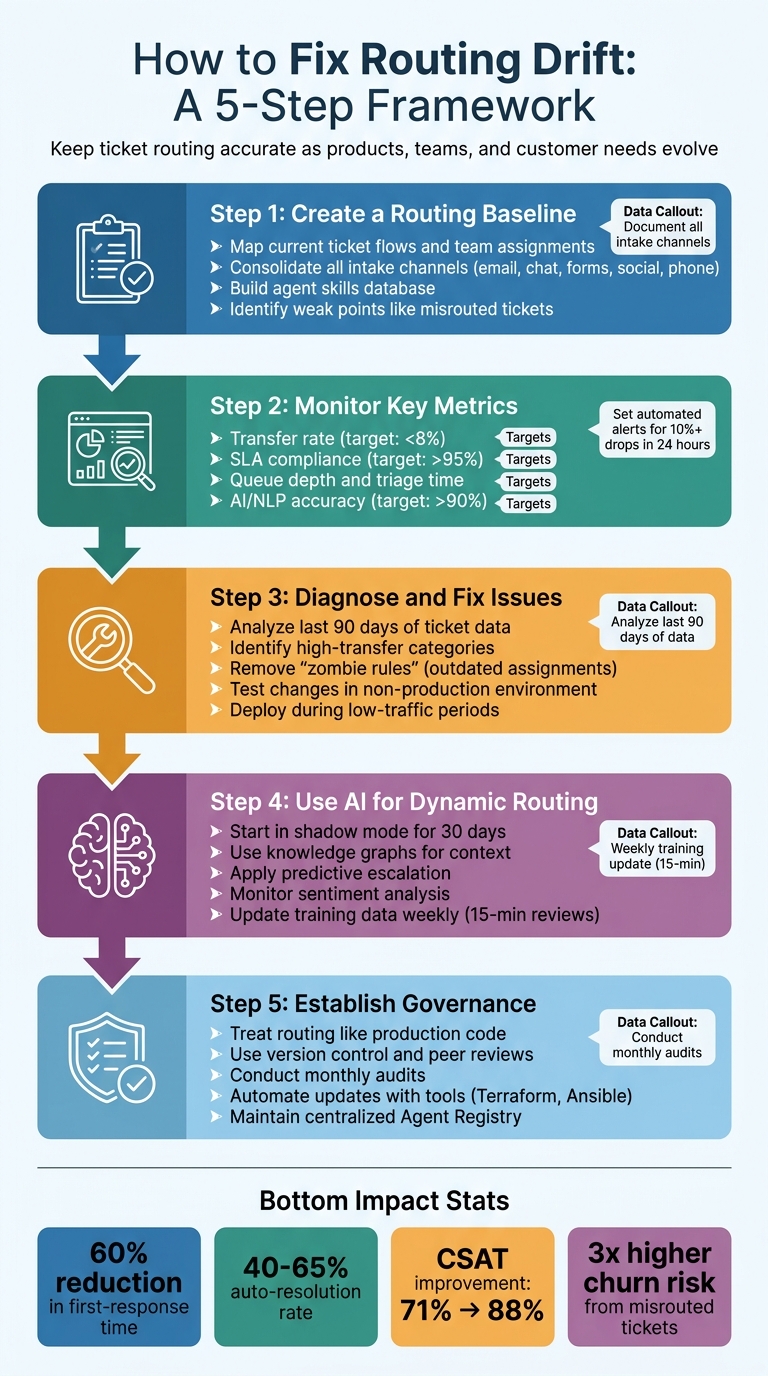
5-Step Framework to Fix Routing Drift in Customer Support
How to Build an AI Powered Ticket Routing System with UiPath | Step by Step Tutorial

sbb-itb-e60d259
Step 1: Create a Routing Baseline Before Making Changes
A routing baseline serves as a documented snapshot of your ticket flows, rules, team assignments, and escalation paths. This foundation makes it easier to diagnose and resolve issues when changes are implemented.
Map Current Routing Rules and Team Assignments
Start by consolidating all your intake channels – email, live chat, web forms, social media, and phone – into a unified view. For example, in early 2026, Thompson Career College streamlined their system by routing website inquiries, emails, and phone calls into a single automated pipeline. This effort brought their response times down from 1–2 business days to less than 60 seconds [3].
Next, create a master configuration table to map out how tickets flow through your system. This table should include:
- Metadata: Details like customer tier, geography, language, and product area.
- Classification Logic: Elements such as keywords, form fields, or AI-detected intent.
- Routing Methods: Whether tickets are routed manually, rule-based, round-robin, skills-based, or load-balanced [5].
Also, outline escalation triggers like SLA breach risks, negative sentiment, or keywords such as "lawsuit" or "cancel" [3][5].
Don’t forget to build an agent skills database. Record details such as language proficiencies, product certifications, and expertise in handling high-tier accounts. This database is essential for effective skills-based routing [5].
With this comprehensive map, you can pinpoint and address weaknesses in your routing system.
Find Weak Points in Your Routing Logic
Take a closer look at misrouted tickets from the past 30 days. Are billing inquiries landing in technical support queues? Are tickets sitting unassigned because they’re routed to inactive teams? These are signs of vulnerable rules that are likely to fail when team structures or products change [3][5].
Check for issues like priority inflation. If too many tickets are marked "urgent", your priority-based routing may not be distinguishing true urgency effectively [5]. Ensure that every automated workflow has an escape route, allowing customers to reach a human agent immediately if automation fails to resolve their issue [3]. Poor data quality, often stemming from undocumented or outdated routing rules, can cost organizations millions annually [3][5].
Building a habit of regular review can prevent these issues. Spend just 15 minutes each week reviewing misrouted tickets to catch problems early as customer language and product features evolve [3]. Remember, this baseline isn’t a one-and-done task – it’s the foundation for creating a flexible and efficient routing system.
Step 2: Monitor for Routing Drift with Data and Alerts
After establishing your routing baseline, the next step is to keep a close watch on how tickets move through your system. Without consistent monitoring, small issues can snowball into bigger problems that hurt customer satisfaction and team efficiency. The key is to spot routing drift early – before it causes disruptions. By tracking specific metrics, you can set up automated alerts to catch and address anomalies as they happen.
Track Metrics That Signal Routing Problems
One of the clearest signs of routing drift is your ticket transfer rate. Frequent transfers often mean there’s a disconnect between routing rules and agent expertise. Top-performing B2B support teams aim for transfer rates below 8% [1].
SLA compliance is another critical metric. Keep it above 95% and use predictive tools to reroute tickets at least 30 minutes before an SLA breach is likely to occur [1][4].
Other metrics to monitor include queue depth and triage time. If tickets are sitting unassigned for too long, it may indicate issues with your automated routing system. Manual triage can add 10–15 minutes per ticket [8], whereas automated routing typically minimizes these delays. Pay attention to the average age of tickets in each queue – if this number is climbing, you might be facing a bottleneck.
"The ‘hidden throttle’ in most support orgs isn’t agent effort – it’s routing. When tickets land in the wrong place, everything downstream slows." – Ameya Deshmukh, Director of Customer Support [6]
For AI-powered systems, track the accuracy of your NLP (Natural Language Processing) classifications. Ideally, your model should maintain at least 90% precision [1]. Over time, as customer language evolves or new product features are introduced, classification accuracy can drift. Reviewing ticket categories and NLP performance every 30 days ensures your routing logic stays aligned with these changes [1][6].
Also, keep an eye on agent workload variance. Teams using agent self-assignment often experience 2.3× higher workload variation compared to those using automated assignment systems [1].
Once you’ve established these metrics, the next step is to automate how you detect and respond to anomalies.
Configure Automated Alerts for Routing Anomalies
Automated alerts can help you catch routing errors before they spiral out of control. Set up notifications for key metrics like misroute rates or SLA compliance. For example, trigger alerts if any metric drops by more than 10% in a 24-hour period [1]. If overall routing accuracy falls below 70% or specific rules dip under 50%, act immediately to investigate and resolve the issue [8].
For AI-driven routing, implement confidence thresholds. Only allow routing actions when AI confidence is above 90%; otherwise, flag the ticket for manual review [7].
You can also create high-risk pattern triggers for urgent situations. For instance, configure real-time alerts for conditions like "VIP customer status + negative sentiment + outage-related keywords." These should trigger immediate escalation or notify on-call staff [6]. Similarly, sensitive categories like security, legal, or account deletion requests should bypass standard automation and alert specialized supervisors directly [7].
Finally, monitor for queue thrash, where tickets are reassigned multiple times between teams. Set alerts to flag any ticket with more than two reassignments [6].
Before fully deploying automated alerts, test them in "shadow mode" for 30 days. This allows you to collect data on agent overrides, fine-tune thresholds, and reduce false positives [6].
Step 3: Diagnose and Fix Routing Drift
When alerts highlight an issue, it’s crucial to dig deep, find the root cause, and address it quickly. Routing drift doesn’t usually scream for attention – it sneaks in as subtle trends like increasing transfer rates, unassigned tickets, or agents repeatedly reassigning certain types of issues. Tackling this requires a systematic approach: diagnose the problem first, then fine-tune your routing rules.
Investigate Broken Routing Logic
Start by analyzing the last 90 days of ticket data to identify categories with high transfer rates [1]. This will help you spot where your routing logic is falling short. Are certain product lines consistently misrouted? Are tickets missing key data fields, causing them to slip through the cracks?
Audit trails can also be a goldmine of information. Many modern support platforms automatically log ticket paths and triggered rules [5]. If you notice tickets frequently hitting a "catch-all" rule instead of specific routing paths, that’s a warning sign. Similarly, a spike in unclassified queries might suggest that your AI intent classification model is struggling to match incoming language to existing categories [9].
Pay attention to tickets flagged with NLP confidence below 70%. Low confidence often points to issues like new product terms, evolving customer language, or gaps in your training data [1]. Identifying these patterns can guide updates to your AI model.
Don’t overlook integration or field data issues. Routing logic can break if it relies on fields that are missing or improperly populated – like account tiers, health scores, or renewal dates stored in your CRM [1]. Make sure all structured data dependencies are intact and integrations are functioning correctly.
"Manual routing wastes an estimated 35% of support agent capacity on administrative work rather than actual customer problem-solving." – Gartner, Customer Service Operations benchmark data [1]
A helpful diagnostic method is parallel operation testing. Run automated routing suggestions alongside manual triage for 48 hours and compare the outcomes [1]. Discrepancies between the two methods will reveal areas where your logic needs adjustment.
Once you’ve pinpointed the root causes, move on to updating your routing rules and testing the changes in a controlled environment.
Update Rules and Test Changes Before Deployment
Begin by revising rules tied to outdated team structures or product lines. Remove "zombie rules" that assign tickets to former employees or discontinued categories [10]. Confirm that all agents in your rotation are active and available – routing often fails because rules reference staff who are unavailable or no longer part of the team.
When organizing your rules, arrange them from most specific to most general [10][5]. For instance, prioritize VIP accounts or specific product lines before broader territory-based rules. If general rules fire first, they’ll catch everything and your specialized routing won’t work as intended.
Always include a fallback rule that assigns unmatched tickets to a manager or overflow queue [10][3]. This ensures no ticket sits unassigned when it doesn’t meet any primary criteria.
After updating your rules, test them thoroughly in a non-production environment. Submit test tickets through all available channels – web forms, email, chat – and track their journey through the system [10]. Double-check that field values aren’t being altered or misformatted during system handoffs (e.g., "California" turning into "CA" and breaking a rule expecting the full state name) [10].
Run edge-case scenarios, such as tickets with incomplete data, unknown industries, or submissions outside business hours [10][3]. To ensure accuracy, test your updated rules against 50 to 100 historical tickets and confirm they produce consistent, correct assignments [3].
A great example comes from KwikUI, a SaaS platform with over 3,000 users. In early 2026, they implemented an AI-powered routing system that mapped their top 20 most-asked questions to a refined knowledge base. By testing their classification logic against historical data before going live, they achieved a 65% auto-resolution rate. This improvement doubled their trial-to-paid conversion rate from 4% to 8% and reduced churn by 40% [3].
Once testing is complete, deploy your changes during low-traffic periods and carefully monitor performance over the first 24 hours. Keep an eye on key metrics like transfer rates, SLA compliance, and queue depth to ensure everything is functioning as expected. If anything seems off, roll back immediately and investigate further.
| Testing Phase | Action | Success Criteria |
|---|---|---|
| Data Flow | Submit test leads through all channels | Lead appears in CRM in <5 minutes with all fields intact |
| Logic Validation | Validate with incomplete data | System handles lead via fallback rule rather than crashing |
| Capacity Check | Confirm rep rotation | No leads assigned to inactive (or "zombie") profiles |
| Historical Backtest | Run new rules against 50-100 past tickets | >90% agreement with expected assignments |
| SLA Verification | Monitor time-to-assignment | Consistent assignment times under 5 minutes |
Step 4: Use AI to Prevent and Adapt to Routing Drift
Once your routing logic is fixed and tested, the next hurdle is keeping it accurate as your organization evolves. Static rules often fail when product lines grow or team structures change. The key is to implement AI-driven systems that can adjust automatically, learning from patterns and adapting assignments without constant manual updates.
Set Up AI-Powered Dynamic Routing
AI-based routing uses a knowledge graph to map relationships between customers, products, and bugs. This setup ensures the system updates its context immediately when new products or features are introduced [12]. Dynamic routing also utilizes interaction text and real-time signals – like agent skills and capacity – to use AI-powered ticket routing to assign tickets with precision [11][6].
Take Bolt, for example. Between February 2024 and January 2025, they adopted an AI platform integrated with a knowledge graph to automate ticket triaging. This combination of intelligent routing and AI-powered root cause analysis helped Bolt cut their average resolution time from 129.8 hours to 62.7 hours [12]. Similarly, in 2026, BILL implemented an AI system with secure knowledge graph integration and automated workflows. The result? Over 70% autonomous resolution and $5 million in operational savings [12].
AI can also spot patterns in ticket issues, linking them to specific product areas or engineering incidents [12]. This capability prevents multiple tickets about the same bug from being scattered across different queues, creating a more streamlined process.
"Traditional routing based on static rules like skills and queues often fails to capture the complexity of today’s expectations, while AI-powered routing can use context to optimize outcomes." – NiCE [11]
When introducing AI routing, start in shadow mode. In this phase, AI provides "suggestions only" for the first 30 days, allowing you to compare its predictions against human decisions. This approach helps you identify edge cases and refine the system before fully automating the process [6].
Apply Predictive Escalation and Sentiment Analysis
AI can also improve ticket prioritization by preventing potential escalations. It evaluates factors like customer value, contract stage, and sentiment to prioritize tickets effectively [12].
Predictive escalation is particularly powerful. By monitoring signals such as declining customer sentiment, repeat contacts, and SLA proximity, AI can trigger escalations before a breach occurs [4][3]. For instance, if a customer shows signs of frustration, the system can immediately route their issue to a senior agent, bypassing standard time-based escalation rules.
For predictive escalation to work well, it should draw on a mix of signals: severity (e.g., outages or security risks), complexity (e.g., multi-step problem-solving), account health (e.g., high-value or churn-risk accounts), and SLA breach proximity [13][4]. If AI confidence in a routing decision falls below a set threshold, it can either ask the customer for clarification or send the ticket to a triage lead to avoid misrouting [11].
In early 2026, a B2B SaaS company with 45 agents and 3,000 weekly tickets implemented an AI orchestration layer. By automating L0 self-service for 35% of their ticket volume and using predictive escalation based on sentiment and account value, they reduced their first-response time from 4.2 hours to 1.1 hours. Their customer satisfaction score (CSAT) also jumped from 71% to 88% in just 90 days [4].
To keep routing models accurate, treat them as living systems. Regularly update the training set with insights from misrouted tickets or human-corrected escalations to prevent performance issues [14][15]. A quick, 15-minute weekly audit of misrouted tickets can help refine AI classification prompts and adapt to changes in customer language [3].
| Escalation Trigger | Description | AI Action |
|---|---|---|
| Sentiment | Detects frustration, sarcasm, or anxiety | Lowers escalation threshold; prioritizes for senior agents |
| Complexity | Identifies multi-step troubleshooting needs | Routes directly to Tier 2 or specialist engineering queues |
| Account Health | Recognizes high-value or churn-risk accounts | Bumps priority to the top of the queue regardless of arrival time |
| Confidence Score | AI confidence drops below a set threshold | Triggers immediate human-in-the-loop intervention |
Step 5: Build a Governance Framework for Long-Term Routing Health
To keep your routing system running smoothly over the long haul, you need a structured governance framework. Think of routing logic as production code – it should have version control, approval processes, and automated monitoring. This approach helps ensure that the fixes you’ve implemented so far stick, even as your organization grows and changes. Without clear ownership and change management, routing configurations can fall apart as teams shift, new products launch, and roles evolve.
Create a Change Control Process for Routing Updates
Having a clear, documented change control process for routing updates is essential. Log every decision and approval to maintain system integrity. For example, record why a rule was created, when it was implemented, and who signed off on it. This kind of documentation minimizes confusion, especially during staff changes.
Treat routing updates like software deployments. Use peer reviews to ensure changes meet quality and security standards before they go live. For high-stakes updates – like those affecting legal workflows or fraud detection – require explicit approval from a designated Data Steward. To catch issues early, schedule a formal audit 30 days before any configuration snapshot expires [20].
"IaC and PaC are the reference points for what the infrastructure should be." – Ori Yemini, CTO & Co-Founder, ControlMonkey [16]
Before deploying any new routing logic, run it alongside your current system for 48 hours. This allows you to compare automated suggestions with human decisions, ensuring the new logic works as intended [1].
Conduct Regular Routing Audits
Regular audits help keep your routing configurations aligned with your organization’s current structure. Mismanagement of data – often due to unclear ownership – can cost businesses an average of $12.9 million annually [19]. Audits can catch these misalignments before they escalate.
Set up a Routing Health Dashboard to monitor key metrics like SLA breach rates, workload imbalances, and how quickly tickets are assigned to agents. Keep an eye on routing accuracy as a KPI, focusing on how often tickets are assigned correctly on the first try [2]. Automate metadata stamping (e.g., Routing Team, Assignment Date, Workflow ID) to maintain reporting accuracy even as roles and responsibilities shift [22].
Make monthly adjustments to improve NLP classification accuracy and refine ticket taxonomy. This might include adding new categories as your offerings expand or tweaking agent skill matrices as teams change [1]. Watch for "context drift" – when a model designed for low-risk tasks starts being used for higher-stakes decisions [21]. Set up alerts for such shifts to prevent errors.
"How often are we updating our policies – not because the model changed, but because the context did?" – Amit Batra, Transformation Leader [21]
Even a quick 15-minute weekly review of misrouted tickets can help fine-tune AI classification and adapt to evolving customer language [3].
Automate Routing Updates with Governance Tools
While audits highlight areas for improvement, automation ensures consistency and compliance as your system evolves. Use tools like Terraform or Ansible to manage routing configurations declaratively. These tools can detect unauthorized changes and either roll back to the approved state or trigger alerts for sensitive updates [16].
Maintain a centralized Agent Registry to track all routing rules and AI agents. This inventory should include details like ownership, purpose, and access scope to prevent unauthorized deployments [17]. Implement automated approval gates for each stage of the process – for example, requiring Validation Approval before testing and Production Approval before deployment [20]. Assign unique identities to routing agents and enforce strict permissions so they access only the data they need [17][18].
Research shows that organizations with governance frameworks experience 66% fewer data security issues and 52% fewer compliance breaches [19]. By automating updates and syncing them with team and product changes, you minimize manual errors and make your system more scalable while staying in control.
| Area | Fragile Pattern (High Drift Risk) | Scalable Pattern (Governance-Led) |
|---|---|---|
| User Logic | Embedding specific names in workflows | Using functional "Teams" in settings [22] |
| Triggers | Triggering on any event (e.g., "Any Form") | Triggering on Lifecycle Stage + Unknown Owner [22] |
| Reporting | Relying only on the standard "Owner" field | Stamping custom fields at assignment [22] |
| Maintenance | Manually editing workflows for team changes | Updating team membership in a central directory [22] |
Conclusion
Routing drift is an ongoing challenge. As products, teams, and customer language and intent evolve, routing precision can gradually decline. To combat this, it’s crucial to establish a clear starting point, monitor performance regularly, diagnose problems methodically, and automate processes whenever possible.
The stakes are high – customers who encounter misrouted tickets are three times more likely to churn within 90 days [1]. For a support team of 50 agents, inefficiencies tied to manual routing – like triage delays, customer churn, and SLA penalties – can rack up costs of up to $818,750 annually, directly affecting both revenue and customer retention [1].
Advanced routing tools can make a significant difference. They’ve been shown to cut first-response times by 60% [1] and automatically resolve 40% to 65% of tickets [3]. Simple practices like weekly 15-minute reviews and automated drift alerts can help keep your routing system aligned with changing demands [3]. Without this kind of proactive management, even the most sophisticated AI systems can falter as customer needs shift.
"Routing drift is not a problem to be solved but a process to be managed." – raia [9]
To build a resilient system, start by documenting every routing rule, assigning clear ownership, and automating updates. Taking these steps ensures your support operation stays flexible and responsive. Organizations that view routing as a strategic priority can scale their support operations efficiently – without adding unnecessary headcount or risking customer satisfaction.
FAQs
How do I know if routing drift is happening in my support org?
Detecting routing drift involves keeping an eye out for inefficiencies such as more frequent escalations, excessive handoffs, slower response times, or tickets being sent to the wrong teams. These patterns often point to problems like outdated routing rules or misaligned support tier structures. To address this, it’s important to regularly evaluate workflows and gather feedback to ensure tickets are routed correctly and efficiently. If inefficiencies persist even with automation in place, it’s a strong indicator that routing drift might be at play.
What’s the fastest way to build a routing baseline without disrupting support?
The fastest way to set up a routing baseline without interrupting your support processes is by using automated workflows. These workflows should connect your helpdesk, CRM, and product data, allowing you to route tickets to the right agent efficiently. With minimal setup, this can often be implemented in under a week. Plus, it highlights any inefficiencies in your current routing system without disrupting your ongoing support efforts.
How can I use AI routing safely without increasing misroutes or risk?
To ensure safe and effective use of AI routing, start by implementing intent-based classification systems. These systems should be trained on a wide range of historical data to accurately determine ticket intent, urgency, and sentiment. This helps the AI make more informed decisions.
Consider using no-code or low-code AI tools. These allow you to fine-tune workflows gradually without needing advanced technical expertise. It’s a practical way to make adjustments as your needs evolve.
Make it a habit to regularly review outcomes. This helps you catch any errors or inefficiencies early. Additionally, set up fallback procedures for cases where the AI is uncertain. This ensures no ticket gets stuck in limbo. Finally, include escalation triggers to handle high-priority or complex issues promptly.
By following these steps, you can reduce misrouted tickets, minimize risks, and improve SLA compliance – all while taking advantage of AI’s ability to optimize workflows efficiently.






