


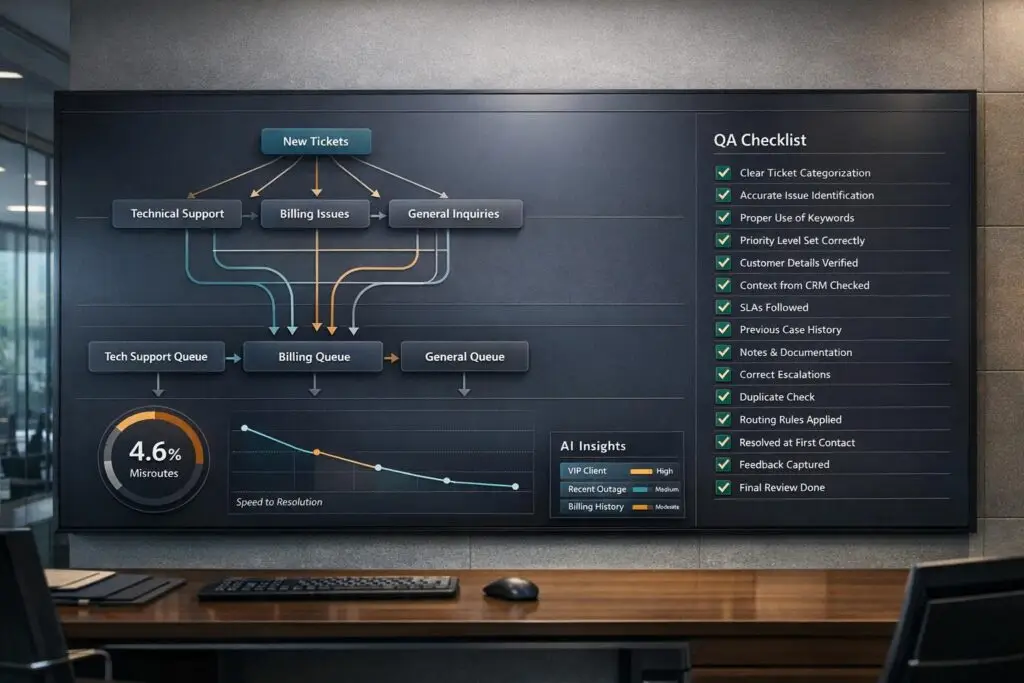
Misrouted tickets waste time, money, and trust. On average, 23% of SaaS support tickets are misrouted, adding 4.2 hours to resolution times and costing businesses managing 3,000 tickets monthly over $260,000 annually. Misrouting frustrates customers, increases churn, and slows operations.
The solution? A Routing QA Checklist. By addressing common issues like inconsistent categorization, manual triage, lack of customer context, and poor channel integration, businesses can reduce misrouting rates from 23% to under 4%.
Key fixes include:
- Simplify categories to 8–15 with clear subcategories.
- Use AI-powered ticket routing for assisted decisions and context-enriched triage.
- Integrate CRM data to prioritize high-value customers.
- Implement a unified routing engine for all channels.
Companies adopting this process see resolution times improve by 80% while cutting SLA violations by 67%. Adding AI enhances accuracy further, ensuring tickets land in the right hands on the first try.
Metrics to track success:
- Misroute Rate: Target <5%.
- Time in Triage: Keep under 15 minutes.
- SLA Breach Rate: Aim for <2%.
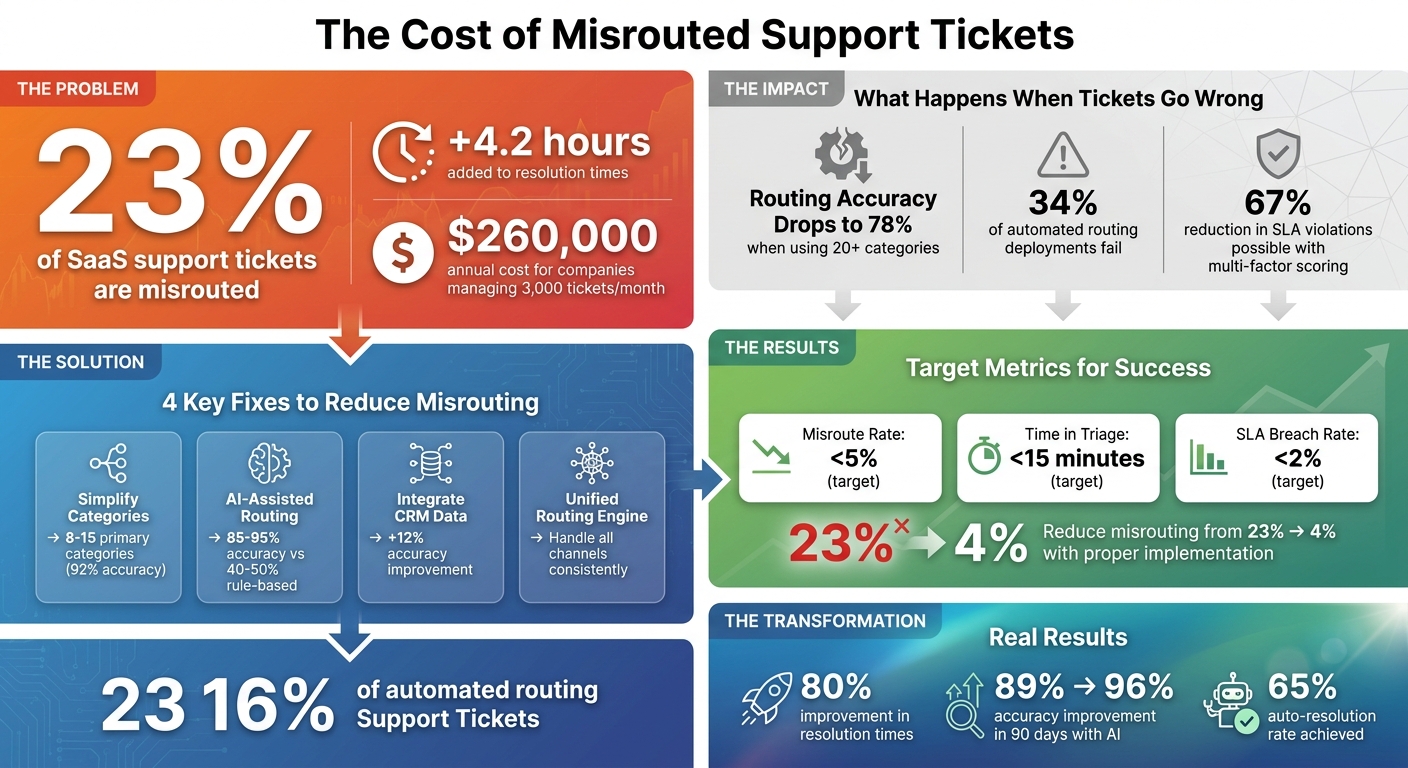
The Cost of Misrouted Support Tickets: Key Statistics and Solutions
AI in Ticket Management Explained | Automate Support Tickets with AI
sbb-itb-e60d259
Why Tickets Get Misrouted
Figuring out why tickets end up in the wrong hands is the first step to solving the problem. Most misrouted tickets come down to four common, avoidable issues that cause ongoing inefficiencies and drain resources from B2B support teams.
Inconsistent Categorization Rules
Too many overlapping categories can make it harder to route tickets correctly. Research shows that when support teams use more than 20 categories, routing accuracy drops to around 78%. In contrast, teams with 8–15 well-defined categories achieve about 92% accuracy [1]. Overlapping or vague categories force agents to make inconsistent judgment calls, especially with borderline cases.
This issue gets worse with rigid keyword rules that fail to account for different ways people phrase the same issue. For example, a ticket mentioning "refund" might route to the billing team, but phrases like "I want my money back" or typos like "refudn" could easily be missed [6].
According to Gartner, by 2025, 28% of poorly performing automated routing systems will fail due to overly complicated taxonomies [1]. A practical solution? Keep primary categories between 8–15, add 3–5 subcategories under each, and use custom fields or tags for specific details like product versions or operating systems [5]. Simplifying categories is a key part of the routing QA checklist.
Overreliance on Manual Triage
Relying too much on manual review for ticket assignment leads to decision fatigue and errors, especially during busy times. Manual triage is slow, labor-intensive, and often results in tickets being routed to the wrong team, creating delays in resolution.
This manual approach can also lead to a frustrating cycle of re-routing. A ticket might sit in the wrong queue until an agent realizes they can’t handle it, only for it to be transferred again – wasting valuable time. A better approach is to use assisted routing for medium-confidence tickets (those with 60–85% certainty). In this system, AI suggests a category, and a human confirms it, speeding up the review process and reducing errors [6].
Ignoring Customer Context
Routing tickets without considering customer tier, account history, or overall account health often results in misrouted tickets. For example, high-value customers might end up with lower-priority tickets, delaying the service they expect.
Integrating CRM and billing data into routing decisions – an approach called context-enriched routing – can improve accuracy by 12% compared to content-only classifications [1]. This is critical because repeat customers generate 300% more revenue than first-time buyers [2]. For high-value accounts, the system should automatically escalate tickets based on factors like customer tier, contract terms, and customer service SLA requirements.
Multi-factor priority scoring can take this further. By assigning weights to factors like customer tier (40%), issue severity (30%), and SLA urgency (20%), teams can create a composite priority score. This method has been shown to cut SLA violations by 67% compared to single-factor systems [1]. Incorporating these data points is a must for the QA checklist to ensure proper prioritization.
Poor Integration Across Channels
Handling live channels like chat and SMS the same as asynchronous ones like email can lead to missed SLAs and poor prioritization. For instance, customers on live chat usually expect a response within minutes, while email users are more patient.
Disconnected channels create silos. If a customer emails about an issue and then follows up via chat, the second agent may not have any context from the first interaction. This forces the customer to repeat themselves and increases the chance of misrouting.
A unified routing engine that applies channel-specific priority rules can solve this. By automatically prioritizing real-time channels like SMS, live chat, and social messaging over email, support teams can handle urgent inquiries faster [2]. These integration challenges make it clear why a thorough QA checklist is critical for effective ticket routing.
The Routing QA Checklist
A QA checklist is a powerful tool for auditing ticket routing and spotting patterns in errors. Its main purpose? To refine your rules and boost accuracy over time.
Checklist Overview and Format
This checklist focuses on 15 core items grouped into four categories: ticket metadata accuracy, categorization and priority, routing and escalation, and workflow compliance. Each item is evaluated using a straightforward pass/fail scoring system – either the ticket was routed correctly, or it wasn’t. This binary approach makes it easy to calculate a weekly Routing Quality Score.
For instance, if you review 50 tickets and 47 meet all criteria, your routing accuracy is 94%. The three failures highlight areas where rule adjustments are needed. This method is far more actionable than vague assessments and gives you a clear baseline to track progress.
Here’s a breakdown of the 15 key items, organized by category.
Key Items in the Checklist
The checklist targets the most frequent routing failures:
Metadata and Context (Items 1–4):
- Ticket metadata accuracy: Ensure account names, contact details, asset numbers, and locations are accurate [7].
- Customer context integration: Confirm routing logic incorporates CRM data, such as customer tier or contract value [1].
- SLA alignment: Verify the applied Service Level Agreement matches the customer’s contract [7] [3].
- Duplicate and KB check: Check if agents searched for duplicate tickets or linked relevant knowledge base articles before routing [3].
Categorization and Priority (Items 5–8):
- Categorization match: Ensure issues are categorized correctly (e.g., billing, technical bug) and descriptions provide enough troubleshooting context [7] [3] [1].
- Priority and impact assessment: Confirm urgency and business impact (e.g., downtime risk, affected users) were assessed properly [3] [1].
- Multi-factor priority scoring: Verify routing considered customer tier (40%), issue severity (30%), SLA urgency (20%), and account health (10%) [1].
Routing and Escalation (Items 9–12):
- Routing accuracy: Check if the ticket was sent to the correct team or specialist on the first attempt [3] [1].
- Escalation compliance: Ensure escalation flags were used correctly and followed the proper escalation path (e.g., Tier 1 to Tier 2) [3] [1].
- Skill match: Identify tickets assigned via round-robin instead of specific skill mapping [1].
- Capacity-based routing: Detect instances where agents were overloaded due to poor workload balancing [1].
Workflow Compliance (Items 13–15):
- Workflow validators: Confirm all required triage steps were completed before tickets were marked "In Progress" or "Resolved" [3] [8].
- Auto-response escape hatch: Check that automated responses included clear instructions for customers to contact a human if needed [4].
These items are designed to address recurring issues in ticket routing. Regular audits can significantly reduce misrouting.
How to Apply the Checklist
Incorporating this checklist into your routine audits is vital for improving support operations while keeping costs in check. Here’s how to make it work:
- Export 90 days of ticket data: Include timestamps, agent interactions, categories, and resolution notes to account for trends and edge cases [1].
- Sample 50–100 tickets weekly: Focus on tickets with transfers, escalations, or SLA violations, as they’re more likely to expose routing errors.
- Audit each ticket against all 15 items: Use the pass/fail system. Any failure counts as a routing error, helping you pinpoint the rules that need adjustment.
- Incorporate agent feedback: Add a “misrouted” button for agents to flag incorrect assignments. According to US Tech Automations, “Agent feedback loops are the difference between 89% accuracy (good) and 96% accuracy (excellent)” [1].
- Refine rules weekly: Dedicate 15 minutes each week to review misrouted tickets and adjust classification rules immediately [4].
- Test new rules in parallel: Run routing in "recommendation mode" for 10–14 days to compare AI suggestions with human dispatcher decisions. This approach catches 90% of routing errors before they impact customers [1].
Finally, enforce a rule that tickets can’t progress from "Triage" until all checklist items are complete [3] [8]. This ensures consistency and prevents incomplete routing. Pair these audits with AI-powered ticket routing and prioritization for dynamic rule adjustments, keeping your process sharp and efficient.
Using AI to Improve Ticket Routing
AI, when paired with a well-structured routing QA checklist, transforms ticket management by streamlining processes and minimizing manual work. Traditional, rule-based routing systems often fall short. In contrast, AI-powered platforms can analyze ticket details and customer histories to assign tickets accurately on the first try [11]. By moving from rigid "if-then" rules to adaptive learning models, these systems improve over time, handling errors like typos or unfamiliar phrasing without breaking down [11].
AI-Driven Triage and Categorization
AI-driven triage takes ticket categorization to the next level by using detailed customer data [10]. Unlike basic keyword matching, AI understands entities and relationships, linking tickets to specific customers, products, features, or even known bugs [10]. This approach enriches tickets automatically with CRM data, like annual recurring revenue (ARR), contract details, or account tier, ensuring high-value customers are sent to the right teams quickly [9][11]. It even evaluates customer sentiment, flagging frustration or urgency to prioritize cases for at-risk accounts [11][12].
For instance, in March 2026, Cynet introduced AI-driven smart routing, cutting Tier 1 ticket volume by half and boosting customer satisfaction (CSAT) scores by 14 points, from 79 to 93 [9]. Similarly, Bolt reduced its average resolution time from 129.8 hours to just 62.7 hours in January 2025 by using intelligent routing with root cause analysis [10]. Mature AI systems achieve routing accuracy rates of 85–95%, far outpacing the 40–50% accuracy of rules-based systems [11]. AI also eliminates vague categories like "Other" or "General", achieving over 90% tagging consistency [11].
To get started, focus on automating 3–5 high-volume intents, such as billing questions or password resets, and aim for at least 90% accuracy before scaling up [11]. Review your tag taxonomy first – AI performance depends heavily on the clarity of your categories [11]. Always set up fallback mechanisms so the AI can defer to human agents when confidence levels drop, avoiding incorrect routing [11].
"The shift from deterministic rules to learned judgment means that while a rules-based system is limited to explicit instructions, an AI model evolves with every resolved ticket." – IrisAgent Team [11]
Automated QA Scoring for Routing
AI doesn’t just improve categorization – it also automates quality assurance for ticket routing [11]. By auditing tickets in real time against your QA checklist, AI flags routing errors immediately [11]. Every time an agent manually re-routes a ticket, the system learns from the correction, improving future accuracy [11].
Before fully deploying automated QA scoring, run the AI in "shadow mode." This lets you compare its evaluations to human decisions and establish a baseline [13]. Set confidence thresholds to ensure the AI defers to human judgment for complex or multi-issue tickets [11].
Dynamic SLA Adjustments
AI goes beyond routing by dynamically adjusting SLAs (service-level agreements) based on case specifics. By analyzing ticket content, historical data, and customer tier, AI assigns urgency scores, ensuring high-priority cases are addressed first [13]. It also monitors queues for potential SLA breaches, triggering automatic reprioritization or alerting supervisors before deadlines are missed [13].
Advanced AI can handle multi-label classification, identifying tickets with multiple issues – like a billing error coupled with a technical bug – and adjusting SLAs based on the most critical problem [13].
"SLAs don’t get saved by labels; they get saved by faster movement to resolution." – Ameya Deshmukh, EverWorker [13]
To streamline this process, create a routing action map. For example, specific AI outputs like "Outage cluster" or "High Urgency" can trigger workflows such as auto-responses or specialized queue assignments. This ensures high-risk tickets are addressed promptly, preventing escalation to executive-level concerns [13].
Tracking and Maintaining Improvements
Keeping a close eye on your QA checklist and refining it regularly is crucial for reducing misrouted tickets over time. By monitoring progress and fine-tuning your routing system, you can ensure that improvements stick.
Key Metrics to Measure Success
To gauge the success of your routing system, focus on these key metrics:
- Misroute Rate: Tracks the percentage of tickets that need reassignment due to incorrect initial routing.
- Time in Triage: Measures how long tickets wait before being assigned.
- SLA Breach Rate: Monitors the percentage of tickets that miss response or resolution deadlines.
- Reassignment Count: Looks at the average number of handoffs per ticket.
- CSAT (Routing-Specific): Measures customer satisfaction with tickets routed through automation.
For example, in April 2026, KwikUI – a SaaS platform with over 3,000 users – implemented an AI-powered routing system. By conducting weekly reviews of misrouted tickets, the team led by founder Silviya Velani achieved a 65% auto-resolution rate, reduced churn by 40%, and doubled their trial-to-paid conversion rate from 4% to 8% within eight weeks [4]. Similarly, Thompson Career College centralized inquiries from multiple channels into an automated pipeline, reducing their average response time from 1–2 business days to under 60 seconds [4].
| Metric | Definition | Target Benchmark |
|---|---|---|
| Misroute Rate | % of tickets reassigned due to incorrect initial routing | < 5% |
| Time in Triage | Average time a ticket spends waiting for assignment | < 15 minutes |
| SLA Breach Rate | % of tickets exceeding response or resolution deadlines | < 2% |
| Reassignment Count | Average number of handoffs per ticket | < 1.2 |
| CSAT (Routing-Specific) | Customer satisfaction score for AI-routed tickets | > 4.5 / 5 |
These benchmarks provide a clear framework for tracking and enhancing your ticket routing process.
Continuous QA and Feedback Loops
As customer needs evolve and products change, your routing system will need regular updates to stay effective. Weekly refinement cycles are critical for maintaining accuracy. By reviewing misrouted tickets and collecting agent feedback, you can adjust classification rules and address new ticket types [1].
With consistent updates, routing accuracy can jump from 89% at launch to 96% within just 90 days [1]. Conduct quarterly audits of your ticket taxonomy to ensure it reflects current product features and customer language [13][14].
"Agent feedback loops are the difference between 89% accuracy (good) and 96% accuracy (excellent)."
– US Tech Automations [1]
Using AI Predictive Insights
Once you’ve built a strong foundation with metrics and QA, AI predictive insights can take your routing system to the next level. These tools go beyond routing by identifying potential issues before they escalate. For instance, AI can predict CSAT and FCR outcomes at the moment of routing, allowing managers to step in when tickets are likely to result in low satisfaction [13]. Real-time sentiment analysis can also flag tickets at risk of frustration or escalation, which is especially useful for retaining customers [13].
Integrating CRM data such as customer tier, billing status, and product usage can improve classification accuracy by 12% [1]. Additionally, AI systems use low-confidence scores – typically below 0.7 – to trigger manual triage. These cases not only ensure accuracy but also provide valuable training data to improve future performance. Setting a confidence threshold for manual review ensures that tickets with scores below 0.7 are routed appropriately [1].
"The ‘hidden throttle’ in most support orgs isn’t agent effort – it’s routing. When tickets land in the wrong place, everything downstream slows."
– Ameya Deshmukh, EverWorker [13]
Conclusion
Misrouted tickets create bottlenecks that slow down resolutions and waste resources. The costs are steep – over $260,000 annually for a company managing 3,000 tickets per month – driven by wasted labor, SLA penalties, and customer churn [1].
A streamlined QA checklist can address these routing issues and significantly improve resolution times. By focusing on critical steps like baseline audits, agent feedback loops, and parallel testing, companies can close the gaps that cause 34% of automated routing deployments to fall short [1]. Following all four phases of deployment – Audit, Configuration, Deployment, and Optimization – can reduce misrouting rates from 23% to under 4%, while speeding up resolution times by 75-85% [1]. Adding AI into the mix enhances routing precision even further, cutting down manual errors and improving efficiency.
AI-powered routing systems tackle challenges that traditional methods struggle with, such as varied customer language, multi-topic requests, and VIP exceptions. These systems process tickets in just 100 to 200 milliseconds, delivering 92% accuracy [6]. They also improve over time, learning from agent-flagged misrouted tickets to boost accuracy from 89% at launch to 96% within 90 days [1].
To get started, audit your current routing patterns, simplify categories down to 8-15 core types, and deploy AI in shadow mode. Enable agents to flag misrouted tickets with a one-click button and commit to weekly refinement cycles during the first 90 days. By taking these steps, support leaders can unlock immediate efficiency gains and build an AI-driven routing system that turns their support operation into a competitive edge.
FAQs
How do I calculate our misroute rate?
To figure out your misroute rate, take the number of tickets that ended up with the wrong agent or department, divide it by the total number of tickets received, and then multiply the result by 100%. For instance, if 600 out of 3,000 tickets were misrouted, the calculation would be: (600 ÷ 3,000) × 100% = 20%. Keeping an eye on this metric helps you evaluate how accurately tickets are being routed and track progress over time.
What confidence score should trigger manual routing?
A confidence score of 80% or higher is generally recommended for triggering manual routing. This helps ensure tickets are assigned accurately while reducing errors during the routing process. You can also fine-tune the threshold to align with your team’s specific requirements for even better results.
How do I simplify our ticket categories safely?
To make ticket categories easier to manage, create a standardized system with clear definitions for each type of inquiry. Implement auto-suggest tools that recommend labels, but give agents the flexibility to adjust them when necessary. Regularly analyze misrouted tickets to fine-tune your classification system, ensuring it stays accurate and easy to understand. This approach minimizes confusion, enhances routing precision, and simplifies the categorization process.
Related Blog Posts
- How do you rebuild SLAs and queues when moving off JSM?
- Omnichannel Routing Logic: Balancing Chat, Email, and Portal Loads
- Reducing “Ticket Ping-Pong”: Strategies for Faster Resolution
- How to support “end-user + admin” ticketing in the same portal
Evaluating help desks for a B2B team?
Supportbench is all-inclusive from $32 per agent per month, with migration and onboarding included. See pricing or book a 20-minute demo.






