



Slow and error-prone client intake processes cost businesses time and money. On average, manual intake takes 2–4 hours per client, with a 12% error rate, leading to inefficiencies and frustration for both teams and clients. These issues cost businesses an estimated $647,000 annually, making intake a critical area for improvement.
To fix this, a well-structured workflow is essential. Here’s how to create one:
- Map Request Types: Categorize tasks (e.g., client-facing, internal, compliance) to streamline handling.
- Set Prioritization Rules: Use scoring systems to filter and prioritize high-value tasks.
- Create Efficient Intake Forms: Collect actionable data while keeping forms user-friendly.
- Automate Processes: Leverage AI to triage requests, reduce delays, and minimize manual effort.
- Integrate Tools: Connect intake forms with CRMs and project management systems for seamless task routing.
- Monitor Metrics: Track speed, accuracy, and workload to identify bottlenecks and improve continuously.
This approach reduces intake times by up to 83%, cuts errors, and ensures requests are routed efficiently, allowing teams to focus on meaningful work.
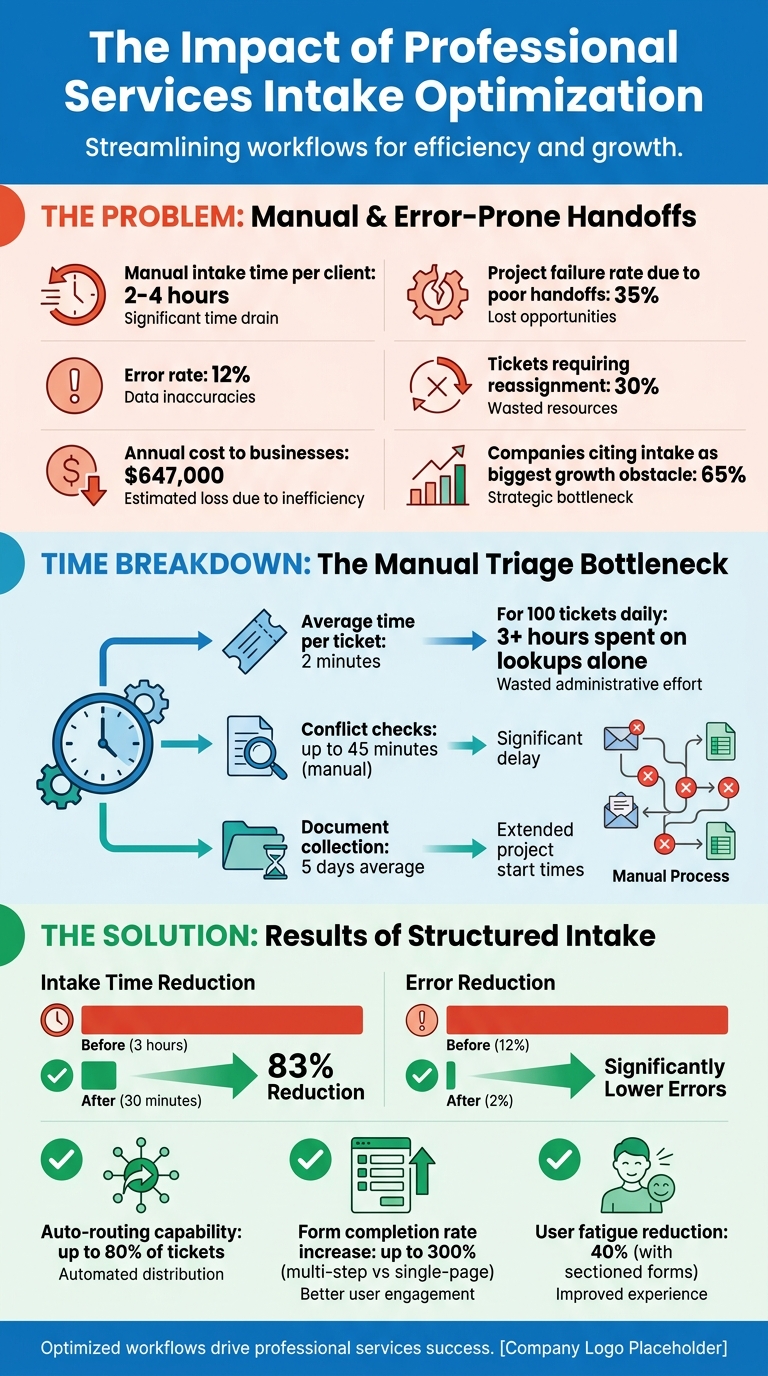
Professional Services Intake Workflow: Key Statistics and Impact Metrics
How to Create a Project Intake Process That Works Best for You
Define Your Intake Workflow Scope and Requirements
Laying out a clear intake scope is a must when incorporating AI-driven triage into your workflow. This step ensures better resource allocation and smoother operations. Before diving into the design of your intake system, it’s crucial to identify the types of requests your team handles. Most professional services teams juggle a combination of client-facing tasks, internal projects, and compliance-heavy duties – each requiring varying levels of attention. Mapping these categories is key to covering all bases.
Identify Request Types
Professional services requests generally fall into three main categories:
- Client-facing work: Includes tasks like handling new inquiries, managing project requests, onboarding processes, and resolving billing disputes.
- Internal operations: Covers IT support tickets, department-specific workflows, and other internal needs.
- Product evolution: Involves feature requests, bug reports, and change requests [3][5].
For firms working in regulated industries, compliance tasks such as KYC (Know Your Customer) and AML (Anti-Money Laundering) screenings are also part of the mix [1].
To streamline this process, categorize requests by their intent (e.g., billing issues, technical challenges, or security incidents) and routing factors like product line, customer tier, or geographic region. Adding a risk-based scoring system for high-priority cases ensures that VIP clients receive swift attention, while routine requests are funneled through standard workflows [1][3].
Set Intake Thresholds
Once you’ve categorized requests, the next step is to set clear criteria for filtering out basic support tasks from higher-value projects. Financial thresholds are particularly effective – establish a minimum budget or expected ROI that triggers the formal intake process [7][8].
You’ll also want to factor in complexity – consider timelines, resource needs, and whether the work involves custom solutions or straightforward fixes [7][8]. For professional services firms, compliance and risk factors are non-negotiable. Requests requiring regulatory checks or conflict screenings should follow a formal workflow [1][6].
Lastly, assess strategic alignment. Does the request match your ideal client profile, or is it a low-priority inquiry better filtered out early? Setting these thresholds ensures your team focuses on meaningful projects and avoids rushed decisions [6][7][8].
Identify Current Bottlenecks
To improve efficiency, map out all request channels to uncover redundancies and delays [3]. Often, a small number of request types – around 20% – account for the majority of your workload, roughly 80% [2].
For professional services teams, delays often crop up in specialized areas like conflict checks (which can take up to 45 minutes manually), document collection (which averages about 5 days), and compliance screenings [1]. To address this, create a single intake schema that standardizes key details such as requester information, company, product, category, and priority. This prevents critical information from being scattered across platforms and allows automation to cut intake times significantly – from 3 hours to just 30 minutes [1][2][3].
With well-defined categories, thresholds, and bottlenecks identified, you’re ready to design an intake form that captures all the essential information in a streamlined way.
Build an Effective Intake Form
After defining your workflow scope, the next step is creating an intake form that gathers essential information without overwhelming users. A poorly designed form can lead to inefficiencies and low completion rates. In fact, 65% of companies cite subpar intake processes as their biggest obstacle to growth [5]. The key is striking the right balance – collecting actionable data while keeping the process user-friendly.
Required Fields for Data Collection
An effective intake form should capture enough details to start work without follow-ups. At a minimum, include contact information (name, company, email, phone) and basic project details like objectives, deliverables, deadlines, and budget. These fields allow you to qualify leads right away [9].
To further refine your understanding of the project, ask for specifics like primary goals, deliverables, and the reasoning behind the request. You can also include fields for current challenges, previous solutions, and competitors to better tailor your approach. For creative or technical projects, allow file uploads for assets like logos, brand guidelines, or technical specs. Adding e-signature fields and checkboxes for agreements ensures compliance and protects your business.
| Field Category | Essential Fields | Purpose |
|---|---|---|
| Identity | Name, Email, Company, Phone | Identification and communication |
| Qualification | Project Type, Budget Range, Timeline | Assessing fit and resource availability |
| Strategy | Goals, Challenges, Competitors | Customizing services to client needs |
| Execution | File Uploads, Technical Specs | Providing necessary project materials |
| Legal | E-signature, Policy Agreement | Ensuring compliance and business protection |
Form Design Tips
The design of your form plays a big role in whether users complete it. Multi-step forms, for example, can boost completion rates by up to 300% compared to single-page forms [11]. Breaking your form into sections – like Basic Info, Project Details, and Logistics – can reduce user fatigue and boost completion rates by 40% [10].
Using conditional logic is another way to simplify the process. For instance, if a user selects "Web Development", show fields related to technical requirements. If they choose "Social Media", present questions about brand voice. Order your fields strategically, starting with easy questions like name and saving more sensitive ones, like budget, for later. Placeholder text (e.g., "Budget range: $5,000–$10,000") can also guide users through the form.
Since mobile optimization is critical, test your form on real devices. Issues like cramped layouts or tiny text fields can discourage users. Research shows users spend an average of 7.4 seconds filling out address fields and 3.5 seconds on name fields, so every second counts [11].
"Your intake form is often a client’s first real interaction with your process. A clunky form signals disorganization. A thoughtful one builds confidence before you even meet."
- Bohdan Khodakivskyi, Founder, Fomr [10]
Once your form is optimized for user experience, integrating it with your existing systems will streamline workflows even further.
Connect with Existing Systems
Integrating your intake form with tools you already use can save time and reduce manual data entry. For instance, connect submissions to your CRM or project management platform to automatically assign tasks based on the service type. This "lead dispersion" method ensures high-priority leads go to sales, while general inquiries are routed to support.
Using webhooks or middleware tools, you can trigger automated follow-ups as soon as a form is submitted. For example, sending confirmation emails with next steps or calendar booking links helps maintain momentum.
A great case study is Zen Media, a B2B PR agency. In March 2025, they standardized their intake and onboarding processes using a central knowledge base. By sending automated links to new clients and staff, they eliminated "tribal knowledge" silos and sped up onboarding while ensuring consistency across global operations [5]. Similarly, The Life Coach School implemented a structured intake process that cut training and onboarding time in half while scaling toward a $100 million revenue target [5].
"I send them SweetProcess links and that’s everything they need to get started!"
- Stephanie Chavez, Chief Marketing Officer, Zen Media [5]
Ensure your form fields align with downstream documents like proposals, contracts, and CRM records for smooth data flow. Set up automated alerts via Slack or email for high-priority submissions so your team can respond quickly. Tracking metrics like completion time and data accuracy will help you identify and address any gaps in your system.
A well-designed intake form not only simplifies data collection but also sets the stage for efficient task management and prioritization down the line.
Set Up Prioritization and Capacity Management
Once your intake form starts collecting accurate data, the next step is to establish a system for prioritizing requests and managing team capacity. Without clear rules, teams often default to "first come, first served", which can delay high-value tasks. Research indicates that manual triage can lead to 30% of tickets requiring reassignment, adding an average of 15 minutes of delay per ticket[15].
Create a Scoring System
A scoring system helps standardize how you prioritize. Assign points based on factors like Urgency (0–3 points), Business Impact (0–3 points), Customer Tier (0–2 points), and SLA Risk (0–2 points)[13]. For instance, a request from an enterprise client with an expiring contract might score 9 or 10, demanding immediate attention. Meanwhile, a minor suggestion from a free-tier user might score a 2, with a response target of 2–3 business days.
Clarity is key. Define what "urgent" means in writing to avoid inconsistent interpretations. For example:
- P1 (Critical): System-wide outages or security issues
- P2 (High): Major impairments in core features
- P3 (Normal): Minor bugs or general queries
- P4 (Low): Non-critical feedback[14]
"Consistency beats heroics. A clear, daily-applied prioritization rubric keeps customers satisfied and loyal."
For high-confidence cases, let AI-powered triage systems handle automatic routing. If confidence levels are low, route requests to a manual triage queue where a Triage Lead can step in[3][14]. Once priorities are set, ensure your team’s workload matches the demand.
Check Resource Availability
After prioritizing requests, evaluate your team’s current capacity to act on them. Marking a ticket as urgent doesn’t help if no one is available to tackle it. Before assigning tasks, check agent workloads, including open tickets and recent assignments[15]. Use skills-based routing to assign requests to the right team members based on expertise, language, or product knowledge[13][14].
Implement load-balanced routing to distribute tasks efficiently, factoring in agent availability and time zones[13]. For example, if it takes 2 minutes to gather context for each ticket, a team handling 100 tickets daily would spend over 3 hours just collecting information[15]. Automate these checks using database queries to find agents with the fewest open tickets and an "available" status[15].
Keep a close eye on SLA risks. Compare request urgency with team bandwidth to avoid breaching response targets. If your P1 response goal is 30 minutes but your team is overwhelmed, you’re at risk. To handle this, set up a dedicated rapid-response team for P0 and P1 tickets, ensuring critical issues don’t get stuck in the general backlog[16].
Design Approval Workflows
Not all requests need the same level of scrutiny. Build tiered workflows based on the size and complexity of the request. For instance:
- Low-risk requests (e.g., password resets or basic updates) can be auto-approved and routed immediately.
- High-risk or sensitive tasks (e.g., legal reviews, security assessments, or projects over $10,000) should trigger manual approvals involving managers or specialists[13][3].
To prevent unresolved tickets from bouncing between teams, set clear escalation criteria. For example, require a reproducible bug report or system logs before escalating to engineering[14]. Use structured intake fields like dropdowns for "Product Area" and "Issue Type" to make categorization easier and fuel automation[14].
Introduce a "fast lane" for tasks that can be resolved in under five minutes. This ensures simple fixes aren’t delayed by larger projects[16]. Regularly review scoring and routing rules – monthly updates can help you stay aligned with shifting support trends[16].
"A well-oiled triage machine is the first step in evolving from a reactive fire-fighting team to a proactive, data-driven organization."
These prioritization and capacity strategies lay the groundwork for seamless AI-driven routing and automation.
sbb-itb-e60d259
Automate Workflows and Routing with AI
Streamline your team’s workload by letting AI handle repetitive triage tasks, freeing them up for more impactful work. On average, manual triage takes around 2 minutes per ticket, pulling data from CRM, billing, and analytics systems. For a team managing 100 tickets daily, that adds up to over 3 hours spent just on lookups [15]. AI-powered automation not only eliminates this time sink but also enhances routing precision.
Automated Notifications and Updates
Set up instant notifications to confirm receipt of customer requests. These confirmations should include a case ID, SLA deadline, and relevant KB links to establish clear expectations. Use Slack for internal updates (with priority scores and assignment options) and email for customer-facing communications.
Focus automation on straightforward cases. For instance, auto-confirm requests like password resets, while reserving complex or ambiguous issues for human review. Always provide an escalation option in automated messages so customers can quickly connect with a person when needed.
By automating updates, you ensure consistent communication while enabling AI to further optimize triage and routing.
AI-Powered Triage and Routing
AI tools can analyze incoming tickets to detect intent, urgency, customer type, and sentiment – all without manual intervention. They also pull in data from CRM and billing systems, enriching tickets with details like monthly recurring revenue, plan tier, and ticket history [15]. This eliminates repetitive lookup tasks for agents and standardizes descriptions (e.g., "SSO loop" or "can’t log in") for better routing.
A great approach is to let AI recommend, business rules finalize, and humans override as needed. AI makes initial recommendations, while deterministic rules handle the final assignment. Agents can easily correct errors with a single click. Setting confidence thresholds – for example, auto-routing cases with 85% or higher confidence – helps automate up to 80% of tickets, leaving edge cases for manual review.
Start small with a few stable categories like Billing, Technical, and Feature Requests. This keeps the system manageable and improves AI accuracy. For sensitive issues, such as security breaches or billing disputes, use hard-coded rules to ensure human oversight.
"Building a scalable ticket triage pipeline transforms support operations from reactive to proactive. The key is treating triage as a data pipeline problem – not a manual process."
Conditional Workflow Triggers
Enhance AI triage with conditional triggers that refine routing using real-time data. These triggers rely on multi-factor scoring, combining urgency, impact, customer value, and SLA risk. Signals from CRM (e.g., plan tier, MRR), billing systems (like payment status), and product analytics (such as usage history) help make smarter routing decisions [15].
| Trigger Type | Data Source | Best Use Case |
|---|---|---|
| Customer Tier | CRM / Billing | Direct VIP/Enterprise clients to senior support teams [15] |
| Intent Category | AI Classification | Route billing queries to finance, technical issues to engineering [15] |
| Sentiment | AI Analysis | Escalate frustrated customers to a "High Priority" queue [13] |
| System Status | Monitoring Tools | Flag tickets tied to known service outages [15] |
| SLA Risk | Helpdesk Metadata | Alert when a ticket nears an SLA breach [15] |
Before fully automating, use an "assist mode" where AI suggests intent and priority, but human agents confirm the routing. This creates a high-quality training dataset [13]. For sensitive categories – like security, legal, or account deletions – apply strict rules to ensure human oversight. Conditional triggers can also customize automated responses, such as sending a unique acknowledgment for billing disputes versus technical bugs.
Track every automated decision for debugging and optimization. Additionally, provide agents with a one-click option to fix misrouted tickets, allowing their feedback to continuously improve AI accuracy [13].
Move from Intake to Execution
Once requests are prioritized and approved, the next step is turning them into actionable projects. This transition is crucial, as 35% of projects fail due to missing or inaccurate information during the handoff phase[4].
Automatic Project Setup
Simplify the process with template-based automation. This approach uses intake data to automatically fill in key project details like scope, timeline, billing methods, and team assignments[1]. It doesn’t stop there – project folders, engagement letters, and connections to systems like CRM, accounting, and document management are generated automatically. This ensures a centralized source of truth. Real-time dashboards can then assign tasks to team members based on their expertise and current workload, thanks to AI-powered integrations[1][4][18].
Track Intake Metrics
Keeping an eye on metrics is essential. Focus on these areas:
- Speed: How long does it take to triage and assign requests?
- Quality: Are requests routed accurately, or are frequent reassignments needed?
- Business Impact: Metrics like SLA compliance and customer satisfaction provide insight into overall effectiveness[3].
It’s also important to track approval times, capacity usage, and any scope changes after a project kicks off. These data points help identify bottlenecks[17][3]. Finally, compare the outcomes of completed projects – such as adoption rates or cost savings – against the initial value estimates. This analysis can refine how future requests are prioritized[17].
Create Feedback Loops
No system is perfect without continuous improvement. Review your intake workflow regularly, whether monthly or quarterly, to spot and address friction points[17]. For example, if users abandon forms frequently or certain fields often require clarification, these are clear signs that the system needs adjustments[12].
"If your team needs two follow-up messages to understand a request, your intake system is underbuilt." – OrbitForms[12]
Feedback is also key. Gather input from the execution team about handoff clarity and from requesters on how transparent the decision-making process feels. To maintain consistency, require that informal requests (like emails or Slack messages) are logged into the formal intake system. This ensures all work is accounted for and evaluated properly[17]. A clean and reliable intake system keeps your data accurate and your metrics trustworthy.
Conclusion
A well-structured intake workflow acts as a powerful filter for managing your team’s time and resources effectively. By creating standardized entry points, gathering essential data upfront, and automating processes like triage and routing, you can eliminate the confusion of unorganized requests. This ensures every project matches your team’s capacity before work begins. For example, a structured intake process can reduce total processing time by 83% – from 3 hours to just 30 minutes – and cut data entry errors from 12% to 2%. It also helps avoid the 35% of project failures caused by incomplete or incorrect handoff information[1][4].
While automation enhances efficiency, human oversight remains critical to ensure the process runs smoothly. The most effective workflows strike a balance by combining AI-driven recommendations with clear business rules and human decision-making. This blend allows your team to retain control while leveraging the speed and consistency of automation[2]. Regularly reviewing intake metrics – such as speed, accuracy, and capacity usage – can help pinpoint areas for improvement and fine-tune the system over time.
When done well, an intake workflow doesn’t just streamline processes – it elevates customer support into a source of actionable insights. It provides product and engineering teams with valuable information on recurring issues, customer needs, and new opportunities. This integration shifts support from simply resolving tickets to delivering critical business intelligence, leading to measurable results and driving meaningful outcomes[14].
FAQs
What should we route to support vs professional services?
Support requests should be categorized and routed according to their complexity to ensure efficient resolution. Tier 1 support manages straightforward issues like password resets or setting up accounts. For more technical challenges, such as system errors, the requests are directed to Tier 2 support. When it comes to intricate problems like software bugs, these are escalated to Tier 3 support.
Additionally, professional services handle specialized inquiries. These might include tasks like clarifying project scopes, addressing billing disputes, managing resource escalations, or answering compliance-related questions. This approach ensures every request is handled with the appropriate expertise and context.
How do we set priority scores without bias?
Using AI-driven tools can help you create priority scores that are as objective as possible. These tools evaluate measurable factors such as impact, urgency, customer sentiment, entitlement, and risk. By relying on these criteria, you can ensure consistency and cut down on subjective decision-making.
To complement this, consider deterministic routing. This method assigns tasks based on product area, required skills, and time zones, ensuring the right issues go to the right people at the right time. Together, these approaches help you align priority scores with SLAs and actual customer impact, while keeping bias to a minimum.
What’s the safest way to add AI triage to intake?
To integrate AI triage into your intake process while prioritizing safety, it’s essential to put strong safeguards and oversight measures in place to maintain security, compliance, and accuracy. Here are some key actions to consider:
- Limit data usage to only what’s absolutely necessary to safeguard sensitive information.
- Perform regular reviews of access logs and carry out thorough security audits.
- Engage stakeholders to ensure AI workflows meet established safety standards.
- Set up real-time escalation protocols so high-risk cases can be promptly handled by human staff.






