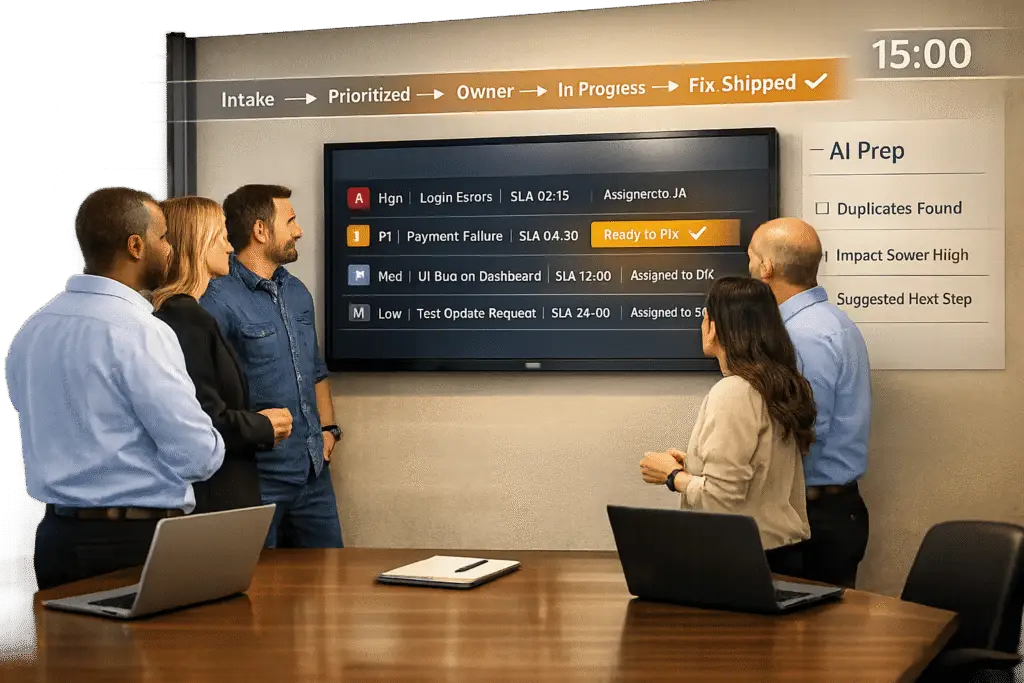
Want to fix customer problems faster? A well-run weekly triage meeting between support and product teams is the key. Here’s how to make it work:
- Purpose: Align support insights with product priorities to fix bugs and improve customer experience.
- Why It Fails: Most meetings get stuck in discussions, lack ownership, or focus on low-impact issues.
- Solution: Use structured processes, clear roles, and AI tools to prioritize and resolve issues efficiently.
Key Steps to Success:
- Assemble the Right Team: Include support managers, product managers, engineering leads, and a rotating "Goalie" to manage tasks.
- Prepare with AI: Use AI in customer support to categorize, tag, and prioritize tickets before meetings.
- Set a Clear Agenda: Focus on trends and high-priority issues in a 30-minute session.
- Prioritize Smartly: Use a Severity vs. Impact Matrix to rank fixes based on user impact and business importance.
- Follow Up: Automate workflows to track progress and update customers on resolutions.
Why It Matters: Fixing one reported issue could prevent 26 hidden ones, saving costs and reducing churn.
Pro Tip: Use tools like GitHub integrations and AI-driven insights to close the feedback loop and ensure fixes reach customers quickly.
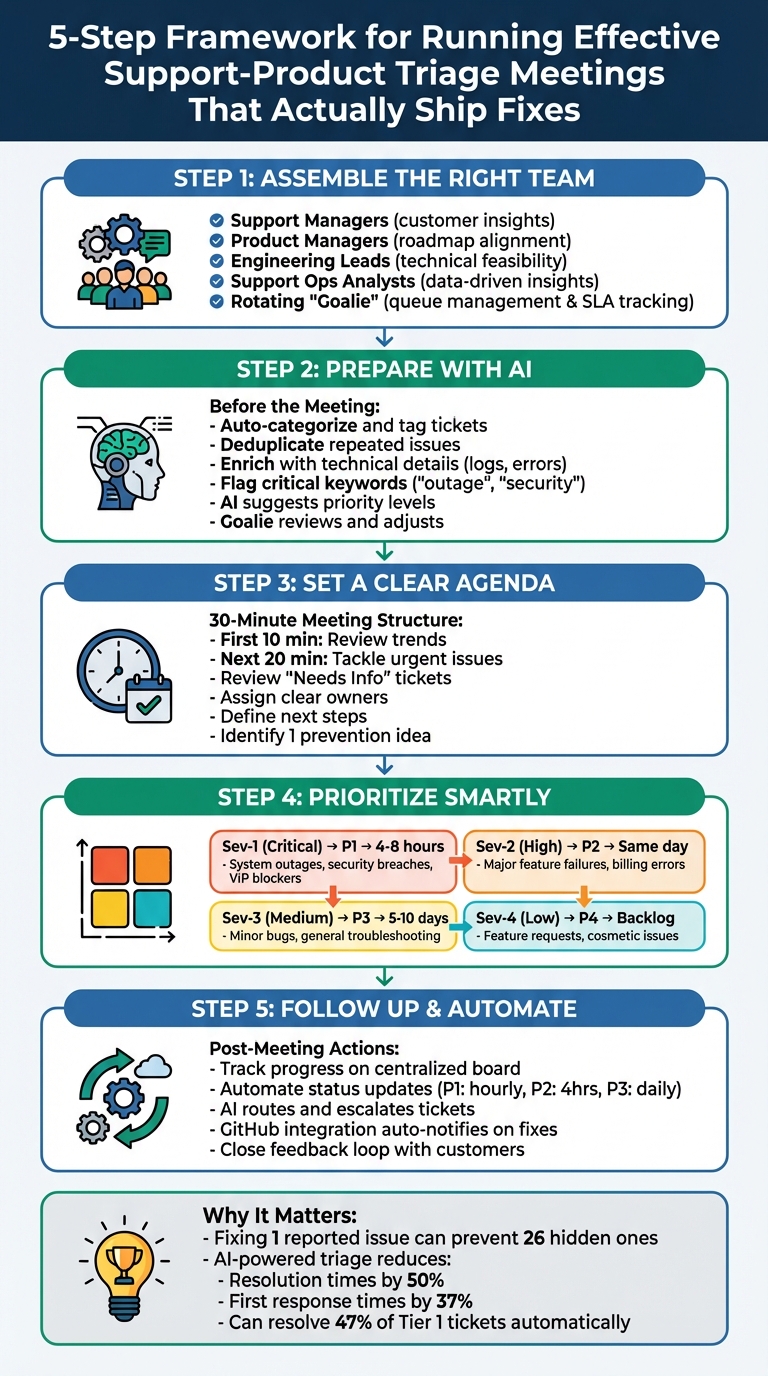
5-Step Framework for Running Effective Support-Product Triage Meetings
Product prioritization is triage | Featured Product Makers, Ian Ames
sbb-itb-e60d259
Why Most Triage Meetings Fail to Ship Fixes
Triage meetings often fall short because they become discussion-heavy rather than action-oriented. Instead of resolving issues, teams get stuck in endless conversations without assigning clear owners, deadlines, or follow-up plans. This leads to repetitive discussions, delays, and frustrated customers still waiting for fixes. To break this cycle, teams need a structured approach that prioritizes decisions and drives real results.
Backlog Overload and Misaligned Priorities
One major challenge is the sheer volume of tickets, combined with unclear priorities. Teams often treat every ticket as equally urgent, falling into the "first-come, first-served" trap. For example, a routine "where is my order" request might get the same attention as a pre-sale inquiry from a high-value enterprise client. Without a solid prioritization system, truly urgent issues get buried under less critical ones.
This problem becomes worse when support and product teams work in isolation. Support teams may struggle to push critical fixes up the priority ladder, while product teams might remain unaware of issues that are hurting the customer experience.
To avoid this, teams need to separate technical impact from business urgency. When these factors aren’t clearly defined, disputes over what to fix first can drag on indefinitely.
No Clear Ownership or Follow-Up
Another common pitfall is the lack of ownership. Complex tickets often get passed around like hot potatoes, highlighting the need for AI-powered ticket routing and prioritization – support hands it to product, product sends it to engineering, and engineering bounces it back to support for more information. Each handoff adds unnecessary delays, sometimes stretching resolution times into weeks.
Even when issues are discussed in meetings, they often lack clear assignment. Without a specific person responsible for resolving the issue by a set deadline, progress stalls. As Elyse Mankin, Product Support Team Lead at Help Scout, puts it:
A product request that is backed by data is more compelling, but it takes more than slapping some numbers on the table.
Without accountability, even data-supported requests can fail to move forward.
Meetings That Run Too Long or Lack Focus
Triage meetings can also fall apart when they lack focus. Without a clear agenda, these meetings often turn into lengthy debates about edge cases or hypothetical scenarios. Reviewing every ticket consumes time that could be spent making decisions.
On top of that, meetings often get bogged down by administrative tasks – like categorizing tickets, filling in missing details, or searching for customer information. These tasks could easily be automated but instead eat up valuable time. When meetings focus on busywork rather than actionable decisions, the fixes customers need are delayed yet again.
The solution lies in creating a structured framework that eliminates these inefficiencies and ensures that meetings drive meaningful action.
How to Set Up Weekly Triage Meetings That Work
A well-structured framework is the backbone of successful triage meetings. These sessions should turn customer issues into actionable fixes by bringing the right people together, minimizing unnecessary prep work, and focusing on decisions that drive results.
Who Should Attend and What They Should Do
The team for triage meetings should be small but diverse, with key players from different functions. Here’s who to include:
- Support Managers: They bring firsthand knowledge of customer frustrations.
- Product Managers: They align fixes with the product roadmap.
- Engineering Leads: They evaluate technical feasibility and execution.
- Support Operations Analysts: They provide data-driven insights to guide decisions.
A rotating "Goalie" role is essential for keeping things organized. This person manages queues, assigns bugs, and ensures customer service SLAs are met. For example, in November 2025, Linear implemented a weekly goalie rotation to spread product knowledge and prevent burnout. Using their "Triage Intelligence" tool, they auto-labeled and deduplicated issues, allowing the goalie to either resolve bugs directly or delegate them to the right specialists. The system also integrated with GitHub, automatically notifying the customer experience team when a pull request merged – a seamless way to close the loop with customers.
This approach is particularly important given that only 58% of product teams currently use input from customer support to shape their roadmaps, and just one in three product managers consistently follows up on customer feedback.
| Role | Primary Responsibility | Key Contribution to Meeting |
|---|---|---|
| Support Ops Analyst | Data Analysis | Highlights recurring customer pain points and trends |
| Goalie (Rotating) | Queue Management | Determines assignments and ensures SLA compliance |
| Product Manager | Roadmap Alignment | Connects feedback to product goals |
| Triage Specialist | Initial Assessment | Tags and prioritizes issues based on severity before the meeting |
| Engineering Lead | Technical Execution | Oversees technical fixes and communicates progress |
With this team in place, using AI tools for pre-meeting prep ensures that the meeting time is spent on solving problems, not sorting through them.
Pre-Meeting Preparation with AI Tools
AI can take much of the heavy lifting out of pre-meeting preparation. Use it to categorize, tag, and enrich tickets with technical details like code snippets, system logs, or error patterns. Deduplication rules can identify repeated issues and link customer feedback to existing backlog items, saving time and reducing redundancy.
Automation rules can also streamline prioritization. For example, tickets flagged with keywords like "outage" or "security" can automatically be marked as critical. Similarly, customer attributes like VIP status or SLA deadlines can help assign appropriate priority levels. Once the system processes these inputs, the rotating goalie reviews AI-suggested assignments and makes any necessary adjustments before the meeting.
| Priority Level | Target Response Time | Typical Issue Type |
|---|---|---|
| Critical | Within 30–60 minutes | System outages, security breaches, VIP blockers |
| High | Within 1–2 hours | Major feature failures, billing errors, significant customer impact |
| Medium | Same business day | General troubleshooting, refund requests, minor bugs |
| Low | 24–48 hours | Feature requests, policy questions, compliments |
Build a Clear Agenda
A focused agenda is key to avoiding the drawn-out debates that can derail triage meetings. For a 30-minute meeting, allocate the first 10 minutes to reviewing trends and the remaining 20 minutes to tackling urgent issues.
Start by addressing high-priority tickets. Review any "Needs Info" tickets that are stuck, gather missing details, and assign each ticket a clear owner with defined next steps. Wrap up the meeting by discussing overall trends and identifying at least one "prevention idea" to implement in the next week. This shifts the focus from constantly putting out fires to making proactive improvements.
"Support teams now have a direct line of communication to product, giving us the chance to advocate for customer pain points and ensure that feature updates reflect these real-world concerns."
- Lemuel Chan, Support Operations Analyst, Front
Lastly, use automated ticket validators to ensure tickets can’t move out of "Triage" status until all required fields – like category, impact, and priority – are completed. This keeps meetings efficient and focused on actionable items instead of administrative tasks.
How to Prioritize Fixes That Matter Most
When deciding which fixes to tackle first, it’s essential to separate technical impact from business urgency. You’ll need to consider both the number of users affected and the level of inconvenience caused by workarounds. Not all bugs are created equal – some may have severe technical implications, while others quietly cause frustration for a large number of users. For example, while a system outage affecting one administrator might be classified as a Sev-1 issue, a minor workflow problem slowing down thousands of customers can gradually harm satisfaction and increase support costs.
The trick is to differentiate issue severity from fix priority. Severity reflects the technical or business impact – like a complete outage or a broken feature. Priority, on the other hand, determines when the fix should happen, factoring in severity, customer impact, and business urgency. To make fair decisions, teams need standardized data, not subjective opinions. This means gathering information like the number of users affected, how often the issue occurs, which customer segments are impacted (e.g., high-revenue accounts), and the difficulty of any workarounds. Once this data is in place, you can use a structured approach like the Severity vs. Impact Matrix.
Use a Severity vs. Impact Matrix
The Severity vs. Impact Matrix is a reliable way to categorize issues and set clear resolution timelines. Start by defining severity levels, ranging from Sev-1 (critical issues like outages, data breaches, or security risks) to Sev-4 (minor cosmetic problems or small UI glitches). Then, align each severity level with a priority tier – P1 (immediate action), P2 (same day), P3 (this sprint), or P4 (backlog) – and set clear timeframes for resolution.
Here’s how it works in practice: a Sev-1 issue, such as a system outage, would get P1 priority and be resolved within 4–8 hours. Meanwhile, a Sev-3 issue, like a minor bug with limited impact, might be assigned P3 priority for resolution during the current sprint (typically 5–10 days). This framework prevents "priority inflation" and ensures engineering teams focus on the most impactful fixes.
To make prioritization even more objective, consider using a weighted scoring model. Assign points based on factors like frequency of occurrence, customer segment affected, the difficulty of workarounds, and blocked business outcomes. This approach ranks issues on a 0–100 scale, making it easier to focus on fixes that deliver meaningful results.
"Support will often hear the same issues, over and over again. Some are quick fixes, while others – like broken workflows or complex product gaps – would benefit from dedicated product updates."
- Lemuel Chan, Support Operations Analyst, Front
Use AI to Predict Customer Satisfaction Risks
AI tools can help identify issues that might harm customer satisfaction before they escalate into larger problems. By analyzing sentiment and tone in real time, AI can flag high-risk tickets that might otherwise slip through the cracks. This ensures that conversations likely to cause dissatisfaction are prioritized, even if they don’t meet traditional severity thresholds.
AI also excels at spotting patterns. For instance, if multiple users report the same app crash after an update, AI can flag it as a potential major issue before it becomes widespread. Additionally, AI tools can monitor for SLA breaches, automatically escalating tickets at risk of missing deadlines and routing high-value customer inquiries to senior agents within minutes.
These AI systems don’t just speed things up – they also make prioritization smarter. For example, they can integrate customer value data, ensuring that tickets from strategic accounts or customers nearing renewal are prioritized. Platforms like Supportbench incorporate AI-driven features, such as predictive CSAT and CES scoring, to bring attention to the issues most likely to impact retention. The best part? These tools often work seamlessly within existing systems, avoiding the need for costly add-ons or complex setups. Once priorities are set, the process transitions smoothly into automated follow-ups and progress tracking.
AI-powered triage systems have been shown to cut resolution times by 50% and reduce first response times by 37%. By combining AI insights with structured prioritization frameworks, teams can focus on what truly matters – delivering fixes that keep customers happy and loyal.
Post-Meeting Follow-Up and Automation
The success of a triage meeting ultimately depends on the actions that follow. Without proper follow-up, even the most well-prioritized fixes can remain unresolved. This is where automated workflows come in – they help maintain accountability and ensure customers see tangible results.
Track and Communicate Progress
A centralized triage board with clear status columns – like New/Needs Triage, Needs Info, Accepted (Owner & Priority Set), In Progress, Blocked/External, Ready to Verify, and Done – can provide both support and product teams with full visibility into ticket statuses. Assign a lead to review new issues, enforce SLAs, and route tickets appropriately. Additionally, appoint a "comms owner" to keep both internal teams and customers updated, ensuring the communication loop is closed once a fix is shipped.
Establish regular update cadences based on issue priority. For example:
- P1: Hourly updates
- P2: Every four hours
- P3: Daily
- P4: Weekly
Here’s a real-world example: In April 2025, Lemuel Chan, a Support Operations Analyst at Front, noticed a sharp 85% increase in manual inbox ownership transfers within a single quarter. By suggesting a self-serve feature during a "Support Fix" meeting, the team projected annual savings of $30,000 to $57,000. The feature launched the following year, cutting inbound requests and improving customer efficiency.
These steps help transform meeting discussions into concrete actions.
Automate Escalations and Summaries with AI
Once progress tracking is in place, automation can take things further by minimizing manual tasks and ensuring no issues slip through the cracks. AI can classify, tag, and route tickets, as well as generate summaries for review – resolving up to 47% of Tier 1 tickets without needing escalation.
Set up escalation triggers based on thresholds, such as flagging tickets after five unresolved agent replies. These triggers can include internal notes with suggestions for escalation or links to relevant knowledge base articles. AI can also analyze customer intent and sentiment in real time, automatically routing high-priority tickets to specialists or managers when negative sentiment is detected.
Automation also helps close the feedback loop between development and support. For instance, in November 2025, Alexandra Lapinsky Wilson from Linear’s Customer Experience team explained how GitHub integrations streamline their workflow. When a pull request is merged, Linear marks the issue as "Done", sends a Slack update, and reopens the linked Intercom conversation. This prompts the CX team to notify the customer immediately about the fix.
"Once the PR is merged, Linear’s GitHub integration marks the issue as Done in the Linear issue, which prompts CX to close the loop with the customer."
- Alexandra Lapinsky Wilson, Customer Experience, Linear
Platforms like Supportbench take automation even further with built-in AI features. These include automated case summaries, predictive CSAT and CES scoring, and workflows that create Jira tickets or log feature requests directly into product roadmaps. This eliminates the need for extra engineering resources. By using such integrated tools, teams can avoid spending $4,000 to $10,000 per month on fragmented AI add-ons for a 50-person team.
Measure Success and Improve Over Time
For triage meetings to be effective, tracking the right metrics is essential. Without proper measurement, it’s easy to mistake activity for progress. With automated follow-ups in place, these metrics ensure your process adapts based on real-world data.
Key Metrics to Track
Start by monitoring efficiency metrics like median and 90th percentile response times, resolution rates, and SLA breaches, broken down by priority. For instance, P1 issues should ideally see a first response within 15 minutes and resolution within a single business day. On the other hand, P3 issues might aim for a one-day response and a five-day resolution timeline.
Backlog health is another critical area. Keep an eye on the overall size of your backlog, the age distribution of tickets, and the oldest ticket’s age. A growing backlog signals a failing triage process. Plus, reducing backlog isn’t just about efficiency – it’s about cost. Consider this: self-serviced tickets cost about $2, IT support tickets cost $104, and field support tickets can run up to $221.
To ensure you’re addressing what matters most, track product impact metrics. These include User Experience Friction (tickets tied to confusing product flows rather than bugs), Issue Repeat Rate (how often the same issues resurface), and Product Blockers (critical issues stopping users from completing essential tasks). A high repeat rate is a red flag – it suggests broken experiences that can damage trust and retention.
Quality indicators also provide valuable insights. Metrics like Reopen Rate can reveal whether fixes are genuinely solving problems or just closing tickets prematurely. Similarly, Touches per Resolution measures how smoothly your process runs. Don’t forget to monitor customer sentiment shifts before and after the first reply – this helps gauge how well your team communicates during the resolution process.
Refine the Process Based on Results
Once you’ve gathered these metrics, use them to fine-tune your triage approach. For example, spend 30 minutes each week reviewing five recent P0/P1 tickets to confirm proper scoring and routing. On the first Monday of every month, revisit your scoring system to adjust weights and refresh playbook examples.
If you notice frequent misrouted tickets, audit them weekly and update your AI rules accordingly. For queues with repeated SLA breaches, either adjust to more realistic, dynamic SLAs or reassign resources to better meet the goal.
Consider launching internal shadowing programs where product managers temporarily work as support agents. This hands-on experience can reveal customer pain points directly, yet only 58% of product teams currently incorporate support feedback into their roadmaps.
Finally, pay close attention to your Issue Repeat Rate and share this data with your product team. Repeated bugs indicate an urgency that goes beyond ticket volume. To manage this, allocate 10% of sprint capacity specifically for bug fixes. Ensure all bugs are placed in a prioritized bucket with a designated sprint for resolution, keeping accountability clear and the backlog under control.
Conclusion
Triage meetings thrive on structured preparation, clear prioritization, and consistent follow-through. Without a standardized intake process – one that captures critical details like impact, affected users, and environmental factors – meetings often become chaotic and unproductive. Accountability can also fade quickly without defined roles, such as a rotating Triage Lead and a dedicated Resolver Squad.
To ensure actionable outcomes, follow-up is key. A shared tracking system, like a triage board or a "Support Fix" spreadsheet, helps both support and product teams stay aligned and monitor progress in real time. For high-priority issues like P0 and P1, automated escalations reduce the risk of critical problems being overlooked. Meanwhile, regular trend reviews – such as a Friday check-in – shift the focus from reactive fixes to proactive prevention.
Interestingly, only a small percentage of teams consistently incorporate support feedback into their product roadmaps. This disconnect presents both a challenge and an opportunity. When support and product teams collaborate effectively, the results are tangible. For example, turning repetitive manual requests into self-serve features can lead to measurable cost savings and improved efficiency.
"Regardless of your industry or product, your agent support and product teams share one important goal: making your customers successful. That goal becomes 10 times more attainable when those two teams are integrated, sharing knowledge, and working closely together." – Alexis Fogel, CEO, Stonly
The framework discussed here, especially with AI-driven pre-meeting preparation, has proven effective in modern support operations. Start with the essentials: define roles clearly, set achievable SLA targets, and apply a Severity vs. Priority matrix to separate technical impact from business urgency. Leverage AI tools for tasks like auto-tagging and clustering issues, while reserving human judgment for complex decisions. Track meaningful metrics – such as Issue Repeat Rate, Product Blockers, and User Experience Friction – and refine your process monthly based on data insights. By adopting this approach, you can turn triage meetings into a powerful driver of customer success.
FAQs
How can AI improve the effectiveness of weekly triage meetings?
AI tools can transform weekly triage meetings by automating tasks like detecting, categorizing, and prioritizing issues. For instance, AI can sift through customer tickets to determine intent, language, and sentiment. This ensures that tickets are routed to the right teams without anyone having to manually sort them, saving time and allowing teams to focus on solving the most pressing problems.
On top of that, AI can analyze ticket trends to predict escalation risks and uncover recurring customer pain points. These insights help support and product teams prioritize fixes more effectively, making meetings more focused and actionable. By cutting down on manual work, streamlining workflows, and offering real-time insights, AI empowers teams to resolve issues faster and achieve better outcomes.
What key roles are needed to run an effective support-product triage meeting?
For a support-product triage meeting to run smoothly and effectively, a few roles are absolutely essential. These team members help ensure that customer-reported issues are prioritized and addressed efficiently.
On the support team, the support lead or triage manager takes the reins. They organize the meeting, classify issues, and rank them based on urgency and the impact on customers. Support agents also contribute by sharing detailed insights and context about the reported problems, which helps the team pinpoint root causes.
From the product team, a product manager or product owner plays a key role. They assess the technical feasibility of solutions and align customer feedback with the product roadmap. In some cases, bringing in engineering representatives can further improve collaboration by ensuring that proposed fixes are actionable and realistic.
When these roles work together, the process becomes more efficient, leading to meaningful product updates while keeping customer satisfaction front and center.
What is the Severity vs. Impact Matrix, and how does it help prioritize fixes?
The Severity vs. Impact Matrix is a straightforward tool designed to help prioritize customer-reported issues effectively. It considers two main factors: severity – how critical or urgent the issue is – and impact – how many customers or processes are affected.
This dual focus ensures that even issues with lower severity but significant customer impact are addressed promptly. It prevents teams from spending excessive time on less important problems while ensuring that pressing customer concerns are resolved efficiently. The result? Better resource allocation and happier customers.