
Want to cut down on follow-up tickets? Focus on improving First-Call Resolution (FCR).
Every repeat call increases costs and frustrates customers. Raising your FCR from 55% to 85% can save millions annually while boosting customer satisfaction and retention. The key lies in preparation, structured calls, and leveraging AI tools to streamline workflows and ensure complete resolutions during the first interaction.
Here’s the approach in four steps:
- Prepare with Customer Context: Use AI to pull customer history, summarize past interactions, and suggest knowledge base solutions before the call starts.
- Structure Calls for Full Resolution: Confirm the issue, provide clear instructions, and complete all tasks (like refunds or password resets) during the call.
- Address Repeat Call Triggers in Real-Time: Use AI to analyze sentiment, flag unresolved issues, and ensure clarity on next steps.
- Close with Follow-Ups and Surveys: Recap resolutions, send confirmations, and deploy predictive tools to measure satisfaction and prevent churn.
AI-powered tools can push FCR rates above 85%, significantly reducing costs and improving customer loyalty. Let’s dive into how to implement these strategies effectively.
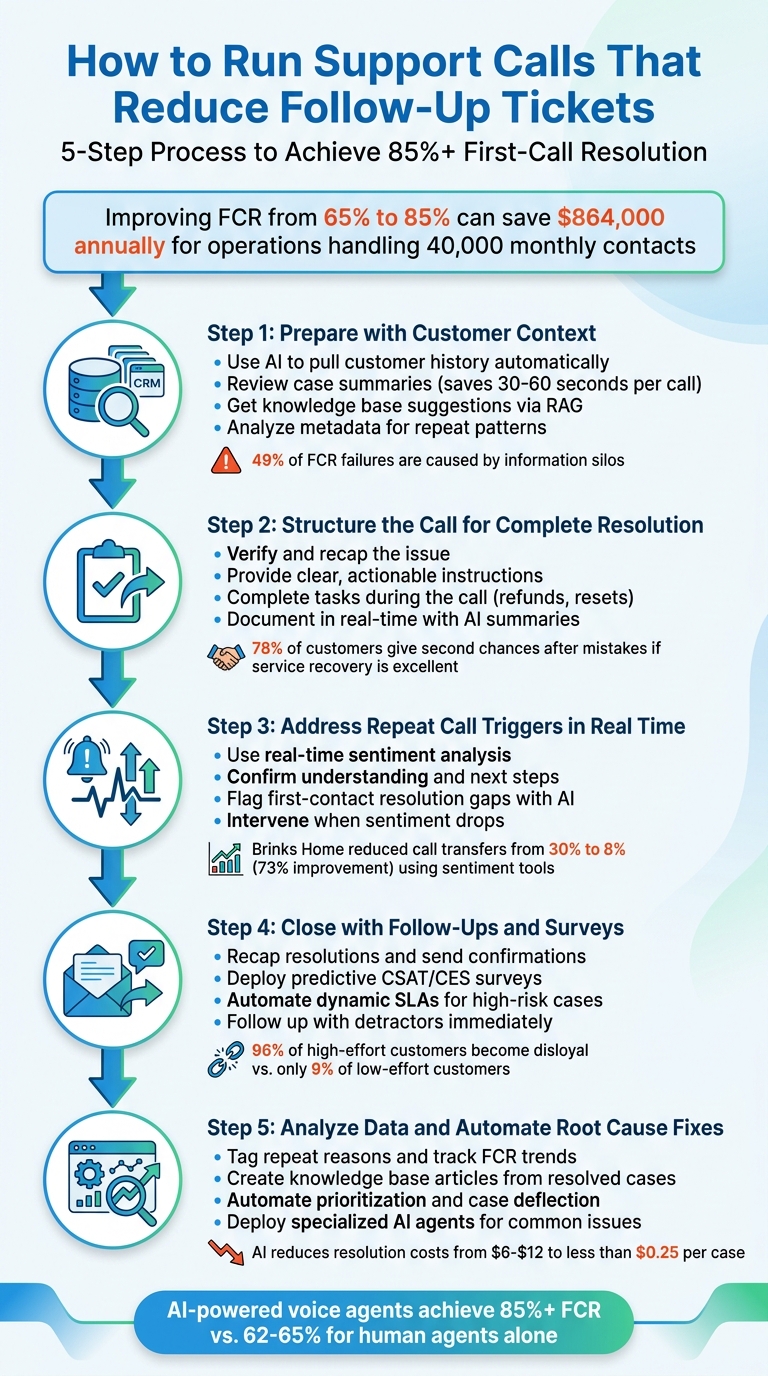
5-Step Process to Reduce Follow-Up Support Tickets and Improve First-Call Resolution
How To Fix Low First Call Resolution FCR In Your Call Center
sbb-itb-e60d259
Step 1: Prepare for the Call with Customer Context
Getting ready for a call is the foundation of resolving issues on the first try. Without proper preparation, agents often force customers to repeat themselves, which wastes time and lowers the chances of resolving the issue. This is where having the right context makes all the difference.
But don’t worry – preparation doesn’t mean slogging through endless notes. Modern AI tools use Caller ID to automatically pull up customer details from CRM systems. By the time the agent says hello, they already have access to the customer’s account status, recent tickets, and product configurations. This eliminates the need for guesswork and sets the stage for a smoother conversation. In fact, information silos are responsible for 49% of First Call Resolution (FCR) failures [3]. Breaking down those silos is key to improving FCR rates. Here’s how AI can make pre-call preparation seamless.
Review Customer History and Case Summaries
AI tools can summarize previous interactions, turning long transcripts into concise overviews. Agents don’t have to scroll through pages of notes – they get a snapshot of the customer’s past conversations, unresolved issues, and preferences. This saves 30 to 60 seconds per call [3], giving agents more time to focus on solving the problem.
Take SWTCH, an EV charging provider, as an example. In 2026, they introduced AI systems that instantly accessed driver data as calls came in. This gave agents full context right away, cutting support costs by over 50% [3]. Customers no longer had to repeat their issues, making the whole process faster and more efficient. AI tools also enhance this process by offering knowledge base suggestions to help agents find solutions quickly.
Use AI for Knowledge Base Suggestions
AI-powered systems like Retrieval-Augmented Generation (RAG) take pre-call preparation a step further. These tools link directly to knowledge bases, internal documents, and past tickets, pulling up the most relevant information as soon as the call begins. This ensures agents have accurate answers at their fingertips.
"The RAG approach means the agent knows your product as well as your docs do. If your docs are good, the agent is good." – CallSphere Team [1]
Supportbench’s AI Agent-Copilot is a great example of this in action. It scans through previous cases and both internal and external resources to provide agents with the best possible suggestions, making issue resolution faster and more reliable.
Identify Repeat Patterns Through Metadata
Metadata like customer IDs, intent tags, and sentiment scores can reveal recurring problems and help agents anticipate challenges. Intent tags, such as "missing_item" or "billing_query", show if the issue has come up before, while sentiment scores flag if the caller had a frustrating experience in the past [2]. This allows agents to approach the conversation with greater empathy and preparedness.
For instance, in 2026, Medical Data Systems used AI voice agents for inbound collections. These systems analyzed metadata to prioritize high-value accounts and predict objections, leading to a 30% transfer rate and $280,000 in monthly collections [3]. By having full context, agents could resolve calls more effectively, with typical AI-assisted calls lasting just 90 seconds to 4 minutes [2].
When patterns of failed resolutions emerge, it’s often a sign that agents need more authority or better tools. AI ensures agents are equipped with the right context from the start, making it much easier to tackle even complex issues.
Step 2: Structure the Call for Complete Resolution
Once you’ve gathered the necessary customer context, the next step is to structure your call in a way that ensures every issue is fully resolved during that interaction. This involves confirming the problem, walking the customer through a clear solution, and completing all documentation while still on the call. A structured approach not only addresses the current issue but also helps avoid future problems. On the flip side, when calls lack structure, agents may rush to meet speed goals, often leaving issues unresolved. This leads to repeat contacts, which can significantly drive up support costs [5].
Start with Issue Verification and Recap
When a customer explains their issue, pause briefly to ensure they’ve finished speaking. This small gesture shows you’re listening and gives them space to share all the details. Afterward, paraphrase their concern in a concise sentence to confirm you’re on the same page. For example, instead of a generic "I understand", you might say, "So, it seems like your payment didn’t process yesterday, and you’re now seeing an error message when trying again – is that correct?" This approach helps avoid misunderstandings and ensures you’re tackling the right issue.
If possible, reference previous interactions like past purchases or earlier tickets. This demonstrates you’re prepared and prevents customers from having to repeat themselves. It’s worth noting that 78% of customers are willing to give a business another chance after a mistake – if the service recovery is excellent [4].
Provide Clear and Actionable Instructions
Once the issue is confirmed, offer a straightforward, step-by-step solution. Avoid vague statements like, "We’re looking into it." Instead, be specific. For instance, you could say, "Your account was locked after three failed login attempts. I’m resetting your password now, and you’ll get an email within two minutes with a link to create a new one."
Leverage task-based knowledge base articles to guide your instructions. These resources break down solutions into simple, actionable steps that customers can follow easily. While maintaining consistency in your responses, avoid sounding overly scripted. Personalize the conversation by using the customer’s name and referencing their specific account details. This keeps the interaction natural and prevents it from feeling mechanical.
Complete After-Call Work During the Call
Take notes and document key details in real time while on the call. This ensures nothing gets overlooked and minimizes the risk of losing context later. AI-powered tools can help by automatically summarizing calls, capturing essential points, and highlighting follow-up actions [6]. For example, if you’re processing a refund or resetting a password, complete the task during the call so the customer can confirm the resolution immediately.
"AI voice agents are structurally advantaged at FCR for three reasons: they have full context on every call from the first second, they can execute multi-system workflows in real time, and they never forget to do the follow-up steps." – CallSphere Team [1]
Completing tasks during the call isn’t just about saving time – it’s about reducing the need for follow-ups. Increasing your First-Call Resolution (FCR) rate from 65% to 85% can save around $864,000 annually for a support operation handling 40,000 monthly contacts [1]. Before ending the call, confirm the solution worked by asking something like, "Can you try logging in now to make sure everything’s resolved?" This simple step ensures the issue is truly fixed, eliminating the need for additional contact.
With the call structured for resolution, you’re ready to tackle any real-time triggers that might lead to repeat issues.
Step 3: Address Repeat Call Triggers in Real Time
Even with a well-structured call, certain triggers can still lead to follow-up tickets if they’re not handled during the initial conversation. These triggers often manifest as subtle signs of confusion, frustration, or unresolved issues that customers might not directly mention. Spotting and addressing these signals in real time is key to achieving first-call resolution and avoiding repeat interactions. The idea is to identify these issues while the customer is still on the line and resolve them before the call ends.
Use Real-Time Sentiment and Speech Analytics
Real-time sentiment analysis tools are game-changers for identifying customer frustration or confusion as they happen. These tools analyze not just the words being said, but also how they’re being said – examining tone, pitch, and overall delivery to pick up on emotional shifts that go beyond simple keyword detection. For example, a customer saying "okay" in a flat tone might signal uncertainty, which the system would flag for immediate action.
These systems often prioritize the customer’s emotional state at the end of the call, as it’s the most accurate indicator of whether the issue was truly resolved. Take Brinks Home, for instance. In 2026, they reduced their call transfer rate from 30% to just 8% – a 73% improvement – by using real-time sentiment tools. This not only improved their first-call resolution rates but also boosted their Net Promoter Score by 30 points [7][9].
When sentiment drops below a certain threshold, these tools can trigger specific workflows. For instance, if the system detects confusion, it might prompt the agent to offer additional clarification. If frustration is detected, it could suggest escalating the issue or enabling supervisor support through features like "Call Whisper" [8][9]. As strategic researcher Mosharof Sabu explains:
"The score matters less than the action it triggers" [8].
Confirm Understanding and Next Steps
One simple yet effective way to prevent follow-up tickets is by confirming the customer’s understanding of the solution and next steps. This doesn’t mean repeating everything verbatim – it’s about ensuring both parties are on the same page. For example, you might say: "Just to confirm: I’ve reset your password, and you’ll receive an email within two minutes with a new login link. Your account should be fully accessible after that. Does that make sense?"
This step helps catch any lingering misunderstandings before they turn into repeat calls. If the customer hesitates or sounds unsure, you can follow up with a clarifying question like, "Is there anything about the next steps that’s unclear?" Many AI tools can even generate a clear summary of action items at the end of the call, ensuring nothing is overlooked and both the agent and customer have a concrete understanding of what’s been resolved and what’s next [1].
Use AI to Flag First-Contact Resolution Gaps
Once customer sentiment is confirmed, AI can play a critical role in identifying any unresolved issues during the call. These tools analyze conversations in real time, looking for missed steps, incomplete workflows, or knowledge gaps [1]. By using Retrieval-Augmented Generation (RAG), AI can pull accurate answers from your company’s knowledge base and runbooks, allowing agents to provide correct information without wasting time on manual searches [1][10].
For example, in April 2026, a B2B software company managing 80,000 seats introduced an AI voice agent for tier-1 support. After struggling with a 62% first-call resolution rate for two years, the AI agent helped achieve an 87% FCR within its first month. It flagged calls at risk of failing FCR by analyzing sentiment scores (ranging from -1.0 to 1.0) and intent, enabling agents to intervene or hand off calls to specialists when needed [1].
The financial impact of improving FCR is significant. For large B2B operations, every 1-point improvement in FCR can save $340,000 annually in support costs and reduce churn by $780,000 [1]. Addressing these gaps in real time not only saves money but also enhances customer satisfaction and loyalty.
Once these real-time triggers are managed, you’re ready to close the call in a way that solidifies the resolution and minimizes the chance of future contact.
Step 4: Close the Call with Follow-Ups and Surveys
Wrapping up a call effectively does more than just resolve the immediate issue – it reassures the customer and reinforces the quality of support they’ve received. A clear, confident closure helps ensure first-call resolution while minimizing the chance of follow-up tickets. Plus, these final steps set the groundwork for analyzing recurring issues in the next phase.
Recap Resolutions and Send Confirmations
Before ending the call, take a moment to summarize the issue and the solution. This doesn’t mean repeating everything in detail – just ensure both you and the customer are on the same page. For example:
"Recap: Your API credentials have been reset, and your webhook endpoint updated. Data should resume shortly. A confirmation email with next steps has been sent."
This quick recap reduces misunderstandings and helps avoid repeat calls. Why is this important? Companies that excel in follow-ups see 41% faster revenue growth and 51% better customer retention, yet only a small fraction – just 3% – achieve the level of being truly customer-focused in their follow-up practices [6].
After the call, send a follow-up email or SMS summarizing the resolution, any tasks the customer needs to complete, and links to helpful documentation. This proactive communication not only strengthens trust but also ensures customers have everything they need.
Deploy Predictive CSAT/CES Surveys
Traditional surveys often fail to capture the full picture, with only 5% of customers responding [11]. This leaves most interactions unmeasured, which means potential dissatisfaction might go unnoticed until it’s too late. AI can step in here, analyzing sentiment and call transcripts in real time to predict metrics like CSAT (Customer Satisfaction Score) and CES (Customer Effort Score) for every interaction [11][13].
CES, in particular, is a strong predictor of loyalty. It’s 1.8 times more effective than CSAT and twice as accurate as NPS (Net Promoter Score) [12]. The stakes are high: 96% of customers who report high-effort experiences become disloyal, compared to just 9% of those with low-effort experiences [12]. Interestingly, even satisfied customers aren’t always safe – between 60% and 80% of customers who eventually churn had previously reported being "satisfied" or "very satisfied" in surveys [12].
Supportbench’s Predictive CSAT and CES tools analyze every call to detect dissatisfaction early, even before customers explicitly voice it [13]. This allows companies to act immediately, following up with detractors to recover the relationship. By embedding real-time feedback into your process, you can address potential issues before they escalate, paving the way for smarter SLA management.
Automate Dynamic SLAs for High-Risk Cases
Not every customer issue carries the same level of urgency. A customer nearing their renewal date, for instance, demands more attentive follow-up than someone with a routine question. AI can identify high-risk scenarios during a call – whether it’s based on sentiment, account status, or keywords like "cancellation" or "escalation" – and adjust SLAs accordingly [14].
Here’s an example: if a customer’s sentiment takes a dip during a billing inquiry, AI can notify a supervisor immediately and tighten SLAs to ensure faster follow-up [14]. AI voice agents can even execute complex workflows across CRM, billing, and support systems to handle tasks like refunds or account updates on the spot, without manual intervention [15][1].
Supportbench’s Dynamic SLAs adapt response times to the context of each case, whether it’s an upcoming renewal or a detected escalation risk. The impact can be substantial – improving first-call resolution from 65% to 85% could save an operation handling 40,000 monthly contacts around $864,000 in direct support costs and reduce churn-related losses by $2.6 million annually [1]. These tailored follow-ups ensure no critical issue is overlooked, setting the stage for deeper analysis in the next step.
Step 5: Analyze Data and Automate Root Cause Fixes
Shifting support from reaction to prevention is a game-changer. By analyzing repeat contacts and automating fixes for underlying issues, you can stop problems before they even start.
Tag Repeat Reasons and Track FCR Trends
Start by digging into your most common repeat-contact categories. Use AI tools to analyze calls for sentiment, intent, and satisfaction. This data helps you uncover recurring problems and track First Contact Resolution (FCR) trends. Why do customers call back? Often, it’s because agents lack access to key information or can’t handle transactional tasks – like processing refunds or resetting passwords – during the initial interaction [1].
"The most expensive ticket your support team handles is not the complicated one. It is the second one on the same issue."
– Neelam Chakrabarty, Support Leader [16]
Zero in on the top ten ticket categories from the past 90 days. Then, figure out whether the root cause stems from a knowledge gap, product issue, or inconsistent processes [16]. Translate these findings into financial terms to get buy-in from your product team. For instance, "This category costs $12,000 annually; fixing 50% of these issues saves $6,000" [16]. Tools like Supportbench’s AI Automation can tag cases and identify FCR trends automatically, saving time and effort.
Once you’ve identified the patterns, the next step is turning those insights into practical tools.
Create Knowledge Base Articles from Resolved Cases
Transforming resolved cases into knowledge base articles is a smart way to empower self-service. AI-powered tools like Retrieval-Augmented Generation can take a resolved case and generate a full article, complete with a subject, summary, and keywords. This process reduces live agent costs from $6–$12 per resolution to less than $0.25 [16].
Supportbench’s AI KB Article Creation tool ensures your knowledge base stays relevant and up-to-date, reflecting the real challenges customers encounter. This approach not only saves money but also improves customer satisfaction by providing quick, accessible solutions.
From here, it’s all about integrating smarter case management into your workflow.
Automate Prioritization and Case Deflection
AI can classify issues based on urgency: High (self-serviceable), Medium (requiring customization), and Low (needing human oversight). This ensures that complex cases always get the attention they need. For example, in April 2026, this strategy improved FCR by 15 points, resulting in annual savings of over $5 million [1].
For high-deflection categories, deploy AI agents specialized in handling specific types of inquiries – like IT helpdesk or billing. This targeted approach ensures greater precision and efficiency [1]. As noted earlier, even a 1-point improvement in FCR can save $340,000 annually in support costs [1].
Supportbench’s Dynamic SLAs and AI-driven prioritization take it a step further. High-risk cases – like those involving renewals or negative sentiment – are flagged for tighter follow-ups automatically. The impact? A 30–50% drop in repeat contact rates and a 40–60% reduction in resolution times [1].
Conclusion
Steps to Improve Support Calls
Making support calls more effective starts with solid preparation, clear communication, and the smart use of technology. Before the call, gather as much customer context as possible – this includes their history, account details, and recent interactions. This preparation allows agents to quickly verify the issue and tackle tasks like password resets, refunds, or data exports right on the call, avoiding delays. Wrapping up with a recap and setting up automated follow-ups ensures the issue is fully resolved. By focusing on improving first-call resolution (FCR), businesses can lower support costs and improve customer experience metrics. Addressing root issues like missing data or incomplete tasks is key to achieving these goals.
These steps lay the groundwork for integrating AI to enhance support operations even further.
The Role of AI in Modern B2B Support Operations
AI transforms support calls by offering real-time access to documentation and automating workflows, enabling immediate task completion. AI-powered voice agents can deliver an impressive FCR rate of over 85% for tier-1 inquiries, far surpassing the 62–65% range typically achieved by human agents [1].
"First-call resolution is the north star metric for support operations because it directly drives both cost (fewer repeat calls) and CSAT (fewer frustrated customers)." – CallSphere Team [1]
FAQs
How do I measure first-call resolution accurately?
To get an accurate read on first-call resolution (FCR), start by defining what counts as a "resolution." Make sure your criteria are consistent and apply them across all communication channels. Once that’s in place, you can use this formula to calculate FCR: (Total issues resolved on first contact ÷ Total issues handled) × 100.
AI tools can be a game-changer here. They can spot patterns in interactions and sharpen your measurement accuracy. This data not only helps refine your FCR but also offers insights to make your operations smoother and more efficient.
What call steps help prevent most follow-up tickets?
To avoid follow-up tickets, the goal should be to fully resolve issues during the initial call. Here’s how you can make that happen:
- Get the complete picture right away: Use AI tools to gather all the relevant details about the issue upfront. This saves time and ensures nothing important is overlooked.
- Wrap up tasks during the call: Update records, apply tags, and complete any necessary workflows while still on the line with the customer.
- Double-check with the customer: Before you end the call, confirm that the issue has been resolved to their satisfaction.
- Use AI insights on the spot: Tools like sentiment analysis can help you identify and handle any lingering concerns before the call ends.
By following these steps, you can minimize the chances of customers needing to reach out again.
What AI features improve FCR the fastest?
AI tools that enhance First Call Resolution (FCR) focus on giving agents the right support at the right time. Features like real-time agent assistance deliver precise, context-aware answers, ensuring agents can handle customer inquiries more efficiently. Additionally, AI-powered workflows, such as call summarization and next-step suggestions, streamline the process, helping agents resolve issues during the first interaction and cutting down on follow-up calls.