
Losing customers can hurt your revenue long-term, but helpdesk tools with customer health scoring can help you prevent churn. By tracking metrics like engagement, sentiment, and product usage, these systems alert you to at-risk accounts and help you act before it’s too late.
This article reviews Supportbench, Zendesk, and Freshdesk – three helpdesk platforms with varying customer health scoring capabilities. Here’s a quick summary:
- Supportbench: Offers AI-driven health scoring, dynamic SLA adjustments, and real-time organizational insights. Designed for B2B teams managing complex accounts. Starts at $32 per agent/month.
- Zendesk: Focuses on agent performance with customizable scorecards but lacks built-in tools for tracking customer health trends. Advanced features are only available in higher-tier plans.
- Freshdesk: Affordable and user-friendly for small businesses, with a basic health scoring system. However, it’s less equipped for large, complex operations.
Quick Comparison:
| Platform | Health Scoring Features | Best For | Starting Price |
|---|---|---|---|
| Supportbench | AI-driven, real-time updates, predictive | B2B enterprise accounts | $32/agent/month |
| Zendesk | Agent-focused, manual configuration | Large-scale enterprises | Varies by plan |
| Freshdesk | Basic scoring, color-coded health bands | Small-to-mid-sized teams | $15/agent/month |
If you’re managing high-value accounts, Supportbench stands out with its predictive analytics and proactive tools. For smaller teams, Freshdesk offers simplicity at a lower cost. Zendesk suits enterprises but may require extra integrations for full customer health tracking.
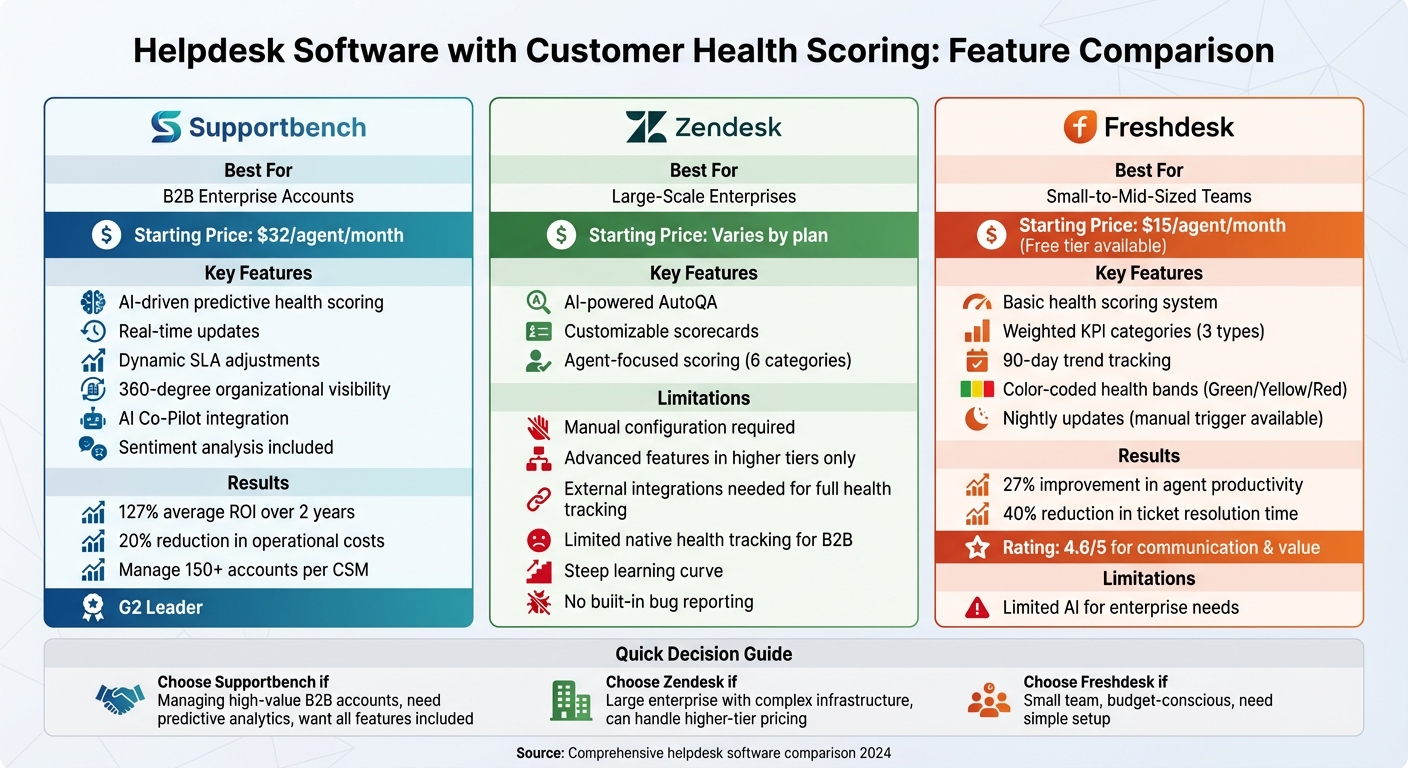
Helpdesk Software Customer Health Scoring Features Comparison: Supportbench vs Zendesk vs Freshdesk
1. Supportbench
AI-Driven Predictive Health Scoring
Supportbench taps into AI CX Intelligence to uncover hidden patterns in customer interactions. By analyzing the context and complexity of each case, the platform calculates predictive CSAT and CES ratings – no customer surveys required. This gives support teams real-time insights into customer health, helping them address issues proactively. For support leaders, this means staying ahead of potential risks in enterprise accounts.
The system compiles data like engagement frequency, escalation rates, sentiment trends, first-contact resolution (FCR), and contract renewals. Eric Klimuk, Founder and CTO of Supportbench, highlights the importance of this approach:
"Integrating health scoring into SLAs isn’t just about adjusting to current customer health. It’s also about predicting future behavior and adapting service accordingly" [3].
Dynamic SLA Adjustments Based on Health
A standout feature of Supportbench is its Dynamic SLAs, which adapt in real time based on health scores. When a customer’s health score drops or a contract renewal is on the horizon, the system speeds up response times, escalates tickets, and sends alerts to customer success managers. This ensures at-risk accounts get immediate attention. As Supportbench puts it:
"The health scoring feature is designed to make your organization more proactive, allowing you to quickly and efficiently assess a clients needs and take the necessary actions" [2].
These responsive adjustments create a foundation for better organizational oversight.
360-Degree Organizational Visibility
Supportbench goes beyond tracking individual tickets by offering organizational-level health scoring. This allows support leaders to monitor trends across entire divisions or specific customer portfolios. The platform combines key metrics – like performance data, product usage, interaction history, and contract details – into one dashboard. This comprehensive view gives teams the context they need to improve retention and streamline operations.
Users report impressive results, including an average ROI of 127% over two years and a 20% reduction in operational costs [1]. Trusted by over 9,000 businesses worldwide, Supportbench has earned recognition as a "Leader" by G2, Gartner, Capterra, and Software Advice in multiple categories [1].
With this holistic approach, Supportbench also enhances issue resolution through its AI Co-Pilot.
AI Co-Pilot Integration for Smarter Resolutions
Supportbench’s AI Co-Pilot uses customer health data, ticket history, and product knowledge to deliver smarter recommendations during live interactions. This tool helps agents save time on research and understand the broader context behind customer requests. AI-driven workflows further optimize operations – automating ticket prioritization, assigning issue types, and summarizing resolutions. These efficiencies improve retention and reduce manual workloads.
Hugh Dauterman, Data Operations Director, shared his experience:
"Supportbench has supplied our group with a whole client control system. Because the whole things is in a single platform, all are capable of control all conversation in a single area and feature complete over sight into each clients and group" [1].
sbb-itb-e60d259
2. Zendesk
AI-Powered Autoscoring for Agent Interaction Scoring
Zendesk’s AutoQA evaluates agent interactions by focusing on six key categories: Empathy, Tone, Solution Offered, Comprehension, Readability, and Greeting/Closing. Each category is assessed using either binary or customizable scales, providing detailed insights into how agents perform during customer interactions. However, this system is centered on evaluating individual agent performance rather than offering a broader view, such as predicting customer churn or renewal risks. This narrower focus limits its usefulness for teams aiming to implement proactive, AI-driven support strategies.
Customizable Scorecards with Manual Configuration
Zendesk’s QA and Workforce Engagement Management add-ons allow administrators to design scorecards tailored to their quality standards. These scorecards can use binary scales or 3-point, 4-point, and 5-point options, offering flexibility. Conditional Scorecards take this further by applying specific evaluation criteria automatically, based on factors like help desk tags, conversation channels, or CSAT scores.
However, creating a comprehensive customer health score isn’t straightforward. It requires manually assigning weights to various customer actions, which can complicate the process. For complex B2B environments, this makes it harder to monitor customer health efficiently or take timely actions when issues arise [4].
Limited Native Health Tracking for B2B Operations
Zendesk lacks built-in tools to track critical health indicators such as product usage or engagement trends. As a result, support teams must rely on external integrations to assess customer health. This fragmented approach creates challenges for support leaders managing enterprise portfolios. Without a unified system, it’s harder to identify at-risk accounts or address potential issues before renewal periods, limiting the ability to act proactively while increasing operational complexity.
Customer Health Dashboards Explained | Real-Time Visibility for Success Teams
3. Freshdesk
Freshdesk brings a structured and straightforward approach to customer health scoring, making it a popular choice for small-to-mid-sized businesses.
Weighted KPI Categories for Health Scoring
Freshdesk groups metrics into three key categories: Product Usage, Support, and Engagement. Each category is assigned a weight, and these weights are automatically normalized to calculate a final percentage-based health score. This setup allows businesses to tailor their health scoring model to their priorities [5][6].
90-Day Trends with Limited Real-Time Updates
The platform tracks daily health scores over a 90-day period, giving teams a clear view of customer satisfaction trends over time [6]. While health scores are updated nightly by default, users can manually trigger updates if needed. However, this approach may not meet the demands of larger, more complex enterprise customer support operations [5].
Reporting Features Geared Toward SMBs
Freshdesk’s reporting tools are designed with small-to-mid-sized businesses in mind. While effective for basic needs, they may fall short for enterprises managing intricate, high-volume customer portfolios. Some legacy reporting features have been retired, reflecting a broader industry shift toward AI-driven support tools [8]. Despite these limitations, Freshdesk claims a 27% improvement in agent productivity and a 40% reduction in ticket resolution time [8].
Health Band Segmentation for Quick Insights
Freshdesk uses a simple color-coded system to segment accounts into health bands:
- Green (71–100): Healthy accounts
- Yellow (41–70): At-risk accounts
- Red (0–40): High-risk accounts
This visual system helps teams quickly identify which accounts need immediate attention [5][6].
Pricing and User Reviews
Freshdesk offers a competitive pricing structure, starting at $15 per user per month, with a free tier available for up to 10 agents [8]. The platform scores well in user feedback, with a 4.6/5 rating for communication and value, and 4.1/5 for customer support quality [8]. Users appreciate its user-friendly interface and easy setup, though lower-priced plans come with limited AI features and customization options [7].
Strengths and Weaknesses
Effective customer health scoring plays a crucial role in proactive B2B support. Below is a summary of the strengths and weaknesses of the platforms evaluated above:
| Platform | Key Strengths | Key Weaknesses |
|---|---|---|
| Supportbench | • Enterprise-grade health scoring included in all pricing tiers | • Less brand recognition compared to larger competitors |
| • Built-in predictive analytics and sentiment analysis | • Requires dedicated onboarding for advanced configurations | |
| • Designed specifically for complex B2B relationships | ||
| • Transparent pricing starting at $32 per agent per month | ||
| Zendesk | • Proven infrastructure for large-scale enterprises | • Advanced predictive intelligence only available in higher-tier plans |
| • Comprehensive AI-powered features across multiple channels | • Steep learning curve with configuration challenges | |
| • Extensive integration ecosystem | • Lacks built-in bug reporting | |
| Freshdesk | • Most budget-friendly entry point | • Limited AI capabilities for complex enterprise needs |
| • User-friendly interface with quick setup | • Scalability challenges as organizations grow | |
| • Strong omnichannel support and chatbot features | • Lacks deep, predictive health scoring | |
| • Advanced features often require costly add-ons |
These trade-offs highlight critical factors like scalability and operational efficiency. For example, while Freshdesk offers an affordable starting point, its limited features often push growing B2B organizations to adopt additional tools for comprehensive health monitoring. Zendesk’s tiered pricing structure can lead to escalating costs as teams add agents or advanced features. Supportbench, on the other hand, provides enterprise-level tools – including AI-driven health scoring – across all pricing levels.
Platform architecture also plays a major role in meeting the needs of B2B support teams. Nooshin Alibhai, Founder and CEO of Supportbench, emphasizes this distinction:
"Trying to use a B2C system for the complexities of a B2B world will always leave you with costly inefficiencies."
Both Zendesk and Freshdesk were originally designed for B2C interactions, which can leave gaps in the nuanced insights required for managing long-term, renewal-focused customer relationships.
Another critical factor is the timing of health score updates. Real-time updates, often available in dedicated customer success platforms, provide immediate insights that enable faster intervention. In contrast, traditional helpdesk tools like Zendesk and Freshdesk tend to focus on reactive ticket management, which can delay account health assessments. For teams managing high-value accounts, this delay can significantly impact churn prevention. Real-time insights are essential for proactive B2B support strategies.
Conclusion
When selecting a helpdesk platform with built-in customer health scoring, it’s essential to consider your organization’s size, budget, and operational complexity. For B2B teams, platforms offering native health scoring that goes beyond reactive ticket management can make a significant difference.
Supportbench stands out by providing enterprise-grade health scoring, predictive analytics, and sentiment analysis – all included at a starting price of $32 per agent per month. This eliminates the need for costly add-ons. Its automated health monitoring allows Customer Success Managers to manage portfolios of over 150 accounts by focusing on exceptions, saving the 4–6 hours typically spent on manual data compilation per account [9]. Companies switching to Supportbench report an average 127% ROI over two years and a 20% reduction in operational costs [1].
Other platforms cater to different needs. Zendesk, for instance, is geared toward large enterprises capable of handling complex configurations. However, its advanced predictive intelligence is locked behind higher-tier plans, which can drive up costs as teams grow. On the other hand, Freshdesk appeals to startups and smaller teams with its simplicity and low cost. That said, its limited AI features and scalability might prompt growing B2B organizations to look elsewhere for more robust tools.
For B2B SaaS companies, the right platform – one that offers real-time health updates, dynamic SLAs, and AI-driven sentiment analysis from the start – can significantly improve customer retention and operational efficiency.
FAQs
What data should a customer health score include for B2B accounts?
A well-rounded customer health score for B2B accounts pulls together several critical metrics. These include product usage (such as how often users log in or adopt key features), support interactions (like ticket volumes and resolution times), and customer sentiment (measured through tools like NPS or feedback analysis).
You can take it a step further by factoring in behavioral signals, engagement levels, and even financial data. Together, these elements create a more precise score that helps support teams stay ahead of potential issues. With this data in hand, teams can address risks proactively, improve retention, and uncover opportunities for growth by turning insights into action.
How can health scores automatically change ticket priority and SLAs?
Customer health scores offer a smarter way to manage ticket priority and SLAs by leveraging real-time data and AI. By analyzing key metrics such as product usage, customer sentiment, and engagement levels, advanced helpdesk systems can pinpoint at-risk customers and automatically prioritize their tickets. This means faster response times and SLAs tailored to the situation, enabling support teams to tackle critical issues head-on, minimize churn, and boost overall customer satisfaction.
How do you prove ROI from customer health scoring in support?
Proving the return on investment (ROI) from customer health scoring means showcasing its effects on retention, reducing churn, and driving revenue growth. The key indicators? Think better retention rates, quicker issue resolution, and happier customers. AI-powered scoring tools can spot churn risks early, allowing teams to act proactively, cut costs, and increase renewals. These measurable results – like improved retention, lower churn, and operational efficiency – highlight the clear financial benefits of customer health scoring efforts.