


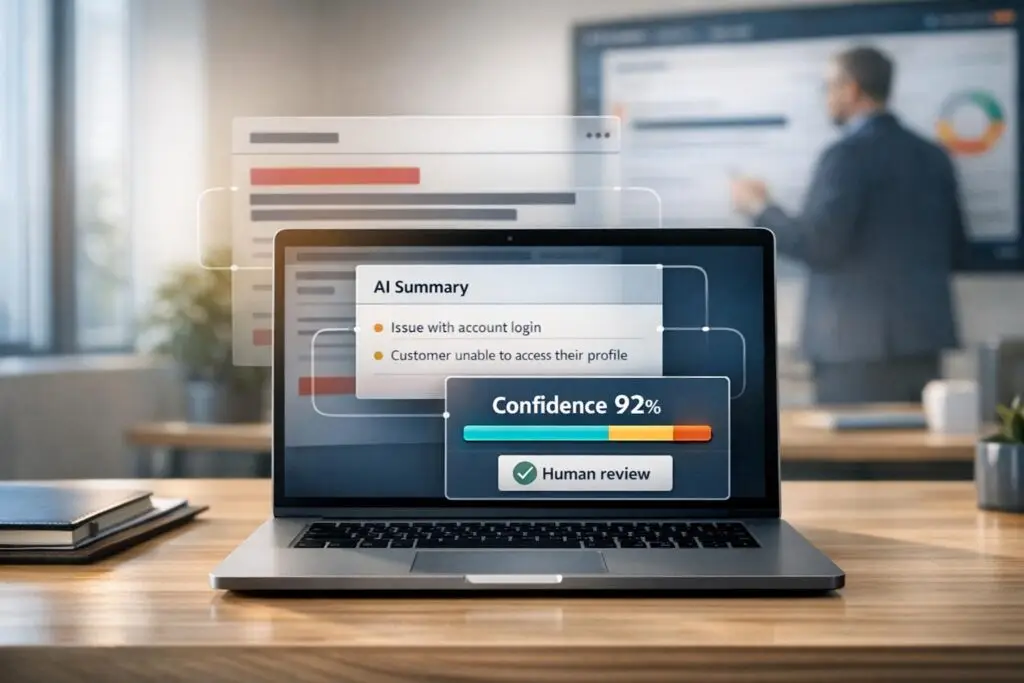
AI-assisted ticket summarization can streamline support processes, but poor implementation risks data breaches, compliance violations, and operational inefficiencies. Here’s how to do it right:
- Accuracy is key: Tailor summarization goals to specific use cases like intake, escalation, and closure summaries. Use structured prompts and monitor correction rates to refine outputs.
- Privacy matters: Redact sensitive data like PII and ensure compliance with regulations (e.g., GDPR, HIPAA). Use secure workflows, data classification, and audit trails.
- Model selection: Choose between extractive (for accuracy) and abstractive (for readability) summarization or combine both. Pair with confidence scoring to flag areas needing human review.
- Human oversight: Automate summaries but involve agents for quality control, especially in complex or high-stakes cases.
- Compliance safeguards: Use role-based access, data residency controls, and ensure third-party vendors adhere to strict data handling agreements.
Setting Goals and Boundaries for Summarization
Before diving into prompts or picking a model, it’s crucial to define what AI summarization should achieve – and where its limits are. This is especially important for AI-driven B2B support teams focused on improving cost efficiency and protecting sensitive data. Without clear goals and boundaries, you risk ending up with tools that may work technically but fail in practical, day-to-day use.
Identifying Key Use Cases
Not every support ticket needs the same type of summary. In B2B support, there are four primary scenarios where summarization proves most useful:
- New case intake: Provides a quick overview of the customer’s issue, environment, and business impact. This helps agents get up to speed without needing to sift through the entire thread.
- Continuous activity updates: Automatically updates summaries as tickets evolve, replacing manual "Context, Action, Needs" (CAN) reports that quickly become outdated. As Omar Nasser from Inkeep explains:
"Manual summaries decay the moment a customer replies. The CAN report you wrote three messages ago no longer reflects reality." [2]
- Escalation summaries: Delivers structured handoff notes that outline actions taken, current blockers, and suggested next steps. This can save engineers significant time – up to 2–4 hours per ticket, which translates to $200–$500 per escalation [2].
- Closure summaries: Creates clean, structured wrap-ups that can populate knowledge base articles and guide future triage decisions.
Focusing on high-impact scenarios, like escalations, helps establish a measurable baseline and demonstrates value quickly. Once these use cases are outlined, define specific accuracy goals tailored to each one.
Matching Accuracy Requirements to Each Use Case
Accuracy isn’t one-size-fits-all – it varies depending on the summary’s purpose.
For case intake, the priority is descriptive accuracy: does the AI correctly capture the customer’s issue and environment? With escalation summaries, procedural accuracy is critical. The summary must detail every troubleshooting step already taken to avoid redundant work and maintain trust in the tool. For closure summaries, factual accuracy and grounding in the original source are essential.
To ensure reliability, require the AI to cite transcript excerpts for all factual claims, making verification easier and boosting agent confidence. Additionally, configure the model to include a confidence score with each summary. This helps agents quickly identify areas of uncertainty. As Priya Nair, an IoT Architect, emphasizes:
"Summarization doesn’t replace the agent’s judgement; it accelerates it. Treat the summary as a decision-support artifact, not the decision itself." [1]
An important metric to monitor from the start is the correction rate – the percentage of summaries that agents edit before finalizing. A high correction rate might indicate issues with the model, prompt design, or tag structure. The IrisAgent team puts it succinctly:
"The AI’s ceiling is set by the clarity of your taxonomy – garbage in, garbage out." [5]
Before setting accuracy benchmarks, audit your ticket categories and eliminate redundant tags to ensure clarity.
Accuracy aside, protecting sensitive information is equally critical.
Understanding Privacy and Compliance Requirements
In the United States, B2B support operations must often comply with frameworks like SOC 2 (security and availability controls), HIPAA (for health-related data), and CCPA (California Consumer Privacy Act, which governs personal data use). These regulations shape what AI summarization can and cannot do with ticket data.
Sensitive information, such as personal identifiers, contact details, login credentials, and payment data, must be redacted before processing. However, technical details like error codes, product versions, and system logs should remain intact to ensure the summaries are useful. Any vendor you work with must provide a contractual guarantee that your data will not be used to train their models. The IANS AI Governance Policy highlights this point:
"A critical and non-negotiable condition for the approval of any new AI tool is a contractual guarantee from the vendor that it will not use any client data… to train its AI." [6]
Additionally, maintain logs of all model inputs and outputs. This ensures you can trace what the AI summarized, when it did so, and the source data it used. Beyond being a best practice, this is a requirement under SOC 2 and is becoming a standard expectation in emerging AI governance frameworks. These safeguards are the foundation for responsible AI summarization in AI-driven B2B enterprise customer support operations.
sbb-itb-e60d259
Building Secure and Accurate Summarization Workflows
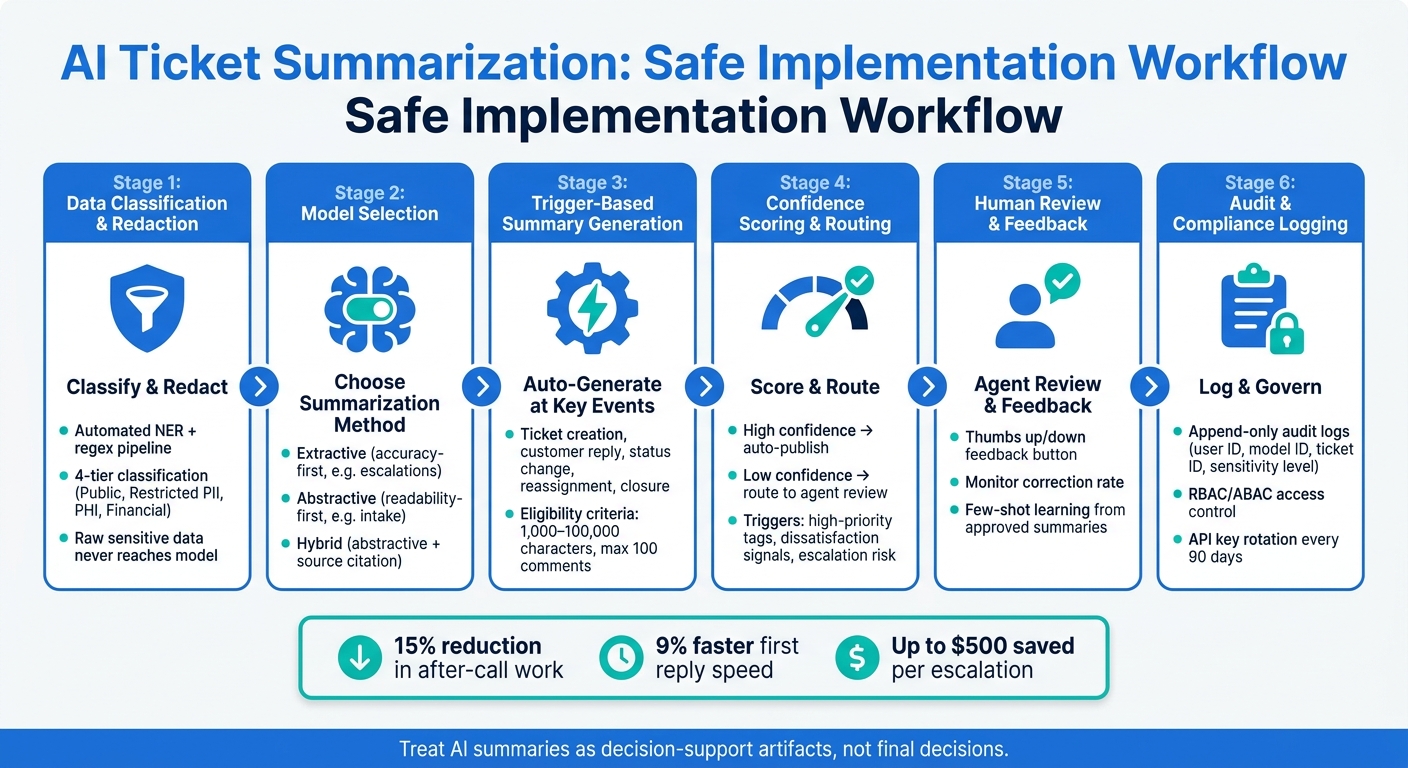
AI Ticket Summarization: Safe Implementation Workflow
Once you’ve nailed down your goals and privacy requirements, the challenge is turning those into a workflow that runs smoothly in production. This workflow should not only operate efficiently but also stick to your data privacy and accuracy standards. Achieving this involves choosing the right summarization method, planning how summaries are generated throughout a ticket’s lifecycle, and knowing when human intervention is necessary.
Choosing the Right Summarization Model and Approach
There are two main ways AI can summarize a support ticket. Extractive summarization takes sentences straight from the original text without changing them – what’s in the summary is word-for-word from the ticket. On the other hand, abstractive summarization creates new sentences that paraphrase and condense the content. While abstractive summaries are often easier to read, they can introduce errors.
For B2B support, the choice depends on the specific situation. For tasks like escalation summaries or compliance-heavy cases, extractive methods are the safer bet because factual accuracy is critical. Studies show that nearly 30% of abstractive summaries may contain factual mistakes [8]. However, for scenarios like intake summaries or conversational threads, where readability is a priority, abstractive methods work better. Many teams strike a balance by using a hybrid approach: abstractive generation paired with instructions to cite the source text for factual claims. This makes verification easier without sacrificing clarity.
If you’re handling sensitive customer data, privacy is another factor to consider. A "Summarize & Anonymize" workflow – where the model generates a summary first, then anonymizes it in a separate step – performs better than relying on the model to suppress personal information on its own [7]. While this adds complexity, it’s worth it for teams dealing with private or regulated data.
Once you’ve selected your summarization method, the next step is integrating it into a workflow that reacts dynamically to ticket events.
Setting Up End-to-End Summarization Flows
With the right model in place, your workflow should trigger summary updates at key points in a ticket’s lifecycle. These updates can happen automatically at moments like ticket creation, customer replies, status changes, reassignments, and closure. This keeps summaries up-to-date without requiring agents to manually refresh them. To ensure the system stays efficient, set clear eligibility criteria: tickets should fall between 1,000 and 100,000 characters and have no more than 100 comments [4]. Tickets outside these limits – either too short or too complex – should be flagged for manual review. Before processing, clean up unnecessary elements like email signatures or repeated reply chains; this simple step can noticeably improve summary quality [9].
Structured prompts also play a big role in consistency. Instead of a vague request like "summarize this ticket", use a defined format: issue description, environment details, actions already taken, current status, and next steps. This structure ensures summaries are easy to scan and follow the same format, no matter how complex the ticket. For closed tickets, archiving a resolution summary in a searchable database can help newer team members resolve similar issues more efficiently in the future [4].
Adding Human Review to Manage Risk
Automation is great for handling large volumes, but human oversight is key for minimizing risks. A practical way to balance the two is by using confidence scoring. The model can assign a confidence level or flag uncertainty for each summary it generates. If the confidence is low, the summary is automatically routed to an agent for review before being shared with the broader team [1].
In addition to confidence scores, set specific triggers for human review. These might include high-priority tags, signals of customer dissatisfaction, or labels indicating potential escalation risks. These rules ensure that summaries for the most sensitive cases are double-checked. Finally, give agents an easy way to flag problematic summaries – something as simple as a thumbs up/down button in their workspace works well. Monitoring the correction rate (how often agents edit a summary before using it) provides ongoing feedback on model performance and highlights areas where prompt adjustments are needed [1][4].
Privacy, Security, and Governance for AI Summarization
Once you’ve nailed down your technical workflows, the next step is ensuring your data is protected, properly classified, and governed. This is just as important as the technical setup. A 2025 IBM report highlights that AI-related security breaches cost enterprises an average of $4.88 million per incident, with recovery times stretching 38% longer than traditional cyberattacks [12]. For B2B support teams dealing with sensitive data like customer PII, financial information, or healthcare records, this isn’t just a hypothetical threat. It emphasizes the need for strict data handling practices, including classification, access restrictions, and compliance-driven workflows.
Data Inventory, Classification, and Redaction
Before any ticket content gets processed by your summarization model, you need a clear understanding of the data you’re working with. An automated classification pipeline – using regex patterns and Named Entity Recognition (NER) – can label incoming ticket data before it reaches the model [10]. A four-tier classification system works well:
| Data Type | Sensitivity Level | Handling Requirement |
|---|---|---|
| General ticket text | Public / Internal | No special restrictions |
| PII (email, phone, SSN) | Restricted | Mask or anonymize before LLM processing |
| PHI (medical records) | Restricted | Requires BAA, encryption, HIPAA-compliant services |
| Financial data (credit cards) | Restricted | Must be redacted; never sent to general LLM APIs |
For sensitive data, raw forms should never reach the model. A "progressive disclosure" method works best – start with a redacted ticket and only allow access to sensitive details when a validated step in the workflow requires it. This approach minimizes exposure while keeping the summarization process smooth [3].
The GDPR’s data minimization principle (Article 5) reinforces this idea: models should process only the data absolutely necessary for the task [3]. Pair this with automated retention schedules – for example, keeping PII for 30 days and conversation logs for 90 days. This aligns with GDPR’s purpose limitation requirements [10].
Access Control and Audit Trails
Think of your AI summarization system as a privileged team member. Assign it a dedicated service identity with scoped, read-only permissions, rather than sharing credentials across systems [3]. A study found that 97% of organizations with AI-related breaches lacked proper access controls [11]. The takeaway? Strong security measures aren’t optional, even for seemingly simple tools like summarizers.
"The real security question isn’t ‘Is AI safe?’ It’s ‘Is this AI implementation designed to prevent leakage, misuse, and unauthorized actions?’" – Ameya Deshmukh, Director of Customer Support [3]
For human users, Role-Based Access Control (RBAC) is the baseline. Agents should only see summaries relevant to their assigned queue, while only admins should have the ability to tweak summarization configurations. For more complex scenarios – such as limiting access based on a ticket’s sensitivity – Attribute-Based Access Control (ABAC) provides finer control [12]. Rotating AI service account API keys every 90 days adds another layer of security, reducing the risk of compromised credentials [12].
Every summarization request should generate an append-only audit log that tracks details like user ID, model ID, ticket ID, and the sensitivity level of the accessed data [12]. These logs are crucial for compliance reviews and detecting unusual access patterns before they escalate.
Data Residency and Third-Party Processing Compliance
If your summarization pipeline uses a third-party LLM provider, you’re effectively sending data to a data processor. Under GDPR, this requires a signed Data Processing Agreement (DPA) [10]. For healthcare-related data, you’ll also need a Business Associate Agreement (BAA) before processing any PHI [10].
When working with third-party APIs, opt for providers offering zero-data-retention options and enforce data residency using Policy-Based Access Control (PBAC). For instance, ensure that tickets from EU-based customers are processed exclusively within EU infrastructure [10] [12]. These measures aren’t just about ticking compliance boxes – they’re essential for avoiding cross-border data mishaps.
Deploying and Improving AI Summarization Over Time
Once secure and accurate workflows are in place, the next step is to focus on deployment and continuous improvement. These efforts ensure that AI summarization evolves in a way that balances innovation with responsible data handling.
Phased Rollout and Gradual Expansion
Jumping straight into full automation can be risky. As one expert explains:
"The biggest mistake we see is trying to automate every possible action from day one. Get the summarization right first. Build trust. Then expand." – SiteLiftMedia [9]
Start small. For instance, deploy the system with a limited group of agents and focus on a single channel, such as email. Begin with internal-only notes to contain any potential issues, like prompt failures or unexpected errors, within a controlled environment.
As the system’s accuracy improves and governance processes are refined, you can gradually scale up. This might include adding more queues, expanding to additional channels, and eventually handling more complex tasks, such as escalation summaries or handoff notes. Even if early results look promising, resist the urge to skip steps. A steady, phased approach creates a foundation for incorporating agent feedback, which is key to improving the system over time.
Using Agent Feedback to Improve Results
Agent feedback is a goldmine for improving summarization quality. A simple thumbs up/down button on the summary interface allows agents to quickly share feedback and provide context [4].
When an agent flags a summary as poor, log the original transcript alongside the AI-generated output. This helps pinpoint specific issues, like missed urgency, incorrect tone, or fabricated details, which can guide prompt adjustments. Keep an eye on the correction rate – the percentage of summaries that agents edit – as it serves as a clear measure of the model’s performance [1].
Few-shot learning can also play a big role. By using agent-approved summaries as examples, you can fine-tune the model to produce outputs that align with your standards [1][14].
| Feedback Method | Captured Data | Usage |
|---|---|---|
| Thumbs Up/Down | Binary sentiment + full context | Tracks performance trends and informs prompt adjustments [4] |
| Manual Edits | Corrected text vs. AI output | Identifies recurring issues like hallucinations for model refinement [1][9] |
| Confidence Flags | Low-confidence scores | Triggers human review for ambiguous or complex cases [1][2] |
In addition to qualitative feedback, measurable metrics ensure that improvements are making a tangible difference.
Measuring Performance and Cost Impact
In a 12-week pilot (Feb–May 2026), a technical support company reported some impressive results: a 15% reduction in after-call work and a 9% increase in first reply speed [1]. They also saw better agent retention, likely because the system eased cognitive strain during high-demand shifts.
These metrics are key when making the case for AI summarization. Track efficiency metrics like reduced after-call work and faster response times, and combine them with financial data, such as API costs per ticket, to create a comprehensive business case. Qualitative data, like agent satisfaction scores, can also highlight risks like burnout and retention challenges. Tools like Supportbench simplify this process by integrating AI-driven summaries, predictive CSAT and CES analysis, and QA insights into a single dashboard, eliminating the need to juggle multiple platforms.
"The goal isn’t 100% automation. It’s removing the 80% of manual summarization that agents skip under volume pressure anyway." – Omar Nasser, Inkeep [2]
Conclusion: Balancing AI Progress with Responsible Implementation
AI-assisted ticket summarization offers measurable benefits when built on a foundation of accuracy, privacy, and human oversight. Pilot programs highlight its potential, showing a 15% reduction in after-call work and a 9% improvement in first reply speed[1].
However, the goal of AI isn’t to replace human judgment – it’s to complement and enhance it. As Priya Nair, IoT Architect, explains:
"Summarization doesn’t replace the agent’s judgement; it accelerates it. Treat the summary as a decision-support artifact, not the decision itself."[1]
This approach shapes every stage of implementation. From redacting sensitive information to incorporating agent feedback to address inaccuracies, AI-generated summaries should be treated as tools to support decisions, not as standalone solutions. This not only improves operational efficiency and ROI but also builds customer trust while adhering to data protection standards.
Privacy and governance remain critical. For enterprise-grade deployments, measures like internal-only summaries, role-based access control, and audit trails are essential[13]. As regulations evolve, private AI architectures – designed to keep data within an organization’s infrastructure – are becoming the go-to method for managing sensitive customer information[15]. These practices ensure that AI integration aligns with both operational needs and compliance requirements.
Rather than aiming for full automation, the focus should be on reducing friction so agents can dedicate their time to more critical tasks. When implemented thoughtfully, AI summarization can lead to faster, more reliable customer support while maintaining the human touch.
FAQs
What should we summarize in a ticket – and what should we avoid?
When summarizing a ticket, zero in on the main problem, the customer’s expectations, the actions taken, the outcomes, and the current status. Be sure to include critical details like the root cause and the business impact.
Avoid including sensitive or unverified information, unnecessary details, irrelevant content, or anything fabricated. Keep the summary concise and focused on the key issue and actions, ensuring that it remains accurate, relevant, and respects privacy.
How do we prevent PII or PHI from reaching the model?
To keep PII (Personally Identifiable Information) or PHI (Protected Health Information) safe from reaching the model, focus on data masking and anonymization. These techniques hide sensitive details like names, addresses, and payment information. It’s also crucial to enforce strict access controls and use encryption to protect raw data from unauthorized access.
Another key step is mapping out data flows. This helps track where sensitive information is stored or transferred, ensuring it’s stripped away before being processed by AI systems. And remember: never use customer data for training unless you’ve obtained explicit consent.
When should agents review AI summaries?
Agents need to carefully review AI-generated summaries, especially when they’re used for important tasks like ticket triage, escalation, or handoffs. This step is crucial to ensure the summaries are accurate and contextually appropriate. Human oversight helps catch potential mistakes, such as AI hallucinations, and safeguards sensitive information. While AI can simplify workflows and ease mental effort, having agents verify these summaries ensures customer communications are handled correctly, with privacy and accuracy as top priorities.






