


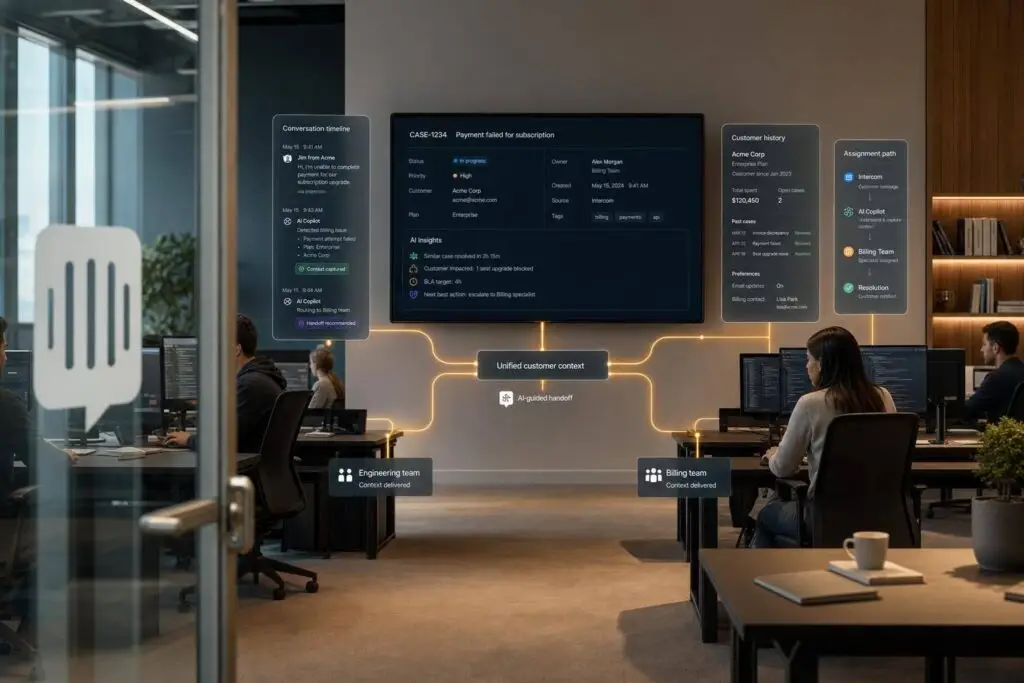
If Intercom is your front door, the fix is simple: keep intake in Intercom, but keep one case record somewhere else. I’d make Supportbench that record so every handoff carries the same account, SLA, history, and next-step data.
Here’s the short version:
- Intercom is good for first contact
- Context often breaks after the first handoff
- Agents then switch tabs, copy notes, and rebuild the story by hand
- That slows replies, hurts first-contact resolution, and can put renewals at risk
- The fix is to define a small handoff package and make it follow the case everywhere
- AI can help by writing summaries, filling fields, and blocking weak handoffs before they move
A few details matter most:
- Send only the fields that change the next action
- Keep one owner at each stage
- Pass the reason for the handoff, not just the transcript
- Run a QA check before the case moves to another team
The article’s core idea is clear: Intercom should open the conversation, not hold the whole support story. I’d treat Supportbench as the system that keeps the durable case record, then sync only status updates, milestone notes, and handoff-ready summaries to the other tools.
That approach cuts repeat questions, lowers manual work, and gives each new agent one place to see what happened, what was tried, and what should happen next.
Map the minimum context package that must follow every handoff
You don’t need to sync every field from every system. That just creates noise.
What you need is the small set of details that changes the next action. That’s the context package every handoff should carry.
At a minimum, every handoff needs a fixed set of context: identity, prior conversation, prior actions, billing or plan status, and recent product or lifecycle signals. [1]
Some of this should move as structured data automatically. That includes account name, primary contact, CRM record link, contract tier, SLA status, renewal date, severity, product area, environment, and current owner. Then there are AI-generated fields that add meaning: issue summary, business impact, what has been tried, and next step. [1]
One field gets missed all the time: the escalation rationale. That’s the why behind the transfer.
A transcript can show what was said. It usually doesn’t show what the agent concluded, what they ruled out, or why the case needs a new owner. That layer of interpretation needs to live in a durable record, like a CRM note or an internal case workspace, so the next person doesn’t have to piece it together from scratch. [2]
How the context package changes by workflow type
The minimum package stays the same. But the emphasis shifts based on where the case is going next.
| Handoff Type | Required Context Fields | Risk if Missing | Suggested Automation |
|---|---|---|---|
| Support-to-Support | Account name, primary contact, issue summary, transcript link, current owner, next step | Customer repeats story; duplicate effort by multiple agents | AI-generated conversation summary and auto-assignment |
| Support-to-Engineering | Product area, environment details, repro steps, business impact, linked bugs | Engineering can’t reproduce the issue; long back-and-forth delays | Auto-enrichment of environment data from product logs |
| Support-to-Success | Contract tier, SLA, renewal date, account health signals, recent friction points | Success team looks uninformed; high churn risk during renewal | Sync billing and subscription status from CRM to support view |
| Enterprise Escalation | Severity, business impact, SLA, account tier, previous resolution attempts | SLA breach; contract penalties; loss of high-value account trust | Priority routing based on contract tier and SLA fields |
Once the minimum package is defined, the next move is making sure it follows the case across every system transfer. After that, the workflow needs to carry that package cleanly through Intercom, Supportbench, and downstream systems.
sbb-itb-e60d259
Design workflows that keep Intercom, Supportbench, and downstream systems aligned
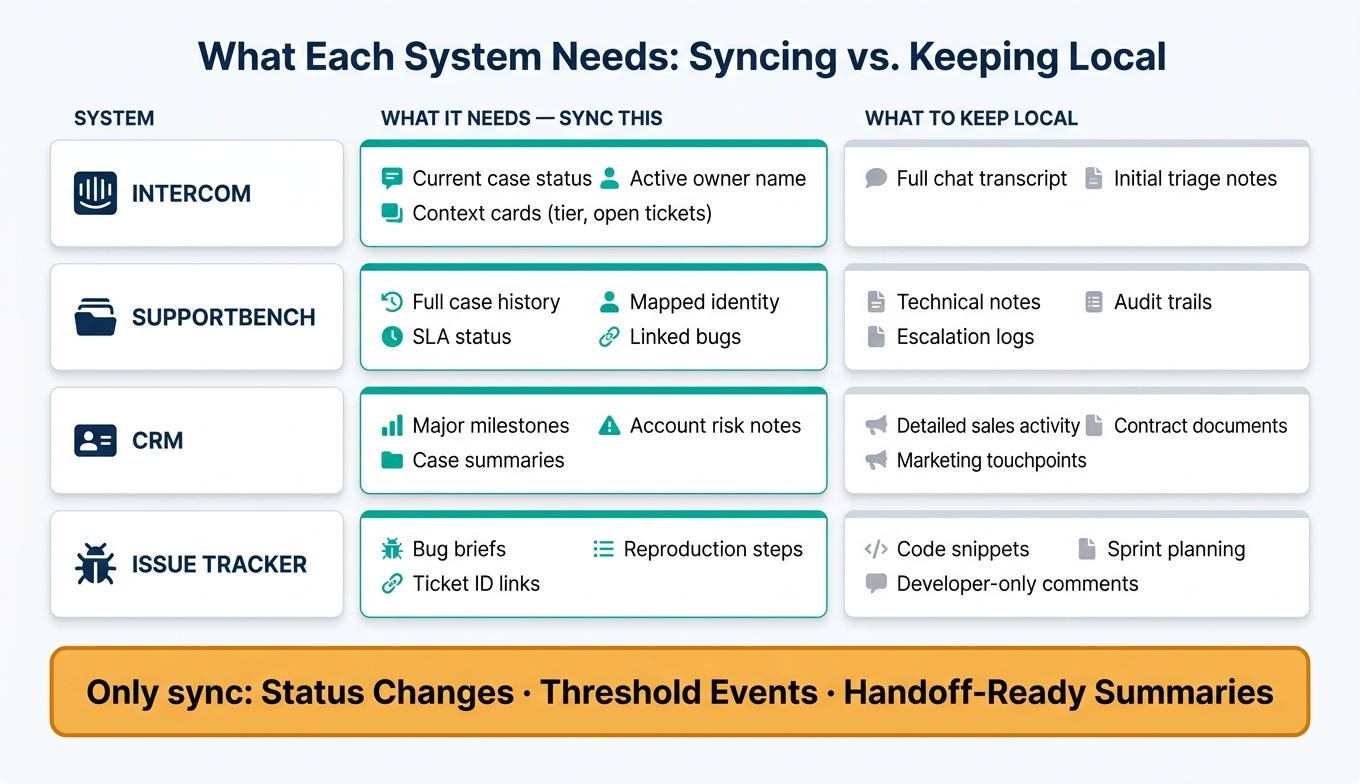
What to Sync vs. Keep Local: Customer Support System Alignment Guide
After you’ve set the minimum context package, the next step is simple in theory and messy in practice: make sure that context moves cleanly between systems without creating extra work or confusion.
The goal isn’t to copy everything into every tool. It’s to move the right information to the right place at the right time, so agents don’t have to guess who owns the work or hunt for missing details.
Route intake into structured case ownership
Not every Intercom conversation should turn into a full case. But some clearly should. A refund request, a bug report, a cancellation signal, or any other complexity threshold your team has defined should trigger automated ticket routing, with the needed fields already mapped.
Send those mapped fields, along with the full transcript, into Supportbench. That gives Supportbench the case record for SLA tracking, escalation, and account history, while the CRM continues to hold identity and account data. And with sidebar integrations in Intercom, agents can check Supportbench ticket status, customer tier, and open cases without bouncing between tabs.
Once the case exists, the next step is more selective: sync only the updates each system needs to do its job.
Sync only the updates each system actually needs
The urge to sync everything everywhere sounds safe. In practice, it creates noise.
A cleaner setup is to decide what each system needs, then keep the rest local.
| System | What It Needs | What to keep local |
|---|---|---|
| Intercom | Current case status, active owner name, context cards like tier and open tickets | Full chat transcript, initial triage notes |
| Supportbench | Full case history, mapped identity, SLA status, linked bugs | Technical notes, audit trails, escalation logs |
| CRM | Major milestones, account risk notes, case summaries | Detailed sales activity, contract documents, marketing touchpoints |
| Issue Tracker | Bug briefs, reproduction steps, ticket ID links | Code snippets, sprint planning, developer-only comments |
So instead of pushing every field into every system, sync only:
- Status changes
- Threshold events
- Handoff-ready summaries
That keeps each tool useful without turning it into a dumping ground.
Set clear ownership rules for every transfer
Once a case hits an escalation trigger, ownership should move automatically to the right team. That might happen because of renewal risk, a refund request, or an unresolved bug. When it does, the workflow should also attach a structured handoff note and adjust the SLA to match the urgency.
That handoff note should include the customer’s stated issue, the data already collected, the trigger that fired, and the recommended next step. With that in place, each team sees the context it needs. Frontline agents can confirm status fast, and specialists can move the work forward without asking the customer to repeat the story all over again.
When a trigger fires, the workflow should:
- Assign ownership
- Attach a structured handoff note
- Adjust the SLA automatically
That handoff layer sets up the AI work that follows: summaries, briefs, field enrichment, and QA checks.
Use AI to carry context forward instead of asking customers to repeat themselves
With the case record and ownership rules in place, AI can keep context moving without all the manual copy-and-paste.
Once those ownership rules and handoff notes are set, AI can turn them into a durable case record that follows the work across tools and over time. A strong handoff should include verified identity, detected intent, prior actions, sentiment, and the next step.
Use AI to turn the handoff record into the next agent’s working context.
Generate summaries, escalation briefs, and CRM notes automatically
When a case enters Supportbench, AI Case Summaries can create a 3- to 5-sentence snapshot of the issue, what’s already been tried, and the current status. Intercom should surface that summary, while Supportbench stores the durable record. That way, the next agent gets the full picture without asking the customer to explain everything again.
For long-running cases, like bug investigations or multi-week renewal conversations, AI Customer Activity Summaries can condense recent interactions into a short brief. If a new agent picks up the case, they can see where things stand right away.
When a case needs to move to engineering, the AI copilot can draft a structured escalation brief with:
- The customer’s stated issue
- The diagnostic steps already taken
- The specific blocker
- A recommended next step
You can also generate CRM notes from that same case data.
Those summaries should also populate structured fields so routing and escalation stay on track.
Enrich ticket fields and prioritize work with AI
Manual tagging and field completion are common places where context slips through the cracks. An agent is moving fast and skips the issue type field. Severity never gets set. By the time the case reaches a specialist, the routing logic has less to work with.
AI can classify issue type, apply tags, detect sentiment, and fill structured fields at case creation. It can also use account value, renewal date, and health score to set priority and ownership [3]. If a renewal is close or a customer health score drops, dynamic SLAs can shorten the response window. That helps high-risk cases surface faster, and the agents who get them already have the account context they need to act.
Run QA checks before handoffs create delays
Before a case moves downstream, run one last check for missing context.
A fast handoff with missing information can do more damage than a slow one. If reproduction steps are missing or business impact isn’t clear, an engineering ticket can stall while someone chases down basic details.
AI-driven QA checks act like a gate before a case moves downstream. If key fields are missing, block the handoff until they’re filled in. The customer shouldn’t have to become the backup source of context for the next team.
| Context Failure Mode | Detection Method | Control Point in Workflow |
|---|---|---|
| Missing reproduction steps | AI scan for technical keywords or patterns | Before Tier 2 or engineering handoff |
| Unclear business impact | Sentiment analysis cross-referenced with account ARR or tier | Escalation trigger logic |
Conclusion: Build one durable case record behind the front door
Once routing, syncing, and QA checks are set, and workflow automation is established, the last job is to keep one durable case record. Intercom remains the front door. Supportbench keeps the case record.
Each handoff should pass along the structured case record, not just the latest transcript. Required fields need to be filled before the handoff moves forward, while AI summaries and QA checks help keep the record complete as work moves across systems.
When a new agent picks up a case, they should be able to open one record and know exactly where things stand. That’s the bar every handoff should meet. No tab-switching. No repeat questions. No lost context.
The goal is one case record that follows the issue across every system.
FAQs
When should a chat become a case?
A chat should become a case when it needs tracking, clear ownership, or follow-up that won’t be finished in a single session without help from other teams.
Create a case when the issue:
- Spans multiple shifts
- Involves engineering, finance, or legal
- Affects VIP or enterprise accounts
- Relates to bugs, outages, SLA management, or a multi-day investigation
This helps make sure the work has a clear owner and doesn’t get lost between handoffs.
What fields belong in the handoff package?
Include the minimum context agents need so they don’t have to rebuild the whole story from scratch.
That usually means four things:
- Customer and account details: who the customer is, their organization, subscription tier, and account status
- Interaction history: the conversation, ticket history, and what’s already been tried
- Operational details: who is affected, what’s impacted, where, when, and why, plus any error codes or logs
- Intent and status: escalation reason, next action, owner, priority, and status
Think of it this way: the next agent should be able to open the case and understand the situation without digging through a long thread, chasing old notes, or asking the customer to repeat themselves.
How can AI prevent bad handoffs?
AI helps stop messy handoffs by attaching a full context package when a chat turns into a ticket. That package should include the conversation transcript, customer tier, diagnostics already collected, and the reason for escalation.
It also cuts down on repeat questions by routing conversations with keyword triggers and keeping updates visible through bidirectional sync. That way, agents don’t have to piece the history back together by hand.
Related Blog Posts
- Intercom to helpdesk: how do you preserve customer context across chat + email?
- How to set up “follow-the-sun” handoffs with clean context transfer
- Intercom is not a helpdesk: how to keep Intercom for chat and run tickets elsewhere
- How to centralize Intercom conversations into a real helpdesk workflow
Evaluating help desks for a B2B team?
Supportbench is all-inclusive from $32 per agent per month, with migration and onboarding included. See pricing or book a 20-minute demo.






