


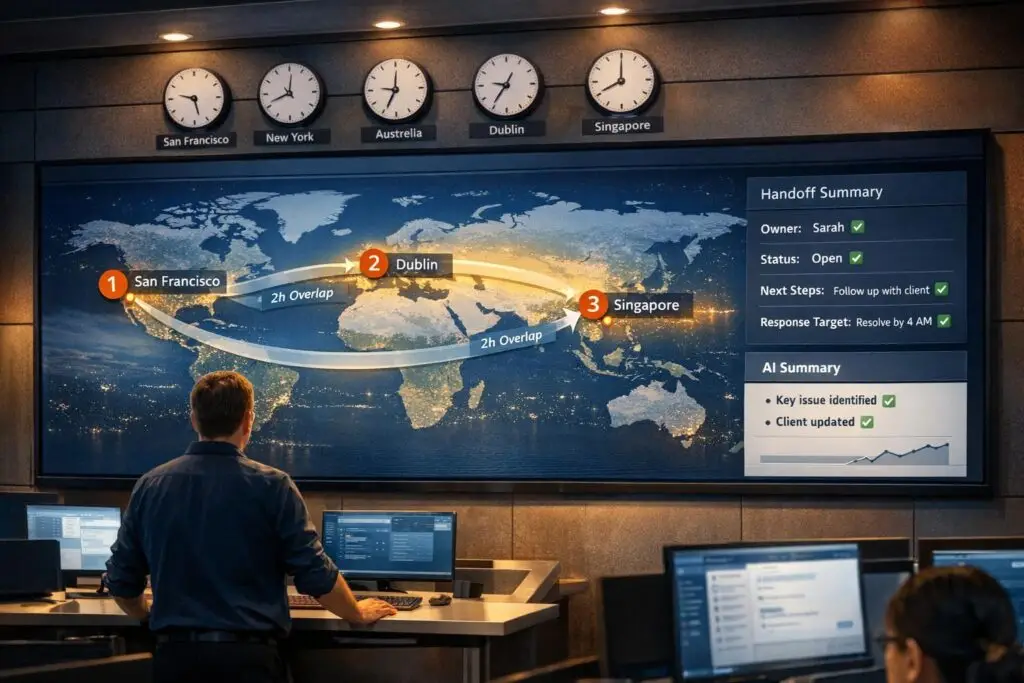
Follow-the-sun handoffs ensure 24/7 customer support by transferring issues between global teams across time zones. The key to success lies in smooth context transfer, clear ownership, and standardized processes. Poor handoffs can delay resolutions, frustrate customers, and harm satisfaction scores. Here’s how to avoid these pitfalls:
- Map time zones: Align team schedules with planned overlaps (30–60 minutes) for real-time collaboration.
- Standardize handoffs: Use templates to document ticket details like actions taken, blockers, and next steps.
- Leverage AI: Automate ticket summaries, update context dynamically, and analyze sentiment to reduce manual errors.
- Assign ownership: Ensure every ticket has a clear owner, and confirm handoff acknowledgment.
Teams that implement these strategies can reduce delays, improve efficiency by 30–50%, and maintain customer satisfaction scores above 85%. Proper planning and automation make global support operations more effective.
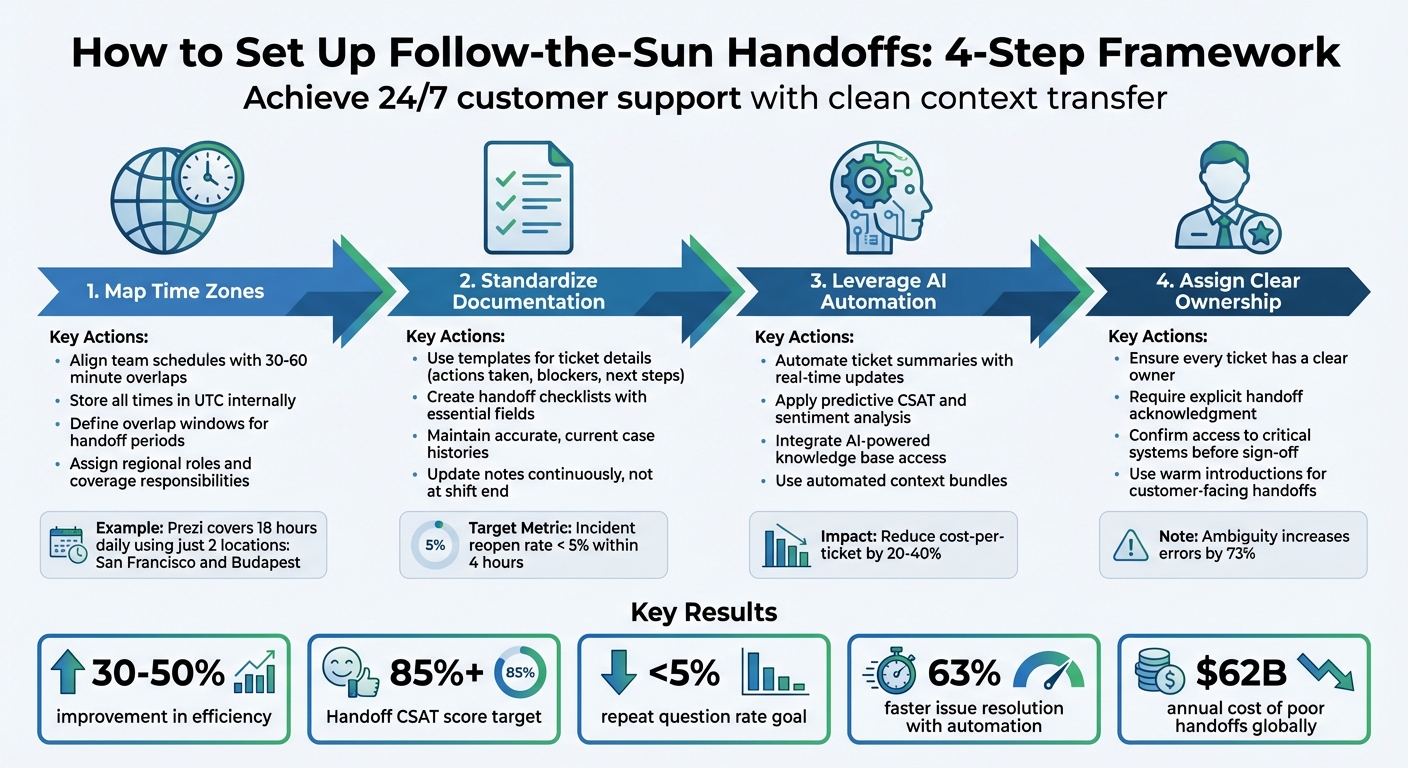
4-Step Framework for Follow-the-Sun Support Handoffs
Follow the Sun Method: How Global Teams Never Stop Working
sbb-itb-e60d259
Map Time Zones for Better Team Coordination
One of the toughest parts of follow-the-sun support is syncing up global schedules to ensure smooth handoffs. When there’s no planned overlap, tickets can get stuck in limbo. The solution? Start by mapping out your regional working hours and creating overlap periods where teams can collaborate in real time.
To avoid time conversion headaches – especially during Daylight Saving Time (DST) transitions – store all internal times in UTC. While your support platform should display timestamps in each agent’s local time zone, the backend system should always rely on UTC. This eliminates the confusion that DST changes often bring to global teams [4]. With this foundation in place, you can focus on creating productive overlap windows.
"The transition between timezone-based teams is where follow-the-sun coverage either succeeds or collapses. Effective handoffs require structured communication, not just calendar boundaries." – Upstat [4]
Define Overlap Windows for Handoff Periods
To ensure smooth handoffs, include 30–60 minute overlaps in your shift schedules. During this time, the outgoing engineer should remain available as the incoming engineer starts their day [4]. At least 10–15 minutes of this overlap should involve live discussions to transfer context effectively [4].
For more complex cases or strategic conversations, extend the overlap to 1–2 hours [5]. Use this time for in-depth alignment rather than basic status updates. If you’re testing the model, begin with two neighboring time zones – like U.S. East Coast and EMEA – before scaling globally [6]. For example, Prezi covers 18 hours daily using just two locations: San Francisco and Budapest [2].
Another way to stretch your coverage is by staggering start times within a single region. For instance, having team members start at 7 AM, 8 AM, and 9 AM extends your coverage without increasing headcount [2]. Once schedules are optimized, assign specific roles to streamline handoffs even further.
Assign Regional Roles and Coverage Responsibilities
Once schedules are aligned, assign roles based on each region’s strengths for both real-time and asynchronous tasks. Your nearshore teams (your "Daytime Engine") should focus on client-facing activities, strategic planning, and real-time collaboration. Meanwhile, offshore teams (your "Overnight Engine") can handle asynchronous tasks like clearing support queues, QA testing, and report prep [5].
| Region Type | Key Focus | Typical Tasks |
|---|---|---|
| Nearshore (Daytime Engine) | Strategy & Real-time collaboration | Client meetings, strategic planning, escalations [5] |
| Offshore (Overnight Engine) | Execution & Continuity | Support queues, QA testing, data processing, reports [5] |
Be sure to account for regional holidays – like Chinese New Year, American Thanksgiving, and European labor laws – when planning schedules. These events can create gaps if not considered ahead of time [4]. Build them into your system early to avoid scrambling for last-minute fixes. Finally, every handoff should clearly outline the "next action" and assign ownership directly in the ticket notes [6].
"The follow-the-sun model only works if you can facilitate great handoffs between different time zones. Without that, you’re dead on arrival." – Mark Sherwood, CX Strategist and Support Operations Leader [6]
Standardize Documentation for Clean Context Transfer
In follow-the-sun support, every detail in your documentation matters. When handoff notes are incomplete or inconsistent, even the most carefully planned schedules can unravel. Smooth transitions depend on clear, thorough documentation. Without it, incoming agents might have to ask customers to repeat themselves or redo troubleshooting steps that already failed.
The objective is straightforward: the next agent should grasp the full context in under two minutes, without digging through countless messages or guessing what happened before they took over [1]. This demands structured notes that outline what’s been done, what didn’t work, decisions made, and the next steps.
"Poor handoffs cause more operational problems than most teams realize. Context gets lost. Ongoing incidents fall through cracks." – Upstat [7]
Create Handoff Checklists and Templates
Ditch freeform messages in favor of templates with essential fields like "Customer Impact", "Next Action", and "Decision Needed" [1]. These templates should capture key details, such as ticket links, current status, failed troubleshooting steps, working theories, and any temporary workarounds [7].
For both AI-to-human and human-to-human handoffs, use structured bundles that include customer ID, verbatim interaction history, detected intents, and sentiment analysis [3]. This approach helps reduce the "repeat question rate" – when agents ask customers for information they’ve already provided – which should ideally stay below 5% [3]. Include a "Do Not Revisit" section to highlight resolved issues or ruled-out theories, preventing teams from retracing unproductive paths [10].
"A good handoff is a compact, repeatable packet that can be scanned in under two minutes and still support action." – fitgap [1]
For incident management, aim for an incident reopen rate under 5% within four hours of a handoff – this metric reflects the quality of your documentation [7].
| Element | Data Points | Purpose |
|---|---|---|
| Active Risks | Ticket links, current status, customer impact | Prioritizes immediate tasks for the next shift |
| System State | Metrics vs. baselines, recent deployments | Helps identify new issues quickly |
| Technical Debt | Workarounds applied, root cause | Prevents temporary fixes from becoming permanent |
| Decisions | Decision needed (Y/N), owner, due date/time | Avoids bottlenecks and clarifies responsibilities |
| Context Notes | Working theories, failed steps, tribal knowledge | Speeds up troubleshooting by sharing insights |
These templates provide a consistent structure for documentation, ensuring that case histories are updated and transitions remain seamless.
Maintain Accurate and Current Case Histories
Once templates and checklists are in place, keeping case histories up to date is critical. Instead of saving notes for the end of your shift, update them continuously [7]. This practice reduces the risk of losing important details, such as failed troubleshooting attempts, customer escalations, or temporary fixes. Be specific in your entries; for instance, note "Database query latency P95 increased from 50ms to 200ms at 2:30 PM" [7].
Document negative findings to avoid repeating ineffective actions [7]. Include timestamps for major events like alerts, identified issues, or fixes to create a clear timeline. For complex cases with lengthy histories, use AI tools to generate concise summaries (3–5 sentences) so incoming agents can quickly understand the situation without wading through pages of notes [3][9].
"If it isn’t written down, incoming engineer doesn’t know it." – Upstat [7]
Before the outgoing team signs off, confirm the incoming team has access to critical systems (e.g., VPNs, dashboards, credential vaults) to prevent delays during incidents [7]. Regularly audit field mappings between tools to ensure that no data is lost when tickets are transferred – for example, when "Customer Impact" in your CRM lacks a corresponding field in your engineering bug tracker. These gaps can cause vital information to disappear during handoffs [8].
A well-executed handoff process should aim for a Handoff CSAT score above 85% [3]. With standardized documentation and up-to-date case histories, teams can boost productivity by 30–50%, spending less time piecing together context and more time resolving issues [3]. Proper documentation not only prevents errors but also improves global support efficiency.
Use AI to Automate Context Transfer and Maintain Continuity
Manual reports can quickly lose relevance as new customer messages roll in. Picture this: the outgoing team writes a summary at 5:00 PM EST, but by the time the APAC team logs in at 9:00 PM EST, multiple new customer replies have arrived. That initial handoff note? It’s already outdated. This is where AI-driven automation steps in. Instead of relying on static summaries that become obsolete, AI tools dynamically update ticket information with every change. This ensures that incoming teams always have the latest context at their fingertips, making transitions smoother [11].
When context isn’t properly transferred, engineers can spend 2–4 hours per ticket trying to piece together details, which can cost up to $500 in wasted labor. In an 18-hour resolution cycle, incomplete context can waste more than 6 hours. Teams that adopt continuous AI summarization often reduce their cost-per-ticket by 20–40% [11].
Automate Ticket Summarization with AI
AI-powered ticket summaries eliminate the need for agents to dig through long message threads to reconstruct context. These summaries capture the essentials: key context, actions taken, blockers, and next steps. With this structured approach, the incoming agent can quickly get up to speed.
For added reliability, use AI tools that provide inline citations and flag summaries with confidence scores below 70% for manual review [13,14].
"Manual CAN reports decay the moment a customer replies. The CAN report you wrote three messages ago no longer reflects reality." – Inkeep Team [11]
AI summaries should also include internal notes to preserve troubleshooting insights. A well-crafted escalation brief – about 200 words – can be reviewed in 30 seconds, compared to the several minutes it takes to read a raw transcript. For follow-the-sun teams, embedding AI summaries directly into the CRM sidebar ensures agents can access critical context without jumping between tabs [13,14].
Apply Predictive CSAT and Sentiment Analysis
Traditional CSAT surveys only capture feedback from 5–15% of interactions and often arrive too late to make a difference [15,16]. Predictive CSAT, on the other hand, analyzes 100% of conversations in real time. This allows teams to spot dissatisfied customers and act before issues escalate. With up to 87% accuracy, these AI models have been shown to improve overall CSAT scores by about 14% in less than three weeks [13].
Sentiment analysis takes this a step further by identifying frustration levels and triggering proactive actions. A multi-level sentiment model can help classify customer emotions:
- Level 1: Neutral language
- Level 2: Mild frustration (e.g., "this isn’t working" or "I’ve tried that already")
- Level 3: Active frustration (e.g., all-caps messages or terms like "unacceptable" or "cancelling")
When Level 3 frustration is detected, immediate escalation can prevent customers from repeating themselves and losing up to 78% of context [[14]](https://docs.buildbetter.ai/pages/Use Cases/cs/support-handoff).
Including sentiment data in the context package – summarizing the issue, previous attempts, and frustration triggers – helps agents respond with precision. For instance, instead of a generic apology, an agent might say, "I see you’ve tried this three times already – let me take over." This shows the customer that their concerns are understood and being taken seriously [14,18].
Integrate AI-Powered Knowledge Base Access
AI tools that connect directly to your knowledge base can suggest relevant articles during handoffs, minimizing redundant troubleshooting. The best systems embed right into an agent’s workspace, offering one-click access to documentation and past resolutions without requiring tab-switching [11].
Loop detection is another helpful feature. If a customer rephrases the same question three or more times, the AI can trigger an escalation, signaling that human intervention is needed. In these cases, the AI should prepare a context package with interaction history, customer details, and a log of AI actions – such as previously suggested knowledge base articles. This prevents redundant recommendations and ensures advanced troubleshooting is as efficient as possible [12].
AI-powered knowledge bases also enhance agent workflows. With tools like the AI Agent-Copilot, agents receive real-time suggestions and auto-generated replies based on case history and existing documentation. These features ensure that context transfer not only covers what has happened but also highlights effective solutions already available. This integration keeps support cycles running smoothly and ensures no detail is overlooked.
Avoid Common Pitfalls in Global Handoffs
Even with strong documentation and AI-driven updates, certain pitfalls can derail the smooth transfer of responsibilities. Poor handoffs cost organizations around $62 billion annually due to subpar customer service, much of which stems from avoidable mistakes [[14]](https://docs.buildbetter.ai/pages/Use Cases/cs/support-handoff). The most common issues include incomplete context transfer, unclear ownership, and over-reliance on manual processes.
Addressing these challenges can lead to faster resolutions and happier customers.
Fix Incomplete or Unclear Context Transfer
Clear documentation is the backbone of effective handoffs. Vague notes like "DB is slow" or assumptions like "you know about the database issue" can lead to confusion, wasted time, and unresolved incidents. Instead, teams should provide precise details and avoid relying on prior knowledge. Structured templates can help capture key information, such as ongoing incidents, recent fixes, system health, and any temporary workarounds [7].
Failures should also be documented. For instance, if restarting a service or rolling back a deployment has already been attempted without success, that information should be included to prevent redundant troubleshooting. Temporary fixes should be flagged so incoming teams know they are not permanent solutions [7].
In customer-facing scenarios, asking customers to repeat their issues can harm satisfaction. Studies show that traditional handoffs lose up to 78% of the original context between teams [[14]](https://docs.buildbetter.ai/pages/Use Cases/cs/support-handoff). Automated context bundles can address this by packaging key information – like conversation history, customer profiles, and reasons for escalation – into a streamlined transfer process [3].
Establish Clear Ownership During Transitions
Ambiguity in ownership is a major reason why handoffs fail, increasing the likelihood of errors by 73% [[14]](https://docs.buildbetter.ai/pages/Use Cases/cs/support-handoff). To avoid this, every handoff should assign a specific owner. Formal acknowledgment protocols, such as an incoming engineer explicitly stating, "Handoff received. I am now on-call", ensure accountability before the outgoing team signs off [7].
Before leaving, the outgoing team should confirm that the incoming team has access to all necessary tools, such as VPNs, SSH credentials, and paging systems. Running a quick "test alert" can verify everything is working as intended, preventing delays during incidents [7].
In customer-facing handoffs, warm introductions build trust. Instead of silently transferring a ticket, have the outgoing team introduce the new team member by name and expertise (e.g., "Maria from our technical team is now handling your case"). Automated status updates can also keep customers informed when their case is reassigned, ensuring transparency throughout the process [[14]](https://docs.buildbetter.ai/pages/Use Cases/cs/support-handoff).
Replace Manual Processes with Automation
Manual workflows during handoffs are slow, prone to errors, and hard to scale. If transferring context takes more than five minutes, it’s a sign that automation is needed [[14]](https://docs.buildbetter.ai/pages/Use Cases/cs/support-handoff). Automated context bundles and intelligent routing can replace outdated manual processes. These tools dynamically update with new customer messages and provide incoming teams with real-time details [3][[14]](https://docs.buildbetter.ai/pages/Use Cases/cs/support-handoff).
These bundles should include key data like customer ID, intent, sentiment scores, and escalation triggers in a structured format. Intelligent routing engines can then match customer needs to the most suitable specialist based on factors like complexity and urgency [3][[14]](https://docs.buildbetter.ai/pages/Use Cases/cs/support-handoff). Automated triggers can also flag issues, such as unresolved cases over 24 hours or signs of customer frustration, ensuring they are addressed promptly [[14]](https://docs.buildbetter.ai/pages/Use Cases/cs/support-handoff).
Organizations using automated tools resolve issues 63% faster [[14]](https://docs.buildbetter.ai/pages/Use Cases/cs/support-handoff). Automation not only speeds up handoffs but also reduces human error. SLA timers can start instantly, and real-time alerts via Slack or email ensure receiving teams are notified immediately.
| Handoff Component | Common Mistake | Recommended Solution |
|---|---|---|
| Documentation | Vague notes like "DB is slow" | Use specific metrics and detailed performance data [7] |
| Ownership | Assuming the next shift will handle it | Require explicit acknowledgment (e.g., "handoff received") [7] |
| Process | Manual data collection during transitions | Implement automated context bundles and updates [7] |
| Customer Experience | Requiring customers to repeat their issue | Use automated conversation bundles for seamless transitions [3] |
| Verification | Discovering access issues during incidents | Confirm access to critical systems before shift end [7] |
Conclusion
Follow-the-sun handoffs thrive on consistent processes, AI-driven automation, and effective team collaboration. These elements aren’t just buzzwords – they lead to real, measurable results.
"The follow‐the‐sun model works best when three key elements are in place: seamless handoffs between regions, clear ownership of customer issues, and standardized processes that ensure consistent quality everywhere." – Mark Sherwood, CX Strategist and Support Operations Leader [6]
AI tools can significantly enhance productivity, with agents seeing efficiency gains of 30–50%. High-performing teams also keep repeat question rates under 5% during handoffs and aim for a Handoff CSAT score above 85% [3]. These results are possible by replacing outdated manual processes with automation and ensuring tools and training are standardized across regions.
To make this work in practice, focus on optimizing overlap windows and creating standardized handoff templates. Leverage AI-generated summaries to turn lengthy conversation histories into actionable insights, and use automated routing to prevent tickets from being delayed by offline teams [6].
Trust between regions is also critical. If agents doubt the next team can maintain quality, frustration grows, and resolution times increase. To combat this, unify your global tech stack, empower agents to act without unnecessary approvals, and closely monitor handoff metrics to pinpoint bottlenecks [6].
The formula for success is clear: ensure smooth context transfer, adopt intelligent routing, and eliminate repeated customer questions [3]. When customers don’t have to repeat themselves and agents receive complete context during handoffs, the follow-the-sun model transforms into a real advantage. By adopting these strategies, your global support operations can cut costs while consistently delivering top-tier customer experiences.
FAQs
What should be in a perfect handoff note?
A well-crafted handoff note keeps things running smoothly and spares the customer from having to re-explain their issue. Here’s what it should cover:
- Issue history and context: A concise recap of the problem, previous conversations, and any troubleshooting already attempted.
- Customer sentiment and urgency: Insight into the customer’s emotional state and how critical the issue is.
- Business impact: A clear explanation of how the problem is affecting the customer’s operations.
- Relevant data: Include any logs, screenshots, or files that provide important details.
- Clear ownership and next steps: Specify who is responsible and outline the follow-up actions required.
How do we choose the right overlap hours?
To determine the best overlap hours for follow-the-sun support, it’s important to align them with the team’s handoff requirements. This ensures a smooth transfer of context and promotes effective collaboration. Prioritize critical times like shift changes, and study customer activity trends to maintain quick response times. At the same time, distribute workloads evenly to prevent burnout while ensuring steady coverage. These practices help maintain smooth operations and deliver top-notch support across different regions.
How can AI keep handoff context up to date?
AI keeps handoff context current by organizing information into structured conversation bundles and using automated summarization. These bundles include essential details such as the conversation history, customer profiles, and reasons for escalation. Features like sentiment analysis and AI-driven summaries create clear, concise updates, making it easier to transfer context smoothly during handoffs. This approach not only speeds up resolution times but also minimizes unnecessary repetition.






