



Bad dedupe can wreck a migration fast. If you don’t set match rules before moving data, duplicate rates can sit at 10%–30%, and fixing the mess later can cost 3–10x more than cleaning it up before cutover.
Here’s the short version: I’d define what counts as a duplicate first, clean and standardize match fields, auto-merge only high-confidence records, review gray-area matches in staging, and put post-go-live controls in place so new duplicates don’t keep showing up.
If I were planning this migration, I’d focus on these points first:
- Set duplicate rules early: Decide what is a true duplicate and what must stay separate, like subsidiaries, regional entities, and shared inboxes.
- Match in layers: Start with exact matches like business email, external IDs, and normalized phone numbers. Use names and company names only as support signals.
- Keep auto-merges tight: A confidence band of 0.95–1.00 is the safe zone for auto-merge. Mid-range matches should go to human review.
- Merge in staging, not production: Back up records first, merge Accounts before Contacts, and check that tickets, notes, and ownership still point to the master record.
- Protect edge cases: Mark shared mailboxes, holding companies, and records with conflicting legal or tax IDs as do-not-merge.
- Stop duplicate regrowth after go-live: Use upserts tied to stable external IDs, standardize record creation, and track post-cutover duplicate rate with a target of under 1%.
- Use AI with guardrails: Let AI score unresolved matches and flag conflicts, but keep human approval for gray-area and high-value accounts.
A simple way to think about it: exact match = automate, fuzzy match = review, risky account = slow down.
| Match approach | Best use | Main risk | Best action |
|---|---|---|---|
| Email-based exact match | Contact dedupe with clean email data | Misses records with old or bad emails | Auto-merge if confidence is very high |
| ID-based match | Cross-system sync where shared IDs exist | Fails when IDs are missing | Auto-merge if ID is trusted |
| Hybrid match | B2B accounts with messy data | More records need review | Use for staging review |
| Name-only match | Last-pass signal only | High false-positive risk | Flag, don’t merge |
Bottom line: I’d treat dedupe as a migration workstream, not a cleanup task. That means clear rules, staged review, field-level ownership, and post-go-live checks that keep account history, routing, and reporting intact.
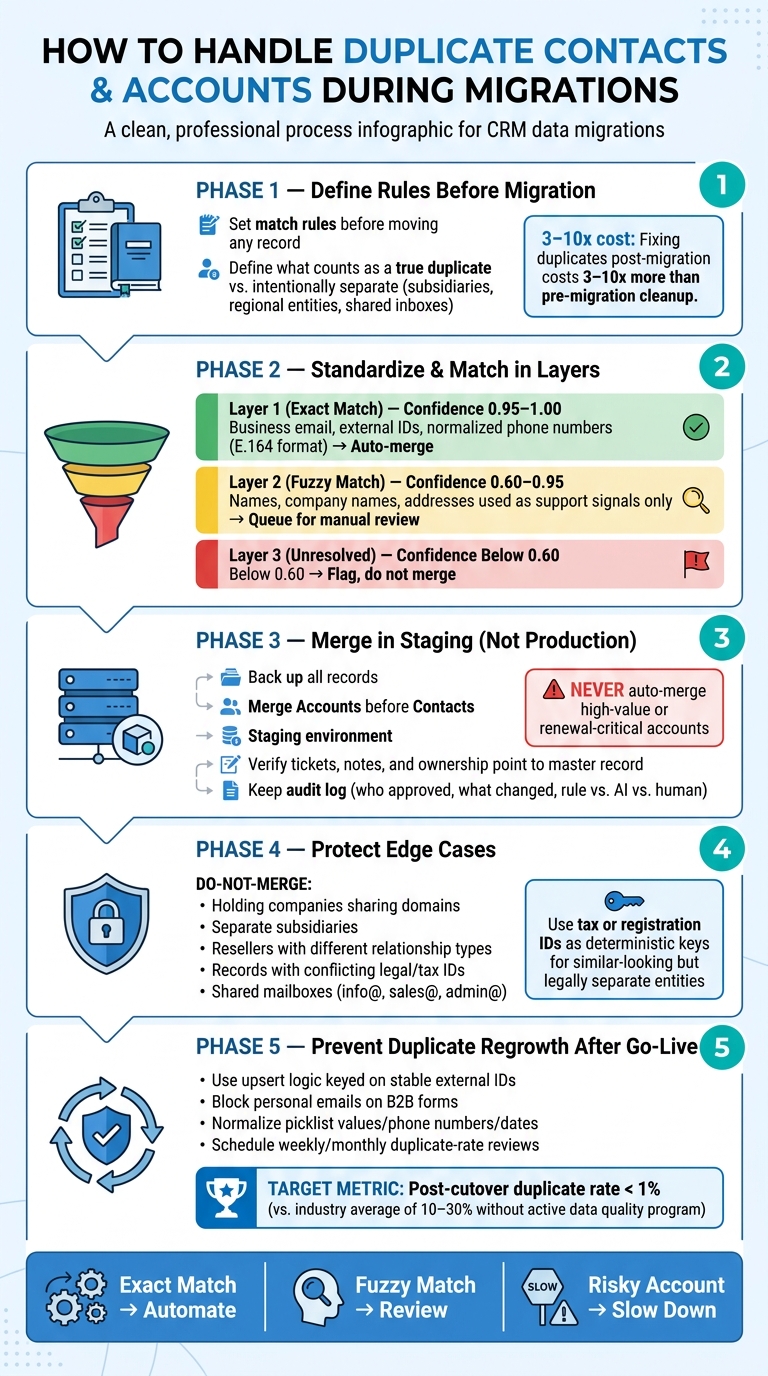
Duplicate Contact & Account Deduplication Process for CRM Migrations
HubSpot Data Quality: A Complete Guide to Managing Duplicate Contacts
sbb-itb-e60d259
Define duplicate detection rules before moving any data
Set your match rules before you move a single record. Those rules decide what gets merged on its own, what gets sent to review, and what stays separate. If you wait until after migration, cleanup gets expensive fast. In many cases, fixing duplicates later can cost 3–10x more than cleaning them before the move[5].
Choose the right match fields for contacts and accounts
For exact matching, business email, external IDs, and normalized phone numbers are your strongest fields[1][4]. They tend to produce almost no false positives. The catch is that they can fail when the data has typos, bad formatting, or missing values.
Phone numbers need clean formatting first, ideally in E.164. Also check for shared lines and extensions before you use phone as a match field[2][4]. For contacts, matching on domain alone is too weak for merging person records. It can still help link a new contact to the right account, but it shouldn’t decide a person-level merge by itself[1][2].
For fuzzy matching, use names, company names, and addresses as support signals, not as standalone rules[4]. With accounts, pairing legal name + domain helps cut down on false positives[2][3].
Normalize data first. That means:
Then run exact matching first. After that, apply fuzzy matching only to records that still haven’t been resolved[1].
Set confidence thresholds and ownership rules
Each confidence level needs a clear action. A simple three-tier setup works well:
| Confidence Level | Score Range | Action |
|---|---|---|
| Exact email or external ID match | 0.95–1.00[2][4] | Safe to auto-merge |
| Name + company fuzzy match | 0.60–0.95[2][4] | Queue for manual review |
| Name only, no email or company | Below 0.60[2][4] | Flag; do not merge |
Keep auto-merging limited to the top tier. Middle-tier matches belong in a review queue, plain and simple[2][4].
The merge call is only half the job. You also need field ownership rules. Instead of picking one full record as the winner, decide which system owns each field. Your CRM might own the email address, while your billing or ERP system owns the legal company name and billing address. That gives you one trusted record built field by field from the best source[1][4].
Comparison table: email-based vs. ID-based vs. hybrid matching
| Match Type | Accuracy | Risk Level | Best Use During Migration |
|---|---|---|---|
| Email-based (exact) | High | Low | Primary contact deduplication when email data is clean |
| ID-based (external ID) | High | Low | Cross-system syncing when a shared identifier exists |
| Hybrid (multiple signals) | High | Low–Medium | Complex B2B accounts where no single field is reliable enough on its own |
| Name-only (standalone) | Low | High | Avoid as a standalone rule; use only as a supplemental signal |
For many B2B migrations, hybrid matching is the safer path because it uses multiple signals instead of betting everything on one field[1]. If one field is missing or misformatted, the whole match doesn’t fall apart. The downside is a bigger review queue, but that’s still better than a bad merge you can’t undo[2][4]. Once the rules are locked in, send only unresolved matches into a staging review queue.
Run a structured review and merge workflow
Once your match rules are in place, send only unresolved candidates into staging for review.
Start in a staging environment every time. Back up Contacts, Accounts, and related records first, because most merge actions can’t be undone. Handle exact-email and exact-ID matches in staging before anything else, then move to fuzzy matches. Before you approve any merge, check for active cases and open escalations.
After exact matches are out of the way, review what’s left based on ownership, history, and active work.
Review duplicate candidates in a staging environment first
Set field-level survivorship rules before you merge anything, so each attribute comes from the source you trust. In plain English: decide which system owns which field. Your CRM might own the email address, while your billing system owns the legal company name.
Merge Accounts before Contacts so Contact merges inherit the right account history.
After each merge, verify that support tickets, cases, notes, and account links still point to the master record. If case history gets split or dropped, your team loses sight of that account. That can affect escalation handling and renewal decisions.
Keep an audit log that shows:
- who approved each merge
- what changed
- whether the decision came from a rule, AI, or a human reviewer
Merge records without breaking history or ownership
Don’t stop at row counts. Validate ticket links, account ownership, and case history. Make sure all related objects are reattached to the master record after every merge [1][4].
Comparison table: auto-merge vs. assisted merge vs. manual merge
| Merge Approach | When to Use | Pros | Risks |
|---|---|---|---|
| Auto | Exact email or standardized ID matches; confidence score 0.95–1.00 [2][4] | Fast; handles high volume with no manual effort | Can incorrectly combine different people sharing a name; irreversible if rules are flawed [2] |
| Assisted | Fuzzy name + company matches; confidence score 0.80–0.95 [1][4] | AI surfaces similarity scores for fast human accept/reject decisions; faster than full manual review | Some tools cap batch merges, which slows review |
| Manual | High-value accounts; renewal-critical accounts; confidence score 0.60–0.80; complex account hierarchies [2][4] | Highest accuracy; allows full review of cases, escalations, and notes before committing | Slowest option; best for high-risk records |
Never auto-merge high-value or renewal-critical accounts.
After you choose the merge path, move exceptions and sync rules into post-go-live controls.
Handle exceptions and stop new duplicates from forming after go-live
After merge cleanup, lock down exceptions and intake rules so new duplicates don’t start piling up again.
Flag accounts that should never be merged
Some records need to stay separate on purpose. That includes holding companies that share domains, separate subsidiaries under one parent brand, resellers tied to different relationship types, and records with conflicting legal or tax ID data. Mark these records clearly as do-not-merge, note the reason, and assign a named owner [1]. That step helps prevent bad merges that would mash together separate support queues or account hierarchies.
Shared mailbox addresses like info@, sales@, and admin@ need the same kind of care. Keep them separate unless no individual contact record exists. Never auto-merge them into person-level records [2].
Similar company names can also trip people up. Two businesses may look alike on the surface and still be separate legal entities. In those cases, use tax or registration IDs as deterministic keys to keep the records apart [1].
Those tags act like guardrails. They help future merge logic avoid breaking hierarchy, routing, and ownership.
Standardize record creation and sync rules across support, CRM, and billing systems
Most post-migration duplicates show up because new records get created with no guardrails in place. Block personal email addresses on B2B forms, auto-link records by company domain, and normalize picklist values, phone numbers, and dates before matching [1] [2]. That keeps support reps, web forms, and sync jobs from rebuilding the same mess.
For system syncs, use upsert logic keyed on stable external IDs. That way, retries update the right record instead of creating another one [5].
Use a post-migration validation checklist
Don’t stop at row counts. You also need to check associations, owners, stage values, and consent flags [5].
Use the same rules that protected the merge to verify the cutover.
| Validation Area | What to Check | Target |
|---|---|---|
| Data integrity | No orphaned notes, cases, or activities detached from master records | 0 orphaned records |
| Account ownership | All accounts assigned to the correct rep or territory | 100% assigned |
| Support | Tickets for the same company stay unified | No split ticket threads |
| Reporting totals | ARR and contact counts match expected baselines | Within acceptable variance |
| Renewal visibility | Unified health signals visible for all active accounts | No accounts missing renewal data |
| Post-cutover duplicate rate | Duplicate rate after cutover | <1% [4] |
After go-live, schedule weekly or monthly duplicate-rate reviews until the rate stabilizes [4].
Use AI-assisted dedupe to cut migration risk and review time
Use AI to score candidate pairs, sort the review queue, and filter obvious non-matches. The key is simple: use AI only on unresolved candidates in the staging review queue.
Apply AI for similarity scoring, record summaries, and conflict flags
AI-assisted deduplication returns a similarity score between 0.0 and 1.0 instead of a basic yes/no answer [4]. That score makes it much easier to sort the queue by confidence band instead of forcing reviewers to check every candidate pair by hand.
Exact-key matching misses a lot of true duplicates. Fuzzy scoring helps catch those missed pairs, which means reviewers can spend their time on the highest-risk matches first.
AI can also speed up review in other ways. It can summarize account and case history so reviewers don’t have to dig through every record themselves [4]. And it can flag field-level conflicts, which helps the team pick the right surviving values with less guesswork.
Build the surviving record field by field, using the best source for each attribute.
Set governance rules for AI-assisted merge decisions
Once AI ranks the queue, governance should decide who can approve each confidence band. A tiered threshold model helps keep automation under control [4]:
| AI Confidence Band | Action | Governance Rule |
|---|---|---|
| 0.95–1.00 | Auto-merge | Near-certain match; requires audit log |
| 0.80–0.95 | Assisted review | AI recommends; one human approves |
| 0.60–0.80 | Manual validation | Human selects surviving fields; AI flags conflicts |
| Below 0.60 | Ignore or flag | Likely false positive; no merge suggested |
High-value accounts should always go through human approval. And don’t stop at showing that a pair was flagged. Store the exact match features behind each AI suggestion so reviewers can see why it was flagged [1]. That kind of visibility helps teams trust the workflow and move faster.
After go-live, sample AI-assisted decisions on a set schedule to catch threshold issues before they snowball [4].
Conclusion: Build a repeatable dedupe process before, during, and after migration
Dedupe works best when rules, review, and prevention stay steady before, during, and after migration. Organizations without an active data quality program often carry duplicate rates between 10–30%, while best-in-class organizations keep that below 1% [4].
Getting below 1% means fewer misdirected tickets, fewer missed renewals, and support teams that can trust the records in front of them.
FAQs
What should count as a duplicate?
During a migration, a duplicate is any record that points to the same real-world contact or account but shows up more than once.
Start with exact matches. Then use fuzzy signals to flag records for review.
For contacts, lean on:
- Verified work emails
- Unique system IDs
For accounts, use:
- Website domains
- Legal entity IDs
Don’t auto-merge unless a high-confidence field matches exactly. And before you merge anything, set a source of truth so it’s clear which record wins for each field.
When is it safe to auto-merge records?
In B2B customer support, it’s usually safe to auto-merge records only when there’s an exact match on a high-confidence identifier. For contacts, that often means a primary email address. For organizations, it usually means a domain name. When a merge happens, keep the record with the most complete field data.
Anything below that bar should go to manual review. That includes fuzzy name matches, overlapping phone numbers, and partial domain matches. Why be so careful? Because one bad merge can damage account history and strain customer relationships.
How do we prevent duplicates after go-live?
Move from reactive cleanup to proactive identity management.
Set up a canonical record system with one account ID and one contact ID that every connected platform maps to. That gives your team a single source of truth instead of a mess of competing records.
Use deterministic matching for verified identifiers. Then use AI-assisted fuzzy matching to catch borderline cases and send them for review. That way, clear matches stay automated, while risky ones get a human check.
You’ll also want clear ownership rules. Without them, stale syncs can overwrite newer data and send bad records back into your systems. Define which platform owns each field, who can update it, and when syncs should win or lose.
Finally, monitor identity drift every week. If records start to split, merge, or conflict across platforms, you want to catch that early – not after reporting, routing, and outreach start going sideways.
Related Blog Posts
- How to implement case deduplication rules that don’t hide real issues
- How to migrate integrations when switching helpdesks
- How to keep historical CRM context when migrating support tools
- How to preserve customer identity mapping across systems
Evaluating help desks for a B2B team?
Supportbench is all-inclusive from $32 per agent per month, with migration and onboarding included. See pricing or book a 20-minute demo.






