



Native integrations and Zapier serve different purposes for connecting systems in AI-driven B2B support. Here’s the key takeaway:
- Native integrations provide direct, secure, and real-time connections between systems. They’re best for high-volume workflows, sensitive data, and critical processes like CRM sync or SLA tracking. Maintenance is handled by the vendor, making them reliable and predictable in cost.
- Zapier acts as a middleware platform connecting over 7,000 apps. It’s ideal for low-risk, low-volume, or experimental workflows. While easy to set up, it introduces latency, security risks, and higher costs as usage scales.
Quick Comparison
| Feature | Native Integrations | Zapier |
|---|---|---|
| Speed | Sub-second, event-driven | 1–15 min polling delays |
| Security | Direct 2-party connection | 3-party middleware |
| Cost | Fixed, included in plans | Per-task, scales with use |
| Maintenance | Vendor-managed | User-managed |
| Compliance | Supports HIPAA, BAA | No HIPAA/BAA support |
| Best For | High-volume, critical tasks | Low-risk, niche workflows |
Bottom line: Use native integrations for core, high-risk workflows and Zapier for non-critical or niche tasks. A hybrid approach can balance both.
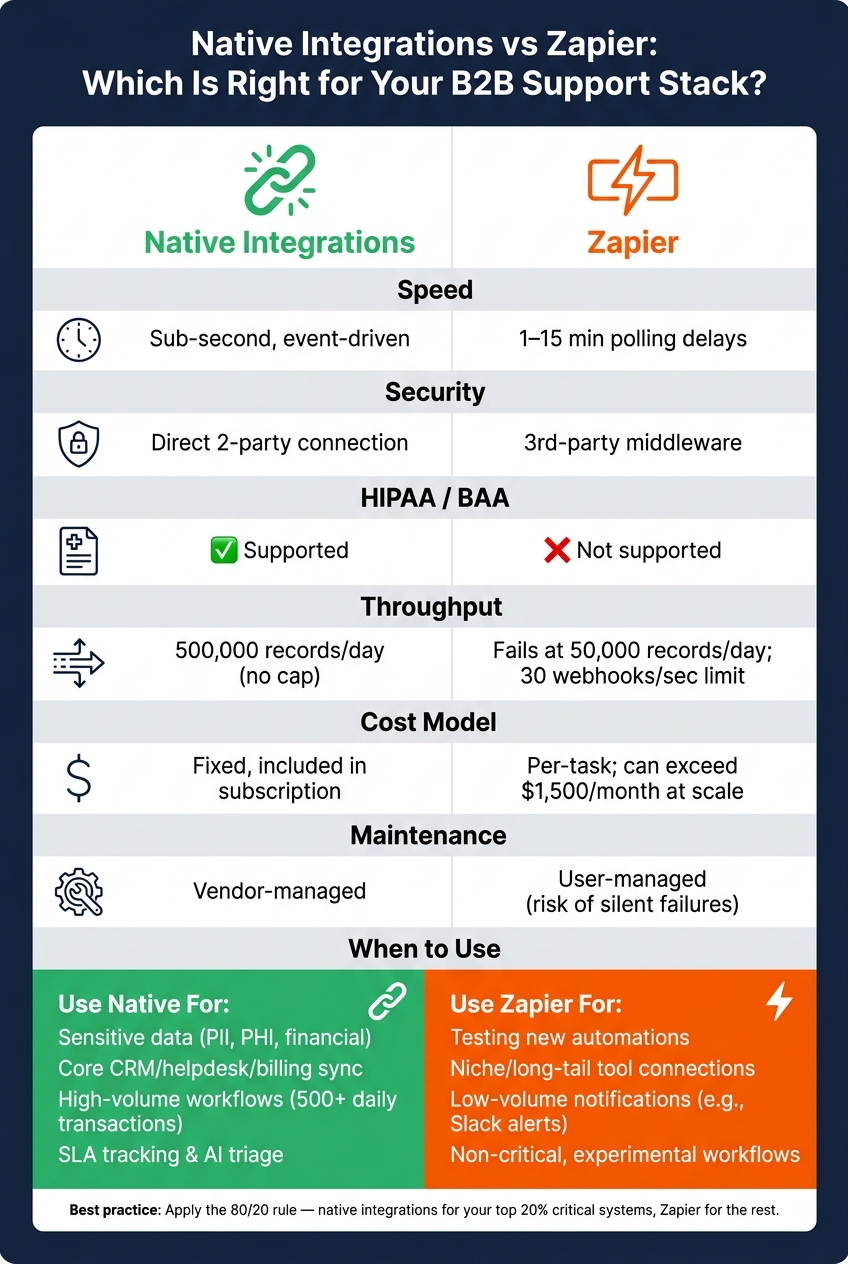
Native Integrations vs Zapier: Key Differences at a Glance
What Are Native Integrations and Zapier-Based Workflows?
For AI-focused support systems, deciding between these two approaches can significantly impact response speeds and system reliability.
Native Integrations: How They Work and Why They Matter
Native integrations are direct connections between two platforms, built and maintained by the software provider itself [1]. This setup ensures a secure and seamless flow of data between systems without any intermediaries.
In AI-driven support setups, this design is essential. Native integrations operate at the database level and are event-driven, enabling actions to occur in fractions of a second [3]. For example, when a high-priority ticket comes in, your AI system can instantly access data from your CRM, billing software, or product database to make real-time decisions about routing or escalation.
These integrations also allow for advanced, two-way syncing with custom field mapping, letting your support platform both read and update detailed data across connected systems. Plus, since the vendor manages API changes, your team is spared the hassle of dealing with disruptions.
"A scalable tech stack is built on a stable core. We apply the 80/20 principle by focusing our engineering resources on creating bulletproof native integrations for mission-critical systems." – CTO, Journeybee [1]
On the other hand, Zapier workflows prioritize flexibility, though they come with certain trade-offs.
Zapier Workflows: Pros and Cons
Zapier acts as a third-party middleware, linking over 7,000 apps using a trigger-and-action model [3]. Data first passes through Zapier’s servers for processing before reaching its final destination. While this adds flexibility, it also introduces latency and increases the potential for security vulnerabilities.
The appeal lies in its simplicity: a support team can set up automations in just a few hours without needing engineering expertise [2]. For specific, one-off workflows – like routing a form submission to a project management tool – Zapier is a practical choice. However, its limitations become clear at scale. Polling-based triggers can cause delays, and workflows often hit API rate limits, especially when handling high volumes, such as 50,000 records per day [5]. For large-scale support operations, this threshold can be reached quickly.
Additionally, Zapier workflows demand ongoing maintenance. If an upstream API changes, the workflow may break, leaving teams stuck in a troubleshooting cycle where both the software vendor and Zapier shift responsibility [1][9].
"iPaaS tools are convenient and fast for simple integrations. Custom APIs are more expensive upfront but deliver unlimited scalability, control, and lower long-term costs." – Tim Ritchie, CEO, Integrate IQ [5]
Here’s a quick comparison of the two approaches:
| Feature | Native Integrations | Zapier Workflows |
|---|---|---|
| Data Path | Direct (System A ↔ System B) [1] | Middleware (System A → Zapier → System B) [1] |
| Trigger Speed | Sub-second, event-driven [3] | 1–15 minutes, polling-based [3] |
| Data Depth | Deep bi-directional sync with custom field mapping [1] | High-level actions only (e.g., "create contact") [1] |
| Maintenance | Handled by the vendor [1] | Handled by your team [9] |
| App Coverage | Limited to strategic partners [4] | Over 7,000 third-party apps [3] |
| Error Handling | Vendor-managed, unified logs [3] | User-managed, fragmented logs [9] |
sbb-itb-e60d259
Native Integrations vs Zapier: A Direct Comparison for AI-Native B2B Support
Security and Data Protection
Native integrations create a direct data transfer between two systems, while Zapier introduces an intermediary. This extra step increases the potential for security risks and complicates compliance procedures.
For organizations managing sensitive data under strict regulations, this difference is critical. Native integrations limit compliance checks to two vendors, streamlining processes like SOC 2 and GDPR audits. More importantly, Zapier cannot sign Business Associate Agreements (BAAs) and does not meet HIPAA compliance standards, which disqualifies it for handling Protected Health Information (PHI).
"The use of regulated healthcare and medical data including Protected Health Information (PHI) under HIPAA isn’t supported on Zapier. Zapier also can’t sign business associate agreements (BAAs)." – Zapier Documentation [9]
When issues arise, Zapier users often find themselves piecing together logs from multiple systems to diagnose the problem – a cumbersome and error-prone process. This gap in security also impacts system performance, especially during high-demand periods, as we’ll explore next.
Scalability and Performance
Zapier works adequately for low-volume tasks but struggles to scale in high-demand environments. Performance testing revealed that native and custom API integrations could handle 500,000 records per day without performance degradation, while Zapier hit its limits and failed at just 50,000 records per day [5]. For busy B2B support teams managing thousands of tickets daily, these limitations can quickly become a bottleneck.
Zapier also enforces a 30 requests per second limit on webhooks per endpoint, returning 429 errors when exceeded [9]. On top of that, polling delays of up to 15 minutes can slow down critical, time-sensitive actions like escalating urgent tickets or triggering AI-powered ticket routing. Native integrations avoid these issues by being event-driven and free from the throughput caps imposed by middleware. For AI-powered support operations, these performance constraints can directly impact response times and reliability.
Costs and Maintenance Burden
Cost and maintenance add another layer of complexity to the comparison. Zapier’s pricing model, based on per-task usage, might seem straightforward at first but can escalate rapidly as volume increases.
"The Zapier Tax is the compounding cost that SaaS companies or their customers absorb when integration volume grows under Zapier’s per-task billing model." – Truto Blog [7]
For example, Zapier’s Team plan starts at $103.50/month for 2,000 tasks, but high-volume usage can push costs beyond $1,500/month [7]. Native integrations, on the other hand, are usually included in your software subscription as a fixed cost [1].
Maintenance is another area where native integrations shine. If a native integration fails, the software vendor is responsible for fixing it. However, when a Zapier workflow breaks – often due to silent issues like API updates or field changes – your team has to troubleshoot. This creates a "support triangle", where your team ends up stuck between Zapier and the software vendor, with each side pointing fingers [1]. Additionally, teams often accumulate "zombie automations" – outdated workflows created by former employees that continue to consume paid task limits without adding value [6].
Comparison Table: Native Integrations vs Zapier
| Dimension | Native Integrations | Zapier |
|---|---|---|
| Security Model | Direct 2-party data tunnel [1] | 3-party middleman; data passes through Zapier’s servers [1] |
| HIPAA / BAA Support | Supported (if vendor-enabled) | Not supported; no BAAs signed [9] |
| Trigger Speed | Sub-second, event-driven | 1–15 minute polling delays [3] |
| Throughput Limit | No middleware cap | 30 webhooks/sec; 429 errors beyond that [9] |
| Cost Model | Fixed; included in subscription [1] | Per-task; scales with volume [7] |
| Maintenance Owner | Vendor | Your team [9] |
| Audit Trail | Unified across platform [3] | Fragmented across vendors [3] |
When to Use Native Integrations vs Zapier for B2B Support
When deciding between native integrations and Zapier for B2B support workflows, it’s important to weigh factors like security, performance, and cost. Below are some clear guidelines to help you choose the right approach for your needs.
When Native Integrations Are the Right Choice
Native integrations are best suited for workflows involving sensitive data, financial transactions, or processes tied to strict SLAs. For example, if a failed connection could lead to billing errors, expose patient information, or violate compliance standards, native integrations provide the reliability and security needed to prevent catastrophic issues.
Additionally, if your workflow handles more than 500 transactions per day, native integrations are the safer bet. This is especially true for key support functions like ticket routing, CRM synchronization, SLA monitoring, and AI-driven triage. In these cases, delays or unnoticed failures can significantly impact both customers and support teams.
When Zapier Is a Better Fit
Zapier shines in low-risk, low-volume, or experimental workflows. It’s especially helpful when:
- Connecting niche tools that lack native connectors.
- Testing the viability of an automation before committing engineering resources. You can prototype with Zapier and, if the automation proves valuable, later invest in a native or custom solution.
Zapier is also ideal for notification-based automations, such as sending Slack alerts for ticket escalations or logging support events. In these cases, a short delay won’t disrupt operations.
"The builders who win are not the ones who picked the ‘right’ architecture upfront. They are the ones who shipped fast, measured honestly, and migrated the hot paths before the duct tape became load-bearing." – Listicler [2]
Using Both: Hybrid Integration Strategies
For many businesses, the best approach combines native integrations and Zapier. Native integrations can manage critical processes, while Zapier handles less essential tasks. A practical way to balance these is by applying the 80/20 rule: use native integrations for the 20% of systems (like CRM, helpdesk, or billing) that generate 80% of your business value, and rely on Zapier for niche or non-critical workflows [1].
In a hybrid setup, native AI might handle initial triage and ticket routing, while Zapier automates secondary tasks such as updating cross-tool data or enriching CRM records. However, when using Zapier, it’s crucial to ensure that updates are additive rather than replacements. This prevents accidental overwrites of critical routing data established by your native systems [8].
"If the action only affects the helpdesk and can be easily corrected by an agent, native is usually enough. If the action writes to the CRM or triggers downstream financial or lifecycle changes, add the external commit layer with approvals." – Justin, ThinkBot [8]
Decision Matrix
Here’s a quick reference guide to help you decide:
| Scenario | Recommended Approach |
|---|---|
| Sensitive data (PII, HIPAA, financial) | Native Integration [2][7] |
| Testing a new, non-critical automation | Zapier [1] |
| Connecting niche or "long-tail" tools | Zapier [1] |
| Voluminous CRM or billing sync | Native Integration [1][7] |
| Core AI triage and SLA tracking | Native Integration [2] |
| Cross-tool notifications (e.g., Slack alerts) | Zapier |
Key Takeaways and Next Steps
Integration Strategy Checklist
Before deciding on an approach, consider these four essential questions:
- Does this workflow involve sensitive data? If sensitive data is part of the workflow, stick with native integration. Zapier doesn’t support HIPAA compliance and cannot sign Business Associate Agreements (BAAs).
- What’s the daily transaction volume? Zapier works well for fewer than 500 daily transactions. If you exceed that, webhook failures and API rate limits can become issues, making native integration the more reliable option [2].
- Is this a core system or a niche tool? Use the 80/20 rule: native integrations should focus on the 20% of systems – like your CRM, helpdesk, or billing platform – that drive 80% of your business value. Zapier is better suited for the rest [1].
- Who will manage this automation long-term? Zapier workflows can silently fail when APIs change, creating outdated automations. If you can’t guarantee ongoing maintenance, vendor-managed native integration is the safer choice [6].
If you’re unsure where to begin, start by prototyping with Zapier. Test the use case within two weeks and track failure rates. If handoff issues exceed 1% or manual fixes start consuming engineering time, it’s a sign to transition to a native solution [2].
This checklist helps align your integration approach with the criticality of your workflows.
Final Thoughts on Choosing the Right Integration Approach
A well-thought-out integration strategy is key to avoiding inefficiencies.
"The blast radius of a broken integration matters more than the speed of building it." – Listicler [2]
Native integrations and Zapier aren’t opposing solutions – they’re designed for different levels of work. Native integrations ensure reliability for critical processes, while Zapier is ideal for managing lower-risk, non-core tasks. Keeping this distinction clear helps prevent your support stack from accumulating technical debt.
For B2B support teams handling complex accounts, long-term cases, and SLA-driven workflows, the integration layer isn’t just a backend detail – it’s a foundational part of the infrastructure. Platforms like Supportbench address this by offering features like native AI, built-in CRM synchronization, and workflow automation, all without relying on third-party middleware to manage sensitive support data.
Reserve native solutions for critical workflows and let Zapier handle the rest.
FAQs
How do I decide what data is too sensitive for Zapier?
Zapier isn’t designed for handling every type of data. For instance, it does not sign HIPAA Business Associate Agreements (BAAs), making it unsuitable for workflows that involve Protected Health Information (PHI).
When dealing with other sensitive data, like Personally Identifiable Information (PII) or financial records, it’s essential to conduct a thorough risk assessment. If you decide to use Zapier, consider taking precautions like tokenizing or hashing sensitive fields. This ensures that only non-sensitive metadata – such as IDs or status flags – is processed, keeping your data safer.
When should I replace a Zapier workflow with a native integration?
When your workflows demand greater reliability, faster performance, or enhanced security, it’s time to consider switching to a native integration. This becomes especially important for business-critical tasks, handling large volumes of actions (e.g., over 500 actions per day), or ensuring real-time data syncing.
Native integrations offer several benefits:
- Reduced latency: By cutting out third-party intermediaries, data moves faster and more efficiently.
- Improved security: Data stays within trusted systems, minimizing exposure to potential vulnerabilities.
- Predictable costs: Say goodbye to unpredictable usage-based fees that can pile up with third-party tools.
- Advanced API capabilities: Perfect for more complex requirements like bi-directional syncing or custom field mapping.
For workflows that are critical to your business operations, native integrations provide the performance and control you need.
What’s the safest way to run a hybrid setup without overwriting critical data?
To ensure a hybrid setup operates smoothly without risking critical data, it’s important to follow some key principles. First, assign a single system as the source of truth for each entity and workflow state. This prevents confusion about where the most accurate and up-to-date data resides.
When creating records, use stable identifiers by capturing record IDs at the time of creation and reusing them for updates. This approach ensures consistency across systems. Always apply a find-then-update logic, which verifies the correct record before making any changes. Additionally, designate one system or integration path to update specific fields. This avoids potential issues caused by conflicting automations or overlapping updates.






