


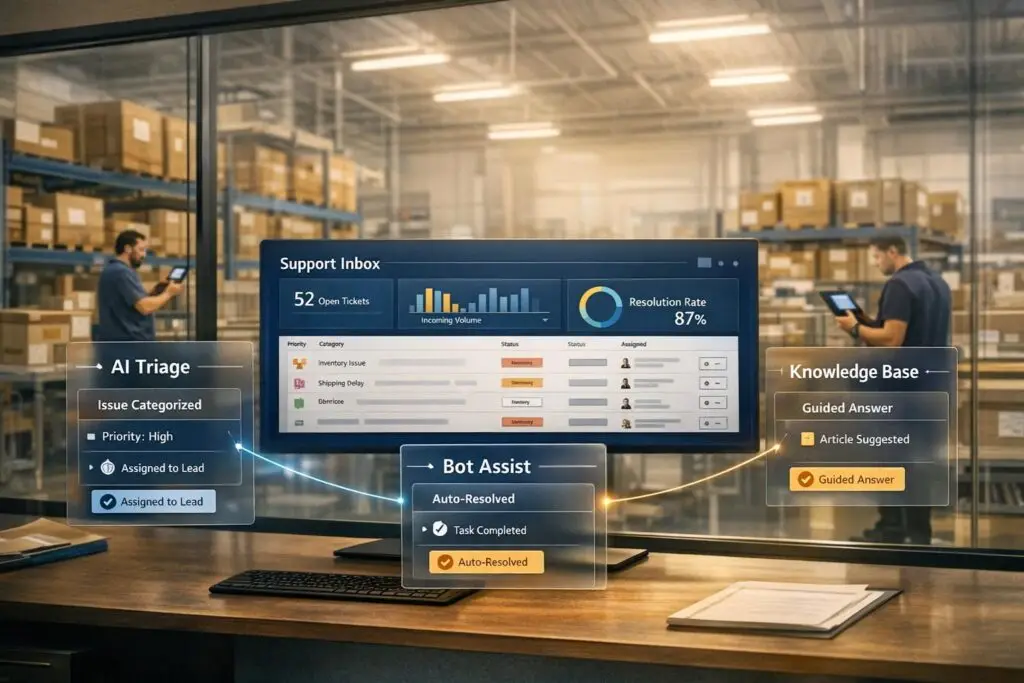
Warehouse teams face constant pressure to resolve issues quickly – from broken scanners to inventory mismatches. Yet, inefficient workflows and disconnected systems often create delays, costing valuable time and money. Here’s how to fix it:
- Centralize issue reporting: Use a single intake system with mandatory fields to avoid fragmented reporting.
- Leverage AI for triage: Use AI-powered ticket routing and prioritization to automate categorization, prioritize critical issues, and consolidate duplicates to reduce delays.
- Streamline workflows: Map out common problems step-by-step to identify bottlenecks and simplify resolution processes.
- Build a knowledge base: Create clear guides for frequent issues like equipment troubleshooting and inventory adjustments.
- Deploy AI bots: Automate repetitive queries and integrate bots with backend systems for quick answers.
- Predict and prevent escalations: Use AI to monitor patterns, flag high-risk tickets, and dynamically adjust response times.
Understanding Support Friction in Warehouse Operations
What Is Support Friction in a Warehouse?
Support friction refers to anything that slows down issue resolution in warehouse operations. This can include delays, unclear responsibilities, missing information, or relying too heavily on manual processes. In a warehouse environment, where every minute of downtime adds to costs, these inefficiencies can snowball quickly.
The root problem? Most warehouse support systems weren’t built for speed. They often rely on generic helpdesk setups that treat all issues the same way: a request is submitted, a ticket is created, and an agent eventually responds. That approach might work in other settings, but in a warehouse, it falls apart when faced with urgent problems like a broken label printer holding up a packing line or an ASN mismatch that stops a receiving dock in its tracks.
Common Friction Points in Warehouse Support
Warehouse operations face friction from several areas at once, and these issues often compound each other.
| Friction Category | Specific Examples | Impact on Efficiency |
|---|---|---|
| Inventory | Quantity mismatch, short picks, damaged stock | Delays order fulfillment; requires manual cycle counts [1] |
| Equipment | Label printer failure, scanner unreadable | Stops packing lines; leads to missed carrier cutoffs [1] |
| System | Failed API handoff, WMS record missing | Creates data silos and forces manual workarounds [1] |
| Shipping | Address errors, service-level changes | Spikes WISMO (Where Is My Order) inquiries [4] |
| Carrier | Dimensional weight disputes, late invoices | Diverts staff to financial investigations [1] |
These problems often feed into one another. For instance, a broken scanner might lead to a missing WMS scan event, which then causes a WISMO inquiry. Resolving that inquiry could require an agent to dig through multiple systems to piece together the shipment status. A single equipment issue can ripple through operations, creating a chain of new support requests.
The result? Disrupted workflows and rising operational expenses.
The Cost of Poor Support in Warehouse Settings
When support friction isn’t addressed, it leads to broader delays across operations. Key performance metrics take a hit: order cycle times increase when exceptions like address errors or service-level changes aren’t resolved before carrier cutoffs. Inventory mismatches slow down dock-to-stock times as manual reviews take over.
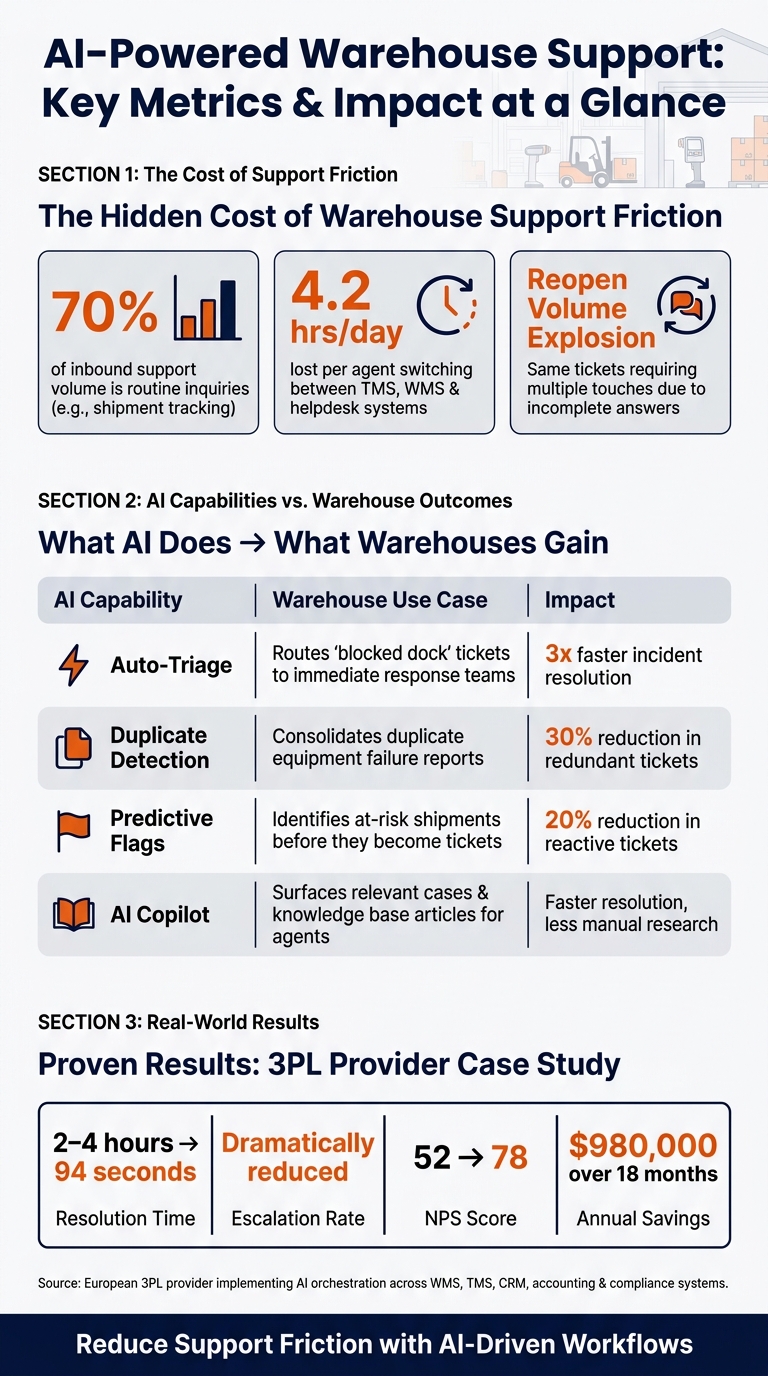
Customer satisfaction suffers, too. Under pressure, agents may provide incomplete or incorrect answers, leading to repeated follow-ups. This phenomenon, called a reopen volume explosion, happens when the same ticket needs multiple touches to resolve [4]. Routine inquiries, such as shipment tracking, can make up as much as 70% of inbound support volume [5]. When these aren’t handled efficiently, backlogs grow quickly.
The inefficiencies extend to logistics teams as well. On average, they lose 4.2 agent-hours per day switching between TMS, WMS, and helpdesk systems [2]. That’s valuable time wasted on hunting for information instead of solving problems.
sbb-itb-e60d259
Mapping and Measuring Warehouse Support Workflows
How to Map Support Workflows in a Warehouse
To pinpoint inefficiencies, start by mapping out your workflows. Organize a focused workshop with key team members – floor associates, shift supervisors, maintenance technicians, IT staff, and operations managers. Together, identify three to five common, high-impact issues like scanner malfunctions, WMS login errors, label printer problems, or inventory count discrepancies. Walk through each issue step-by-step.
For every workflow, document these key elements:
- Trigger: The event that initiates the process.
- Reporting channel: Whether it’s reported via radio, handheld app, kiosk, or email.
- Roles involved: Who handles each step of the process.
- Systems touched: Examples include WMS, CMMS, or helpdesk platforms.
- Data captured: Details like asset ID, zone, shift, or order number.
Use a swimlane diagram to visualize each role’s responsibilities and how information flows between them. This helps uncover hidden issues, such as two teams assuming the other is responsible for a step, or the same problem being reported through multiple channels at once.
Once workflows are mapped out, you can measure and analyze the steps to identify where delays or bottlenecks occur.
Using Metrics to Measure Support Friction
Segmenting metrics by shift, zone, device, and issue category provides actionable insights into operational delays. Start by establishing baseline KPIs over a 30- to 60-day period before implementing any changes. Focus on these key metrics:
| KPI | What It Measures | High-Performing Target |
|---|---|---|
| Time to First Response (TTFR) | How quickly support acknowledges an issue | Under 5–10 minutes for floor-impacting problems |
| Time to Resolution (TTR) | Average time to resolve an issue, categorized by type | Under 30–60 minutes for common device or WMS issues |
| First Contact Resolution (FCR) | Percentage of issues resolved without escalation | Above 70–80% |
| Repeat Incident Rate | Recurrence of problems with the same asset or zone within 30 days | Below 10–15% for critical equipment |
| Reopen Rate | Tickets that require follow-up after being marked as resolved | Below 5–10% |
Breaking down TTR by shift often reveals surprising trends. For example, WMS issues during the night shift might take three times longer to resolve because IT support isn’t available on-site, and escalations are delayed until morning. This type of insight highlights problems that are easy to address once identified.
If these standard metrics don’t provide enough clarity, AI tools can dig deeper into recurring issues and patterns, often by using AI-powered ticket routing to streamline the resolution process.
Using AI to Spot Friction Patterns
While manual reporting captures obvious issues, AI is better at detecting subtle, recurring patterns that might otherwise go unnoticed. In a warehouse, even small patterns can disrupt operations. AI tools can cluster tickets based on language similarities and asset IDs, uncovering trends that manual tagging might miss. For example, tickets labeled as "device freeze", "scanner reset", and "battery issue" might all trace back to the same aging batch of hardware in Zone C.
Tal Holtzer, CEO of VPSServer, highlights the power of AI in these scenarios:
"AI-driven analytics allow warehouse managers to track key performance indicators such as picking speed, fulfillment accuracy, and throughput in real time. With that visibility, companies can quickly identify bottlenecks and continuously improve operational performance."
Tools like Supportbench can automatically tag incoming tickets based on their content, device IDs, and the submission channel. This data can then be visualized in heatmaps, showing ticket volume and average TTR by zone and shift. Start with a clear taxonomy of 20–40 warehouse-specific issue categories – such as "Scanner / Hardware", "WMS / Access", "Label Printing", or "Inventory Mismatch" – and train your team to select or confirm the correct category when creating tickets. Consistent categorization improves the AI model over time, sharpening its ability to detect patterns and provide actionable insights.
Building AI-Driven Workflows to Speed Up Support
AI-Powered Warehouse Support: Key Metrics & Impact at a Glance
By combining mapped workflows with friction metrics, AI-driven processes are now making support faster and more cost-efficient.
Setting Up a Centralized Ticket Intake Process
After identifying points of friction, the next step is ensuring all issues are reported consistently. Fragmented reporting – through phone calls, emails, or informal channels – can delay how quickly support teams respond.
The fix? A single intake channel with mandatory fields. Each ticket should capture key details like the facility ID, dock or zone number, equipment ID, and severity of the issue. For example, a structured ticket like "Dock 4 / Blocked Shipment / Severity: Critical" allows an AI system to act right away. Missing information, on the other hand, leads to unnecessary follow-ups and routing errors.
This intake system should also integrate with core systems to provide real-time context. For instance, if a worker reports a scanner failure in Zone C, the system should already have the device’s details on hand, saving valuable time during diagnostics.
AI-Powered Ticket Triage and Prioritization
With a structured intake process in place, AI can step in to handle triage. The system analyzes incoming tickets, classifies them based on a predefined taxonomy (e.g., Technical > Equipment > Scanner Failure), spots duplicate reports from the same area, and assigns priority levels – all within seconds.
A key feature here is keyword-based escalation. Configure the AI to flag critical phrases like "blocked shipment", "outage", or "critical safety issue." This ensures urgent tickets are escalated immediately through a formal escalation management system, bypassing standard queue rules.
AI also consolidates duplicate reports, cutting down redundant work by 30% [7].
The benefits add up fast. For example, in April 2026, a European third-party logistics provider implemented an AI orchestration layer across five key systems: WMS, TMS, CRM, accounting, and compliance. Under the guidance of Leadership Success Manager Elsa Petterson at Put It Forward, they slashed average ticket resolution times from 2–4 hours to just 94 seconds and saved $980,000 in annual support costs over 18 months [3].
Once triage is handled efficiently, the next step is routing tickets to the appropriate workflows for resolution.
Routing and Resolution Workflows for High-Volume Issues
With streamlined intake and triage as a foundation, standardized resolution workflows take issue handling to the next level. For routine problems – like equipment failures, WMS login errors, or inventory discrepancies – standard workflows remove guesswork. Instead of relying on individualized solutions, the AI directs the ticket to the right specialist and provides relevant case histories and knowledge base articles, speeding up resolution.
Supportbench’s AI Copilot is a great example of this. It scans case histories and internal knowledge bases to suggest the most logical next steps. For more complex scenarios, like large-scale inventory discrepancies affecting multiple docks, the system pre-loads all relevant WMS and ERP data, giving human specialists everything they need to act quickly [3].
"Integration is 50% of success. That unglamorous work was foundational. They didn’t cut corners." – Elsa Petterson, Leadership Success Manager, Put It Forward [3]
Here’s how specific AI capabilities translate to warehouse outcomes:
| AI Capability | Warehouse Use Case | Impact |
|---|---|---|
| Auto-Triage | Routes "blocked dock" tickets to immediate response teams | 3x faster incident resolution [6] |
| Duplicate Detection | Consolidates duplicate reports of equipment failures | 30% reduction in redundant tickets [7] |
| Predictive Flags | Identifies at-risk shipments before they become support tickets | 20% reduction in reactive tickets [3] |
| AI Copilot | Surfaces relevant cases and knowledge base articles for agents | Faster resolution with less manual research |
To keep the system sharp, regularly retrain the AI using notes from closed tickets. This continuous learning improves diagnostic accuracy over time.
Cutting Repetitive Queries with AI Bots and Knowledge Base Tools
Even with efficient triage systems in place, repetitive questions – like resetting WMS logins or pairing scanners – continue to crop up. These issues demand quick, accurate responses to keep operations running smoothly.
Building a Warehouse-Specific Knowledge Base
Once AI-driven ticket routing is in place, the next step to reducing support friction is tackling repetitive queries. The cornerstone of this strategy is a well-constructed knowledge base tailored to your team’s actual needs. Begin by identifying the 10–25 most common questions from ticket tags or saved replies. Then, create clear, step-by-step guides addressing these specific issues – whether it’s fixing RF workflow errors, troubleshooting dock equipment, handling inventory adjustments, or reviewing safety protocols.
Warehouse associates need precise, up-to-date instructions – not generic advice. To ensure accuracy, tag every article with an effective date and equipment revision level. This prevents outdated specs from being used on newer hardware [9]. Ungrounded AI systems can generate incorrect technical details – like part numbers or torque specs – in 15%–30% of cases [9]. In a warehouse, such errors could lead to damaged equipment or safety risks.
"A torque spec or part number that ‘sounds right’ but is hallucinated will end up in a maintenance log and break something." – Palak Dalal Bhatia, CEO & Co-founder, IrisAgent [9]
Supportbench’s AI KB Article Creation tool simplifies this process by drafting articles from resolved cases. It captures the issue, the solution, and the context, ensuring nothing important gets left out.
Deploying AI Bots to Handle Common Questions
With a robust knowledge base in place, AI bots can effectively manage routine queries. It’s important to distinguish between bots that link users to articles and those that directly resolve issues. By integrating with backend systems like WMS, ERP, and TMS, bots can handle questions such as, “What’s the status of shipment #4821?” or “Is the hydraulic seal kit for dock leveler 4 in stock?” – all without redirecting workers [9]. This self-service approach works hand-in-hand with advanced AI triage systems.
In February 2026, AI engineer Nikhil Pai implemented AI agents across several U.S. fulfillment centers to handle Q&A and troubleshooting. These agents automated 80% of routine queries, boosting productivity for area managers and site engineers by 37% [8][10].
"The key was building agents that could distinguish between routine operational questions and complex issues that still needed human expertise." – Nikhil Pai, AI Engineer [8]
To ensure quality, a 90% confidence threshold is used. When bots are unsure, they escalate the query to human agents, providing full context. Tools like Supportbench’s Customer QA AI Bot and Agent Knowledgebase AI Bot follow this principle: confident answers when grounded, seamless escalation when uncertain.
Measuring the Impact of Knowledge-Driven Support
The success of these automated processes can be measured using key metrics like ticket deflection rate, first contact resolution (FCR), and escalation rate. Here’s a breakdown:
| Metric | What It Measures | Target |
|---|---|---|
| Ticket Deflection Rate | Percentage of queries resolved through self-service | 40–60% reduction in volume [13] |
| Escalation Rate | Percentage of bot queries passed to human agents | Below 10% [3] |
| Average Handle Time | Time from query assignment to resolution | Seconds vs. hours [3] |
| Hallucination Rate | Percentage of incorrect AI responses | Below 5% for grounded systems [9] |
It’s also critical to track phantom resolutions – cases where workers return within 24–48 hours with the same question. These indicate the initial response wasn’t sufficient [12][13]. Regularly reviewing failed searches can help identify content gaps and guide the creation of new articles.
"The knowledge base is not a nice-to-have you add later. It is the agent’s brain." – Alix Gallardo, Co-Founder, Invent [12]
Traditional self-service methods address only 14% of issues [12]. However, when AI-powered knowledge search is properly integrated and grounded, self-service resolution rates can increase by 35%–50%, while overall ticket volume drops by 40%–60% within six months [13].
Using AI to Predict and Prevent Escalations
AI is not just about solving problems faster – it’s now helping businesses anticipate and prevent issues before they spiral out of control.
Predicting Escalations Before They Occur
AI tools can monitor active tickets in real time and flag those likely to escalate by analyzing historical patterns. For instance, they can pinpoint issue types that often result in escalations[3]. Supportbench’s AI Predictive CSAT and AI Predictive CES scores take this a step further by examining case history and interaction signals. These tools predict when a customer might be nearing frustration, enabling teams to prioritize, reassign, or escalate high-risk tickets to senior agents – often before the customer even realizes they need extra help.
The results speak for themselves. One provider managed to slash its escalation rate, cut resolution times from 2–4 hours to just 94 seconds, boost its NPS from 52 to 78, and save $980,000 over 18 months[3].
Adjusting SLAs Based on Warehouse Conditions
AI doesn’t just predict problems – it adapts to them. By dynamically adjusting SLAs (Service Level Agreements), AI ensures that response times align with the urgency of the situation. Supportbench’s dynamic SLA engine uses real-time context to prioritize critical issues, making sure they’re addressed promptly and efficiently.
Using Dashboards to Identify Chronic Friction Areas
Beyond individual tickets, AI-powered dashboards offer a bird’s-eye view of recurring support challenges. These tools can spot patterns – like certain shifts or areas generating more queries – allowing managers to address root causes. Whether it’s scheduling extra training or updating the knowledge base, actionable insights from Supportbench’s customizable dashboards and KPI scorecards help teams improve efficiency. Metrics like escalation rates, first-contact resolution, and customer health scoring become easier to track and optimize.
Together, these predictive tools are reshaping warehouse support strategies, reducing downtime, and creating smoother operations for everyone involved.
Conclusion: Building Efficient Warehouse Support with AI
Support issues often stem from small delays and miscommunications that add up over time. As we’ve explored, these challenges can be tackled effectively by centralizing ticket intake, automating triage processes, creating a warehouse-focused knowledge base, and using predictive tools to address potential escalations before they occur.
By combining clear workflows with measurable metrics, and leveraging automation, reactive support can evolve into proactive management. AI takes on repetitive tasks, freeing your team to handle more complex problems that need human insight. This shift not only boosts efficiency but also reduces downtime.
Supportbench simplifies warehouse support with tools like a dynamic SLA engine, AI-powered Predictive CSAT scoring, customizable dashboards, and an integrated knowledge base. Whether it’s resolving a dock leveler issue or managing a critical logistics escalation, these features ensure smooth operations. Voice-to-CMMS workflows further enhance productivity, allowing floor technicians to log faults and close work orders hands-free – cutting administrative tasks by 38% in just six months [11].
The journey from reactive problem-solving to proactive management begins with a strong foundation. Start by mapping your workflows, identifying friction points, and automating repetitive tasks. These small steps quickly lead to significant improvements, helping you achieve long-term efficiency in warehouse support through AI-driven strategies.
FAQs
What information should every warehouse support ticket include?
To make resolving issues quicker and smoother, every ticket should include basic contact details and a short description of the problem. This ensures clarity right from the start.
You can also use AI tools to automatically pull in extra details, like tracking numbers, account information, or shipment IDs, directly from emails or attachments. This approach keeps things straightforward for users while giving warehouse teams the essential context they need to tackle issues effectively.
How do we connect AI triage to our WMS/TMS without slowing operations?
To connect AI triage with your WMS or TMS effortlessly, consider using an event-driven architecture that acts as an operational intelligence layer. Begin with read-only integrations through APIs, webhooks, or event streams. This ensures you can handle real-time data without causing system slowdowns.
Automate straightforward tasks – like address corrections – through direct API writes, keeping things efficient. For more complex challenges, direct them to your team with pre-built resolution briefs to streamline the process. Lastly, keep detailed audit trails to support governance and drive ongoing improvements.
How can we keep AI bots accurate and avoid wrong answers?
To keep AI bots on track and minimize mistakes, prioritize grounding, well-organized knowledge, and strong safeguards. Use retrieval-augmented generation (RAG) to ensure the AI pulls answers exclusively from reliable internal sources. Structure your knowledge base with short, topic-focused articles that have clear, descriptive titles. Establish safeguards by programming the AI to escalate unclear or complex queries to human support. Make it a habit to audit your content regularly, monitor recurring issues, and analyze escalations to identify and fix any knowledge gaps.






