


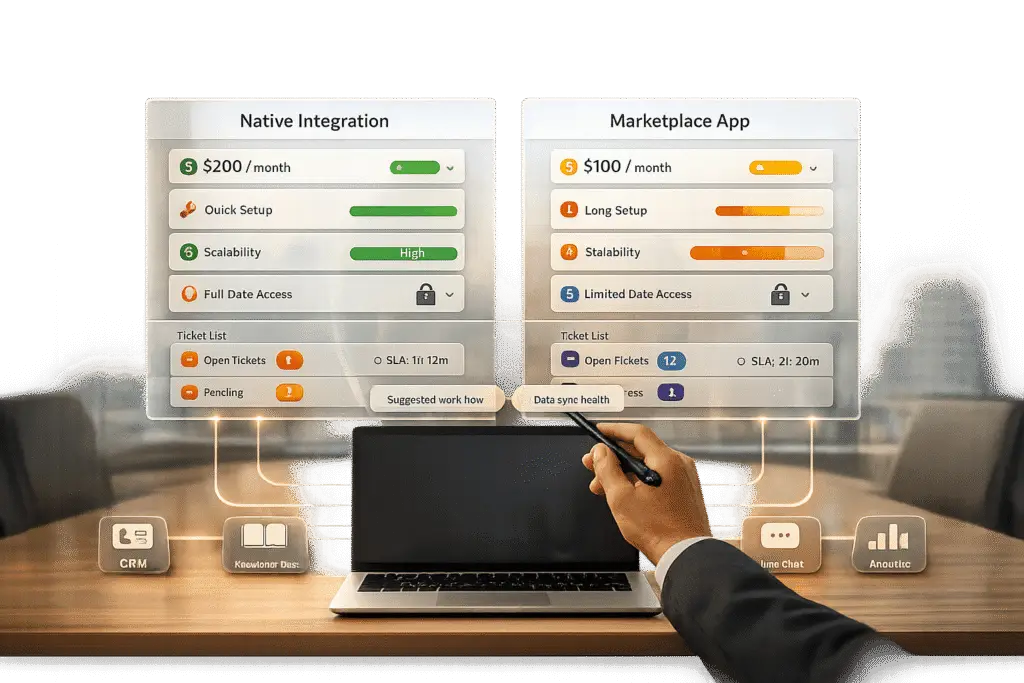
When connecting your helpdesk to other tools, you have two main options: native integrations or marketplace apps. Both can streamline workflows, but which one is right for your team depends on your needs, ticket volume, and budget.
- Native integrations are built by your helpdesk vendor. They’re easy to set up, reliable, and maintained by the vendor. However, they’re limited to the vendor’s ecosystem and often cost more per ticket.
- Marketplace apps are third-party tools that offer flexibility, cross-platform connections, and flat-rate pricing. They’re better for scaling and integrating with external systems but require more setup and a separate security review.
Key takeaway: Choose native integrations for simplicity and low-volume needs. Opt for marketplace apps if you need flexibility, scalability, or plan to switch platforms in the future.
Quick Comparison
| Factor | Native Integrations | Marketplace Apps |
|---|---|---|
| Setup Time | ~5 minutes | ~30 minutes |
| Data Access | Limited to helpdesk system | Cross-platform (external tools) |
| Pricing Model | Per-resolution ($1.50–$2.00) | Flat-rate monthly pricing |
| AI Model Choice | Vendor-selected | Flexible |
| Portability | Vendor lock-in | Portable across helpdesks |
| Best For | Low-volume, single-platform use | Scaling, multi-system workflows |
A hybrid approach can combine the strengths of both for efficient, scalable support.
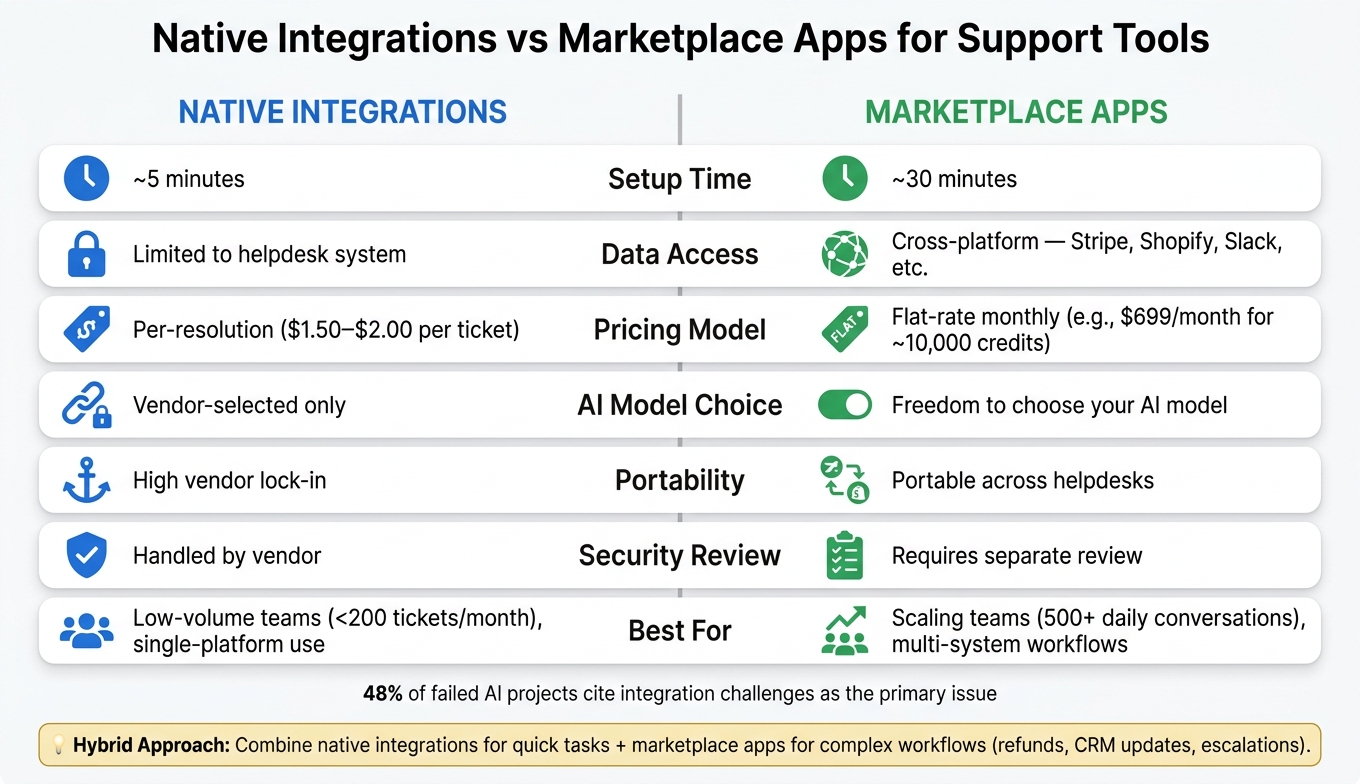
Native Integrations vs Marketplace Apps: Side-by-Side Comparison
Enhancing Zoho Desk With Native And Marketplace Integrations
sbb-itb-e60d259
1. Native Integrations
Native integrations, developed and supported by the vendor, are designed to stay synchronized with your platform, ensuring smooth operation even after updates.
Integration Depth
A major benefit of native integrations is their strong connection to your helpdesk data. They can access and modify ticket fields, tags, statuses, and priorities while also responding to events like ticket creation, customer replies, and agent assignments in real-time. These integrations are embedded directly into the agent’s workspace, giving immediate access to customer context. This two-way data exchange is essential for AI-driven workflows, enabling automated actions like auto-tagging and updating records.
This level of integration not only strengthens data flow but also speeds up the setup process, which we’ll explore further in the "Implementation Speed" section.
Implementation Speed
Native integrations are as easy to deploy as installing an app from a marketplace. This simplicity eliminates the need for complex engineering work.
Reliability and Scalability
"Native integrations are more reliable because they are specifically designed to work with a particular platform… ensuring that updates or system changes don’t break the connection." – Retenva [2]
Since the vendor handles API changes and version updates, your team sidesteps the ongoing maintenance hassle. This approach also supports scalability – features like a native knowledge base can be immediately utilized across your help center, AI agents, and agent copilots without requiring additional connectors. Interestingly, 48% of failed AI projects identify integration challenges – not model performance – as the primary issue [8].
Cost Efficiency
Native integrations tend to be more budget-friendly in the long run. The vendor absorbs the costs of maintaining the integration, such as fixing broken connections and handling API deprecations. On the other hand, custom-built integrations can cost anywhere from $50,000 to $150,000 annually per integration when you factor in development, quality assurance, ongoing maintenance, and support costs [4].
2. Marketplace Apps
Marketplace apps, created by third-party vendors, are designed to integrate seamlessly with helpdesk platforms. They expand functionality without requiring extensive engineering resources.
Integration Depth
The strength of marketplace apps lies in their ability to interact deeply with your helpdesk data. These apps can read and write ticket details, including subjects, bodies, custom fields, tags, and internal notes. They also respond to real-time events like new ticket creation or customer replies [1]. For AI-driven workflows, this means the AI can not only analyze but also act on ticket data. A major advantage over native platform AI is the ability to connect with external tools. For example, marketplace apps can pull data from systems like Stripe, Shopify, or Slack – capabilities that native helpdesk AI often lacks [3]. This level of access also contributes to faster implementation, as discussed below.
Implementation Speed
Marketplace apps are quick to deploy, with setup times ranging from 5 to 30 minutes. For a support team managing 5,000 tickets per month, this efficiency can translate into savings of $48,000 to $90,000 over 90 days, assuming an average ticket cost of $8–$15 [9]. The ability to go live quickly isn’t just about convenience – it directly impacts the bottom line.
Reliability and Scalability
Updates managed by vendors mean your engineering team doesn’t have to worry about API changes or fixing webhooks. However, marketplace apps can sometimes lag in adopting the newest features of a helpdesk platform [1]. For teams handling high volumes – think 500+ conversations daily – these apps often outperform middleware solutions in managing retries and meeting SLA requirements [5]. A great example is the workflow automation platform n8n, which scaled its ticket volume from 100 to over 2,000 per week (a 20x increase) while only doubling its team size. Their AI-integrated support stack autonomously resolves 60% of tickets, showcasing the efficiency of such tools [6].
Cost Efficiency
Marketplace apps typically offer flat-rate pricing, which can be more budget-friendly for high-volume teams compared to variable per-resolution fees. For instance, native resolution fees often range from $1.50 to $2.00 per resolved ticket [3][10]. In contrast, third-party marketplace apps often use fixed monthly rates, such as a professional tier priced at $699/month for about 10,000 credits [3]. Over time, this pricing model can lead to significant savings.
"At very high volumes, the flat-plan model gets dramatically cheaper." – Macha Team [3]
Another advantage is portability. Unlike native platform AI, which is tied to a specific helpdesk, many marketplace apps can move with you if you switch platforms [7]. For teams uncertain about their long-term commitment to one provider, this flexibility offers strategic value. These pricing and portability benefits make marketplace apps a strong option for scaling support operations effectively.
Pros and Cons of Each Option
When it comes to AI-driven workflows in customer support, the choice between native integrations and marketplace apps boils down to your specific needs – ticket volume, workflow complexity, and reliance on a particular platform. Here’s a clear breakdown of the strengths and challenges of each option.
Native integrations are all about ease of use. They’re quick to set up – usually just 5 minutes – and don’t require engineering resources. Everything operates within one vendor’s ecosystem, which simplifies security compliance and procurement. However, this simplicity comes with trade-offs. Your data access is restricted to what the helpdesk platform provides, and you’re tied to the vendor’s AI roadmap. Pricing is also a consideration. At $1.50–$2.00 per ticket, the per-resolution cost can add up quickly, making this option better suited for teams handling fewer than 200 tickets monthly and not needing external data integrations.
Marketplace apps, on the other hand, offer greater flexibility. They allow integration with multiple external systems and let you choose the AI model that works best for you. Their flat-rate pricing becomes more economical as ticket volume increases, making them ideal for scaling operations. However, setup takes longer – about 30 minutes – and requires a separate security review. For B2B teams focused on scalability and controlling costs, marketplace apps are a portable choice, especially if you plan to switch helpdesks down the line.
"The actual leverage of AI in support is not just ‘reply to tickets’, but ‘complete the whole workflow.’" – Macha Team
| Factor | Native Integrations | Marketplace Apps |
|---|---|---|
| Setup | ~5 minutes | ~30 minutes |
| Data Access | Limited to the helpdesk system | Cross-platform (external systems) |
| Pricing Model | Per-resolution ($1.50–$2.00) | Flat-rate pricing |
| AI Model Choice | Vendor-selected models | Freedom to choose |
| Portability | High vendor lock-in | Portable across helpdesks |
| Security Review | Handled by the vendor | Requires separate review |
| Best For | Low-volume, single-platform use | Scaling, multi-system workflows |
Some teams find value in combining both approaches. For example, native AI can handle basic tasks like intent detection and sentiment analysis, while marketplace apps manage more complex workflows (e.g., refunds, CRM updates, or escalations). This hybrid strategy leverages the quick setup of native tools alongside the scalability and flexibility of marketplace apps.
Conclusion
Each integration type brings its own strengths to AI-driven support workflows. The right choice depends on your current needs and how you anticipate scaling in the future. For straightforward, low-volume support on a single platform, native integrations are a practical choice. On the other hand, marketplace apps are better for scaling operations, connecting multiple systems, or switching tools without starting from scratch. These differences often make a hybrid approach worth considering.
Many successful teams combine native integrations for quick, simple tasks with marketplace apps to handle more automated workflows. This balanced strategy ensures efficient, scalable support while keeping costs in check.
It’s critical to remember that the effectiveness of your AI-driven operations doesn’t just rely on the AI itself – it also hinges on how well it’s connected.
"A brilliant AI agent connected through a fragile integration is worse than a good AI agent with rock-solid connectivity." – Twig [1]
If you’re unsure where to start, try prototyping with low-code tools. In just a couple of weeks, you can identify weak spots in your workflows. For processes involving high volume or sensitive tasks like payments, legal issues, or account updates, it’s wise to transition to a more dependable solution. Align your integration strategy with the complexity of your workflows to ensure secure and efficient AI-native operations.
FAQs
How do I calculate the real cost of per-ticket fees vs a flat monthly plan?
To figure out the total cost, you’ll need to calculate your Total Cost of Ownership (TCO) over a period of 12–24 months.
For flat-rate plans, use this formula:
(Monthly fee × 12) + (Add-ons × 12) + Implementation costs
For per-ticket pricing, the formula looks like this:
(Per-ticket fee × monthly ticket volume × 12) + Base fees + (Maintenance hours × hourly rate × 52)
Don’t forget to account for hidden costs. These might include expenses for training, integration tools, and scaling as your needs grow.
What security checks should we require before approving a marketplace app?
Before giving the green light to a marketplace app, it’s crucial to assess the vendor’s security practices to safeguard your B2B support operations. Start by requesting a current SOC 2 Type II report from a reputable CPA firm. This ensures the vendor meets industry standards for data security.
Next, confirm the app supports Single Sign-On (SSO) using either SAML 2.0 or OIDC protocols, and verify it integrates seamlessly with your identity provider. Dive deeper into the app’s security by reviewing its data residency policies, encryption methods, and compliance with regulations like GDPR.
Additionally, check the app’s access scopes to ensure they align with your organization’s needs. Make sure the vendor has systems in place for active monitoring, keeps incident response logs, and has a clear vulnerability disclosure policy. These steps help ensure the app meets your security expectations.
When does a hybrid setup actually make sense for AI support workflows?
A hybrid setup is a smart choice when you need to blend quick, in-platform efficiency with more complex, cross-system automation. For example, you can rely on native AI for straightforward tasks like language detection or sentiment analysis. Meanwhile, an external layer can handle workflows that involve CRM updates, billing access, or approval processes. This combination ensures a balance between speed and control, making it especially useful for automating multi-step processes that single-platform AI might not manage consistently.






