In B2B customer support, ticket misrouting – commonly called "ticket bouncing" – is a major issue. It delays resolutions, frustrates customers, and increases operational costs. A resolver group model can fix this by ensuring tickets are routed to the right team on the first try. Here’s how:
- What is a Resolver Group? A specialized team focused on specific issues, products, or customer types. They reduce misrouting by combining expertise with AI-powered ticket routing.
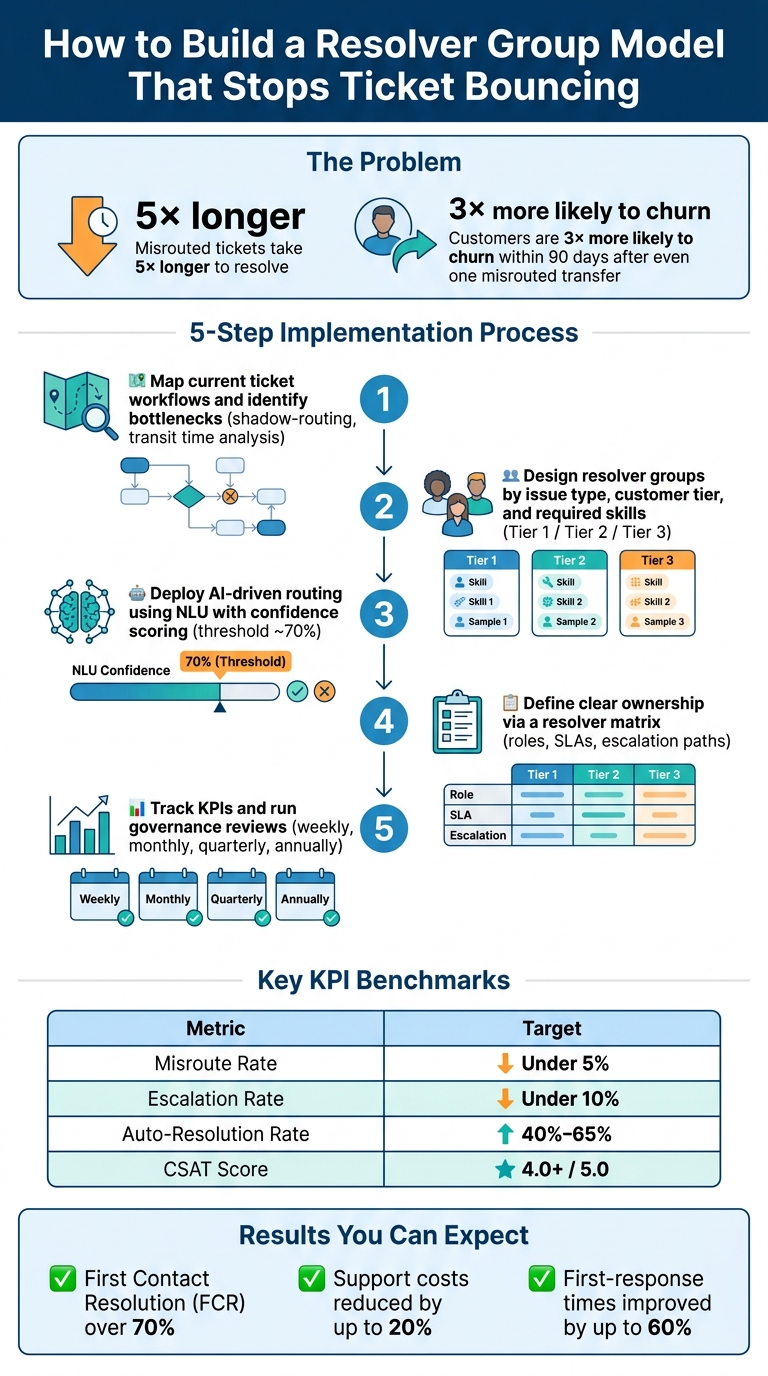
- The Problem: Misrouted tickets take 5× longer to resolve, with customer satisfaction dropping significantly after multiple handoffs.
- The Solution: Use resolver groups with AI-driven routing to cut misrouting rates to under 5%, improve first contact resolution (FCR) to over 70%, and reduce support costs by up to 20%.
- Steps to Implement:
- Map your current workflows and identify bottlenecks.
- Create resolver groups based on issue type, customer tier, and required skills.
- Use AI to route tickets accurately and predict escalations.
- Define clear ownership and responsibilities within each group.
- Regularly track KPIs like misroute rate, escalation rate, and FCR to refine the system.
This model enhances efficiency, reduces delays, and improves customer trust. Dive deeper to learn how to structure resolver groups, set up AI routing, and enforce policies for smooth operations.
How to Build a Resolver Group Model That Stops Ticket Bouncing
3 Rules to Automate Ticket Routing
sbb-itb-e60d259
Mapping Current Workflows and Finding Bottlenecks
Before tackling ticket bouncing, it’s crucial to identify exactly where it’s occurring. General assumptions won’t cut it – you need a detailed map of the ticket’s journey.
How to Document Current Ticket Flows
Start by pulling case logs and reports from all channels – email, chat, phone – to trace the actual path of tickets. Often, this real-world flow differs from the intended process.
Pay close attention to every handoff point. Note where the ticket originated, who handled it first, which team it was assigned to, and how many times it was transferred before resolution. A critical area to examine is transit time – the time tickets spend moving between teams instead of being resolved. This is where the hidden costs of ticket bouncing often lurk.
A useful technique here is shadow-routing. Use your existing ticket data and simulate routing through a proposed resolver group model without making any changes. Compare where tickets currently land versus where they would go under the new model. The gaps you uncover will highlight the areas most in need of attention [4].
Once you’ve mapped the flows, use key metrics to assess performance.
Key Metrics for Measuring Ticket Bouncing
Not all metrics are equally helpful when diagnosing ticket bouncing. The following are particularly effective:
| Metric | What It Reveals |
|---|---|
| Reassignment count per ticket | Tracks how many times a ticket changes hands before resolution. |
| Transit time | Measures how long a ticket spends moving between teams instead of being resolved. |
| SLA window consumption | Shows the percentage of the SLA used before the first meaningful response. |
| First Contact Resolution (FCR) rate | Indicates whether the issue was resolved on the first attempt. |
| Reopen rate | A high rate may point to poor initial routing or weak adherence to policies. |
In manual triage setups, it’s common to find that 66% of breached tickets bounced initially because they were assigned to the wrong team [5]. Be alert for signs of customer frustration, like “this is the third time I’ve contacted you” or “still not fixed.” These are red flags for ongoing bouncing and need immediate attention [5].
How to Segment Problem Areas
With data in hand, break it down into actionable segments. Don’t just look at overall bounce rates – dig deeper by examining customer tier, product area, issue category, and account tenure. This segmentation will reveal patterns that can guide your fixes.
For example, ambiguous categories like “Access Issues” often have higher bounce rates compared to more specific ones like “Printer Hardware” [5]. Similarly, if enterprise accounts with high-value contracts experience more handoffs than SMB accounts, it suggests a flaw in your system’s ability to prioritize and route tickets effectively.
How to Design Effective Resolver Groups
Once you’ve mapped out your ticket flows and pinpointed where the most handoffs occur, the next step is creating resolver groups that align with the way your support operations actually work.
How to Structure Resolver Groups
The best way to set up resolver groups is by focusing on three key factors: the type of ticket, who the customer is, and the skills required to resolve it. By addressing these dimensions, you can cut down on misrouted tickets before they even happen.
For SaaS and B2B teams, a tiered approach often works well. Tier 1 handles simpler issues like account problems or password resets. Tier 2 takes on more technical challenges, such as bugs or integration issues. Tier 3 is reserved for escalations that require engineering support [6]. This setup ensures that straightforward tickets don’t bog down your most skilled resources.
For teams with diverse responsibilities, structuring groups by issue type can improve routing accuracy. For example, billing questions should go to billing specialists, API issues to the integration team, and onboarding challenges to implementation staff. This level of specificity reduces the confusion that often leads to tickets bouncing between generalist queues [6].
Support level management and customer segmentation also play a major role. Enterprise accounts or high-value customers should be routed directly to dedicated account managers or priority queues. Pulling data from your CRM ensures these customers avoid the delays and misrouting that can harm critical relationships. This approach not only protects your top-tier accounts but also minimizes unnecessary handoffs and builds trust [6][2].
Once you’ve defined your resolver groups based on issue type, customer type, and required skills, the next step is assigning clear ownership and responsibilities.
Defining Responsibilities and Ownership
After organizing your resolver groups, it’s essential to define roles and responsibilities to keep tickets moving smoothly. Without clear accountability, a resolver group risks becoming just another queue. Each group needs a specific owner – someone responsible for overseeing the ticket flow and ensuring issues are resolved efficiently.
Within each group, roles should be clearly outlined. For instance:
- The service desk manages initial intake and customer communication.
- A problem manager ensures that tickets progress through each stage – logging, categorization, and resolution – without stalling [3].
- The technical resolver group focuses on analyzing and fixing the root cause of the issue.
When these roles are unclear, tickets can get stuck because everyone assumes someone else is handling them.
A resolver matrix can help formalize these responsibilities. By mapping out issue types, required skills, SLAs, and escalation paths, you create a clear reference for agents and managers. Here’s an example:
| Issue Type | Resolver Group | Required Skill | SLA Target | Escalation Owner |
|---|---|---|---|---|
| Bug Report (Critical) | Senior Engineering | API/Backend expertise | 4 hours | Engineering Lead |
| Billing Dispute | Billing Specialists | Finance/ERP knowledge | 8 hours | Billing Manager |
| Cancellation Request | Retention Team | Account management | 2 hours | Team Lead |
| Onboarding Blocker | Implementation | Product configuration | 24 hours | CSM |
| VIP/Enterprise Issue | Priority Queue | Senior Agent + Manager CC | 1 hour | Account Director |
This structure also supports proactive problem management, allowing teams to identify recurring issues before they escalate into a flood of new tickets [3].
Setting Up Resolver Groups in Supportbench
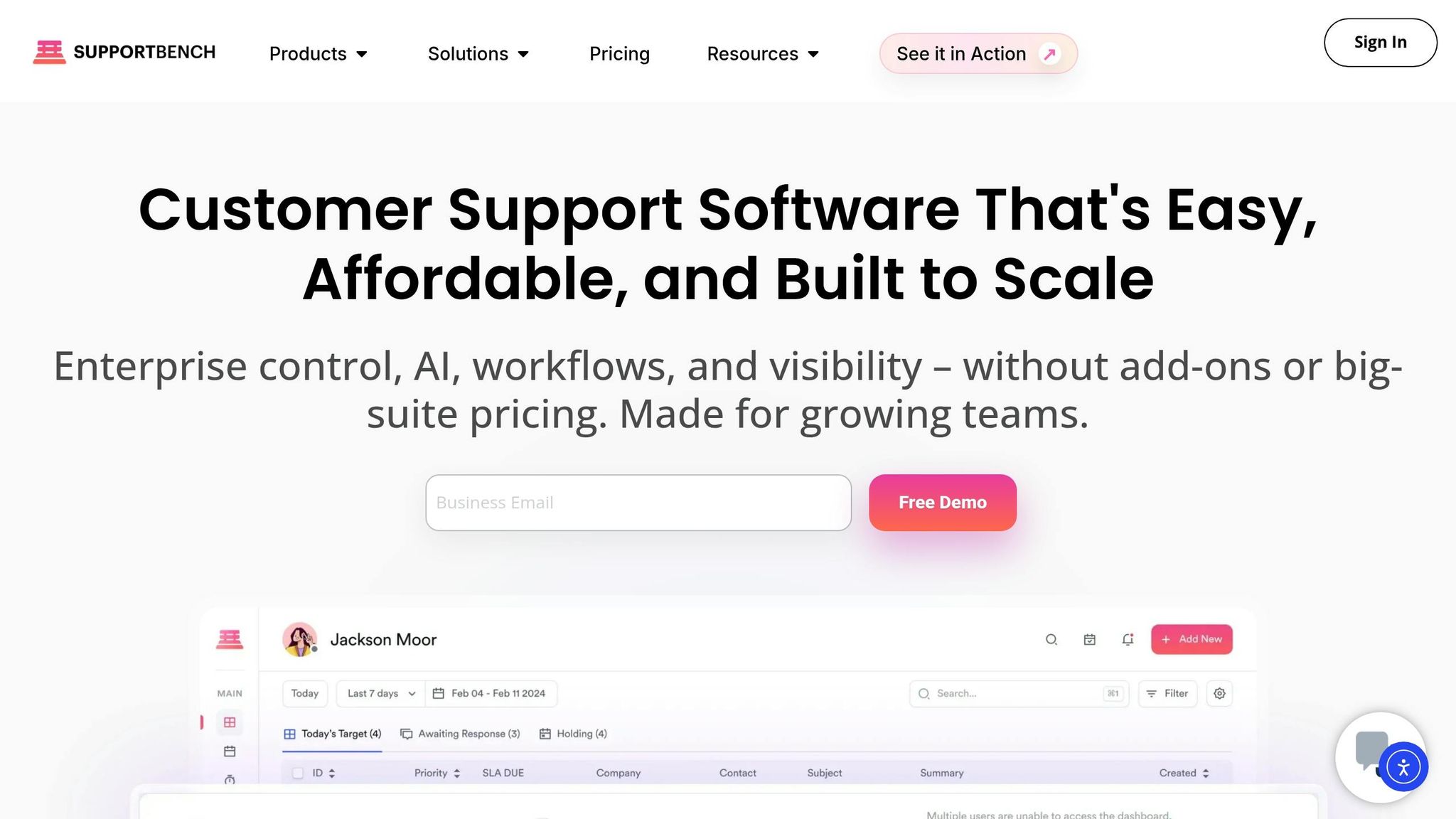
Supportbench makes it easy to put this structure into action – without requiring IT support. Custom fields automatically tag tickets by product area, customer tier, or issue type during intake, routing them to the right group immediately.
For enterprise accounts, Supportbench integrates with Salesforce to pull in contract value and account tier data. This ensures high-priority customers are routed correctly from the moment their ticket is created, eliminating the need for manual triage. Dynamic SLAs adjust automatically based on account activity, such as shortening response times when a renewal is near.
Escalation management is also streamlined. Instead of relying on agents to remember escalation paths, the platform provides clear guidance, tracks handoffs, and keeps everything visible in the case timeline. With AI handling tasks like prioritization, tagging, and assignment, resolver groups can focus on solving problems rather than getting bogged down in operational details. This setup reinforces the efficiency and effectiveness that well-designed resolver groups are meant to deliver.
Using AI for Ticket Routing and Escalation
Once you’ve set up your resolver groups and ownership matrix, the next big hurdle is ensuring tickets reach the right team on the first try – without relying on manual sorting. This is where AI routing makes a huge difference.
How AI-Driven Ticket Routing Works
AI ticket routing uses Natural Language Understanding (NLU) to analyze the entire ticket – subject, body, language, and product area – to identify the customer’s needs. It then matches that intent to the right resolver group and assigns the ticket accordingly [7].
To maintain accuracy, AI models assign a confidence score to every routing decision. If the score falls below a set threshold (often around 70%), the ticket is flagged for human review instead of being automatically assigned [8]. This prevents misroutes and helps reduce bounce rates. In fact, SaaS teams using this method have seen first-response times improve by up to 60% compared to manual triage [8].
For best results, start with a simple intent taxonomy – 8–15 high-level categories (like billing, API issues, onboarding, or security). This keeps the model focused and ensures it learns effectively from real ticket data [7].
This accurate routing is the foundation for better escalation management.
Escalation Prediction and Management
Once tickets are routed correctly, AI can take things further by identifying potential escalations before they happen. By analyzing factors like sentiment, SLA deadlines, customer tier, and account health, the system flags high-risk tickets that could breach service levels or bounce between groups [8].
A weighted priority scoring model helps operationalize this process. Here’s an example of how different factors contribute to a ticket’s overall risk score:
| Priority Factor | Scoring Range | Examples |
|---|---|---|
| Urgency Signals | 0–3 | "Payment failed", "System down" |
| Business Impact | 0–3 | Full outage vs. minor UI confusion |
| Customer Value | 0–2 | Enterprise vs. Free plan |
| SLA Risk | 0–2 | Approaching due dates or breach risk |
Critical tickets (scores of 90–100) are routed to an enterprise team for a 15-minute response, while standard tickets follow a skill-based path with a 4-hour response window [8]. This approach eliminates guesswork, ensuring high-priority accounts get the immediate attention they need.
How AI Reduces Unnecessary Reassignments
Even with strong routing and escalation processes, ticket reassignments can happen when agents lack the right context. Supportbench’s AI Copilot addresses this by providing agents with case histories, recommended next steps, and summaries of past interactions as soon as a ticket arrives or is handed off. This eliminates delays caused by agents needing to re-read or dig for information.
Why does this matter? Because even a single misrouted transfer makes customers 3× more likely to churn within 90 days [8]. By equipping agents with the right information at the right time, AI helps them resolve issues without unnecessary escalations or bounces.
"SaaS teams that go live with automated routing within 14 days of starting implementation achieve 3× better routing accuracy than teams that run extended pilots – because real-world data improves the model faster than lab testing." – Intercom [8]
To get started, consider using assist mode, where AI suggests intent and priority while humans confirm decisions. This approach builds a reliable training dataset and helps catch early misroutes before they become recurring issues [7].
Policies and Training to Keep Resolver Groups Running Well
AI routing is great for directing tickets quickly, but it won’t fix issues caused by unclear handoff protocols. To keep resolver groups efficient, you need solid policies and comprehensive training.
Policies That Reduce Ticket Bouncing
To prevent tickets from bouncing between teams, implement these policies:
- Add context to every handoff: Each transfer should include key details like the customer’s identity, account tier, and a summary of previous troubleshooting steps. This avoids starting from scratch and speeds up resolution times[6].
- Document troubleshooting steps before reassigning: Agents should record what they’ve already tried. This creates accountability and gives the next team the context they need to continue seamlessly.
- Match tickets based on skills, not availability: Route tickets to agents with proven expertise – whether that’s specific product knowledge, language skills, or certifications. A study of 500,000 tickets revealed that over half were resolved by the first assigned group, demonstrating the importance of accurate initial assignment[1].
Once these policies are in place, the next step is ensuring agents are trained to follow them effectively.
Agent Training and Enablement
Training programs should go beyond just teaching agents about the products. Agents need to fully understand the resolver matrix – knowing which group handles specific issues and when to escalate versus when to take ownership[9].
Documentation is essential. As one industry expert put it:
"Think of documentation as your team’s secret weapon for conquering future customer service adventures, helping them navigate problems with confidence and precision."[9]
Well-documented tickets don’t just help the next agent – they create a knowledge base for the whole team. Scenario-based training, where agents practice handling real handoff situations, can help build this habit. You can also introduce reflection cycles after complex cases close, where agents review the ticket’s journey and identify ways to avoid unnecessary transfers.
Finally, these standards should be reinforced through your support platform to maintain consistency across all teams.
Enforcing Policies Through Platform Settings
Your support platform can play a big role in enforcing these policies. For example, tools like Supportbench allow you to set required fields for reassignments. This means agents can’t transfer a ticket without including a detailed handoff summary.
Other helpful platform features include:
- Round Robin assignment: Automatically distribute tickets to the next available agent, avoiding bottlenecks and preventing "cherry-picking" of easier tasks[11].
- Assignment weighting: Send more complex tickets to senior agents while shielding newer team members[11].
- Role-based permissions: Restrict tickets so only relevant resolver groups can access them, reducing accidental reassignments.
- Automated escalation paths: Use triggers like ticket age or SLA deadlines to ensure tickets don’t get stuck due to uncertainty about the next step[10].
Tracking and Improving the Resolver Group Model Over Time
Once resolver groups are in place and policies are enforced, keeping a close eye on performance is essential to meeting changing support needs. By consistently tracking and refining your approach, you can ensure the model remains effective over time. This requires a focus on clear KPIs to measure success and identify areas for improvement.
KPIs for Tracking Resolver Group Performance
Key performance indicators (KPIs) help gauge how well tickets are being routed and resolved. For instance, the Misroute Rate measures how often tickets are reassigned after their initial classification. Keeping this rate below 5% ensures routing accuracy [2]. Similarly, the Escalation Rate tracks the percentage of tickets that bypass standard resolver groups, with a target of under 10% [2].
Other important metrics include First Contact Resolution (FCR), which shows whether the first assigned group resolves the ticket, and the Reopen Rate, which flags instances where unresolved tickets resurface, potentially signaling issues with initial troubleshooting [4].
Supportbench offers KPI scorecards to monitor both team and individual performance, helping spot underperforming groups early. Here’s a quick breakdown of key metrics and their benchmarks:
| Metric | Target Benchmark | Description |
|---|---|---|
| Misroute Rate | Under 5% | Accuracy of initial ticket classification |
| Escalation Rate | Under 10% | Frequency of tickets bypassing standard resolver groups |
| Auto-Resolution Rate | 40%–65% | Effectiveness of AI classifier and knowledge base |
| CSAT Score | 4.0+ / 5.0 | Customer satisfaction with resolver group experience |
Using AI Insights to Find Improvement Areas
Metrics provide the "what", but AI tools can help uncover the "why." For example, if billing-related questions frequently end up in technical queues, it might be time to refine classification prompts [2]. Sentiment analysis can also flag trends, such as one group receiving a disproportionate number of frustrated or repeat contacts, which could indicate process inefficiencies.
Take the case of KwikUI as an example. In early 2026, founder Silviya Velani led an 8-week AI routing initiative for a SaaS platform serving over 3,000 users. By mapping the top 20 most common questions to a knowledge base and implementing AI for classification, they achieved a 65% auto-resolution rate – up from 0% – and reduced churn by 40% [2]. Velani put it succinctly:
"The ROI isn’t speculative… the gains come from faster response (which lowers churn) and reduced agent workload (which lets your team focus on complex cases)." [2]
Supportbench’s AI tools, like sentiment scoring and predictive CSAT, provide managers with ongoing insights, helping to identify patterns without the need for manual audits.
Setting Up a Governance Review Cycle
A resolver group model isn’t static. As ticket types evolve, products change, and teams restructure, routing rules can become outdated. Regular reviews are critical to prevent misroutes and maintain efficiency.
Here’s a practical governance schedule:
- Weekly: Spend 15 minutes reviewing misrouted tickets to catch classification issues early [2].
- Monthly: Conduct a KPI audit, focusing on auto-resolution rates, escalation trends, and CSAT scores.
- Quarterly: Update your knowledge base to reflect new product features or policy adjustments.
- Annually: Perform a comprehensive review of governance, covering resolver group roles, ownership, and routing logic [12].
"Data governance is not a one-time project – it’s a continuous process and should become part of ‘business as usual’ for the entire organization." – Anne Marie Smith, Ph.D., Director of Professional Certification, DATAVERSITY [12]
When auditing, try sampling tickets based on specific outcomes rather than generic queues. For example, group cases like "fix account access" or "adjust billing" instead of using broad labels like "Tier 1" or "Technical." This approach can make it easier to spot recurring routing issues [4].
Conclusion and Key Takeaways
Creating a resolver group model that minimizes ticket bouncing relies on a few core principles: establishing clear ownership at every tier, defining structured escalation criteria, and ensuring that every ticket includes complete context during handoffs. When teams have a solid understanding of their responsibilities – and know exactly when and how to escalate a ticket – misroutes decrease, and resolution times get faster.
The operational framework is just as crucial as the technical setup. As Emily Carter, a Customer Service Software Expert, explains:
"Clear ownership prevents tickets from falling through cracks and ensures someone is always accountable for progress", [13]
This highlights the importance of embedding accountability into your processes right from the start.
AI can play a big role in improving ticket routing and escalation management by tracking key metrics like time to escalation and escalation rate. These insights allow teams to spot potential issues early. When paired with regular governance reviews, they help keep resolver groups aligned with changing team dynamics and product updates. With a focus on continuous improvement, these strategies can deliver long-term success.
FAQs
How many resolver groups should we start with?
To manage and resolve support tickets effectively, consider organizing your team into three resolver groups based on a tiered support model:
- Tier 1: This group handles basic customer inquiries and straightforward issues. They act as the first point of contact, resolving common problems quickly and escalating more complex cases as needed.
- Tier 2: Specialists in this tier address more intricate technical problems that require deeper knowledge or experience. They take over cases escalated from Tier 1 and work on issues that demand a more detailed investigation.
- Tier 3: The highest level of support, Tier 3 focuses on highly complex or critical issues. This group often includes subject-matter experts or engineers who can provide advanced troubleshooting and solutions.
This structure ensures that tickets are routed efficiently, matching the complexity of the issue to the appropriate level of expertise. It also minimizes unnecessary escalations, keeping the process streamlined and effective.
What ticket data is needed to train AI routing?
To train AI routing effectively, it’s crucial to gather a broad range of ticket data. This includes:
- Ticket text: Titles and descriptions provide context and highlight important terms.
- Keywords: Terms like "network", "cloud", or "security" help pinpoint the right resolver groups.
- Categorical data: Information such as category, urgency, and impact guides routing decisions.
- Historical data: Details like past agent assignments and timestamps reveal useful patterns.
- Metadata: Customer tier and support history ensure more accurate routing.
Collecting this data can significantly cut down on misrouting and reduce bounce rates.
How do we handle low-confidence AI routing decisions?
To address low-confidence AI routing, create workflows that can detect uncertainty and redirect those tickets to human agents for manual handling. Keep an eye on AI performance by monitoring metrics like reassignments or bounce rates, which can highlight areas needing adjustment. This approach improves ticket accuracy, reduces errors, and steadily enhances the routing process. Continuously updating decision rules based on performance insights is crucial for cutting down on misrouting over time.