



B2B support teams often fail due to inefficient systems – not lack of skill. Misrouted tickets, slow resolutions, and siloed workflows create chaos and cost businesses hundreds of thousands annually. A support operations roadmap fixes these issues by prioritizing improvements in the right order, laying the groundwork for AI integration and better customer outcomes.
Key Takeaways:
- Start by assessing your baseline: Analyze ticket data, identify workflow bottlenecks, and establish a maturity level.
- Set clear goals: Focus on metrics like resolution time, cost per ticket, and customer satisfaction (CSAT).
- Prioritize these 10 improvements:
- Refine routing rules to reduce misrouted tickets.
- Standardize ticket intake and triage processes.
- Define clear SLA and escalation rules.
- Organize your knowledge base for easier access.
- Use macros and templates to speed up responses.
- Simplify ticket categorization and tagging.
- Integrate customer context into agent tools.
- Build quality assurance workflows.
- Automate repetitive tasks with AI.
- Improve reporting with real-time dashboards.
- Leverage AI only after fixing core inefficiencies: AI works best when paired with clean data and streamlined workflows.
By following this roadmap, support teams can cut costs, improve efficiency, and deliver faster resolutions without expanding headcount.
Step 1: Assess Your Current Support Operations Baseline
Start by taking a close look at your existing support operations. Skipping this step can lead to solutions that don’t address the actual problems. This baseline assessment lays the groundwork for all future improvements.
Key metrics to analyze
Evaluate 90 days of ticket data to gauge the health of your operations. Use the table below as a guide to differentiate between what’s working well and what needs attention:
| Metric | Healthy Target | Alarming Threshold |
|---|---|---|
| CSAT | 90%+ | <85% |
| First Response Time (FRT) | <1 hour | >4 hours |
| Time to Resolution (TTR) | <24 hours | >72 hours |
| First Contact Resolution (FCR) | 70%+ | <50% |
| Deflection Rate | 30–50% | <20% |
| Reopen Rate | <5% | >10% |
One often-overlooked metric is Cost Per Ticket (CPT). This is calculated by dividing your monthly support costs by the number of resolved tickets. For B2B SaaS companies, human-handled tickets typically cost between $30 and $60 each as of 2026 [4]. Highlighting this figure can be particularly persuasive when presenting to leadership about the need for operational changes.
Once you’ve established these benchmarks, the next step is to identify where friction occurs in your workflows.
Identify workflow friction points
Pinpointing inefficiencies is crucial. Common friction points include ticket misrouting and gaps in context. To better understand these issues, categorize tickets into the following groups:
- Fully deflectable: Straightforward, repetitive inquiries like password resets.
- Partially deflectable: Questions requiring some account-specific context.
- Human-required: Complex cases like billing disputes or emotionally charged situations.
Typically, 30–50% of tickets fall into the fully deflectable category, signaling a strong opportunity for automation [3].
Another major bottleneck is context gaps. When agents have to ask customers to repeat information or switch between multiple tools to access account history without a modern support CRM, resolution times increase. Implementing context-rich escalation – where agents receive full conversation transcripts and summaries – can significantly reduce the time needed to handle escalated tickets [3].
By addressing these friction points, you’ll get a clearer picture of where your team stands on the maturity scale and where automation can make the most impact.
Establish a maturity baseline
After identifying friction areas, assess your current processes using a 5-level maturity model. This will help you pinpoint where automation and AI can deliver immediate benefits and where foundational improvements are needed.
| Level | Type | Typical Traits |
|---|---|---|
| 1 | Manual | High misrouting (~35%), slow response times, agents manually review every ticket |
| 2 | Rule-based | Relies on if-then logic; keyword routing for simple cases |
| 3 | ML/NLP Automated | Uses machine learning to classify intent and sentiment but with limited context |
| 4 | Contextual | Employs knowledge graphs and entity relationships (e.g., Customer → Product) for routing |
| 5 | Autonomous | Identifies root causes, resolves issues during triage, and continuously learns over time |
As of 2026, most B2B support teams operate at Level 2 or 3. While basic automation is in place, it often lacks the necessary context to be truly effective. Understanding your current level will help you prioritize improvements that can be implemented quickly while identifying areas that require more groundwork for long-term success.
sbb-itb-e60d259
Step 2: Define Roadmap Goals and Success Metrics
Once you’ve completed your baseline assessment in Step 1, it’s time to turn your insights into specific, measurable goals. This step ensures your roadmap becomes a well-defined action plan instead of a vague wishlist.
Turn Operational Issues into Measurable Outcomes
Every operational challenge you identified can be transformed into a concrete, measurable goal. For example, if misrouting is a frequent issue, you might aim to "reduce resolution times by 28% through improved routing logic" [3].
Use the Support Operations Hierarchy to guide your approach. This hierarchy starts with individual ticket resolution at the base, followed by queue flow, channel deflection, and cost per ticket at the top [5]. Align each operational issue with its corresponding level in this structure. For instance, fixing a routing problem requires a different strategy than tackling high costs per ticket.
Prioritize Key Performance Indicators (KPIs)
Not all metrics are equally important. Focus on key customer experience metrics that directly address the gaps highlighted in your assessment:
| Metric Category | Key KPI | Insight Provided |
|---|---|---|
| Quality | CSAT / CES | Are customers satisfied? |
| Efficiency | First Contact Resolution (FCR) | Are issues resolved on the first attempt? |
| Speed | Mean Time to Resolution (MTTR) | How quickly are cases being closed? |
| Cost | Cost per Resolved Interaction | What’s the actual cost per resolution? |
| Automation | Deflection Rate (resolved without agent) | Is automation effectively reducing workload? |
When implementing AI-driven workflows, set a CSAT floor before launch – typically your current CSAT score minus 3 points. If scores dip below this threshold, pause the rollout and adjust your automation confidence settings [3]. This approach ensures efficiency gains don’t come at the expense of customer satisfaction and trust.
Keep Goals Focused and Actionable
Limit your focus to three to five metrics that directly address your most pressing operational issues. Hold your team accountable for hitting these targets over the first 90 days.
"Tier-1 deflection without an archetype-level CSAT breakdown is a vanity number waiting to be exposed at the next quarterly review." – Digital Applied [6]
Begin with high-volume, low-complexity tasks – things like password resets, order status inquiries, and account lookups. These "Bucket A" tickets often represent 30–50% of total volume [3] and offer the quickest, clearest return on investment. Success here builds the momentum and confidence to tackle more complex challenges later on.
Step 3: Prioritize the First 10 Improvements
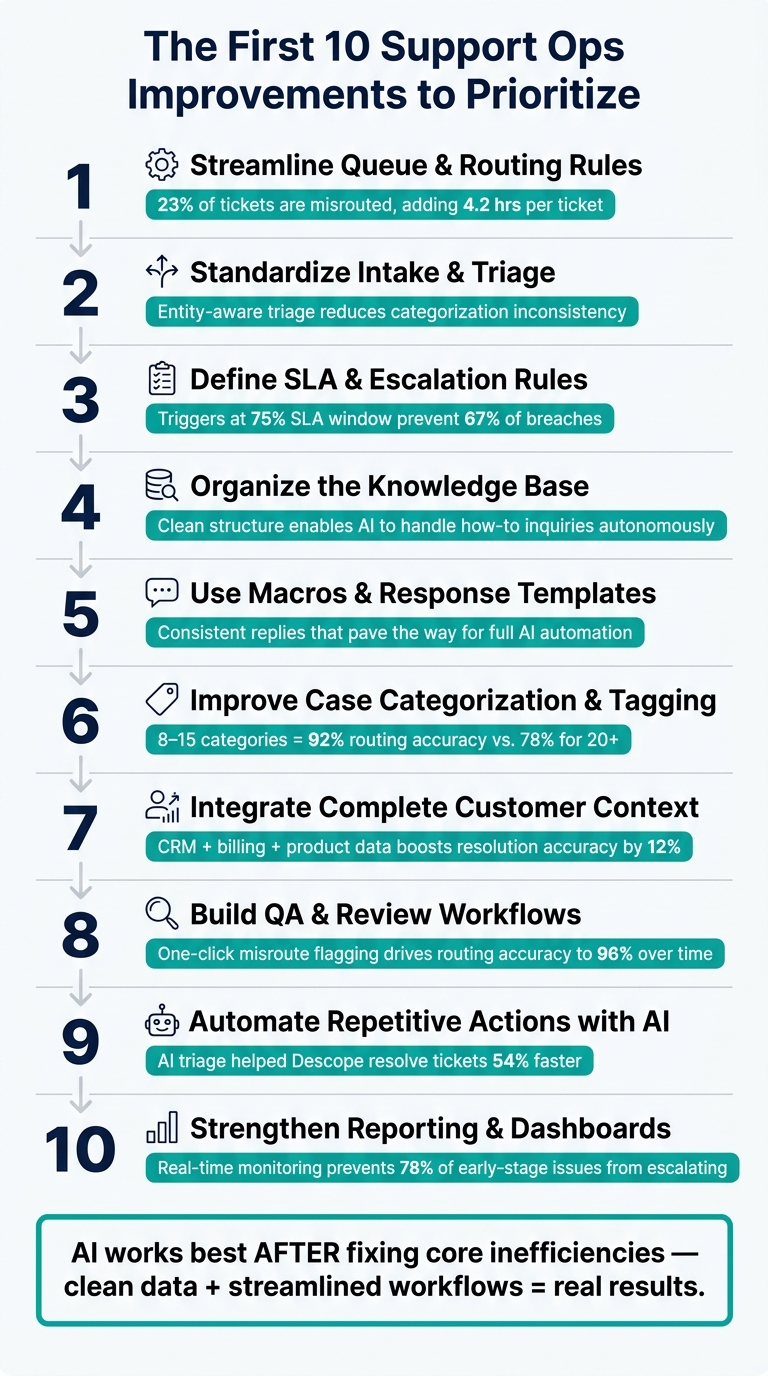
Support Ops Roadmap: 10 Improvements to Prioritize
Once you’ve assessed your current operations and set clear goals, it’s time to focus on these ten key improvements. Tackling them in order helps you build momentum and resolve the most pressing inefficiencies first.
1. Streamline queue and routing rules
Misrouted tickets waste time and resources. Did you know that 23% of SaaS support tickets are misrouted on the first assignment, adding an average of 4.2 hours to resolution times per ticket [7]?
Start by auditing 90 days of ticket data to identify the top five misrouting patterns. Transition from round-robin routing to capacity-based routing, which improves resolution speed by 18% [7]. Before going live, test new rules in "recommendation mode" for 10–14 days to catch about 90% of potential issues before they impact customers [7].
2. Standardize intake and triage processes
Inconsistent ticket intake can cause chaos down the line. When agents categorize similar issues differently, it disrupts routing logic, skews reporting, and confuses AI learning.
Switch from basic keyword matching to an entity-aware triage system. This approach recognizes relationships between customers, products, features, and issues, offering a more advanced and accurate way to handle support tickets [1].
3. Define SLA and escalation rules
Clear SLA management strategies and automated escalation triggers can prevent most violations. For example, setting triggers at 75% of the SLA window helps avoid 67% of SLA breaches [7]. Instead of relying solely on static priority labels like P1 or P2, consider a dynamic system that accounts for factors like customer ARR, renewal risks, and sentiment trends to protect high-value accounts.
4. Organize the knowledge base for better access
A messy knowledge base slows agents down and limits AI’s ability to help. When articles are well-structured, AI can autonomously provide step-by-step guidance, even handling common "how-to" inquiries without agent involvement [1].
Start by auditing your knowledge base for outdated content, consolidating duplicates, and organizing articles using the same entity structure applied in triage – grouping by product, feature, and issue type.
5. Use macros and response templates
Once your knowledge base is in good shape, focus on streamlining agent responses. Macros save agents from rewriting the same answers repeatedly, ensuring consistent communication. As these templates prove effective, they pave the way for AI to fully automate routine replies [1].
6. Improve case categorization and tagging
Your categorization system is critical for both reporting and automation. Keep it simple: limit your taxonomy to 8–15 primary categories with 3–5 subcategories each. This setup achieves 92% routing accuracy. Overcomplicating it with more than 20 categories drops accuracy to 78% and increases maintenance headaches [7].
| Taxonomy Size | Routing Accuracy | Maintenance Burden |
|---|---|---|
| Under 8 categories | 84% | Low |
| 8–15 categories | 92% | Moderate |
| 16–20 categories | 87% | High |
| Over 20 categories | 78% | Very high |
7. Integrate complete customer context for agents
When agents have to switch between multiple tabs to gather customer info, it slows them down, increases errors, and contributes to burnout. By integrating CRM, billing, and product usage data directly into the support interface, you can boost routing and resolution accuracy by 12% [7]. Plus, having a clear view of factors like upcoming renewals helps agents prioritize tickets more effectively.
8. Build QA and review workflows
Quality assurance isn’t just about spotting mistakes – it’s a goldmine for improving operations. For example, adding a one-click button for flagging misrouted tickets can drive routing accuracy to 96% over time [7]. Ensure your QA process feeds agent feedback directly into your routing and tagging systems for continuous improvement.
9. Automate repetitive actions with AI
Once your tagging, routing, and knowledge base are fine-tuned, automation becomes much more reliable. Use AI to handle repetitive tasks like ticket tagging, priority scoring, case summarization, and status updates. For instance, Descope used AI-driven triage to prioritize high-risk accounts, resolving tickets 54% faster without adding staff [1].
"The real opportunity isn’t just faster classification. It’s using AI support ticket triaging strategies that eliminate tickets by resolving them at the point of triage." – Neelabja Adkuloo, Member of marketing staff, DevRev [1]
10. Strengthen reporting and dashboard visibility
You can’t improve what you can’t measure. Real-time monitoring of metrics like misrouting rates and SLA compliance can prevent 78% of early-stage operational issues from escalating [7]. Build dashboards that track key metrics – such as first contact resolution (FCR), mean time to resolution (MTTR), cost per resolution, and deflection rate – and make them accessible to team leads daily, not just during monthly reviews. This visibility sets the stage for leveraging AI to optimize processes further.
Step 4: Use AI to Speed Up Key Processes
Once you’ve set up routing rules, organized categorization, and built a solid knowledge base, the clean data and streamlined workflows from Steps 1–3 allow AI to deliver real efficiency improvements. Without this groundwork, automation can end up speeding up inefficient processes. Now, it’s time to use AI to make ticket management faster and smarter.
AI for Triage and Issue Classification
Manual triage is slow and inefficient. AI takes this to the next level by using entity relationships – connecting a customer to their product tier, known bugs, and feature usage – to automatically route and prioritize tickets. This approach outperforms traditional rule-based systems, which often fail when language is ambiguous. While rule-based systems depend on rigid if-then conditions, contextual AI powered by knowledge graphs significantly reduces misrouting. Advanced multi-agent AI setups can even resolve tickets during triage, continuously improving their accuracy over time.
Take Bolt as an example: after implementing AI-driven ticket triage, they cut their average resolution time from 129.8 hours to 62.7 hours between February 2024 and January 2025 [1]. Beyond classification, AI also helps manage workloads proactively.
Predict Escalations and Forecast Workload with AI
Reactive monitoring doesn’t scale well. For instance, a manager overseeing 50 agents with 750 open tickets would need about 25 hours just to skim the queue once [8]. AI solves this by continuously scoring tickets based on key factors like sentiment changes, repeat contacts, and response delays. This allows teams to identify potential risks before they escalate into larger problems.
The trick lies in prioritizing signals based on business context. For example, a delayed response for a high-value account nearing renewal should trigger a higher risk score than a similar delay for a lower-tier account. Rapid7 implemented this kind of AI-powered alerting in March 2026 to manage over 7,000 complex support tickets monthly. The results were impressive: ticket handling became 30% faster, agent capacity increased by 35%, and they maintained a 95% customer satisfaction (CSAT) score [8].
"There’s an opportunity for support to move from a very reactive state – where your general measure of success is how many tickets you close per day… to one that is much more proactive, where the measure of success is how impactful support is at driving great customer outcomes." – Josh Solomon, General Manager and VP of Revenue, Mosaic AI [8]
This proactive approach naturally supports capturing and preserving insights from every resolved ticket.
Automate Case Summarization and Knowledge Base Updates
Every resolved ticket holds valuable insights, but agents rarely document them. AI can step in by automatically generating structured case summaries and KB articles from the case history, capturing the problem, solution, and context with no manual effort.
Platforms like Supportbench make this process seamless. When a case is resolved, AI pulls the entire interaction history and creates a ready-to-publish article, complete with a subject line, summary, and keywords. This keeps the knowledge base up-to-date without adding extra work for agents. Plus, it feeds better content into future AI-assisted responses. For teams handling large volumes, AI classification and summarization costs about $0.01 per ticket [9], making it an incredibly cost-effective solution.
Step 5: Roll Out Improvements and Manage Risk
Now that you’ve fine-tuned workflows and integrated AI tools, the final hurdle is implementing these changes effectively. Rushing this step can lead to confusion among agents, frustrated customers, and a drop in CSAT scores. A disciplined, phased rollout ensures changes are introduced carefully, minimizing risks while maintaining momentum. This approach also sets the foundation for controlled pilot testing.
Start with Pilot Implementations
Before rolling improvements out to your entire team, test them in a controlled environment. Start small by focusing on 2–3 high-volume, low-complexity ticket types – password resets and billing receipt requests are great options. These tasks are straightforward, and the stakes are low, making them ideal for testing [10]. Begin with a four-week baseline measurement period to establish benchmarks for metrics like AHT and CSAT. This ensures you can accurately measure the impact of the changes.
During the pilot, configure your AI tools to "draft-for-agent" mode. This means the AI generates responses, but a human reviews them before they’re sent to customers [10]. This step safeguards your brand voice while providing data on the AI’s accuracy. To refine the system, track the "edit distance" – how much agents need to adjust AI-generated responses [10]. Also, set a strict CSAT safety threshold: if scores drop more than three points below your baseline, pause the rollout and reassess [3].
"A support copilot is only as safe as its escalation path. Define confidence thresholds, forbidden topics, and handoff rules." – Alex Rivera, Director of AI Experiences, DeepSpeed AI [10]
Phase in Changes to Minimize Disruption
Once the pilot is successful, expand the rollout gradually. A phased approach helps avoid overwhelming your team and ensures smooth integration. Here’s a practical three-phase structure:
| Rollout Phase | Focus Area | Duration | Expected Impact |
|---|---|---|---|
| Phase 1 | Triage & routing | Weeks 1–4 | 10–15% reduction in handle time [3] |
| Phase 2 | Deflection (simple intents) | Weeks 5–8 | ~30% deflection on targeted tickets [3] |
| Phase 3 | Full workflow & escalation | Weeks 9–12 | 40–50% deflection; 15% faster escalation handling [3] |
Integrating these changes into tools your team already uses is key to adoption. For example, when Engine, a travel platform, introduced their AI assistant EVA in 2026, they embedded it directly into Salesforce. Every human handoff included a full conversation transcript and an AI-generated summary. This allowed EVA to autonomously resolve over 50% of travel cases, while agents handling escalations had immediate access to context, improving efficiency [3].
By phasing in improvements and ensuring seamless integration, you can confirm the effectiveness of your changes without disrupting daily operations.
Establish Governance and Ownership
Sustaining improvements requires clear ownership. Assign three specific roles for every change you implement:
- Business Owner: Usually the Head of Support, responsible for the overall outcomes.
- Technical Owner: Often Support Ops, tasked with managing the implementation.
- Security Owner: Ensures data handling and access controls meet compliance standards [10].
As Chris Arnold, VP of Contact Center Strategy at ASAPP, explains:
"Governance frameworks must ensure: AI outcome accountability, policy enforcement, auditability, risk management, [and] continuous improvement. Without this, AI autonomy becomes a liability." [2]
At the end of each rollout phase, schedule a formal review. This isn’t just about checking metrics – it’s an opportunity to decide whether to scale, adjust, or pause the rollout. Regular reviews keep your strategy grounded in reality and help avoid scaling initiatives that aren’t delivering results.
Step 6: Measure Results and Refine the Roadmap
After rolling out your plan and setting up strong governance, the next step is all about evaluating the impact and fine-tuning your strategy. This phase is where you shift focus from tracking activity to measuring outcomes. The goal? To ensure you’re solving real customer problems, not just checking off tasks. By analyzing results, you can adjust and improve your roadmap for the future.
Track Metrics That Reflect Real Impact
It’s time to move away from activity-based metrics like tickets closed or response volume. Instead, focus on outcome-based metrics that reveal whether customer issues are truly resolved. For example, closing a ticket doesn’t necessarily mean the problem is fixed.
| Traditional Metric | Outcome-Based Metric |
|---|---|
| Tickets closed | Issues fully resolved |
| First response time | Mean time to resolution (MTTR) |
| Ticket backlog size | SLA compliance (response and resolution) |
| Average handle time (AHT) | Customer effort score (CES) |
| Tickets per agent | CSAT (post-resolution) |
Use real-time dashboards to display these metrics. When your team can monitor live performance, they can quickly adjust workloads and address issues before they escalate. For reference, healthy B2B SaaS support teams aim for a first contact resolution (FCR) rate of 70–80% and a CSAT of 85–92%. Top-performing teams push these numbers even higher, with FCR above 85% and CSAT above 95% [4].
Don’t just track deflection (AI-handled tickets) – also measure resolution quality. Solely focusing on deflection can hide underlying problems that might not appear on the surface.
With these metrics in place, you can reassess priorities and refine your roadmap.
Reassess and Prioritize Future Improvements
Use data from your initial improvements to identify areas that need more attention. Break down metrics by ticket type – such as billing, troubleshooting, or account access – to pinpoint where friction occurs. If data shows that AI-handled tickets consistently underperform human-handled ones by more than 5 CSAT points, it’s time to adjust confidence thresholds [3].
"V1 is never the final product. Models change under you monthly. The teams that win treat this like a new hire – ramp time, feedback loops, iteration." – Matt Payne, Author, StoryPros [3]
Remember, your roadmap isn’t static. It’s a flexible guide that evolves based on what the data tells you.
Commit to Ongoing Optimization
Think of roadmap refinement as a multi-year journey:
- Year 1: Prove the value of your approach and establish a solid foundation.
- Year 2: Scale workflows and expand AI capabilities to cover more ticket types.
- Year 3: Aim for full autonomy and optimize outcomes [2].
Mature AI-driven operations often achieve 70–90% automation of interactions by the third year [2].
To stay on track, establish a weekly review process. Use this time to analyze ticket categories, deflection diagnostics, and CSAT trends. This regular recalibration prevents stagnation and ensures your system adapts to changes in customer needs and product complexity. You might also consider adding specialized roles like AI Operations (AIOps) managers or Conversation Designers, who focus on maintaining and enhancing the quality of automated workflows [2].
Conclusion: Building a Scalable, Efficient Support Operations Framework
A support operations roadmap is not a one-and-done task – it’s an ongoing commitment. Every improvement, whether it’s refining routing rules or integrating AI-driven deflection, directly impacts your bottom line. To put it in perspective, handling a ticket manually costs $12–$18, while an AI-deflected ticket costs just $0.02–$0.05 [3]. As ticket volumes grow, the cost difference becomes even more dramatic.
Teams that successfully scale don’t chase every shiny new tool. Instead, they focus on building a system with three distinct layers: triage, deflection, and escalation – allowing each layer to serve a specific purpose [3]. For instance, effective routing alone can improve first-contact resolution rates by 19% and speed up resolution times by 28% [3]. These kinds of gains can completely reshape how teams approach staffing and resource allocation.
"The companies winning aren’t building one magic AI that answers everything. They’re building three layers – triage, deflection, and escalation – and letting each one do a specific job." – Matt Payne, StoryPros [3]
This layered approach isn’t just about optimizing processes – it’s about delivering measurable financial outcomes. Real-world examples prove its effectiveness. BILL achieved a 70%+ autonomous resolution rate using an AI platform, saving $5 million while keeping customers happy [1]. Similarly, Descope slashed ticket resolution times by 54% through business-impact scoring for prioritization – all without increasing headcount [1]. These results are achievable for teams of all sizes when they focus on disciplined prioritization and smart system design.
FAQs
How do I know which maturity level my support ops is at?
To gauge where your support operations stand, compare your current capabilities to established benchmarks, such as the five-stage AI support maturity model. Key metrics to evaluate include:
- Deflection rate: How effectively are you redirecting simple queries to self-service options?
- CSAT scores: Are your customers consistently satisfied with the support experience?
- Resolution speed: How quickly are you resolving issues?
- Automation levels: How much of your workflow is automated versus manual?
If your processes still rely heavily on manual effort, you’re likely at an earlier stage of maturity. On the other hand, advanced stages are marked by AI-driven workflows, high deflection rates, and robust self-service options.
To pinpoint areas for improvement and plan your next steps, consider using maturity assessment tools designed for support operations. These tools can help identify gaps and guide your progress toward more efficient and automated systems.
What should I fix before adding AI automation?
Before diving into AI automation, it’s crucial to tackle the basics of your support operations. Start by establishing clear support context and ownership – everyone involved should know their role and responsibilities. Create a well-structured taxonomy to organize issues, and ensure your routing and tracking systems are solid to avoid inefficiencies or confusion.
It’s also important to unify scattered communication channels. Combine them into a single system that provides a comprehensive view of tickets, ownership, and customer history. Lastly, review and resolve outdated or conflicting documentation. AI systems depend on precise and up-to-date information to perform as intended.
How do I prove ROI for a support ops roadmap to leadership?
To demonstrate the return on investment (ROI) of a support operations roadmap, focus on quantifiable metrics that tie directly to financial impact. Start by measuring baseline metrics such as cost per ticket, average resolution time, and churn rate. These provide a clear starting point for comparison.
Use these metrics to calculate cost savings and efficiency gains. For example, show how reducing ticket costs or speeding up resolution times can lead to measurable financial benefits. Additionally, highlight revenue protection by showcasing how improved support can lower churn and retain customers.
When presenting your case, use conservative projections to maintain credibility. For instance, estimate savings based on modest improvements rather than overly optimistic assumptions. To make your data more compelling, incorporate visuals like charts or graphs to clearly illustrate the improvements.
Frame ROI in dollar terms and emphasize quick payback periods – ideally within 60 days. Pair this with an outline of the long-term savings to demonstrate both short-term wins and sustainable benefits. This approach ensures your roadmap is seen as a smart, strategic investment.






