


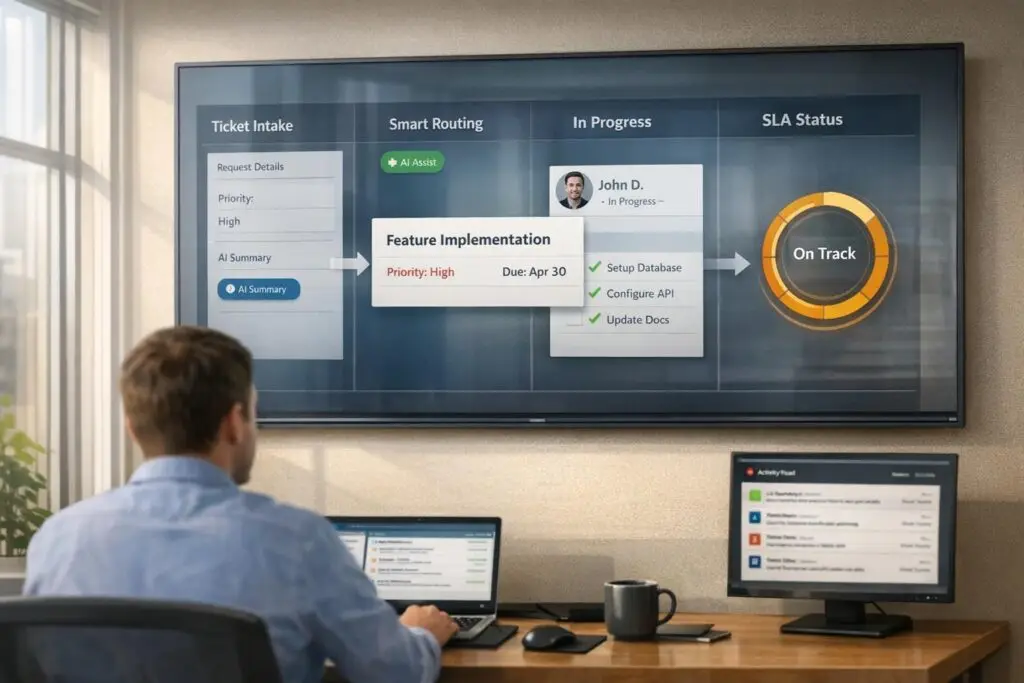
Implementation tickets can be a nightmare if not handled properly. They often lead to long, unproductive threads due to missing details, inefficient workflows, and unclear ownership. Here’s how to fix that:
- Capture Complete Information Early: Use structured forms and service catalogs to gather all necessary details upfront.
- Streamline Workflows: Categorize tickets, prioritize effectively, and ensure proper routing to the right teams.
- Improve Accountability: Assign clear ownership to tickets and track progress with defined SLAs.
- Leverage AI: Automate repetitive tasks, generate summaries, and predict potential roadblocks to keep things moving.
Managed the Flow of Tickets Into Your System – SOP for Managed Services
sbb-itb-e60d259
What Causes Tickets to Stall
Understanding why implementation tickets stall is crucial for speeding up resolutions. Typically, the main culprits are incomplete information, inefficient workflows, and unclear accountability. These issues can turn simple requests into prolonged back-and-forths, making problem-solving much more difficult.
Vague Ticket Scopes and Missing Information
When tickets lack detail – like one titled simply "Help" – agents are forced to spend time digging for context instead of solving the issue [3]. Without all the necessary information upfront, agents might waste hours gathering details or escalate the ticket prematurely, leaving specialists to start the process all over again.
Poor documentation is a widespread issue, with 20% of tickets requiring manual intervention due to missing or incomplete information [2]. Matthew Plotkin, an expert in AI-driven customer experience, highlights this recurring problem:
"Hard-won answers disappear when tickets close and docs never update" [2].
This creates a frustrating cycle where the same problems resurface because they were never fully resolved in the first place [2].
Poor Workflows and Slow Escalations
A lack of automated workflows can also grind ticket progress to a halt. Informal intake methods – like emails, Slack messages, or casual hallway chats – make tracking tickets inconsistent. This can lead to misrouted, overlooked, or even duplicate tickets [3].
Workflow errors, such as looping tickets that never reach resolution, further complicate the process. Without safeguards to prevent such loops, progress stalls [4]. When teams rely on unstructured, real-time communication instead of defined workflows, it increases distractions and forces constant context switching, slowing down resolution efforts.
No Clear Ownership or Accountability
Tickets often stall because no one is clearly responsible for moving them forward. Without a designated owner, tickets can easily fall through the cracks [3]. This mirrors the "automation black holes" mentioned earlier, where a lack of accountability leads to delays [1]. For example, support teams might wait for engineering to investigate, while engineering waits for more details from support – leaving customers stuck in limbo.
The impact of this ownership gap is significant. A staggering 85% of customer experience leaders say unresolved issues cause customers to abandon a brand, even after just one negative interaction [2]. The frustration doesn’t just come from slow responses – it stems from the feeling of being ignored because no one took clear responsibility for resolving the problem.
How to Prevent Long Ticket Threads
Once you’ve pinpointed issues like vague ticket scopes, inefficient workflows, and misrouted tickets, the next step is to establish systems that ensure smooth processes. The main objectives? Capture essential details early, route tickets correctly right away, and track progress effectively so nothing gets overlooked. Below are actionable strategies to prevent tickets from spiraling into endless threads.
Create Standard Ticket Workflows
Start by categorizing tickets with a simple system of 8–15 high-level categories like Billing, Technical Issue, or Feature Request. Research shows that exceeding 15 categories reduces accuracy, so aim for clarity and exclusivity in your classification [5].
Move beyond vague urgency labels by introducing multi-factor priority scoring. Assign a score between 0–10 based on factors like urgency (0–3 points), business impact (0–3 points), customer tier (0–2 points), and SLA risk (0–2 points). This way, tickets are prioritized based on objective criteria rather than subjective urgency [5].
Leverage routing based on skills and ticket complexity to ensure tickets land with the right specialist or team from the start. Using AI for this process can save time and reduce errors. Begin by using AI suggestions with human oversight, and gradually shift to full automation as the system learns and improves [5].
Collect Complete Information Upfront
Delays often occur before a ticket is even addressed. As William Westerlund from Suptask explains:
"Most ticket delays start before anyone touches the ticket. Clean intake reduces misroutes, duplicate work, and follow-up questions" [6].
To combat this, require users to fill out key fields like Category and Issue Type. Use dropdowns for Impact and Urgency to ensure consistent and complete entries [6].
A service catalog in your self-service portal can guide users to the right request types, prompting them to provide the necessary details upfront. Regularly review tickets that fall into "Other" or "General" categories to identify gaps in your forms and update them accordingly [6].
For tickets awaiting user input, implement a 3-strike rule: send automated reminders at 24 and 48 hours, and auto-close the ticket after 72 hours if no response is received. This keeps the queue manageable. When reassigning tickets, require agents to include a summary note detailing the issue, previous attempts, and the next required step to avoid unnecessary back-and-forth [6].
Set Clear SLAs and Track Progress
SLAs are only effective if they’re clearly defined and actively monitored. Establish straightforward guidelines for what qualifies as "urgent" or "sensitive" to ensure consistent labeling across the team [5]. Use automation to triage tickets, but only auto-route or prioritize when the AI’s confidence level is high enough; otherwise, flag them for manual review [5].
Track these key metrics weekly to stay on top of performance and address bottlenecks quickly [5]:
- SLA Breach Rate: Percentage of tickets that exceed their time limits
- First Response Time (FRT): Time taken to send an initial human response
- Time to Resolution (TTR): Total time from ticket creation to resolution
- Reassignment Rate: Frequency of tickets being moved between queues, often signaling poor routing or unclear SLAs
For sensitive tickets, enforce stricter SLAs and faster escalation procedures. Platforms like Supportbench offer dynamic SLAs that adapt to the situation – for example, tightening response times when a customer’s renewal date is approaching – ensuring consistent service even in complex cases.
Using AI to Manage Tickets Better
Incorporating AI into ticket management is a game-changer for support teams. It bridges the gap between manual processes and scalable solutions, automating routine tasks and identifying issues early. Instead of wasting hours sifting through threads or crafting handoff notes, AI takes over – summarizing conversations, predicting potential roadblocks, and resolving routine requests autonomously. The result? Faster resolutions and fewer frustrating back-and-forth exchanges. This approach sets the stage for streamlined ticket management at every level.
AI Ticket Summaries
Ticket threads can be time sinks, especially when an implementation ticket bounces between support, engineering, and customer success teams. Each person must comb through countless messages to understand the situation. AI-generated summaries solve this by condensing ticket histories into concise, actionable overviews. These summaries outline the problem, what’s been tried, and what needs to happen next.
AI-generated summaries also include key technical details like logs, customer tier, and impact metrics, enabling teams to act without needing follow-up clarifications [7]. This eliminates the "manual escalation loop", where agents write summaries that engineers need to clarify or re-read [7].
AI goes even further by spotting patterns across multiple tickets using knowledge graphs. For example, if 15 customers report similar API integration issues, AI consolidates them into a single engineering task instead of treating each as a separate case [7]. This kind of efficiency has real-world results: from February 2024 to January 2025, Bolt cut its average ticket resolution time nearly in half – from 129.8 hours to 62.7 hours – by using AI for routing and prioritization and root cause analysis [7]. Similarly, BILL, a financial platform, achieved over 70% autonomous ticket resolution, saving $5 million while improving customer satisfaction [7].
Predictive Escalation and Early Problem Detection
AI doesn’t just summarize – it anticipates. By analyzing sentiment, follow-up patterns, and historical data, AI can predict which tickets are likely to stall and flag them for rapid escalation [8][5]. This proactive approach shifts support teams from reacting to problems to preventing them.
Machine learning models analyze ticket content against thousands of past resolutions to determine the quickest path forward, routing tickets to the right specialist instantly. Natural language processing (NLP) detects signs of urgency or negative sentiment in customer messages, triggering escalation before frustration builds [8][5]. For example, when Rapid7 adopted AI workflows in December 2025, the company reduced ticket handling time by 30%, increased agent capacity by 35%, and maintained a 95% customer satisfaction score (CSAT) [8]. Similarly, Cynet achieved a 47% ticket deflection rate at Tier 1 and saw its CSAT score jump 14 points, from 79 to 93 [8].
Some platforms, like Supportbench, even use AI to dynamically adjust SLAs. For instance, response times tighten automatically as a customer’s renewal date approaches, ensuring consistent service during critical periods. AI also monitors ticket streams to identify potential bottlenecks or systemic issues before they escalate [8].
Automating Routine Tasks
AI excels at handling repetitive tasks, freeing up agents to focus on more complex challenges. Intent classification allows AI to analyze incoming tickets and determine the customer’s actual need – whether it’s a billing issue, a bug report, or a refund request – without relying on simple keyword matching [9]. Intelligent routing ensures tickets are assigned to the right agent or team based on factors like skill set, language, or product expertise [9]. Priority scoring evaluates urgency by considering sentiment, business impact, customer tier, and SLA risk, ensuring critical issues are addressed promptly [9].
AI also enriches tickets by auto-adding tags, pulling relevant customer data, and drafting responses for agents to review and send [9]. For straightforward Tier-1 tasks, such as password resets, AI can handle them entirely on its own [9]. The impact is significant: first response times can drop from 4–8 hours to under 30 seconds, and misrouted tickets decrease from 15–25% to just 3–8% [9]. Advanced AI tools can autonomously resolve 50–70% of Tier-1 tickets [9].
Supportbench offers built-in AI automation that prioritizes cases, assigns issue types, and tags tickets automatically, removing the need for agents to manually sort through requests. This allows support teams to focus on high-value tasks that require human expertise, aligning with the demands of modern, cost-efficient B2B support operations.
Tracking Results and Avoiding Mistakes
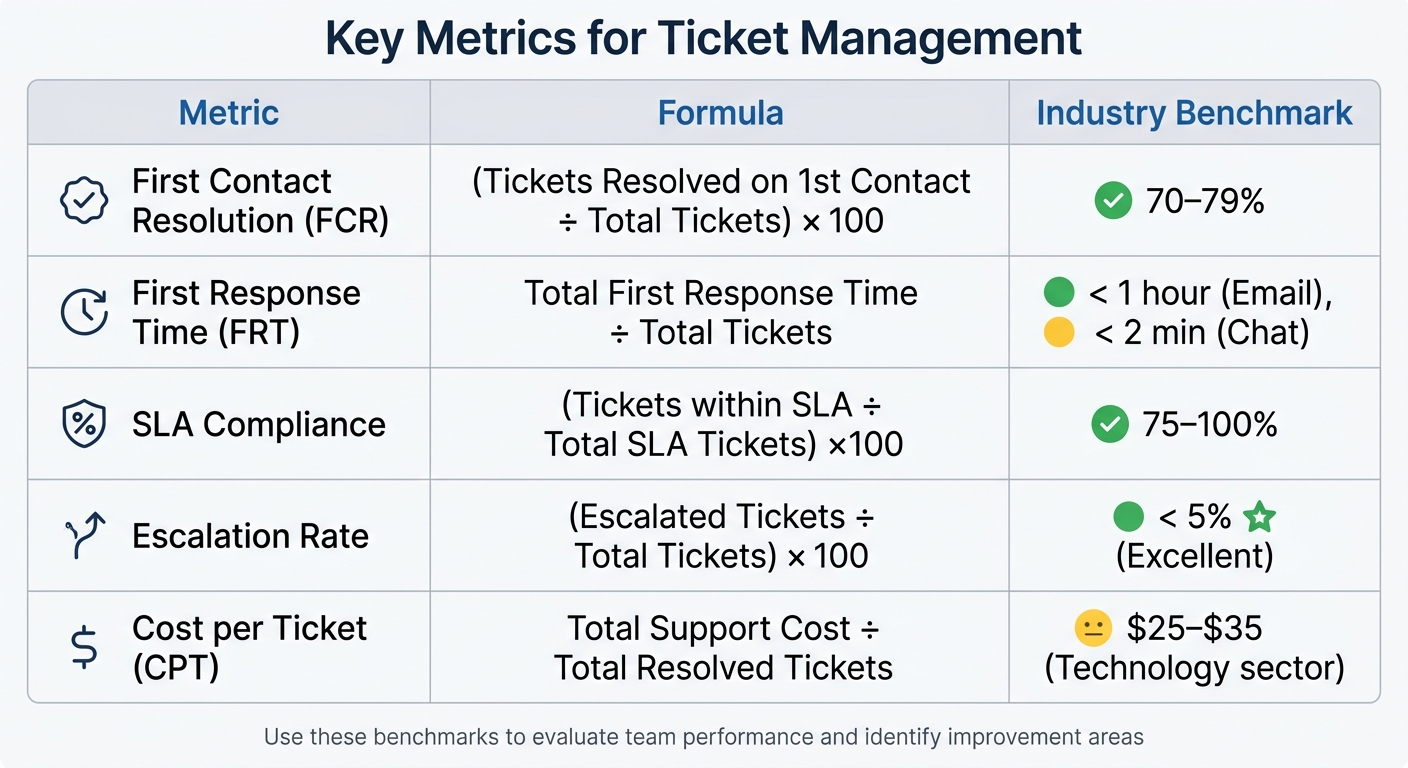
Key Support Ticket Metrics: Formulas and Industry Benchmarks
Rolling out new workflows and AI tools is just the beginning – you need to measure their effectiveness. Without proper metrics, you’re essentially guessing. Focus on five essential metrics: First Response Time (FRT), Resolution Time, Customer Satisfaction (CSAT), First Contact Resolution (FCR), and Ticket Backlog. These indicators provide a clear picture of your team’s speed, quality, and overall performance [10].
To get accurate insights, use median values instead of averages, which can be skewed by outliers. For example, segment resolution times by ticket tier to set realistic goals. It makes no sense to treat all tickets the same when Tier 1 issues might be resolved in 4–8 hours, while Tier 3 cases could take 3–5 days [10]. Keep an eye on your escalation rate, too – anything under 5% is excellent, but rates above 20% suggest problems in triage or documentation [11].
If you’re leveraging AI, include auto-resolution rate in your dashboard. This measures the percentage of tickets resolved without human help, with mature AI setups aiming for around 60% [7]. Another useful metric is the "misrouting tax", which you can calculate by multiplying your monthly ticket volume by the misroute rate and the average delay per reassignment (47 minutes) [7]. These insights help fine-tune your workflows and AI systems.
Key Metrics for Ticket Management
The table below outlines benchmarks for key support metrics. Use these to evaluate your team’s performance and identify areas for improvement.
| Metric | Formula | Industry Benchmark |
|---|---|---|
| First Contact Resolution (FCR) | (Tickets Resolved on 1st Contact ÷ Total Tickets) × 100 | 70–79% [11] |
| First Response Time (FRT) | Total First Response Time ÷ Total Tickets | < 1 hour (Email), < 2 min (Chat) [10] |
| SLA Compliance | (Tickets within SLA ÷ Total SLA Tickets) × 100 | 75–100% [11] |
| Escalation Rate | (Escalated Tickets ÷ Total Tickets) × 100 | < 5% (Excellent) [11] |
| Cost per Ticket (CPT) | Total Support Cost ÷ Total Resolved Tickets | $25–$35 (Technology sector) [11] |
To avoid "support debt", keep your open ticket backlog under twice your average daily ticket volume [10]. Also, send CSAT surveys 24 hours after resolution instead of immediately to see if the fix actually worked [10]. Improving FCR by just 10% can reduce total ticket volume by 12–18%, creating a ripple effect of efficiency gains [10]. By monitoring these metrics regularly, you can keep your support operations on track and aligned with AI-driven workflows.
"If you’re reporting on volume without context or measuring time without linking it to customer satisfaction, you’re just busy, not improving." – Eric Klimuk, Founder and CTO, Supportbench [11]
Common Mistakes to Avoid
While metrics are vital for tracking progress, avoiding common pitfalls is just as important to maintain long-term success. One major error is treating all tickets the same. Rigid prioritization based solely on issue type overlooks factors like customer tier, renewal risk, or the number of users affected [7]. This can lead to inefficient queues, where trivial requests are handled before critical issues. A priority matrix that balances impact and urgency can help [12].
Another misstep is relying on AI copilots that only draft responses instead of using agentic AI capable of resolving issues or identifying root causes independently [7]. If your AI requires human approval for every action, you’re not fully reaping its benefits [7]. Also, don’t push agent utilization above 85% – this leads to burnout, not efficiency. Aim for a healthier range of 60–70% [10][11].
Vague ticket categorization is another trap. If 40% of your tickets fall under a generic "Other" category, you’re missing out on actionable insights [12]. Break down categories into more specific, meaningful groups. Avoid undermining clear workflows and AI optimizations by steering clear of public leaderboards for individual metrics. Instead, share team-level data publicly and keep individual performance reviews private to prevent toxic competition [10].
Lastly, don’t fall into the "Groundhog Day" cycle of manually resolving the same recurring issues over and over. Use AI to spot patterns in repetitive questions and develop a prioritized documentation plan [2]. During monthly reviews, focus on three high-impact action items rather than a long list of minor tweaks that never get implemented [10].
Conclusion
Avoiding endless back-and-forth on implementation tickets requires a combination of structured workflows, smart automation, and proactive management. The real culprit behind stalled tickets isn’t unmotivated agents or challenging customers – it’s structural breakdowns during handoffs. These are the moments where context gets lost, ownership becomes blurry, and critical information vanishes into disconnected tools [1].
"The failures are structural, not human." – Richie Aharonian, Head of Customer Experience & Revenue Operations, Unito [1]
To tackle these issues, focus on three key actions:
- Minimize unnecessary handoffs by replacing approval gates with notification rules, cutting down on avoidable delays [1].
- Enable bidirectional synchronization between support and engineering tools. This ensures updates are instant and visible across systems – when an engineer completes a task in one platform, the support agent and customer are immediately informed in another [1].
- Turn manual resolutions into documentation updates. Every resolved issue should feed into improving your knowledge base [2].
Take it a step further by using generative AI in customer support to analyze repetitive questions, identify trends, and prioritize documentation updates automatically [2].
Remember, automation without better documentation is like running on a treadmill [2]. Even if AI resolves 80% of tickets, the recurring 20% will keep dragging you down unless you address the root cause. Use metrics like First Contact Resolution, escalation rates, and the "misrouting tax" to measure progress and identify gaps [7].
FAQs
What fields should every implementation ticket include?
Every implementation ticket should include certain key fields to ensure a smooth resolution process. These fields are:
- Issue Description: A clear and concise explanation of the problem.
- Priority Level: Indicates the urgency of the issue.
- Category/Subcategory: Helps in organizing and classifying the ticket.
- Status: Tracks the current stage of the ticket (e.g., Open, In Progress, Resolved).
- Assignee: Identifies who is responsible for handling the ticket.
- Customer Information: Provides details about the customer or client involved.
- Creation Date/Time: Logs when the ticket was created for proper tracking.
- Resolution Details: Documents how the issue was resolved.
Including these fields ensures better communication, accurate prioritization, and effective progress tracking. This approach helps avoid unnecessary back-and-forth, making the entire process more efficient.
How do I stop tickets from bouncing between teams?
To keep tickets from bouncing back and forth between teams, it’s essential to tackle workflow challenges and improve how handoffs are managed. Start by mapping out your workflow to identify where misrouting tends to happen. Establish clear and standardized handoff procedures, supported by detailed documentation, so everyone knows what to do. AI tools can also be a game-changer for triaging and routing tickets to the right team from the start. Additionally, automation can help enforce routing rules and escalate tickets that remain unresolved.
By taking these steps, you can cut down on miscommunication, speed up resolution times, and create a smoother experience for your customers.
What’s the safest way to start using AI in ticket workflows?
The best way to introduce AI into ticket workflows is to take things step by step. Start with simpler tasks like classifying, prioritizing, and routing tickets. Use your existing data to train the AI, keeping a close eye on how it performs. Regularly check and validate its decisions to ensure accuracy. Once you see consistent results, you can gradually apply AI to more complex workflows. This approach helps reduce risks while keeping support operations efficient and scalable.






