


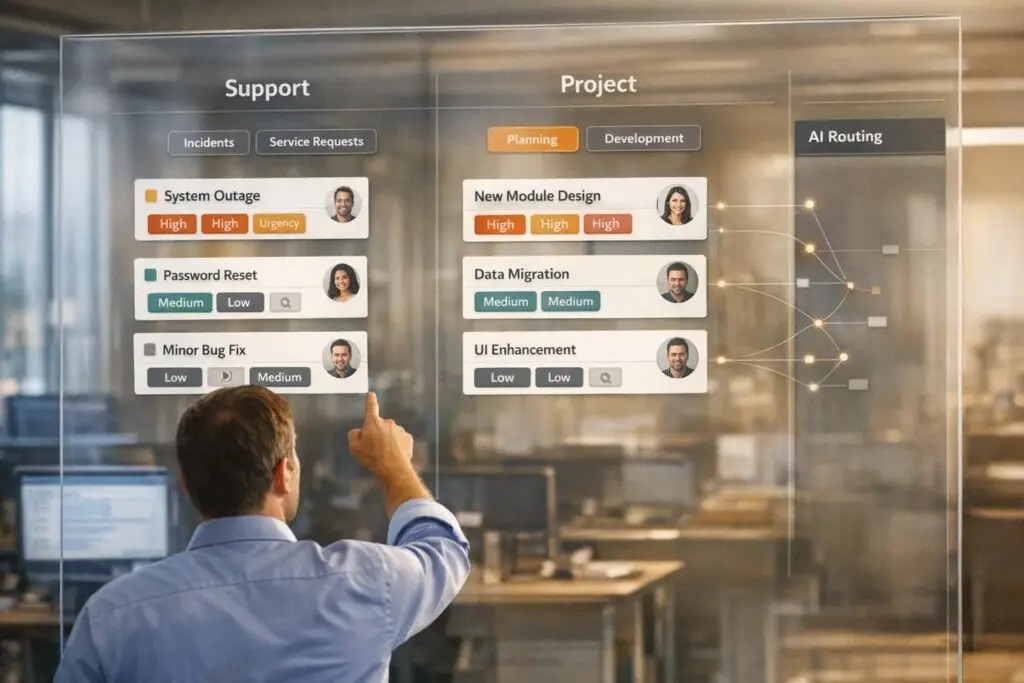
When managing B2B implementation projects, separating support tickets from project work is essential. Mixing these distinct tasks leads to missed deadlines, overburdened teams, and unhappy customers. Here’s how to fix it:
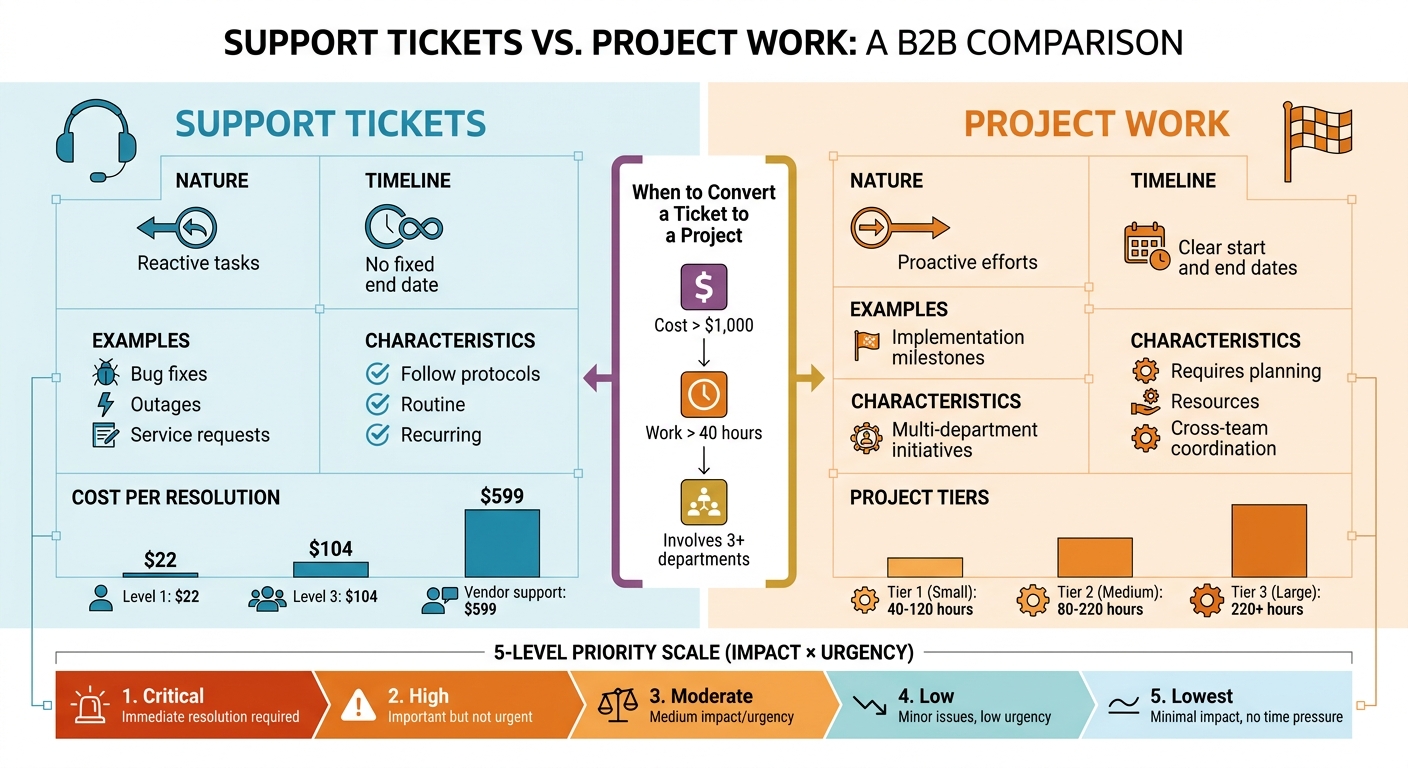
- Support Tickets: Reactive tasks like fixing bugs or resolving outages. These are routine, follow protocols, and lack a fixed timeline.
- Project Work: Proactive efforts with clear start/end dates, requiring planning, resources, and cross-team coordination.
Key practices:
- Define thresholds for turning tickets into projects (e.g., costs over $1,000, 40+ hours of work, or involving 3+ departments).
- Use a two-tier ticket categorization system: broad categories (e.g., "Technical Issue") and specific subcategories (e.g., "Login Problem").
- Assign priorities based on impact (scale of disruption) and urgency (time sensitivity), using a 5-level priority scale.
- Automate ticket routing and ensure clear ownership with required fields like assignee, impacted users, and next steps.
Avoid common mistakes like excessive tags, unclear ownership, and treating all tasks as urgent. Leveraging AI tools for classification and routing can save time and improve resolution rates.
This approach ensures smooth workflows, better resource allocation, and improved customer satisfaction.
Support Tickets vs Project Work: Key Differences and Classification Framework
How to Build a Ticketing Process That Works
sbb-itb-e60d259
How to Categorize and Prioritize Tickets
Once you’ve separated support tasks from project work, the next step is to organize tickets based on their business impact and urgency. Without a clear system for categorization and prioritization, tickets can easily get lost in the shuffle, leading to missed critical issues and frustration across teams.
Ticket Categories by Type
A well-structured ticket management system starts with a shared classification framework that your support, product, and engineering teams can all understand. Categories should align with your product’s structure and the type of work being requested. For B2B implementation projects, this often involves a two-tier hierarchy: a broad category (like Product Area) followed by a more specific sub-category (such as Root Cause or Request Type) [6].
Here are a few common ticket types for implementation projects:
- Support Incident: Technical problems or bugs that need resolution.
- Implementation Milestone: Specific steps in the project’s lifecycle.
- Project Blocker: Issues that prevent users from completing essential workflows.
- Change Request: Modifications to services that might have contractual implications [1][5][6].
The goal is to align these categories with your product and engineering team’s structure – think areas like "Analytics" or "Workflow Automation." This alignment helps streamline escalations and pinpoint bottlenecks [6].
To keep things manageable, limit your categories to fewer than 20. Overcomplicating the system can overwhelm your team and make ticket handling inefficient. As Alan Parker, Founder of Iseo Blue Limited, puts it:
"Poor ticket categorisation leads to confusion in the team, inefficient ticket handling, crappy reports and an increased cost per ticket" [9].
Stick to established thresholds for converting support tickets into project tasks to avoid clogging your support queue with "projickets." Once your categories are set, the next step is assigning priority levels to allocate resources effectively.
How to Set Priority Levels
Priority isn’t just about how fast something needs to be done – it’s a balance of impact and urgency. Impact measures the scale of disruption, such as the number of users affected, potential revenue loss, or the importance of the affected system to operations. Urgency, on the other hand, reflects how quickly a solution is needed. For instance, a high-impact issue might have low urgency if the effects won’t be felt until later, like a system required for end-of-quarter reporting [7][8].
A priority matrix can help remove subjective decision-making and ensure consistent adherence to service level agreements (SLAs). Many organizations use a 5-level priority scale:
- Critical: Immediate resolution required for high-impact issues.
- High: Important but not urgent.
- Moderate: Medium impact or urgency.
- Low: Minor issues with low urgency.
- Lowest: Minimal impact and no time pressure.
For example, a widespread outage (high impact) that needs immediate attention (high urgency) would be marked as Critical. Meanwhile, a small feature request (low impact) with no deadline would fall under Low or Lowest priority.
In implementation projects, you can use a 1–5 scale to assess both demand and impact objectively. Consider factors like ticket volume relative to annual recurring revenue, customer value (risk of churn), and business value (strategic importance) [2]. This ensures resources are allocated based on data, not just the loudest requests. As Julien Quintard, Founder and CEO of Routine, explains:
"Treat tickets as valuable data points, not directives. Your roadmap should represent a blend of business objectives, customer value, and available resources" [2].
To save time, AI-powered ticket routing and prioritization. Use triggers based on keywords like "urgent", "outage", or "refund" to assign categories and priorities instantly. This ensures critical issues bypass standard queues and reach the right team without delay [6].
How to Structure Tickets for Clear Ownership
Well-structured tickets are the backbone of efficient operations, ensuring accountability is clear and problems are resolved faster.
Required Fields for Every Ticket
Unclear ownership can turn tickets into a game of hot potato, bouncing between teams until someone takes charge. To avoid this chaos, every ticket should include a core set of fields that establish responsibility right from the start.
Start with a Title, Description, and a unique identifier to define the ticket’s scope. Beyond that, accountability hinges on assigning a clear Assignee (the person currently responsible), specifying the Source and Destination teams (for escalations), and including a Next Action field to outline the immediate step forward. Without these, tickets often stall because no one knows who’s supposed to act next [2][3].
For B2B implementation projects, adding contextual metadata helps prioritize tickets effectively. Include details like customer segment (SMB, Enterprise), Account Impact (e.g., ARR band or number of seats affected), and Lifecycle stage (onboarding, active, renewal). This ensures teams understand not just what the issue is, but why it matters. For example, a $500,000 ARR customer facing a critical blocker during onboarding should never be treated the same as a minor request from a lower-tier account.
To prevent redundant backtracking when tickets move between teams, include Technical context fields. These should cover Affected Users, Troubleshooting Steps (to avoid repeating diagnostics), and a clear Problem Statement that outlines the specific outcome the user is struggling to achieve [2][3].
In environments where different teams use separate tools – like support and engineering platforms – State Synchronization fields are crucial. These ensure statuses are updated consistently across systems. Richie Aharonian, Head of Customer Experience & Revenue Operations at Unito, highlights this challenge:
"Every handoff is a compression point. Information gets compressed into whatever the receiving system can accept. Everything else… simply disappears" [3].
For example, if your support tool has a "Customer Impact" field but your engineering system doesn’t, that critical context can vanish during a transfer [3].
Once these fields are in place, the next step is ensuring seamless handoffs during ownership transitions.
How to Assign Clear Ownership
With all the necessary information in the ticket, assigning clear ownership becomes the key to keeping things moving.
Ownership means assigning someone with the right context, authority, and notifications to take action. Most ticket delays happen during handoffs between teams – not because of negligence, but because gaps in the system cause information to get lost [3].
To address this, create a handoff specification for every ownership transfer. Document the trigger condition (what prompts the ticket to move), the information requirements (what must accompany the ticket, such as attachments, troubleshooting history, and customer impact), and the notification requirements (how the new owner is alerted). Don’t rely solely on automated assignments – send direct notifications to ensure the ticket is noticed and the SLA management ensures the clock is being monitored [3].
Explicitly map fields between systems to avoid losing context. For instance, ensure your support platform’s "Business Impact" field aligns with its counterpart in your project management tool. Without this, engineers may waste time asking redundant questions because critical details disappeared during the sync [3].
Also, define rollback conditions upfront. These clarify when and how a ticket should return to its previous owner, along with what information needs to be included for the return to be productive. This prevents tickets from endlessly bouncing back and forth, saving time and reducing frustration for everyone involved [3].
A structured approach like this ensures tickets move smoothly between support and project teams, with clarity and efficiency at every step.
| Handoff Component | Requirement for Clear Ownership |
|---|---|
| Trigger Conditions | Define exactly what status change or event causes the handoff. |
| Information Requirements | List mandatory fields, attachments, and conversation history needed. |
| Field Mapping | Ensure source fields match destination fields across systems. |
| Notification | Specify who is notified and how (automated vs. direct). |
| State Sync | Define how systems stay synchronized during the work. |
| Rollback Rules | Define when and how a ticket returns to the previous owner. |
How to Build Workflows for Support and Project Tickets
When managing support and project tickets, it’s essential to create distinct workflows for each. Support workflows focus on recurring, unexpected issues that follow routine procedures, like service requests or incidents. On the other hand, project workflows are designed for tasks with a clear start and end date, aimed at achieving specific results [1]. Combining these workflows can lead to inefficiencies and bottlenecks.
Support Workflows: Fast Resolution
Support workflows are all about speed and consistency. The primary goal is to route tickets to the correct team immediately, resolve them efficiently, and close them without unnecessary delays. To achieve this, start with a two-tier taxonomy. This structure includes:
- A mandatory high-level "Topic" (e.g., Technical Issue or Billing).
- An optional "Subtopic" (e.g., Login Issues or Refund Requests).
This setup enables automated routing rules and SLA timers to kick in seamlessly [10].
AI tools can further streamline the process. Using natural language processing, these tools can classify tickets – whether they’re bugs, feature requests, or tasks – in under 30 seconds [11]. This auto-tagging system ensures tickets are routed and addressed faster, improving overall efficiency.
Additionally, automation rules can be built around intake form responses. For example, conditional routing ensures that tickets land directly in the hands of the appropriate team without manual intervention.
While speed is the focus of support workflows, project workflows require a more strategic approach, emphasizing milestones and resource management.
Project Workflows: Managing Milestones and Dependencies
Project workflows are designed to handle tasks that demand milestone tracking, resource planning, and risk management [1]. To streamline these workflows, projects can be categorized into tiers based on their complexity and required work hours:
- Tier One (Small Projects): Typically 40–120 hours of work. These projects require a project charter, a kick-off meeting, and regular status updates.
- Tier Two (Medium Projects): Involving 80–220 hours, these projects may include a work breakdown structure and a communications plan.
- Tier Three (Large Projects): With 220+ hours of work, these projects often need detailed risk response plans and quality management measures [1].
It’s also important to define triggers for converting tickets into projects. For instance, a ticket might be escalated to project status if it exceeds $1,000 in cost, requires more than 40 hours of work, or involves more than three departments [1]. Converting such tickets while maintaining their history ensures seamless continuity.
Using a unified platform can make a big difference. Real-time visibility into resource allocation helps teams manage both urgent support tasks and long-term projects effectively. IT Analyst Nikole Cabral highlights the value of this approach:
"We have the visuals now. We have the project list, and we can show Operations: Here’s our resource allocation for the next three months. Anybody in red, they’re overscheduled, and we need to reassess things" [1].
This integrated system helps prevent over-scheduling and ensures resource availability for both immediate and future needs.
Common Mistakes and How to Avoid Them
Getting ticket structuring right is crucial for keeping support and implementation projects on track. Even seasoned support teams can slip up, and these errors often lead to unnecessary delays and higher costs, disrupting smooth B2B support operations.
Mistakes to Avoid in Ticket Structuring
One of the biggest issues is mixing support and project work. Treating complex implementation projects like regular tickets can obscure resource management and timelines. Nikole Cabral, an IT Analyst and Project Manager at Self Regional Healthcare, highlighted this challenge:
"One of the biggest problems we had with our previous ticketing system was tickets bouncing around among many different teams before landing in the right bucket to get resolved" [1].
Another common problem is excessive tagging. Over time, support teams often create hundreds of tags, which leads to confusion when agents randomly pick categories because the correct one isn’t clear [10]. Similarly, synonym chaos – such as using "Billing" and "Payments" interchangeably – can ruin the accuracy of reports [10]. Jake Bartlett, a technical writer and customer success expert, summed it up:
"The taxonomy is the strategy. Ticket tagging is just the execution" [10].
Marking every ticket as urgent is another pitfall. When everything is labeled as high priority, nothing truly gets prioritized, creating bottlenecks in implementation workflows [12]. Emily Carter, a help desk software specialist, explains:
"When everything becomes urgent, nothing is urgent" [12].
This mismanagement is particularly costly in B2B environments, where the cost of resolving a ticket rises sharply by level: Level 1 costs around $22, Level 3 jumps to $104, and vendor support can reach $599 [13].
Incomplete intake information is yet another issue, leading to endless email exchanges and unnecessary delays [13]. And without a clear "Definition of Done" for projects, rejection rates spike, resulting in costly rework. As Bogdan, a product management expert, points out:
"Normally, a user story being rejected should be an exception; someone misunderstood something, someone made the wrong assumption, someone failed to communicate" [14].
By recognizing these common pitfalls, teams can take steps to streamline ticket management and improve overall efficiency.
Proven Methods for Better Ticket Management
A solid approach begins with a two-tier taxonomy. This system uses a required high-level "Topic" for broad categorization and an optional "Subtopic" for more detail [10]. It simplifies routing and ensures SLA timers are triggered without overwhelming agents.
The RUF Framework is an effective way to simplify ticket categorization. Tickets are grouped into one of three categories: Reliability (errors or performance issues), Usability (questions about how to use something), or Functionality (requests for new features) [10]. This method reduces ambiguity and makes data analysis easier.
For larger tasks, use the "1,000/40/3" rule: If a ticket involves more than $1,000 in costs, over 40 hours of work, or input from more than three departments, treat it as a project, not a standard ticket [1].
Eliminating catch-all categories like "Other" or "General Inquiry" is another must. These categories often become dumping grounds, making data analysis ineffective [10]. Instead, require agents to choose from defined topics and conduct quarterly audits to clean up unused tags [10].
Automating ticket routing can save time and reduce errors. AI or rule-based systems can assign tickets based on category, priority, or customer tier. This automation can eliminate the 30 to 45 minutes agents often spend sorting tickets manually each day [12]. AI tools can even classify tickets – whether they’re bugs, feature requests, or tasks – in under 30 seconds using natural language processing [11].
Comparison Table: Mistakes vs Solutions
| Common Mistake | Impact | Recommended Solution |
|---|---|---|
| Tag Bloat: Too many unused or redundant tags | Agents pick categories randomly; data loses value [10] | Conduct quarterly audits to clean up tags [10] |
| Catch-all Categories: Overuse of "Other" or "General" | Data becomes useless for analysis [10] | Remove generic categories; require specific topic selection [10] |
| Mixing Work Types: Treating projects as standard tickets | Overloads resources and disrupts timelines [1] | Apply the "1,000/40/3" rule to classify larger tasks as projects [1] |
| Manual Routing: Agents sorting tickets manually | Wastes 30–45 minutes per agent daily [12] | Use automated tools for ticket assignment [12] |
| Everything Marked Urgent: No clear prioritization | Creates bottlenecks; critical tasks are delayed [12] | Establish clear priority levels tied to business impact and SLAs |
Using AI to Improve Ticket Management
AI-powered tools are reshaping how B2B support teams handle support tickets and manage complex implementation projects. By automating processes like triage and routing, these platforms use AI to classify, prioritize, and direct tickets efficiently. This is especially helpful when juggling routine support requests alongside long-term implementation projects involving multiple stakeholders and milestones. Let’s dive into the specific AI features that streamline these tasks.
AI Features for Support and Project Tickets
AI eliminates time-consuming manual tasks that often bog down ticket management. Features like automated classification and predictive prioritization analyze urgency signals and customer health data to assign issue types, categories, and urgency levels instantly. This ensures tickets are routed to the right team or agent without the need for manual intervention [17][18].
Another game-changer is AI summarization, which condenses lengthy ticket threads into concise overviews. This is particularly useful for implementation projects where a single ticket might remain active for weeks or months. Additionally, knowledge capture automation transforms closed tickets into knowledge base articles with just one click, ensuring that unique solutions are documented without adding extra work for the team [16][17][18].
B2B teams adopting AI ticketing systems often report significant improvements. For instance, within 90 days, they can see a 20–40% reduction in Tier-1 ticket volume and a 30–50% improvement in resolution times for cases requiring human input [15]. A great example is Cynet, a B2B security company, which experienced a 14-point increase in CSAT (from 79 to 93 points) and achieved a 47% ticket deflection rate after integrating generative AI into their support system. Nearly half of their tickets were resolved at Tier 1, reducing the workload on senior engineers [15].
How Supportbench Handles B2B Implementation Projects
Supportbench takes these AI capabilities a step further by offering a tailored solution specifically for B2B implementation projects. Unlike many platforms, all AI features are included in the standard subscription with no extra fees [18]. The AI Co-Pilot, for example, provides agents with context-aware guidance directly within the case view. Agents can query knowledge bases, ticket histories, and customer data using natural language, eliminating the need to switch between tools [17][18].
For implementation projects, Supportbench introduces division-based customization. This allows teams to lock priorities, statuses, and activity types for specific divisions. For instance, your "Support" team can operate with different workflows and statuses than your "Project" or "Managed Services" teams, avoiding confusion caused by mixing work types. Custom statuses like "Awaiting Client", "Milestone Reached", or "Implementation Phase 2" can be defined to better reflect the lifecycle of a project rather than using generic support stages [4].
Dynamic SLA management is another standout feature, especially in B2B contexts where contract renewals and project deadlines are critical. The AI engine adjusts SLA timers based on customer health signals and impending deadlines, ensuring that high-priority accounts or time-sensitive projects receive the attention they require [17]. As Marjia T., an IT Specialist in Banking, shared:
"Dynamic SLA timers and agent coaching scorecards helped bring consistency across the board. We finally have visibility into who’s doing what, and cases aren’t falling through the cracks" [18].
Supportbench also supports custom activity types, such as "On-site Visit" or "Remote Session", which are essential for tracking the specific actions needed in implementation work. This level of customization helps teams analyze resource allocation and understand where time is being spent across various tasks [4].
Conclusion
Key Takeaways
Structuring tickets effectively starts with a clear distinction between work types. Projects are one-time efforts with defined start and end points, while tickets handle recurring incidents, service requests, and operational tasks [1]. As mentioned earlier, setting clear thresholds for converting tickets into projects ensures that complex tasks are handled with the proper workflows instead of basic ticketing systems [1].
A two-tier taxonomy strikes a balance between speed and depth. Tier 1, the mandatory "Topic" (e.g., Technical Issue or Billing), allows agents to work efficiently. Tier 2, the optional "Subtopic" (e.g., Login or Refund Request), provides the granular detail needed for robust reporting [10]. Jake Bartlett, Writer at Swifteq, sums it up perfectly:
"The taxonomy is the strategy. Ticket tagging is just the execution" [10].
Regularly auditing ticket tags is another crucial step. This process helps eliminate unnecessary tags and broad, catch-all categories, ensuring your data remains clean and actionable [10].
AI-driven classification adds another layer of efficiency by automatically sorting and routing tickets based on plain-language definitions. This approach ensures consistency and scalability, even as ticket volumes grow [10].
Lastly, tailoring priorities, statuses, and activity types to meet the specific needs of each division – like Support versus Managed Services – ensures workflows align with the operational demands of different teams [4].
These strategies lay the groundwork for improving ticket management processes across the board.
Next Steps for B2B Support Leaders
Here’s how B2B support leaders can put these insights into action:
- Audit your taxonomy: Remove redundant tags and consolidate similar ones (e.g., "Billing", "Payments", and "Invoicing"). Standardize language across the team and create concise definitions for each category to streamline agent onboarding [10].
- Define project tiers: Establish clear guidelines for when a ticket should transition into a project. For instance, small projects (Tier 1) might require only a basic charter and updates, while larger ones (Tier 3) may involve detailed risk and quality management plans [1].
- Consolidate platforms: If your support and project teams use separate systems, consider merging them into one. A unified platform provides a comprehensive view of resource capacity, prevents tickets from bouncing between teams, and helps identify overworked employees before burnout becomes an issue [1].
- Leverage AI-native tools: Invest in platforms with built-in automation features, like AI-driven classification and customizable workflows. These tools minimize manual effort while allowing flexibility to adapt processes for both support and project teams, ensuring operations stay efficient and scalable.
FAQs
When should a ticket become a project?
When a task becomes complex, lengthy, or involves multiple components, it’s time to transition it from a ticket into a project. Trying to manage such work within a single ticket can lead to missed details, oversights, or delays. By converting it into a project, you can ensure better tracking, proper resource allocation, and clearer oversight. This approach is especially effective for tasks with a defined start and end point that aim to deliver a specific result.
What fields should every ticket require?
Every support ticket should include the following fields to keep things organized and ensure quick resolution:
- Unique ID: A specific identifier for the ticket.
- Customer Info: Details like the customer’s name, contact information, or account ID.
- Issue Description: A clear explanation of the problem or request.
- Category: The type of issue (e.g., billing, technical, account-related).
- Priority: The urgency of the issue (e.g., low, medium, high).
- Status: The current state of the ticket (e.g., new, in progress, resolved).
- Date Created: The timestamp when the ticket was submitted.
- Assigned Agent: The person or team handling the ticket.
Including these fields ensures that every ticket is easy to track, prioritize, and resolve efficiently.
How do you prioritize tickets without marking everything urgent?
To handle tickets efficiently, rely on objective criteria such as impact and urgency. Using weighted scoring models can help maintain consistency in prioritization. Establish clear priority levels – like Low, Normal, High, and Critical – to indicate the severity and impact of each ticket.
Separating internal support tickets from customer support requests can help minimize bottlenecks and keep workflows smooth. Additionally, AI-driven triage systems can simplify the routing process, ensuring tickets are directed to the right teams faster.
Keep an eye on key metrics, such as SLA compliance and first-contact resolution rates. Regular reviews of these metrics can ensure your priorities stay aligned with your operational goals. And remember, avoid overusing the "urgent" label – it should truly reflect critical situations.






