


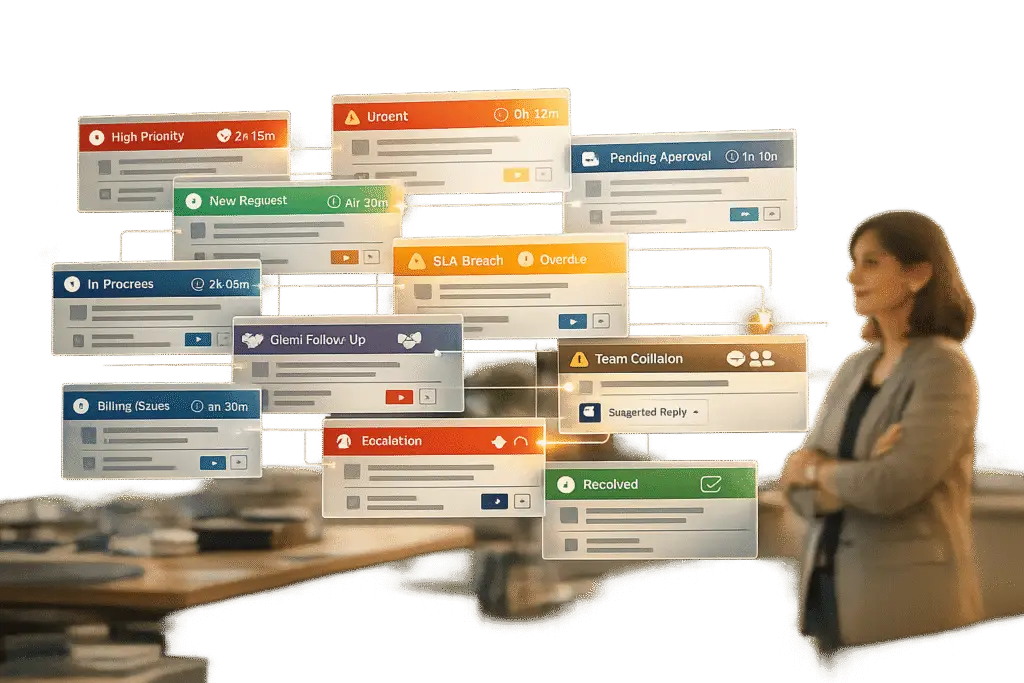
Shared inboxes like support@company.com seem like a simple solution for managing customer inquiries. But as teams grow, these systems often break down, leading to inefficiencies, slow responses, and frustrated customers. This article outlines 12 common shared inbox problems and how AI or automation can address them.
Key Issues:
- No ownership of customer queries: Emails get ignored or duplicated without clear responsibility.
- Slow response times: Poor prioritization leads to delays, missing customer expectations.
- Multiple agents replying to the same ticket: Conflicting responses confuse customers.
- Emails falling through the cracks: Unclaimed messages result in missed opportunities.
- Lack of accountability: Open tickets stagnate without tracking or assignment.
- Inconsistent messaging: Agents provide conflicting information due to no centralized knowledge base.
- No prioritization of high-value customers or urgent issues: Critical matters are treated as routine.
- No access to customer history: Agents waste time searching for context, frustrating customers.
- Missed SLA deadlines: Lack of tracking tools causes delays and unmet commitments.
- Broken escalation processes: Poor workflows lead to misrouted or unresolved tickets.
- No performance metrics: Managers can’t track team efficiency or identify bottlenecks.
- Poor integration with other tools: Agents manually switch between systems, wasting time.
Quick Fix:
AI-powered tools and automation can solve these problems by:
- Automatically assigning tickets to agents.
- Prioritizing urgent inquiries and high-value customers.
- Tracking SLAs and flagging potential breaches.
- Providing a complete customer history at a glance.
- Reducing duplicate responses with collision detection.
Shared inboxes may work for small teams, but scaling requires smarter systems. If your team struggles with these issues, it’s time to explore AI-driven solutions to improve efficiency and customer satisfaction.
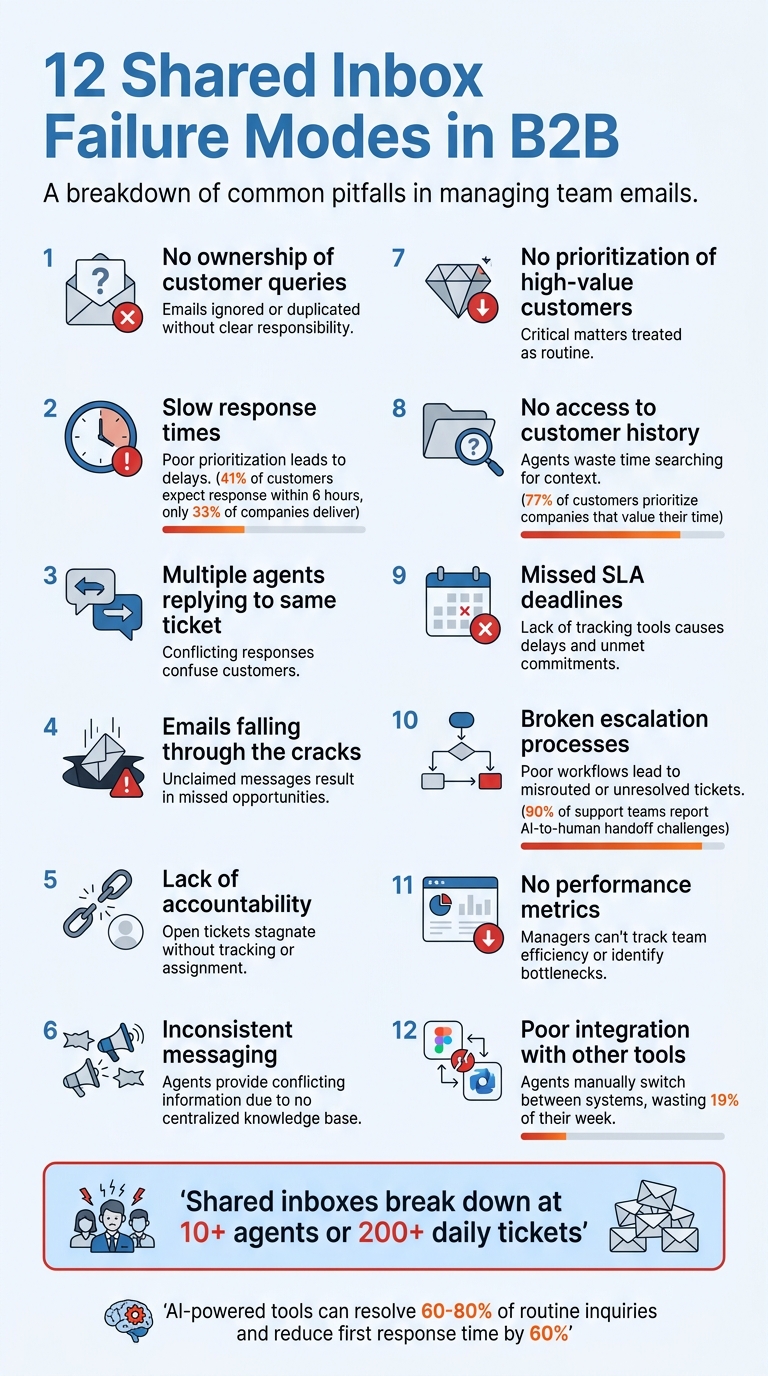
12 Common Shared Inbox Failure Modes in B2B Customer Support
1. No clear ownership of customer queries
When no one is specifically assigned to handle a customer email, the task often falls through the cracks. This is a classic example of the bystander effect – a psychological phenomenon where individuals are less likely to take action when others are present, assuming someone else will step in [2]. In the context of shared inboxes, this can lead to critical customer queries being ignored while the team shifts focus to other tasks.
Email platforms like Gmail and Outlook don’t have built-in assignment features, which exacerbates the problem. As Robbie Richards from Jitbit puts it: "Since email accounts don’t provide the ability to assign emails to different agents, you’ll often find multiple employees working on, and responding to the same support ticket, often with different answers" [2]. The outcome? Customers get conflicting information, the company appears disorganized, and customer trust takes a hit.
Effect on operational efficiency
When ownership isn’t clear, teams waste valuable time on coordination instead of solving problems. Agents resort to Slack or other tools to ask, “Is anyone handling this one?” Managers lose track of who’s working on what. Meanwhile, multiple agents might draft responses to the same query, duplicating efforts and wasting hours that could be used to resolve other issues [2][3].
This inefficiency becomes even more pronounced as teams grow. Shared inboxes tend to break down once a team surpasses 10 agents or handles more than 200 tickets daily [3]. At that point, manual processes for claiming tickets become unreliable, and the system struggles to keep up with the workload.
Potential for resolution through AI or automation
AI-powered tools can help address these challenges by drafting initial responses for agents to review, speeding up response times while keeping a human touch [3]. Some AI systems can autonomously resolve up to 81% of repetitive queries [3], removing the need for manual ownership entirely in many cases. For more complex issues, automated assignment rules can direct tickets to the appropriate agent based on keywords, customer type, or priority. This ensures every query has a clear owner the moment it lands in the inbox [2].
sbb-itb-e60d259
2. Slow response times from poor prioritization
Shared inboxes often fall short when it comes to distinguishing between urgent matters and routine emails. Without tools to set priorities, teams tend to handle messages on a first-come, first-served basis, regardless of urgency [2]. While email folders can help organize, they lack features like priority tagging, agent assignments, or real-time updates [2]. Robbie Richards from Jitbit highlights this issue:
"Email is becoming one of the slower support options, while customer expectations for a faster response time are getting higher all the time" [2].
Impact on customer satisfaction
The disconnect between what customers expect and what businesses deliver is striking. For instance, 41% of customers want a response within six hours, but only a third of companies manage to meet that expectation [2]. In B2B settings, such delays can frustrate clients, leading to negative word-of-mouth that jeopardizes future contracts. Lengthy email back-and-forths often push customers to faster alternatives like social media or phone calls, creating a fragmented support experience and driving up operational costs [2].
Effect on operational efficiency
Poor prioritization doesn’t just hurt customer satisfaction – it also drains team productivity. Shared inboxes can quickly become "black holes for productivity" [2], with agents spending more time searching through threads than solving problems. As email volume grows, this administrative burden compounds, pulling agents further away from meaningful support tasks [2].
Potential for resolution through AI or automation
Automation offers a way out of this prioritization mess. AI-powered ticket routing and prioritization uses predefined rules to assign inquiries based on urgency or required expertise, removing the guesswork [2]. AI tools can analyze messages for priority signals and route them accordingly, slashing response times without needing extra staff [2]. Platforms like Supportbench take this a step further, integrating automation to streamline ticket routing and prioritization. This reduces administrative hassles and boosts efficiency, ensuring critical issues get the attention they deserve. Addressing prioritization challenges is just one piece of the puzzle, setting the stage for broader operational improvements.
3. Multiple agents responding to the same ticket
When more than one agent replies to the same customer message, it creates confusion and inconsistency for the customer [3]. This happens frequently with standard shared inboxes because they lack tools to indicate which agent is actively handling a ticket [3].
As Stevia Putri, Marketing Generalist at eesel AI, explains:
"Two people reply to the same customer with different answers. No one knows who is handling what." [3]
Impact on customer satisfaction
When customers receive conflicting responses, their confidence in your support team takes a hit. It makes your business seem disorganized and unprofessional, which can harm your reputation and weaken trust [3]. This issue is especially risky in B2B settings where strong relationships and credibility are vital. Miscommunication of this kind can even jeopardize future contracts or partnerships. Beyond damaging trust, it also complicates internal workflows, creating unnecessary friction.
Effect on operational efficiency
Duplicate responses waste valuable resources. If two agents spend time researching and replying to the same query, the effort required for one task effectively doubles [4]. Robbie Richards from Jitbit highlights the broader implications:
"Task duplication is not only inefficient, it reflects poorly on a business’s reputation. Support teams appear disorganized, and the clear lack of communication between agents lowers consumer confidence." [2]
Likelihood of occurrence in shared inbox systems
This problem tends to grow as support teams scale. When teams exceed 10 agents or handle more than 200 tickets per day, the chances of collision detection failures increase significantly [3][4].
Potential for resolution through AI or automation
Modern help desk platforms can address this issue with collision detection features. These tools provide real-time notifications when another agent is viewing or drafting a reply, preventing overlapping efforts [4]. AI can also step in to handle repetitive queries or draft responses that agents can review, ensuring consistency and maintaining a single thread of communication. With AI, businesses can achieve up to 81% autonomous resolution rates, reducing errors and streamlining operations [3]. By integrating AI for collision detection and automated responses, support teams can provide clear, consistent communication while improving efficiency and customer experience.
4. Emails falling through the cracks
When team members assume someone else will handle an email, it often results in unanswered messages – and unhappy customers [2]. This breakdown not only disrupts customer trust but also throws internal coordination into chaos.
As teams expand, this issue becomes even more pronounced. Without clear assignment rules, accountability disappears. On top of that, technical hiccups – like emails getting flagged as spam, bouncing back, or being deleted – further complicate things. And when employees leave, the deletion of their email folders can erase vital customer history [2].
Impact on customer satisfaction
41% of customers expect an email response within 6 hours, but only 33% of companies meet this expectation [2]. When emails slip through the cracks, customers are forced to repeat their concerns across different channels. This not only frustrates them but also undermines trust and tarnishes a company’s reputation. In B2B relationships, where dependability is critical, losing track of communications can jeopardize contracts and strain long-term partnerships.
Effect on operational efficiency
Manually forwarding emails creates a mess. It disrupts tracking and wastes time on unnecessary follow-ups [5]. Instead of solving problems, teams waste time asking, “Who’s handling this?” Meanwhile, relying on BCC for internal coordination can backfire – once a customer replies, the entire thread often becomes invisible to the team [2].
Potential for resolution through AI or automation
AI can tackle this issue head-on by automatically routing and prioritizing emails based on factors like priority, availability, or expertise [2]. Automation tools can also handle repetitive tasks, such as organizing emails into folders or adding labels, without any human input [2]. Modern platforms provide clear audit trails and assign ownership from the moment an email arrives, ensuring nothing falls through the cracks. This approach not only boosts transparency but also prevents duplicate efforts, keeping the entire support process streamlined [2][5].
5. No accountability for open tickets
Unassigned tickets can easily fall through the cracks, leading to missed opportunities to resolve customer issues. In a shared inbox setup, there’s no built-in mechanism to assign emails to specific agents. The result? Emails pile up, unclaimed, as team members assume someone else will pick them up [2][1]. This lack of clear ownership often leaves urgent customer concerns unresolved for hours – or even days.
"The biggest limitation [of a shared inbox]? Accountability. Emails can be lost, misdirected, or accidentally deleted. And without proper assignment and tracking, no one is ever held accountable." – Robbie Richards, Jitbit [2]
While assigning initial ownership is critical, maintaining accountability throughout the resolution process is just as important.
Impact on customer satisfaction
77% of customers prioritize companies that value their time [1]. Without clear ticket ownership, response times can spiral out of control. For instance, a SaaS company with eight agents reduced its first response time by 60% in just one month after switching from a shared inbox to a system that allows for ticket assignment [1]. In B2B settings, where reliability often determines contract renewals and expansion opportunities, delays caused by accountability lapses can have serious consequences.
Effect on operational efficiency
Managers face an uphill battle when it comes to tracking open tickets. Without automatic assignment, it’s nearly impossible to monitor who’s handling what, leaving bottlenecks undetected until customers escalate issues [1][3]. Teams often rely on manual workarounds like folders or flags labeled "Needs Response", but these methods demand flawless execution. A single mistake – like accidentally removing a flag – can cause critical tickets to vanish from view [1]. Such gaps in accountability not only allow tickets to stagnate but also make it difficult to distinguish between active and idle issues. These inefficiencies highlight the need for automation to fill the void.
Potential for resolution through AI or automation
Automation can solve these challenges by assigning incoming tickets to agents immediately, based on factors like priority, availability, or expertise [2]. Modern systems also log every action taken on a ticket, creating a clear audit trail that shows who worked on it and when [3]. AI tools can take it a step further, achieving up to an 81% autonomous resolution rate while maintaining accountability through automatic tracking [3]. SLA timers flag tickets that are at risk of breaching deadlines, ensuring no issue goes unnoticed while team members assume someone else is handling it [1][3].
6. Inconsistent messaging across agents
In addition to issues like duplicate responses and slow prioritization, inconsistent messaging stands out as another major challenge in shared inbox management. Even when agents avoid responding at the same time, the absence of standardized communication can result in conflicting information being sent to customers. For instance, one agent might assure a customer that a feature is available, while another might say the opposite.
This problem worsens when experienced employees leave the company, taking their knowledge and context with them. Without access to a centralized knowledge base or detailed ticket history, new agents are left to make educated guesses – or worse, send out contradictory information. These gaps not only confuse less experienced team members but also erode customer trust, leading to dissatisfaction and potential churn.
Impact on customer satisfaction
When messaging is inconsistent, it can give the impression that your business is chaotic and unprofessional. Customers quickly lose trust when they receive conflicting answers from different agents. This is particularly damaging in B2B settings, where precise and reliable information is often a dealbreaker.
"Support teams appear disorganized, and the clear lack of communication between agents lowers consumer confidence in the company’s ability to quickly and accurately solve their problem." – Robbie Richards, Jitbit [2]
Having to repeat issues multiple times or sort through mixed messages can frustrate customers, especially in industries where trust and dependability are key to maintaining long-term contracts.
Effect on operational efficiency
This lack of coordination – often referred to as "agent collision" – leads to multiple agents unknowingly working on the same ticket. The result? Wasted time, duplicated efforts, and sometimes even conflicting responses being sent to the customer. Traditional shared inbox tools lack features like real-time status updates and ticket assignments, which are critical for avoiding these inefficiencies.
Potential for resolution through AI or automation
To address these inconsistencies, AI and automation can be a game changer. Modern ticketing systems can automatically assign queries to agents based on their expertise, while AI-powered knowledge bases ensure responses are both consistent and personalized. These tools also help retain institutional knowledge, allowing new agents to access complete customer histories. Additionally, real-time status indicators can prevent duplicate efforts, ensuring smoother operations and better customer experiences.
7. Can’t identify high-priority customers or issues
This challenge builds on earlier problems like slow responses and lack of accountability, but here the focus shifts to the inability to separate urgent matters from routine inquiries. In a shared inbox, everything looks the same – there’s no built-in way to highlight VIP customers or urgent issues. Tools like Gmail or Outlook don’t offer native features to flag these automatically, meaning all emails are treated equally until something critical slips through the cracks.
Impact on customer satisfaction
Missing a high-priority issue can have serious consequences, especially for high-value clients. Delays in addressing their concerns can damage trust, hurt relationships, and lead to negative word-of-mouth. In B2B settings, where contracts often involve hundreds of thousands of dollars, failing to prioritize urgent needs can send a message that their business isn’t valued.
"Email is becoming one of the slower support options, while customer expectations for a faster response time are getting higher all the time." – Robbie Richards, Jitbit [2]
When urgent issues are overlooked, you risk more than just missing service-level agreements (SLAs) – you risk driving your most valuable customers straight to competitors.
Effect on operational efficiency
A shared inbox without prioritization features can become what some experts describe as a "black hole for productivity" [2]. Agents spend unnecessary time sifting through emails to figure out what needs immediate attention. The "bystander effect" often comes into play, where everyone assumes someone else is handling a high-priority issue, leading to it being neglected entirely [2]. On top of that, task duplication becomes a problem when multiple agents respond to the same VIP query, creating confusion and making your team look uncoordinated. These inefficiencies highlight why automation is no longer a luxury but a necessity.
Potential for resolution through AI or automation
Modern ticketing systems offer solutions by using automated workflows and AI to prioritize effectively. Simple automation can trigger instant notifications for VIP emails, while AI analyzes content, customer tier, and historical data to detect urgency [1][2]. These platforms also monitor SLA timers, sending alerts before deadlines are missed [1]. By implementing a ticketing tool, teams can cut first response times by up to 60% within the first month, as manual sorting is eliminated [1].
8. No access to customer history and context
One of the biggest hurdles in customer support is the lack of access to a customer’s history. When agents handle emails in a shared inbox, they often do so without any background information. There’s no consolidated view of past conversations, previous issues, or account details – just the current message and whatever they can manually piece together from old threads. This forces agents to spend valuable time sifting through emails to reconstruct interactions, increasing the likelihood of errors and missed details.
Impact on customer satisfaction
Customers hate having to repeat themselves every time they reach out for help. When agents don’t have quick access to prior interactions, customers are left waiting while support staff scramble to retrieve the necessary information [2]. Worse yet, if multiple agents respond with conflicting answers because they lack visibility into each other’s responses, it undermines trust and damages the company’s reputation [2].
"Customer support agents must have access to the full history of a customer’s prior interactions across multiple communication channels in order to personalize service and deliver a good customer experience." – Robbie Richards, Jitbit [2]
In B2B settings, where maintaining strong relationships is critical, asking customers to reiterate their problems signals that their business isn’t being treated as a priority.
Effect on operational efficiency
The inefficiencies caused by this lack of context are glaring. Searching for customer history in a shared inbox eats up time and slows down resolution rates [2]. New agents, in particular, face steep challenges. Instead of diving straight into problem-solving, they often have to play detective, piecing together past interactions to make sense of the current issue [3]. When seasoned employees leave, they take their knowledge with them, leaving new hires to sift through old emails to figure out the status of unresolved requests. This creates bottlenecks and disrupts workflows [2]. Without a clear history, team members may unknowingly duplicate efforts, further compounding inefficiencies [2].
Modern AI tools offer a solution by consolidating customer histories automatically, allowing agents to resolve issues faster and preventing these operational breakdowns.
Potential for resolution through AI or automation
Advanced support platforms address this issue by keeping a complete, searchable history tied to each ticket. AI-powered tools can even achieve up to 81% autonomous resolution rates by learning from past tickets and interactions [3]. These integrated systems provide agents with instant access to a customer’s full history – past cases, resolutions, account details, and communication records – all in one place. Platforms like Supportbench are leading the way, reducing the need for manual effort and ensuring new team members can quickly get up to speed without losing critical knowledge.
9. Missing SLA deadlines
SLAs (Service Level Agreements) are designed to set clear expectations for response and resolution times. However, tracking these deadlines in shared inboxes can be a real challenge. Tools like Outlook or Gmail don’t come equipped with SLA timers or visual alerts to warn agents as deadlines approach. On top of that, without automated ticket assignment, emails can sit unclaimed until it’s too late to meet the agreed-upon deadlines [2].
Likelihood of occurrence in shared inbox systems
When there’s no real-time tracking for ticket statuses, urgent B2B issues can easily get lost in the shuffle of routine inquiries. This lack of visibility often leads to missed SLA deadlines, which can directly impact customer trust and satisfaction [2].
Impact on customer satisfaction
When SLA deadlines are missed, it sends a clear message to customers: their issues aren’t being prioritized. This can be especially damaging in B2B relationships, where trust is everything. Robbie Richards from Jitbit puts it succinctly:
"Email is becoming one of the slower support options, while customer expectations for a faster response time are getting higher all the time." [2]
When delays become a recurring problem, customers may start looking for vendors who can better align with their expectations. Proper SLA management is critical to maintaining strong, reliable relationships in the B2B space.
Potential for resolution through AI or automation
Modern B2B helpdesk solutions offer solutions to this problem by automating SLA tracking. These tools provide real-time monitoring and visual alerts, such as color-coded countdown timers, to ensure agents are aware of approaching deadlines. AI can also play a key role by categorizing and prioritizing tickets based on keywords, customer value, or sentiment. This ensures that urgent issues are handled first.
Automated routing methods, like round-robin or skill-based assignment, further streamline the process by assigning tickets to the best-suited agent right away. Platforms like Supportbench even use dynamic SLAs that adjust based on the customer’s specific context, creating a seamless experience without requiring manual adjustments. These tools make it easier to stay on top of SLA commitments and avoid the pitfalls of missed deadlines.
10. Broken escalation processes
When escalation workflows break down in shared inbox systems, the entire support process can come to a standstill. Without well-defined workflows, tickets often get misrouted – billing inquiries might land with technical support, or urgent bugs could end up in general inquiries. This lack of clear ownership creates confusion, wastes time, and frustrates both customers and support teams alike [7].
Likelihood of occurrence in shared inbox systems
Escalation failures are a frequent issue in shared inbox setups. In fact, 90% of support teams report challenges with AI-to-human handoffs [7]. As teams expand, processes that work for smaller groups often become bottlenecks. Without structured workflows or intent-based routing, agents escalate inconsistently, leading to buried high-priority tickets and missed SLA deadlines.
Impact on customer satisfaction
Ineffective escalations take a toll on customer satisfaction. When context is lost during a handoff, customers are forced to repeat their issue – sometimes multiple times. As one industry analysis explains:
"A bad handoff is arguably worse than no AI at all. The customer has already spent time interacting with the bot, increasing frustration, and then gets transferred to a human agent who has no context on what just happened." – Twig [7]
In some cases, AI systems may get stuck in a "bot loop", repeatedly asking for clarifications instead of escalating to a human. These failures can quickly erode CSAT ratings and trust.
Effect on operational efficiency
The inefficiencies caused by poor escalations are significant. For instance, B2B teams often spend 3 hours coordinating for every 1 hour spent solving actual problems [6]. Unclear ownership leads to duplicated efforts, with multiple teams – such as support, product, and finance – working on the same ticket. Additionally, long chains of handoffs introduce delays, increasing the likelihood of missed SLA targets. These inefficiencies leave teams busy but far less productive, highlighting the need for smarter escalation processes.
Potential for resolution through AI or automation
AI and automation offer promising solutions to improve escalations. Modern platforms can generate concise summaries of the issue, actions taken, and reasons for escalation [7]. Skill-based routing ensures tickets are assigned to the right specialist based on expertise and workload, rather than relying on basic keyword matching. Automated triggers can flag high-priority tickets that meet specific criteria, ensuring urgent matters are addressed promptly. Tools like Supportbench even use dynamic SLAs that adapt to customer context, helping maintain consistent service levels during escalations.
11. No reporting or performance metrics
When it comes to customer support, failing to track performance metrics can create serious roadblocks. Beyond just delays in responses or poor ticket management, the lack of reporting leaves support managers in the dark. Traditional shared mailboxes don’t provide insights into critical metrics like first response time, resolution time, agent workload, or trends in unresolved issues [9]. Without these numbers, teams can’t tell if they’re improving, which types of emails slow them down the most, or where their resources are being drained.
Likelihood of occurrence in shared inbox systems
This issue is incredibly common for teams relying on shared inboxes like those in Outlook. Once daily email traffic exceeds 50 messages or the team grows beyond three or four people, these inboxes become more hindrance than help [9]. The root of the problem? These tools aren’t built for tracking or reporting. At best, they log basic message counts and archive data but provide no deeper operational insights [2].
Impact on customer satisfaction
Without performance metrics, customer satisfaction takes a hit. Teams can’t track deadlines or how long emails sit unanswered, leading to missed service level agreements with no warning systems in place [9]. Here’s a stark statistic: companies that respond to inquiries within one hour are 7 times more likely to qualify leads than those taking longer, and 60 times more likely than those waiting over 24 hours [11]. Without metrics, hitting these response goals is nearly impossible.
Effect on operational efficiency
The inefficiency extends beyond customer satisfaction. Managers are often stuck manually exporting email data into Excel to calculate timestamps – a tedious and error-prone process [9]. Dinesh Goel, CEO of Robylon, sums up the challenge:
"Without metrics, you cannot identify your most common email topics, your slowest response categories, or whether your team is improving – making it impossible to optimize or justify additional resources" [9].
Teams also miss out on critical insights like mentions of competitors, contract expiration dates, or timing cues that could shape marketing and product strategies [10]. These gaps highlight the need for smarter tools that can streamline operations.
Potential for resolution through AI or automation
The lack of metrics creates a snowball effect of inefficiency, but modern AI-powered tools can step in to fill the gap. These systems offer real-time dashboards that track performance indicators without the need for manual exports [8][9]. They can automatically sort emails by intent or topic, giving teams a clearer picture of what’s driving their workload. AI tools can even handle 60% to 80% of tickets automatically, cutting down response times and reducing backlogs [9]. On top of that, they provide SLA alerts and visual warnings for emails nearing deadlines, ensuring accountability that traditional shared inboxes simply can’t match [9].
12. Poor integration with other business systems
Shared inboxes often struggle to work smoothly with essential business tools like CRMs, ERPs, and accounting systems. This forces agents to jump between multiple applications to find critical customer information. The constant back-and-forth not only slows down response times but also disrupts the overall support experience for both the agents and the customers. This lack of integration is a common issue in shared inbox setups.
Likelihood of occurrence in shared inbox systems
Platforms like Outlook and Gmail don’t come with built-in connectors to CRMs, ERPs, or billing systems. This means agents are left manually searching across various tools to gather the context they need. Dinesh Goel, CEO of Robylon, explains:
"This context-switching adds significant handling time and means agents frequently respond without the full picture" [9].
The issue is compounded by storage limitations. For example, Outlook shared mailboxes have a 50 GB storage cap, which high-volume teams can exhaust in just a few months [9]. Once the limit is reached, older emails may be archived, removing valuable historical context from immediate access.
Impact on customer satisfaction
When agents lack context, customers feel the frustration. In fact, 77% of customers report that valuing their time is the most important thing a company can do [1]. Without integrated systems, agents often spend 3–5 minutes per email searching for relevant information, causing delays. Worse, if knowledge bases aren’t connected, different agents might give inconsistent or even conflicting answers to similar queries [9]. Robbie Richards highlights this issue:
"Customers don’t want to sit back and wait hours, or days, for you to dig through the inbox piecing together past conversations" [2].
Effect on operational efficiency
The inefficiency isn’t just about customer satisfaction – it’s a drain on productivity too. Knowledge workers lose about 19% of their week searching through disconnected systems [12], which translates to a significant loss of valuable time for support teams.
Potential for resolution through AI or automation
AI technology offers a practical solution to these integration challenges without requiring a complete overhaul of existing systems. AI email agents can use APIs to connect directly with CRMs, order management tools, and billing systems, pulling the necessary data to generate personalized responses [9]. These agents can handle 60–80% of email inquiries by ensuring agents have access to complete customer context. While switching to a new helpdesk system might take 2–6 months, integrating AI with an existing Outlook mailbox can be done in just 2 weeks [9]. This approach provides immediate access to critical data without the disruption of transitioning to an entirely new platform.
How to Fix Shared Inbox Failures
Fixing shared inbox issues doesn’t mean overhauling your entire email system. Instead, targeted, tech-driven solutions can make a big difference. For example, AI-powered triage and routing tools can integrate seamlessly with platforms like Outlook or Gmail. These tools analyze emails for intent, urgency, and sentiment, automatically tagging and prioritizing messages. The result? First-response times drop from hours to under 30 minutes [13].
To address ownership issues and prevent agent collisions, automation is your best friend. Automated ticket assignment ensures queries go to the right agent based on factors like priority, expertise, or availability, eliminating manual overlap. Real-time collision detection also stops multiple agents from responding to the same query, which reduces duplicate replies and customer frustration.
For teams managing high volumes or mission-critical tasks, advanced tools provide even greater control. If your team handles more than 200 tickets daily or works under strict SLAs, platforms like Supportbench can offer better oversight compared to traditional shared inboxes. These systems come with features like automated SLA tracking (complete with breach alerts), account-based ticketing integrated with CRM systems, and the ability to resolve 60%–80% of routine inquiries automatically [9]. Unlike tools designed for high-volume B2C support, these B2B-focused solutions emphasize first-contact resolution and provide deep customer insights.
To ease into AI-driven support, start with a trial phase. Run AI agents in draft mode for 5–12 days, allowing them to create response drafts for human review before enabling auto-send [9]. Confidence thresholds can also help – low-confidence queries can be flagged for human moderation, ensuring sensitive cases are handled with care. Keep in mind that while 60% of customers expect a reply within 10 minutes [14], in B2B scenarios, providing a thorough and accurate first response matters more than speed.
Switching from manual shared inboxes to AI-driven tools isn’t about replacing your team; it’s about giving them the resources to work smarter. When routine tasks like categorization, drafting, and routing are automated, your team can focus on more complex tasks that build relationships and drive long-term customer loyalty. These focused improvements can transform your support operations into a more efficient and context-aware system.
Conclusion
The 12 shared inbox failure modes highlight how outdated systems can prevent scalable and efficient B2B support. Issues like unclear query ownership lead to duplicate responses and delays. Meanwhile, poor prioritization, missed emails, and the lack of customer history or SLA tracking leave teams struggling to meet expectations. Customers, demanding faster responses, often encounter delays that tarnish their experience. As Robbie Richards from Jitbit aptly warns:
"The negative word-of-mouth can be very expensive for your business" [2].
When agents spend more time coordinating than resolving issues, it’s a sign that your system isn’t keeping up [4]. These recurring challenges signal the need for smarter, AI-powered solutions to streamline support operations.
The good news? Fixing these issues doesn’t require a long, drawn-out migration process. Start by auditing three critical metrics: first response time, resolution time, and customer satisfaction. If response times routinely exceed six hours, that’s a clear indicator your system needs attention [2]. Monitoring for duplicate replies or missed emails can further reveal scaling problems [4].
AI-driven tools offer a practical solution, capable of handling 60%-80% of routine inquiries. This efficiency can reduce team size from 10 agents to just 3-4 [9]. Unlike traditional helpdesk setups – which can cost between $10,000 and $50,000 and take months to deploy – AI email agents can be operational in about two weeks, helping teams resolve issues up to 44% faster [4].
Don’t wait for customer complaints to pile up or for your team to burn out. Assess your current system against these failure modes and explore AI-driven automation to address the gaps. By embracing these smarter tools, you can move from reactive problem-solving to proactive, context-aware support – ensuring your tools work to drive your team forward, not hold them back.
FAQs
When should a B2B team stop using a shared inbox?
When a shared inbox starts causing more harm than good, it’s time for a change. Challenges like agents accidentally working on the same query, missing urgent messages, struggling to track SLAs, or managing workflows poorly are clear red flags. As your support operations become more complex, these issues can snowball into delays, mistakes, and unhappy customers.
Switching to an AI-powered ticketing system can make a world of difference. It streamlines operations, minimizes errors, and elevates the overall support experience.
What should AI automate first in a shared inbox workflow?
The first task AI should tackle in a shared inbox workflow is triage – sorting and directing incoming messages to the right team members. This ensures urgent issues are addressed promptly, avoids SLA breaches, and eliminates inefficiencies.
AI can also take care of categorizing and tagging messages automatically. This not only streamlines workflows but also reduces the chances of duplicate responses. Together, these steps help boost response times, make support teams more effective, and solve common challenges that come with managing inboxes manually.
How do we keep humans in control while using AI for email support?
To keep human control intact when using AI for email support, it’s important to have clear escalation protocols and smooth transitions from AI to human agents. Make sure the AI passes along all relevant context when escalating issues to ensure agents are fully informed. AI can also help by prioritizing urgent cases, automating ticket routing, and equipping agents with detailed background information. Regularly review how well escalations are handled and monitor performance to ensure humans remain in charge of critical decisions and the quality of support stays high.






