


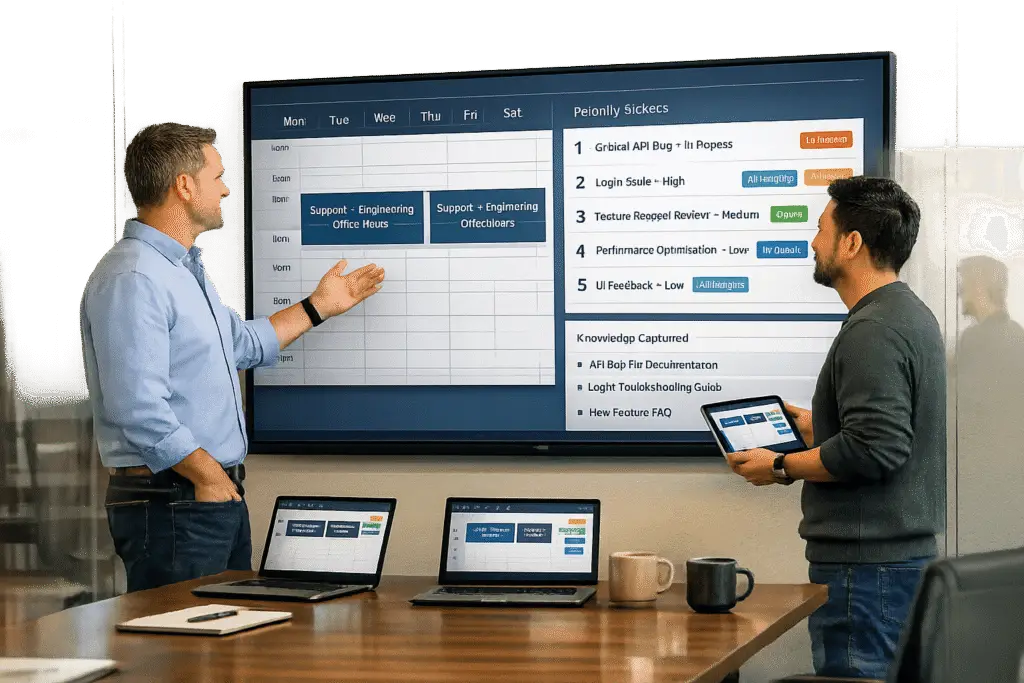
Want a better way to solve tough customer issues without disrupting your engineering team? Internal office hours can help.
These are scheduled sessions where Support and Engineering teams collaborate to tackle complex problems. Instead of endless Slack messages or emails, you get a dedicated time slot for clear communication and quick resolutions. Here’s how it works:
- Why it works: Reduces escalations, speeds up fixes, and builds trust between teams.
- How to do it: Hold weekly or bi-weekly sessions, set clear goals, and use AI-powered ticket prioritization to manage issues.
- What to track: Measure success using metrics like resolution time, escalation volume, and customer satisfaction.
- The result: Clearer tickets, fewer disruptions, and a more efficient workflow.
This guide breaks down the steps to set up and run effective office hours, ensuring smoother collaboration and happier teams.
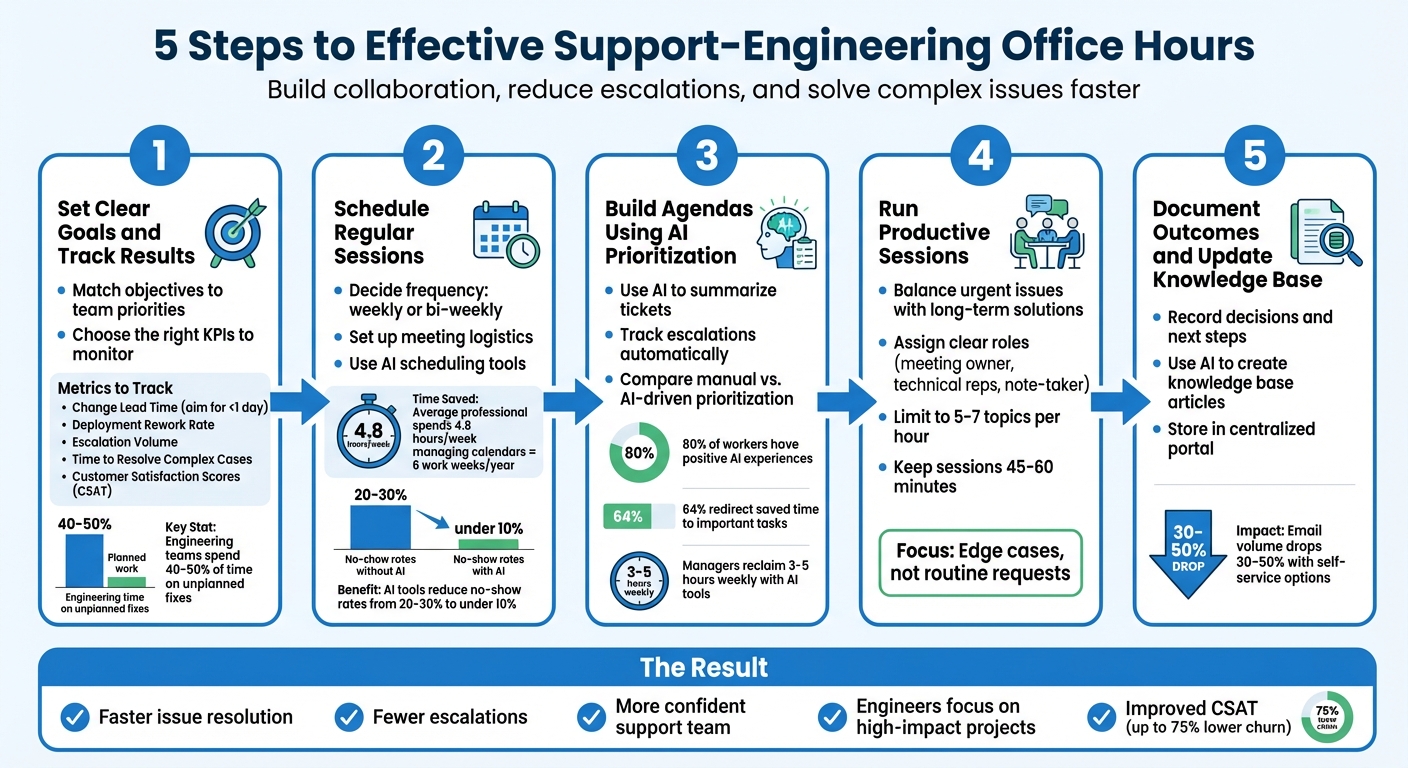
5-Step Process for Running Internal Office Hours Between Support and Engineering
Step 1: Set Clear Goals and Track Results
Before diving into office hours, it’s crucial to define shared goals and agree on how to measure success. Both teams need a clear picture of what “success” means to avoid wasting time on unproductive discussions.
Match Objectives to Team Priorities
Start by understanding what each team hopes to achieve through office hours. For instance, Support might need quicker answers to tricky customer issues, while Engineering might want better context to address bugs or build solutions. Look for common ground – like reducing after-hours disruptions or cutting down on back-and-forth clarifications – that can serve both teams.
A good example of a shared goal is reducing unplanned maintenance work. Research shows that many engineering teams spend 40-50% of their time dealing with unplanned fixes instead of focusing on new features [4]. Office hours can help address this by catching problems early and providing clear requirements, which leads to fewer rushed fixes and less wasted effort. Use data on resource allocation to demonstrate how office hours can reduce rework and justify the time investment [4].
### Choose the Right KPIs to Monitor
Tracking the right metrics is key to measuring the impact of office hours. Consider monitoring:
- Change Lead Time: Aim for resolutions within a day to measure how quickly issues are addressed [4].
- Deployment Rework Rate: This tracks the percentage of deployments that involve unplanned fixes for production problems [4].
But don’t stop at engineering metrics. Include indicators like:
- Escalation Volume: How many cases are being escalated to Engineering?
- Time to Resolve Complex Cases: Use your ticketing system to track resolution times.
- Customer Satisfaction Scores (CSAT): Improving CSAT from “poor” to “excellent” can lower churn by up to 75% [3].
Lena Reinhard, a respected engineering leader, emphasizes the importance of using metrics wisely:
"Engineering metrics for teams are the ones teams actively use to improve… Engineering metrics about teams give engineering leaders organizational visibility" [4].
Before your first office hours session, establish a baseline for these metrics. This will help you track progress and demonstrate results over time [5]. Once goals and KPIs are in place, you’re ready to move on to setting up a regular meeting schedule.
sbb-itb-e60d259
Step 2: Schedule Regular Sessions
Once your goals and KPIs are set, the next step is to establish a reliable meeting schedule. Regular sessions create a dependable rhythm, ensuring both teams know when they can raise concerns or collaborate. As Matt Dixon, an experienced engineer, explains:
"The exact cadence is something you will need to experiment with, but I have had success with both weekly and bi-weekly depending on supporting team size." [2]
Decide How Often to Meet
Start by deciding whether weekly or bi-weekly sessions work best for your teams. Smaller engineering teams or support teams managing a high volume of complex cases may benefit from weekly meetings. On the other hand, if escalations are rare, bi-weekly sessions might be more practical. Avoid relying on impromptu meetings to replace this regular cadence. Once the schedule is set, the focus can shift to organizing the logistics.
Set Up Meeting Logistics
To streamline the process, create a centralized hub where team members can access sign-up sheets, FAQs, ticket links, and clear instructions for participation. Adding this resource to email signatures or internal homepages ensures it’s easy to find. Limit each session to five to seven topics per hour to keep discussions focused and manageable. Requiring participants to submit topics in advance through a shared sign-up sheet helps avoid vague requests and gives everyone time to prepare.
Assign a meeting owner to handle invites, review submitted topics, and track follow-up tasks. Schedule sessions for 45 to 60 minutes using tools like Zoom, Microsoft Teams, or Google Meet. Recording the meetings ensures remote team members can stay in the loop.
Consider using AI scheduling tools to save time and reduce coordination headaches. The average professional spends about 4.8 hours each week managing calendars – equivalent to six work weeks per year [7]. Tools such as Reclaim.ai and Motion can automate scheduling, resolve conflicts, and safeguard engineers’ focus time [7]. Automated reminders are another bonus, helping reduce no-show rates from the usual 20–30% to under 10% [6].
Step 3: Build Agendas Using AI Prioritization
Once your schedule is set, the next hurdle is figuring out which issues to tackle during each session. Traditionally, this involves manually sifting through ticket threads to identify urgent matters – a task that can eat up a lot of time. Here’s where AI steps in to simplify things.
Use AI to Summarize Tickets and Track Escalations
AI tools can take lengthy ticket threads and boil them down to the essentials. They highlight the main issue and summarize previous actions, making it easier to spot cases that need immediate attention – especially those with a long history or multiple handoffs between agents[8]. For instance, Supportbench’s "Summarize" feature creates a quick, high-level brief for every ticket on your meeting agenda. This ensures both Support and Engineering teams are on the same page about the technical issues at hand. These summaries also help categorize tickets by their impact or customer sentiment, so you can focus on resolving the most pressing frustrations first. It’s a streamlined way to compare with the slower, manual prioritization process.
Comparing Manual and AI-Driven Prioritization
Manually combing through ticket details is not only time-consuming but also prone to errors. AI, on the other hand, delivers concise summaries in seconds and can handle large volumes of tickets with ease[8]. Research shows that 80% of workers have positive experiences using AI, with 64% redirecting the time saved to more important tasks[9]. Managers, who often spend 3 to 10 hours per week on manual scheduling and coordination, can reclaim 3 to 5 hours weekly by adopting AI-driven tools[9][10]. This shift from manual work to automated analysis means your office hours can focus more on solving problems instead of organizing them.
Step 4: Run Productive Sessions
Now that you’ve set the agenda and used AI to prioritize topics, it’s time to focus on running sessions that deliver real results. Here’s how to make the most of your meeting time.
Balance Urgent Issues with Long-Term Solutions
Keep the focus on edge cases rather than routine requests. Standard requests can typically be handled through your ticketing system. These sessions should address the more complex or unclear issues that aren’t easily resolved with existing documentation [2]. Once you’ve gathered enough information to create a detailed ticket, stop there. As Matt Dixon explains:
"If the initial question has been disambiguated enough to enable the technical folks on the call to feel confidence in their ability to deep dive for the answer, you now have a slam dunk ticket… Don’t rob time from your office hours chasing this answer down" [2].
To avoid losing focus, watch out for scope creep. If someone tries to slip in "just one more quick question" that wasn’t part of the original agenda, the facilitator should steer them toward signing up for the next session [2]. Redirecting unscheduled topics ensures the session stays on track.
Some teams adopt a Rapid Response Team (RRT) model. This setup involves three rotating members: a permanent leader (often a Senior Staff Engineer), one person managing immediate responses, and another handling small fixes identified during support interactions [1]. With priorities clear, the structure helps keep things moving efficiently.
Assign Clear Roles
Every session needs a clear structure, starting with defined roles. A meeting owner should take charge of reviewing sign-ups, tracking action items, and ensuring follow-ups are completed [2].
For technical representatives, accountability is key. If they can’t provide an answer immediately, they should commit to a deadline, such as, "I’ll follow up by Friday" [2]. This builds trust and prevents unresolved issues from slipping through the cracks.
To keep everyone focused on problem-solving, consider rotating the role of note-taker. Even better, use AI-powered meeting assistants to handle documentation automatically. This way, your engineers can stay fully engaged without worrying about taking notes.
Step 5: Document Outcomes and Update Knowledge Base
Keeping track of session outcomes is crucial for building a knowledge repository and avoiding repeated issues. By doing this consistently, you’ll not only outline actionable next steps but also reinforce the KPIs you set back in Step 1. This approach can help reduce repeated escalations and make future sessions more efficient.
Record Decisions and Next Steps
To ensure accountability, assign a meeting owner to oversee action items and follow through on tasks. As Matt Dixon explains, "This person will own grooming of the sign-ups, action items that follow the office hours meetings and regular pulse checks between the stakeholders and the team to ensure alignment" [2].
Strengthen the roles established earlier by designating one person to take detailed notes, focusing specifically on decisions made during the session. Additionally, assign an assistant to track action items and conduct a quick review after the meeting to delegate tasks effectively. For more complex issues, prepare a close-out report summarizing the steps taken and final outcomes [11].
Each documentation entry should include essential details like the date of the discussion, names of participants, a summary of the issue, and the agreed resolution [11]. Store all records in a centralized portal that is accessible to both Support and Engineering teams. This shared resource becomes the go-to hub for FAQs, sign-up logs, and ticket queue links [2].
These documented outcomes can then serve as the foundation for updating and expanding your knowledge base.
Use AI to Create Knowledge Base Articles
Detailed documentation from your sessions can also power AI-generated knowledge base articles. When you encounter a recurring issue with a well-defined solution, consider automating the article creation process. Tools like Supportbench’s AI can pull from case history to generate articles that include the subject, summary, and relevant keywords.
The benefits are clear. Teams that implement structured documentation and centralized resources often see email volume drop by 30% to 50% as users adapt to self-service options [12]. Make the portal easily accessible by including its link in team email signatures and internal homepages. This ensures everyone knows where to find the answers they need.
Conclusion
Running effective internal office hours takes careful planning and execution. Start by defining clear objectives and identifying the key performance indicators (KPIs) that matter most. From there, schedule regular sessions that sync with the priorities of both teams. Leverage AI tools to help prioritize tickets and create smarter agendas. During meetings, focus on balancing immediate concerns with long-term strategies, and make sure to document outcomes so your knowledge base remains a dynamic, valuable resource.
Bridging knowledge gaps through consistent collaboration leads to faster issue resolution, fewer escalations, and a more confident support team. This allows engineers to concentrate on high-impact projects. As Jake Bartlett, Writer at Swifteq, aptly puts it:
"Handoffs are really about the transfer of knowledge" [13].
By working together regularly, teams can shift from merely reacting to problems to proactively solving them. This approach helps flag potential issues early and reduces stress across departments [13].
Pairing human expertise with AI can also streamline processes like summarization, ticket prioritization, and capturing knowledge. This frees up your team to tackle more complex challenges. As Fabrizio Dell’Acqua, Postdoctoral Researcher at Harvard Business School, explains:
"If you want to be in that top 10% of performers, a full human team plus AI seems like the recipe for success" [14].
The key is to stay consistent. Even if your first attempts feel imperfect, stick to a regular schedule. Learn from what works, tweak what doesn’t, and keep improving. Over time, these sessions will form the foundation of a more efficient, cost-effective, and customer-centered support system.
FAQs
Who should attend Support–Engineering office hours?
Support–Engineering office hours should bring together support team members, engineers, and key stakeholders who play a role in tackling tough problems and refining workflows. The goal is to include participants who are actively involved in troubleshooting and making decisions, ensuring discussions lead to clear, actionable results.
What issues should go on the office hours agenda?
Set aside time to tackle frequent challenges that keep popping up. Whether it’s recurring bugs, user complaints, or misunderstandings about workflows, addressing these head-on can save everyone time. This is also a great opportunity to clarify any lingering questions that might be slowing progress.
Team Updates
Keep everyone in the loop with demos or progress reports. These updates can highlight recent accomplishments, showcase new features, or provide insights into ongoing projects. Sharing progress ensures alignment and helps the team stay motivated.
Discussion Topics
Use this space to dive into process changes or address open questions. For example, if there’s a new tool being introduced or a shift in priorities, this is the time to get everyone’s input and ensure a smooth transition. Open discussions also encourage team members to voice concerns or suggest improvements.
Action Item Reviews
Revisit previous action items to ensure follow-ups are on track. This helps maintain accountability and keeps smaller tasks from slipping through the cracks. Highlighting completed items also gives the team a sense of progress.
Knowledge Sharing
Dedicate time for knowledge sharing on features, troubleshooting tips, or best practices. Whether it’s a quick walkthrough of a new tool or a solution to a tricky issue, this fosters learning and helps the team work more efficiently.
Feedback Collection
Gather feedback to refine workflows and improve collaboration. Whether it’s about communication, tools, or processes, collecting input regularly can uncover areas that need attention and lead to better outcomes for both support and engineering teams.
By focusing on these areas, you can strengthen collaboration, address pain points, and smooth out handoffs between teams.
How do we measure if office hours are working?
Tracking the success of office hours can be done by monitoring a few key indicators: reduced internal email volume, better employee engagement, and quicker team responses. Research shows that well-implemented office hours might decrease email interruptions by 30–50%, leading to more efficient communication overall. Pay attention to metrics that highlight improved collaboration and fewer instances of issues being escalated.
Related Blog Posts
- How do you build an internal escalation agreement with Engineering (templates + SLAs)?
- How do you run a weekly “Support–Product” triage meeting that actually ships fixes?
- Intercom (10) – framed correctly as “chat-first → real helpdesk”
- How to prioritize internal tickets without starving paying customers






