


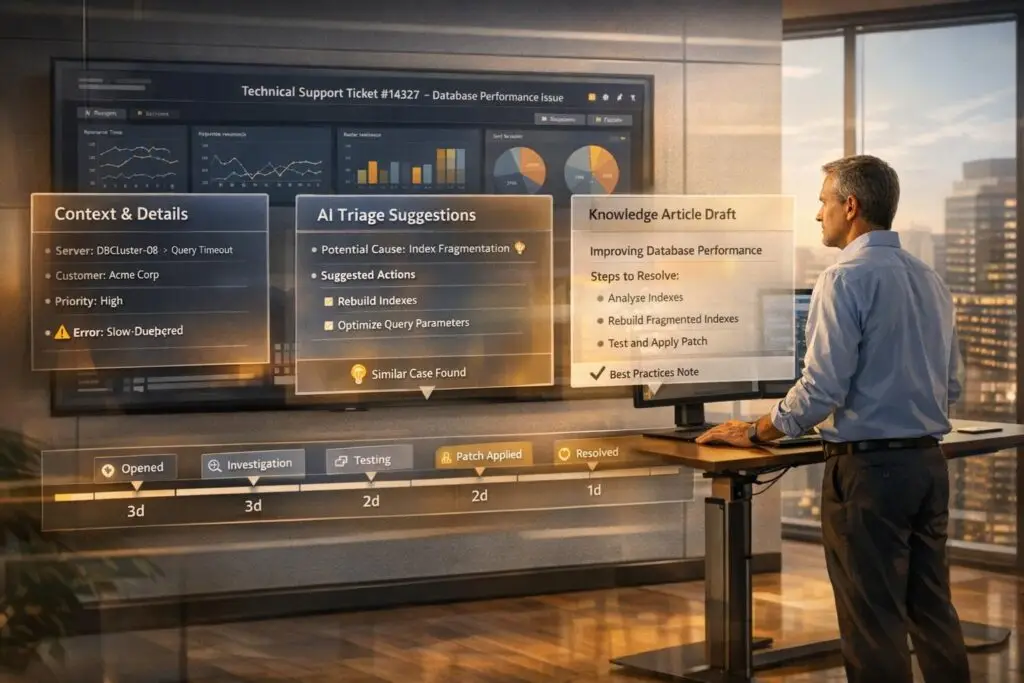
Implementing Knowledge-Centered Service (KCS) in B2B technical support can transform how teams handle complex, multi-step issues. But long ticket resolution cycles, scattered information, and inconsistent documentation often create roadblocks. Here’s what you need to know:
- Key Challenges:
- Long resolution times lead to lost context and repeated work.
- Technical resolutions often go undocumented or lack clarity.
- Inconsistent documentation across teams reduces usability.
- Solutions:
- Use structured "context packets" to retain critical details during escalations.
- Leverage AI for ticket triage, summaries, and drafting knowledge articles.
- Build knowledge articles during ticket resolution, not after.
- Automate updates and track content lifecycle to keep information relevant.
- Results:
Main Challenges of KCS for Long, Technical Tickets
Implementing KCS (Knowledge-Centered Service) in B2B support can be tricky, especially when dealing with tickets that take a long time to resolve and involve multiple technical layers. The challenges extend far beyond writing documentation – they touch on how teams manage, share, and preserve their technical expertise.
Challenge 1: Keeping Context Through Long Resolution Cycles
When a ticket drags on for days or weeks, context often gets lost along the way. For example, a support agent might start investigating an issue early in the week, pass it to engineering midweek, and by the following week, key details – like hardware configurations, software versions, or specific error messages – might be forgotten or misplaced.
Ticketing systems don’t always help here. As Michael Iantosca, Senior Director of Knowledge Platforms and Engineering at Avalara, points out, "JIRA functions as a transient System of Record… Content Central is a persistent SoR, maintaining active records throughout the entire content lifecycle" [3]. Without a persistent system to store and maintain technical context, teams risk asking customers to repeat themselves or redoing troubleshooting steps that were already attempted. This issue becomes even more pronounced when multiple teams, such as support, engineering, DevOps, and account management, are involved. Every handoff increases the risk of losing critical information. Preserving this context isn’t just important for resolving the current issue – it’s also key to creating knowledge that teams can use in the future.
Challenge 2: Capturing Technical Knowledge for Reuse
Turning a complex technical resolution into a reusable knowledge article is no small feat. Imagine spending hours troubleshooting a complex integration issue involving API authentication, database timeouts, and network configurations. After all that effort, it’s tempting for agents to skip documentation altogether. But without proper documentation, the next agent facing a similar problem might have to start from scratch.
The traditional approach – documenting after a ticket is closed – often fails in practice. As Tina Grubisa from Mosaic AI explains, "The agent shouldn’t close a ticket until they’ve documented the knowledge" [1]. Yet, agents frequently move on to the next urgent case, leaving the knowledge base incomplete. Even when articles are written, making them reusable can be tough. A solution tailored to one customer’s environment might not work for another. Without structured templates or tools like decision trees, these articles can become overly dense and hard for others to follow.
It’s not just about capturing the technical details – it’s about ensuring the documentation is clear, consistent, and actionable for future use.
Challenge 3: Maintaining Consistency Across Teams
On top of context loss and documentation gaps, inconsistency across teams can make things worse. Support, engineering, and product teams often contribute to the knowledge base, but their approaches can vary wildly. One team might write in highly technical terms, another might simplify for end users, and yet another might create notes meant only for internal use. Without clear guidelines or a review process, the knowledge base can turn into a patchwork of articles with inconsistent quality and structure.
To address this, teams need defined roles – like agents capturing initial details and knowledge managers ensuring quality. But coordinating these roles without creating bottlenecks is easier said than done.
The problem doesn’t stop there. As products evolve, older solutions may become outdated. A workaround that worked six months ago might no longer apply after a software update. Without regular reviews and clear ownership of content, outdated information can linger in the knowledge base, ultimately reducing its reliability and usefulness.
sbb-itb-e60d259
How to Adapt KCS Workflows for Technical B2B Support
Handling long, technical support tickets in a B2B environment comes with its own set of challenges, like missing context and inconsistent documentation. To make Knowledge-Centered Service (KCS) workflows work in this space, you need to rethink how you capture and share information, route cases, and create knowledge. The trick is to weave these practices seamlessly into your daily operations.
Create Standard Context Packets for Escalations
Every time a ticket moves from one team to another – say, from Tier 1 support to engineering – there’s a risk of losing important details. Customers often have to repeat themselves, and engineers waste time piecing together scattered information. This inefficiency can slow down resolutions and frustrate everyone involved.
A better approach is what Michael Iantosca from Avalara calls the "support case payload." This is a structured packet of critical details that travels with every escalation. It includes:
- Customer configuration data
- Troubleshooting steps already taken
- Error logs
- Product versions
- Full communication history
Instead of digging through notes or asking customers the same questions repeatedly, engineers get everything they need upfront to start solving the problem.
"The goal is to minimize additional input from the support agent. The workflow automatically extracts this data – referred to as the support case payload – to streamline the content creation process." – Michael Iantosca, Senior Director of Knowledge Platforms and Engineering, Avalara [3]
This method not only speeds up escalations but also helps protect your subject matter experts (SMEs) from burnout. With less time spent gathering context and more time solving issues, SMEs are more productive and less stressed. For example, Cynet implemented a similar system and saw their resolution times nearly cut in half, along with a jump in their CSAT score from 79 to 93 points [6].
The next step? Let AI take ticket triage and context management to the next level.
Use AI for Ticket Summaries and Triage
Traditional ticket triage often relies on simple tags or keywords. For example, an agent might label a ticket as "API issue", and it gets routed to the integration team. But in B2B scenarios, this isn’t enough. An "API issue" could range from a minor authentication error to a complex system failure involving multiple factors like databases, network settings, or third-party integrations.
AI-powered triage changes the game by analyzing the entire context of a ticket. It looks beyond keywords, factoring in customer history, product usage patterns, and the technical complexity of the issue. This allows AI to predict whether a ticket might escalate, estimate its difficulty, and recommend the best team or agent to handle it.
AI also generates summaries for long, multi-day tickets. These summaries highlight key technical details and previous troubleshooting steps, saving team members from having to sift through dozens of messages to get up to speed. For some companies, this has significantly reduced resolution times, proving how effective AI-driven triage can be.
With automated routing, AI can even take action based on its confidence level:
- High confidence: The AI auto-resolves or suggests a solution.
- Moderate confidence: It drafts a response for an agent to review.
- Low confidence: It escalates directly to a specialist.
This approach eliminates delays and keeps customers from getting frustrated. Once triage is optimized, the focus shifts to capturing knowledge during the resolution process.
Build Knowledge Articles During Resolution
One common pitfall in KCS implementations is failing to document knowledge from complex cases. When agents close tickets without capturing insights, that valuable information remains locked in the case, unavailable to others. The next agent facing a similar issue is forced to start from scratch.
The solution? Create knowledge articles while resolving tickets, not after. AI tools can scan the ticket’s conversation history, extract the problem and solution, and generate a draft article automatically. Agents then review and approve the draft – a much lighter workload than writing articles from scratch.
"Knowledge creation should happen in the flow of work, not separate from it." – Tina Grubisa, Mosaic AI [1]
This process works because it removes barriers. Agents don’t have to set aside extra time to document what they’ve done; the system takes care of the heavy lifting. For instance, HiBob used this workflow to generate over 800 support articles, which helped them cut ticket volume by 40% [1].
To make this work, ensure your AI has access to the full support case payload, including metadata, configuration details, and troubleshooting steps. Without this context, the generated articles risk being too generic to be helpful. But with complete information, you end up with a technically accurate, reusable knowledge base that grows with every resolved ticket.
Using AI to Improve KCS in B2B Support
AI isn’t just about speeding up ticket resolutions – it’s reshaping how knowledge is captured, refined, and reused in B2B environments. By building on streamlined workflows, AI takes Knowledge-Centered Service (KCS) to the next level, automating research, documentation, and performance tracking. Traditional KCS processes often struggle with long resolution times and context loss, but AI bridges these gaps by refining knowledge extraction and reuse.
AI Copilot for Research and Response Drafting
AI simplifies research and response drafting, addressing challenges like lengthy resolutions and information overload. Acting as a real-time research assistant, an AI copilot scans your entire case history and knowledge base to surface the most relevant information instantly. Instead of agents manually searching through documentation, the copilot provides quick access to troubleshooting steps, configuration details, and solutions from similar cases. It even drafts responses based on successful resolutions from the past.
With this approach, agents focus on refining AI-generated drafts rather than starting from scratch. For a typical 20-agent support team, this can boost efficiency by 40% [9]. New hires benefit even more – ramp-up time drops from 6–8 weeks to just 2–3 weeks as they gain immediate access to institutional knowledge, bypassing the need to rely solely on advice from senior team members [9].
The copilot also ensures compliance by automatically redacting sensitive data, such as email addresses, account IDs, and customer names, before presenting drafts [8]. This safeguards sensitive information while making technical solutions reusable.
Automate Knowledge Updates After Resolution
Once an issue is resolved, AI ensures that the knowledge loop is closed without requiring manual follow-up. By analyzing the entire conversation thread – including internal notes, diagnostic steps, and the final resolution – the system generates a structured knowledge article complete with headings and bullet points [8]. What used to take 60–90 minutes can now be completed in under 2 minutes [8].
"The single biggest cost in support isn’t salaries; it’s the repeated time spent solving the same problems." – BizAI [8]
Automation is triggered strategically – when a ticket is marked "resolved" by a senior agent or tagged with specific labels like "complex_process" or "escalated" [8]. This ensures that only high-value cases are documented.
AI also proactively identifies gaps in the knowledge base. By analyzing ticket clusters and search queries, it flags trending issues that lack documentation before they escalate into widespread problems [8]. Since knowledge gaps account for up to 40% of internal service desk contacts [8], addressing them early can significantly reduce ticket volume. With automated updates, AI provides clearer insights into support performance and helps teams stay ahead of emerging issues.
Track B2B Metrics with AI
In B2B environments, traditional metrics like average handle time (AHT) don’t always capture the full picture. AI enables tracking of more meaningful metrics, such as time-to-first-useful-response, which measures how quickly agents provide substantive technical information rather than just an acknowledgment. Another key metric is first contact resolution (FCR), which AI can detect by analyzing case histories to confirm whether issues were resolved on the first attempt [10].
AI also monitors the percentage of AI-generated content modified by agents, offering a quality benchmark [3]. If agents frequently edit drafts, it signals that the system may need additional training or context refinement. For knowledge adoption, tracking how often specific articles contribute to ticket deflection or resolution provides valuable insights [3].
On a strategic level, AI links support performance to revenue outcomes. Metrics like Net Revenue Retention (NRR) and new hire ramp time reveal whether your knowledge management processes are effectively supporting complex accounts and scaling your team [11]. These metrics are particularly important in B2B settings, where preserving expertise and maintaining strong customer relationships often outweigh raw ticket counts.
Common KCS Mistakes and How to Fix Them
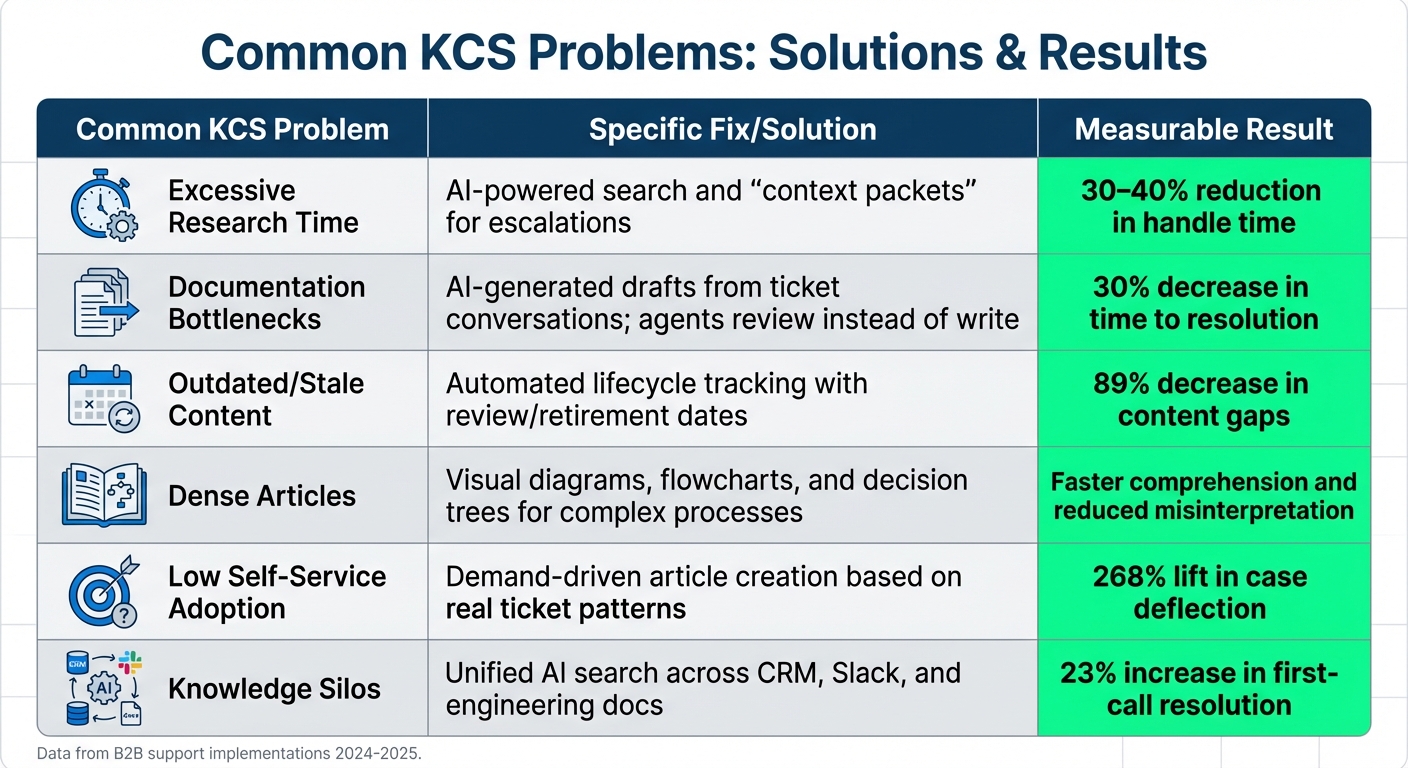
Common KCS Problems vs Solutions and Measurable Results in B2B Support
Implementing KCS (Knowledge-Centered Service) often runs into familiar roadblocks. One major misstep is treating knowledge management as a separate task rather than weaving it into everyday workflows [1][4]. Agents frequently see documentation as an extra burden that clashes with efficiency goals. Using AI tools can help by embedding knowledge management directly into daily processes. Michael Iantosca, Senior Director of Knowledge Platforms and Engineering at Avalara, highlights this issue:
"When we divert [agents] to write technical support articles, they’re not servicing customers… This diversion undermines customer service."
- Michael Iantosca, Avalara [3]
Another common issue is relying on a small group of senior engineers (SMEs) to handle documentation, creating bottlenecks and backlogs [1]. Teams also often fall into the trap of anticipatory writing – producing articles for hypothetical scenarios rather than focusing on actual ticket trends [4]. This leads to a knowledge base filled with unused content, while recurring customer issues remain unaddressed.
In B2B environments, overly complex documentation can also be a major hurdle. Technical processes often span multiple systems and decision points, and lengthy articles can overwhelm agents during live support interactions. Samie Delebo from Gliffy explains:
"An article can be 100% accurate and still fail to be useful if the audience cannot easily comprehend it – a common problem in technical support."
- Samie Delebo, Gliffy [2]
Addressing these challenges can lead to smoother workflows and better outcomes for both agents and customers.
Table: Problems, Solutions, and Results
| Common KCS Problem | Specific Fix/Solution | Measurable Result |
|---|---|---|
| Excessive Research Time | AI-powered search and "context packets" for escalations | 30–40% reduction in handle time [11][5] |
| Documentation Bottlenecks | AI-generated drafts from ticket conversations; agents review instead of write | 30% decrease in time to resolution [1] |
| Outdated/Stale Content | Automated lifecycle tracking with review/retirement dates | 89% decrease in content gaps [5] |
| Dense Articles | Visual diagrams, flowcharts, and decision trees for complex processes | Faster comprehension and reduced misinterpretation [2] |
| Low Self-Service Adoption | Demand-driven article creation based on real ticket patterns | 268% lift in case deflection [5] |
| Knowledge Silos | Unified AI search across CRM, Slack, and engineering docs | 23% increase in first-call resolution [5] |
Automation plays a crucial role in overcoming these challenges. For instance, in 2025, HiBob used Mosaic AI to automate the creation of over 800 support articles by analyzing resolved tickets and generating structured drafts. This approach led to a 40% reduction in ticket volume and a 30% decrease in time to resolution [1]. By shifting agents from content creators to reviewers, they eliminated much of the friction that often derails KCS efforts.
Conclusion
Implementing Knowledge-Centered Service (KCS) effectively in B2B technical support requires three major changes: incorporating knowledge capture into the resolution process, utilizing AI to simplify documentation, and avoiding common mistakes. By embedding knowledge creation into daily workflows instead of treating it as a separate task, teams can eliminate the bottlenecks that often derail KCS initiatives [1][3].
AI shifts the role of agents from content creators to reviewers, allowing them to validate AI-generated drafts. This dramatically reduces documentation time – from 60–90 minutes to less than 2 minutes [8]. It also ensures that senior engineers’ expertise is captured during resolutions, making it instantly available to junior agents and lowering the chances of escalations [7]. This approach not only speeds up resolution times but also maintains the technical rigor essential in B2B support.
Organizations adopting AI-powered KCS have reported impressive results: resolution times improved by 30–50%, ticket volumes dropped by 20–40% within 90 days, and customer satisfaction scores (CSAT) saw notable gains. For example, Cynet achieved a 14-point jump in CSAT, moving from 79 to 93 [1][7].
FAQs
What should a “context packet” include for escalations?
A "context packet" for escalations is like a cheat sheet for solving problems efficiently. It should include key details such as:
- Technical information: Any relevant system or product specifics.
- Customer history: Background on the customer’s interactions and past issues.
- Prior troubleshooting steps: What’s already been tried and what outcomes were observed.
- Specific issue details: A clear description of the problem at hand.
Having this information upfront streamlines the escalation process, ensuring the team can tackle the issue with all the necessary context.
How do we keep AI-written knowledge articles accurate and safe?
Keeping AI-generated knowledge articles accurate and reliable requires staying on top of product updates, bug fixes, and new features. Regularly review and update documentation to reflect these changes. It’s also important to validate the content periodically to ensure its accuracy and fill in any technical gaps.
AI tools can play a big role here. Use them to identify outdated or inconsistent information, flagging areas that need attention. Additionally, schedule routine audits to catch anything that might slip through the cracks. By combining frequent updates, careful validation, and AI-driven monitoring, you can maintain dependable and trustworthy support articles.
Which KCS metrics matter most for long, technical B2B cases?
For long, technical B2B cases, the time to first useful response stands out as the most critical metric. This measures how fast support teams can deliver relevant information and actionable next steps. In scenarios where research and gathering context are the biggest hurdles, this metric ensures that customers receive timely and practical support, even in the most complex situations.






